Spring AI MCP Apps 实战:打造聊天与富 UI 融合的智能化应用
摘要:Model Context Protocol (MCP) Apps 是 Spring AI 2.0.0-M3 引入的革命性功能,它打破了传统聊天界面的局限,让 AI 助手能够在对话中嵌入交互式富 UI 组件。本文将深入讲解 MCP Apps 的核心原理、架构设计,并通过完整的骰子滚动和数据分析两个实战案例,演示如何从零开始构建融合聊天与图形界面的智能化应用。你将学会使用@McpResource 和@McpTool 注解创建交互式 UI,理解前端 App 与后端 MCP Server 的通信机制,掌握 CSP 安全配置和上下文更新技巧。无论你想构建数据可视化仪表板、交互式表单还是动态图表,本文提供的完整代码示例和最佳实践都能帮助你快速上手。
一、引言:为什么需要 MCP Apps?
1.1 聊天界面的局限性
在当今的 AI 应用开发中,聊天界面已成为人机交互的主流方式。从 ChatGPT 到 Claude Desktop,自然语言对话让用户能够以"人类的方式"与计算机交流,无需学习复杂的命令或界面操作。这种灵活性无疑是 AI 技术最迷人的特性之一。
然而,聊天界面并非万能。想象以下场景:
- 地图选择:让用户用自然语言描述"北京市朝阳区三里屯太古里北区 N4 楼"远不如直接在地图上点击一个位置来得精确和直观
- 数据筛选:在包含数十个维度的数据集中,用滑块调整过滤条件比输入"显示销售额大于 100 万且增长率超过 20% 的数据"更加高效
- 可视化配置:调整图表类型、颜色方案、坐标轴范围时,图形化界面提供的即时反馈是纯文本对话无法比拟的
这就是 MCP Apps 诞生的背景------它不是要取代聊天界面,而是增强聊天界面,在需要时提供最佳的交互方式。
1.2 MCP Apps 的核心价值
MCP Apps 的核心思想可以概括为:在聊天中嵌入应用,在应用中保持对话。具体来说:
- 混合交互体验:用户可以在聊天窗口中直接与嵌入的 HTML/CSS/JavaScript 应用交互,无需离开对话上下文
- 双向通信:UI 组件可以调用服务器工具、更新对话上下文、向用户发送消息,实现真正的双向互动
- 渐进式增强:开发者可以选择性地为特定功能添加 UI,其他功能仍保持纯文本对话
- 生态兼容:基于 Model Context Protocol 标准,构建的应用可以运行在 Claude Desktop、MCP Jam、Goose 等多个宿主平台
1.3 本文内容概览
本文将通过两个完整的实战案例,带你掌握 Spring AI MCP Apps 的开发技能:
- 案例一:骰子滚动应用(Dice Roller)- 入门级示例,演示基础架构
- 案例二:股票数据分析仪表板 - 企业级应用,整合实时数据与可视化
二、MCP Apps 架构解析
2.1 核心组件
MCP Apps 架构由三个核心组件构成:
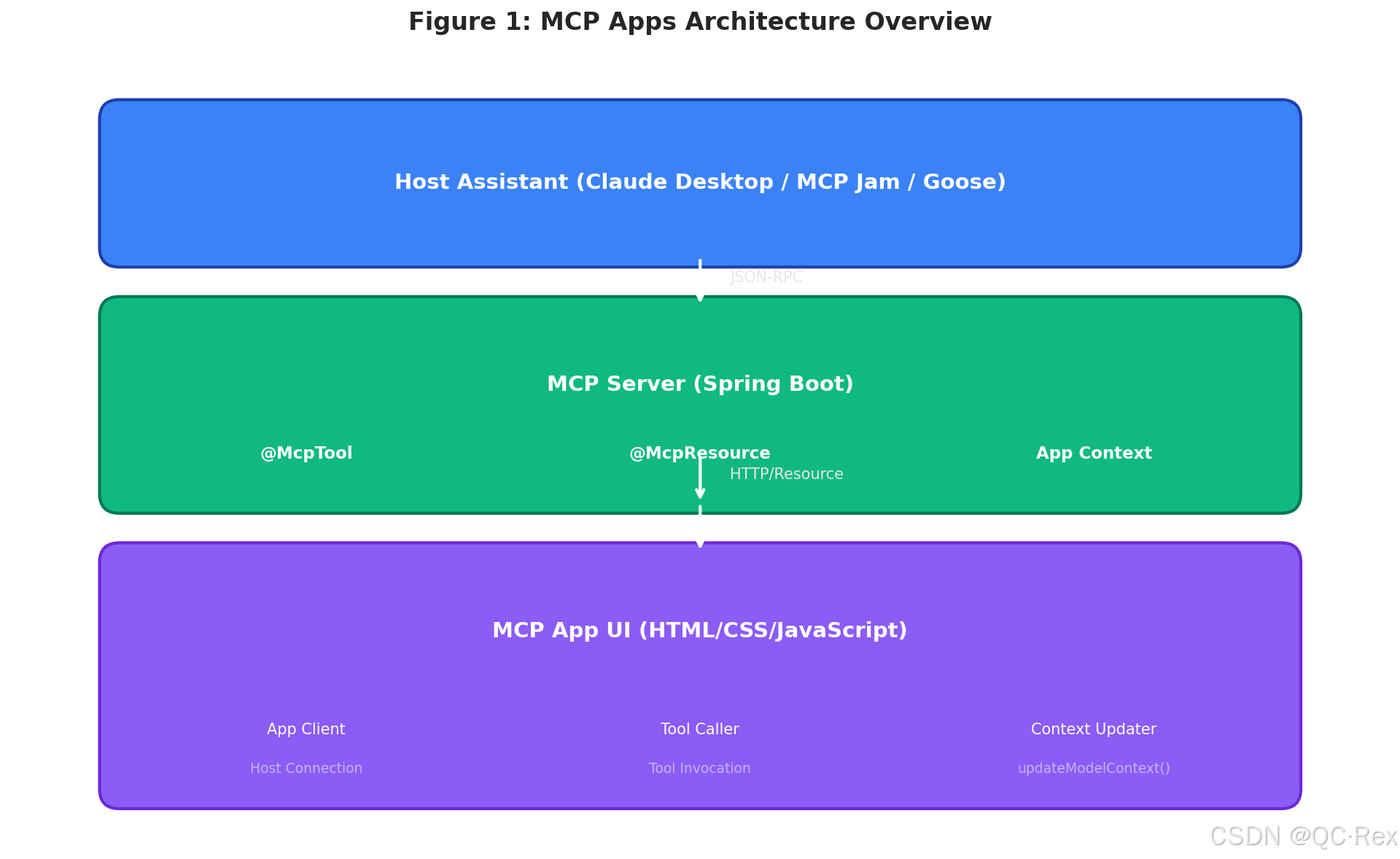
图 1: MCP Apps 三层架构 - Host Assistant、MCP Server 和 MCP App UI 通过 JSON-RPC 和资源服务进行通信
2.2 通信流程
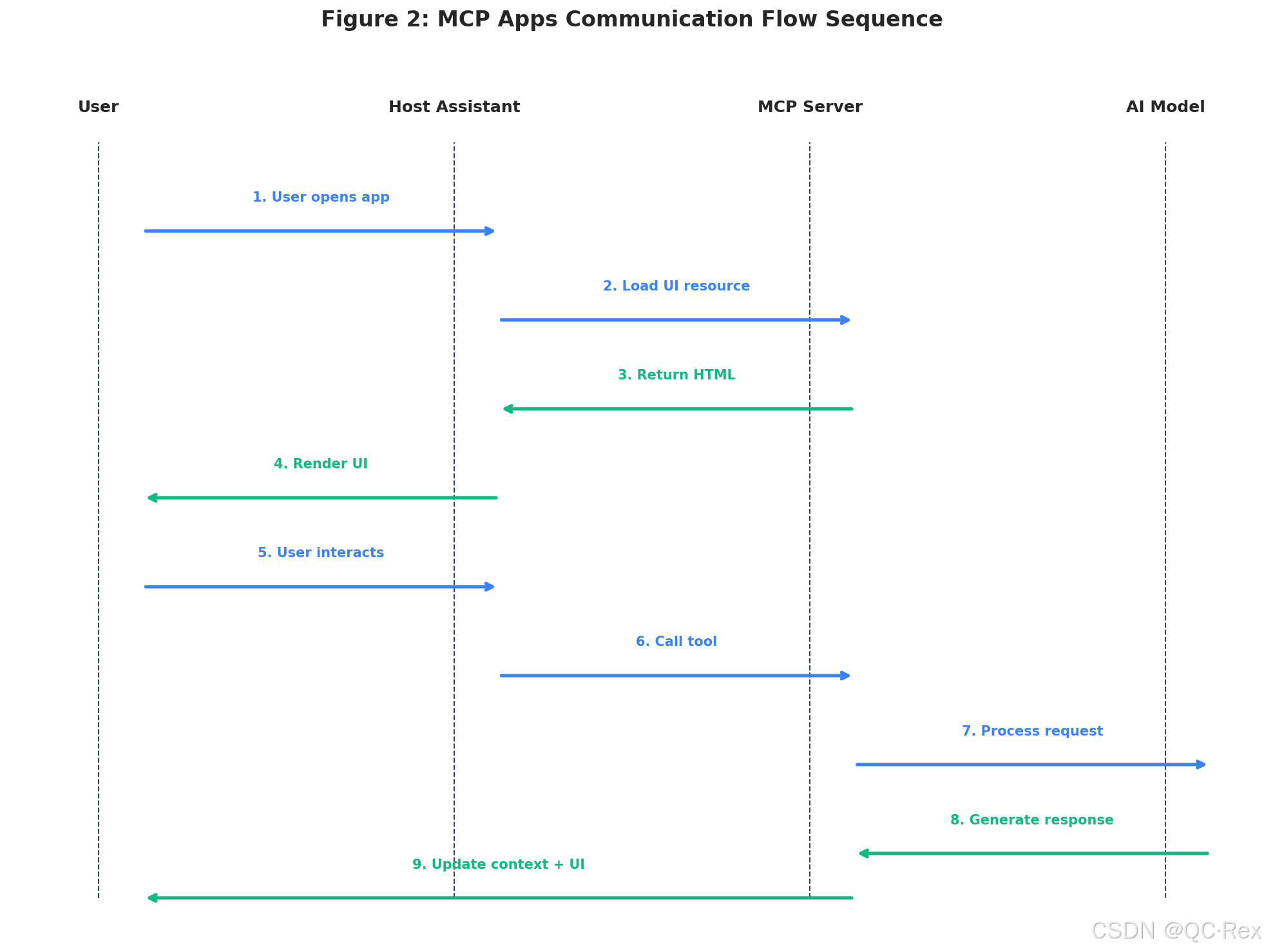
图 2: MCP Apps 通信流程 - 从用户请求到 AI 响应的完整 9 步序列
MCP Apps 的完整通信流程如下:
- 用户发起请求:用户在聊天窗口中输入消息或点击 UI 按钮
- 宿主转发:Host Assistant 将请求通过 JSON-RPC 转发给 MCP Server
- 工具执行:MCP Server 执行对应的@McpTool 方法
- UI 渲染:如果涉及 UI,服务器返回 HTML 资源,宿主在聊天窗口中渲染
- 用户交互:用户在 UI 中操作(点击按钮、输入数据等)
- 上下文更新 :UI 通过
app.updateModelContext()将结果注入对话历史 - AI 响应:AI 基于更新后的上下文生成自然语言回复
2.3 关键技术点
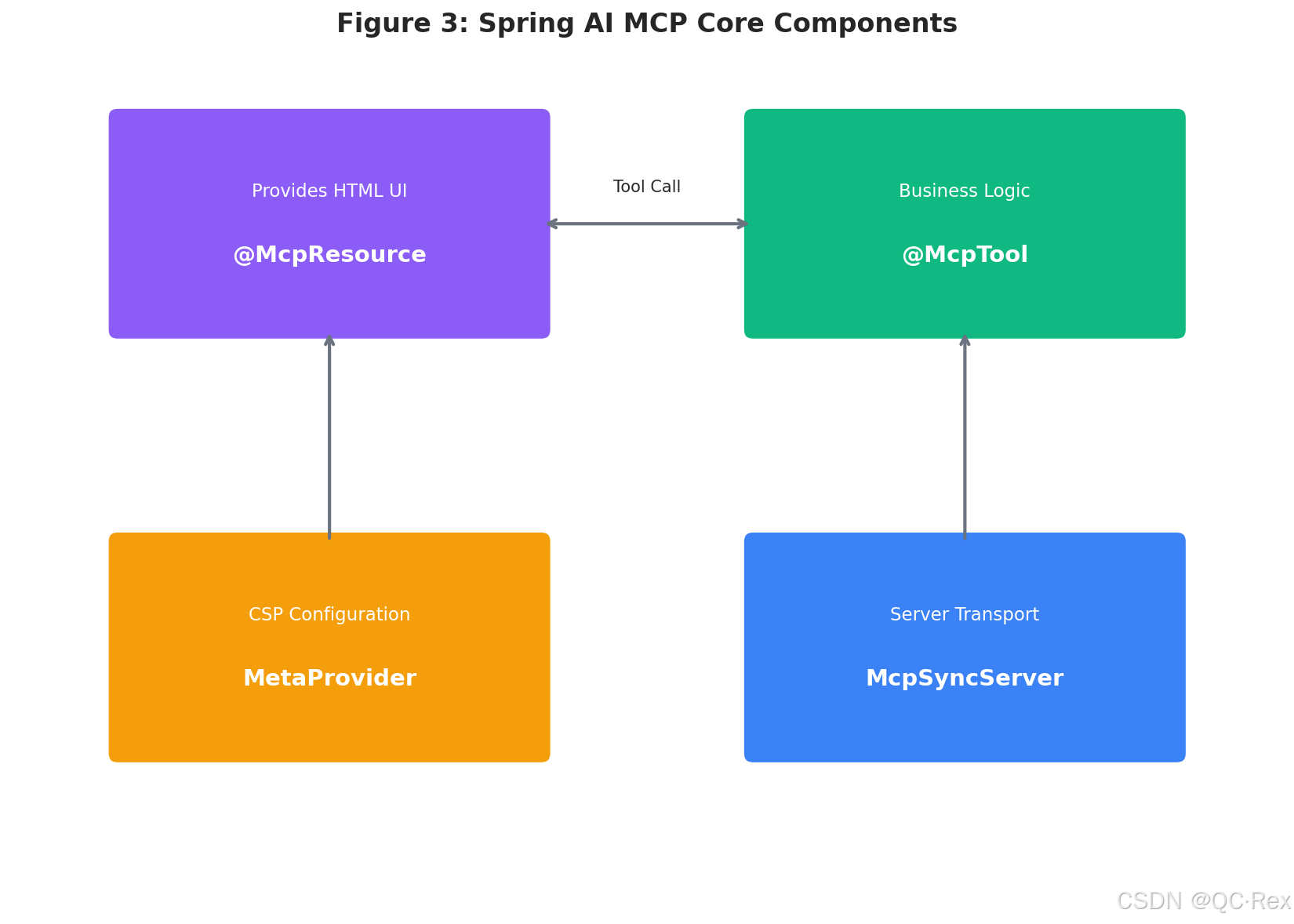
图 3: Spring AI MCP 核心组件 - @McpResource、@McpTool、MetaProvider 和 McpSyncServer 协同工作
| 技术点 | 说明 | 重要性 |
|---|---|---|
@McpResource |
标注提供 HTML UI 资源的方法 | ⭐⭐⭐⭐⭐ |
@McpTool |
标注可被 UI 调用的工具方法 | ⭐⭐⭐⭐⭐ |
ext-apps.ts |
前端与宿主通信的 JavaScript 模块 | ⭐⭐⭐⭐ |
updateModelContext() |
UI 向对话注入消息的 API | ⭐⭐⭐⭐ |
| CSP MetaProvider | 内容安全策略配置 | ⭐⭐⭐ |
三、实战案例一:骰子滚动应用(Dice Roller)
3.1 项目初始化
首先,使用 Spring Initializr 创建项目。访问 https://start.spring.io,配置如下:
yaml
Project: Gradle - Groovy
Spring Boot: 4.0.3 (或最新稳定版)
Java: 25
Dependencies:
  - Spring Web
- Spring AI MCP Server生成项目后,检查build.gradle 确保 Spring AI 版本为 2.0.0-M3 或更高:
groovy
ext {
    set('springAiVersion', "2.0.0-M3")
}

dependencies {
    implementation 'org.springframework.boot:spring-boot-starter-web'
    implementation 'org.springframework.ai:spring-ai-mcp-server-spring-boot-starter'
}
3.2 创建 UI 资源
在 src/main/resources/app/ 目录下创建 dice-app.html:
html
<!DOCTYPE html>
<html>
<head>
    <title>Dice Roller</title>
    <style>
        body {
            font-family: -apple-system, BlinkMacSystemFont, 'Segoe UI', Roboto, sans-serif;
            text-align: center;
            margin-top: 50px;
            background: linear-gradient(135deg, #667eea 0%, #764ba2 100%);
            min-height: 100vh;
            color: white;
        }
        .container {
            background: rgba(255, 255, 255, 0.1);
            border-radius: 20px;
            padding: 40px;
            display: inline-block;
            backdrop-filter: blur(10px);
        }
        .dice {
            font-size: 100px;
            margin: 30px 0;
            text-shadow: 0 4px 8px rgba(0,0,0,0.3);
        }
        .dice span {
            display: inline-block;
            margin: 0 10px;
            animation: none;
        }
        .dice.rolling span {
            animation: shake 0.5s infinite;
        }
        @keyframes shake {
            0%, 100% { transform: rotate(0deg); }
            25% { transform: rotate(10deg); }
            75% { transform: rotate(-10deg); }
        }
        button {
            font-size: 20px;
            padding: 15px 40px;
            background: white;
            color: #667eea;
            border: none;
            border-radius: 50px;
            cursor: pointer;
            transition: all 0.3s;
            font-weight: bold;
            box-shadow: 0 4px 15px rgba(0,0,0,0.2);
        }
        button:hover {
            transform: translateY(-2px);
            box-shadow: 0 6px 20px rgba(0,0,0,0.3);
        }
        button:active {
            transform: translateY(0);
        }
        .result {
            font-size: 24px;
            margin-top: 20px;
            opacity: 0;
            transition: opacity 0.3s;
        }
        .result.show {
            opacity: 1;
        }

        @media (prefers-color-scheme: dark) {
            body {
                background: linear-gradient(135deg, #1a1a2e 0%, #16213e 100%);
            }
        }
    </style>
</head>
<body>
    <div class="container">
        <h1>🎲 骰子滚动器</h1>
        <div class="dice">
            <span id="die1">⚀</span>
            <span id="die2">⚀</span>
        </div>
        <button id="roll-dice-btn">开始滚动</button>
        <div class="result" id="result-text"></div>
    </div>

    <script type="module">
        import { App } from "https://unpkg.com/@modelcontextprotocol/[email protected]/app-with-deps";
        const app = new App({ name: "dice-roller", version: "1.0.0" });

        // 连接宿主
        await app.connect();

        // 初始化滚动
        rollDice();

        // 更新上下文
        const updateContext = async (diceRoll) => {
            const message = `🎲 骰子结果:${diceRoll.die1} 和 ${diceRoll.die2},总和 = ${diceRoll.die1 + diceRoll.die2}`;
            await app.updateModelContext({
                content: [{ type: "text", text: message }],
            });
        };

        // 骰子面值
        const diceFaces = ["⚀", "⚁", "⚂", "⚃", "⚄", "⚅"];
        const randomIndex = () => Math.floor(Math.random() * 6);

        // 滚动逻辑
        const rollDice = async () => {
            const die1El = document.getElementById("die1");
            const die2El = document.getElementById("die2");
            const resultEl = document.getElementById("result-text");
            const diceEl = document.querySelector(".dice");

            // 添加滚动画效果
            diceEl.classList.add("rolling");
            resultEl.classList.remove("show");

            let rolls = 0;
            const animation = setInterval(() => {
                die1El.textContent = diceFaces[randomIndex()];
                die2El.textContent = diceFaces[randomIndex()];
                rolls++;

                if (rolls > 15) {
                    clearInterval(animation);
                    diceEl.classList.remove("rolling");

                    const final1 = randomIndex();
                    const final2 = randomIndex();
                    die1El.textContent = diceFaces[final1];
                    die2El.textContent = diceFaces[final2];

                    const diceRoll = {
                        die1: final1 + 1,
                        die2: final2 + 1,
                        total: final1 + final2 + 2
                    };

                    resultEl.textContent = `总和:${diceRoll.total}`;
                    resultEl.classList.add("show");

                    await updateContext(diceRoll);
                }
            }, 80);
        };

        // 绑定按钮事件
        document.getElementById("roll-dice-btn").addEventListener("click", rollDice);
    </script>
</body>
</html>
3.3 创建 MCP Server
创建 DiceApp.java 服务类:
java
package com.example.demo;

import org.springframework.ai.mcp.annotation.McpResource;
import org.springframework.ai.mcp.annotation.McpTool;
import org.springframework.core.io.ClassPathResource;
import org.springframework.core.io.Resource;
import org.springframework.stereotype.Service;

import java.io.IOException;
import java.nio.charset.Charset;
import java.util.Map;

@Service
public class DiceApp {

    private final Resource diceAppResource;

    public DiceApp() {
        this.diceAppResource = new ClassPathResource("app/dice-app.html");
    }

    /**
     * 提供 MCP App UI 资源
     * 关键:mimeType 必须包含 profile=mcp-app
     */
    @McpResource(
        name = "Dice Roller App",
        uri = "ui://dice/dice-app.html",
        mimeType = "text/html;profile=mcp-app",
        metaProvider = CspMetaProvider.class
    )
    public String getDiceAppResource() throws IOException {
        return diceAppResource.getContentAsString(Charset.defaultCharset());
    }

    /**
     * 骰子滚动工具(可选,UI 可以直接调用前端逻辑)
     */
    @McpTool(name = "roll_dice", description = "Roll two dice and return the results")
    public Map<String, Object> rollDice() {
        int die1 = (int) (Math.random() * 6) + 1;
        int die2 = (int) (Math.random() * 6) + 1;
        return Map.of(
            "die1", die1,
            "die2", die2,
            "total", die1 + die2,
            "die1_icon", getDiceIcon(die1),
            "die2_icon", getDiceIcon(die2)
        );
    }

    private String getDiceIcon(int value) {
        return switch (value) {
            case 1 -> "⚀";
            case 2 -> "⚁";
            case 3 -> "⚂";
            case 4 -> "⚃";
            case 5 -> "⚄";
            case 6 -> "⚅";
            default -> "⚀";
        };
    }

    /**
     * CSP 元数据提供者
     * 允许从 unpkg.com 加载外部脚本
     */
    public static final class CspMetaProvider implements MetaProvider {
        @Override
        public Map<String, Object> getMeta() {
            return Map.of("ui",
                Map.of("csp",
                    Map.of("resourceDomains",
                        List.of("https://unpkg.com"))));
        }
    }
}
3.4 配置 MCP Server
创建配置类 McpServerConfig.java:
java
package com.example.demo;

import org.springframework.ai.mcp.server.McpServerFeatures;
import org.springframework.ai.mcp.server.McpSyncServer;
import org.springframework.ai.mcp.server.transport.StdioServerTransport;
import org.springframework.ai.mcp.spec.ServerMcpTransport;
import org.springframework.context.annotation.Bean;
import org.springframework.context.annotation.Configuration;

@Configuration
public class McpServerConfig {

    @Bean
    public McpSyncServer mcpSyncServer() {
        ServerMcpTransport transport = new StdioServerTransport();

        return McpServerFeatures.Sync.builder()
            .name("dice-roller-server")
            .version("1.0.0")
            .transport(transport)
            .build();
    }
}
3.5 运行与测试
- 构建项目:
bash
./gradlew build- 运行应用:
bash
java -jar build/libs/demo-0.0.1-SNAPSHOT.jar- 在 Claude Desktop 中配置 MCP Server :
在 Claude Desktop 配置文件中添加:
json
{
  "mcpServers": {
    "dice-roller": {
      "command": "java",
      "args": ["-jar", "/path/to/demo-0.0.1-SNAPSHOT.jar"],
      "cwd": "/path/to/project"
    }
  }
}- 测试交互 :
- 在 Claude Desktop 中输入"打开骰子应用"
- Claude 会加载 UI 并显示可交互的骰子界面
- 点击"开始滚动"按钮,观看动画效果
- 结果会自动注入对话上下文,Claude 可以基于结果继续对话
四、实战案例二:股票数据分析仪表板
4.1 需求分析
企业级应用需要更复杂的功能:
- 实时股票数据获取
- 多维度数据可视化(K 线图、成交量、指标)
- 交互式筛选和对比
- 自然语言查询与图表联动
4.2 后端架构设计
java
package com.example.stock;

import org.springframework.ai.mcp.annotation.McpResource;
import org.springframework.ai.mcp.annotation.McpTool;
import org.springframework.stereotype.Service;
import org.springframework.web.client.RestClient;

import java.util.*;

@Service
public class StockDashboardApp {

    private final RestClient restClient;

    public StockDashboardApp() {
        this.restClient = RestClient.create();
    }

    /**
     * 提供股票仪表板 UI
     */
    @McpResource(
        name = "Stock Analysis Dashboard",
        uri = "ui://stock/dashboard.html",
        mimeType = "text/html;profile=mcp-app",
        metaProvider = StockCspMetaProvider.class
    )
    public String getDashboardResource() throws IOException {
        return new ClassPathResource("app/stock-dashboard.html")
            .getContentAsString(Charset.defaultCharset());
    }

    /**
     * 获取股票实时行情
     */
    @McpTool(name = "get_stock_quote", description = "Get real-time stock quote for a given symbol")
    public Map<String, Object> getStockQuote(String symbol) {
        // 实际项目中调用真实 API(如东方财富、新浪财经)
        // 这里使用模拟数据
        return Map.of(
            "symbol", symbol,
            "price", 68.50 + Math.random() * 2,
            "change", -1.5 + Math.random() * 3,
            "changePercent", -2.0 + Math.random() * 4,
            "volume", (long)(1000000 + Math.random() * 5000000),
            "high", 70.0 + Math.random(),
            "low", 67.0 + Math.random(),
            "open", 68.0 + Math.random(),
            "prevClose", 68.50
        );
    }

    /**
     * 获取历史 K 线数据
     */
    @McpTool(name = "get_kline_data", description = "Get historical K-line data for charting")
    public List<Map<String, Object>> getKlineData(String symbol, int days) {
        List<Map<String, Object>> klineData = new ArrayList<>();
        Calendar cal = Calendar.getInstance();
        double basePrice = 68.0;

        for (int i = days; i >= 0; i--) {
            cal.add(Calendar.DAY_OF_MONTH, -1);
            double change = -2 + Math.random() * 4;
            double open = basePrice;
            double close = open + change;
            double high = Math.max(open, close) + Math.random() * 2;
            double low = Math.min(open, close) - Math.random() * 2;
            long volume = (long)(1000000 + Math.random() * 5000000);

            klineData.add(Map.of(
                "date", String.format("%tF", cal),
                "open", Math.round(open * 100.0) / 100.0,
                "high", Math.round(high * 100.0) / 100.0,
                "low", Math.round(low * 100.0) / 100.0,
                "close", Math.round(close * 100.0) / 100.0,
                "volume", volume
            ));

            basePrice = close;
        }
        return klineData;
    }

    /**
     * 计算技术指标(MA、MACD、RSI)
     */
    @McpTool(name = "calculate_indicators", description = "Calculate technical indicators for stock analysis")
    public Map<String, Object> calculateIndicators(List<Map<String, Object>> klineData) {
        // 简化版:实际应实现完整算法
        List<Double> ma5 = new ArrayList<>();
        List<Double> ma20 = new ArrayList<>();

        for (int i = 0; i < klineData.size(); i++) {
            double sum5 = 0, sum20 = 0;
            int count5 = 0, count20 = 0;

            for (int j = i; j >= 0 && j > i - 20; j--) {
                double close = (Double) klineData.get(j).get("close");
                if (count5 < 5) { sum5 += close; count5++; }
                sum20 += close;
                count20++;
            }

            if (count5 == 5) ma5.add(sum5 / 5);
            if (count20 == 20) ma20.add(sum20 / 20);
        }

        return Map.of(
            "ma5", ma5,
            "ma20", ma20,
            "rsi", 45 + Math.random() * 10,
            "macd", -0.5 + Math.random()
        );
    }

    public static final class StockCspMetaProvider implements MetaProvider {
        @Override
        public Map<String, Object> getMeta() {
            return Map.of("ui",
                Map.of("csp",
                    Map.of("resourceDomains",
                        List.of("https://unpkg.com", "https://cdn.jsdelivr.net"))));
        }
    }
}
4.3 前端 UI 实现(精简版)
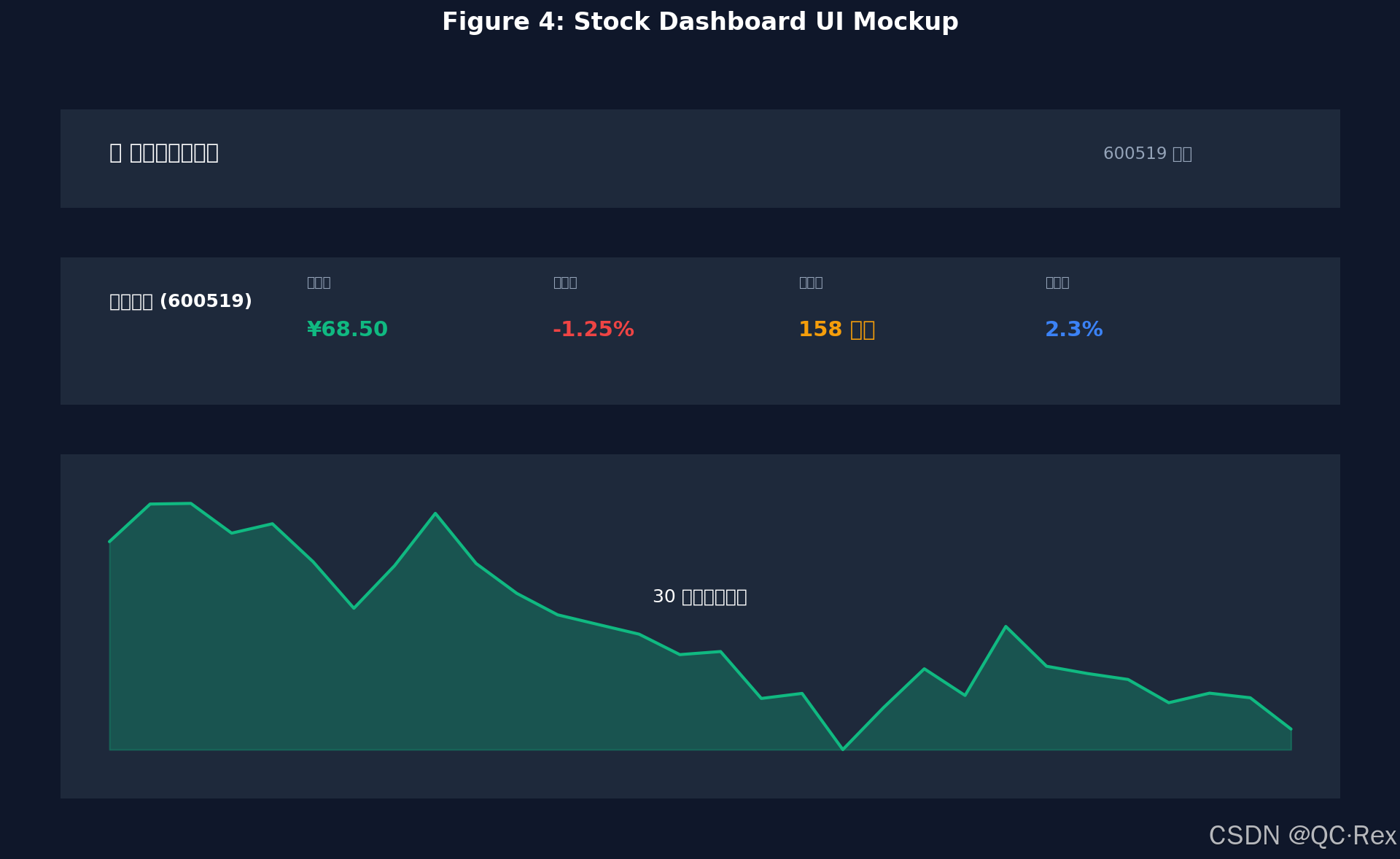
图 4: 股票数据仪表板 UI 原型 - 实时行情卡片与 K 线图可视化
html
<!DOCTYPE html>
<html>
<head>
    <title>股票分析仪表板</title>
    <script src="https://cdn.jsdelivr.net/npm/chart.js"></script>
    <style>
        :root {
            --primary: #10b981;
            --danger: #ef4444;
            --bg: #0f172a;
            --card: #1e293b;
            --text: #f1f5f9;
        }
        body {
            font-family: 'Inter', system-ui, sans-serif;
            background: var(--bg);
            color: var(--text);
            margin: 0;
            padding: 20px;
        }
        .dashboard {
            max-width: 1200px;
            margin: 0 auto;
        }
        .header {
            display: flex;
            justify-content: space-between;
            align-items: center;
            margin-bottom: 30px;
        }
        .search-box {
            display: flex;
            gap: 10px;
        }
        input {
            padding: 10px 15px;
            border: 1px solid #334155;
            border-radius: 8px;
            background: var(--card);
            color: var(--text);
            font-size: 16px;
        }
        button {
            padding: 10px 20px;
            background: var(--primary);
            color: white;
            border: none;
            border-radius: 8px;
            cursor: pointer;
            font-weight: 600;
        }
        .quote-card {
            background: var(--card);
            border-radius: 12px;
            padding: 20px;
            margin-bottom: 20px;
        }
        .quote-grid {
            display: grid;
            grid-template-columns: repeat(auto-fit, minmax(150px, 1fr));
            gap: 15px;
        }
        .metric {
            text-align: center;
        }
        .metric-label {
            font-size: 12px;
            color: #94a3b8;
            margin-bottom: 5px;
        }
        .metric-value {
            font-size: 24px;
            font-weight: bold;
        }
        .positive { color: var(--primary); }
        .negative { color: var(--danger); }
        .chart-container {
            background: var(--card);
            border-radius: 12px;
            padding: 20px;
            height: 400px;
        }
    </style>
</head>
<body>
    <div class="dashboard">
        <div class="header">
            <h1>📈 股票分析仪表板</h1>
            <div class="search-box">
                <input type="text" id="symbol-input" placeholder="输入股票代码 (如:600519)" value="600519">
                <button onclick="loadStockData()">查询</button>
            </div>
        </div>

        <div class="quote-card">
            <h2 id="stock-title">贵州茅台 (600519)</h2>
            <div class="quote-grid">
                <div class="metric">
                    <div class="metric-label">当前价</div>
                    <div class="metric-value" id="price">--</div>
                </div>
                <div class="metric">
                    <div class="metric-label">涨跌幅</div>
                    <div class="metric-value" id="change">--</div>
                </div>
                <div class="metric">
                    <div class="metric-label">成交量</div>
                    <div class="metric-value" id="volume">--</div>
                </div>
                <div class="metric">
                    <div class="metric-label">换手率</div>
                    <div class="metric-value" id="turnover">--</div>
                </div>
            </div>
        </div>

        <div class="chart-container">
            <canvas id="kline-chart"></canvas>
        </div>
    </div>

    <script type="module">
        import { App } from "https://unpkg.com/@modelcontextprotocol/[email protected]/app-with-deps";
        const app = new App({ name: "stock-dashboard", version: "1.0.0" });
        await app.connect();

        let klineChart = null;

        async function loadStockData() {
            const symbol = document.getElementById('symbol-input').value;

            // 调用 MCP 工具获取数据
            const quote = await app.callServerTool('get_stock_quote', { symbol });
            const klineData = await app.callServerTool('get_kline_data', { symbol, days: 30 });

            // 更新行情卡片
            document.getElementById('price').textContent = `¥${quote.price.toFixed(2)}`;
            const changeEl = document.getElementById('change');
            changeEl.textContent = `${quote.change >= 0 ? '+' : ''}${quote.changePercent.toFixed(2)}%`;
            changeEl.className = `metric-value ${quote.change >= 0 ? 'positive' : 'negative'}`;
            document.getElementById('volume').textContent = (quote.volume / 10000).toFixed(0) + '万';

            // 绘制 K 线图
            renderKlineChart(klineData);

            // 更新对话上下文
            await app.updateModelContext({
                content: [{
                    type: "text",
                    text: `📊 已加载 ${symbol} 的行情数据:现价 ¥${quote.price.toFixed(2)},涨跌幅 ${quote.changePercent.toFixed(2)}%`
                }]
            });
        }

        function renderKlineChart(klineData) {
            const ctx = document.getElementById('kline-chart').getContext('2d');

            if (klineChart) klineChart.destroy();

            klineChart = new Chart(ctx, {
                type: 'line',
                data: {
                    labels: klineData.map(d => d.date.slice(5)),
                    datasets: [{
                        label: '收盘价',
                        data: klineData.map(d => d.close),
                        borderColor: '#10b981',
                        tension: 0.1
                    }, {
                        label: 'MA5',
                        data: klineData.map(d => d.close), // 简化:实际应计算 MA
                        borderColor: '#f59e0b',
                        borderDash: [5, 5]
                    }]
                },
                options: {
                    responsive: true,
                    maintainAspectRatio: false,
                    plugins: {
                        legend: { position: 'top' },
                        title: { display: true, text: '30 日价格走势' }
                    }
                }
            });
        }

        // 初始化加载
        loadStockData();
    </script>
</body>
</html>
五、高级技巧与最佳实践
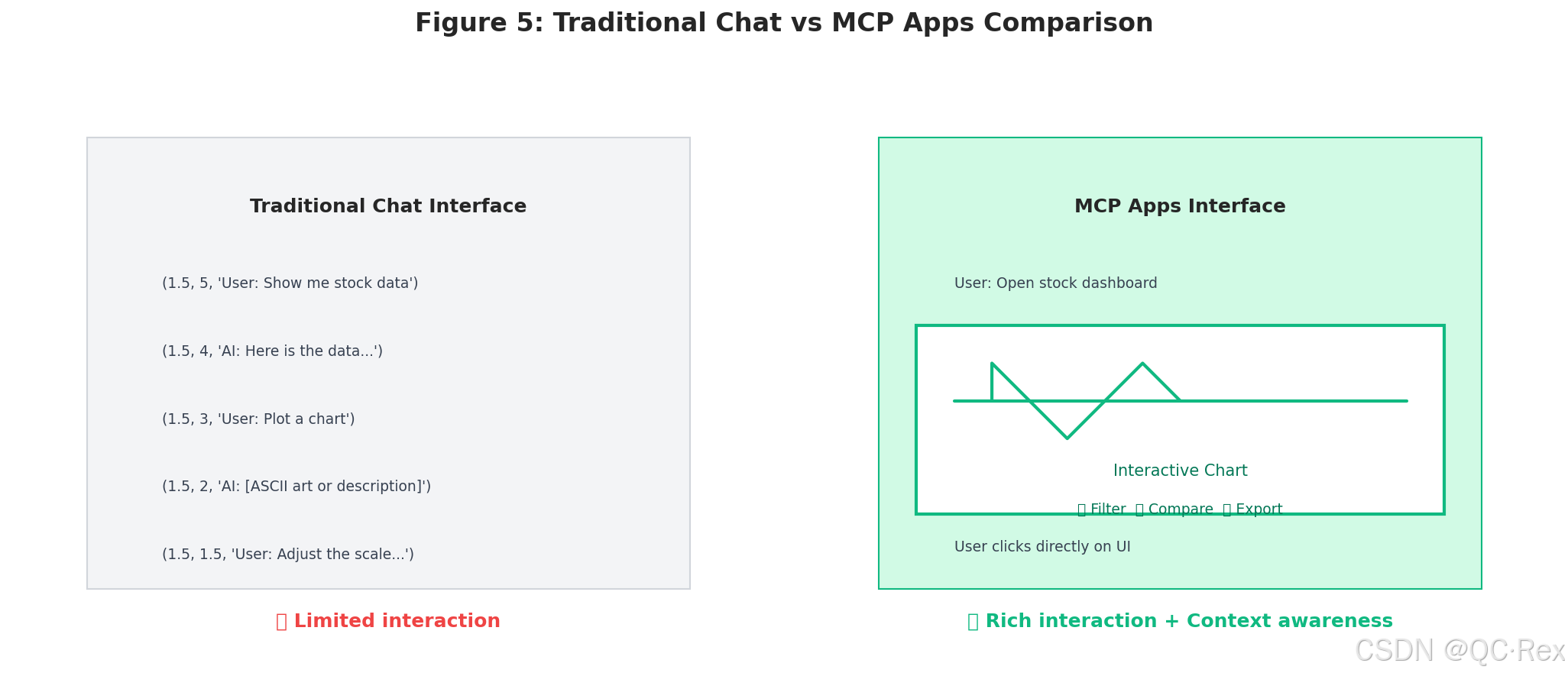
图 5: 传统聊天界面与 MCP Apps 对比 - MCP Apps 提供丰富的交互能力和上下文感知
5.1 性能优化
- 资源懒加载:大型 UI 应用应拆分模块,按需加载
- 数据缓存:在 MCP Server 端缓存 API 响应,避免重复请求
- 虚拟滚动:大数据列表使用虚拟滚动减少 DOM 节点
5.2 安全配置
- CSP 策略:严格限制外部资源加载域
- 输入验证:所有工具参数必须验证
- 权限控制:敏感操作需要用户确认
5.3 调试技巧
- 日志记录:在 MCP Server 中记录所有工具调用
- 浏览器 DevTools:UI 调试使用标准 Web 开发工具
- JSON-RPC 抓包:使用 Wireshark 或类似工具分析通信
六、总结与展望
6.1 核心要点回顾
- MCP Apps 让聊天界面与富 UI 无缝融合
- Spring AI 2.0.0-M3+ 提供完整的 MCP Server 支持
@McpResource和@McpTool是核心注解- 前端通过
ext-apps.ts与宿主通信 updateModelContext()实现 UI 到对话的上下文注入
6.2 未来方向
随着 MCP 协议的演进,我们可以期待:
- 更丰富的 UI 组件库
- 更好的跨平台兼容性
- 标准化的应用模板
- 更强大的安全机制
作者:超人不会飞
版权声明:本文内容为原创,基于公开资料独立撰写。文中示例代码可自由使用于学习和个人项目。转载或引用请注明出处。