最近又学了安卓吸顶嵌套滑动recyclerview,感觉还不错,分享一下。
(其实是很早之前学的,一直没写demo,然后学了忘忘了学,这次终于敲出来了!)
介绍
常用于主页、个人信息页等页面框架。
一般是长这样,进来可上下滑动,tabbar滑上去的时候吸顶在上面的导航栏底部,tabbar下面的内容可以左右滑动翻页,吸顶后再滑动滑动的是tabbar内部的rv里面的内容。
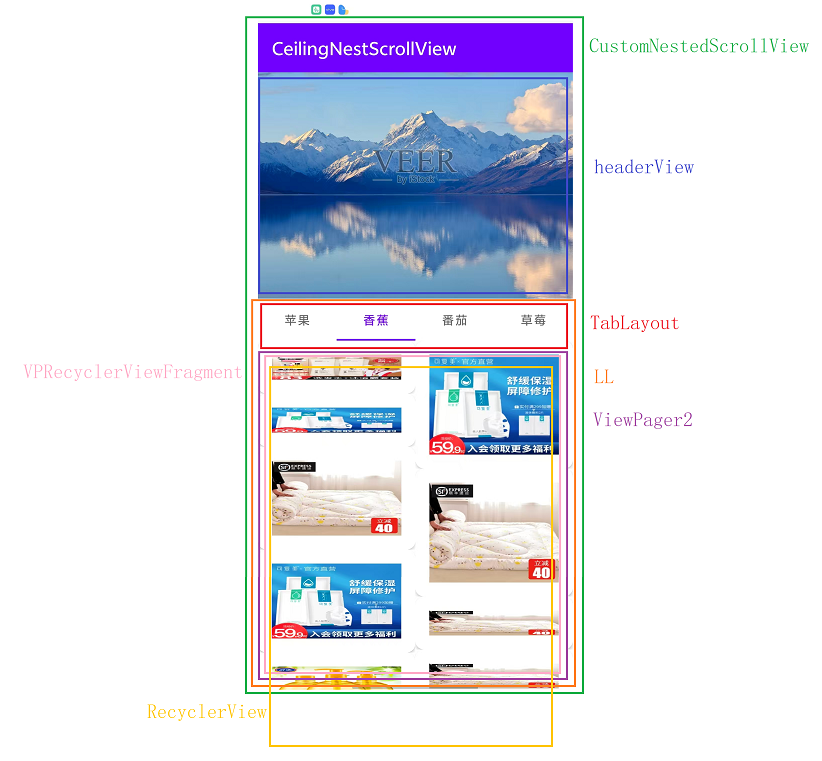
冲突场景分析
页面存在2层可竖直滑动的view
-
外层:CustomNestedScrollView
-
内层:ViewPager2的RecyclerView
需要解决的问题
-
手指上滑,谁先消费
-
外层fling到底部,惯性如何传给内层
-
tabbar吸顶时机、怎么吸顶怎么取消吸顶状态
核心代码
1.解决滑动冲突
java
public class CustomNestedScrollView extends NestedScrollView implements View.OnScrollChangeListener {
    /**
     * 用于判断recyclerview是否在fling
     */
    boolean isStartFling = false;
    /**
     * 记录当前滑动y轴加速度
     */
    private int velocityY = 0;
    FlingHelper mFlingHelper;
    int totalDy = 0;
    ViewPager2 mViewPager2;

    public CustomNestedScrollView(@NonNull Context context) {
        super(context);
        init();
    }

    public CustomNestedScrollView(@NonNull Context context, @Nullable AttributeSet attrs) {
        super(context, attrs);
        init();
    }

    public CustomNestedScrollView(@NonNull Context context, @Nullable AttributeSet attrs, int defStyleAttr) {
        super(context, attrs, defStyleAttr);
        init();
    }

    public void init() {
        setOnScrollChangeListener(this);
        mFlingHelper = new FlingHelper(getContext());
    }

    @Override
    public void onNestedPreScroll(@NonNull View target, int dx, int dy, @NonNull int[] consumed, int type) {
        int headerViewHeight = getChildAt(0).getMeasuredHeight() - getMeasuredHeight();
        //向上滑动,若当前topview可见,需要将topview滑动至不可见
        boolean hideTop = dy > 0 && getScrollY() < headerViewHeight;
        if (hideTop) {
            scrollBy(0, dy);
            consumed[1] = dy;
        }
    }

    @Override
    public void fling(int velocityY) {
        super.fling(velocityY);
        this.velocityY = velocityY;
        if (velocityY > 0) {
            isStartFling = true;
            totalDy = 0;
        }
    }

    @Override
    public void onScrollChange(View v, int scrollX, int scrollY, int oldScrollX, int oldScrollY) {
        //在recyclerview fling的情况下,记录当前recyclerview在y轴的偏移
        totalDy += scrollY - oldScrollY;
        if (scrollY == (getChildAt(0).getMeasuredHeight() - getMeasuredHeight())) {
            if (velocityY != 0) {
                Double splineFlingDistance = mFlingHelper.getSpineFlingDistance(velocityY);
                if (splineFlingDistance > totalDy) {
                    mViewPager2 = getChildRecyclerView(this, ViewPager2.class);
                    if (mViewPager2 != null) {
                        RecyclerView childRecyclerView = getChildRecyclerView(((ViewGroup) mViewPager2.getChildAt(0)).getChildAt(mViewPager2.getCurrentItem()), RecyclerView.class);
                        if (childRecyclerView != null) {
                            childRecyclerView.fling(0, mFlingHelper.getVelocityByDistance(splineFlingDistance - Double.valueOf(totalDy)));
                        }
                    }
                }
            }
            totalDy = 0;
            velocityY = 0;
        }
    }

    private <T> T getChildRecyclerView(View viewGroup, Class<T> targetClass) {
        if (viewGroup != null && viewGroup.getClass() == targetClass) {
            return (T) viewGroup;
        }
        if (viewGroup instanceof ViewGroup) {
            for (int i = 0; i < ((ViewGroup) viewGroup).getChildCount(); i++) {
                View view = ((ViewGroup) viewGroup).getChildAt(i);
                if (view instanceof ViewGroup) {
                    T result = getChildRecyclerView(view, targetClass);
                    if (result != null) {
                        return result;
                    }
                }
            }
        }
        return null;
    }
}
2.处理外层
java
public class MainActivity extends AppCompatActivity {

    final String[] labels = {"苹果", "香蕉", "番茄", "草莓"};

    ActivityMainBinding binding;

    @Override
    protected void onCreate(Bundle savedInstanceState) {
        super.onCreate(savedInstanceState);
        binding = DataBindingUtil.setContentView(this, R.layout.activity_main);
        ViewPagerAdapter viewPagerAdapter = new ViewPagerAdapter(this, getPageFragments());
        binding.viewpagerView.setAdapter(viewPagerAdapter);
        new TabLayoutMediator(binding.tablayout, binding.viewpagerView, new TabLayoutMediator.TabConfigurationStrategy() {
            @Override
            public void onConfigureTab(@NonNull TabLayout.Tab tab, int position) {
                tab.setText(labels[position]);
            }
        }).attach();
        binding.tablayoutViewpager.post(new Runnable() {

            @Override
            public void run() {
                binding.tablayoutViewpager.getLayoutParams().height = binding.scrollview.getMeasuredHeight();
                int height = binding.scrollview.getMeasuredHeight();
                if (Build.VERSION.SDK_INT >= 35) {
                    int resourceId = getResources().getIdentifier("status_bar_height", "dimen", "android");
                    if (resourceId > 0) {
                        height -= getResources().getDimensionPixelSize(resourceId);
                    }
                }
                binding.tablayoutViewpager.getLayoutParams().height = height;
                binding.tablayoutViewpager.requestLayout();
            }
        });
    }

    private List<Fragment> getPageFragments() {
        ArrayList<Fragment> data = new ArrayList<>();
        data.add(new RecyclerViewFragment());
        data.add(new RecyclerViewFragment());
        data.add(new RecyclerViewFragment());
        data.add(new RecyclerViewFragment());
        return data;
    }
}
2.fling转距离
java
public class FlingHelper {
    private static float DECELERATION_RATE = ((float) (Math.log(0.78d) / Math.log(0.9d)));
    private static float mFlingFriction = ViewConfiguration.getScrollFriction();
    private static float mPhysicalCoeff;

    public FlingHelper(Context context) {
        mPhysicalCoeff = context.getResources().getDisplayMetrics().density * 160.0f * 386.0878f * 0.84f;
    }

    private double getSplineDeceleration(int i) {
        return Math.log((double) ((0.35f * ((float) Math.abs(i))) / (mFlingFriction * mPhysicalCoeff)));
    }

    private double getSplineDecelerationByDistance(double d) {
        return ((((double) DECELERATION_RATE) - 1.0f) * Math.log(d / ((double) (mFlingFriction * mPhysicalCoeff)))) / ((double) DECELERATION_RATE);
    }

    public double getSpineFlingDistance(int i) {
        return Math.exp(getSplineDeceleration(i) * (((double) DECELERATION_RATE) / (((double) DECELERATION_RATE) - 1.0d))) * ((double) (mFlingFriction * mPhysicalCoeff));
    }

    public int getVelocityByDistance(double d) {
        return Math.abs((int) (((Math.exp(getSplineDecelerationByDistance(d)) * ((double) mFlingFriction)) * ((double) DECELERATION_RATE)) / 0.34999999999d));
    }
}
注意点
1.targetSDK 35及以上版本开启了edge-to-edge,内容会绘制到actionbar和状态栏后面导致
scrollview.getMeasuredHeight()拿到的是全屏高度,导致tabbar被遮挡,因此计算时需要减去这部分高度
java
binding.tablayoutViewpager.getLayoutParams().height = binding.scrollview.getMeasuredHeight();
int height = binding.scrollview.getMeasuredHeight();
if (Build.VERSION.SDK_INT >= 35) {
  int resourceId = getResources().getIdentifier("status_bar_height", "dimen", "android");
  if (resourceId > 0) {
     height -= getResources().getDimensionPixelSize(resourceId);
  }
}
binding.tablayoutViewpager.getLayoutParams().height = height;
binding.tablayoutViewpager.requestLayout();
2.使用的databinding,需要在build.gradle里面配置
java
 dataBinding {
        enabled true
    }
源码
效果视频
CeilingNestedRecyclerview