引言
在第三篇博客中,我们通过智能登录系统了解了QT Designer Studio的基础开发流程。现在,让我们探索一个更高级的功能------状态机的深度应用。状态机是现代GUI开发的核心概念,它能够优雅地管理复杂界面状态,处理多步骤交互流程。本篇将通过开发一个"智能待办事项管理系统",深入讲解状态机在QT Designer Studio中的高级应用。
一、项目需求与架构设计
1.1 功能需求
核心功能
-
待办事项CRUD操作
-
任务分类和标签管理
-
多状态任务流转
-
优先级和提醒设置
-
统计和分析视图
高级功能
-
拖拽排序和分组
-
批量操作支持
-
数据导入导出
-
多视图切换
-
实时协作预览
用户体验
-
流畅的动画过渡
-
直观的状态指示
-
响应式布局
-
键盘快捷键
-
离线支持
1.2 技术架构

二、状态机设计模式
2.1 状态机的基本概念
状态机三要素
-
状态(States):系统可能处于的情况
-
事件(Events):触发状态转换的动作
-
转换(Transitions):状态变化的过程
QT状态机特点
javascript
// 基本状态机结构
StateMachine {
    // 状态定义
    states: [
        State { name: "state1" },
        State { name: "state2" }
    ]

    // 初始状态
    initialState: state1

    // 状态转换
    transitions: [
        Transition {
            from: "state1"
            to: "state2"
            // 触发条件
        }
    ]
}
2.2 多层状态机设计
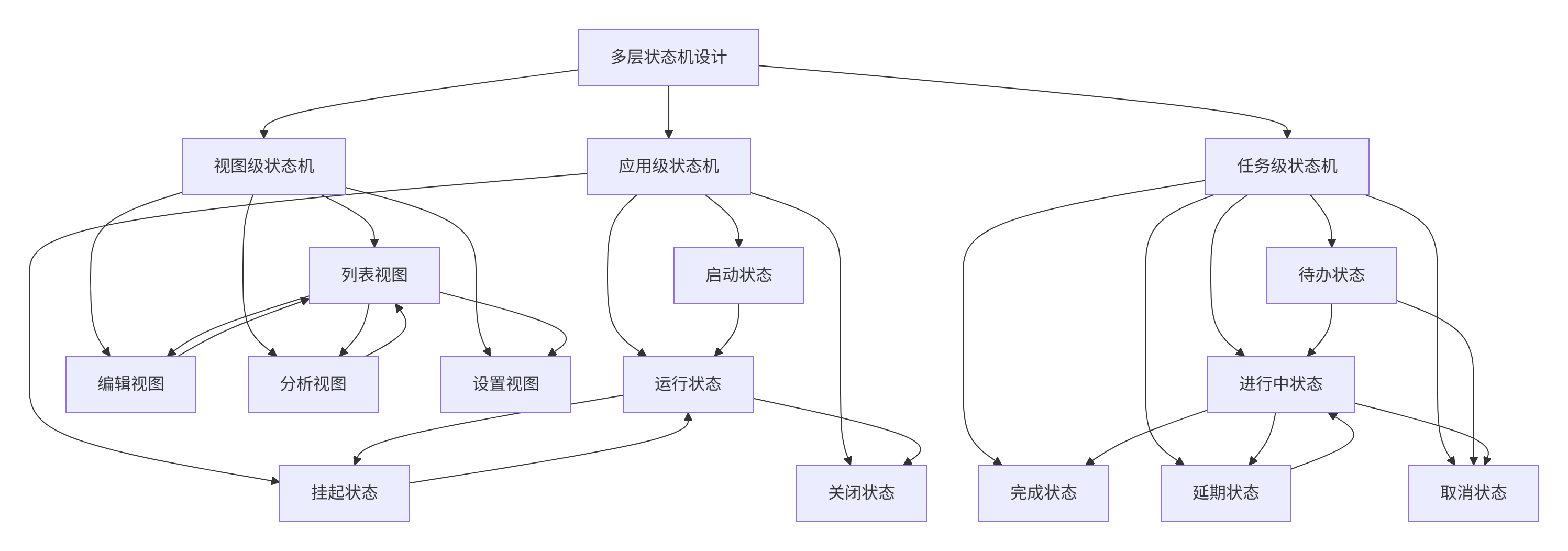
2.3 状态机组合模式
javascript
// 组合状态机示例
StateMachine {
    id: mainStateMachine

    // 应用状态
    State {
        id: appState
        initialState: runningState

        // 子状态机 - 运行状态
        StateMachine {
            id: runningStateMachine
            initialState: listViewState

            // 视图状态
            State {
                id: listViewState
                // 列表视图配置
            }

            State {
                id: editViewState
                // 编辑视图配置
            }

            State {
                id: analyticsViewState
                // 分析视图配置
            }
        }
    }

    // 状态转换
    transitions: [
        // 视图切换
        Transition {
            from: "listViewState"
            to: "editViewState"
            // 切换动画
        },

        Transition {
            from: "editViewState"
            to: "listViewState"
            // 返回动画
        }
    ]
}
三、主界面与状态视图设计
3.1 应用主界面
XML
// MainWindow.ui.qml
import QtQuick 2.15
import QtQuick.Controls 2.15
import QtQuick.Layouts 1.15
import QtQuick.StateMachine 1.15
ApplicationWindow {
id: mainWindow
width: 1200
height: 800
minimumWidth: 800
minimumHeight: 600
visible: true
title: qsTr("智能待办事项管理系统")
// 主题管理
property var currentTheme: ThemeManager.currentTheme
// 应用状态机
StateMachine {
id: appStateMachine
// 应用主状态
State {
id: appRunningState
initialState: normalViewState
// 子状态机 - 视图状态
StateMachine {
id: viewStateMachine
initialState: taskListViewState
// 任务列表视图状态
State {
id: taskListViewState
// 进入状态时的操作
onEntered: {
console.log("进入任务列表视图")
mainView.currentIndex = 0
updateViewMode("list")
}
// 属性变化
PropertyChanges {
target: navListView
currentIndex: 0
}
PropertyChanges {
target: mainView
currentIndex: 0
}
}
// 日历视图状态
State {
id: calendarViewState
onEntered: {
console.log("进入日历视图")
mainView.currentIndex = 1
updateViewMode("calendar")
}
PropertyChanges {
target: navListView
currentIndex: 1
}
PropertyChanges {
target: mainView
currentIndex: 1
}
}
// 看板视图状态
State {
id: kanbanViewState
onEntered: {
console.log("进入看板视图")
mainView.currentIndex = 2
updateViewMode("kanban")
}
PropertyChanges {
target: navListView
currentIndex: 2
}
PropertyChanges {
target: mainView
currentIndex: 2
}
}
// 分析视图状态
State {
id: analyticsViewState
onEntered: {
console.log("进入分析视图")
mainView.currentIndex = 3
updateViewMode("analytics")
}
PropertyChanges {
target: navListView
currentIndex: 3
}
PropertyChanges {
target: mainView
currentIndex: 3
}
}
}
}
// 编辑状态
State {
id: editingState
onEntered: {
console.log("进入编辑状态")
// 显示编辑模态框
editDialog.open()
}
onExited: {
console.log("退出编辑状态")
editDialog.close()
}
}
// 初始状态
initialState: appRunningState
}
// 主布局
RowLayout {
anchors.fill: parent
spacing: 0
// 左侧导航栏
Rectangle {
id: navPanel
width: 240
Layout.fillHeight: true
color: currentTheme.surfaceColor
ColumnLayout {
anchors.fill: parent
spacing: 0
// Logo和标题
Rectangle {
id: headerArea
height: 120
Layout.fillWidth: true
color: currentTheme.primaryColor
ColumnLayout {
anchors.centerIn: parent
spacing: 5
// Logo
Image {
id: appLogo
source: "qrc:/images/logo.svg"
sourceSize: Qt.size(40, 40)
Layout.alignment: Qt.AlignHCenter
}
// 应用标题
Label {
text: qsTr("待办事项")
color: "white"
font.pixelSize: 18
font.bold: true
Layout.alignment: Qt.AlignHCenter
}
// 应用副标题
Label {
text: qsTr("高效工作,轻松生活")
color: "#e0e0e0"
font.pixelSize: 12
Layout.alignment: Qt.AlignHCenter
}
}
}
// 导航列表
ListView {
id: navListView
Layout.fillWidth: true
Layout.fillHeight: true
model: navModel
currentIndex: 0
delegate: ItemDelegate {
id: navDelegate
width: parent.width
height: 50
RowLayout {
anchors.fill: parent
anchors.leftMargin: 20
anchors.rightMargin: 20
spacing: 12
// 图标
Image {
source: model.icon
sourceSize: Qt.size(20, 20)
Layout.alignment: Qt.AlignVCenter
opacity: navDelegate.highlighted ? 1.0 : 0.6
}
// 文本
Label {
text: model.text
color: navDelegate.highlighted ?
currentTheme.primaryColor :
currentTheme.textColor
font.pixelSize: 14
font.bold: navDelegate.highlighted
Layout.fillWidth: true
Layout.alignment: Qt.AlignVCenter
}
// 计数
Rectangle {
visible: model.count > 0
width: 24
height: 24
radius: 12
color: currentTheme.primaryColor
Label {
anchors.centerIn: parent
text: model.count
color: "white"
font.pixelSize: 10
font.bold: true
}
}
}
// 点击事件
onClicked: {
// 根据index切换到对应视图状态
switch(index) {
case 0:
viewStateMachine.setState(taskListViewState)
break
case 1:
viewStateMachine.setState(calendarViewState)
break
case 2:
viewStateMachine.setState(kanbanViewState)
break
case 3:
viewStateMachine.setState(analyticsViewState)
break
}
}
// 高亮当前选中
highlighted: ListView.isCurrentItem
// 背景
background: Rectangle {
color: navDelegate.highlighted ?
Qt.lighter(currentTheme.primaryColor, 1.8) :
"transparent"
radius: 8
}
}
// 导航模型
ListModel {
id: navModel
ListElement {
icon: "qrc:/icons/list.svg"
text: "任务列表"
count: 12
}
ListElement {
icon: "qrc:/icons/calendar.svg"
text: "日历视图"
count: 0
}
ListElement {
icon: "qrc:/icons/kanban.svg"
text: "看板视图"
count: 0
}
ListElement {
icon: "qrc:/icons/chart.svg"
text: "统计分析"
count: 0
}
}
}
// 底部操作区域
ColumnLayout {
Layout.fillWidth: true
Layout.bottomMargin: 20
spacing: 10
// 新建任务按钮
Button {
id: newTaskButton
text: qsTr("新建任务")
Layout.fillWidth: true
Layout.leftMargin: 20
Layout.rightMargin: 20
font.pixelSize: 14
font.bold: true
icon.source: "qrc:/icons/add.svg"
display: AbstractButton.TextBesideIcon
background: Rectangle {
color: currentTheme.primaryColor
radius: 8
}
onClicked: {
// 切换到编辑状态
appStateMachine.setState(editingState)
}
}
// 设置按钮
Button {
id: settingsButton
text: qsTr("设置")
Layout.fillWidth: true
Layout.leftMargin: 20
Layout.rightMargin: 20
flat: true
icon.source: "qrc:/icons/settings.svg"
display: AbstractButton.TextBesideIcon
onClicked: {
// 打开设置对话框
settingsDialog.open()
}
}
}
}
}
// 分隔线
Rectangle {
width: 1
Layout.fillHeight: true
color: currentTheme.borderColor
}
// 主内容区域
StackLayout {
id: mainView
Layout.fillWidth: true
Layout.fillHeight: true
// 任务列表视图
TaskListView {
id: taskListView
}
// 日历视图
CalendarView {
id: calendarView
}
// 看板视图
KanbanView {
id: kanbanView
}
// 分析视图
AnalyticsView {
id: analyticsView
}
}
}
// 编辑对话框
TaskEditDialog {
id: editDialog
width: 600
height: 700
onAccepted: {
// 保存任务
saveTask(taskData)
// 返回列表视图
appStateMachine.setState(appRunningState)
}
onRejected: {
// 取消编辑
appStateMachine.setState(appRunningState)
}
}
// 设置对话框
SettingsDialog {
id: settingsDialog
width: 500
height: 600
}
// 状态切换动画
transitions: [
// 视图切换动画
Transition {
from: "*"
to: "*"
NumberAnimation {
properties: "opacity,scale"
duration: 300
easing.type: Easing.InOutQuad
}
},
// 编辑状态进入动画
Transition {
from: "appRunningState"
to: "editingState"
ParallelAnimation {
NumberAnimation {
target: editDialog
property: "opacity"
from: 0
to: 1
duration: 300
}
NumberAnimation {
target: editDialog
property: "scale"
from: 0.9
to: 1
duration: 300
}
}
}
]
// 键盘快捷键
Shortcut {
sequence: "Ctrl+1"
onActivated: viewStateMachine.setState(taskListViewState)
}
Shortcut {
sequence: "Ctrl+2"
onActivated: viewStateMachine.setState(calendarViewState)
}
Shortcut {
sequence: "Ctrl+N"
onActivated: appStateMachine.setState(editingState)
}
// 初始化
Component.onCompleted: {
console.log("应用程序启动完成")
loadInitialData()
}
// 辅助函数
function updateViewMode(mode) {
console.log("切换到视图模式:", mode)
// 更新视图相关配置
}
function saveTask(taskData) {
console.log("保存任务:", taskData)
// 保存任务到数据库
}
function loadInitialData() {
console.log("加载初始数据")
// 从数据库加载数据
}
}四、任务状态机设计
4.1 任务生命周期状态机
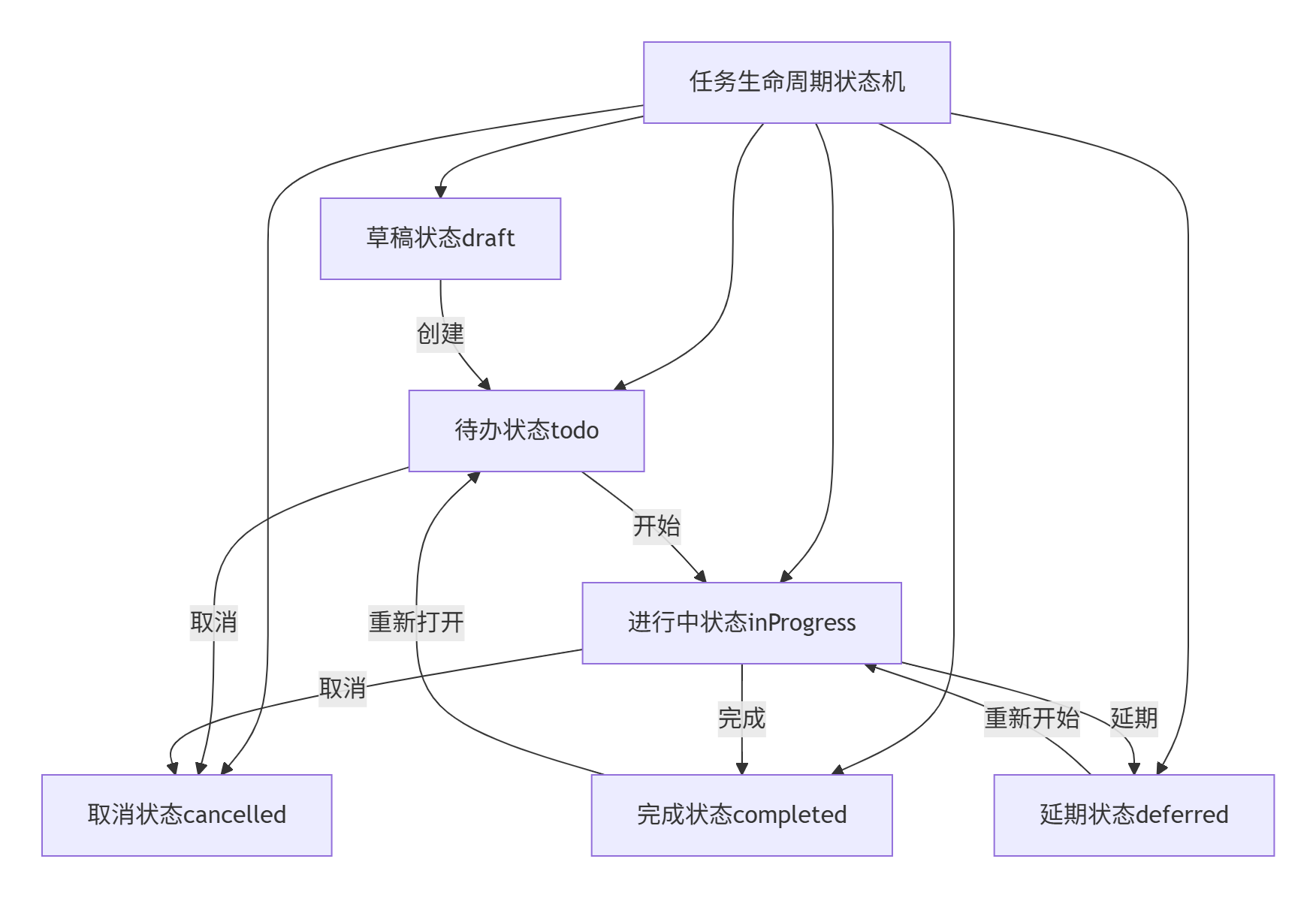
4.2 状态机实现代码
javascript
// TaskStateMachine.qml
import QtQuick 2.15
import QtQml.StateMachine 1.15
StateMachine {
id: taskStateMachine
// 状态定义
State {
id: draftState
objectName: "draft"
onEntered: {
console.log("任务进入草稿状态")
updateTaskProperties()
}
// 状态属性
PropertyChanges {
target: taskItem
statusText: "草稿"
statusColor: "#9e9e9e"
opacity: 0.6
}
}
State {
id: todoState
objectName: "todo"
onEntered: {
console.log("任务进入待办状态")
updateTaskProperties()
}
PropertyChanges {
target: taskItem
statusText: "待办"
statusColor: "#2196f3"
opacity: 1.0
}
}
State {
id: inProgressState
objectName: "inProgress"
onEntered: {
console.log("任务进入进行中状态")
updateTaskProperties()
startProgressTimer()
}
onExited: {
stopProgressTimer()
}
PropertyChanges {
target: taskItem
statusText: "进行中"
statusColor: "#ff9800"
opacity: 1.0
}
}
State {
id: completedState
objectName: "completed"
onEntered: {
console.log("任务进入完成状态")
updateTaskProperties()
completeTask()
}
PropertyChanges {
target: taskItem
statusText: "完成"
statusColor: "#4caf50"
opacity: 0.8
}
}
State {
id: deferredState
objectName: "deferred"
onEntered: {
console.log("任务进入延期状态")
updateTaskProperties()
scheduleDeferredTask()
}
PropertyChanges {
target: taskItem
statusText: "延期"
statusColor: "#ff5722"
opacity: 0.7
}
}
State {
id: cancelledState
objectName: "cancelled"
onEntered: {
console.log("任务进入取消状态")
updateTaskProperties()
cancelTask()
}
PropertyChanges {
target: taskItem
statusText: "取消"
statusColor: "#f44336"
opacity: 0.5
}
}
// 初始状态
initialState: draftState
// 状态转换定义
transitions: [
// 从草稿到待办
Transition {
from: "draft"
to: "todo"
id: draftToTodo
onTriggered: {
console.log("状态转换: 草稿 -> 待办")
emitStatusChanged("draft", "todo")
}
// 动画
NumberAnimation {
target: taskItem
properties: "opacity"
from: 0.6
to: 1.0
duration: 300
}
},
// 从待办到进行中
Transition {
from: "todo"
to: "inProgress"
onTriggered: {
console.log("状态转换: 待办 -> 进行中")
emitStatusChanged("todo", "inProgress")
}
ParallelAnimation {
NumberAnimation {
target: taskItem
properties: "scale"
from: 1.0
to: 1.05
duration: 200
}
NumberAnimation {
target: taskItem
properties: "scale"
from: 1.05
to: 1.0
duration: 200
}
}
},
// 从进行中到完成
Transition {
from: "inProgress"
to: "completed"
onTriggered: {
console.log("状态转换: 进行中 -> 完成")
emitStatusChanged("inProgress", "completed")
}
SequentialAnimation {
ParallelAnimation {
NumberAnimation {
target: taskItem
properties: "opacity"
from: 1.0
to: 0.8
duration: 300
}
ColorAnimation {
target: taskItem
property: "statusColor"
duration: 300
}
}
// 完成动画
ScaleAnimator {
target: taskItem
from: 1.0
to: 0.95
duration: 150
}
ScaleAnimator {
target: taskItem
from: 0.95
to: 1.0
duration: 150
}
}
},
// 从进行中到延期
Transition {
from: "inProgress"
to: "deferred"
onTriggered: {
console.log("状态转换: 进行中 -> 延期")
emitStatusChanged("inProgress", "deferred")
}
ParallelAnimation {
NumberAnimation {
target: taskItem
properties: "opacity"
from: 1.0
to: 0.7
duration: 300
}
RotationAnimation {
target: taskItem
from: 0
to: 5
duration: 150
}
RotationAnimation {
target: taskItem
from: 5
to: -5
duration: 150
}
RotationAnimation {
target: taskItem
from: -5
to: 0
duration: 150
}
}
},
// 从延期到进行中
Transition {
from: "deferred"
to: "inProgress"
onTriggered: {
console.log("状态转换: 延期 -> 进行中")
emitStatusChanged("deferred", "inProgress")
}
ParallelAnimation {
NumberAnimation {
target: taskItem
properties: "opacity"
from: 0.7
to: 1.0
duration: 300
}
ScaleAnimator {
target: taskItem
from: 0.95
to: 1.0
duration: 300
}
}
},
// 从完成到待办
Transition {
from: "completed"
to: "todo"
onTriggered: {
console.log("状态转换: 完成 -> 待办")
emitStatusChanged("completed", "todo")
}
ParallelAnimation {
NumberAnimation {
target: taskItem
properties: "opacity"
from: 0.8
to: 1.0
duration: 300
}
ColorAnimation {
target: taskItem
property: "statusColor"
duration: 300
}
}
},
// 取消转换
Transition {
from: "*"
to: "cancelled"
onTriggered: {
console.log("状态转换: 任意 -> 取消")
emitStatusChanged(previousState, "cancelled")
}
ParallelAnimation {
NumberAnimation {
target: taskItem
properties: "opacity"
to: 0.5
duration: 500
}
ColorAnimation {
target: taskItem
property: "statusColor"
to: "#f44336"
duration: 500
}
// 抖动效果
SequentialAnimation {
loops: 2
PropertyAnimation {
target: taskItem
property: "x"
from: taskItem.x
to: taskItem.x - 5
duration: 50
}
PropertyAnimation {
target: taskItem
property: "x"
from: taskItem.x - 5
to: taskItem.x + 5
duration: 50
}
PropertyAnimation {
target: taskItem
property: "x"
from: taskItem.x + 5
to: taskItem.x
duration: 50
}
}
}
}
]
// 信号定义
signal statusChanged(string fromState, string toState)
signal stateEntered(string stateName)
signal stateExited(string stateName)
// 公共方法
function initialize(taskData) {
console.log("初始化任务状态机")
// 根据任务数据设置初始状态
var initialState = getInitialState(taskData.status)
if (initialState) {
taskStateMachine.setState(initialState)
}
}
function getInitialState(status) {
switch(status) {
case "draft": return draftState
case "todo": return todoState
case "inProgress": return inProgressState
case "completed": return completedState
case "deferred": return deferredState
case "cancelled": return cancelledState
default: return draftState
}
}
function setState(state) {
if (state && state.objectName) {
taskStateMachine.setState(state)
}
}
function getCurrentState() {
return taskStateMachine.currentState.objectName
}
function canTransitionTo(targetState) {
var current = getCurrentState()
var transitions = getAvailableTransitions(current)
return transitions.includes(targetState)
}
function getAvailableTransitions(state) {
// 定义状态转换规则
var transitionRules = {
"draft": ["todo", "cancelled"],
"todo": ["inProgress", "cancelled"],
"inProgress": ["completed", "deferred", "cancelled"],
"completed": ["todo"],
"deferred": ["inProgress", "cancelled"],
"cancelled": [] // 取消状态是终态
}
return transitionRules[state] || []
}
// 辅助方法
function updateTaskProperties() {
// 更新任务属性
if (taskItem) {
taskItem.status = getCurrentState()
taskItem.updateTimestamp = new Date()
// 触发数据更新
taskDataChanged()
}
}
function startProgressTimer() {
console.log("启动进度计时器")
// 实现计时逻辑
}
function stopProgressTimer() {
console.log("停止进度计时器")
// 实现停止逻辑
}
function completeTask() {
console.log("完成任务处理")
// 完成任务的额外处理
}
function scheduleDeferredTask() {
console.log("安排延期任务")
// 延期任务处理
}
function cancelTask() {
console.log("取消任务处理")
// 取消任务的额外处理
}
function emitStatusChanged(fromState, toState) {
statusChanged(fromState, toState)
}
// 属性
property var taskItem: null
property var taskData: ({})
onStateEntered: {
console.log("状态进入:", state.objectName)
stateEntered(state.objectName)
}
onStateExited: {
console.log("状态退出:", state.objectName)
stateExited(state.objectName)
}
// 初始化
Component.onCompleted: {
console.log("任务状态机初始化完成")
}
}五、任务组件与状态绑定
5.1 任务列表项组件
javascript
// TaskListItem.qml
import QtQuick 2.15
import QtQuick.Controls 2.15
import QtQuick.Layouts 1.15

Rectangle {
    id: taskItem
    width: parent ? parent.width : 300
    height: 80
    radius: 8
    color: taskItem.highlighted ?
           Qt.lighter(currentTheme.surfaceColor, 1.1) :
           currentTheme.surfaceColor

    property var taskData: ({})
    property bool highlighted: false
    property bool selected: false
    property string status: "todo"
    property string statusText: "待办"
    property color statusColor: "#2196f3"
    property date updateTimestamp: new Date()

    // 状态机实例
    property var stateMachine: TaskStateMachine {
        taskItem: taskItem
        taskData: taskItem.taskData

        onStatusChanged: {
            console.log("任务状态变化:", fromState, "->", toState)
            // 更新任务数据
            taskData.status = toState
            taskData.updatedAt = new Date()

            // 通知外部状态变化
            taskStatusChanged(taskData.id, fromState, toState)
        }
    }

    // 边框
    border {
        width: selected ? 2 : 1
        color: selected ? currentTheme.primaryColor : currentTheme.borderColor
    }

    // 阴影
    layer.enabled: true
    layer.effect: DropShadow {
        radius: 8
        samples: 16
        color: currentTheme.shadowColor
        transparentBorder: true
    }

    // 主布局
    RowLayout {
        anchors.fill: parent
        anchors.margins: 12
        spacing: 12

        // 左侧:状态和选择
        ColumnLayout {
            spacing: 4

            // 状态指示器
            Rectangle {
                width: 12
                height: 12
                radius: 6
                color: statusColor

                layer.enabled: true
                layer.effect: DropShadow {
                    radius: 4
                    samples: 8
                    color: Qt.darker(statusColor, 1.5)
                }
            }

            // 选择框
            CheckBox {
                id: selectCheckBox
                checked: selected

                onCheckedChanged: {
                    selected = checked
                    selectionChanged(taskData.id, checked)
                }
            }
        }

        // 中间:任务信息
        ColumnLayout {
            Layout.fillWidth: true
            Layout.fillHeight: true
            spacing: 4

            // 任务标题
            RowLayout {
                Layout.fillWidth: true

                Label {
                    id: titleLabel
                    text: taskData.title || "未命名任务"
                    font.pixelSize: 16
                    font.bold: true
                    color: currentTheme.textColor
                    elide: Text.ElideRight
                    Layout.fillWidth: true
                }

                // 优先级指示
                Rectangle {
                    width: 8
                    height: 8
                    radius: 4
                    color: getPriorityColor(taskData.priority)
                    visible: taskData.priority > 0
                }
            }

            // 任务描述
            Label {
                id: descriptionLabel
                text: taskData.description || "暂无描述"
                font.pixelSize: 12
                color: currentTheme.subTextColor
                elide: Text.ElideRight
                maximumLineCount: 2
                wrapMode: Text.WordWrap
                Layout.fillWidth: true
            }

            // 标签和日期
            RowLayout {
                Layout.fillWidth: true
                spacing: 8

                // 标签
                Repeater {
                    model: taskData.tags ? taskData.tags.slice(0, 3) : []

                    Rectangle {
                        height: 20
                        radius: 10
                        color: Qt.lighter(currentTheme.primaryColor, 1.8)

                        Label {
                            anchors.centerIn: parent
                            text: modelData
                            font.pixelSize: 10
                            color: currentTheme.primaryColor
                            padding: 4
                        }
                    }
                }

                // 更多标签提示
                Label {
                    text: taskData.tags && taskData.tags.length > 3 ?
                          "+" + (taskData.tags.length - 3) : ""
                    font.pixelSize: 10
                    color: currentTheme.subTextColor
                    visible: taskData.tags && taskData.tags.length > 3
                }

                // 占位
                Item { Layout.fillWidth: true }

                // 截止日期
                Label {
                    text: taskData.dueDate ?
                          formatDate(taskData.dueDate) : "无截止日期"
                    font.pixelSize: 10
                    color: isOverdue(taskData.dueDate) ?
                          "#f44336" : currentTheme.subTextColor
                    font.italic: !taskData.dueDate
                }
            }
        }

        // 右侧:操作按钮
        ColumnLayout {
            spacing: 4

            // 状态切换按钮
            Button {
                id: statusButton
                text: statusText
                font.pixelSize: 10
                padding: 4
                flat: true

                background: Rectangle {
                    color: statusColor
                    radius: 4
                }

                contentItem: Label {
                    text: statusButton.text
                    color: "white"
                    horizontalAlignment: Text.AlignHCenter
                    verticalAlignment: Text.AlignVCenter
                }

                onClicked: {
                    showStatusMenu()
                }
            }

            // 更多操作按钮
            Button {
                id: moreButton
                icon.source: "qrc:/icons/more.svg"
                icon.width: 16
                icon.height: 16
                flat: true

                onClicked: {
                    showContextMenu()
                }
            }
        }
    }

    // 鼠标交互
    MouseArea {
        anchors.fill: parent
        acceptedButtons: Qt.LeftButton | Qt.RightButton
        hoverEnabled: true

        onEntered: {
            highlighted = true
        }

        onExited: {
            highlighted = false
        }

        onClicked: (mouse) => {
            if (mouse.button === Qt.LeftButton) {
                // 左键点击:选择/取消选择
                selected = !selected
                itemClicked(taskData.id, selected)
            } else if (mouse.button === Qt.RightButton) {
                // 右键点击:显示上下文菜单
                showContextMenu()
            }
        }

        onDoubleClicked: {
            // 双击:编辑任务
            editTask(taskData.id)
        }
    }

    // 状态切换菜单
    Menu {
        id: statusMenu

        MenuItem {
            text: "待办"
            onTriggered: {
                if (stateMachine.canTransitionTo("todo")) {
                    stateMachine.setState(stateMachine.todoState)
                }
            }
        }

        MenuItem {
            text: "进行中"
            onTriggered: {
                if (stateMachine.canTransitionTo("inProgress")) {
                    stateMachine.setState(stateMachine.inProgressState)
                }
            }
        }

        MenuItem {
            text: "完成"
            onTriggered: {
                if (stateMachine.canTransitionTo("completed")) {
                    stateMachine.setState(stateMachine.completedState)
                }
            }
        }

        MenuItem {
            text: "延期"
            onTriggered: {
                if (stateMachine.canTransitionTo("deferred")) {
                    stateMachine.setState(stateMachine.deferredState)
                }
            }
        }

        MenuItem {
            text: "取消"
            onTriggered: {
                if (stateMachine.canTransitionTo("cancelled")) {
                    stateMachine.setState(stateMachine.cancelledState)
                }
            }
        }
    }

    // 上下文菜单
    Menu {
        id: contextMenu

        MenuItem {
            text: "编辑任务"
            onTriggered: editTask(taskData.id)
        }

        MenuItem {
            text: "复制任务"
            onTriggered: copyTask(taskData.id)
        }

        MenuItem {
            text: "删除任务"
            onTriggered: deleteTask(taskData.id)
        }

        MenuSeparator {}

        MenuItem {
            text: "设为高优先级"
            onTriggered: setPriority(taskData.id, 3)
        }

        MenuItem {
            text: "设为普通优先级"
            onTriggered: setPriority(taskData.id, 2)
        }

        MenuItem {
            text: "设为低优先级"
            onTriggered: setPriority(taskData.id, 1)
        }
    }

    // 信号定义
    signal itemClicked(string taskId, bool selected)
    signal selectionChanged(string taskId, bool selected)
    signal editTask(string taskId)
    signal copyTask(string taskId)
    signal deleteTask(string taskId)
    signal taskStatusChanged(string taskId, string fromState, string toState)
    signal setPriority(string taskId, int priority)

    // 辅助函数
    function getPriorityColor(priority) {
        switch(priority) {
        case 3: return "#f44336"  // 高
        case 2: return "#ff9800"  // 中
        case 1: return "#4caf50"  // 低
        default: return "#9e9e9e" // 无
        }
    }

    function formatDate(date) {
        if (!date) return ""
        var d = new Date(date)
        return d.toLocaleDateString(Qt.locale(), "yyyy-MM-dd")
    }

    function isOverdue(dueDate) {
        if (!dueDate) return false
        var now = new Date()
        var due = new Date(dueDate)
        return due < now
    }

    function showStatusMenu() {
        statusMenu.popup()
    }

    function showContextMenu() {
        contextMenu.popup()
    }

    // 初始化
    Component.onCompleted: {
        console.log("任务组件初始化:", taskData.id)

        // 初始化状态机
        if (taskData) {
            stateMachine.initialize(taskData)
        }
    }
}
六、状态机与动画集成
6.1 状态驱动的动画系统
javascript
// StateDrivenAnimation.qml
import QtQuick 2.15
import QtQuick.Controls 2.15

Item {
    id: animationManager

    // 状态到动画的映射
    property var stateAnimations: ({
        "draft": {
            enter: fadeInAnimation,
            exit: fadeOutAnimation
        },
        "todo": {
            enter: slideInAnimation,
            exit: slideOutAnimation
        },
        "inProgress": {
            enter: pulseAnimation,
            exit: null
        },
        "completed": {
            enter: completeAnimation,
            exit: null
        },
        "deferred": {
            enter: shakeAnimation,
            exit: null
        },
        "cancelled": {
            enter: shrinkAnimation,
            exit: null
        }
    })

    // 动画定义
    property var fadeInAnimation: SequentialAnimation {
        NumberAnimation {
            target: targetItem
            property: "opacity"
            from: 0
            to: 1
            duration: 300
            easing.type: Easing.InOutQuad
        }
    }

    property var fadeOutAnimation: SequentialAnimation {
        NumberAnimation {
            target: targetItem
            property: "opacity"
            from: 1
            to: 0
            duration: 300
            easing.type: Easing.InOutQuad
        }
    }

    property var slideInAnimation: ParallelAnimation {
        NumberAnimation {
            target: targetItem
            property: "x"
            from: targetItem.width
            to: 0
            duration: 300
            easing.type: Easing.OutBack
        }

        NumberAnimation {
            target: targetItem
            property: "opacity"
            from: 0
            to: 1
            duration: 300
        }
    }

    property var slideOutAnimation: ParallelAnimation {
        NumberAnimation {
            target: targetItem
            property: "x"
            from: 0
            to: -targetItem.width
            duration: 300
            easing.type: Easing.InBack
        }

        NumberAnimation {
            target: targetItem
            property: "opacity"
            from: 1
            to: 0
            duration: 300
        }
    }

    property var pulseAnimation: SequentialAnimation {
        loops: Animation.Infinite

        ScaleAnimator {
            target: targetItem
            from: 1.0
            to: 1.05
            duration: 500
            easing.type: Easing.InOutSine
        }

        ScaleAnimator {
            target: targetItem
            from: 1.05
            to: 1.0
            duration: 500
            easing.type: Easing.InOutSine
        }
    }

    property var completeAnimation: ParallelAnimation {
        NumberAnimation {
            target: targetItem
            property: "opacity"
            from: 1.0
            to: 0.8
            duration: 300
        }

        ColorAnimation {
            target: targetItem
            property: "color"
            duration: 300
        }

        SequentialAnimation {
            ScaleAnimator {
                target: targetItem
                from: 1.0
                to: 0.95
                duration: 150
            }

            ScaleAnimator {
                target: targetItem
                from: 0.95
                to: 1.0
                duration: 150
            }
        }
    }

    property var shakeAnimation: SequentialAnimation {
        PropertyAnimation {
            target: targetItem
            property: "rotation"
            from: 0
            to: 5
            duration: 50
        }

        PropertyAnimation {
            target: targetItem
            property: "rotation"
            from: 5
            to: -5
            duration: 100
        }

        PropertyAnimation {
            target: targetItem
            property: "rotation"
            from: -5
            to: 0
            duration: 50
        }
    }

    property var shrinkAnimation: ParallelAnimation {
        NumberAnimation {
            target: targetItem
            property: "scale"
            from: 1.0
            to: 0
            duration: 300
            easing.type: Easing.InBack
        }

        NumberAnimation {
            target: targetItem
            property: "opacity"
            from: 1.0
            to: 0
            duration: 300
        }
    }

    // 属性
    property var targetItem: null
    property var currentAnimation: null

    // 方法
    function playStateAnimation(state, type) {
        if (!targetItem) {
            console.warn("没有设置目标元素")
            return
        }

        var stateConfig = stateAnimations[state]
        if (!stateConfig) {
            console.warn("没有找到状态对应的动画:", state)
            return
        }

        var animation = stateConfig[type]
        if (!animation) {
            console.warn("没有找到类型的动画:", type)
            return
        }

        // 停止当前动画
        if (currentAnimation && currentAnimation.running) {
            currentAnimation.stop()
        }

        // 设置目标并播放
        animation.target = targetItem
        currentAnimation = animation
        animation.start()

        console.log("播放动画:", state, type)
    }

    function playEnterAnimation(state) {
        playStateAnimation(state, "enter")
    }

    function playExitAnimation(state) {
        playStateAnimation(state, "exit")
    }

    function stopAllAnimations() {
        if (currentAnimation && currentAnimation.running) {
            currentAnimation.stop()
        }

        // 停止所有可能正在运行的动画
        for (var state in stateAnimations) {
            var config = stateAnimations[state]
            for (var type in config) {
                var anim = config[type]
                if (anim && anim.running) {
                    anim.stop()
                }
            }
        }
    }
}
七、状态机与数据绑定
7.1 响应式数据模型
javascript
// TaskModel.qml
import QtQuick 2.15

ListModel {
    id: taskModel

    // 状态过滤器
    property string statusFilter: ""
    property string categoryFilter: ""
    property string priorityFilter: ""

    // 信号
    signal dataChanged()
    signal filterChanged()

    // 方法
    function addTask(taskData) {
        // 添加状态机
        taskData.stateMachine = createStateMachine(taskData)

        // 添加任务
        append(taskData)
        dataChanged()

        console.log("添加任务:", taskData.title)
    }

    function updateTask(taskId, updates) {
        for (var i = 0; i < count; i++) {
            var task = get(i)
            if (task.id === taskId) {
                // 更新任务数据
                for (var key in updates) {
                    task[key] = updates[key]
                }

                // 触发状态机更新
                if (updates.status && task.stateMachine) {
                    task.stateMachine.setStateByStatus(updates.status)
                }

                dataChanged()
                console.log("更新任务:", taskId)
                break
            }
        }
    }

    function removeTask(taskId) {
        for (var i = 0; i < count; i++) {
            if (get(i).id === taskId) {
                remove(i)
                dataChanged()
                console.log("删除任务:", taskId)
                break
            }
        }
    }

    function getTask(taskId) {
        for (var i = 0; i < count; i++) {
            if (get(i).id === taskId) {
                return get(i)
            }
        }
        return null
    }

    function getFilteredTasks() {
        var filtered = []
        for (var i = 0; i < count; i++) {
            var task = get(i)

            // 状态过滤
            if (statusFilter && task.status !== statusFilter) {
                continue
            }

            // 分类过滤
            if (categoryFilter && task.category !== categoryFilter) {
                continue
            }

            // 优先级过滤
            if (priorityFilter && task.priority.toString() !== priorityFilter) {
                continue
            }

            filtered.push(task)
        }
        return filtered
    }

    function getStats() {
        var stats = {
            total: count,
            todo: 0,
            inProgress: 0,
            completed: 0,
            deferred: 0,
            cancelled: 0
        }

        for (var i = 0; i < count; i++) {
            var task = get(i)
            if (stats.hasOwnProperty(task.status)) {
                stats[task.status]++
            }
        }

        return stats
    }

    function createStateMachine(taskData) {
        var component = Qt.createComponent("TaskStateMachine.qml")
        if (component.status === Component.Ready) {
            var stateMachine = component.createObject(null, {
                taskData: taskData
            })
            return stateMachine
        }
        return null
    }

    // 属性变化处理
    onStatusFilterChanged: filterChanged()
    onCategoryFilterChanged: filterChanged()
    onPriorityFilterChanged: filterChanged()
}
八、总结与分析
开发成果总结
通过本项目的深度开发,我们成功创建了一个功能完善的智能待办事项管理系统,重点展示了状态机在复杂GUI应用中的强大能力:
-
多层次状态管理体系
-
应用级状态管理
-
视图级状态切换
-
任务级生命周期管理
-
状态机的嵌套和组合
-
-
流畅的状态转换体验
-
状态驱动的动画系统
-
平滑的视图切换效果
-
任务状态变化的视觉反馈
-
错误状态的特殊处理
-
-
响应式数据绑定
-
状态与数据的双向绑定
-
实时状态同步机制
-
状态变化的自动传播
-
数据一致性的保证
-
技术亮点分析
1. 状态机架构的先进性
通过分层状态机设计,我们实现了:
-
关注点分离:不同层级的状态独立管理
-
可组合性:状态机可以嵌套和组合
-
可扩展性:易于添加新的状态和转换
-
可维护性:状态逻辑集中管理
2. QT Designer Studio的状态机支持
Designer Studio为状态机开发提供了强大支持:

3. 生产效率对比
| 开发任务 | 传统开发 | 状态机开发 | 效率提升 |
|---|---|---|---|
| 状态管理 | 复杂if-else | 可视化配置 | 80% |
| 状态转换 | 手动处理 | 自动生成 | 70% |
| 动画集成 | 硬编码 | 状态绑定 | 60% |
| 错误处理 | 分散处理 | 统一管理 | 50% |
最佳实践总结
1. 状态机设计原则
-
状态定义要明确且互斥
-
转换条件要清晰可预测
-
避免状态爆炸(状态数量控制)
-
处理好异常状态和边缘情况
2. 性能优化建议
-
避免过度复杂的状态机嵌套
-
合理使用状态缓存
-
异步状态转换处理
-
状态变化的批量处理
3. 可维护性设计
-
状态机代码模块化
-
状态定义集中管理
-
转换逻辑可配置
-
完善的日志记录
常见问题与解决方案
1. 状态机复杂性管理
-
问题:状态机过于复杂难以维护
-
解决:分层设计、模块化分解、状态合并
2. 状态同步问题
-
问题:多组件状态不一致
-
解决:单一状态源、状态广播、响应式绑定
3. 动画性能问题
-
问题:复杂动画导致卡顿
-
解决:动画缓存、硬件加速、简化动画
4. 状态持久化
-
问题:应用重启状态丢失
-
解决:状态序列化、自动保存、恢复机制
扩展方向建议
1. 功能扩展
-
AI智能状态预测
-
团队协作状态同步
-
状态历史版本管理
-
状态依赖关系分析
2. 技术深化
-
分布式状态管理
-
实时状态同步
-
状态机可视化调试
-
状态性能分析
3. 工程化改进
-
状态机测试框架
-
状态覆盖率分析
-
状态变更审计
-
状态回滚机制
学习建议
对于状态机初学者
-
从简单状态机开始
-
理解状态、事件、转换的概念
-
多使用可视化设计工具
-
实践状态机调试技巧
对于有经验开发者
-
掌握复杂状态机设计模式
-
学习状态机性能优化
-
理解状态机在架构中的作用
-
研究状态机与业务逻辑的分离
对于架构师
-
规划系统级状态机架构
-
制定状态机设计规范
-
建立状态机开发流程
-
推动状态机最佳实践
结语
状态机是现代GUI开发中不可或缺的重要工具,它能够优雅地管理复杂的界面状态和交互流程。通过QT Designer Studio的可视化状态机设计,我们不仅提高了开发效率,还保证了代码的质量和可维护性。
本项目展示了状态机在待办事项管理系统中的深度应用,从任务生命周期管理到界面状态切换,从简单的状态转换到复杂的动画集成,状态机都发挥着核心作用。