root@rk3576-buildroot:/# ifconfig wlan0 down
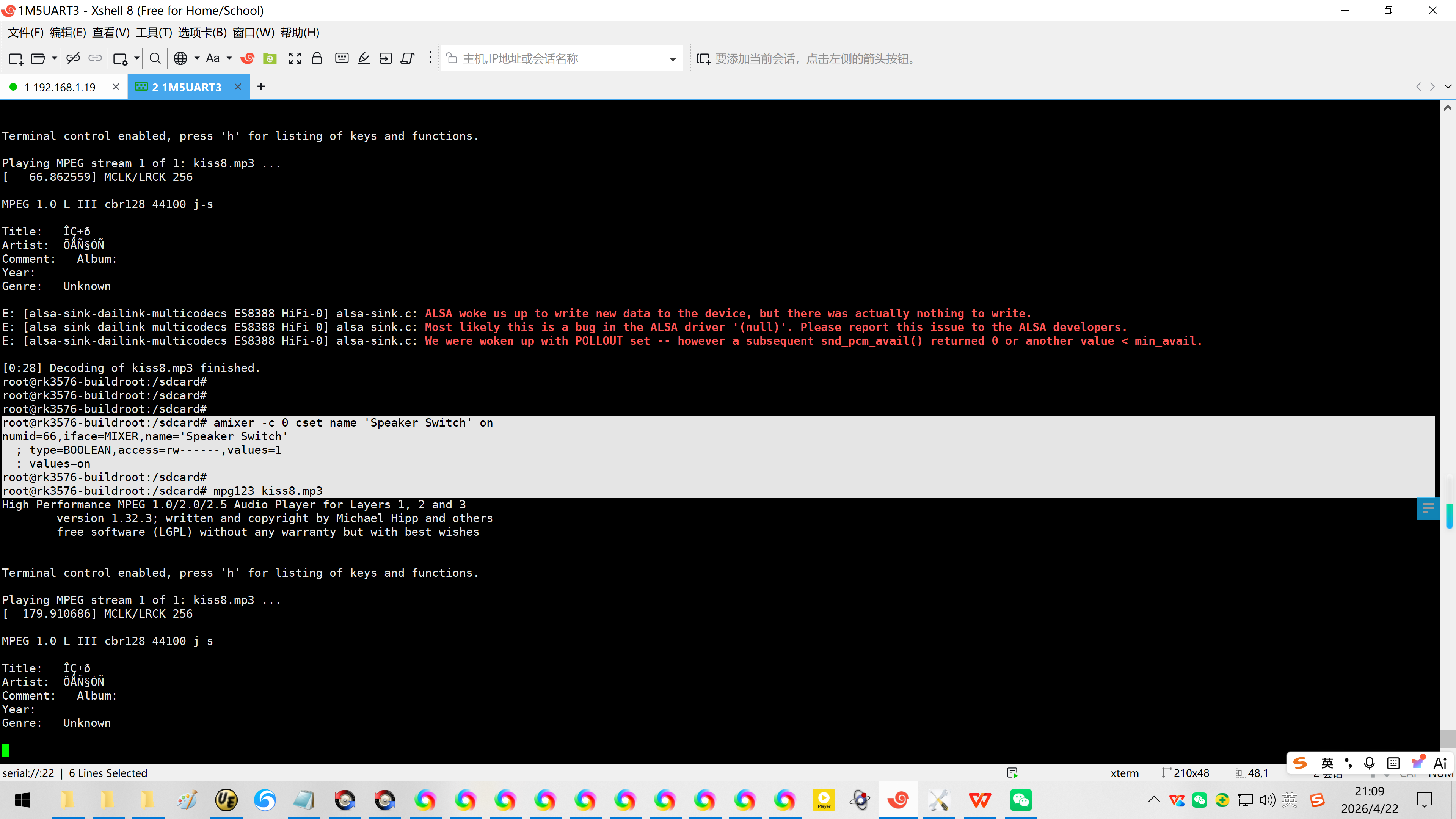
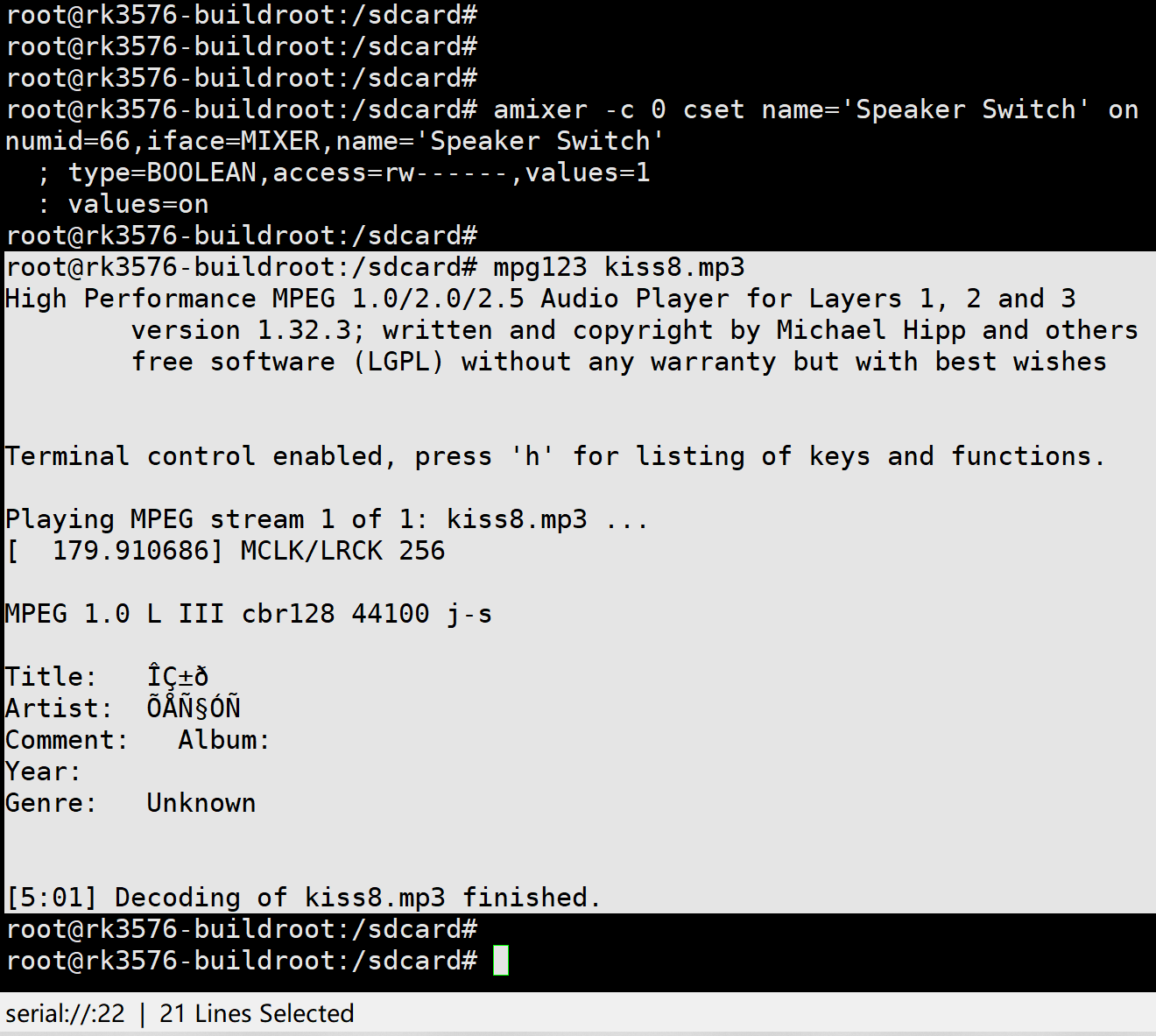
root@rk3576-buildroot:/sdcard# amixer -c 0 cset name='Speaker Switch' on
root@rk3576-buildroot:/sdcard# mpg123 kiss8.mp3
20260422给万象奥科的开发板HD-RK3576-PI适配瑞芯微原厂的Buildroot时使用mpg123播放mp3音频
2026/4/22 21:02
缘起:给万象奥科的开发板HD-RK3576-PI适配瑞芯微原厂的Buildroot时,需要播放mp3音频。
Buildroot系统默认集成了mpg123,不过mpg123只能播放mp3音频,连wav音频都播放不了!
1、使用mpg123播放mp3音频:
root@rk3576-buildroot:/#
root@rk3576-buildroot:/# 15.224725 platform mtd_vendor_storage: deferred probe pending
root@rk3576-buildroot:/#
root@rk3576-buildroot:/# ifconfig wlan0 down
21.949766 dhd wlan0 dhd_pri_stop : tx queue stopped
21.949850 dhd wlan0 dhd_stop : Enter
21.958379 dhd dhd_stop: ######### called for ifidx=0 #########
21.958417 dhd wlan0 dhd_stop : static if operational. skip chip reset.
21.960111 dhd dhd_rx_frame: dhd_stop in progress ignore received packet
21.960128\] \[dhd\] \[Repeats 0 times
21.960241 dhd wlan0 dhd_stop : Exit
root@rk3576-buildroot:/#
root@rk3576-buildroot:/# ifconfig
eth0 Link encap:Ethernet HWaddr 76:7A:BA:CB:6C:9C
UP BROADCAST MULTICAST MTU:1500 Metric:1
RX packets:0 errors:0 dropped:0 overruns:0 frame:0
TX packets:0 errors:0 dropped:0 overruns:0 carrier:0
collisions:0 txqueuelen:1000
RX bytes:0 (0.0 B) TX bytes:0 (0.0 B)
Interrupt:58
lo Link encap:Local Loopback
inet addr:127.0.0.1 Mask:255.0.0.0
inet6 addr: ::1/128 Scope:Host
UP LOOPBACK RUNNING MTU:65536 Metric:1
RX packets:8 errors:0 dropped:0 overruns:0 frame:0
TX packets:8 errors:0 dropped:0 overruns:0 carrier:0
collisions:0 txqueuelen:1000
RX bytes:576 (576.0 B) TX bytes:576 (576.0 B)
wlan1 Link encap:Ethernet HWaddr 9E:B8:B4:36:53:1E
inet6 addr: fe80::3e5:45dd:693d:a4c0/64 Scope:Link
UP BROADCAST RUNNING MULTICAST MTU:1500 Metric:1
RX packets:0 errors:0 dropped:0 overruns:0 frame:0
TX packets:12 errors:0 dropped:0 overruns:0 carrier:0
collisions:0 txqueuelen:1000
RX bytes:0 (0.0 B) TX bytes:1752 (1.7 KiB)
root@rk3576-buildroot:/#
root@rk3576-buildroot:/#
root@rk3576-buildroot:/#
root@rk3576-buildroot:/#
root@rk3576-buildroot:/# 29.955118 mmc_host mmc1: Bus speed (slot 0) = 198000000Hz (slot req 200000000Hz, actual 198000000HZ div = 0)
29.955243 dwmmc_rockchip 2a310000.mmc: Successfully tuned phase to 0
29.955295 mmc1: new ultra high speed SDR104 SDHC card at address 0001
29.957105 mmcblk1: mmc1:0001 SD 29.1 GiB
29.959374 mmcblk1: p1
30.117224 FAT-fs (mmcblk1p1): utf8 is not a recommended IO charset for FAT filesystems, filesystem will be case sensitive!
30.232303 mmc_host mmc1: Bus speed (slot 0) = 400000Hz (slot req 400000Hz, actual 400000HZ div = 0)
30.282186 mmc_host mmc1: Bus speed (slot 0) = 198000000Hz (slot req 200000000Hz, actual 198000000HZ div = 0)
30.282555 dwmmc_rockchip 2a310000.mmc: Successfully tuned phase to 90
30.285776 FAT-fs (mmcblk1p1): Volume was not properly unmounted. Some data may be corrupt. Please run fsck.
root@rk3576-buildroot:/#
root@rk3576-buildroot:/#
root@rk3576-buildroot:/# ll
total 76
drwxr-xr-x 20 root root 4096 Jan 1 00:00 ./
drwxr-xr-x 20 root root 4096 Jan 1 00:00 ../
-rw-r--r-- 1 root root 0 Jan 1 00:00 .resized
lrwxrwxrwx 1 root root 7 Jan 23 2026 bin -> usr/bin/
-rwxr-xr-x 1 root root 489 Jan 20 2026 busybox.fragment*
lrwxrwxrwx 1 root root 8 Apr 22 2026 data -> userdata/
drwxr-xr-x 14 root root 4260 Jan 1 00:00 dev/
drwxr-xr-x 23 root root 4096 Jan 1 00:00 etc/
drwxr-xr-x 2 root root 4096 Apr 22 2026 info/
lrwxrwxrwx 1 root root 7 Jan 23 2026 lib -> usr/lib/
lrwxrwxrwx 1 root root 3 Jan 23 2026 lib64 -> lib/
lrwxrwxrwx 1 root root 11 Jan 23 2026 linuxrc -> bin/busybox*
drwx------ 2 root root 16384 Apr 22 2026 lost+found/
drwxr-xr-x 11 root root 4096 Jan 23 2026 media/
drwxr-xr-x 5 root root 4096 Apr 22 2026 mnt/
drwxr-xr-x 3 root root 4096 Jan 1 00:00 oem/
drwxr-xr-x 3 root root 4096 Jan 23 2026 opt/
dr-xr-xr-x 273 root root 0 Jan 1 00:00 proc/
drwxr-xr-x 17 root root 4096 Apr 22 2026 rockchip-test/
drwx------ 2 root root 4096 Jan 20 2026 root/
drwxr-xr-x 12 root root 580 Jan 1 00:00 run/
lrwxrwxrwx 1 root root 8 Jan 23 2026 sbin -> usr/sbin/
lrwxrwxrwx 1 root root 10 Apr 22 2026 sdcard -> mnt/sdcard/
dr-xr-xr-x 15 root root 0 Jan 1 00:00 sys/
drwxr-xr-x 3 root root 4096 Apr 22 2026 system/
drwxrwxrwt 5 root root 180 Jan 1 00:00 tmp/
lrwxrwxrwx 1 root root 9 Apr 22 2026 udisk -> mnt/udisk/
drwxr-xr-x 4 root root 4096 Jan 1 00:00 userdata/
drwxr-xr-x 7 root root 4096 Apr 22 2026 usr/
drwxr-xr-x 6 root root 4096 Apr 22 2026 var/
lrwxrwxrwx 1 root root 6 Apr 22 2026 vendor -> system/
root@rk3576-buildroot:/#
root@rk3576-buildroot:/#
root@rk3576-buildroot:/# cd /sdcard
root@rk3576-buildroot:/sdcard# ll
total 7646628
drwxr-xr-x 17 root root 32768 Jan 1 00:00 ./
drwxr-xr-x 5 root root 4096 Apr 22 2026 ../
-rwxr-xr-x 1 root root 4749 Mar 11 2026 1.txt*
-rwxr-xr-x 1 root root 4749 Mar 11 2026 2.txt*
-rwxr-xr-x 1 root root 4748 Mar 11 2026 3.txt*
drwxr-xr-x 2 root root 32768 Mar 8 2026 Alarms/
drwxr-xr-x 2 root root 32768 Mar 8 2026 Audiobooks/
drwxr-xr-x 2 root root 32768 Mar 8 2026 DCIM/
drwxr-xr-x 2 root root 32768 Mar 8 2026 Documents/
drwxr-xr-x 2 root root 32768 Mar 8 2026 Download/
drwxr-xr-x 2 root root 32768 Mar 8 2026 LOST.DIR/
drwxr-xr-x 3 root root 32768 Mar 8 2026 Movies/
drwxr-xr-x 3 root root 32768 Mar 8 2026 Music/
drwxr-xr-x 2 root root 32768 Mar 8 2026 Notifications/
drwxr-xr-x 3 root root 32768 Mar 8 2026 Pictures/
drwxr-xr-x 2 root root 32768 Mar 8 2026 Podcasts/
drwxr-xr-x 2 root root 32768 Mar 8 2026 Recordings/
drwxr-xr-x 2 root root 32768 Mar 8 2026 Ringtones/
drwxr-xr-x 2 root root 32768 Mar 8 2026 'System Volume Information'/
-rwxr-xr-x 1 root root 4835832 Mar 7 2026 kiss8.mp3*
-rwxr-xr-x 1 root root 53268598 Mar 7 2026 kiss8.wav*
-rwxr-xr-x 1 root root 0 Jun 4 1994 'p??.(D'*
-rwxr-xr-x 1 root root 0 Jun 4 1994 'p??.(D'*
-rwxr-xr-x 1 root root 0 Jun 4 1994 'p??.(D'*
-rwxr-xr-x 1 root root 0 Jan 9 2012 'p??.?'*
-rwxr-xr-x 1 root root 0 Jan 9 2012 'p??.?'*
-rwxr-xr-x 1 root root 0 Jan 9 2012 'p??.?'*
-rwxr-xr-x 1 root root 0 Jan 9 2012 'p??.?'*
-rwxr-xr-x 1 root root 3859020782 Apr 15 2026 test1.mp4*
-rwxr-xr-x 1 root root 3859020782 Apr 18 2026 test2.mp4*
drwxr-xr-x 2 root root 32768 Mar 11 2026 txt/
-rwxr-xr-x 1 root root 140 Jan 1 1980 wpa_supplicant.conf*
-rwxr-xr-x 1 root root 125 Jan 1 1980 wpa_supplicant.conf.bak1*
-r-xr-xr-x 1 root root 0 Dec 31 2105 ?牿C.??*
-r-xr-xr-x 1 root root 0 Dec 31 2105 ?牿C.??*
-r-xr-xr-x 1 root root 0 Dec 31 2105 ?牿C.??*
-r-xr-xr-x 1 root root 0 Dec 31 2105 ?牿C.??*
-rwxr-xr-x 1 root root 53268598 Mar 7 2026 张学友-吻别.wav*
root@rk3576-buildroot:/sdcard#
root@rk3576-buildroot:/sdcard# mpg123
You made some mistake in program usage... let me briefly remind you:
High Performance MPEG 1.0/2.0/2.5 Audio Player for Layers 1, 2 and 3
version 1.32.3; written and copyright by Michael Hipp and others
free software (LGPL) without any warranty but with best wishes
usage: mpg123 option(s) file(s) \| URL(s) \| -
supported options defaults in brackets:
-v increase verbosity level -q quiet (don't print title)
-t testmode (no output) -s write to stdout
-w f write output as WAV file
-k n skip first n frames 0 -n n decode only n frames all
-c check range violations -y DISABLE resync on errors
-b n output buffer: n Kbytes 0 -f n change scalefactor 32768
-r n set/force samplerate auto
-o m select output module -a d set audio device
-2 downsample 1:2 (22 kHz) -4 downsample 1:4 (11 kHz)
-d n play every n'th frame only -h n play every frame n times
-0 decode channel 0 (left) only -1 decode channel 1 (right) only
-m mix both channels (mono) -p p use HTTP proxy p $HTTP_PROXY
-@ f read filenames/URLs from f -T get realtime priority
-z shuffle play (with wildcards) -Z random play
-u a HTTP authentication string -E f Equalizer, data from file
-C enable control keys --no-gapless not skip junk/padding in mp3s
-? this help --version print name + version
See the manpage mpg123(1) or call mpg123 with --longhelp for more parameters and information.
root@rk3576-buildroot:/sdcard#
root@rk3576-buildroot:/sdcard#
root@rk3576-buildroot:/sdcard# mpg123 kiss8.mp3
High Performance MPEG 1.0/2.0/2.5 Audio Player for Layers 1, 2 and 3
version 1.32.3; written and copyright by Michael Hipp and others
free software (LGPL) without any warranty but with best wishes
Terminal control enabled, press 'h' for listing of keys and functions.
Playing MPEG stream 1 of 1: kiss8.mp3 ...
66.862559 MCLK/LRCK 256
MPEG 1.0 L III cbr128 44100 j-s
Title: ??±?
Artist: ???§??
Comment: Album:
Year:
Genre: Unknown
E: alsa-sink-dailink-multicodecs ES8388 HiFi-0 alsa-sink.c: ALSA woke us up to write new data to the device, but there was actually nothing to write.
E: alsa-sink-dailink-multicodecs ES8388 HiFi-0 alsa-sink.c: Most likely this is a bug in the ALSA driver '(null)'. Please report this issue to the ALSA developers.
E: alsa-sink-dailink-multicodecs ES8388 HiFi-0 alsa-sink.c: We were woken up with POLLOUT set -- however a subsequent snd_pcm_avail() returned 0 or another value < min_avail.
0:28 Decoding of kiss8.mp3 finished.
root@rk3576-buildroot:/sdcard#
root@rk3576-buildroot:/sdcard#
root@rk3576-buildroot:/sdcard#
root@rk3576-buildroot:/sdcard# amixer -c 0 cset name='Speaker Switch' on
numid=66,iface=MIXER,name='Speaker Switch'
; type=BOOLEAN,access=rw------,values=1
: values=on
root@rk3576-buildroot:/sdcard#
root@rk3576-buildroot:/sdcard# mpg123 kiss8.mp3
High Performance MPEG 1.0/2.0/2.5 Audio Player for Layers 1, 2 and 3
version 1.32.3; written and copyright by Michael Hipp and others
free software (LGPL) without any warranty but with best wishes
Terminal control enabled, press 'h' for listing of keys and functions.
Playing MPEG stream 1 of 1: kiss8.mp3 ...
179.910686 MCLK/LRCK 256
MPEG 1.0 L III cbr128 44100 j-s
Title: ??±?
Artist: ???§??
Comment: Album:
Year:
Genre: Unknown
5:01 Decoding of kiss8.mp3 finished.
root@rk3576-buildroot:/sdcard#
root@rk3576-buildroot:/sdcard#
2、DeepSeek提供的配置命令!
正确的配置命令
1?? 先查看各控制项的当前状态和取值范围
bash
amixer -c 0 cget name='Speaker Switch'
amixer -c 0 cget name='Headphone Switch'
amixer -c 0 cget name='PCM Volume'
amixer -c 0 cget name='Output 1 Playback Volume'
amixer -c 0 cget name='Output 2 Playback Volume'
amixer -c 0 cget name='spk switch'
amixer -c 0 cget name='hp switch'
2?? 启用扬声器和耳机输出(根据你的实际输出设备选择)
bash
启用扬声器通路
amixer -c 0 cset name='Speaker Switch' on
amixer -c 0 cset name='spk switch' 1
启用耳机通路(如果插着耳机)
amixer -c 0 cset name='Headphone Switch' on
amixer -c 0 cset name='hp switch' 1
3?? 设置音量(先设一个中等偏上的值,范围通常是 0--255)
bash
amixer -c 0 cset name='PCM Volume' 200
amixer -c 0 cset name='Output 1 Playback Volume' 200
amixer -c 0 cset name='Output 2 Playback Volume' 200
?? 测试播放
配置完成后,再次尝试播放:
bash
aplay -D plughw:0,0 -v your_file.wav
如果仍然没有声音,请检查硬件连接(耳机/喇叭是否正确接入),并留意 aplay 输出的 PCM 状态(是否显示 RUNNING)。
?? 补充说明
输出中出现的 SAI2 相关控制项是 Rockchip SAI(I2S)控制器的内部路由,通常不需要手动修改,保持默认即可。
如果扬声器和耳机都有输出,且你希望同时发声,确保 Speaker Switch 和 Headphone Switch 都设为 on。
某些 ES8388 驱动版本中,Output 1/2 Playback Volume 可能默认是 0 或静音,所以务必调高。
完成上述设置后,请告诉我播放结果。如果仍有错误或无声,请附上 aplay -v 的完整输出以及 dmesg | tail -20。