传统的 HTTP 请求是"一问一答":客户端问一次,服务器答一次。如果你想实现实时数据(比如游戏对战、在线聊天),只能用轮询 或长轮询:
- 轮询:每隔 1 秒发一次请求 → 浪费带宽,服务器压力大
- 长轮询:请求挂起,有数据再返回 → 依然有 HTTP 头部开销,延迟也不低
而 WebSocket 一次握手建立持久连接,之后双方随时可以主动发消息,全双工、低延迟、省资源。
举个最直接的例子:你写一个聊天室,用 HTTP 轮询的话,用户说一句话要等 1 秒才能显示,WebSocket 则是即发即收。
1. WebSocket介绍
WebSocket 是一种网络通信协议,旨在提供全双工(双向)通信渠道,允许客户端与服务器之间进行实时数据交换。它基于 TCP 连接,并且通常用于需要低延迟、持续连接的应用场景,如实时聊天、在线游戏、股票行情更新等。
1.1. 特点
Socket 是传输层 TCP/IP 的编程接口,WebSocket 是基于 HTTP 协议的应用层协议,它利用 Socket 实现了全双工通信,但比原生 Socket 更易用,支持浏览器和服务器。
- 全双工通信:WebSocket 允许客户端和服务器之间的双向实时通信,而不像传统的 HTTP 协议那样只能由客户端发起请求。通过 WebSocket,服务器可以主动向客户端推送数据。
- 低延迟:一旦建立了 WebSocket 连接,客户端和服务器之间可以持续交换数据,避免了每次通信都需要重新建立连接的开销,降低了延迟。
- 持久连接:WebSocket 连接在建立后会持续存在,直到明确关闭。这意味着可以保持长时间的通信,而无需反复建立连接。
- 节省资源:与传统的轮询或长轮询方式相比,WebSocket 可以减少服务器和客户端的通信负担,节省了大量的网络带宽和计算资源。
1.2. 原理
- 握手阶段:客户端通过 HTTP 请求发起 WebSocket 握手,向服务器发送一个特殊的请求头部(Upgrade)。如果服务器支持 WebSocket,会响应一个 101 Switching Protocols 的状态码,表示协议已经升级为 WebSocket。
- 数据传输阶段:握手成功后,客户端和服务器之间通过 WebSocket 连接传输数据。数据通过帧(frame)进行传输,每一帧的大小可以灵活变化,支持文本和二进制数据的传输。
- 关闭连接:当通信结束时,任意一方都可以发起关闭连接的请求。双方通过发送一个关闭帧来完成这一过程。
心跳机制:通过定时发送 Ping/Pong 帧。服务端可以每隔一段时间发送 Ping,客户端回复 Pong;反之也可。如果超过一定时间没收到响应,就认为连接断开。代码中可以用 session.getBasicRemote().sendPing() 或自定义业务心跳消息。
1.3. 与 HTTP 的区别
- HTTP 是无状态的请求/响应协议,单向请求-响应模式,每次通信都需要建立新连接,头部开销大。
- WebSocket 是有状态的协议,一旦连接建立,客户端和服务器就可以保持长时间的通信。
2. 引入依赖
xml
<dependency>
    <groupId>org.springframework.boot</groupId>
    <artifactId>spring-boot-starter-websocket</artifactId>
</dependency>
<!-- 如果你需要前端页面,可以加一个 thymeleaf 方便演示(非必须) -->
<dependency>
    <groupId>org.springframework.boot</groupId>
    <artifactId>spring-boot-starter-thymeleaf</artifactId>
</dependency>
3. WebSocketConfig配置类
开启 WebSocket 支持
java
import org.springframework.context.annotation.Bean;
import org.springframework.context.annotation.Configuration;
import org.springframework.web.socket.server.standard.ServerEndpointExporter;

@Configuration
public class WebSocketConfig {

    // 自动注册 @ServerEndpoint 注解的 Bean
    @Bean
    public ServerEndpointExporter serverEndpointExporter() {
        return new ServerEndpointExporter();
    }
}
@ServerEndpoint 和 Spring 的 WebSocketHandler 有什么区别?
@ServerEndpoint是 Java EE 标准(Jakarta WebSocket)的注解,简单轻量;- Spring 的
WebSocketHandler更贴合 Spring 生态,能方便使用拦截器、消息模板、STOMP 协议等。 - 入门推荐
@ServerEndpoint,企业级复杂项目推荐WebSocketHandler。
4. WebSocket 服务端核心类
java
import jakarta.websocket.*;
import jakarta.websocket.server.PathParam;
import jakarta.websocket.server.ServerEndpoint;
import lombok.extern.slf4j.Slf4j;
import org.springframework.stereotype.Component;

import java.util.concurrent.ConcurrentHashMap;

@ServerEndpoint("/ws/{userId}")
@Component
@Slf4j
public class WebSocketServer {

    // 静态变量:记录当前在线连接数(线程安全)
    private static int onlineCount = 0;
    // 存放每个客户端对应的 WebSocketServer 对象
    private static final ConcurrentHashMap<String, WebSocketServer> webSocketMap = new ConcurrentHashMap<>();

    private Session session;
    private String userId;

    @OnOpen
    public void onOpen(Session session, @PathParam("userId") String userId) {
        this.session = session;
        this.userId = userId;
        if (webSocketMap.containsKey(userId)) {
            webSocketMap.remove(userId);
            webSocketMap.put(userId, this);
        } else {
            webSocketMap.put(userId, this);
            addOnlineCount();
        }
        log.info("用户 {} 连接成功,当前在线人数: {}", userId, getOnlineCount());
        sendMessage("连接成功,你的ID:" + userId);
    }

    @OnClose
    public void onClose() {
        if (webSocketMap.containsKey(userId)) {
            webSocketMap.remove(userId);
            subOnlineCount();
        }
        log.info("用户 {} 断开连接,当前在线人数: {}", userId, getOnlineCount());
    }

    @OnMessage
    public void onMessage(String message, Session session) {
        log.info("收到用户 {} 的消息: {}", userId, message);
        // 广播给所有在线用户(简单示例)
        for (WebSocketServer item : webSocketMap.values()) {
            item.sendMessage("【" + userId + "】说: " + message);
        }
    }

    @OnError
    public void onError(Session session, Throwable error) {
        log.error("WebSocket 发生错误,用户: {}", userId, error);
    }

    // 主动推送消息
    public void sendMessage(String message) {
        try {
            this.session.getBasicRemote().sendText(message);
        } catch (Exception e) {
            log.error("发送消息出错", e);
        }
    }

    // 静态方法:向指定用户发送消息
    public static void sendToUser(String userId, String message) {
        if (webSocketMap.containsKey(userId)) {
            webSocketMap.get(userId).sendMessage(message);
        } else {
            log.warn("用户 {} 不在线", userId);
        }
    }

    // 获取在线人数
    public static synchronized int getOnlineCount() {
        return onlineCount;
    }

    private static synchronized void addOnlineCount() {
        WebSocketServer.onlineCount++;
    }

    private static synchronized void subOnlineCount() {
        WebSocketServer.onlineCount--;
    }
}
5. 前端页面
可直接复制到 src/main/resources/templates/demo.html
html
<!DOCTYPE html>
<html lang="zh-CN">
<head>
    <meta charset="UTF-8">
    <meta name="viewport" content="width=device-width, initial-scale=1.0">
    <title>WebSocket 聊天室</title>
    <style>
        * {
            margin: 0;
            padding: 0;
            box-sizing: border-box;
        }

        body {
            font-family: -apple-system, BlinkMacSystemFont, 'Segoe UI', Roboto, 'Helvetica Neue', Arial, sans-serif;
            background: linear-gradient(135deg, #667eea 0%, #764ba2 100%);
            min-height: 100vh;
            display: flex;
            justify-content: center;
            align-items: center;
            padding: 20px;
        }

        .chat-container {
            background: white;
            border-radius: 12px;
            box-shadow: 0 10px 40px rgba(0, 0, 0, 0.2);
            width: 100%;
            max-width: 800px;
            overflow: hidden;
        }

        .chat-header {
            background: linear-gradient(135deg, #667eea 0%, #764ba2 100%);
            color: white;
            padding: 20px;
            text-align: center;
        }

        .chat-header h2 {
            font-size: 24px;
            font-weight: 600;
        }

        .connection-panel {
            padding: 20px;
            background: #f8f9fa;
            border-bottom: 1px solid #e9ecef;
            display: flex;
            gap: 10px;
            align-items: center;
            flex-wrap: wrap;
        }

        .connection-panel label {
            font-weight: 500;
            color: #495057;
        }

        .connection-panel input {
            flex: 1;
            min-width: 150px;
            padding: 10px 15px;
            border: 2px solid #dee2e6;
            border-radius: 6px;
            font-size: 14px;
            transition: all 0.3s ease;
        }

        .connection-panel input:focus {
            outline: none;
            border-color: #667eea;
            box-shadow: 0 0 0 3px rgba(102, 126, 234, 0.1);
        }

        .btn {
            padding: 10px 20px;
            border: none;
            border-radius: 6px;
            font-size: 14px;
            font-weight: 500;
            cursor: pointer;
            transition: all 0.3s ease;
            white-space: nowrap;
        }

        .btn-primary {
            background: linear-gradient(135deg, #667eea 0%, #764ba2 100%);
            color: white;
        }

        .btn-primary:hover {
            transform: translateY(-2px);
            box-shadow: 0 4px 12px rgba(102, 126, 234, 0.4);
        }

        .btn-danger {
            background: linear-gradient(135deg, #f093fb 0%, #f5576c 100%);
            color: white;
        }

        .btn-danger:hover {
            transform: translateY(-2px);
            box-shadow: 0 4px 12px rgba(245, 87, 108, 0.4);
        }

        .btn-success {
            background: linear-gradient(135deg, #4facfe 0%, #00f2fe 100%);
            color: white;
        }

        .btn-success:hover {
            transform: translateY(-2px);
            box-shadow: 0 4px 12px rgba(79, 172, 254, 0.4);
        }

        .message-panel {
            padding: 20px;
        }

        .input-group {
            display: flex;
            gap: 10px;
            margin-bottom: 20px;
        }

        .input-group input {
            flex: 1;
            padding: 12px 15px;
            border: 2px solid #dee2e6;
            border-radius: 6px;
            font-size: 14px;
            transition: all 0.3s ease;
        }

        .input-group input:focus {
            outline: none;
            border-color: #667eea;
            box-shadow: 0 0 0 3px rgba(102, 126, 234, 0.1);
        }

        .message-area {
            border: 2px solid #e9ecef;
            border-radius: 8px;
            height: 400px;
            overflow-y: auto;
            padding: 15px;
            background: #fafbfc;
        }

        .message-item {
            margin-bottom: 12px;
            padding: 10px 15px;
            border-radius: 8px;
            animation: slideIn 0.3s ease;
        }

        @keyframes slideIn {
            from {
                opacity: 0;
                transform: translateX(-10px);
            }
            to {
                opacity: 1;
                transform: translateX(0);
            }
        }

        .message-system {
            background: #fff3cd;
            border-left: 4px solid #ffc107;
            color: #856404;
        }

        .message-received {
            background: #d1ecf1;
            border-left: 4px solid #17a2b8;
            color: #0c5460;
        }

        .message-sent {
            background: #d4edda;
            border-left: 4px solid #28a745;
            color: #155724;
            text-align: right;
        }

        .message-error {
            background: #f8d7da;
            border-left: 4px solid #dc3545;
            color: #721c24;
        }

        .message-from {
            font-weight: 600;
            margin-bottom: 4px;
            font-size: 12px;
        }

        .message-content {
            word-wrap: break-word;
        }

        .status-indicator {
            display: inline-block;
            width: 8px;
            height: 8px;
            border-radius: 50%;
            margin-right: 8px;
            background: #dc3545;
        }

        .status-indicator.connected {
            background: #28a745;
            box-shadow: 0 0 8px rgba(40, 167, 69, 0.6);
        }

        .empty-state {
            text-align: center;
            color: #6c757d;
            padding: 40px 20px;
        }

        .empty-state svg {
            width: 64px;
            height: 64px;
            margin-bottom: 16px;
            opacity: 0.3;
        }
    </style>
</head>
<body>
<div class="chat-container">
    <div class="chat-header">
        <h2>💬 Spring Boot WebSocket 聊天室</h2>
    </div>

    <div class="connection-panel">
        <label><span class="status-indicator" id="statusIndicator"></span>用户ID:</label>
        <input type="text" id="userId" placeholder="例如: 1001">
        <button class="btn btn-primary" onclick="connectWebSocket()">连接</button>
        <button class="btn btn-danger" onclick="closeWebSocket()">断开</button>
    </div>

    <div class="message-panel">
        <div class="input-group">
            <input type="text" id="msg" placeholder="输入消息..." onkeypress="handleKeyPress(event)">
            <button class="btn btn-success" onclick="sendMessage()">发送</button>
        </div>
        <div class="message-area" id="messageArea">
            <div class="empty-state">
                <svg xmlns="http://www.w3.org/2000/svg" fill="none" viewBox="0 0 24 24" stroke="currentColor">
                    <path stroke-linecap="round" stroke-linejoin="round" stroke-width="2" d="M8 12h.01M12 12h.01M16 12h.01M21 12c0 4.418-4.03 8-9 8a9.863 9.863 0 01-4.255-.949L3 20l1.395-3.72C3.512 15.042 3 13.574 3 12c0-4.418 4.03-8 9-8s9 3.582 9 8z" />
                </svg>
                <p>暂无消息,请先连接WebSocket</p>
            </div>
        </div>
    </div>
</div>

<script>
    let websocket = null;

    function connectWebSocket() {
        const userId = document.getElementById('userId').value.trim();
        if (!userId) {
            showMessage('系统', '请输入用户ID', 'error');
            return;
        }
        const url = `ws://localhost:8080/ws/${userId}`;
        websocket = new WebSocket(url);

        websocket.onopen = function() {
            updateStatus(true);
            appendMessage('系统', '连接成功', 'system');
        };
        websocket.onmessage = function(event) {
            appendMessage('收到', event.data, 'received');
        };
        websocket.onclose = function() {
            updateStatus(false);
            appendMessage('系统', '连接已断开', 'system');
        };
        websocket.onerror = function(error) {
            appendMessage('错误', 'WebSocket 发生异常', 'error');
            console.error(error);
        };
    }

    function closeWebSocket() {
        if (websocket) {
            websocket.close();
            websocket = null;
            updateStatus(false);
        }
    }

    function sendMessage() {
        if (!websocket || websocket.readyState !== WebSocket.OPEN) {
            showMessage('系统', 'WebSocket 未连接', 'error');
            return;
        }
        const msg = document.getElementById('msg').value;
        if (msg) {
            websocket.send(msg);
            appendMessage('我', msg, 'sent');
            document.getElementById('msg').value = '';
        }
    }

    function handleKeyPress(event) {
        if (event.key === 'Enter') {
            sendMessage();
        }
    }

    function appendMessage(from, content, type) {
        const area = document.getElementById('messageArea');

        // 移除空状态提示
        const emptyState = area.querySelector('.empty-state');
        if (emptyState) {
            emptyState.remove();
        }

        const messageDiv = document.createElement('div');
        messageDiv.className = `message-item message-${type}`;

        const fromDiv = document.createElement('div');
        fromDiv.className = 'message-from';
        fromDiv.textContent = from;

        const contentDiv = document.createElement('div');
        contentDiv.className = 'message-content';
        contentDiv.textContent = content;

        messageDiv.appendChild(fromDiv);
        messageDiv.appendChild(contentDiv);
        area.appendChild(messageDiv);
        area.scrollTop = area.scrollHeight;
    }

    function updateStatus(connected) {
        const indicator = document.getElementById('statusIndicator');
        if (connected) {
            indicator.classList.add('connected');
        } else {
            indicator.classList.remove('connected');
        }
    }

    function showMessage(from, content, type) {
        alert(`${from}: ${content}`);
    }
</script>
</body>
</html>
6. Controller 来访问页面
**注意:**不是@RestController,没有@ResponseBody
java
// 不是@RestController
@Controller
public class ChatController {
    @GetMapping("/chat")
    // 返回的是页面,所以不能加@ResponseBody
    public String chat() {
        return "demo";
    }
}
7. 测试
打开多个浏览器窗口,输入网址:http://localhost:8080/chat
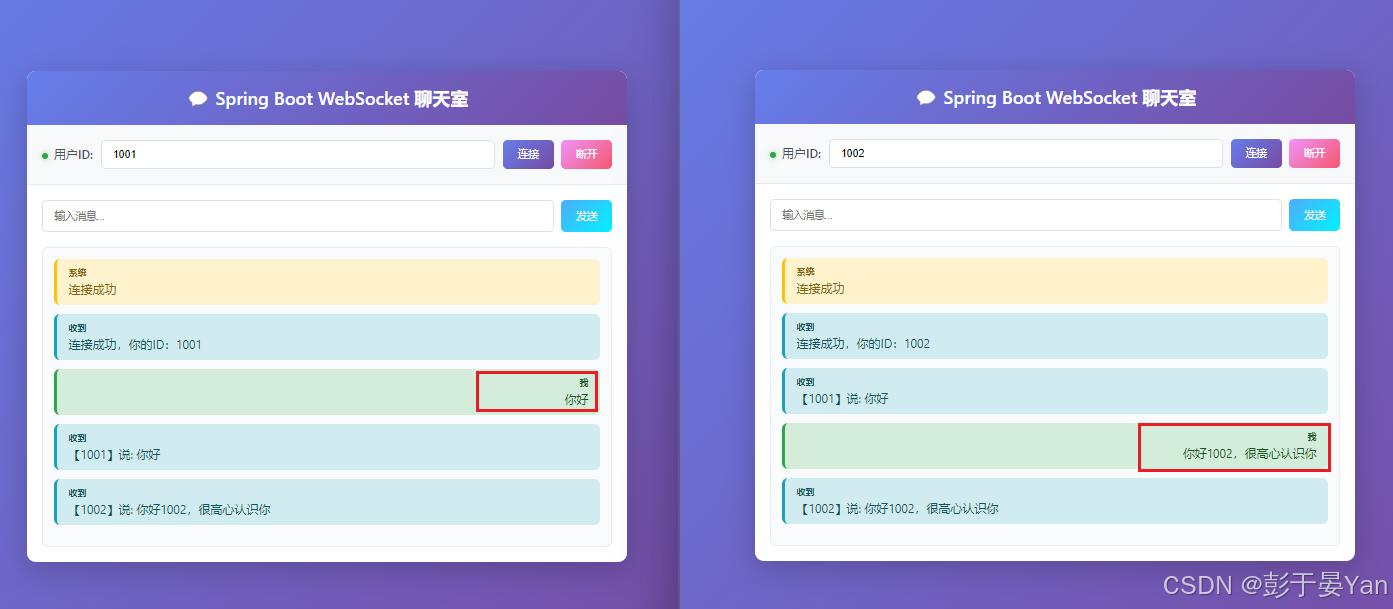
用户【1001】输入"你好",点击发送。用户【1002】会立即收到:"【1001】说: 你好"。
同样用户【1002】发送消息,用户【1001】也能收到。