文章目录
- 概念
- Nodes
-
- python
-
- 最小单元
-
- 完整代码
- [install node](#install node)
- 重新构建package
- 重新加载bash,并运行节点
- 面向对象的Node节点
- [CPP node](#CPP node)
概念
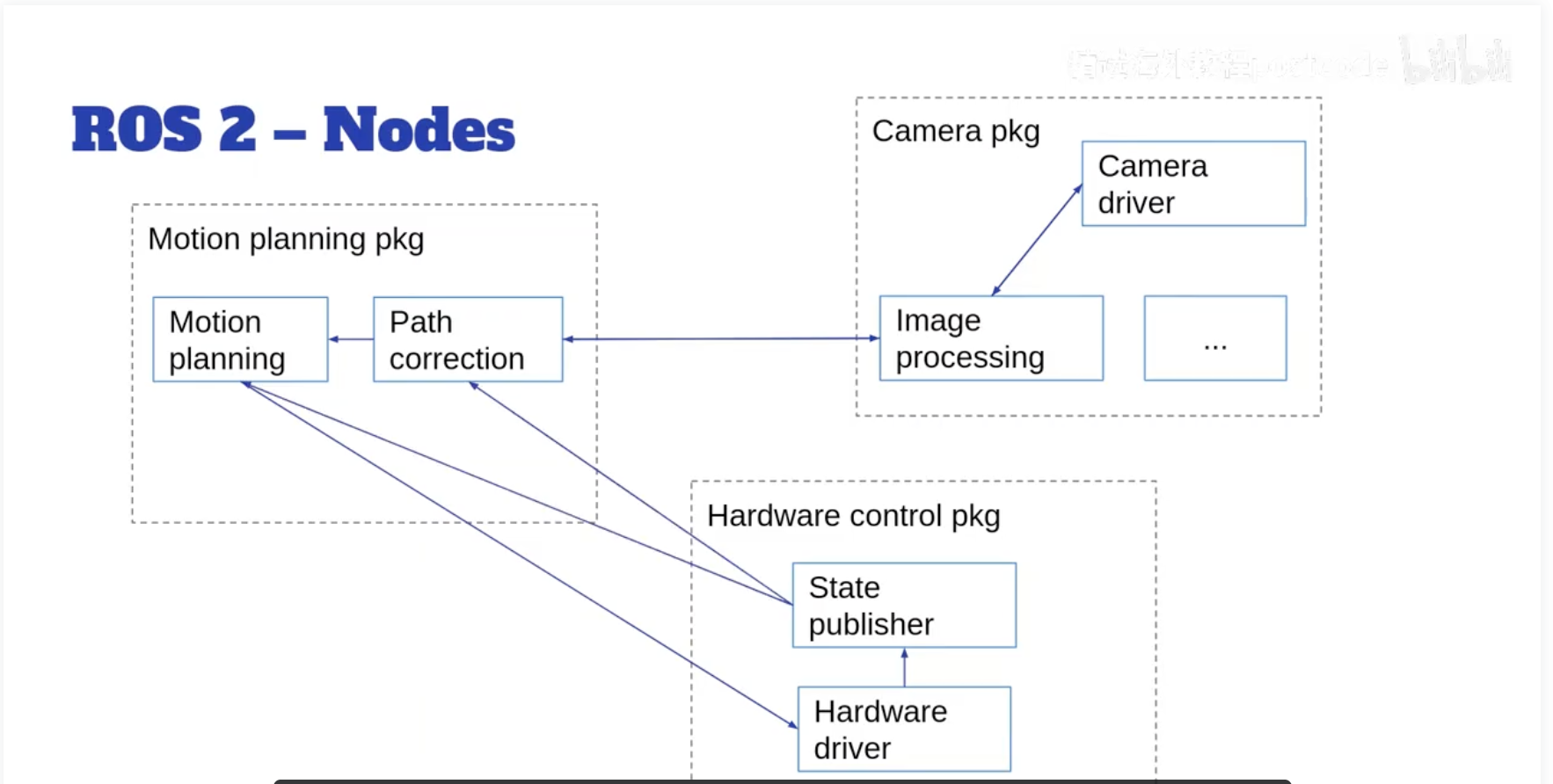
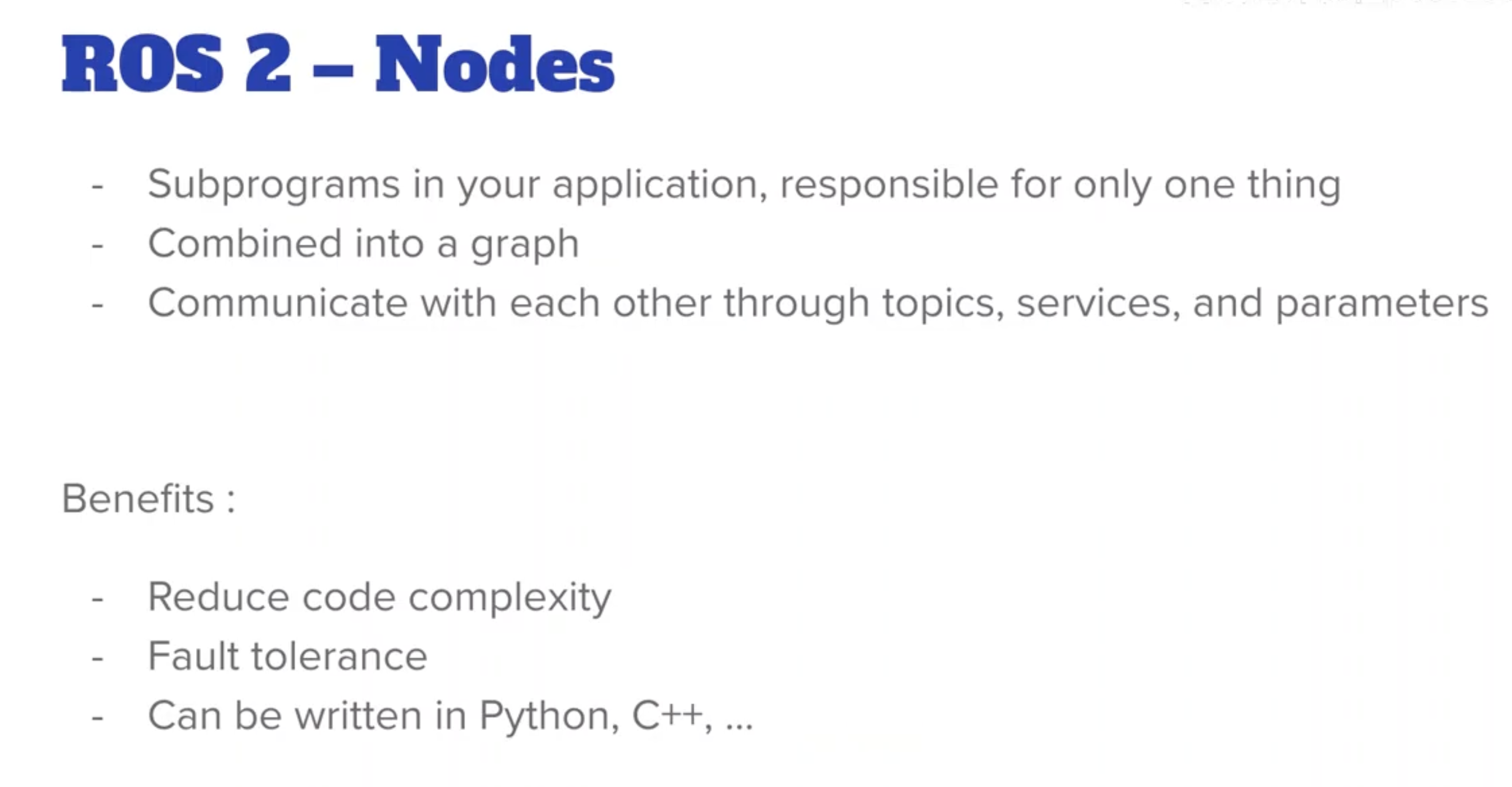
tolerance的意思是节点之间互不影响,即使一个坏掉了,另一个还能用
Nodes
注意区分:
- 节点的文件名称
- 节点的名称
- 节点的可执行文件名称
python
最小单元
bash
# ~/ros2_ws/src/my_py_pkg/my_py_pkg
touch my_first_node.py
Node节点最小的单元示例代码
my_first_node.py
python
#! /usr/bin/env python3
import rclpy
from rclpy.node import Node

def main(args=None):
	rclpy.init(args=args)
	node = Node('py_test')
	rclpy.shutdown()
完整代码
my_first_node.py
python
#! /usr/bin/env python3
import rclpy
from rclpy.node import Node

def main(args=None):
	rclpy.init(args=args)
	node = Node('py_test') # 节点名称
	node.get_logger().info('Hello, ROS2!')
	rclpy.shutdown()

if __name__ == '__main__':
	main()
让节点一直挂着,试试就知道了
python
#! /usr/bin/env python3
import rclpy
from rclpy.node import Node

def main(args=None):
	rclpy.init(args=args)
	node = Node('py_test') # 节点名称
	node.get_logger().info('Hello, ROS2!')
	rclpy.spin(node) # Keeps the node alive until it is shut down
	rclpy.shutdown()

if __name__ == '__main__':
	main()
install node
bash
# ~/ros2_ws/src/my_py_pkg/setup.py
py_node = my_py_pkg.my_first_node:main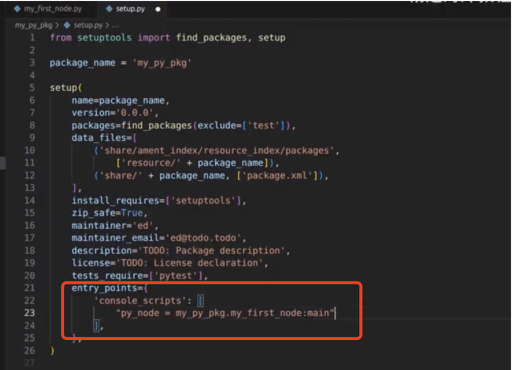
重新构建package
bash
# 在ros2工作目录下
colcon build --packages-select my_py_pkg
重新加载bash,并运行节点
bash
cd ~
source .bashrc
ros2 run my_py_pkg py_node
py_node 是在setup.bash 里创建的可执行文件名称,
⚠️注意区分 文件名称,节点名称,可执行文件名称;有时候会取相同的名称
面向对象的Node节点
示例代码
python
#! /usr/bin/env python3
import rclpy
from rclpy.node import Node

class MyNode(Node):# Inherit from the 【Node】 class
    def __init__(self):
        super().__init__('py_test') # Initialize the node with a name
        self.get_logger().info('Hello, ROS2!')

def main(args=None):
	rclpy.init(args=args)
	node = MyNode()
	rclpy.spin(node) # Keeps the node alive until it is shut down
	rclpy.shutdown()

if __name__ == '__main__':
	main()
重新构建package并运行
bash
# 在ros2工作目录下
colcon build --packages-select my_py_pkg
source install/setup.bash
ros2 run my_py_pkg py_node
工具:timer
代码示例
python
#! /usr/bin/env python3
import rclpy
from rclpy.node import Node

class MyNode(Node):# Inherit from the 【Node】 class
    def __init__(self):
        super().__init__('py_test') # Initialize the node with a name
        self.get_logger().info('Hello, ROS2!')
        self.create_timer(1.0, self.timer_callback) # Create a timer that calls the callback every 1 second;
        # self.timercallback() # Call the callback function immediately
        # self.timercallback #  will not execute the function but will pass the function object itself to the timer, allowing it to be called at the specified intervals.

    def timer_callback(self):
        self.get_logger().info('Timer callback called!')

def main(args=None):
	rclpy.init(args=args) # Initialize the ROS2 Python client library
	node = MyNode()
	rclpy.spin(node) # Keeps the node alive until it is shut down
	rclpy.shutdown()

if __name__ == '__main__':
	main()
重新构建package并运行
bash
cd ~/ros2_wk
colcon build --packages-select my_py_pkg
source install/setup.bash
ros2 run my_py_pkg py_node
完整代码
python
#! /usr/bin/env python3
import rclpy
from rclpy.node import Node

class MyNode(Node):# Inherit from the 【Node】 class
    def __init__(self):
        super().__init__('py_test') # Initialize the node with a name
        self.get_logger().info('Hello, ROS2!')
        self.counter_ = 0
        self.create_timer(1.0, self.timer_callback) # Create a timer that calls the callback every 1 second;
        # self.timercallback() # Call the callback function immediately
        # self.timercallback #  will not execute the function but will pass the function object itself to the timer, allowing it to be called at the specified intervals.

    def timer_callback(self):
        self.get_logger().info('Timer callback called!' + str(self.counter_)) # Log the current time when the timer callback is called
        self.counter_ += 1

def main(args=None):
	rclpy.init(args=args) # Initialize the ROS2 Python client library
	node = MyNode()
	rclpy.spin(node) # Keeps the node alive until it is shut down
	rclpy.shutdown()

if __name__ == '__main__':
	main()
重新构建package并运行
bash
cd ~/ros2_ws
colcon build --packages-select my_py_pkg
source install/setup.bash
ros2 run my_py_pkg py_node
CPP node
最小单元
bash
cd ~/ros2_ws/
touch my_first_node.cpp
c
#include "rclcpp/rclcpp.hpp"

int main(int argc, char * argv[])
{
    rclcpp::init(argc, argv); # Initialize the ROS2 C++ client library/comunication framework
    //
    rclcpp::shutdown();
    return 0;
}
完整代码
c
#include "rclcpp/rclcpp.hpp"

int main(int argc, char **argv)
{
    rclcpp::init(argc, argv); //Initialize the ROS2 C++ client library/comunication framework
    auto node = std::make_shared<rclcpp::Node>("cpp_test"); // Create a node with a name
    RCLCPP_INFO(node->get_logger(), "Hello, ROS2!"); // Log a message to indicate that the node has started

		rclcpp::spin(node);
    rclcpp::shutdown();
    return 0;
}
std::make_shared:C++11 引入的模板函数,用于在动态内存中构造一个对象,并返回一个std::shared_ptr智能指针。相比直接使用new,它更安全、高效(一次内存分配)。rclcpp::Node:ROS2 的 C++ 客户端库(rclcpp)中代表 节点 的类。节点是 ROS2 图中负责通信的基本单元,可以发布/订阅话题、提供服务/客户端、获取参数等。"cpp_test":传递给 rclcpp::Node 构造函数的参数,即 节点名称。在 ROS2 网络中,节点名必须唯一(同一进程内不能重名,不同进程可以同名但通常建议全局唯一)。
因此,std::make_shared<rclcpp::Node>("cpp_test")创建了一个名为"cpp_test"的 ROS2 节点对象,并返回指向它的std::shared_ptr。RCLCPP_INFO宏
来源:ROS2的rclcpp库中定义的一个日志宏(#include <rclcpp/rclcpp.hpp>)。
功能: 输出 INFO 级别 的日志。ROS2 日志级别依次为:DEBUG、INFO、WARN、ERROR、FATAL。INFO 表示一般性提示信息。
参数: 通常需要两个参数------logger 和格式化字符串(类似printf),后面可以跟可变参数。
RCLCPP_INFO(logger, "format string", args...);
特点:宏会根据当前节点的日志配置(如日志级别、输出目标)决定是否实际输出。默认情况下,INFO 及以上级别会输出到控制台和 ROS2 日志系统。node->get_logger()
node是之前创建的std::shared_ptr<rclcpp::Node>智能指针。
get_logger()是rclcpp::Node类的成员函数,返回该节点专属的 日志记录器对象(类型为rclcpp::Logger)。
每个节点有自己的日志器,日志会带上节点的名称(如cpp_test)以便区分不同节点的输出。
C++需要构建代码
bash
vim CMakeLists.txt打开来这样的
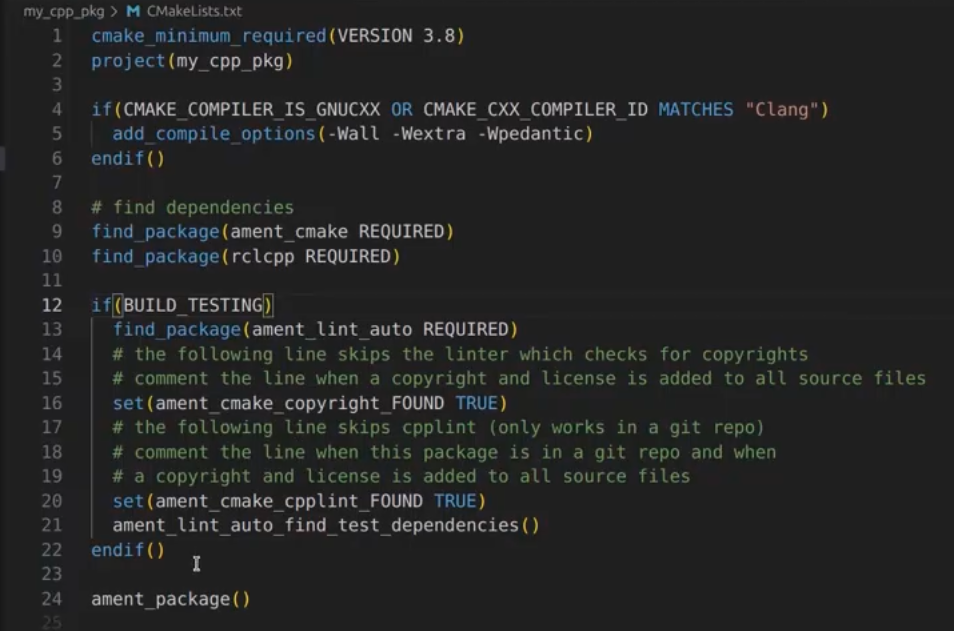
if(BUILD_TESTING)部分不需要可以直接删除
在ament_package()前加入,后面有代码解释
c
// <cpp_node> 是可执行文件名称,<src/my_first_node.cpp>是源文件路径
add_executable(cpp_node src/my_first_node.cpp)
ament_target_dependencies(cpp_node rclcpp)

install(TARGETS
	cpp_node
	DESTINATION lib/${PROJECT_NAME}
)
最终效果
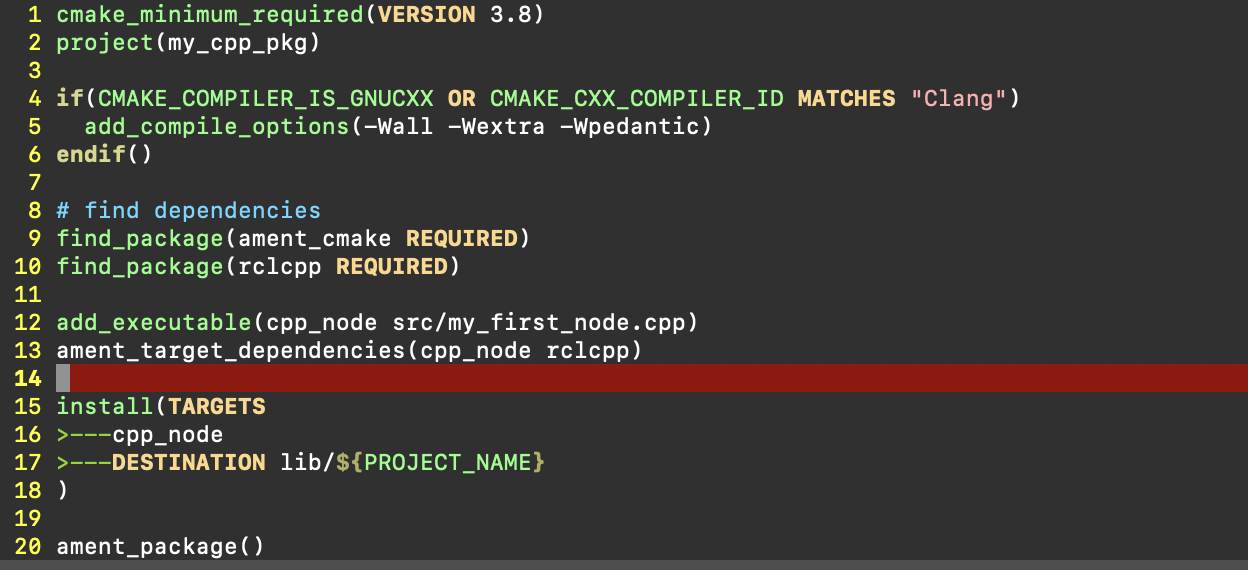
代码解释
add_executable(cpp_node src/my_first_node.cpp)
CMake 内置命令:用于从源代码生成一个可执行文件。
参数:
cpp_node:指定生成的可执行文件的目标名称,自己指定
src/my_first_node.cpp:源文件的路径(相对于 CMakeLists.txt 所在目录)。
作用: 告诉 CMake 需要编译 my_first_node.cpp,并将编译后的目标文件链接成名为 cpp_node 的可执行程序。ament_target_dependencies(cpp_node rclcpp)
ament 宏命令:由 ROS2 的构建系统 ament_cmake 提供,用于为指定的目标 自动处理依赖项的包含目录、链接库和编译定义。
参数:
cpp_node:前面add_executable定义的目标名称,指明要为哪个目标添加依赖。
rclcpp:依赖的 ROS2 包名称(即 rclcpp 库及其相关的依赖,如 rcl, rmw, rcutils 等)。
作用: 自动查找 rclcpp 包及其所有传递依赖(如 ROS2 中间件、日志系统等)install(TARGETS ...)命令
CMake 内置命令:定义构建完成后,如何将生成的目标(可执行文件、库等)安装到指定位置。
TARGETS:关键字,后面列出需要安装的目标名称,这里cpp_node(由前面的add_executable定义)。可以继续换行往后加
DESTINATION:指定安装的目标路径(相对于 -CMAKE_INSTALL_PREFIX)。DESTINATION lib/${PROJECT_NAME}
lib:安装到 lib 目录下。在 ROS2 工作空间中,可执行文件通常安装在install/<package_name>/lib/<package_name>/路径。
${PROJECT_NAME}:CMake 变量,值为当前项目的名称(由project()命令定义)。例如如果 CMakeLists.txt 中有 project(my_cpp_pkg)
组合后:目标被安装到 lib/<项目名>/ 目录下。
代码整体含义
- 编译 src/my_first_node.cpp 生成可执行文件 cpp_node。
- 确保该可执行文件能够正确使用 rclcpp 库,从而可以创建 ROS2 节点、发布/订阅话题、记录日志等。
- 最终在 install 目录下的 lib/<package_name>/ 中生成可执行文件,可通过 ros2 run <package_name> cpp_node 运行。
构建package并运行
bash
cd ~/ros2_ws
colcon build --packages-select my_cpp_pkg
source install/setup.bash
ros2 run my_cpp_pkg cpp_node
面向对象的Node
c++ 创建类
c
class MyNode : public rclcpp::Node //继承创建类
{
public:
    MyNode() : Node("cpp_test") //调用父类函数Initialize the node with a name
    {

    }

private:
}
示例代码
c
#include "rclcpp/rclcpp.hpp"

class MyNode : public rclcpp::Node
{
public:
    MyNode() : Node("cpp_test") //Initialize the node with a name
    {
        RCLCPP_INFO(this->get_logger(), "Hello, ROS2!"); //Log a message to indicate that the node has started
    }

private:
}

int main(int argc, char * argv[])
{
    rclcpp::init(argc, argv); //Initialize the ROS2 C++ client library/comunication framework
    auto node = std::make_shared<MyNode>(); //Create an instance of the MyNode class

    rclcpp::spin(node); //Keeps the node alive until it is shut down
    rclcpp::shutdown();
    return 0;
}
加定时器
c
#include "rclcpp/rclcpp.hpp"

class MyNode : public rclcpp::Node
{
public:
    MyNode() : Node("cpp_test"), counter_(0) //构造函数,初始化节点名称为"cpp_test"并将计数器初始化为0
    {
        RCLCPP_INFO(this->get_logger(), "Hello, ROS2!"); //Log a message to indicate that the node has started
        timer_ = this->create_wall_timer( //Create a timer that calls the callback every 1 second
            std::chrono::seconds(1),
            std::bind(&MyNode::timer_callback, this) //Bind the timer callback function to the timer 注册回调函数
        );
    }

private:
    void timer_callback() // Define a callback function for the timer
    {
        RCLCPP_INFO(this->get_logger(), "Timer callback called! %d", counter_); //Log a message when the timer callback is called
        counter_++;
    }
    rclcpp::TimerBase::SharedPtr timer_; // Declare a timer object
    int counter_ = 0;
}

int main(int argc, char * argv[])
{
    rclcpp::init(argc, argv); //Initialize the ROS2 C++ client library/comunication framework
    auto node = std::make_shared<MyNode>(); //创建MyNode类的实例,并将其作为共享指针返回

    rclcpp::spin(node); //Keeps the node alive until it is shut down
    rclcpp::shutdown();
    return 0;
}-
create_wall_timer是rclcpp::Node提供的成员函数,用于创建一个基于系统时间(壁钟,wall clock)的定时器。- 第一个参数:时间间隔
std::chrono::seconds(1),表示每 1 秒 触发一次。 - 第二个参数:回调函数,类型为
std::function<void()>。这里使用std::bind将成员函数timer_callback绑定到当前对象this 上。 &MyNode::timer_callback:成员函数指针。this:指定调用该成员函数时使用的对象实例。- 返回值:
rclcpp::TimerBase::SharedPtr类型的智能指针,被赋值给成员变量timer_,用于管理定时器的生命周期(只要 timer_ 存在,定时器就会运行)。
- 第一个参数:时间间隔
-
声明一个
rclcpp::TimerBase::SharedPtr类型的成员变量,用于存储create_wall_timer返回的智能指针。保持对定时器的引用,防止定时器被提前销毁(智能指针的特性:只要 timer_ 在作用域内,定时器就保持有效)。