引言
在 Linux 系统编程中,文件操作是最基础也是最常用的功能。C 语言标准库提供了 fopen、fread、fwrite 等函数,但这些函数本质上是对底层系统调用的封装。
系统调用是内核提供的接口,直接与操作系统交互。今天,我将从底层视角,全面讲解 Linux 下的文件操作系统调用:open、read、write、close,并通过实现一个完整的文件复制程序来串联这些知识。
第一部分:系统调用概述
一、什么是系统调用?
系统调用是操作系统内核提供给用户程序的接口,用于请求内核服务(如文件操作、进程管理、内存分配等)。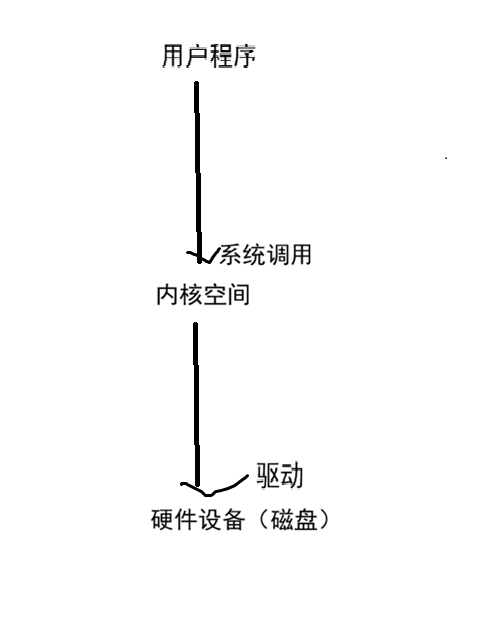
二、标准库函数与系统调用的关系
| 标准库函数 | 底层系统调用 | 说明 |
|---|---|---|
fopen |
open |
打开文件 |
fread/fgets |
read |
读取文件 |
fwrite/fputs |
write |
写入文件 |
fclose |
close |
关闭文件 |
区别:
-
标准库函数:带缓冲,跨平台,易用性高
-
系统调用:无缓冲(或内核缓冲),Linux 平台直接使用,更底层
第二部分:open------打开文件
一、函数原型与头文件
cpp
#include <sys/types.h>
#include <sys/stat.h>
#include <fcntl.h>

// 两参数形式(文件已存在时使用)
int open(const char *pathname, int flags);

// 三参数形式(需要创建文件时使用)
int open(const char *pathname, int flags, mode_t mode);
二、常用标志位(flags)
| 标志 | 含义 |
|---|---|
O_RDONLY |
只读 |
O_WRONLY |
只写 |
O_RDWR |
读写 |
O_CREAT |
文件不存在时创建 |
O_APPEND |
追加到文件末尾 |
O_TRUNC |
打开时清空文件内容 |
标志位组合示例:
cpp
// 只读打开(文件必须存在)
open("file.txt", O_RDONLY);

// 只写打开,不存在则创建,存在则清空
open("file.txt", O_WRONLY | O_CREAT | O_TRUNC, 0644);

// 只写打开,追加模式
open("file.txt", O_WRONLY | O_APPEND | O_CREAT, 0644);
三、权限位(mode)
当使用 O_CREAT 创建文件时,需要指定文件权限。权限用八进制表示:
| 权限 | 数值 |
|---|---|
| 所有者可读 | 0400 |
| 所有者可写 | 0200 |
| 所有者可执行 | 0100 |
| 组用户可读 | 0040 |
| 组用户可写 | 0020 |
| 其他用户可读 | 0004 |
| 其他用户可写 | 0002 |
常用权限组合:
| 权限 | 数值 | 含义 |
|---|---|---|
0600 |
所有者可读可写 | -rw------- |
0644 |
所有者可读写,组和其他只读 | -rw-r--r-- |
0755 |
所有者全权限,组和其他读+执行 | -rwxr-xr-x |
四、返回值------文件描述符
open 成功时返回一个非负整数 ,称为文件描述符(file descriptor) ;失败时返回 -1
cpp
#include <stdio.h>
#include <stdlib.h>
#include <fcntl.h>
#include <unistd.h>

int main() {
    int fd = open("test.txt", O_WRONLY | O_CREAT | O_TRUNC, 0644);

    if (fd == -1) {
        perror("open error");
        exit(1);
    }

    printf("文件描述符:%d\n", fd);  // 通常从3开始(0、1、2已被占用)

    close(fd);
    return 0;
}
五、文件描述符的分配规则
Linux 进程启动时,会自动打开三个文件描述符:
| 文件描述符 | 符号常量 | 对应设备 |
|---|---|---|
| 0 | STDIN_FILENO |
标准输入(键盘) |
| 1 | STDOUT_FILENO |
标准输出(屏幕) |
| 2 | STDERR_FILENO |
标准错误(屏幕) |
分配规则: 新打开的文件分配当前可用的最小文件描述符编号。
第三部分:write------写入文件
一、函数原型
cpp
#include <unistd.h>

ssize_t write(int fd, const void *buf, size_t count);
二、参数说明
| 参数 | 类型 | 说明 |
|---|---|---|
fd |
int | 文件描述符(open返回值) |
buf |
const void* | 写入数据的内存地址 |
count |
size_t | 要写入的字节数 |
| 返回值 | ssize_t | 实际写入的字节数,-1表示错误 |
三、代码示例
cpp
#include <stdio.h>
#include <stdlib.h>
#include <fcntl.h>
#include <unistd.h>
#include <string.h>

int main() {
    int fd = open("output.txt", O_WRONLY | O_CREAT | O_TRUNC, 0644);
    if (fd == -1) {
        perror("open error");
        exit(1);
    }

    char* msg = "Hello, Linux System Call!\n";
    ssize_t ret = write(fd, msg, strlen(msg));

    if (ret == -1) {
        perror("write error");
        close(fd);
        exit(1);
    }

    printf("实际写入 %ld 字节\n", ret);

    close(fd);
    return 0;
}
第四部分:read------读取文件
一、函数原型
cpp
#include <unistd.h>

ssize_t read(int fd, void *buf, size_t count);
二、参数说明
| 参数 | 类型 | 说明 |
|---|---|---|
fd |
int | 文件描述符 |
buf |
void* | 存储数据的缓冲区 |
count |
size_t | 期望读取的字节数 |
| 返回值 | ssize_t | 实际读取的字节数,0表示EOF,-1表示错误 |
三、代码示例
cpp
#include <stdio.h>
#include <stdlib.h>
#include <fcntl.h>
#include <unistd.h>

int main() {
    int fd = open("input.txt", O_RDONLY);
    if (fd == -1) {
        perror("open error");
        exit(1);
    }

    char buffer[128];
    ssize_t n = read(fd, buffer, sizeof(buffer) - 1);

    if (n == -1) {
        perror("read error");
        close(fd);
        exit(1);
    }

    buffer[n] = '\0';  // 添加字符串结束符
    printf("读取了 %ld 字节:%s\n", n, buffer);

    close(fd);
    return 0;
}
四、多次读取与文件指针移动
cpp
#include <stdio.h>
#include <stdlib.h>
#include <fcntl.h>
#include <unistd.h>

int main() {
    int fd = open("data.txt", O_RDONLY);
    if (fd == -1) {
        perror("open error");
        exit(1);
    }

    char buffer[10];
    ssize_t n;

    // 分多次读取文件
    while ((n = read(fd, buffer, sizeof(buffer))) > 0) {
        buffer[n] = '\0';
        printf("%s", buffer);
    }

    if (n == -1) {
        perror("read error");
    }

    close(fd);
    return 0;
}
重要特性:
-
read每次读取后,文件指针会自动向后移动 -
当
read返回 0 时,表示已到达文件末尾(EOF)
第五部分:close------关闭文件
一、函数原型
cpp
#include <unistd.h>

int close(int fd);
二、代码示例
cpp
#include <unistd.h>
#include <fcntl.h>
#include <stdio.h>
#include <stdlib.h>

int main() {
    int fd = open("test.txt", O_RDONLY);
    if (fd == -1) {
        perror("open error");
        exit(1);
    }

    // ... 文件操作

    int ret = close(fd);
    if (ret == -1) {
        perror("close error");
        exit(1);
    }

    printf("文件已关闭\n");
    return 0;
}
重要提醒:
-
文件使用完毕后必须调用
close -
不关闭文件会导致资源泄漏(文件描述符耗尽)
-
进程退出时,系统会自动关闭所有打开的文件,但依赖此行为是不良习惯
第六部分:综合示例------文件复制程序(myCP)
一、需求分析
实现一个类似 Linux cp 命令的程序,能够将源文件复制到目标文件。
cpp
# 用法
./myCP source.txt dest.txt
二、程序流程图
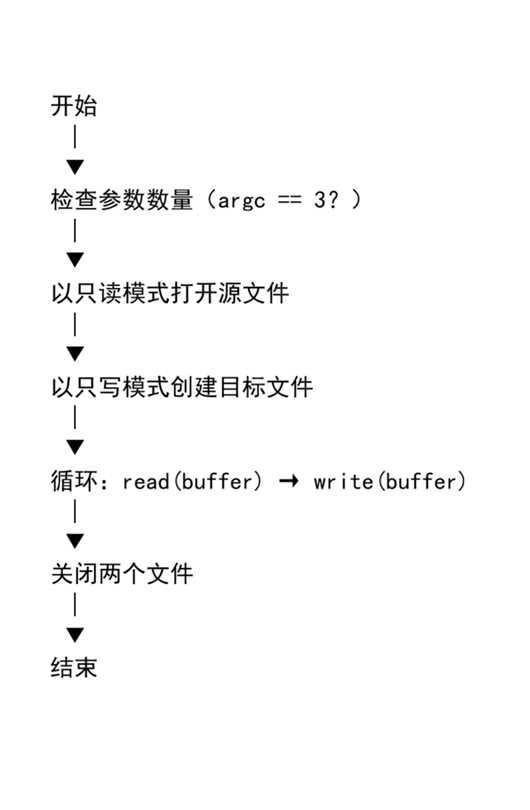
三、完整代码
cpp
#include <stdio.h>
#include <stdlib.h>
#include <fcntl.h>
#include <unistd.h>

#define BUFFER_SIZE 1024

int main(int argc, char* argv[]) {
    int fdr, fdw;
    char buffer[BUFFER_SIZE];
    ssize_t n;

    // 1. 检查命令行参数
    if (argc != 3) {
        printf("用法:%s 源文件 目标文件\n", argv[0]);
        exit(1);
    }

    // 2. 打开源文件(只读)
    fdr = open(argv[1], O_RDONLY);
    if (fdr == -1) {
        perror("打开源文件失败");
        exit(1);
    }

    // 3. 创建目标文件(只写,不存在则创建,存在则清空)
    fdw = open(argv[2], O_WRONLY | O_CREAT | O_TRUNC, 0644);
    if (fdw == -1) {
        perror("创建目标文件失败");
        close(fdr);
        exit(1);
    }

    // 4. 循环读写:从源文件读取,写入目标文件
    while ((n = read(fdr, buffer, BUFFER_SIZE)) > 0) {
        if (write(fdw, buffer, n) != n) {
            perror("写入失败");
            close(fdr);
            close(fdw);
            exit(1);
        }
    }

    // 5. 检查读取是否出错
    if (n == -1) {
        perror("读取失败");
    }

    // 6. 关闭文件
    close(fdr);
    close(fdw);

    printf("文件复制成功!\n");
    return 0;
}
四、编译与运行
cpp
# 编译
gcc -o myCP myCP.c

# 创建测试文件
echo "Hello, this is a test file." > source.txt

# 运行复制
./myCP source.txt dest.txt

# 验证结果
cat dest.txt
# 输出:Hello, this is a test file.
第七部分:文本模式与二进制模式的差异
一、Windows 与 Linux 的换行符差异
| 系统 | 换行符 | 存储方式 |
|---|---|---|
| Linux/Unix | \n (LF) |
1 字节(0x0A) |
| Windows | \r\n (CRLF) |
2 字节(0x0D 0x0A) |
二、文本模式与二进制模式
Windows 系统中:
-
文本模式(
"r"、"w"):读写时会自动转换换行符(\n↔\r\n) -
二进制模式(
"rb"、"wb"):不做任何转换,原样读写
Linux 系统中:
-
不区分文本模式和二进制模式(
"r"和"rb"效果相同) -
因为 Linux 文件系统原生使用
\n作为换行符
三、跨平台开发的注意事项
cpp
#ifdef _WIN32
    // Windows:可能需要区分文本/二进制模式
    int fd = open("file.txt", O_WRONLY | O_CREAT | O_BINARY);
#else
    // Linux:不区分,直接使用
    int fd = open("file.txt", O_WRONLY | O_CREAT);
#endif
第八部分:常见错误总结
| 错误 | 原因 | 解决方法 |
|---|---|---|
open 返回 -1 |
文件不存在或无权限 | 检查文件路径和权限 |
read 返回 0 |
已到达文件末尾 | 正常情况,退出循环 |
write 写入部分数据 |
磁盘空间不足或信号中断 | 循环写入直至全部写完 |
| 文件描述符耗尽 | 忘记调用 close |
确保所有打开的文件都被关闭 |
| 权限拒绝 | 以只读打开但尝试写入 | 使用正确的打开模式 |
总结
一、文件操作系统调用速查表
| 函数 | 作用 | 关键参数 | 返回值 |
|---|---|---|---|
open |
打开文件 | 路径、标志位、权限 | 文件描述符 or -1 |
read |
读取文件 | 文件描述符、缓冲区、大小 | 读取字节数 or -1 or 0(EOF) |
write |
写入文件 | 文件描述符、数据、大小 | 写入字节数 or -1 |
close |
关闭文件 | 文件描述符 | 0 or -1 |
二、文件描述符
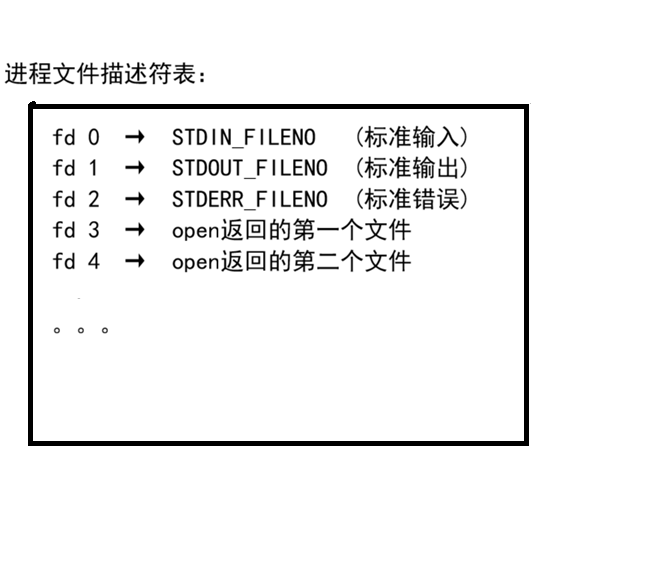
三、标志位组合速查
| 需求 | 标志位组合 |
|---|---|
| 只读打开已存在文件 | O_RDONLY |
| 只写打开已存在文件 | O_WRONLY |
| 读写打开已存在文件 | O_RDWR |
| 只写打开,不存在则创建 | `O_WRONLY |
| 只写打开,追加内容 | `O_WRONLY |
| 只写打开,清空内容 | `O_WRONLY |
写在最后
文件操作是 Linux 系统编程的基础。掌握 open、read、write、close 这四个系统调用,不仅能够完成文件的读写任务,更是理解更高级文件操作(如 mmap、sendfile)的基础。
学习建议:
-
每次打开文件后都要检查返回值
-
文件使用完毕及时关闭
-
循环读写时注意实际读写字节数可能小于请求值
-
理解文件描述符的分配规则
-
区分标准库函数和系统调用的不同应用场景