使用 nsys + gdb 寻找阻塞 API (cuKernelSetAttribute) 并解决
作者注:本文记录了我作为 CUDA 新手,从遇到诡异阻塞,到利用 Nsight Systems 定位,再到通过 GDB 深入理解 API 行为,最终用"预热"优雅解决问题的全过程。
一、问题现象:GreenContext 下的"伪异步"
我们使用 CUDA 的 GreenContext 将 H200 的 132 个 SM 分成两个独立区域:
streamA→ 运行一个耗时极长的 kernel(比如大矩阵乘法)streamB→ 运行F.linear()(GEMM 类 kernel)
理想中,两个 stream 中的 kernel 应该真正并发,互不干扰。但实际跑起来却发现:
streamB上出现一个超长耗时 的cuKernelSetAttribute调用,它一直阻塞,直到streamA的长 kernel 跑完才结束。
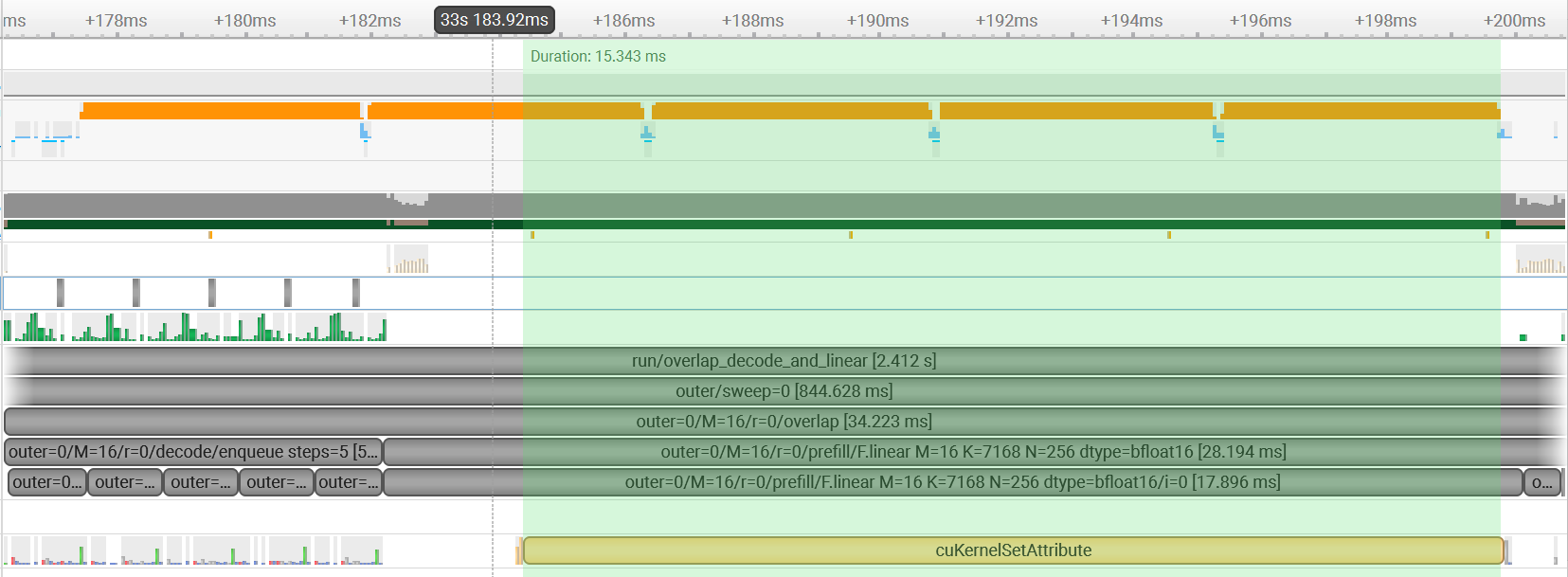
这不仅浪费了 GPU 资源,还让 GreenContext 的隔离性形同虚设。为了搞清楚为什么,我必须从最基础的 API 开始理解。
二、深入理解 cuKernelSetAttribute:API 签名与同步语义
2.1 API 原型(从 CUDA Driver API 文档摘录)
c
CUresult cuKernelSetAttribute(
    CUfunction_attribute attrib,  // 要设置的属性类型
    int val,                       // 属性值
    CUfunction kernel,            // 内核函数句柄(可以理解为函数指针)
    CUdevice dev                  // 设备号
);各参数详解:
CUfunction_attribute attrib:指定我们要修改 kernel 的哪个内在属性。常见的有:CU_FUNC_ATTRIBUTE_MAX_DYNAMIC_SHARED_SIZE_BYTES(数值 8):该 kernel 最多能用多少动态共享内存。CU_FUNC_ATTRIBUTE_NON_PORTABLE_CLUSTER_SIZE_ALLOWED(数值 14):设置是否为便携性cluster size。
int val:对应的属性值,比如共享内存大小(字节)。CUfunction kernel:关键所在 。CUfunction是一个不透明句柄,代表一个编译好的 CUDA kernel(类似于函数指针)。只有拿到这个句柄,才能修改它的属性。CUdevice dev:指定 GPU 设备(多卡环境)。
返回值 :CUresult,成功返回 CUDA_SUCCESS,否则返回错误码。
2.2 同步语义:官方文档的提示
官方 Note 写道:"The API has stricter locking requirements in comparison to its legacy counterpart
cuFuncSetAttribute()due to device-wide semantics."
翻译:相比旧版 cuFuncSetAttribute,这个新版 API 因为具有设备范围的语义,所以加锁更严格。
这意味着什么?
当你在任何一个线程、任何一个流中调用 cuKernelSetAttribute 修改某个 kernel 的属性时,它会在整个设备上施加一个全局屏障 ------等待所有之前提交的 GPU 工作完成,才能安全地修改属性。这就是为什么 streamB 上的这个调用会被 streamA 上正在运行的长 kernel 阻塞!
如果当时我第一时间就去读这段文档,就不会花几天时间瞎猜了。所以第一步永远是:读官方文档。
2.3 关键疑问:CUfunction kernel 是唯一的吗?
CUfunction 代表一个特定的 kernel 实例。如果我多次调用同一个 kernel(比如同样的 F.linear 形状),那么它对应的 CUfunction 指针应该是相同的。那么:
既然属性是一次性设置,那么同一个 kernel 第二次调用时,是不是就不再需要
cuKernelSetAttribute了?
如果这个猜想成立,那么我只要在程序开始时预热 (warmup)一次,让所有 kernel 的属性都设置好,后面的真正计算就不会再有 cuKernelSetAttribute 阻塞,从而恢复并发。
如何验证? 我必须观察程序运行时 cuKernelSetAttribute 究竟被调用了多少次、什么时机调用、针对哪个 kernel。这就需要动用 GDB。
三、用 GDB 观察函数调用:参数、时机、返回值
网上很少有教程教你如何用 GDB 动态追踪 CUDA Driver API 的调用细节。我自己摸索出了一套脚本化方法,极其有效,分享给大家。
3.1 准备一个可调试的 Python 程序(使用 PyTorch + CUDA)
我们写一个简单的 Python 脚本,模拟 GreenContext 下的双流操作,并对 F.linear 重复运行多次(其中第一次作为预热)。
python
import torch
import torch.nn.functional as F

# 假设已经创建了两个 green context 对应的 stream
stream_b = torch.cuda.Stream()

# 准备数据
weight = torch.randn(4096, 7168, device='cuda')
input_b = torch.randn(16, 7168, device='cuda')

# 循环两次,第一次 warmup,第二次正式
for repeat in range(2):
    print(f"\n[shape] repeat={repeat}")
    with torch.cuda.stream(stream_b):
        for _ in range(10):
            out = F.linear(input_b, weight)  # 会触发一系列 CUDA API 调用
    torch.cuda.synchronize()
3.2 编写 GDB 自动化脚本:断点 + 打印参数
我们希望:
- 在
cuKernelSetAttribute和cuKernelGetAttribute处break。 - 自动打印调用时的参数 (属性、值、kernel 指针)和精确时间。
- 当然也可以用
bt观察调用栈情况。 - 继续执行,不打断程序。
创建 trace_cuda.gdb:
gdb
set pagination off
set confirm off
set breakpoint pending on

# 定义辅助函数:打印带纳秒时间戳的字符串
define print_time
  shell date +%S.%N
end

# 断点:cuKernelSetAttribute
break cuKernelSetAttribute
commands
  silent
  printf "\n>>> [GDB-TRACE] [cuKernelSetAttribute] Time: "
  print_time
  # x86-64 调用约定:rdi=attrib, rsi=val, rdx=kernel, rcx=dev
  printf "  attrib=%-2d  val=%-8d  kernel=0x%lx  dev=%d\n", $rdi, $rsi, $rdx, $rcx
  continue
end

# 断点:cuKernelGetAttribute
break cuKernelGetAttribute
commands
  silent
  printf ">>> [GDB-TRACE] [cuKernelGetAttribute] attrib=%-2d  kernel=0x%lx\n", $rsi, $rdx
  continue
end

printf "GDB Automation Ready. Starting Program...\n"
run关键解释:
silent:避免每次断点都打印默认的停靠信息,保持输出干净。print_time:调用 shell 命令获取当前秒数.纳秒,这样时间戳精度足够分辨 API 调用顺序。- 寄存器与参数的对应(System V AMD64 ABI):
rdi→ 第一个参数(attrib)rsi→ 第二个参数(val)rdx→ 第三个参数(kernel)rcx→ 第四个参数(dev)cuKernelGetAttribute操作类似;
3.3 执行 GDB 并观察输出
bash
gdb -x trace_cuda.gdb --args python test_greenctx.py运行后,我们得到类似下面的输出(节选):
[shape] repeat=0
>>> [GDB-TRACE] [cuKernelGetAttribute] attrib=8   kernel=0x5c64f6a0
>>> [GDB-TRACE] [cuKernelSetAttribute] Time: 52.010133726  attrib=8   val=180676   kernel=0x5c64f6a0  dev=0
>>> [GDB-TRACE] [cuKernelGetAttribute] attrib=14  kernel=0x5c64f6a0
>>> [GDB-TRACE] [cuKernelSetAttribute] Time: 52.065440659  attrib=14  val=1        kernel=0x5c64f6a0  dev=0
... (后面跟着大量 GetAttribute,没有 SetAttribute)
[shape] repeat=1
>>> [GDB-TRACE] [cuKernelGetAttribute] attrib=8   kernel=0x5c64f6a0
>>> [GDB-TRACE] [cuKernelGetAttribute] attrib=14  kernel=0x5c64f6a0
... (只有 Get,没有 Set)观察结论:
- 相同的 kernel 指针
0x5c64f6a0在第一次循环(repeat=0)中出现了两次cuKernelSetAttribute(attrib=8 和 14)。 - 第二次循环(repeat=1)中完全没有
cuKernelSetAttribute,只有cuKernelGetAttribute。 - 这完美证实了:每个 kernel 的属性只在第一次使用时设置一次,后续复用不再触发设备级同步。
3.4 为什么 GDB 方法如此本质?
- 调用时机 :可以看到 Set 是在第一次执行
F.linear时发生的,而不是在 kernel launch 的瞬间,而是在更早的属性查询/设置阶段。 - 参数详情:知道了具体设置的是哪些属性(8 和 14)以及值的大小(比如 180676 字节动态共享内存),我们可以进一步思考:能否通过调整启动参数来避免设置某些属性?
- kernel 句柄 :多次运行发现同一个形状的
F.linear总是复用同一个 kernel 句柄,这为预热提供了理论基础。
四、解决方案:预热(Warmup)
基于以上发现,解决方案极其简单:
在实际并发任务开始之前,先用 dummy 数据在每个 stream 中执行一遍相同的运算,让所有 kernel 完成属性设置。
代码示例:
python
# 预热阶段
with torch.cuda.stream(stream_b):
    dummy = torch.randn(1, 7168, device='cuda')
    _ = F.linear(dummy, weight)   # 触发 cuKernelSetAttribute

torch.cuda.synchronize()  # 等待预热完成

# 正式并发运行
with torch.cuda.stream(stream_a):
    long_kernel()          # 耗时任务
with torch.cuda.stream(stream_b):
    for real_input in real_inputs:
        _ = F.linear(real_input, weight)  # 不会再阻塞
再次用 Nsight Systems 验证:预热阶段出现 cuKernelSetAttribute(此时没有长 kernel 运行,不构成阻塞),正式阶段该 API 完全消失,两个 stream 真正并发。
五、总结与反思
5.1 知识点沉淀
| 问题 | 答案 |
|---|---|
cuKernelSetAttribute 为什么阻塞? |
设备级锁,等待所有先前 GPU 工作完成。 |
CUfunction kernel 是什么? |
一个 kernel 的句柄,相同 kernel 复用相同句柄。 |
| 怎么知道某个 API 被调用了、参数是什么? | GDB 断点 + 打印寄存器(rdi, rsi, rdx, rcx)。 |
| 如何避免阻塞? | 预热:在串行阶段提前调用一次 kernel。 |
5.2 总结
- 第一步永远读文档 :如果我先看了
cuKernelSetAttribute的同步语义,至少能少花 80% 的瞎猜时间。 - nsys 给宏观视野:快速定位到底是哪个 API 在阻塞。
- gdb 给微观证据:确认调用的参数、次数、时机,这是推理的根本依据。
- 预热思维:很多一次性开销(JIT 编译、内存池初始化、kernel 属性设置)都可以通过预热来规避,是一种通用性能优化技巧。
5.3 给读者的建议
如果你也遇到类似的 CUDA 阻塞问题,不妨按这个步骤走:
- Nsight Systems 抓时间轴,确定卡在哪个 API。
- 查阅官方文档,理解该 API 的同步语义。
- 写 GDB 脚本,断点该 API,观察参数和调用模式。
- 思考:这个 API 是必须每次都调用,还是一次性的?如果是后者,预热即可。