博主主要在WX写作,C站消息不能及时看见,如有需要联系请关注:《实在太懒于是不想取名》获取联系方式。
STM32N6作为意法半导体推出的首款集成自研神经处理单元的STM32产品以"MCU+NPU"的异构架构重新定义了边缘AI的算力边界,是意法半导体的MCU最前沿技术栈,不过由于其高难度技术应用以及需要的极其深厚的STM32使用经验以及神经网络基础概念,因此上手难度非常的高。
自从STM32N6发布以来,博主有幸获得一块STM32N6570-DK开发板,闲暇之余陆陆续续折腾如何开发。因此将会陆陆续续发表一些使用STM32N6的使用笔记,以供将来的使用者参考。
二月份嵌入式大赛开始报名,最近我们学校也在组织学生参加,博主也是参加了一个队伍,看了一眼选题:
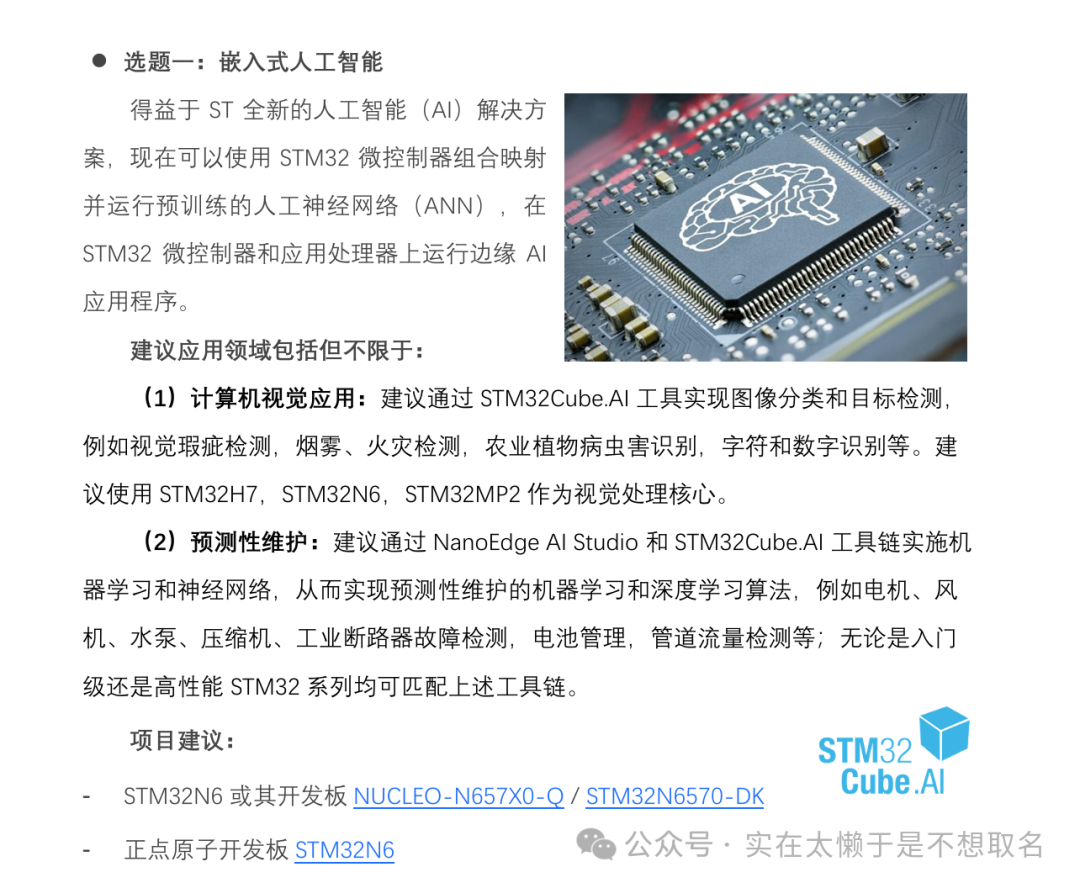
想了一下决定我们还是来做火灾检测,实验平台相对好搭,病虫害检测方面的话并没有什么资源去找,于是在这个基础上,要实现自己自己构建数据集、训练模型和实现在STM32N6上的部署和运行,最后运行效果如下:
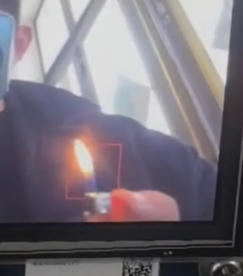
虽然速度有点慢,但是精度非常高。(速度问题我得看看办法总感觉自己好像用错方法了)
模型选择
在决定什么模型之前,我们先分析一下目前目标检测领域常用什么模型结构。
首先我们要先了解目标检测到底什么?目标检测大体就是让设备能正确的识别到图片中:目标位置和目标种类;也就是正确的画出目标框:
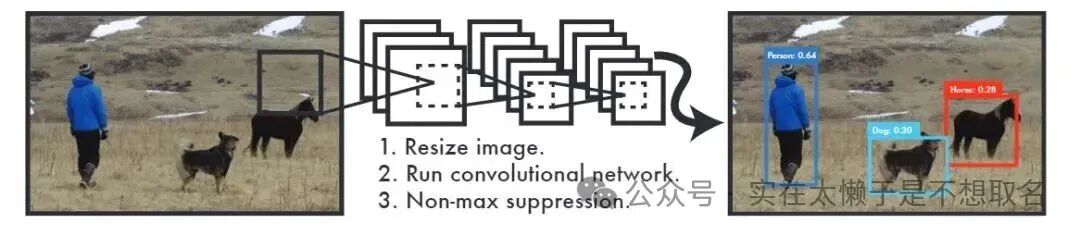
在如何找到目标框的过程中,我们大体将模型分为了两类:一阶段模型和二阶段模型。
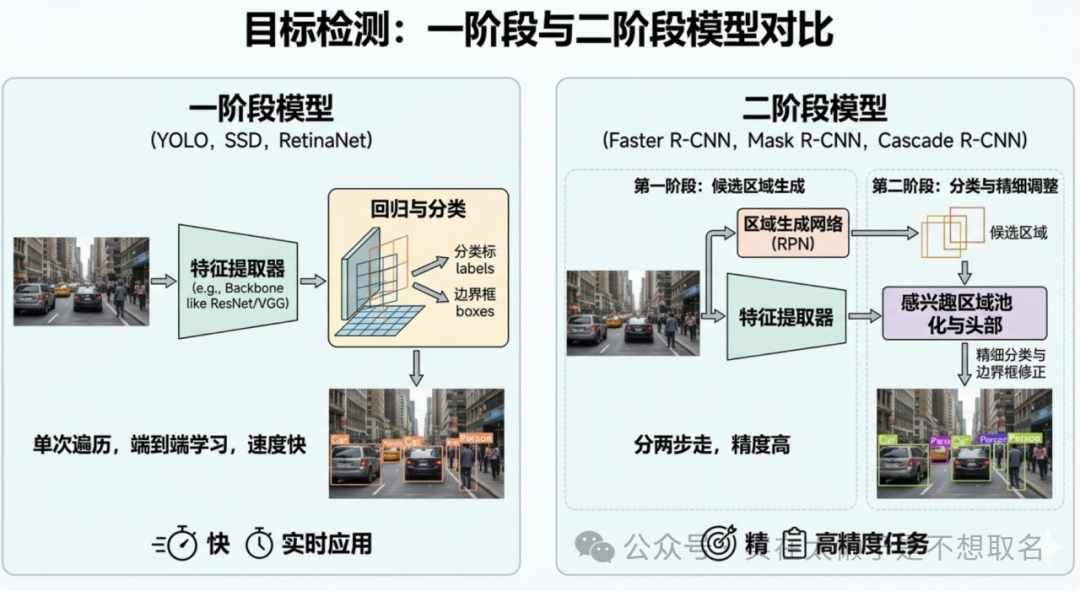
一阶段模型主要以YOLO、SSD、RetinaNET这些为代表的模型,其核心是图片经过特征提取器之后得到检测框再对这些检测框进行分类。
二阶段模型多了一个"候选区域生成"的中间步骤,再对这些区域进行精细的分类和回归,因此精度更高,但流程相对复杂,在STM32N6这类资源有限的目标中,我们要追求精度和性能的折中。
回顾我们的开发目标,检测火焰的位置对实时性要求不是很高,火焰不是一个高速移动,忽有忽无的物体,因此可以接受模型慢,但是一定要位置准确,识别准确度高。
因此最后选择了YOLO模型作为模型火焰识别的模型(其实也试过SSDv1,v2都试过,速度能快很多,但是精度会低一些,后来想着不需要这么快的速度还是使用相对更成熟的yolo架构)
模型构建
模型的训练这里不做过多篇幅的描述,主要讲一下对神经网络模型的处理。
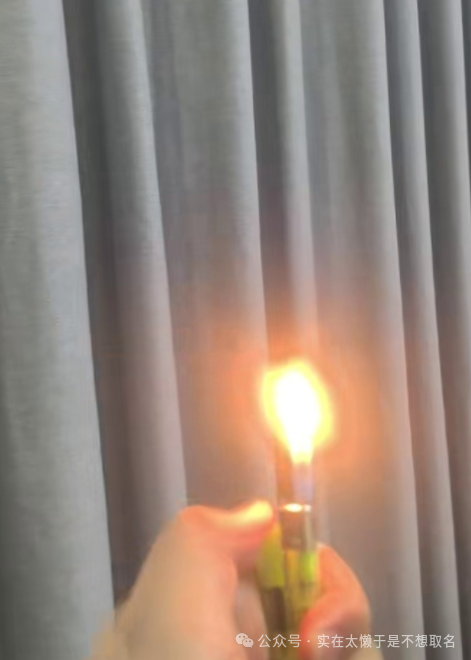
我收集了一些简单的数据集进行标注之后,利用官方脚本训练了一个yolov8n的模型,模型输入是320*320大小。这里选择320*320呢主要是考虑到STM32N6中的DCMIPP可以直接将IMX335的图片缩放到320*320大小,不需要通过DMA2D来再做一段后处理。
Yolo结构中的P3+P4+P5三个检测头在320*320的输入图片中总计会产生40*40+20*20+10*10总计2100个输出,由于是单目标检测每个输出是位置框+置信度,所以总计是1*5*2100输出大小。
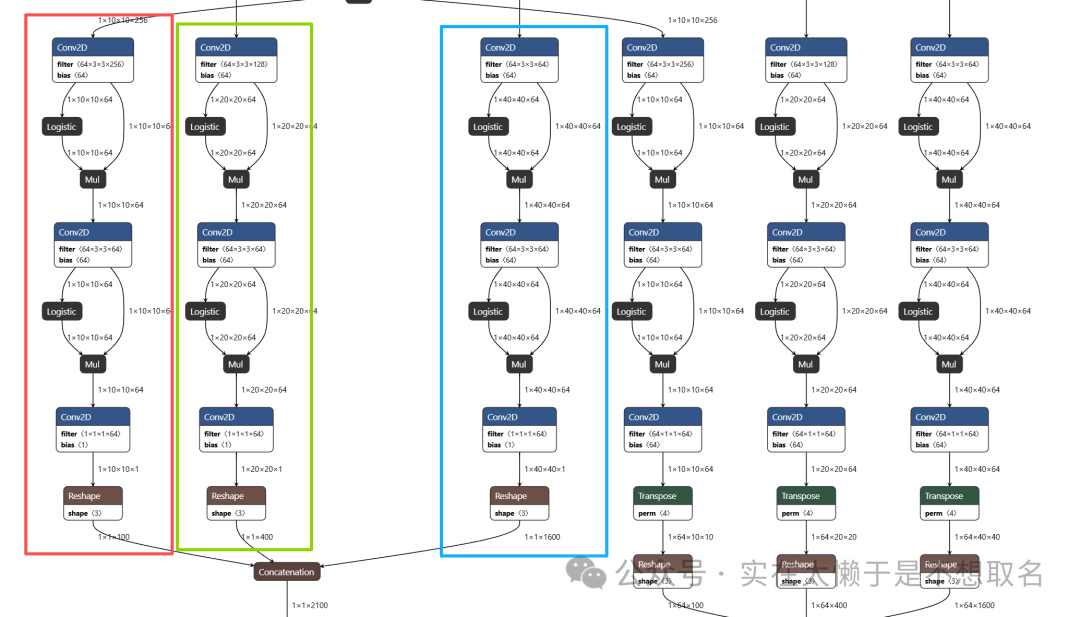
三个尺度框的感受野不一样,10*10的尺度感受野更大用来寻找大致区域,40*40的尺度感受野更小用来精确定位,总之就是这么训练了一个模型出来。
模型处理
由于Yolo官方的模型是保存为pt格式,我们需要将其转化为ST Edge AI可用的格式即Onnx或者tflite格式,例如我们将pt格式导出为onnx格式的话,模型大小约为11MB左右。
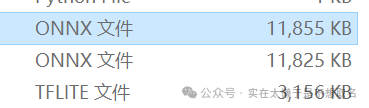
为了进一步降低其大小,我们转为tflite格式的时候对其进行量化,让权重从float类型转为int8类型,这个方法可以大幅度减小模型大小。
在原来的float类型模型,我们需要将图片的原始数据/255得到float类型再传入模型的输入层,当我们进行量化后模型的输入如果是int8类型的话,我们看一下模型的输入要求:
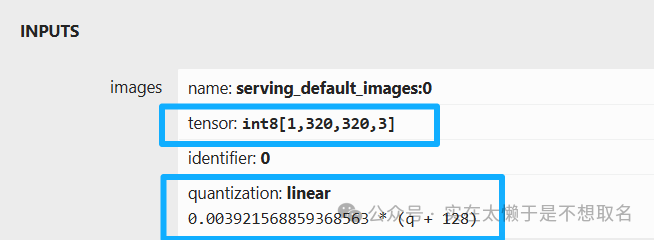
模型的数据是需要先+128转为带符号类型再乘一个系数0.003921....
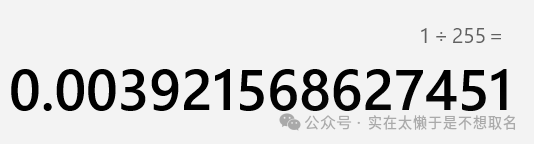
这个系数正是1/255的表示,不过对于一个320*320*3的图片每个字节都+128,这个操作依旧比较消耗CPU资源,因此在量化的时候可以让输入层为uint8类型量化。
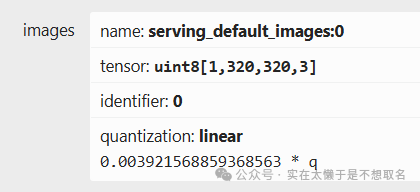
这样子输入层就不需要我们人工处理+128的问题,直接使用原始图像数据来输入。同样的输出层如果采用全int8量化的话,输出字节也是int8类型需要使用转化为float类型得到准确数值,为了使CPU能节省这个部分,我们让模型输出直接采用float类型,这样子后处理的时候就不需要再进行int8转float这个操作了。
STM32N6中的实现
具体如何部署模型在STM32N6的步骤可以参考前几期文章做参考,本文只是讲一下后处理的一些步骤。
float *floatout = (float *)buffer_out;
    int valid_count = 0;
    for (int i = 0; i < 2100; ++i) {
      float conf = floatout[i + 4 * 2100];
//        printf("[%d] %f %f %f %f %f\r\n",i,cx,cy,w,h,conf);
        if (conf > 0.3f && valid_count < 2100) {
          float cx   = floatout[i + 0 * 2100];
          float cy   = floatout[i + 1 * 2100];
          float w    = floatout[i + 2 * 2100];
          float h    = floatout[i + 3 * 2100];
            float cx_input = cx ;
            float cy_input = cy;
            float w_input = w ;
            float h_input = h ;
            boxes[valid_count].x1 = cx_input - w_input / 2.0f;
            boxes[valid_count].y1 = cy_input - h_input / 2.0f;
            boxes[valid_count].x2 = cx_input + w_input / 2.0f;
            boxes[valid_count].y2 = cy_input + h_input / 2.0f;
            boxes[valid_count].conf = conf;
            boxes[valid_count].keep = 1;
            valid_count++;
        }
    }
    printf("开始IOU计算,valid_count=%d\r\n", valid_count);
    for (int i = 0; i < valid_count; i++) {
        if (boxes[i].keep) {
            for (int j = i + 1; j < valid_count; j++) {
                if (boxes[j].keep) {
                    float x1 = (boxes[i].x1 > boxes[j].x1) ? boxes[i].x1 : boxes[j].x1;
                    float y1 = (boxes[i].y1 > boxes[j].y1) ? boxes[i].y1 : boxes[j].y1;
                    float x2 = (boxes[i].x2 < boxes[j].x2) ? boxes[i].x2 : boxes[j].x2;
                    float y2 = (boxes[i].y2 < boxes[j].y2) ? boxes[i].y2 : boxes[j].y2;
                    float intersection = (x2 - x1) * (y2 - y1);
                    if (intersection < 0) intersection = 0;
                    float area_i = (boxes[i].x2 - boxes[i].x1) * (boxes[i].y2 - boxes[i].y1);
                    float area_j = (boxes[j].x2 - boxes[j].x1) * (boxes[j].y2 - boxes[j].y1);
                    float union_area = area_i + area_j - intersection;
                    float iou = (union_area > 0) ? (intersection / union_area) : 0;
                    if (iou > 0.7f) {
                        boxes[j].keep = 0;
                    }
                }
            }
        }
    }
    printf("IOU计算完成\r\n");
    int final_count = 0;
    if (valid_count > 0) {
        printf("开始DMA2D清屏操作\r\n");
        // 配置DMA2D
        hdma2d.Init.Mode = DMA2D_R2M;
        hdma2d.Init.ColorMode = DMA2D_OUTPUT_RGB888;
        hdma2d.Init.OutputOffset = 0;
        hdma2d.Init.RedBlueSwap = DMA2D_RB_REGULAR;
        HAL_DMA2D_Init(&hdma2d);
        HAL_DMA2D_ConfigLayer(&hdma2d, 1);
        SCB_CleanDCache_by_Addr((uint32_t*)lcd_fg_buffer, sizeof(lcd_fg_buffer));
        HAL_StatusTypeDef status = HAL_DMA2D_Start(&hdma2d, 0x00000000, (uint32_t)lcd_fg_buffer, 800, 480);
        if (status != HAL_OK) {
            printf("DMA2D清屏启动失败: %d\r\n", status);
        } else {
            status = HAL_DMA2D_PollForTransfer(&hdma2d, 1000);
            if (status != HAL_OK) {
                printf("DMA2D清屏超时: %d\r\n", status);
                HAL_DMA2D_DeInit(&hdma2d);
            } else {
                // 缓存同步操作
                SCB_InvalidateDCache_by_Addr((uint32_t*)lcd_fg_buffer, sizeof(lcd_fg_buffer));
                printf("DMA2D清屏操作完成\r\n");
            }
        }

        // 重置DMA2D
        HAL_DMA2D_DeInit(&hdma2d);
      } else {
        printf("无目标需要绘制,跳过清屏操作\r\n");
      }
         for (int i = 0; i < valid_count; i++) {
            if (boxes[i].keep) {
                final_count++;
                int display_x1 = (int)(boxes[i].x1 * 2.5);
                int display_y1 = (int)(boxes[i].y1 * 1.5);
                int display_x2 = (int)(boxes[i].x2 * 2.5);
                int display_y2 = (int)(boxes[i].y2 * 1.5);
                int display_width = display_x2 - display_x1;
                int display_height = display_y2 - display_y1;
                /* 边界检查:确保坐标在屏幕范围内 */
                if (display_x1 < 0) display_x1 = 0;
                if (display_y1 < 0) display_y1 = 0;
                if (display_x2 > 800) display_x2 = 800;
                if (display_y2 > 480) display_y2 = 480;
                display_width = display_x2 - display_x1;
                display_height = display_y2 - display_y1;
                if (display_width < 0) display_width = 0;
                if (display_height < 0) display_height = 0;
                if (display_width > 0 && display_height > 0) {
                    if (display_y1 >= 480) display_y1 = 479;
                    if (display_y2 > 480) display_y2 = 480;
                    if (display_x1 >= 800) display_x1 = 799;
                    if (display_x2 > 800) display_x2 = 800;
                    display_width = display_x2 - display_x1;
                    display_height = display_y2 - display_y1;
                    if (display_width <= 0 || display_height <= 0) continue;
                    /* 绘制上边框 */
                    if (display_y1 < 480) {
                        hdma2d.Init.Mode = DMA2D_R2M;
                        hdma2d.Init.ColorMode = DMA2D_OUTPUT_RGB888;
                        hdma2d.Init.OutputOffset = 800 - display_width;
                        hdma2d.Init.RedBlueSwap = DMA2D_RB_REGULAR;
                        HAL_DMA2D_Init(&hdma2d);
                        HAL_DMA2D_ConfigLayer(&hdma2d, 1);
                        HAL_DMA2D_Start(&hdma2d, 0x00FF0000, (uint32_t)&lcd_fg_buffer[(display_y1 * 800 + display_x1) * 3], display_width, 1);
                        HAL_DMA2D_PollForTransfer(&hdma2d, 100);
                    }
                    /* 绘制下边框 */
                    if (display_y2 <= 480 && display_y2 > display_y1) {
                        hdma2d.Init.OutputOffset = 800 - display_width;
                        HAL_DMA2D_Init(&hdma2d);
                        HAL_DMA2D_Start(&hdma2d, 0x00FF0000, (uint32_t)&lcd_fg_buffer[((display_y2 - 1) * 800 + display_x1) * 3], display_width, 1);
                        HAL_DMA2D_PollForTransfer(&hdma2d, 100);
                    }
                    /* 绘制左边框 */
                    if (display_x1 < 800) {
                        hdma2d.Init.OutputOffset = 800 - 1;
                        HAL_DMA2D_Init(&hdma2d);
                        HAL_DMA2D_Start(&hdma2d, 0x00FF0000, (uint32_t)&lcd_fg_buffer[(display_y1 * 800 + display_x1) * 3], 1, display_height);
                        HAL_DMA2D_PollForTransfer(&hdma2d, 100);
                    }
                    /* 绘制右边框 */
                    if (display_x2 <= 800 && display_x2 > display_x1) {
                        hdma2d.Init.OutputOffset = 800 - 1;
                        HAL_DMA2D_Init(&hdma2d);
                        HAL_DMA2D_Start(&hdma2d, 0x00FF0000, (uint32_t)&lcd_fg_buffer[(display_y1 * 800 + (display_x2 - 1)) * 3], 1, display_height);
                        HAL_DMA2D_PollForTransfer(&hdma2d, 100);
                    }
                }
            }
        }
        printf("总计:%d个目标\r\n", final_count);
完整的后处理步骤代码如上,模型的输出总共为1*5*2100即批次1,预测参数5(x,y,w,h还有单目标概率),2100个候选框。Yolo模型的后处理思路大体是:首先对这2100个候选框的置信度进行筛选,挑选出符合置信度的候选框。
接着再对这些候选框进行IOU计算,计算两个候补框的交并比,用于判断这两个框该不该合并,是不是可以被当作是同一个目标。