实验目标回顾
通过本章实验,我们将掌握以下内容:
- Redis 7.4.8 源码编译与 systemd 服务配置
- 主从复制架构(
replicaof配置、读写分离验证) - 哨兵模式(Sentinel)实现高可用故障自动切换
- Redis Cluster 集群部署、扩容、缩容
核心知识点
| 模块 | 关键命令/配置 |
|---|---|
| 源码编译 | make && make install,修改 install_server.sh 跳过 systemd |
| 主从复制 | replicaof <master_ip> <port>,protected-mode no,bind * -::* |
| 哨兵模式 | sentinel monitor mymaster <ip> <port> <quorum>,down-after-milliseconds |
| 集群 | cluster-enabled yes,redis-cli --cluster create/add-node/reshard/del-node |
实验中遇到的问题及解决方法
(文章末尾)
一、部署Redis
安装依赖
bash
[root@redis-node1 ~]# dnf install make gcc initscripts -y源码编译redis
bash
[root@redis-node1 ~]# wget https://download.redis.io/releases/redis-7.4.8.tar.gz
[root@redis-node1 ~]# tar zxf redis-7.4.8.tar.gz
[root@redis-node1 ~]# cd redis-7.4.8/
[root@redis-node1 redis-7.4.8]# make && make install
修改 install_server.sh 跳过 systemd 检测
bash
[root@redis-node1 redis-7.4.8]# cd utils/
[root@redis-node1 utils]# vim install_server.sh
#bail if this system is managed by systemd
#_pid_1_exe="$(readlink -f /proc/1/exe)"
#if [ "${_pid_1_exe##*/}" = systemd ]
#then
#       echo "This systems seems to use systemd."
#       echo "Please take a look at the provided example service unit files in this directory, and adapt and install them. Sorry!"
#       exit 1
#fi
执行安装脚本
bash
[root@redis-node1 utils]# ./install_server.sh
Welcome to the redis service installer
This script will help you easily set up a running redis server

Please select the redis port for this instance: [6379]
Selecting default: 6379
Please select the redis config file name [/etc/redis/6379.conf] /etc/redis/redis.conf
Please select the redis log file name [/var/log/redis_6379.log]
Selected default - /var/log/redis_6379.log
Please select the data directory for this instance [/var/lib/redis/6379]
Selected default - /var/lib/redis/6379
Please select the redis executable path [/usr/local/bin/redis-server]
Selected config:
Port           : 6379
Config file    : /etc/redis/redis.conf
Log file       : /var/log/redis_6379.log
Data dir       : /var/lib/redis/6379
Executable     : /usr/local/bin/redis-server
Cli Executable : /usr/local/bin/redis-cli
Is this ok? Then press ENTER to go on or Ctrl-C to abort.
Copied /tmp/6379.conf => /etc/init.d/redis_6379
Installing service...
Successfully added to chkconfig!
Successfully added to runlevels 345!
Starting Redis server...
Installation successful!
启动并检查服务
bash
[root@redis-node1 utils]# systemctl status redis_6379.service
[root@redis-node2 utils]# systemctl daemon-reload
[root@redis-node2 utils]# systemctl status redis_6379.service
○ redis_6379.service - LSB: start and stop redis_6379
     Loaded: loaded (/etc/rc.d/init.d/redis_6379; generated)
     Active: inactive (dead)
       Docs: man:systemd-sysv-generator(8)

[root@redis-node2 utils]# systemctl start redis_6379.service
[root@redis-node2 utils]# systemctl status redis_6379.service
● redis_6379.service - LSB: start and stop redis_6379
     Loaded: loaded (/etc/rc.d/init.d/redis_6379; generated)
     Active: active (exited) since Sun 2026-03-08 15:24:18 CST; 8s ago
       Docs: man:systemd-sysv-generator(8)
    Process: 35637 ExecStart=/etc/rc.d/init.d/redis_6379 start (code=exited, status=0/SUCCESS)
        CPU: 1ms

[root@redis-node2 utils]# netstat -antlpe | grep redis
tcp        0      0 127.0.0.1:6379          0.0.0.0:*               LISTEN      0          76854      35530/redis-server
tcp6       0      0 ::1:6379                :::*                    LISTEN      0          76855      35530/redis-server
二、Redis主从复制
Redis主节点配置
bash
[root@redis-node1 ~]# vim /etc/redis/redis.conf
#bind 127.0.0.1 -::1
bind * -::*

protected-mode no

[root@redis-node1 ~]# systemctl restart redis_6379.service
配置Redis从节点
bash
#在redis-node2节点
[root@redis-node2 ~]# vim /etc/redis/redis.conf
#bind 127.0.0.1 -::1
bind * -::*

protected-mode no

replicaof 172.25.254.10  6379
[root@redis-node2 ~]# systemctl restart redis_6379.service

#在redis-node3节点
[root@redis-node3 ~]# vim /etc/redis/redis.conf
#bind 127.0.0.1 -::1
bind * -::*

protected-mode no

replicaof 172.25.254.10  6379
[root@redis-node3 ~]# systemctl restart redis_6379.service
查看状态并测试
1. 状态查看
bash
[root@redis-node1 ~]# redis-cli
127.0.0.1:6379> info replication
# Replication
role:master
connected_slaves:2
slave0:ip=172.25.254.20,port=6379,state=online,offset=0,lag=0
slave1:ip=172.25.254.30,port=6379,state=online,offset=0,lag=0
master_failover_state:no-failover
master_replid:4f5a2c3b...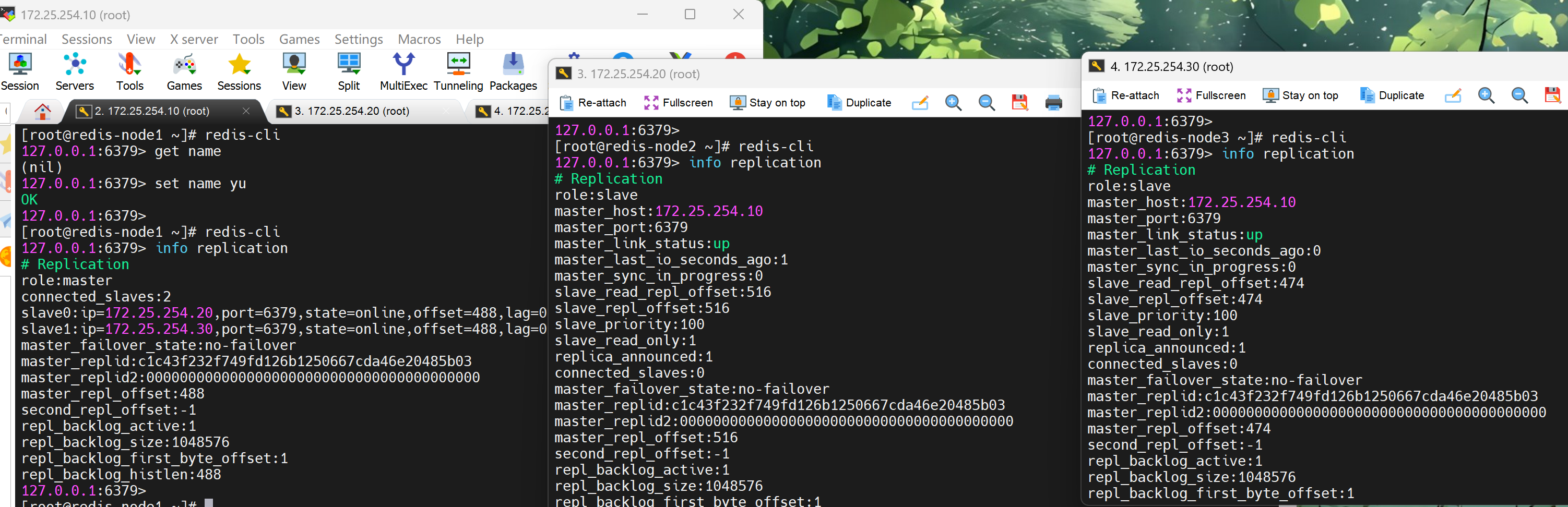
2. 测试数据同步性
bash
#初始为空
[root@redis-node1 ~]# redis-cli
127.0.0.1:6379> get name
(nil)

[root@redis-node2 ~]# redis-cli
127.0.0.1:6379> get name
(nil)

[root@redis-node3 ~]# redis-cli
127.0.0.1:6379> get name
(nil)

#在主节点写入
[root@redis-node1 ~]# redis-cli
127.0.0.1:6379> set name yu
OK

#在从节点查看
[root@redis-node2 ~]# redis-cli
127.0.0.1:6379> get name
"yu"
[root@redis-node3 ~]# redis-cli
127.0.0.1:6379> get name
"yu"

#在从节点中不能写入数据
[root@redis-node3 ~]# redis-cli
127.0.0.1:6379> set test 123
(error) READONLY You can't write against a read only replica.
三、配置Redis哨兵模式
bash
#redis 主节点
[root@redis-node1 ~]# cd redis-7.4.8/
[root@redis-node1 redis-7.4.8]# cp -p sentinel.conf /etc/redis/
[root@redis-node1 ~]# vim /etc/redis/sentinel.conf
[root@redis-node1 redis-7.4.0]# vim /etc/redis/sentinel.conf
protected-mode no									#关闭保护模式
port 26379											#监听端口
daemonize no										#进入不打如后台
pidfile /var/run/redis-sentinel.pid					#sentinel进程pid文件
loglevel notice										#日志级别
sentinel monitor mymaster 172.25.254.10 6379 2		#创建sentinel监控监控master主机,2表示必须得到2票
sentinel down-after-milliseconds mymaster 10000		#master中断时长,10秒连不上视为master下线
sentinel parallel-syncs mymaster 1					#发生故障转移后,同时开始同步新master数据的slave数量
sentinel failover-timeout mymaster 180000			#整个故障切换的超时时间为3分钟

#在从节点关闭protected-mode模式
[root@redis-node2 ~]# vim /etc/redis/redis.conf
protected-mode no
[root@redis-node2 ~]# systemctl restart redis_6379.service
[root@redis-node3 ~]# vim /etc/redis/redis.conf
protected-mode no
[root@redis-node3 ~]# systemctl restart redis_6379.service

#在主节点复制sentinel.conf到从节点
[root@redis-node1 ~]# scp /etc/redis/sentinel.conf root@172.25.254.20:/etc/redis/
sentinel.conf                                                           100%   14KB  16.5MB/s   00:00
[root@redis-node1 ~]# scp /etc/redis/sentinel.conf root@172.25.254.30:/etc/redis/
sentinel.conf         100%   14KB  16.5MB/s   00:00

#所有节点开启哨兵
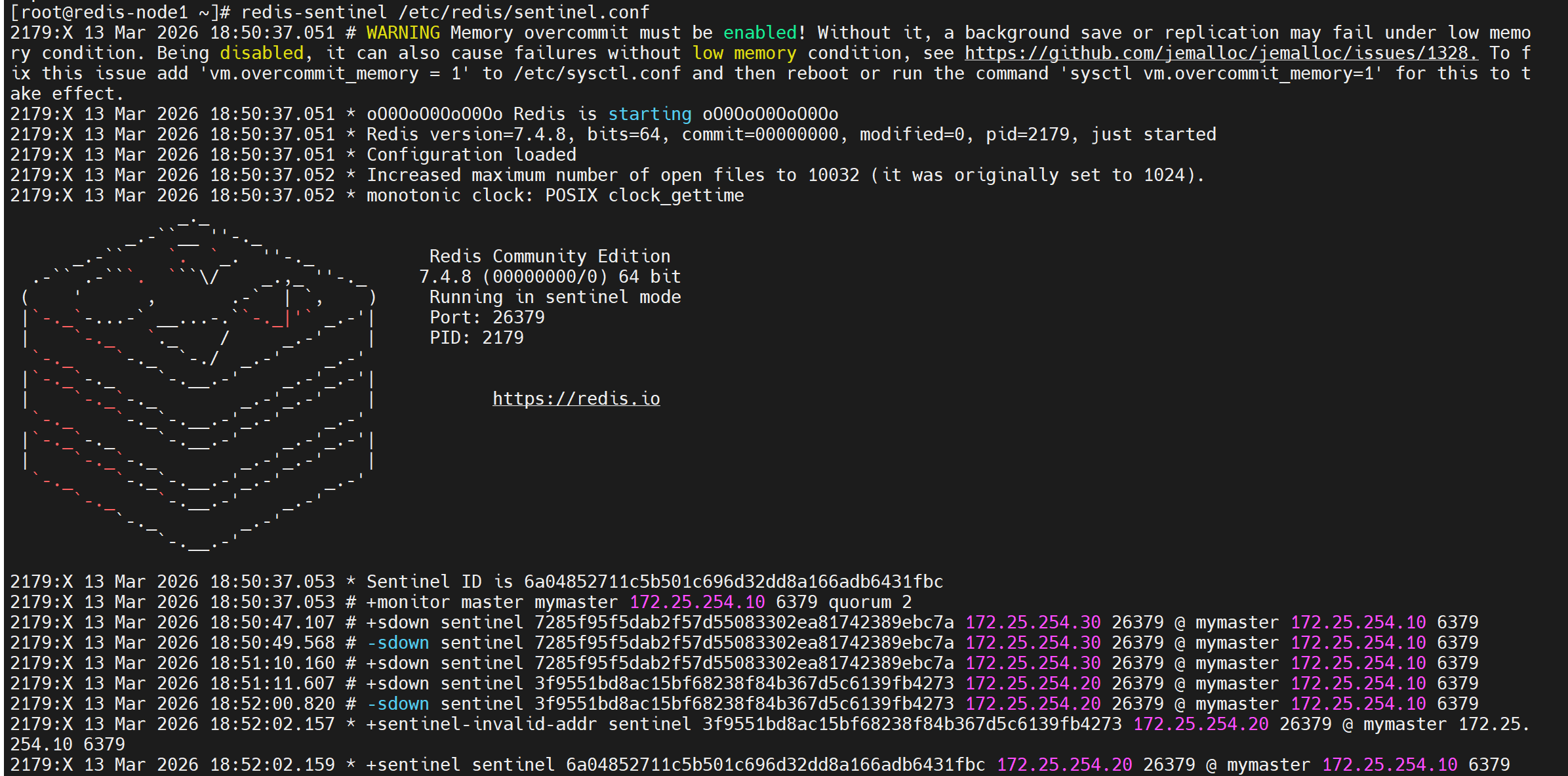
[root@redis-node1~3 ~]# redis-sentinel /etc/redis/sentinel.conf
哨兵启动后输出示例
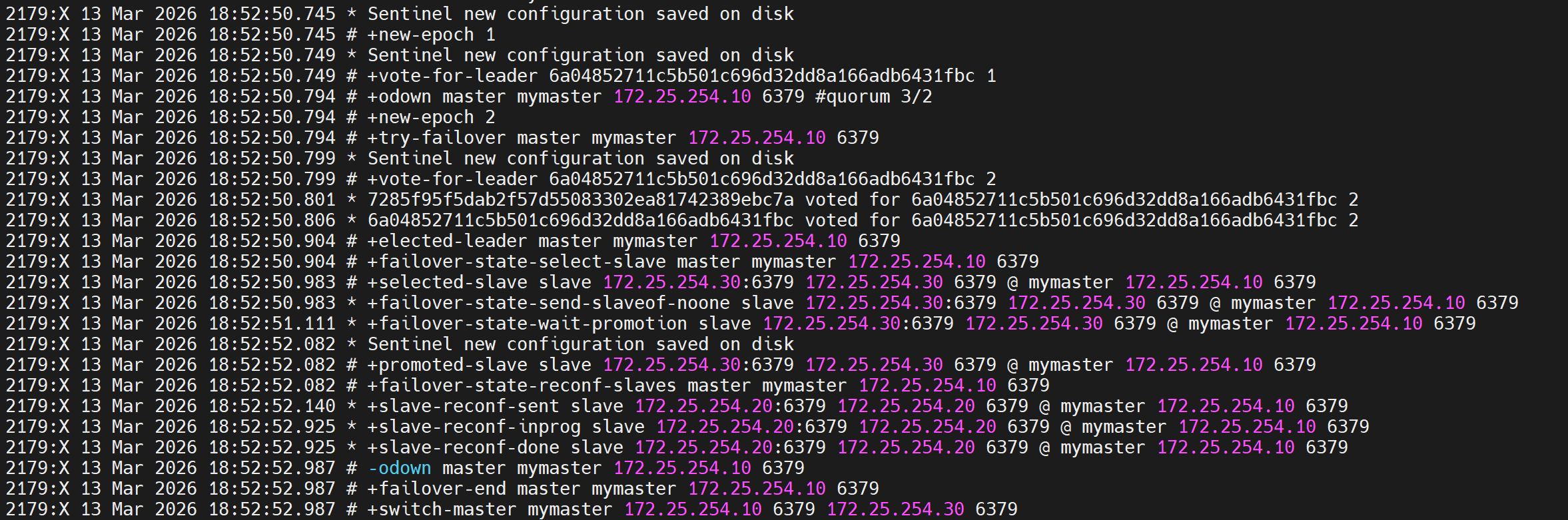
测试故障切换
bash
[root@redis-node1 ~]# redis-cli
127.0.0.1:6379> SHUTDOWN
not connected> quit
切换信息 :最后一行显示主节点切到了30上
在20和30中查看信息
bash
[root@redis-node2 ~]# redis-cli
127.0.0.1:6379> info replication
# Replication
role:slave
master_host:172.25.254.30
master_port:6379
master_link_status:up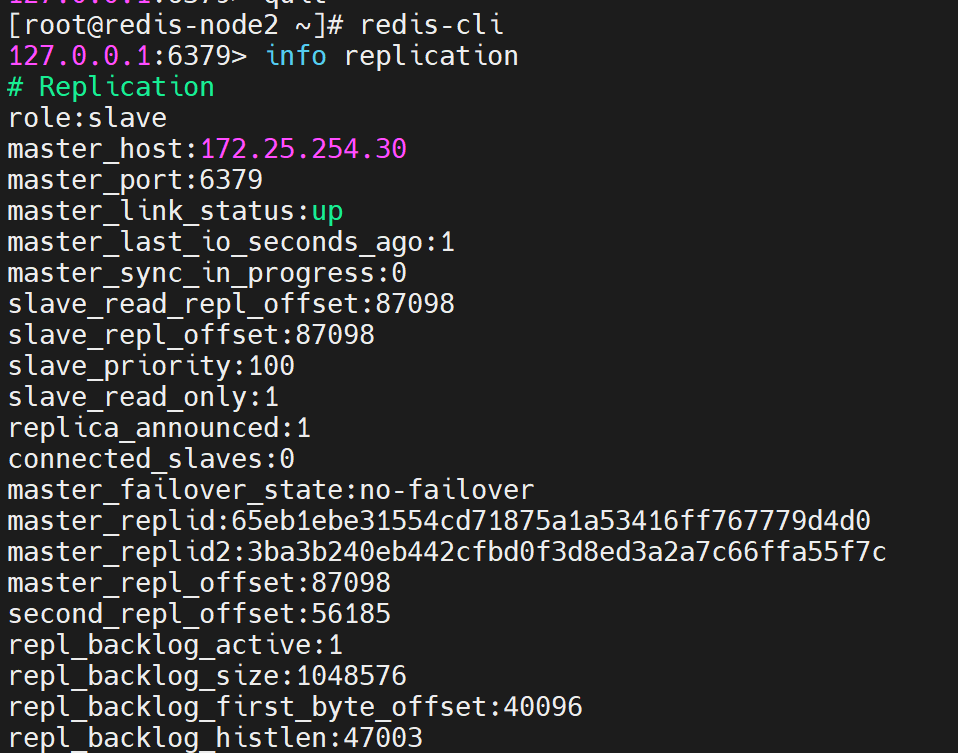
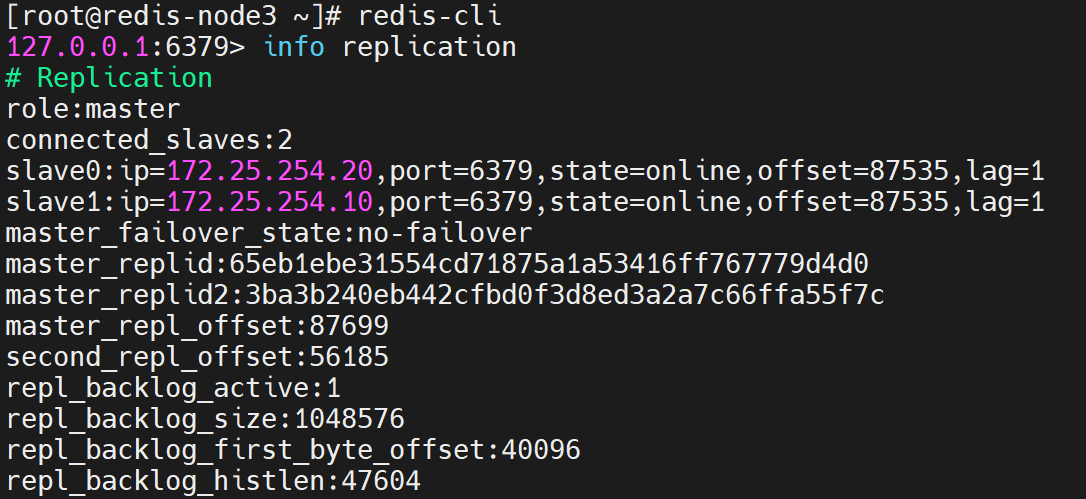
bash
#恢复10redis
[root@redis-node1 ~]# /etc/init.d/redis_6379 start
Starting Redis server...

#在30查看信息
[root@redis-node2 ~]# redis-cli
127.0.0.1:6379> info replication
# Replication
role:master
connected_slaves:2
slave0:ip=172.25.254.10,port=6379,state=online,offset=0,lag=0
slave1:ip=172.25.254.20,port=6379,state=online,offset=0,lag=0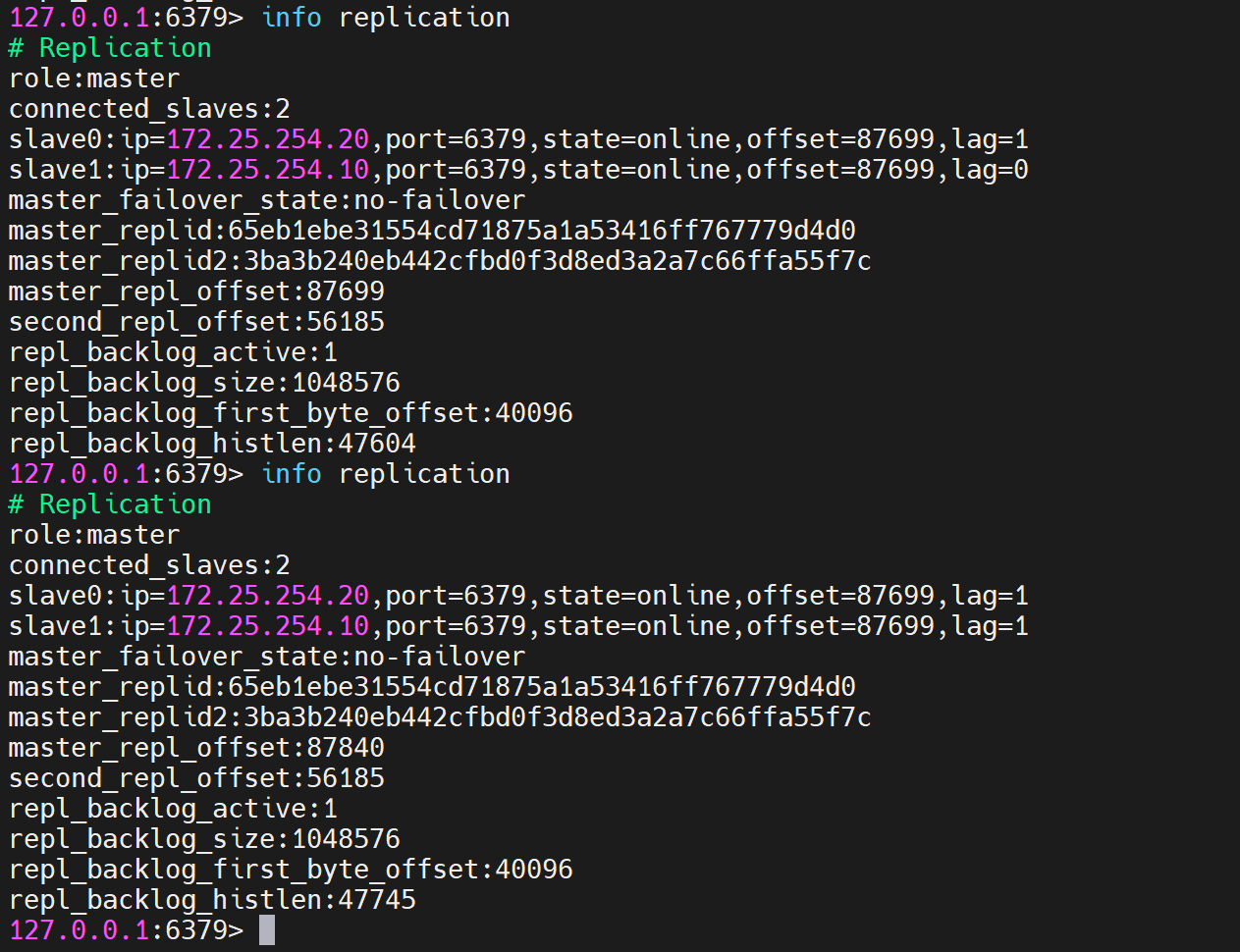
四、redis-cluster
修改所有节点配置文件
bash
[root@redis-node1 ~]# vim /etc/redis/6379.conf
masterauth "123456"					#集群主从认证
cluster-enabled yes					#开启cluster集群功能
cluster-config-file nodes-6379.conf	#指定集群配置文件
cluster-node-timeout 15000			#节点加入集群的超时时间单位是ms

[root@redis-node1 ~]# /etc/init.d/redis_6379 stop
启动集群
bash
[root@redis-node1 ~]# redis-cli  --cluster create 172.25.254.10:6379 172.25.254.20:6379 172.25.254.30:6379 172.25.254.40:6379 172.25.254.50:6379 172.25.254.60:6379 --cluster-replicas 1
>>> Performing hash slots allocation on 6 nodes...
Master[0] -> Slots 0 - 5460
Master[1] -> Slots 5461 - 10922
Master[2] -> Slots 10923 - 16383
Adding replica 172.25.254.50:6379 to 172.25.254.10:6379
Adding replica 172.25.254.60:6379 to 172.25.254.20:6379
Adding replica 172.25.254.40:6379 to 172.25.254.30:6379
M: 8db833f3c3bc6b8f93e87111f13f56d366f833a0 172.25.254.10:6379
   slots:[0-5460] (5461 slots) master
M: ca599940209f55c07d06951480703bb0a5d8873a 172.25.254.20:6379
   slots:[5461-10922] (5462 slots) master
M: d9300173b75149d3056f0ee3edec063f8ec66e9a 172.25.254.30:6379
   slots:[10923-16383] (5461 slots) master
S: 32d797eb30094b77edb896abcc0b0fc91ccdb4fd 172.25.254.40:6379
   replicates d9300173b75149d3056f0ee3edec063f8ec66e9a
S: ba6ef067c63d30c213493eb48d43427015018898 172.25.254.50:6379
   replicates 8db833f3c3bc6b8f93e87111f13f56d366f833a0
S: c939a04358edc1ce7a1c1a44561d77fb402025fd 172.25.254.60:6379
   replicates ca599940209f55c07d06951480703bb0a5d8873a
Can I set the above configuration? (type 'yes' to accept): yes      #输入内容
>>> Nodes configuration updated
>>> Assign a different config epoch to each node
>>> Sending CLUSTER MEET messages to join the cluster
Waiting for the cluster to join
..
>>> Performing Cluster Check (using node 172.25.254.10:6379)
M: 8db833f3c3bc6b8f93e87111f13f56d366f833a0 172.25.254.10:6379
   slots:[0-5460] (5461 slots) master
   1 additional replica(s)
S: c939a04358edc1ce7a1c1a44561d77fb402025fd 172.25.254.60:6379
   slots: (0 slots) slave
   replicates ca599940209f55c07d06951480703bb0a5d8873a
M: d9300173b75149d3056f0ee3edec063f8ec66e9a 172.25.254.30:6379
   slots:[10923-16383] (5461 slots) master
   1 additional replica(s)
M: ca599940209f55c07d06951480703bb0a5d8873a 172.25.254.20:6379
   slots:[5461-10922] (5462 slots) master
   1 additional replica(s)
S: ba6ef067c63d30c213493eb48d43427015018898 172.25.254.50:6379
   slots: (0 slots) slave
   replicates 8db833f3c3bc6b8f93e87111f13f56d366f833a0
S: 32d797eb30094b77edb896abcc0b0fc91ccdb4fd 172.25.254.40:6379
   slots: (0 slots) slave
   replicates d9300173b75149d3056f0ee3edec063f8ec66e9a
[OK] All nodes agree about slots configuration.

#查看集群状态
[root@redis-node1 ~]# redis-cli  --cluster info 172.25.254.10:6379
172.25.254.10:6379 (8db833f3...) -> 0 keys | 5461 slots | 1 slaves.
172.25.254.30:6379 (d9300173...) -> 0 keys | 5461 slots | 1 slaves.
172.25.254.20:6379 (ca599940...) -> 0 keys | 5462 slots | 1 slaves.
[OK] 0 keys in 3 masters.
0.00 keys per slot on average.

#查看集群信息
[root@redis-node1 ~]# redis-cli  cluster info
cluster_state:ok
cluster_slots_assigned:16384
cluster_slots_ok:16384
cluster_slots_pfail:0
cluster_slots_fail:0
cluster_known_nodes:6
cluster_size:3
cluster_current_epoch:6
cluster_my_epoch:1
cluster_stats_messages_ping_sent:168
cluster_stats_messages_pong_sent:163
cluster_stats_messages_sent:331
cluster_stats_messages_ping_received:158
cluster_stats_messages_pong_received:168
cluster_stats_messages_meet_received:5
cluster_stats_messages_received:331
total_cluster_links_buffer_limit_exceeded:0

#检测当前集群
[root@redis-node1 ~]# redis-cli  --cluster  check  172.25.254.10:6379
172.25.254.10:6379 (8db833f3...) -> 0 keys | 5461 slots | 1 slaves.
172.25.254.30:6379 (d9300173...) -> 0 keys | 5461 slots | 1 slaves.
172.25.254.20:6379 (ca599940...) -> 0 keys | 5462 slots | 1 slaves.
[OK] 0 keys in 3 masters.
0.00 keys per slot on average.
>>> Performing Cluster Check (using node 172.25.254.10:6379)
M: 8db833f3c3bc6b8f93e87111f13f56d366f833a0 172.25.254.10:6379
   slots:[0-5460] (5461 slots) master
   1 additional replica(s)
S: c939a04358edc1ce7a1c1a44561d77fb402025fd 172.25.254.60:6379
   slots: (0 slots) slave
   replicates ca599940209f55c07d06951480703bb0a5d8873a
M: d9300173b75149d3056f0ee3edec063f8ec66e9a 172.25.254.30:6379
   slots:[10923-16383] (5461 slots) master
   1 additional replica(s)
M: ca599940209f55c07d06951480703bb0a5d8873a 172.25.254.20:6379
   slots:[5461-10922] (5462 slots) master
   1 additional replica(s)
S: ba6ef067c63d30c213493eb48d43427015018898 172.25.254.50:6379
   slots: (0 slots) slave
   replicates 8db833f3c3bc6b8f93e87111f13f56d366f833a0
S: 32d797eb30094b77edb896abcc0b0fc91ccdb4fd 172.25.254.40:6379
   slots: (0 slots) slave
   replicates d9300173b75149d3056f0ee3edec063f8ec66e9a
[OK] All nodes agree about slots configuration.
>>> Check for open slots...
>>> Check slots coverage...
[OK] All 16384 slots covered.
集群扩容
bash
#添加master
[root@redis-node1 ~]# redis-cli --cluster  add-node 172.25.254.70:6379 172.25.254.10:6379

[root@redis-node1 ~]# redis-cli  --cluster  check  172.25.254.10:6379
172.25.254.10:6379 (8db833f3...) -> 0 keys | 5461 slots | 1 slaves.
172.25.254.70:6379 (dfabfe07...) -> 0 keys | 0 slots | 0 slaves.
172.25.254.30:6379 (d9300173...) -> 0 keys | 5461 slots | 1 slaves.
172.25.254.20:6379 (ca599940...) -> 1 keys | 5462 slots | 1 slaves.
[OK] 1 keys in 4 masters.
0.00 keys per slot on average.
>>> Performing Cluster Check (using node 172.25.254.10:6379)
M: 8db833f3c3bc6b8f93e87111f13f56d366f833a0 172.25.254.10:6379
   slots:[0-5460] (5461 slots) master
   1 additional replica(s)
M: dfabfe07170ac9b5d20a5a7a70c836877bd64504 172.25.254.70:6379
   slots: (0 slots) master
S: c939a04358edc1ce7a1c1a44561d77fb402025fd 172.25.254.60:6379
   slots: (0 slots) slave
   replicates ca599940209f55c07d06951480703bb0a5d8873a
M: d9300173b75149d3056f0ee3edec063f8ec66e9a 172.25.254.30:6379
   slots:[10923-16383] (5461 slots) master
   1 additional replica(s)
M: ca599940209f55c07d06951480703bb0a5d8873a 172.25.254.20:6379
   slots:[5461-10922] (5462 slots) master
   1 additional replica(s)
S: ba6ef067c63d30c213493eb48d43427015018898 172.25.254.50:6379
   slots: (0 slots) slave
   replicates 8db833f3c3bc6b8f93e87111f13f56d366f833a0
S: 32d797eb30094b77edb896abcc0b0fc91ccdb4fd 172.25.254.40:6379
   slots: (0 slots) slave
   replicates d9300173b75149d3056f0ee3edec063f8ec66e9a
[OK] All nodes agree about slots configuration.
>>> Check for open slots...
>>> Check slots coverage...
[OK] All 16384 slots covered.

#分配slot给新加入的主机
[root@redis-node1 ~]# redis-cli --cluster reshard 172.25.254.10:6379
>>> Performing Cluster Check (using node 172.25.254.10:6379)
M: 8db833f3c3bc6b8f93e87111f13f56d366f833a0 172.25.254.10:6379
   slots:[0-5460] (5461 slots) master
   1 additional replica(s)
M: dfabfe07170ac9b5d20a5a7a70c836877bd64504 172.25.254.70:6379
   slots: (0 slots) master
S: c939a04358edc1ce7a1c1a44561d77fb402025fd 172.25.254.60:6379
   slots: (0 slots) slave
   replicates ca599940209f55c07d06951480703bb0a5d8873a
M: d9300173b75149d3056f0ee3edec063f8ec66e9a 172.25.254.30:6379
   slots:[10923-16383] (5461 slots) master
   1 additional replica(s)
M: ca599940209f55c07d06951480703bb0a5d8873a 172.25.254.20:6379
   slots:[5461-10922] (5462 slots) master
   1 additional replica(s)
S: ba6ef067c63d30c213493eb48d43427015018898 172.25.254.50:6379
   slots: (0 slots) slave
   replicates 8db833f3c3bc6b8f93e87111f13f56d366f833a0
S: 32d797eb30094b77edb896abcc0b0fc91ccdb4fd 172.25.254.40:6379
   slots: (0 slots) slave
   replicates d9300173b75149d3056f0ee3edec063f8ec66e9a
[OK] All nodes agree about slots configuration.
>>> Check for open slots...
>>> Check slots coverage...
[OK] All 16384 slots covered.
How many slots do you want to move (from 1 to 16384)? 4096			#分配slot的数量
What is the receiving node ID? dfabfe07170ac9b5d20a5a7a70c836877bd64504
Please enter all the source node IDs.
  Type 'all' to use all the nodes as source nodes for the hash slots.
  Type 'done' once you entered all the source nodes IDs.
Source node #1: all			#slot来源

Ready to move 4096 slots.

#给新主机添加slave
[root@redis-node1 ~]# redis-cli  --cluster  add-node 172.25.254.80:6379 172.25.254.10:6379 --cluster-slave --cluster-master-id dfabfe07170ac9b5d20a5a7a70c836877bd64504

[root@redis-node1 ~]# redis-cli  --cluster  check  172.25.254.10:6379
172.25.254.10:6379 (8db833f3...) -> 0 keys | 4096 slots | 1 slaves.
172.25.254.70:6379 (dfabfe07...) -> 1 keys | 4096 slots | 1 slaves.
172.25.254.30:6379 (d9300173...) -> 0 keys | 4096 slots | 1 slaves.
172.25.254.20:6379 (ca599940...) -> 0 keys | 4096 slots | 1 slaves.
[OK] 1 keys in 4 masters.
0.00 keys per slot on average.
>>> Performing Cluster Check (using node 172.25.254.10:6379)
M: 8db833f3c3bc6b8f93e87111f13f56d366f833a0 172.25.254.10:6379
   slots:[1365-5460] (4096 slots) master
   1 additional replica(s)
S: 1176ee294e6b5071ca57e93374d04ac22028daed 172.25.254.80:6379
   slots: (0 slots) slave
   replicates dfabfe07170ac9b5d20a5a7a70c836877bd64504
M: dfabfe07170ac9b5d20a5a7a70c836877bd64504 172.25.254.70:6379
   slots:[0-1364],[5461-6826],[10923-12287] (4096 slots) master
   1 additional replica(s)
S: c939a04358edc1ce7a1c1a44561d77fb402025fd 172.25.254.60:6379
   slots: (0 slots) slave
   replicates ca599940209f55c07d06951480703bb0a5d8873a
M: d9300173b75149d3056f0ee3edec063f8ec66e9a 172.25.254.30:6379
   slots:[12288-16383] (4096 slots) master
   1 additional replica(s)
M: ca599940209f55c07d06951480703bb0a5d8873a 172.25.254.20:6379
   slots:[6827-10922] (4096 slots) master
   1 additional replica(s)
S: ba6ef067c63d30c213493eb48d43427015018898 172.25.254.50:6379
   slots: (0 slots) slave
   replicates 8db833f3c3bc6b8f93e87111f13f56d366f833a0
S: 32d797eb30094b77edb896abcc0b0fc91ccdb4fd 172.25.254.40:6379
   slots: (0 slots) slave
   replicates d9300173b75149d3056f0ee3edec063f8ec66e9a
[OK] All nodes agree about slots configuration.
>>> Check for open slots...
>>> Check slots coverage...
[OK] All 16384 slots covered.
集群缩容
bash
#集群槽位回收到10主机中
[root@redis-node1 ~]# redis-cli  --cluster reshard 172.25.254.10:6379
>>> Performing Cluster Check (using node 172.25.254.10:6379)
M: 8db833f3c3bc6b8f93e87111f13f56d366f833a0 172.25.254.10:6379
   slots:[1365-5460] (4096 slots) master
   1 additional replica(s)
S: 1176ee294e6b5071ca57e93374d04ac22028daed 172.25.254.80:6379
   slots: (0 slots) slave
   replicates dfabfe07170ac9b5d20a5a7a70c836877bd64504
M: dfabfe07170ac9b5d20a5a7a70c836877bd64504 172.25.254.70:6379
   slots:[0-1364],[5461-6826],[10923-12287] (4096 slots) master
   1 additional replica(s)
S: c939a04358edc1ce7a1c1a44561d77fb402025fd 172.25.254.60:6379
   slots: (0 slots) slave
   replicates ca599940209f55c07d06951480703bb0a5d8873a
M: d9300173b75149d3056f0ee3edec063f8ec66e9a 172.25.254.30:6379
   slots:[12288-16383] (4096 slots) master
   1 additional replica(s)
M: ca599940209f55c07d06951480703bb0a5d8873a 172.25.254.20:6379
   slots:[6827-10922] (4096 slots) master
   1 additional replica(s)
S: ba6ef067c63d30c213493eb48d43427015018898 172.25.254.50:6379
   slots: (0 slots) slave
   replicates 8db833f3c3bc6b8f93e87111f13f56d366f833a0
S: 32d797eb30094b77edb896abcc0b0fc91ccdb4fd 172.25.254.40:6379
   slots: (0 slots) slave
   replicates d9300173b75149d3056f0ee3edec063f8ec66e9a
[OK] All nodes agree about slots configuration.
>>> Check for open slots...
>>> Check slots coverage...
[OK] All 16384 slots covered.
How many slots do you want to move (from 1 to 16384)? 4096
What is the receiving node ID? 8db833f3c3bc6b8f93e87111f13f56d366f833a0  #10id
Please enter all the source node IDs.
  Type 'all' to use all the nodes as source nodes for the hash slots.
  Type 'done' once you entered all the source nodes IDs.
Source node #1: dfabfe07170ac9b5d20a5a7a70c836877bd64504		#70id
Source node #2: done

#删除70和80节点
[root@redis-node1 ~]# redis-cli --cluster del-node  172.25.254.10:6379 dfabfe07170ac9b5d20a5a7a70c836877bd64504
>>> Removing node dfabfe07170ac9b5d20a5a7a70c836877bd64504 from cluster 172.25.254.10:6379
>>> Sending CLUSTER FORGET messages to the cluster...
>>> Sending CLUSTER RESET SOFT to the deleted node.

[root@redis-node1 ~]# redis-cli --cluster del-node  172.25.254.10:6379 1176ee294e6b5071ca57e93374d04ac22028daed
>>> Removing node 1176ee294e6b5071ca57e93374d04ac22028daed from cluster 172.25.254.10:6379
>>> Sending CLUSTER FORGET messages to the cluster...
>>> Sending CLUSTER RESET SOFT to the deleted node.

[root@redis-node1 ~]# redis-cli  --cluster  check  172.25.254.10:6379
172.25.254.10:6379 (8db833f3...) -> 1 keys | 8192 slots | 1 slaves.
172.25.254.30:6379 (d9300173...) -> 0 keys | 4096 slots | 1 slaves.
172.25.254.20:6379 (ca599940...) -> 0 keys | 4096 slots | 1 slaves.
[OK] 1 keys in 3 masters.
0.00 keys per slot on average.
>>> Performing Cluster Check (using node 172.25.254.10:6379)
M: 8db833f3c3bc6b8f93e87111f13f56d366f833a0 172.25.254.10:6379
   slots:[0-6826],[10923-12287] (8192 slots) master
   1 additional replica(s)
S: c939a04358edc1ce7a1c1a44561d77fb402025fd 172.25.254.60:6379
   slots: (0 slots) slave
   replicates ca599940209f55c07d06951480703bb0a5d8873a
M: d9300173b75149d3056f0ee3edec063f8ec66e9a 172.25.254.30:6379
   slots:[12288-16383] (4096 slots) master
   1 additional replica(s)
M: ca599940209f55c07d06951480703bb0a5d8873a 172.25.254.20:6379
   slots:[6827-10922] (4096 slots) master
   1 additional replica(s)
S: ba6ef067c63d30c213493eb48d43427015018898 172.25.254.50:6379
   slots: (0 slots) slave
   replicates 8db833f3c3bc6b8f93e87111f13f56d366f833a0
S: 32d797eb30094b77edb896abcc0b0fc91ccdb4fd 172.25.254.40:6379
   slots: (0 slots) slave
   replicates d9300173b75149d3056f0ee3edec063f8ec66e9a
[OK] All nodes agree about slots configuration.
>>> Check for open slots...
>>> Check slots coverage...
[OK] All 16384 slots covered.
带密码的集群操作示例
bash
[root@redis-node1 ~]# redis-cli --cluster create 172.25.254.10:6379 172.25.254.20:6379 172.25.254.30:6379 172.25.254.40:6379 172.25.254.50:6379 172.25.254.60:6379 --cluster-replicas 1 -a "123456"
Warning: Using a password with '-a' or '-u' option on the command line interface may not be safe.
>>> Performing hash slots allocation on 6 nodes...
Master[0] -> Slots 0 - 5460
Master[1] -> Slots 5461 - 10922
Master[2] -> Slots 10923 - 16383
Adding replica 172.25.254.50:6379 to 172.25.254.10:6379
Adding replica 172.25.254.60:6379 to 172.25.254.20:6379
Adding replica 172.25.254.40:6379 to 172.25.254.30:6379
M: b653659d0c1f2451857683399f6cc8076c30fbf4 172.25.254.10:6379
   slots:[0-5460] (5461 slots) master
M: 4dd7c9c8f9a5b488bf0bc8654fcf9955c4923aad 172.25.254.20:6379
   slots:[5461-10922] (5462 slots) master
M: 692484a111fc4c7fbcff0e20009fa7a493b9cfbe 172.25.254.30:6379
   slots:[10923-16383] (5461 slots) master
S: 991ceecd5a2ee5d0fb552b5b6c664a64f717ef78 172.25.254.40:6379
   replicates 692484a111fc4c7fbcff0e20009fa7a493b9cfbe
S: 43a6d5532f4d84ae1d92990069d5453ccd3b7045 172.25.254.50:6379
   replicates b653659d0c1f2451857683399f6cc8076c30fbf4
S: bf222ca31e085040dd206c0d87207da9c7bd368d 172.25.254.60:6379
   replicates 4dd7c9c8f9a5b488bf0bc8654fcf9955c4923aad
Can I set the above configuration? (type 'yes' to accept): yes
>>> Nodes configuration updated
>>> Assign a different config epoch to each node
>>> Sending CLUSTER MEET messages to join the cluster
Waiting for the cluster to join
.
>>> Performing Cluster Check (using node 172.25.254.10:6379)
M: b653659d0c1f2451857683399f6cc8076c30fbf4 172.25.254.10:6379
   slots:[0-5460] (5461 slots) master
   1 additional replica(s)
M: 692484a111fc4c7fbcff0e20009fa7a493b9cfbe 172.25.254.30:6379
   slots:[10923-16383] (5461 slots) master
   1 additional replica(s)
S: 43a6d5532f4d84ae1d92990069d5453ccd3b7045 172.25.254.50:6379
   slots: (0 slots) slave
   replicates b653659d0c1f2451857683399f6cc8076c30fbf4
S: bf222ca31e085040dd206c0d87207da9c7bd368d 172.25.254.60:6379
   slots: (0 slots) slave
   replicates 4dd7c9c8f9a5b488bf0bc8654fcf9955c4923aad
M: 4dd7c9c8f9a5b488bf0bc8654fcf9955c4923aad 172.25.254.20:6379
   slots:[5461-10922] (5462 slots) master
   1 additional replica(s)
S: 991ceecd5a2ee5d0fb552b5b6c664a64f717ef78 172.25.254.40:6379
   slots: (0 slots) slave
   replicates 692484a111fc4c7fbcff0e20009fa7a493b9cfbe
[OK] All nodes agree about slots configuration.
>>> Check for open slots...
>>> Check slots coverage...
[OK] All 16384 slots covered.
查找集群配置文件位置
bash
[root@redis-node1 ~]# find / -name nodes-6379.conf
/var/lib/redis/6379/nodes-6379.conf
[root@redis-node1 ~]# ll /var/lib/redis/6379/nodes-6379.conf
-rw-r--r-- 1 root root 1165  3月 14 12:21 /var/lib/redis/6379/nodes-6379.conf
带密码查看集群信息
bash
[root@redis-node1 ~]# redis-cli --cluster info 172.25.254.10:6379 -a "123456"
Warning: Using a password with '-a' or '-u' option on the command line interface may not be safe.
172.25.254.10:6379 (b653659d...) -> 0 keys | 5461 slots | 1 slaves.
172.25.254.30:6379 (692484a1...) -> 0 keys | 5461 slots | 1 slaves.
172.25.254.20:6379 (4dd7c9c8...) -> 0 keys | 5462 slots | 1 slaves.
[OK] 0 keys in 3 masters.
0.00 keys per slot on average.

[root@redis-node1 ~]# redis-cli -a "123456" cluster info
Warning: Using a password with '-a' or '-u' option on the command line interface may not be safe.
cluster_state:ok
cluster_slots_assigned:16384
...
向集群添加新节点(带密码)
bash
[root@redis-node1 ~]# redis-cli -a "123456" --cluster add-node 172.25.254.80:6379 172.25.254.10:6379
Warning: Using a password with '-a' or '-u' option on the command line interface may not be safe.
>>> Adding node 172.25.254.80:6379 to cluster 172.25.254.10:6379
...
[OK] New node added correctly.

[root@redis-node1 ~]# redis-cli -a "123456" --cluster check 172.25.254.10:6379
172.25.254.10:6379 (b653659d...) -> 0 keys | 5461 slots | 1 slaves.
172.25.254.30:6379 (692484a1...) -> 0 keys | 5461 slots | 1 slaves.
172.25.254.20:6379 (4dd7c9c8...) -> 0 keys | 5462 slots | 1 slaves.
172.25.254.80:6379 (67e44400...) -> 0 keys | 0 slots | 0 slaves.
[OK] 0 keys in 4 masters.
0.00 keys per slot on average.
...
M: 67e444003652b3f532fe242f796ea8d679fcaec6 172.25.254.80:6379
   slots: (0 slots) master
[OK] All nodes agree about slots configuration.
>>> Check for open slots...
>>> Check slots coverage...
[OK] All 16384 slots covered.
五、实验中常遇到的问题与解决方法
1. install_server.sh 报错 "This systems seems to use systemd"
- 原因:Redis 安装脚本检测到 systemd 后退出。
- 解决 :编辑
utils/install_server.sh,注释掉检测 systemd 的代码段。
2. 从节点无法同步,info replication 显示 master_link_status:down
- 原因 :主节点
protected-mode为yes且未绑定外网 IP。 - 解决 :主节点设置
protected-mode no并bind * -::*,重启服务。
3. 哨兵启动后无法监控到从节点
- 原因 :从节点未关闭
protected-mode。 - 解决 :所有节点
protected-mode no。
4. 集群创建时报错 "Node is not empty"
- 原因:节点之前有旧集群数据。
- 解决 :删除
/var/lib/redis/6379/下的nodes-6379.conf和 dump.rdb,重启 redis。
5. 集群扩容时新节点 slot 为 0
- 原因 :只执行了
add-node,未执行reshard分配槽位。 - 解决 :使用
reshard子命令,指定移动的 slot 数量和源节点。
6. 集群缩容时删除节点失败,提示 "Node is not empty"
- 原因:节点上仍有 slot 未迁移。
- 解决 :先执行
reshard将所有槽位迁移到其他 master,再del-node。
7. 带密码的集群操作需要每次输入 -a 或配置 masterauth
- 原因:集群节点间认证未配置。
- 解决 :所有节点的
redis.conf中设置masterauth "123456"。
六、经验与建议
- 环境准备:部署集群前确保所有节点时间同步、防火墙开放相应端口(6379、26379、16379 等)。
- 日志检查 :Redis 日志默认
/var/log/redis_6379.log,集群问题优先查看。 - 逐步验证:先单机、再主从、再哨兵或集群,不要跳步。
- 备份集群配置文件 :
nodes-6379.conf记录了集群拓扑,误删后需要重新加入集群。 - 生产建议:哨兵至少部署 3 个节点,集群每对主从建议跨物理机。