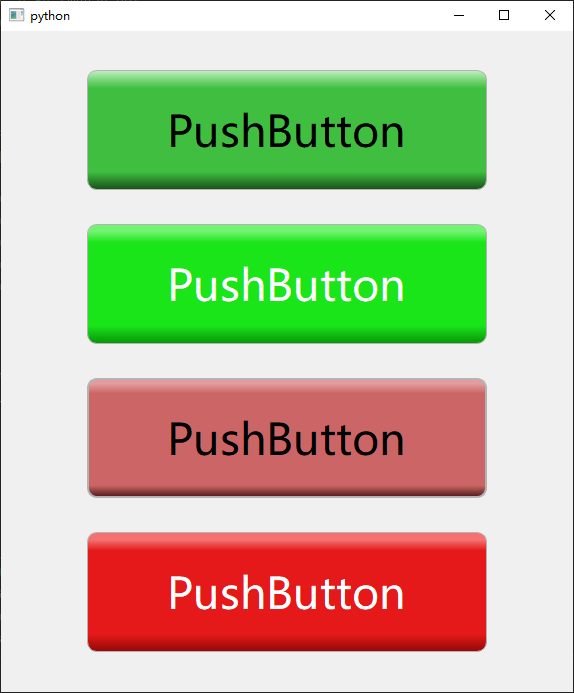
HSL颜色体系知识见:
https://blog.csdn.net/xulibo5828/article/details/160521898
执行脚本:
python
# -*- coding: utf-8 -*-
# 色相字典
h_dict = {
    "灰色": "0",
    "红色": "0",
    "棕色": "20",
    "橙色": "30",
    "橙黄": "45",
    "黄色": "60",
    "黄绿": "90",
    "绿色": "120",
    "青绿": "150",
    "青色": "180",
    "靛蓝": "210",
    "蓝色": "240",
    "紫色": "270",
    "品红": "300",
    "紫红": "330",
}
color_str = "# -*- coding: utf-8 -*-\n黑色 = \"hsl(0, 0%, 0%)\"\n白色 = \"hsl(0, 0%, 100%)\"\n"
color_names = h_dict.keys()
for color_name, h in h_dict.items():
    if color_name == "灰色":
        f = 5
        t = 10
    else:
        t = 105
    for s in range(5, t, 5):
        for l in range(5, 100, 5):
            if color_name == "灰色":
                color_str = "".join([color_str, f"{color_name}_{l}", f" = \"hsl({h}, 0%, {l}%)\"", "\n"])
            else:
                color_str = "".join([color_str, f"{color_name}{s}_{l}", f" = \"hsl({h}, {s}%, {l}%)\"", "\n"])

with open("colors.py", "w", encoding="utf-8") as f:
    f.write(color_str)
print("颜色文件生成成功")将会得到一个文件,colors.py:
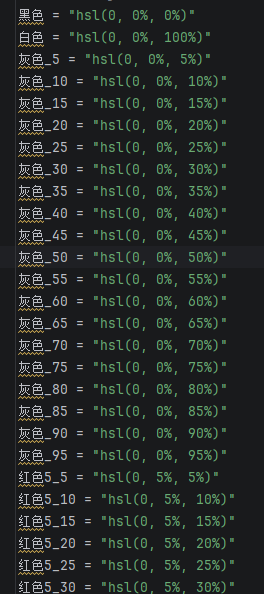
文件中每个颜色的色彩浓度和亮度每间隔5%创建了一个颜色名,黑白灰色的H(色相)和S(色彩浓度)恒为0,黑白灰颜色名的数字是HSL颜色的"L"(亮度)。其余颜色的数字是"S"(色彩浓度5%-100%)和"L"(亮度5%-95%),比如:红色5_30 = hsl(h=0, s=5%, l=30%)。
- 使用demo:
python
from PySide6.QtWidgets import QApplication, QLabel, QWidget, QGridLayout

from colors import *  # 导入颜色

app = QApplication([])

back_clor =  f"qradialgradient(spread:pad, cx:0.5, cy:0.5, radius:0.5, fx:0.3, fy:0.3, stop:0 {绿色95_80}, stop:0.2 {绿色95_50}, stop:1 {绿色95_20})"

widget = QWidget()

label = QLabel()
label.setFixedSize(200,200)
label.setStyleSheet(f"""
    background-color:{back_clor};
    border-radius: 100px;
""")
layout = QGridLayout()
layout.addWidget(label)
widget.setLayout(layout)

widget.show()
app.exec()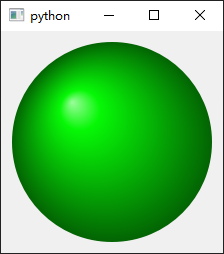
python
from PySide6.QtGui import QFont
from PySide6.QtWidgets import QApplication, QWidget, QGridLayout, QPushButton

from UI.colors import *  # 导入颜色

app = QApplication([])
style_sheet =  \
    f"""QPushButton {{background-color:
    qlineargradient(x1: 1, y1: 0, x2: 1, y2: 1,
        stop: 0 {黄色85_85},
        stop: 0.15 {黄色85_85},
        stop: 0.3 {黄色80_60},
        stop: 1.0 {橙黄90_30});
        border-top: 3px solid {橙黄85_40};
        border-left: 3px solid {橙黄85_40};
        border-right: 3px solid {橙黄85_40};
        border-bottom: 3px solid {橙黄85_40};
        border-radius: 30px;
	}}
"""
widget = QWidget()

btn = QPushButton("PushButton")
btn.setFixedSize(400, 100)
btn.setStyleSheet(style_sheet)
font = QFont()
font.setPointSize(26)
btn.setFont(font)
layout = QGridLayout()
layout.addWidget(btn)
widget.setLayout(layout)

widget.show()
app.exec()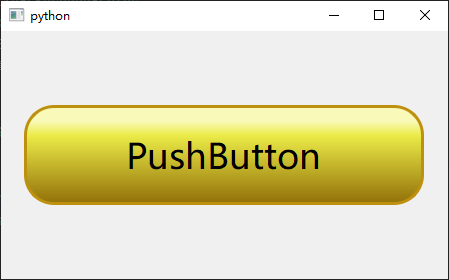
python
from PySide6.QtGui import QFont
from PySide6.QtWidgets import QApplication, QWidget, QGridLayout, QPushButton

from UI.colors import *  # 导入颜色

app = QApplication([])

widget = "QPushButton"
RED_PUSHBUTTON = f"""
    {widget}[light="true"] {{
        background-color:
            qlineargradient(
                x1: 1, y1: 0, x2: 1, y2: 1,
                stop: 0 {红色85_70},
                stop: 0.06 {红色85_70},
                stop: 0.15 {红色80_50},
                stop: 0.85 {红色80_50},
                stop: 1.0 {红色90_30}
        );
        color: {白色};
        border: 1px solid  {灰色_70};
        border-radius: 10px;
    }}
    {widget}[light="true"]:hover {{
        background-color:
            qlineargradient(
                x1: 1, y1: 0, x2: 1, y2: 1,
                stop: 0 {红色85_70},
                stop: 0.04 {红色85_70},
                stop: 0.12 {红色80_50},
                stop: 0.90 {红色80_50},
                stop: 1.0 {红色90_30}
        );
        border: 2px solid  {灰色_70};
	}}
    {widget}[light="true"]:pressed {{
        background-color:
            qlineargradient(
                x1: 1, y1: 0, x2: 1, y2: 1,
                stop: 0 {红色85_75},
                stop: 0.02 {红色85_75},
                stop: 0.06 {红色80_55},
                stop: 0.95 {红色80_55},
                stop: 1.0 {红色90_35}
        );
        border: 3px solid {灰色_55};
	}}
    {widget}[light="false"] {{
        background-color:
            qlineargradient(
                x1: 1, y1: 0, x2: 1, y2: 1,
                stop: 0 {红色55_85},
                stop: 0.06 {红色55_70},
                stop: 0.15 {红色50_50},
                stop: 0.85 {红色50_50},
                stop: 1.0 {红色55_20}
        );
        color: {黑色};
        border: 1px solid  {灰色_70};
        border-radius: 10px;
    }}
    {widget}[light="false"]:hover {{
        background-color:
            qlineargradient(
                x1: 1, y1: 0, x2: 1, y2: 1,
                stop: 0 {红色55_75},
                stop: 0.04 {红色55_75},
                stop: 0.12 {红色50_60},
                stop: 0.90 {红色50_60},
                stop: 1.0 {红色55_20}
        );
        border: 2px solid  {灰色_70};
	}}
    {widget}[light="false"]:pressed {{
        background-color:
            qlineargradient(
                x1: 1, y1: 0, x2: 1, y2: 1,
                stop: 0 {红色55_75},
                stop: 0.02 {红色55_75},
                stop: 0.06 {红色50_55},
                stop: 0.95 {红色50_55},
                stop: 1.0 {红色60_25}
        );
        border: 3px solid {灰色_55};
	}}
    {widget}:disabled {{
        color: {灰色_50};
        border: 1px solid {灰色_20};
    }}
"""

GRN_PUSHBUTTON = f"""
    {widget}[light="true"] {{
        background-color:
            qlineargradient(
                x1: 1, y1: 0, x2: 1, y2: 1,
                stop: 0 {绿色85_70},
                stop: 0.06 {绿色85_70},
                stop: 0.15 {绿色80_50},
                stop: 0.85 {绿色80_50},
                stop: 1.0 {绿色90_30}
        );
        color: {白色};
        border: 1px solid  {灰色_70};
        border-radius: 10px;
    }}
    {widget}[light="true"]:hover {{
        background-color:
            qlineargradient(
                x1: 1, y1: 0, x2: 1, y2: 1,
                stop: 0 {绿色85_70},
                stop: 0.04 {绿色85_70},
                stop: 0.12 {绿色80_50},
                stop: 0.90 {绿色80_50},
                stop: 1.0 {绿色90_30}
        );
        border: 2px solid  {灰色_70};
	}}
    {widget}[light="true"]:pressed {{
        background-color:
            qlineargradient(
                x1: 1, y1: 0, x2: 1, y2: 1,
                stop: 0 {绿色85_75},
                stop: 0.02 {绿色85_75},
                stop: 0.06 {绿色80_55},
                stop: 0.95 {绿色80_55},
                stop: 1.0 {绿色90_35}
        );
        border: 3px solid {灰色_55};
	}}
    {widget}[light="false"] {{
        background-color:
            qlineargradient(
                x1: 1, y1: 0, x2: 1, y2: 1,
                stop: 0 {绿色55_85},
                stop: 0.06 {绿色55_70},
                stop: 0.15 {绿色50_50},
                stop: 0.85 {绿色50_50},
                stop: 1.0 {绿色55_20}
        );
        color: {黑色};
        border: 1px solid  {灰色_70};
        border-radius: 10px;
    }}
    {widget}[light="false"]:hover {{
        background-color:
            qlineargradient(
                x1: 1, y1: 0, x2: 1, y2: 1,
                stop: 0 {绿色55_75},
                stop: 0.04 {绿色55_75},
                stop: 0.12 {绿色50_60},
                stop: 0.90 {绿色50_60},
                stop: 1.0 {绿色55_20}
        );
        border: 2px solid  {灰色_70};
	}}
    {widget}[light="false"]:pressed {{
        background-color:
            qlineargradient(
                x1: 1, y1: 0, x2: 1, y2: 1,
                stop: 0 {绿色55_75},
                stop: 0.02 {绿色55_75},
                stop: 0.06 {绿色50_55},
                stop: 0.95 {绿色50_55},
                stop: 1.0 {绿色60_25}
        );
        border: 3px solid {灰色_55};
	}}
    {widget}:disabled {{
        color: {灰色_50};
        border: 1px solid {灰色_20};
    }}
"""

widget = QWidget()

btn1 = QPushButton("PushButton")
btn1.setFixedSize(400, 120)
btn1.setStyleSheet(GRN_PUSHBUTTON)
btn1.setProperty("light", False)
btn1.style().unpolish(btn1)
btn1.style().polish(btn1)

btn2 = QPushButton("PushButton")
btn2.setFixedSize(400, 120)
btn2.setStyleSheet(GRN_PUSHBUTTON)
btn2.setProperty("light", True)
btn2.style().unpolish(btn2)
btn2.style().polish(btn2)

btn3 = QPushButton("PushButton")
btn3.setFixedSize(400, 120)
btn3.setStyleSheet(RED_PUSHBUTTON)
btn3.setProperty("light", False)
btn3.style().unpolish(btn3)
btn3.style().polish(btn3)

btn4 = QPushButton("PushButton")
btn4.setFixedSize(400, 120)
btn4.setStyleSheet(RED_PUSHBUTTON)
btn4.setProperty("light", True)
btn4.style().unpolish(btn4)
btn4.style().polish(btn4)

font = QFont()
font.setPointSize(32)
btn1.setFont(font)
btn2.setFont(font)
btn3.setFont(font)
btn4.setFont(font)

layout = QGridLayout()
layout.addWidget(btn1)
layout.addWidget(btn2)
layout.addWidget(btn3)
layout.addWidget(btn4)
widget.setLayout(layout)

widget.show()
app.exec()