三角函数绘制椭圆和椭圆旋转
需要编制商标徽标程序和那些画板绘图类程序软件的,在编程时,一般的图形如点直线矩形圆形直接用绘图语句就能绘制,若要绘制椭圆和椭圆旋转就会有些困惑。本博文提供几个简单直捷的方法:三角函数绘制方法。
介绍几个绘制方法:
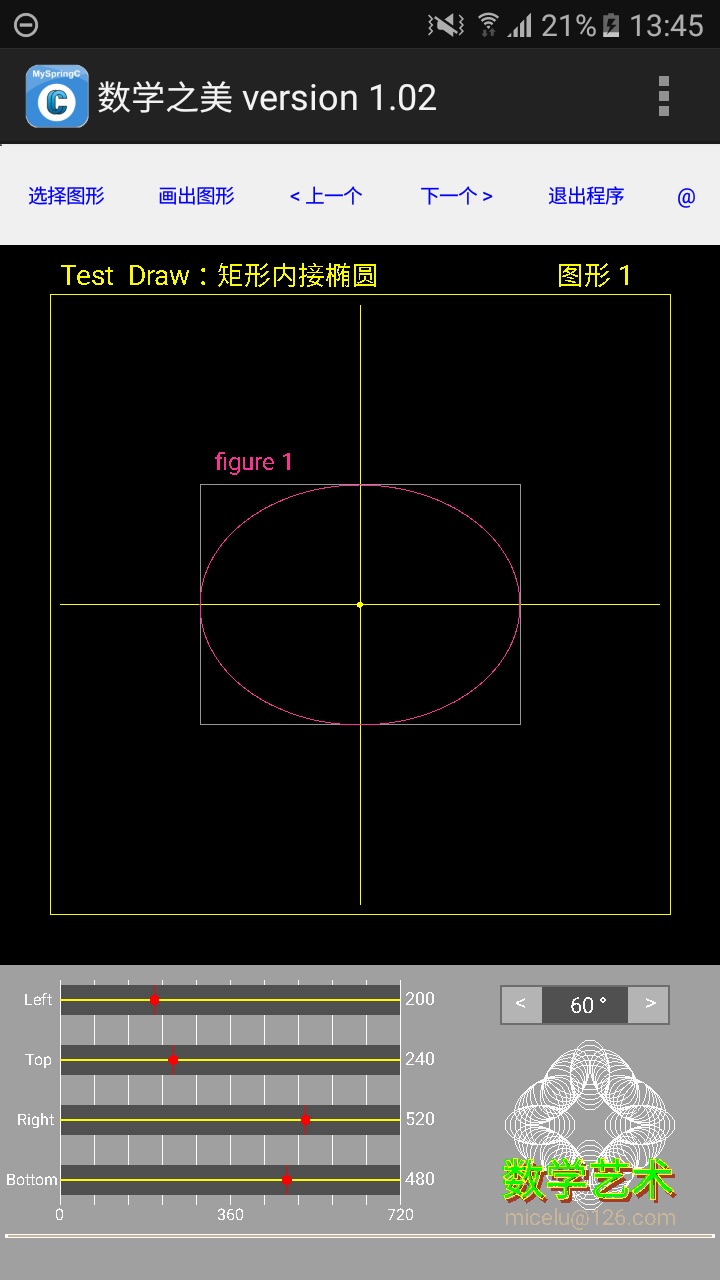
一、矩形内接椭圆 Draw_Oval ( )
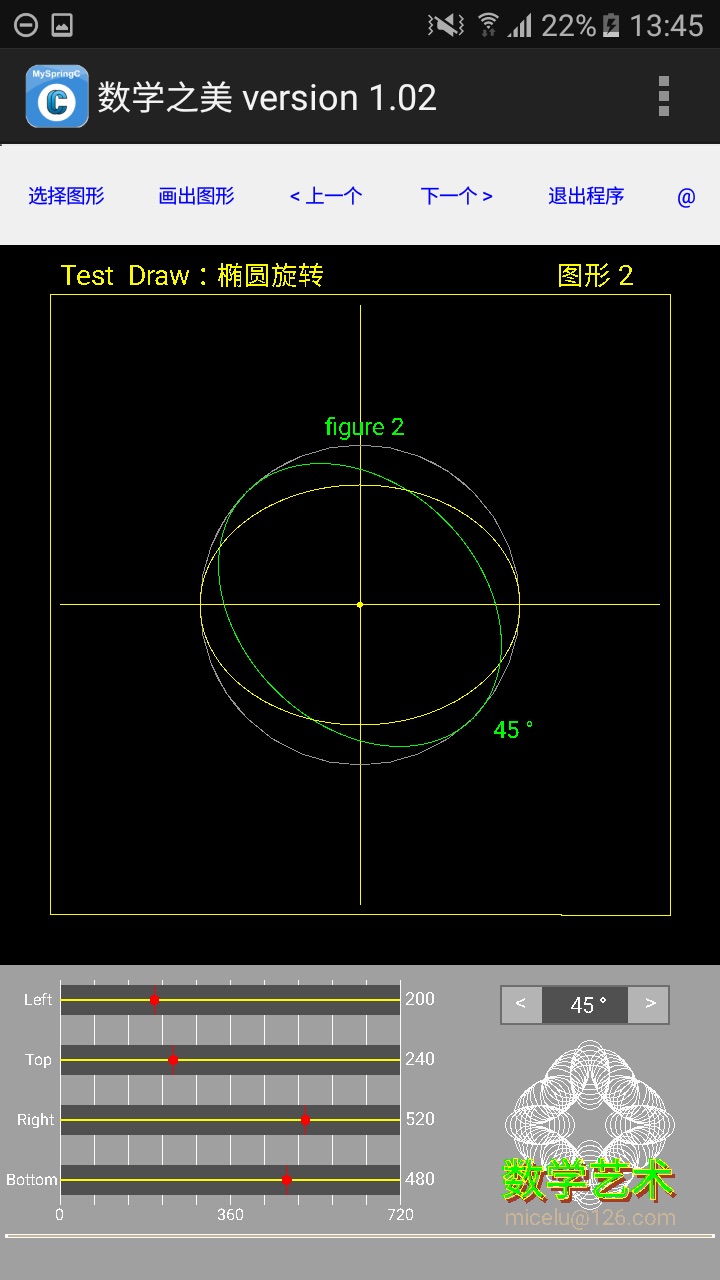
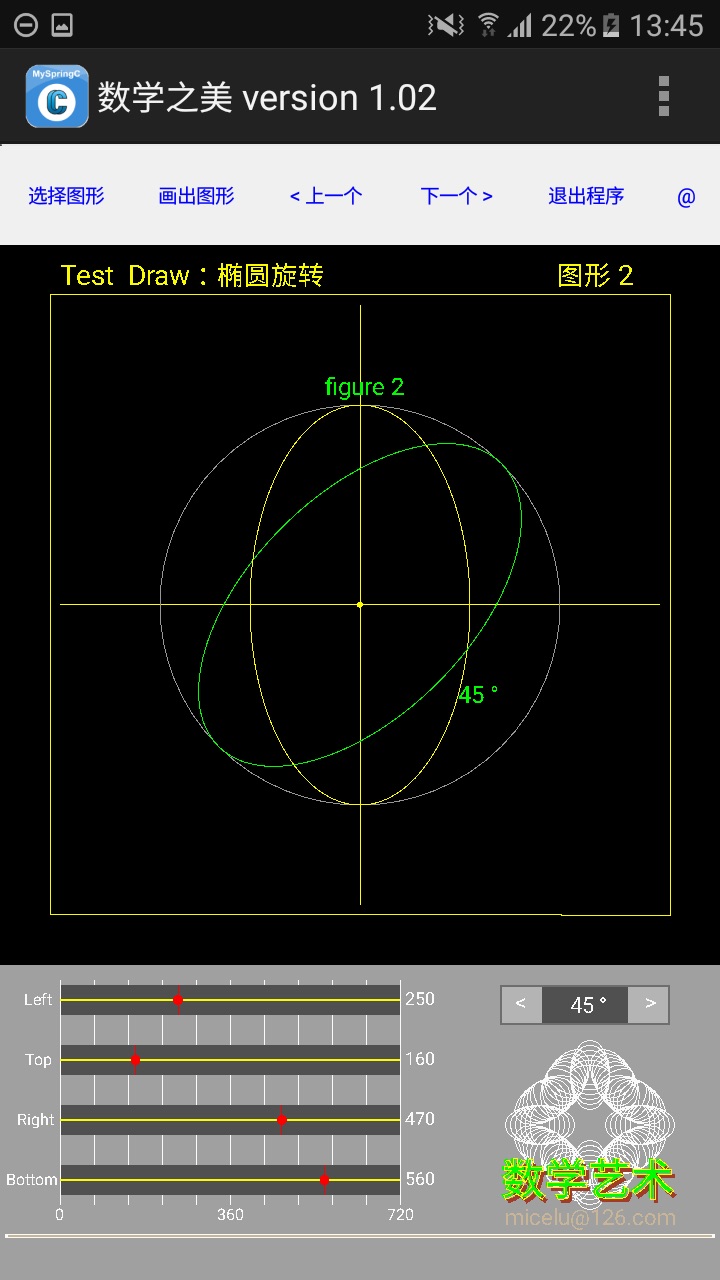
二、椭圆旋转 Rotate_Oval ( )
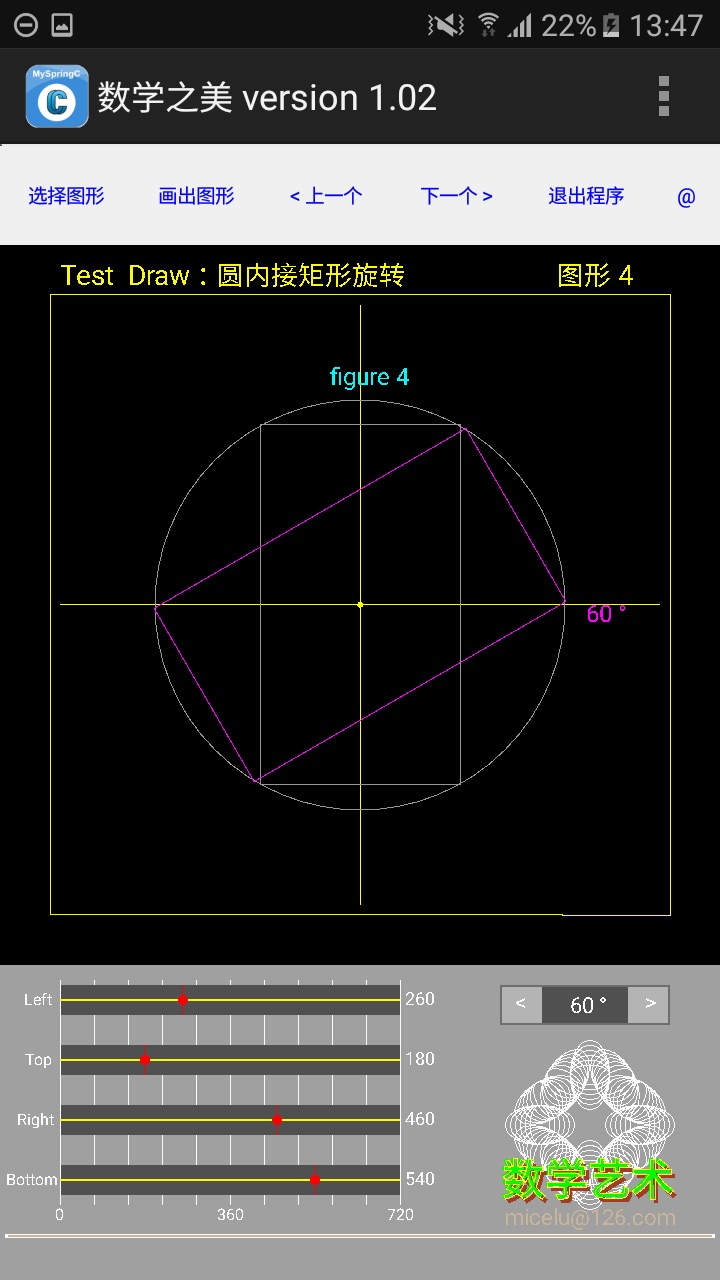
三、矩形旋转 Rotate_Rect ( )
数据传入的一般方法是图形区用鼠标拉出矩形, 依据 left, top, right, bottom 二个坐标点值gx0, gy0, gx1, gy1来计算图形中心点,计算椭圆的半横轴半纵轴 L1, L2 (La, Lb), 依据此6个设置值可以绘制矩形,画出椭圆图形。若L1=L2 则画出的是圆形。
若设置角度值 d 就可以实现椭圆旋转图形的画出。
我设置的数据输入方法是,手机屏幕图形区任意位置点击,以屏幕的XY坐标值来计算直角平面坐标系四个象限的以XY轴交点为中心点的坐标,即计算绘图区的左上角 left, top, 右下角 right, bottom的坐标值,依此就可绘制图形。一、三象限的值可以通过计算转换为二、四象限的左上角右下角的值。
图形旋转的公式:
a=2*pi/180*k;
2pi/180 整圆,pi/180半圆,k = 0 to 180
x0=(float)(L1*cos(a)); //原点顺时针绘出
y0=(float)(L2*sin (a));
x1, y1 >>> 依原点 x0, y0 和 旋转角度 d 计算
x1=(float)(x0*cos (d)-y0*sin (d))+sx ;
y1=(float)(y0*cos (d)+x0*sin (d))+sy ;
顺便说一下,有些文章介绍的是逆时针绘出图形,
x0=(L1*cos(a))
y0=(L2* sin(a)) 是 3点钟方向顺时针画点
x0=(L1* sin (a))
x0=(L2* cos(a)) 是 6点钟方向逆时针画点
还有一点说明:对于半长轴半短轴的提法语意不明确。我的理解是:x轴是横轴,y轴是纵轴,若x>y则是横向椭圆图形,y>x则是纵向椭圆图形。我以L1 (la)表示x轴,以L2 (lb)表示y轴,以此轴径来绘制椭圆。
下面是三个函数的源码:
Draw_Oval (){
//****** Draw Oval in Rect ********
//** 绘图软件鼠标拉矩形画内接椭圆
//传入:Rect gx0, gy0 --- gx1, gy1
cs.SetColor (255,150,150,150);
// gx0=120; gy0=250; //left, top
// gx1=240; gy1=450; //right, buttom
//** 依传入数值绘制图形
cs.SetFillMode (0);//0不填色,1填色
cs.SetTextSize (24);
cs.DrawRect (gx0,gy0,gx1,gy1); //矩形框
//** 若是矩形内接椭圆
cs.SetFillMode (1);//0不填色,1填色
cs.SetColor (255,250,50,150);
cs.DrawText ("figure 1 ", gx0+15, gy0-15);
L1=(int)(gx1-gx0)/2 ; //以矩形计算
L2=(int)(gy1-gy0)/2 ;
sx=gx0+L1; sy=gy0+L2; //圆心
sx1=sx+L1; sy1=py; //绘图起点
for (k=0;k<=180;k++){ //3 点钟方向顺时针绘出
a=2*pi/180*k;
dx=(float)(L1*cos(a))+sx;
dy=(float)(L2*sin (a))+sy;
cs.DrawPoint (dx, dy);
cs.DrawLine (sx1, sy1, dx, dy);
sx1=dx; sy1=dy;
}
cs.Update ();
}//Draw_Oval ()
Rotate_Oval (){
//****** Draw Oval and Rotate figure ******
//** 传入 gx0, gy0, gx1, gy1
//计算 L1, L2 半长轴,半短轴
//计算 图形中心点
L1=(int)(gx1-gx0)/2 ; //以矩形计算
L2=(int)(gy1-gy0)/2 ;
if (L1>L2){ L=L1; } else{ L=L2; }
cs.SetFillMode (0);//0不填色,1填色
cs.SetColor (255,150,150,150);
cs.DrawCircle (sx, sy, L);
cs.SetFillMode (1);//0不填色,1填色
cs.SetColor (255,0,250,0);
cs.SetTextSize (24);
cs.DrawText ("figure 2 ", sx-35, sy-L-10);
//设置 setD=45; //** 旋转角度
d=pi/180*setD;
sx0=sx+L1; sy0=sy; //原椭圆画笔起点
sx1=(float)(L1*cos(d))+sx ; //旋转后画笔起点
sy1=(float)(L1*sin (d))+sy ;
ss=intToString (setD)+" ° " ;
cs.DrawText (ss, sx1+20, sy1+20);
for (k=0;k<=180;k++){ //3 点钟方向顺时针绘
a=2*pi/180*k; //2pi/180 整圆,pi/180半圆
x0=(float)(L1*cos(a)); //原点顺时针绘
y0=(float)(L2*sin (a));
x1=(float)(x0*cos (d)-y0*sin (d))+sx ;
y1=(float)(y0*cos (d)+x0*sin (d))+sy ;
//** x0 >> cos(a), y0 >> sin(a) 3点钟方向顺时针画点
//** x0 >> sin(a), y0 >> cos(a) 6点钟方向逆时针画点
//** 依原点 x0, y0 画出椭圆
cs.SetColor (255,250,250,0);
x0=x0+sx; y0=y0+sy;
cs.DrawPoint (x0,y0);
cs.DrawLine (sx0, sy0, x0,y0);
sx0=x0 ; sy0=y0 ;
//** 依旋转后点 x1, y1 画出椭圆
cs.SetColor (255,0,250,0);
cs.DrawPoint (x1,y1);
cs.DrawLine (sx1, sy1, x1,y1);
sx1=x1; sy1=y1;
}
cs.Update ();
}//Rotate_Oval ()
Rotate_Rect (){
//****** Draw Rect and Rotate
cs.SetFillMode (1);//0不填色,1填色
cs.SetColor (255,0,250,250);
cs.SetTextSize (24);
//** 传入:left, top, right, bottom
//** 计算:L= r 半径, sx, sy 圆心点
//** 拉鼠标画出矩形 >> 坐标数据传入
// gx0=200; gy0=220; //left, top
// gx1=520; gy1=500; //right, bottom
//** calculate center point
sx=gx0+(gx1-gx0)/2 ; //360
sy=gy0+(gy1-gy0)/2 ; //360
//** 计算外接圆圆心
a1=(gx1-gx0)/2 ;
b1=(gy1-gy0)/2 ;
c1=sqrt (a1*a1+b1*b1);
L=(int) c1;
cs.DrawText ("figure 4 ", sx-30, sy-L-15);
cs.SetFillMode (0);//0不填色,1填色
cs.SetColor (255,150,150,150);
//** 画模拟图形,矩形外接圆
cs.DrawCircle (sx,sy, L);
cs.DrawRect (gx0,gy0, gx1,gy1);
x0=gx0; y0=gy0;
x1=gx1; y1=gy0;
x2=gx1; y2=gy1;
x3=gx0; y3=gy1;
//** 圆内接矩形,画原矩形
cs.SetFillMode (1);//0不填色,1填色
cs.DrawLine (x0,y0,x1,y1);
cs.DrawLine (x1,y1,x2,y2);
cs.DrawLine (x2,y2,x3,y3);
cs.DrawLine (x3,y3,x0,y0);
//** test rotate >>>
//setD=15; //输入
d=pi/180*setD; //角度转弧度
//** 四角点旋转
sx0=(float)((x0-sx)*cos (d)-(y0-sy)*sin (d)) ;
sy0=(float)((x0-sx)*sin (d)+(y0-sy)*cos (d)) ;
sx1=(float)((x1-sx)*cos (d)-(y1-sy)*sin (d)) ;
sy1=(float)((x1-sx)*sin (d)+(y1-sy)*cos (d)) ;
sx2=(float)((x2-sx)*cos (d)-(y2-sy)*sin (d)) ;
sy2=(float)((x2-sx)*sin (d)+(y2-sy)*cos (d)) ;
sx3=(float)((x3-sx)*cos (d)-(y3-sy)*sin (d)) ;
sy3=(float)((x3-sx)*sin (d)+(y3-sy)*cos (d)) ;
//** 加中心坐标
sx0=sx0+sx; sy0=sy0+sy;
sx1=sx1+sx; sy1=sy1+sy;
sx2=sx2+sx; sy2=sy2+sy;
sx3=sx3+sx; sy3=sy3+sy;
//** 绘出旋转后图形
cs.SetColor (255,250,0,250);
cs.DrawLine (sx0,sy0,sx1,sy1);
cs.DrawLine (sx1,sy1,sx2,sy2);
cs.DrawLine (sx2,sy2,sx3,sy3);
cs.DrawLine (sx3,sy3,sx0,sy0);
ss=intToString (setD)+" ° " ;
cs.DrawText (ss, sx1+20, sy1+20);
cs.Update ();
}//test
//** End ****