背景:随着项目增大,项目中预设件增多,关联错综复杂,维护修改成本很高,需要一款可视化工具,来辅助开发。
1. 需求分析
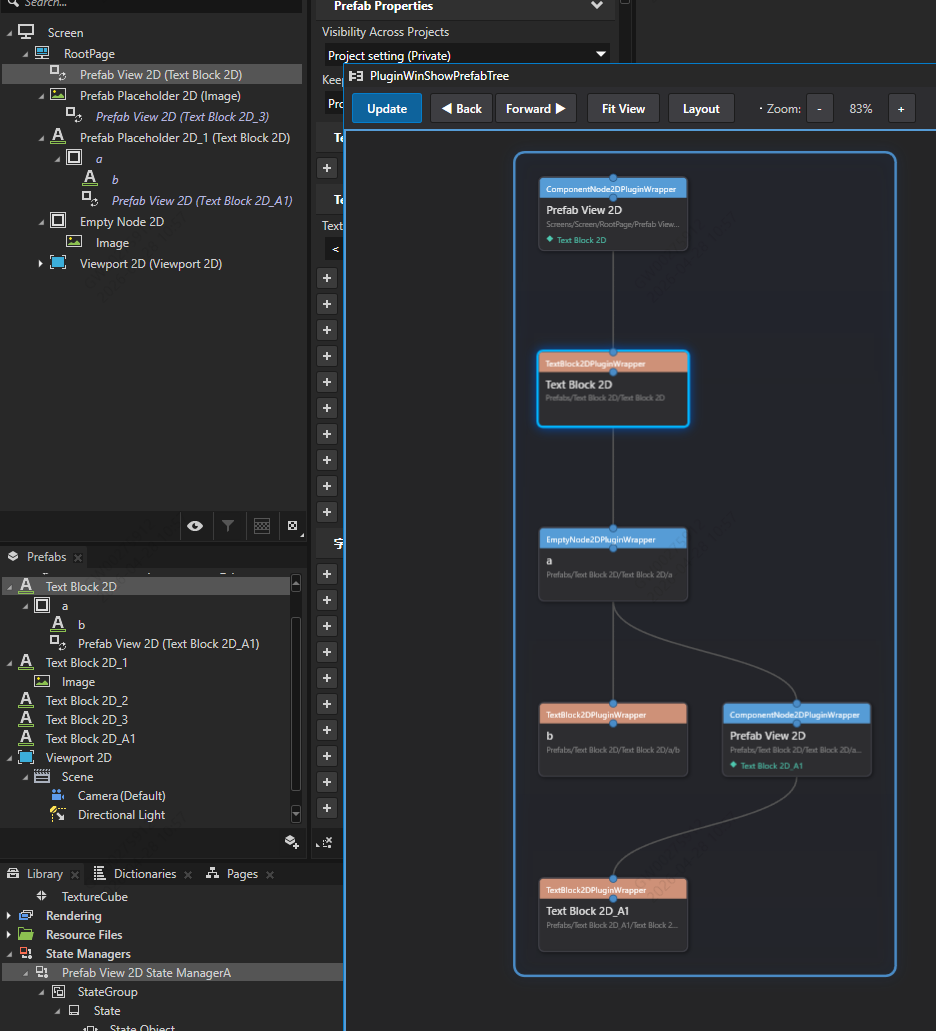
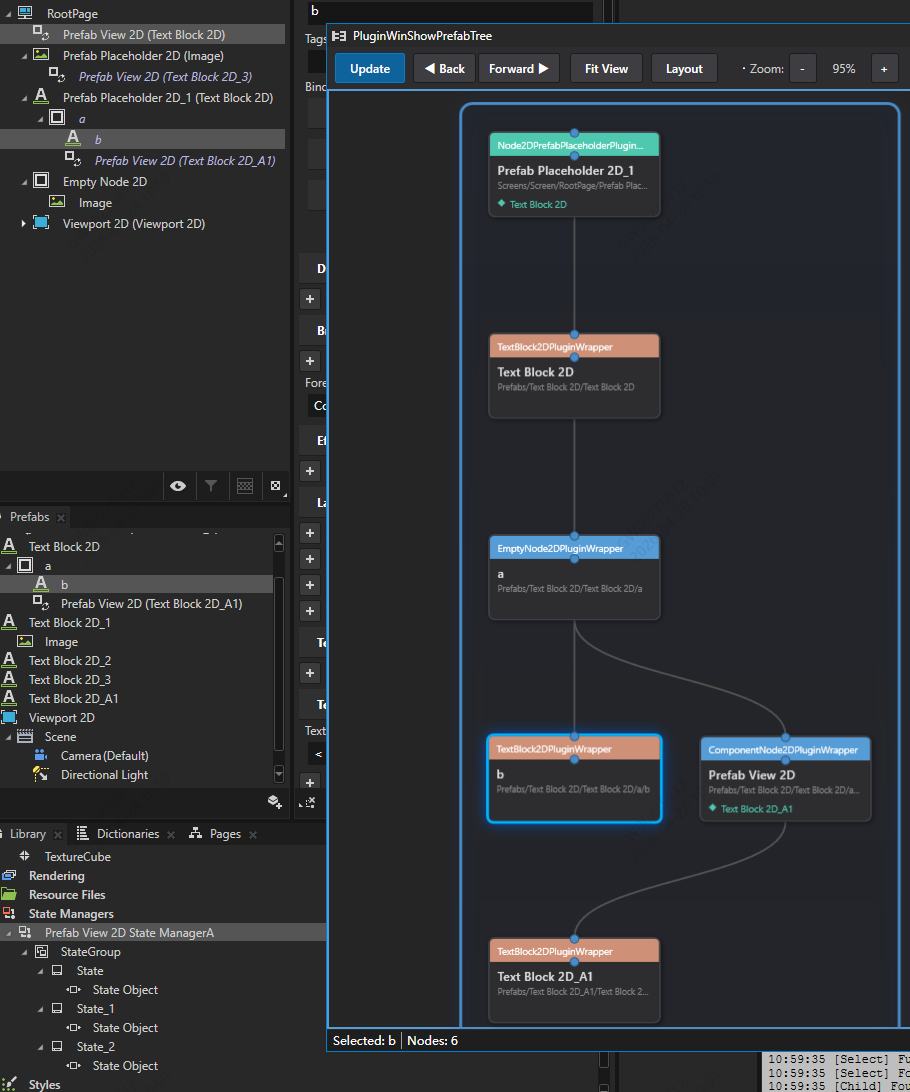
- 节点树可视化-卡片形式
- 如果节点是Prefab View 2D或者Prefab Placeholder 2D类型,展开它的属性Prefab Template,支持递归
- 如果节点里有状态机,状态机中设置了属性Prefab Template,也需要展开,支持递归
- 卡片之间有连线,有上下级关系,状态机的要包围起来,表示对外只有一个节点
- 左键单击选中卡片,kanzi studio焦点自动跳转
- 右键拖拽视图
- 滚轮缩放视图
- 支持前进后退视图
2. 效果
Prefab View 2D
Prefab Placeholder 2D
状态机
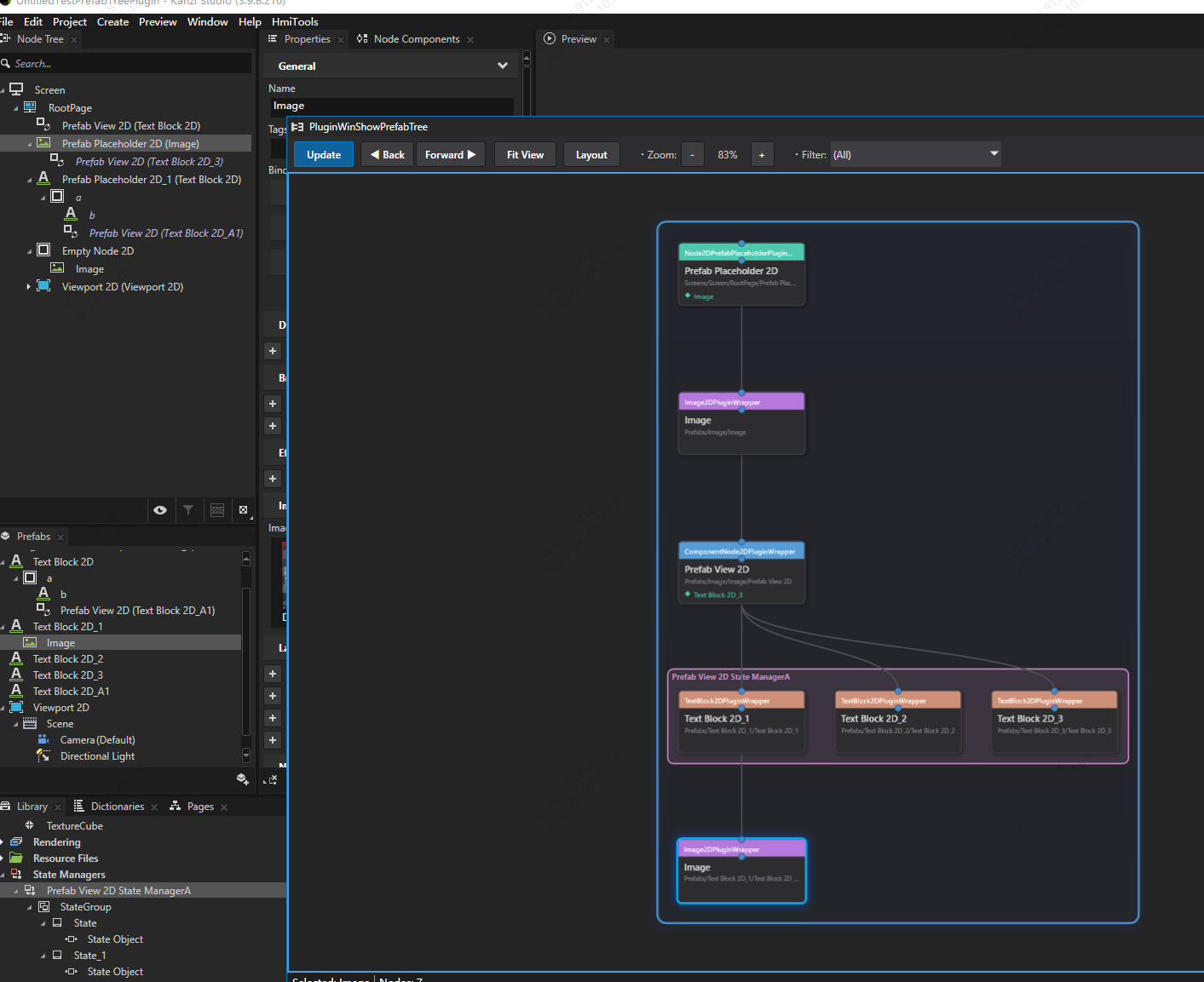
3. 设计
3.1 kanzi窗口插件,名字PluginWinShowPrefabTree
如何创建插件,请参考以往博客
3.2 业务逻辑
- 点击【Update】按钮,获取当前节点
c
this.studio.SelectedItems.ToList();- 先判断有没有状态机
c
if ("Node2DPrefabPlaceholderPluginWrapper" == node.GetType().Name ||
    "ComponentNode2DPluginWrapper" == node.GetType().Name)
{
    Node2D node2d = node as Node2D;
    if (node2d != null && node2d.PropertyTypes.NodeStateManager != null)
    {
        _NodeStateManager = node2d.Get(node2d.PropertyTypes.NodeStateManager);
    }
}-
获取状态机组StateGroup,获取组里的所有状态State,获取状态里的StateObject,获取其属性"PrefabViewConcept.Prefab",递归获取子节点DiguiHandleRefab
-
如果没有状态机,递归获取子节点HandlePrefabResource,
c
if ("Node2DPrefabPlaceholderPluginWrapper" == node.GetType().Name)
{
   var _Node2DPrefabPlaceholder = node as Node2DPrefabPlaceholder;
   if (_Node2DPrefabPlaceholder != null)
   {
       ResourceReference<Node2DPrefabTemplate> tempplateRef = _Node2DPrefabPlaceholder.Get(_Node2DPrefabPlaceholder.PropertyTypes.Node2DPrefabPlaceholderTemplate);

   }
}
else if ("ComponentNode2DPluginWrapper" == node.GetType().Name)
{
   var _ComponentNode2D = node as ComponentNode2D;
   if (_ComponentNode2D != null)
   {
       ResourceReference<PrefabTemplate> _PrefabViewConceptPrefab = _ComponentNode2D.Get(_ComponentNode2D.PropertyTypes.PrefabViewConceptPrefab);

   }
}- 最后遍历获取其子节点
c
var childNodes = node.ChildNodes.ToList();
foreach (Node child in childNodes)
{
    var childTreeNode = DiguiHandleRefab(child, node);
    if (childTreeNode != null)
    {
        treeNode.Children.Add(childTreeNode);
    }
}- 获取的数据储存在树状节点里,claude生成ui代码
- 点击卡片,跳转焦点
c
//搜索screen
var pp = path.Replace(project.Screen.Path + "/", "");
ProjectItem target = project.Screen.GetProjectItemByPath(pp);
this.studio.Commands.SelectProjectItems(new List<ProjectItem> { target as ProjectItem });

//搜索预设件
var target = item.GetProjectItemByPath(childPath);
if (target != null)
{
    studio.Log($"[Select] Found prefab: {target.Name} (path: {target.Path})");
    this.studio.Commands.SelectProjectItems(new List<ProjectItem> { target as ProjectItem });
    return true;
}
搜索场景树的规则是
假如路径是 Screens/Screen1/RootPage/Empty Node 2D/Prefab View 2D
要这样搜 project.Screen.GetProjectItemByPath("RootPage/Empty Node 2D/Prefab View 2D");
搜索prefab的规则是
假如路径是 Prefabs/Text Block 2D_1/Text Block 2D_1/a
要这样搜 item.GetProjectItemByPath("Text Block 2D/a");