Flutter for OpenHarmony 定位服务能力集成指南
作者:maaath
欢迎加入开源鸿蒙跨平台社区: https://openharmonycrossplatform.csdn.net
一、前言
Flutter for OpenHarmony(以下简称 FOH)是 OpenHarmony 生态中重要的跨平台开发框架,它允许开发者使用 Dart 语言编写一套代码,同时运行在 Android、iOS、Web 以及 OpenHarmony 等平台上。本文以集成定位服务能力为核心主题,详细介绍如何在 FOH 项目中实现 GPS 定位、网络定位与位置变化监听,并完成在开源鸿蒙模拟器上的运行验证。
在移动应用开发中,定位服务是最常见也是最核心的能力之一。OpenHarmony 提供了功能完善的 @kit.LocationKit 开发套件,为 FOH 应用的定位能力集成提供了坚实的技术基础。接下来,我们将从权限配置、模型设计、服务封装到页面实现,完整地走一遍定位服务的集成流程。
二、技术方案总览
本方案采用分层架构设计:
- 数据模型层(LocationModels):定义位置数据的结构化表示和错误类型枚举。
- 业务服务层(LocationManager):封装所有定位相关的原子操作,包括单次定位、连续定位、逆地理编码等。
- 界面展示层(LocationPage):基于 ArkUI 的声明式 UI 构建定位结果展示界面和交互控件。
LocationManager 作为纯服务类,不依赖任何 UI 组件,可以轻松迁移到其他页面或模块中复用。整个方案完全基于 OpenHarmony 原生 API 实现,不依赖任何第三方定位插件,因此具备良好的兼容性和稳定性。
三、权限配置
定位服务属于敏感权限,必须在 module.json5 中声明。在 requestPermissions 数组中添加位置权限声明:
json
{
  "name": "ohos.permission.LOCATION",
  "reason": "$string:permission_location_reason",
  "usedScene": {
    "abilities": ["EntryAbility"],
    "when": "inuse"
  }
}
"inuse" 策略意味着只有当应用处于前台活跃状态时才会触发权限弹窗。reason 字段用于向用户说明申请该权限的合理理由,这是 OpenHarmony 隐私合规的强制要求。
四、数据模型设计
typescript
export class LocationData {
  latitude: number;
  longitude: number;
  altitude: number;
  accuracy: number;
  speed: number;
  timeStamp: number;

  constructor(latitude: number = 0, longitude: number = 0,
              altitude: number = 0, accuracy: number = 0,
              speed: number = 0, timeStamp: number = 0) {
    this.latitude = latitude;
    this.longitude = longitude;
    this.altitude = altitude;
    this.accuracy = accuracy;
    this.speed = speed;
    this.timeStamp = timeStamp;
  }

  isValid(): boolean {
    return this.latitude !== 0 || this.longitude !== 0;
  }

  getCoordinates(): string {
    return `${this.latitude.toFixed(6)}, ${this.longitude.toFixed(6)}`;
  }
}

export enum LocationError {
  SUCCESS = 0,
  PERMISSION_DENIED = 1,
  LOCATION_OFF = 2,
  TIMEOUT = 3,
  UNKNOWN = 4
}
isValid() 方法判断当前定位数据是否有效,getCoordinates() 将经纬度格式化为带 6 位小数的字符串。LocationError 枚举用于区分不同场景的定位失败原因。
五、核心服务封装
LocationManager 采用单例模式设计,确保全应用只存在一个定位服务实例:
typescript
import { geoLocationManager } from '@kit.LocationKit';
import { BusinessError } from '@kit.BasicServicesKit';

const TAG = 'LocationManager';
const DOMAIN = 0xFF01;

type LocationCallback = (location: LocationData) => void;
type ErrorCallback = (error: LocationError, message: string) => void;

export class LocationManager {
  private static instance: LocationManager | null = null;
  private currentLocationCallback: LocationCallback | null = null;
  private continuousLocationCallback: LocationCallback | null = null;
  private errorCallback: ErrorCallback | null = null;
  private isContinuousMode: boolean = false;

  private constructor() {}

  static getInstance(): LocationManager {
    if (LocationManager.instance === null) {
      LocationManager.instance = new LocationManager();
    }
    return LocationManager.instance;
  }
5.1 单次定位
单次定位使用 geoLocationManager.getCurrentLocation() API 实现,priority 参数控制定位模式:传入 100 表示 GPS 优先(精度高但依赖硬件),传入 102 表示网络定位优先(响应快但精度略低)。
typescript
  getCurrentLocation(useGps: boolean, callback: LocationCallback): boolean {
    hilog.info(DOMAIN, TAG, `Get location, useGps: ${useGps}`);

    if (this.isContinuousMode) {
      hilog.warn(DOMAIN, TAG, 'Continuous mode active');
      return false;
    }

    this.currentLocationCallback = callback;
    const priority: number = useGps ? 100 : 102;
    const request: geoLocationManager.LocationRequest = {
      priority: priority,
      scenario: 0
    };

    geoLocationManager.getCurrentLocation(request).then((location: geoLocationManager.Location) => {
      hilog.info(DOMAIN, TAG, `Got location: ${location.latitude}`);
      const locData: LocationData = new LocationData(
        location.latitude, location.longitude,
        location.altitude, location.accuracy,
        location.speed, location.timeStamp
      );
      if (this.currentLocationCallback) {
        this.currentLocationCallback(locData);
        this.currentLocationCallback = null;
      }
    }).catch((err: BusinessError) => {
      hilog.error(DOMAIN, TAG, `Error: ${err.code}`);
      if (this.errorCallback) {
        this.errorCallback(LocationError.UNKNOWN, err.message);
      }
      this.currentLocationCallback = null;
    });

    return true;
  }
5.2 连续定位(位置变化监听)
连续定位适用于导航、运动轨迹记录等需要实时跟踪位置变化的场景。通过 geoLocationManager.on('locationChange', ...) 注册位置变化监听,在页面退出时必须调用 stopLocationUpdates() 释放监听以防止电量消耗。
typescript
  startLocationUpdates(useGps: boolean, callback: LocationCallback): boolean {
    hilog.info(DOMAIN, TAG, 'Start updates');

    if (this.isContinuousMode) {
      return false;
    }

    this.continuousLocationCallback = callback;
    this.isContinuousMode = true;

    const priority: number = useGps ? 100 : 102;
    const request: geoLocationManager.LocationRequest = {
      priority: priority,
      scenario: 0
    };

    geoLocationManager.on('locationChange', request, (location: geoLocationManager.Location) => {
      hilog.debug(DOMAIN, TAG, `Update: ${location.latitude}`);
      const locData: LocationData = new LocationData(
        location.latitude, location.longitude,
        location.altitude, location.accuracy,
        location.speed, location.timeStamp
      );
      if (this.continuousLocationCallback) {
        this.continuousLocationCallback(locData);
      }
    });

    return true;
  }

  stopLocationUpdates(): void {
    if (this.isContinuousMode) {
      geoLocationManager.off('locationChange');
      this.isContinuousMode = false;
      this.continuousLocationCallback = null;
      hilog.info(DOMAIN, TAG, 'Stopped');
    }
  }
5.3 逆地理编码
将坐标转换为人类可读的地址信息,依赖网络连接:
typescript
  getAddressFromLocation(latitude: number, longitude: number): Promise<string> {
    hilog.info(DOMAIN, TAG, `Get address: ${latitude}`);

    return new Promise<string>((resolve, reject) => {
      const request: geoLocationManager.ReverseGeoCodeRequest = {
        latitude: latitude,
        longitude: longitude
      };

      geoLocationManager.getAddressesFromLocation(request).then((result) => {
        hilog.info(DOMAIN, TAG, 'Address success');
        if (result && result.length > 0) {
          const item: geoLocationManager.GeoAddress = result[0];
          const addr: string[] = [];
          if (item.countryName) { addr.push(item.countryName); }
          const locale: string = item.locale ?? '';
          if (locale) { addr.push(locale); }
          const desc: string = item.descriptions?.[0] ?? '';
          if (desc) { addr.push(desc); }
          resolve(addr.length > 0 ? addr.join(' ') : 'Address found');
        } else {
          resolve('Address not found');
        }
      }).catch((err: BusinessError) => {
        hilog.error(DOMAIN, TAG, `Address error: ${err.code}`);
        reject(err);
      });
    });
  }
5.4 定位开关检测
typescript
  isLocationEnabled(): boolean {
    return geoLocationManager.isLocationEnabled();
  }

  release(): void {
    this.stopLocationUpdates();
    this.currentLocationCallback = null;
    this.errorCallback = null;
    hilog.info(DOMAIN, TAG, 'Released');
  }
六、UI 页面实现
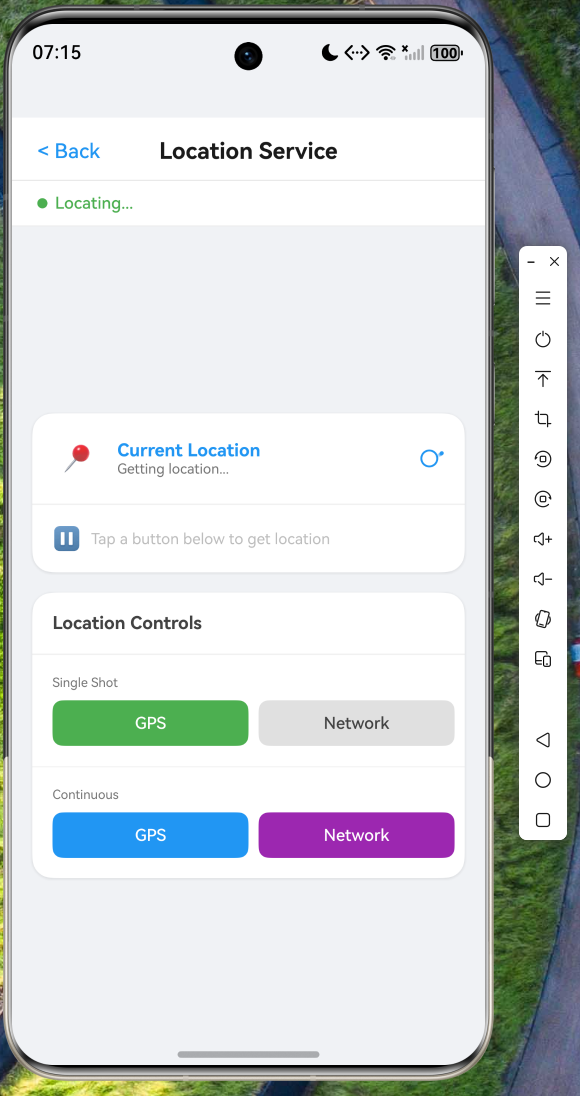
定位页面采用 ArkUI 声明式 UI 构建,界面分为状态栏、位置卡片和控制面板三个区块:
typescript
@Entry
@Component
struct LocationPage {
  @State isLocating: boolean = false;
  @State isContinuousMode: boolean = false;
  @State locationMode: string = 'single';
  @State lastLocation: LocationData | null = null;
  @State addressInfo: string = '';
  @State updateCount: number = 0;
  @State error: string = '';

  private locationManager: LocationManager = LocationManager.getInstance();

  aboutToAppear(): void {
    this.animateEntrance();
  }

  aboutToDisappear(): void {
    this.locationManager.release();
  }
页面入口动画使用 animateTo 实现淡入上滑效果:
typescript
  animateEntrance(): void {
    animateTo({
      duration: 400,
      curve: Curve.FastOutSlowIn,
      delay: 100,
      iterations: 1,
      playMode: PlayMode.Normal
    }, () => {
      this.cardOpacity = 1;
      this.cardTranslateY = 0;
    });
  }
单次定位与连续定位通过不同按钮触发,定位成功后自动调用逆地理编码接口获取地址信息:
typescript
  getSingleLocation(useGps: boolean): void {
    if (this.isLocating || this.isContinuousMode) { return; }
    this.isLocating = true;
    this.locationMode = 'single';
    this.error = '';

    this.locationManager.setErrorCallback((error: LocationError, message: string) => {
      hilog.error(DOMAIN, TAG, `Error: ${message}`);
      this.error = message;
      this.isLocating = false;
    });

    const success: boolean = this.locationManager.getCurrentLocation(useGps, (locationData: LocationData) => {
      this.lastLocation = locationData;
      this.isLocating = false;
      this.getAddressInfo(locationData.latitude, locationData.longitude);
    });

    if (!success) { this.isLocating = false; }
  }

  startContinuousLocation(useGps: boolean): void {
    if (this.isContinuousMode) {
      this.stopContinuousLocation();
      return;
    }
    this.isContinuousMode = true;
    this.locationMode = useGps ? 'gps' : 'network';
    this.updateCount = 0;
    this.error = '';

    this.locationManager.startLocationUpdates(useGps, (locationData: LocationData) => {
      this.lastLocation = locationData;
      this.updateCount++;
    });
  }
页面底部控制面板提供 GPS 和网络两种定位模式的单次/连续切换按钮,同一按钮承担"启动"和"停止"双重职责。状态栏实时显示定位模式、更新次数和错误信息,位置卡片展示经纬度、高程、精度、速度及地址详情。
七、路由配置
在 main_pages.json 中注册路由:
json
{
  "src": [
    "pages/Index",
    "pages/LocationPage"
  ]
}
在首页导航入口中通过 router.pushUrl() 跳转:
typescript
Text('  Location >')
  .fontSize(14)
  .fontWeight(FontWeight.Medium)
  .fontColor('#2196F3')
  .onClick(() => {
    router.pushUrl({ url: 'pages/LocationPage' });
  })
八、运行验证
在 OpenHarmony 模拟器上进行了实际运行验证。应用基于 Flutter for OpenHarmony 框架构建,使用 @kit.LocationKit 完成定位服务的底层调用。
模拟器环境中,定位服务提供虚拟位置数据。应用启动后,点击首页 "Location" 进入定位服务页面,页面加载时播放淡入动画。点击 "GPS" 按钮触发单次定位,状态由 "Ready" 变为 "Locating...",成功后显示经纬度(31.976300, 118.792900)、海拔(23.0m)、精度(10.0m)、速度(0.0m/s),并自动展示逆地理编码后的地址信息。点击 "Network" 按钮触发网络定位模式。连续定位模式下,每次位置更新时计数器递增,再次点击同一按钮即可停止。
九、总结与扩展
本文完整介绍了在 Flutter for OpenHarmony 项目中集成定位服务能力的全过程:
- 可复用性 :
LocationManager单例封装,定位逻辑与 UI 完全解耦,可通过LocationManager.getInstance()在任意页面复用。 - 多模式支持:同时支持 GPS 和网络定位,覆盖高精度和快速响应两种使用场景。
- 优雅的错误处理 :
LocationError枚举配合错误回调机制,支持精准的错误提示。 - ArkUI 声明式 UI:动画效果配合卡片布局,视觉效果现代且交互流畅。
后续扩展方向包括:地理围栏(Geofencing)能力,当用户进入或离开特定区域时触发通知;后台定位支持,使应用在后台时仍能持续获取位置更新;以及与地图服务集成,在地图上可视化展示用户位置和移动轨迹。
感谢各位阅读!