cat /sys/kernel/debug/pinctrl/pinctrl-rockchip-pinctrl/pinmux-pins
cat /sys/kernel/debug/gpio
用户名/密码:root/root
DTS来自,kernel-pi-v1.0.tar.gz(226.7MB)
https://vanxoak.yuque.com/wb353n/hd-rk3576-pi/mg1yh7k1hgmmgtew
开发资料下载
https://vanxoak.yuque.com/wb353n/hd-rk3576-pi/amue52kesw19pqpg#NoWhJ
与PC互传文件【使用WinSCP即可!】
在此介绍一下MobaXterm SFTP传输的一种简单方法:
https://vanxoak.yuque.com/wb353n/hd-rk3576-pi/zw4xqc5ixduxhm13#v5uOq
音频测试
1.音频硬件分布
2.音频控件
3.耳机播音测试
root@hd-rk3576:~# aplay kiss8.wav
Playing WAVE 'kiss8.wav' : Signed 16 bit Little Endian, Rate 44100 Hz, Stereo
root@hd-rk3576:~# apt update
root@hd-rk3576:~# apt install mpg123
root@hd-rk3576:~# mpg123 wenbie.mp3
root@hd-rk3576:~# apt install sox libsox-fmt-all
root@hd-rk3576:~# play wenbie.mp3
root@hd-rk3576:~# iperf3 -s
C:\iperf3.21>iperf3 -c 192.168.1.182 -i 1 -t 1800
20260428给万象奥科的开发板HD-RK3576-PI适配瑞芯微原厂的Android14时调通以太网卡芯片YT8521并实测网速898Mbits/sec
2026/4/28 12:35
缘起:
1、使用iperf3实测网速。略低于Buildroot系统的网速902Mbits/sec。可以尝试扫描RX/TX的延迟值。
2、必须新建临时目录export TMPDIR=/data/local/tmp,根据DeepSeek的建议,可以尝试放到mksh内!
1、
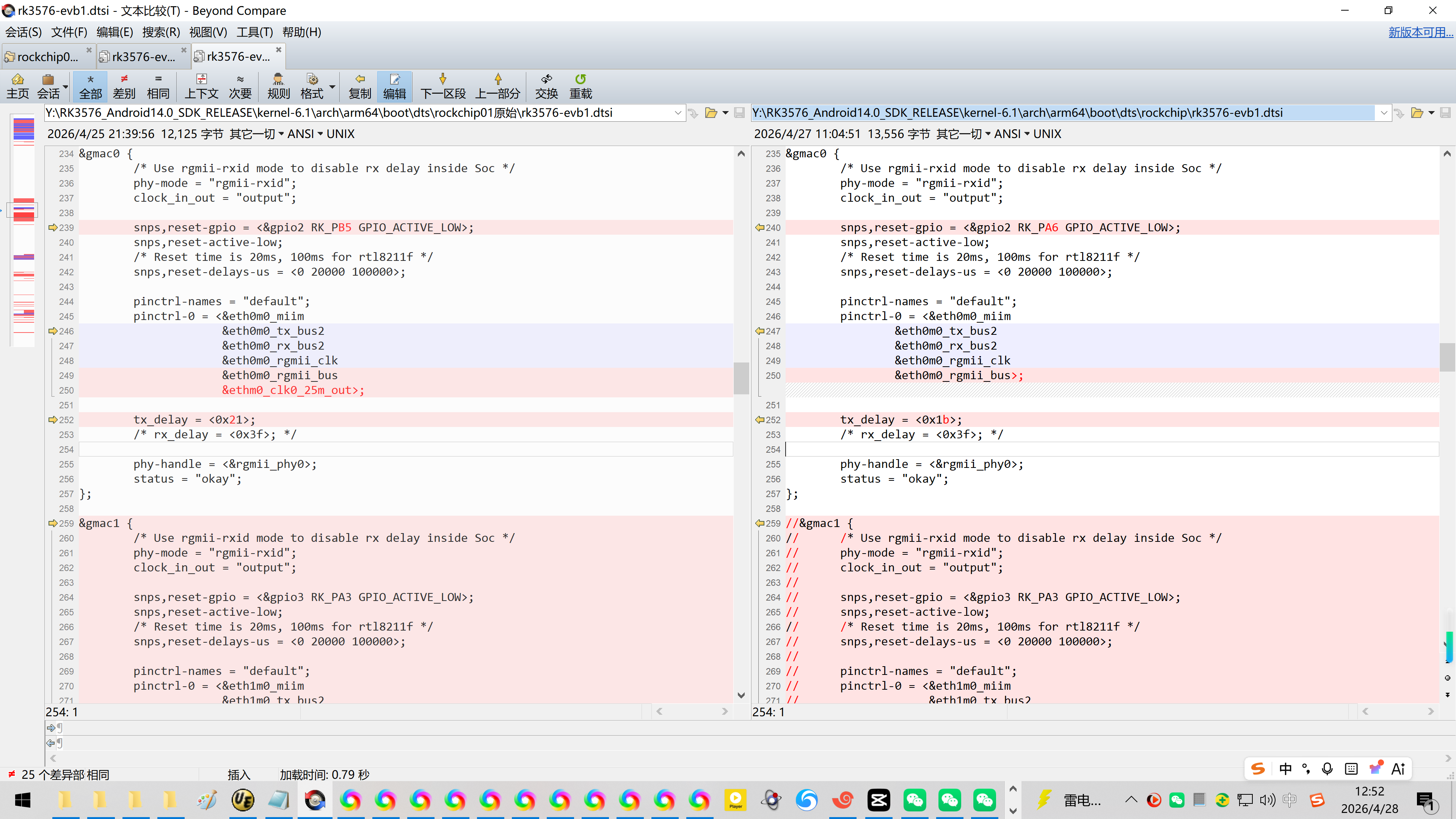
Y:\RK3576_Android14.0_SDK_RELEASE\kernel-6.1\arch\arm64\boot\dts\rockchip\rk3576-evb1.dtsi
&gmac0 {
/* Use rgmii-rxid mode to disable rx delay inside Soc */
phy-mode = "rgmii-rxid";
clock_in_out = "output";
snps,reset-gpio = <&gpio2 RK_PA6 GPIO_ACTIVE_LOW>;
snps,reset-active-low;
/* Reset time is 20ms, 100ms for rtl8211f */
snps,reset-delays-us = <0 20000 100000>;
pinctrl-names = "default";
pinctrl-0 = <ð0m0_miim
ð0m0_tx_bus2
ð0m0_rx_bus2
ð0m0_rgmii_clk
ð0m0_rgmii_bus>;
tx_delay = <0x1b>;
/* rx_delay = <0x3f>; */
phy-handle = <&rgmii_phy0>;
status = "okay";
};
//&gmac1 {
// /* Use rgmii-rxid mode to disable rx delay inside Soc */
// phy-mode = "rgmii-rxid";
// clock_in_out = "output";
//
// snps,reset-gpio = <&gpio3 RK_PA3 GPIO_ACTIVE_LOW>;
// snps,reset-active-low;
// /* Reset time is 20ms, 100ms for rtl8211f */
// snps,reset-delays-us = <0 20000 100000>;
//
// pinctrl-names = "default";
// pinctrl-0 = <ð1m0_miim
// ð1m0_tx_bus2
// ð1m0_rx_bus2
// ð1m0_rgmii_clk
// ð1m0_rgmii_bus
// ðm0_clk1_25m_out>;
//
// tx_delay = <0x20>;
// /* rx_delay = <0x3f>; */
//
// phy-handle = <&rgmii_phy1>;
// status = "okay";
//};
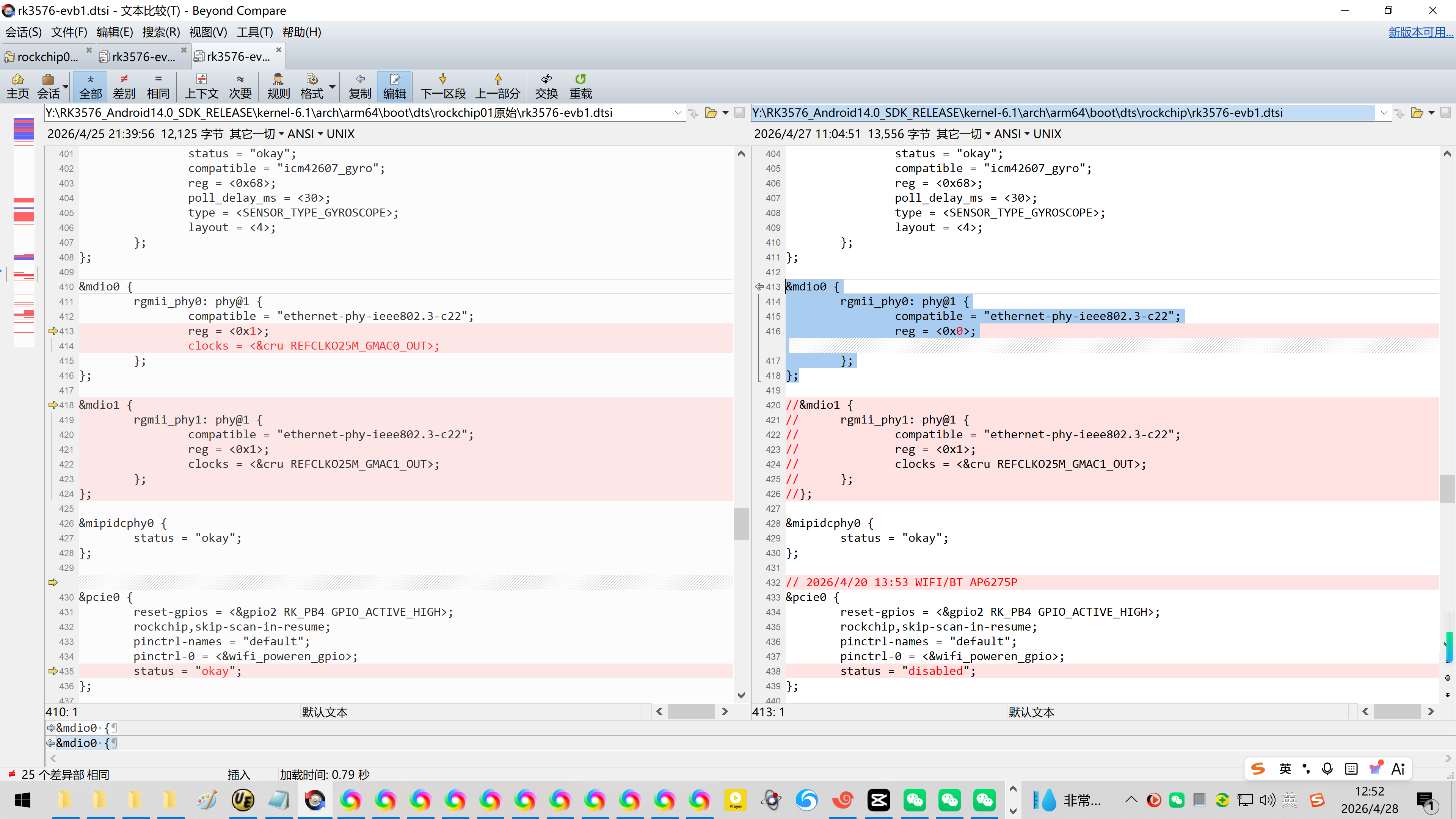
&mdio0 {
rgmii_phy0: phy@1 {
compatible = "ethernet-phy-ieee802.3-c22";
reg = <0x0>;
};
};
//&mdio1 {
// rgmii_phy1: phy@1 {
// compatible = "ethernet-phy-ieee802.3-c22";
// reg = <0x1>;
// clocks = <&cru REFCLKO25M_GMAC1_OUT>;
// };
//};
2、使用iperf3实测网速。略低于Buildroot系统的网速902Mbits/sec。
【基本可以确认iperf3需要一个临时目录】
console:/ # export TMPDIR=/data/local/tmp
console:/ # iperf3 -s
在开发板上运行iperf3:
console:/ #
console:/ #
console:/ #
console:/ #
console:/ # ifconfig
lo Link encap:Local Loopback
inet addr:127.0.0.1 Mask:255.0.0.0
inet6 addr: ::1/128 Scope: Host
UP LOOPBACK RUNNING MTU:65536 Metric:1
RX packets:0 errors:0 dropped:0 overruns:0 frame:0
TX packets:0 errors:0 dropped:0 overruns:0 carrier:0
collisions:0 txqueuelen:1000
RX bytes:0 TX bytes:0
dummy0 Link encap:Ethernet HWaddr b6:e8:93:cf:b5:f3
inet6 addr: fe80::b4e8:93ff:fecf:b5f3/64 Scope: Link
UP BROADCAST RUNNING NOARP MTU:1500 Metric:1
RX packets:0 errors:0 dropped:0 overruns:0 frame:0
TX packets:12 errors:0 dropped:0 overruns:0 carrier:0
collisions:0 txqueuelen:1000
RX bytes:0 TX bytes:840
eth0 Link encap:Ethernet HWaddr 42:74:e5:a4:c1:21 Driver rk_gmac-dwmac
inet addr:192.168.1.181 Bcast:192.168.1.255 Mask:255.255.255.0
inet6 addr: fe80::b04f:d346:132e:a7be/64 Scope: Link
inet6 addr: 2408:8256:348b:103:6961:7fc7:6e16:f4f2/64 Scope: Global
inet6 addr: 2408:8256:348b:103:2ce5:e60b:d3c1:f6ce/64 Scope: Global
UP BROADCAST RUNNING MULTICAST MTU:1500 Metric:1
RX packets:1657 errors:0 dropped:0 overruns:0 frame:0
TX packets:224 errors:0 dropped:0 overruns:0 carrier:0
collisions:0 txqueuelen:1000
RX bytes:128298 TX bytes:20799
Interrupt:57
console:/ #
console:/ #
console:/ #
console:/ # iperf3 9066.366846 T516 healthd: battery l=50 v=3300 t=2.6 h=2 st=3 c=-1600 fc=100 chg=au
^C
130|console:/ #
130|console:/ #
130|console:/ # iperf3 -s
Server listening on 5201
9126.366602 T516 healthd: battery l=50 v=3300 t=2.6 h=2 st=3 c=-1600 fc=100 chg=au
9186.366541 T516 healthd: battery l=50 v=3300 t=2.6 h=2 st=3 c=-1600 fc=100 chg=au
9246.366565 T516 healthd: battery l=50 v=3300 t=2.6 h=2 st=3 c=-1600 fc=100 chg=au
9306.366567 T516 healthd: battery l=50 v=3300 t=2.6 h=2 st=3 c=-1600 fc=100 chg=au
9366.366609 T516 healthd: battery l=50 v=3300 t=2.6 h=2 st=3 c=-1600 fc=100 chg=au
9426.366539 T516 healthd: battery l=50 v=3300 t=2.6 h=2 st=3 c=-1600 fc=100 chg=au
9486.366511 T516 healthd: battery l=50 v=3300 t=2.6 h=2 st=3 c=-1600 fc=100 chg=au
9546.366477 T516 healthd: battery l=50 v=3300 t=2.6 h=2 st=3 c=-1600 fc=100 chg=au
9606.366567 T516 healthd: battery l=50 v=3300 t=2.6 h=2 st=3 c=-1600 fc=100 chg=au
9666.366607 T516 healthd: battery l=50 v=3300 t=2.6 h=2 st=3 c=-1600 fc=100 chg=au
9726.366685 T516 healthd: battery l=50 v=3300 t=2.6 h=2 st=3 c=-1600 fc=100 chg=au
9786.366626 T516 healthd: battery l=50 v=3300 t=2.6 h=2 st=3 c=-1600 fc=100 chg=au
9846.366624 T516 healthd: battery l=50 v=3300 t=2.6 h=2 st=3 c=-1600 fc=100 chg=au
9906.366578 T516 healthd: battery l=50 v=3300 t=2.6 h=2 st=3 c=-1600 fc=100 chg=au
9966.366568 T516 healthd: battery l=50 v=3300 t=2.6 h=2 st=3 c=-1600 fc=100 chg=au
10026.369001 T516 healthd: battery l=50 v=3300 t=2.6 h=2 st=3 c=-1600 fc=100 chg=au
10086.366560 T516 healthd: battery l=50 v=3300 t=2.6 h=2 st=3 c=-1600 fc=100 chg=au
10146.366632 T516 healthd: battery l=50 v=3300 t=2.6 h=2 st=3 c=-1600 fc=100 chg=au
10206.366603 T516 healthd: battery l=50 v=3300 t=2.6 h=2 st=3 c=-1600 fc=100 chg=au
10266.366743 T516 healthd: battery l=50 v=3300 t=2.6 h=2 st=3 c=-1600 fc=100 chg=au
Accepted connection from 192.168.1.19, port 45928
iperf3: error - unable to create a new stream: No such file or directory
Server listening on 5201
10326.366587 T516 healthd: battery l=50 v=3300 t=2.6 h=2 st=3 c=-1600 fc=100 chg=au
^Ciperf3: interrupt - the server has terminated
1|console:/ #
1|console:/ #
1|console:/ #
1|console:/ #
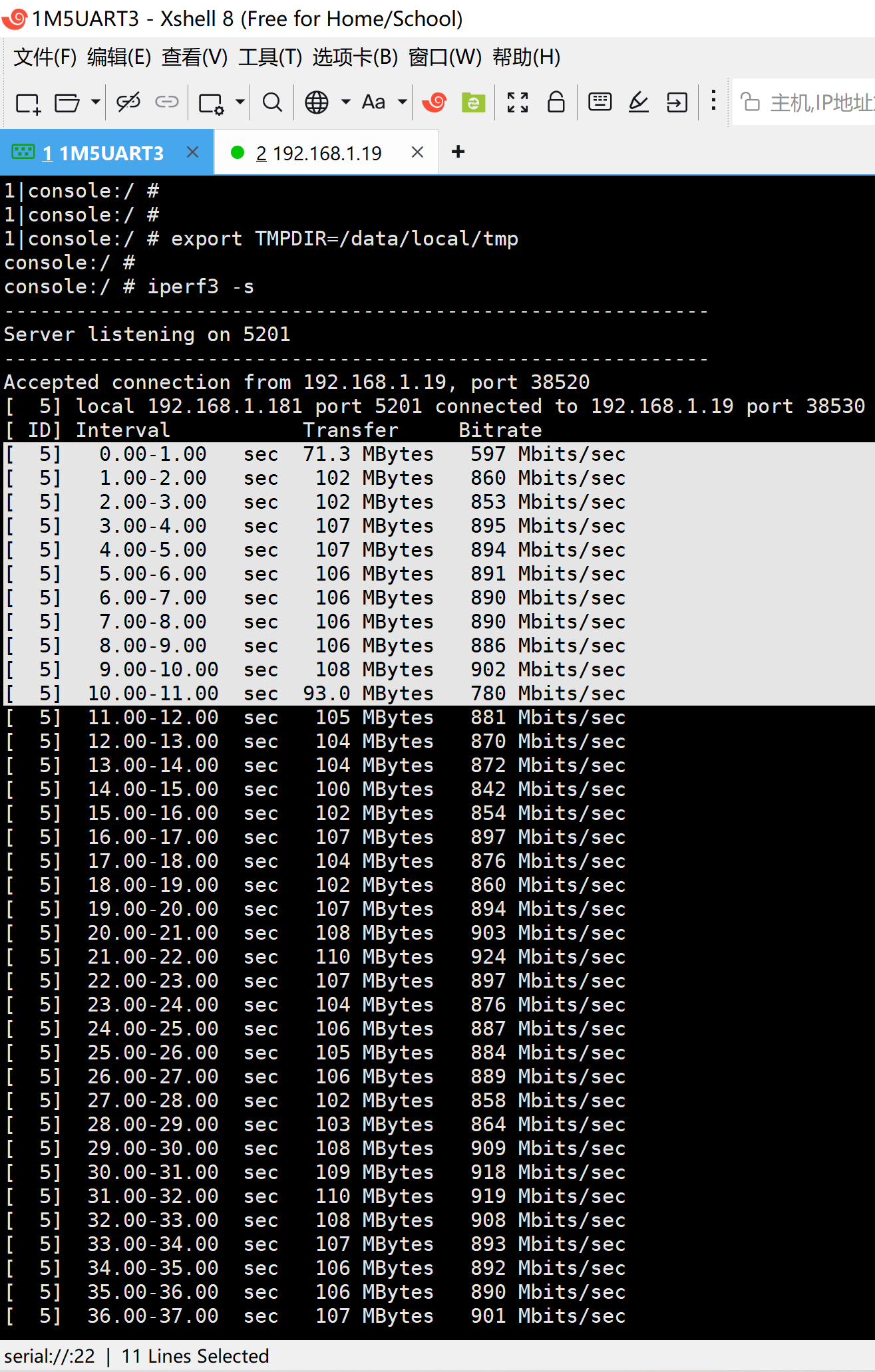
1|console:/ # export TMPDIR=/data/local/tmp
console:/ #
console:/ # iperf3 -s
Server listening on 5201
Accepted connection from 192.168.1.19, port 38520
5 local 192.168.1.181 port 5201 connected to 192.168.1.19 port 38530
ID Interval Transfer Bitrate
5 0.00-1.00 sec 71.3 MBytes 597 Mbits/sec
5 1.00-2.00 sec 102 MBytes 860 Mbits/sec
5 2.00-3.00 sec 102 MBytes 853 Mbits/sec
5 3.00-4.00 sec 107 MBytes 895 Mbits/sec
5 4.00-5.00 sec 107 MBytes 894 Mbits/sec
5 5.00-6.00 sec 106 MBytes 891 Mbits/sec
5 6.00-7.00 sec 106 MBytes 890 Mbits/sec
5 7.00-8.00 sec 106 MBytes 890 Mbits/sec
5 8.00-9.00 sec 106 MBytes 886 Mbits/sec
5 9.00-10.00 sec 108 MBytes 902 Mbits/sec
5 10.00-11.00 sec 93.0 MBytes 780 Mbits/sec
5 1790.00-1791.00 sec 108 MBytes 907 Mbits/sec
5 1791.00-1792.00 sec 104 MBytes 875 Mbits/sec
5 1792.00-1793.00 sec 103 MBytes 865 Mbits/sec
5 1793.00-1794.00 sec 101 MBytes 847 Mbits/sec
5 1794.00-1795.00 sec 93.5 MBytes 784 Mbits/sec
5 1795.00-1796.00 sec 99.3 MBytes 833 Mbits/sec
5 1796.00-1797.00 sec 104 MBytes 873 Mbits/sec
5 1797.00-1798.00 sec 98.9 MBytes 830 Mbits/sec
5 1798.00-1799.00 sec 105 MBytes 878 Mbits/sec
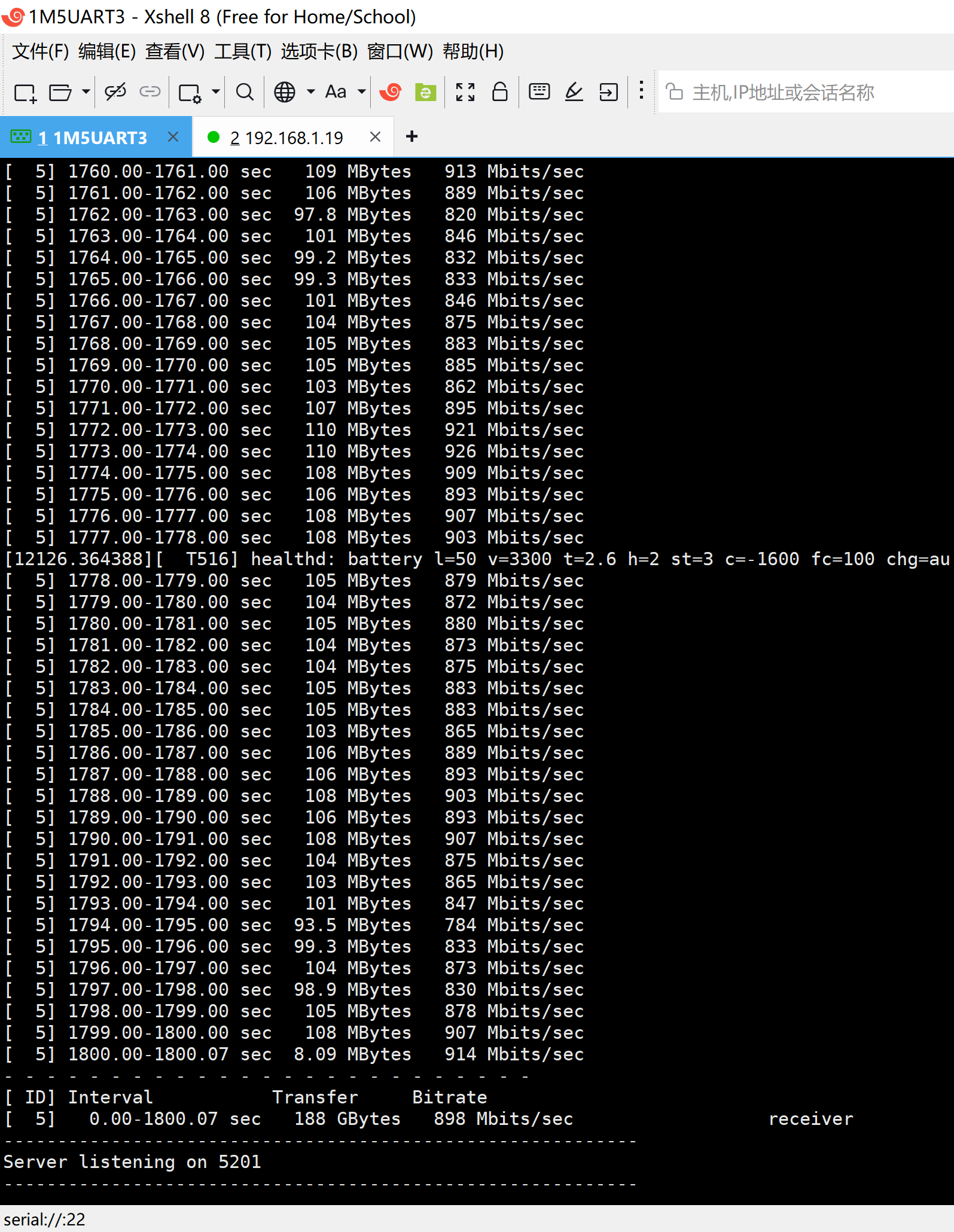
5 1799.00-1800.00 sec 108 MBytes 907 Mbits/sec
5 1800.00-1800.07 sec 8.09 MBytes 914 Mbits/sec
ID Interval Transfer Bitrate
5 0.00-1800.07 sec 188 GBytes 898 Mbits/sec receiver
Server listening on 5201
在Ubuntu上跑iperf3:
rootroot@rootroot-HP-245-14-inch-G10-Notebook-PC:~$
rootroot@rootroot-HP-245-14-inch-G10-Notebook-PC:~$
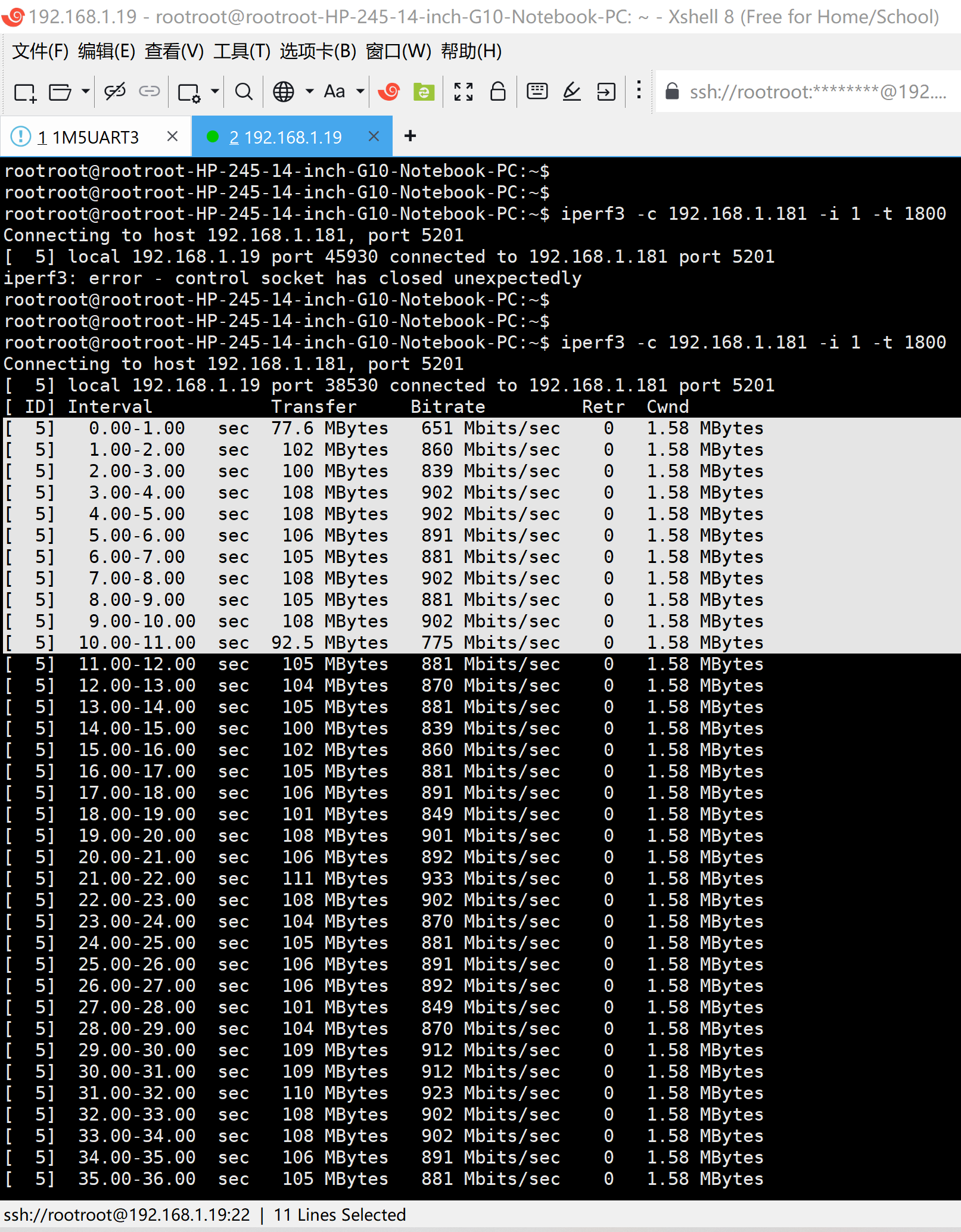
rootroot@rootroot-HP-245-14-inch-G10-Notebook-PC:~$ iperf3 -c 192.168.1.181 -i 1 -t 1800
Connecting to host 192.168.1.181, port 5201
5 local 192.168.1.19 port 45930 connected to 192.168.1.181 port 5201
iperf3: error - control socket has closed unexpectedly
rootroot@rootroot-HP-245-14-inch-G10-Notebook-PC:~$
rootroot@rootroot-HP-245-14-inch-G10-Notebook-PC:~
rootroot@rootroot-HP-245-14-inch-G10-Notebook-PC:\~ iperf3 -c 192.168.1.181 -i 1 -t 1800
Connecting to host 192.168.1.181, port 5201
5 local 192.168.1.19 port 38530 connected to 192.168.1.181 port 5201
ID Interval Transfer Bitrate Retr Cwnd
5 0.00-1.00 sec 77.6 MBytes 651 Mbits/sec 0 1.58 MBytes
5 1.00-2.00 sec 102 MBytes 860 Mbits/sec 0 1.58 MBytes
5 2.00-3.00 sec 100 MBytes 839 Mbits/sec 0 1.58 MBytes
5 3.00-4.00 sec 108 MBytes 902 Mbits/sec 0 1.58 MBytes
5 4.00-5.00 sec 108 MBytes 902 Mbits/sec 0 1.58 MBytes
5 5.00-6.00 sec 106 MBytes 891 Mbits/sec 0 1.58 MBytes
5 6.00-7.00 sec 105 MBytes 881 Mbits/sec 0 1.58 MBytes
5 7.00-8.00 sec 108 MBytes 902 Mbits/sec 0 1.58 MBytes
5 8.00-9.00 sec 105 MBytes 881 Mbits/sec 0 1.58 MBytes
5 9.00-10.00 sec 108 MBytes 902 Mbits/sec 0 1.58 MBytes
5 10.00-11.00 sec 92.5 MBytes 775 Mbits/sec 0 1.58 MBytes
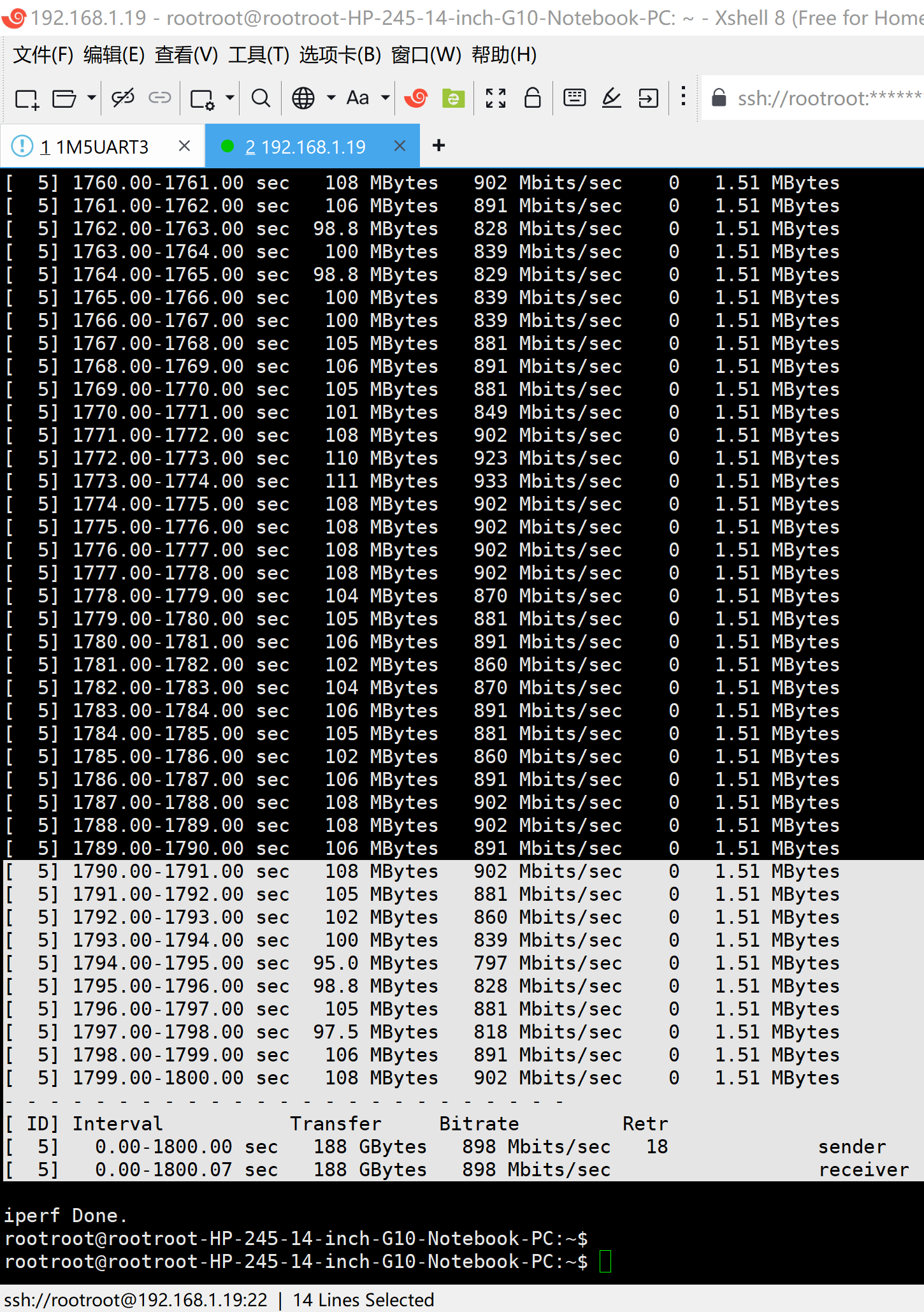
5 1790.00-1791.00 sec 108 MBytes 902 Mbits/sec 0 1.51 MBytes
5 1791.00-1792.00 sec 105 MBytes 881 Mbits/sec 0 1.51 MBytes
5 1792.00-1793.00 sec 102 MBytes 860 Mbits/sec 0 1.51 MBytes
5 1793.00-1794.00 sec 100 MBytes 839 Mbits/sec 0 1.51 MBytes
5 1794.00-1795.00 sec 95.0 MBytes 797 Mbits/sec 0 1.51 MBytes
5 1795.00-1796.00 sec 98.8 MBytes 828 Mbits/sec 0 1.51 MBytes
5 1796.00-1797.00 sec 105 MBytes 881 Mbits/sec 0 1.51 MBytes
5 1797.00-1798.00 sec 97.5 MBytes 818 Mbits/sec 0 1.51 MBytes
5 1798.00-1799.00 sec 106 MBytes 891 Mbits/sec 0 1.51 MBytes
5 1799.00-1800.00 sec 108 MBytes 902 Mbits/sec 0 1.51 MBytes
ID Interval Transfer Bitrate Retr
5 0.00-1800.00 sec 188 GBytes 898 Mbits/sec 18 sender
5 0.00-1800.07 sec 188 GBytes 898 Mbits/sec receiver
iperf Done.
rootroot@rootroot-HP-245-14-inch-G10-Notebook-PC:~$
参考资料:
https://blog.csdn.net/wb4916/article/details/158889690?spm=1011.2415.3001.5331
20260310解决瑞芯微原厂RK3576的Android14刷机后iperf3连接异常iperf3: error - control socket has closed unexpectedly
【基本可以确认iperf3需要一个临时目录】
console:/ # export TMPDIR=/data/local/tmp
console:/ # iperf3 -s
rootroot@rootroot-HP-245-14-inch-G10-Notebook-PC:~$ iperf3 -c 192.168.1.61 -i 1 -t 1800
https://blog.csdn.net/wb4916/article/details/159047633?spm=1011.2415.3001.5331
20260314解决瑞芯微原厂RK3576的Buildroot刷入万象奥科的开发板HD-RK3576-PI后适配以太网卡芯片YT8521【实测网速902Mbits/sec】