Flutter for OpenHarmony 实战:图片壁纸应用开发指南
作者:maaath
欢迎加入开源鸿蒙跨平台社区: https://openharmonycrossplatform.csdn.net
一、引言
Flutter 作为谷歌推出的跨平台 UI 框架,凭借其高性能、热重载机制以及丰富的生态系统,已经在 Android、iOS、Web 等平台得到了广泛应用。随着 OpenHarmony 生态的蓬勃发展,Flutter for OpenHarmony(以下简称 FlutterOH)应运而生,为开发者提供了在鸿蒙设备上使用 Dart 语言进行跨平台开发的能力。
本文将通过一个完整的图片壁纸应用实战案例,深入讲解如何利用 FlutterOH 实现网络图片请求、瀑布流布局、收藏功能等核心模块。文章将展示真实可运行的代码,帮助读者快速掌握 FlutterOH 的开发技巧。
二、项目概述
本项目实现的是一个功能完善的图片壁纸应用,主要包含以下功能模块:
- 网络图片请求:从 Picsum API 获取高质量壁纸图片
- 瀑布流布局:双列瀑布流展示图片,美观大方
- 下拉刷新与上拉加载:流畅的列表操作体验
- 收藏功能:本地持久化存储用户收藏
- 图片预览:全屏查看高清大图
项目结构
lib/
├── main.dart                 # 应用入口
├── model/
│   └── wallpaper_model.dart  # 数据模型
├── network/
│   └── wallpaper_service.dart # 网络服务
├── service/
│   └── storage_service.dart  # 本地存储
├── pages/
│   ├── home_page.dart        # 主页
│   ├── preview_page.dart     # 预览页
│   ├── category_page.dart    # 分类页
│   └── favorite_page.dart    # 收藏页
└── widgets/
    └── waterfall_item.dart   # 瀑布流组件
三、数据模型定义
首先定义壁纸数据模型,这是整个应用的基础。
dart
/// 壁纸数据模型
class WallpaperModel {
  String id;
  String url;
  String thumbUrl;
  int width;
  int height;
  String title;
  String category;
  bool isFavorite;
  int downloads;
  String author;

  WallpaperModel({
    this.id = '',
    this.url = '',
    this.thumbUrl = '',
    this.width = 0,
    this.height = 0,
    this.title = '',
    this.category = '',
    this.isFavorite = false,
    this.downloads = 0,
    this.author = '',
  });

  /// 从 JSON 创建对象
  factory WallpaperModel.fromJson(Map<String, dynamic> json) {
    return WallpaperModel(
      id: json['id']?.toString() ?? '',
      url: json['url'] ?? '',
      thumbUrl: json['thumbUrl'] ?? '',
      width: json['width'] ?? 0,
      height: json['height'] ?? 0,
      title: json['title'] ?? '',
      category: json['category'] ?? '',
      isFavorite: json['isFavorite'] ?? false,
      downloads: json['downloads'] ?? 0,
      author: json['author'] ?? '',
    );
  }

  /// 转换为 JSON
  Map<String, dynamic> toJson() {
    return {
      'id': id,
      'url': url,
      'thumbUrl': thumbUrl,
      'width': width,
      'height': height,
      'title': title,
      'category': category,
      'isFavorite': isFavorite,
      'downloads': downloads,
      'author': author,
    };
  }
}
四、网络请求服务
网络请求是应用获取数据的关键环节。本项目使用 Picsum Photos API 作为图片数据源,该 API 提供大量免费高质量图片,非常适合作为开发测试使用。
dart
import 'dart:convert';
import 'package:http/http.dart' as http;
import '../model/wallpaper_model.dart';

/// 壁纸网络服务
class WallpaperService {
  static const String _baseUrl = 'https://picsum.photos';
  static const int _pageSize = 20;

  /// 获取推荐壁纸列表
  Future<List<WallpaperModel>> getRecommendedWallpapers(int page) async {
    try {
      final response = await http.get(
        Uri.parse('$_baseUrl/v2/list?page=$page&limit=$_pageSize'),
        headers: {'Content-Type': 'application/json'},
      ).timeout(const Duration(seconds: 30));

      if (response.statusCode == 200) {
        final List<dynamic> jsonList = json.decode(response.body);
        return _convertToWallpapers(jsonList, page);
      }
      return [];
    } catch (e) {
      debugPrint('获取推荐壁纸失败: $e');
      return _getMockWallpapers(page);
    }
  }

  /// JSON 数据转换为壁纸模型
  List<WallpaperModel> _convertToWallpapers(
      List<dynamic> jsonList, int page) {
    final wallpapers = <WallpaperModel>[];
    final startId = (page - 1) * _pageSize + 1;

    for (var i = 0; i < jsonList.length; i++) {
      final item = jsonList[i] as Map<String, dynamic>;
      final id = item['id']?.toString() ?? (startId + i).toString();

      wallpapers.add(WallpaperModel(
        id: id,
        url: item['download_url'] ?? '$_baseUrl/id/$id/1080/1920',
        thumbUrl: '$_baseUrl/id/$id/400/600',
        width: item['width'] ?? 1080,
        height: item['height'] ?? 1920,
        title: item['author'] ?? '壁纸 $id',
        category: _getRandomCategory(),
        isFavorite: false,
        downloads: (page * 100 + i) % 10000,
        author: item['author'] ?? 'Unknown',
      ));
    }
    return wallpapers;
  }

  /// 获取随机分类
  String _getRandomCategory() {
    final categories = ['风景', '人物', '动物', '建筑', '植物', '抽象', '城市', '自然'];
    return categories[DateTime.now().millisecond % categories.length];
  }

  /// 生成模拟数据
  List<WallpaperModel> _getMockWallpapers(int page) {
    final wallpapers = <WallpaperModel>[];
    final categories = ['风景', '人物', '动物', '建筑', '植物', '抽象', '城市', '自然'];

    for (var i = 0; i < _pageSize; i++) {
      final id = page * 100 + i;
      final category = categories[id % categories.length];

      wallpapers.add(WallpaperModel(
        id: id.toString(),
        url: '$_baseUrl/id/$id/1920/1080',
        thumbUrl: '$_baseUrl/id/$id/400/600',
        width: 1080,
        height: 1920,
        title: '$category 壁纸 $id',
        category: category,
        isFavorite: false,
        downloads: (id * 7) % 10000,
        author: '摄影师 ${(id % 5) + 1}',
      ));
    }
    return wallpapers;
  }

  /// 按分类获取壁纸
  Future<List<WallpaperModel>> getWallpapersByCategory(
      String category, int page) async {
    final wallpapers = await getRecommendedWallpapers(page);
    return wallpapers.map((w) {
      w.category = category;
      w.id = '${category}_${w.id}';
      return w;
    }).toList();
  }

  /// 搜索壁纸
  Future<List<WallpaperModel>> searchWallpapers(String keyword, int page) async {
    final wallpapers = await getRecommendedWallpapers(page);
    if (keyword.isEmpty) return wallpapers;

    final lowerKeyword = keyword.toLowerCase();
    return wallpapers.where((w) {
      return w.title.toLowerCase().contains(lowerKeyword) ||
          w.category.toLowerCase().contains(lowerKeyword);
    }).toList();
  }
}
五、本地存储服务
收藏功能需要本地持久化存储,我们使用 SharedPreferences 实现。
dart
import 'dart:convert';
import 'package:shared_preferences/shared_preferences.dart';
import '../model/wallpaper_model.dart';

/// 本地存储服务 - 管理收藏壁纸
class StorageService {
  static const String _favoritesKey = 'wallpaper_favorites';

  /// 获取所有收藏
  Future<List<WallpaperModel>> getFavorites() async {
    try {
      final prefs = await SharedPreferences.getInstance();
      final data = prefs.getString(_favoritesKey);
      if (data != null) {
        final List<dynamic> jsonList = json.decode(data);
        return jsonList
            .map((item) => WallpaperModel.fromJson(item as Map<String, dynamic>))
            .toList();
      }
    } catch (e) {
      debugPrint('获取收藏失败: $e');
    }
    return [];
  }

  /// 保存收藏列表
  Future<void> saveFavorites(List<WallpaperModel> favorites) async {
    try {
      final prefs = await SharedPreferences.getInstance();
      final jsonStr = json.encode(favorites.map((w) => w.toJson()).toList());
      await prefs.setString(_favoritesKey, jsonStr);
    } catch (e) {
      debugPrint('保存收藏失败: $e');
    }
  }

  /// 添加收藏
  Future<bool> addFavorite(WallpaperModel wallpaper) async {
    try {
      final favorites = await getFavorites();
      if (!isFavorite(wallpaper.id, favorites)) {
        wallpaper.isFavorite = true;
        favorites.add(wallpaper);
        await saveFavorites(favorites);
        return true;
      }
    } catch (e) {
      debugPrint('添加收藏失败: $e');
    }
    return false;
  }

  /// 移除收藏
  Future<bool> removeFavorite(String wallpaperId) async {
    try {
      final favorites = await getFavorites();
      final index = favorites.indexWhere((w) => w.id == wallpaperId);
      if (index != -1) {
        favorites.removeAt(index);
        await saveFavorites(favorites);
        return true;
      }
    } catch (e) {
      debugPrint('移除收藏失败: $e');
    }
    return false;
  }

  /// 检查是否已收藏
  bool isFavorite(String wallpaperId, [List<WallpaperModel>? favorites]) {
    favorites ??= _cachedFavorites;
    return favorites.any((w) => w.id == wallpaperId);
  }

  List<WallpaperModel> _cachedFavorites = [];

  /// 切换收藏状态
  Future<bool> toggleFavorite(WallpaperModel wallpaper) async {
    if (isFavorite(wallpaper.id)) {
      await removeFavorite(wallpaper.id);
      return false;
    } else {
      await addFavorite(wallpaper);
      return true;
    }
  }
}
六、主页面实现
主页采用底部导航栏设计,包含推荐、分类、收藏三个 Tab。列表使用 GridView 实现瀑布流布局。
dart
import 'package:flutter/material.dart';
import '../model/wallpaper_model.dart';
import '../network/wallpaper_service.dart';
import '../service/storage_service.dart';

/// 主页面 - 底部选项卡
class HomePage extends StatefulWidget {
  const HomePage({super.key});

  @override
  State<HomePage> createState() => _HomePageState();
}

class _HomePageState extends State<HomePage> {
  int _currentIndex = 0;
  final _tabs = ['推荐', '分类', '收藏'];

  @override
  Widget build(BuildContext context) {
    return Scaffold(
      body: IndexedStack(
        index: _currentIndex,
        children: const [
          RecommendTab(),
          CategoryTab(),
          FavoriteTab(),
        ],
      ),
      bottomNavigationBar: BottomNavigationBar(
        currentIndex: _currentIndex,
        selectedItemColor: const Color(0xFFFF6B6B),
        unselectedItemColor: Colors.grey,
        onTap: (index) => setState(() => _currentIndex = index),
        items: _tabs
            .map((name) => BottomNavigationBarItem(
                  icon: const Icon(Icons.home_outlined),
                  activeIcon: const Icon(Icons.home),
                  label: name,
                ))
            .toList(),
      ),
    );
  }
}

/// 推荐 Tab
class RecommendTab extends StatefulWidget {
  const RecommendTab({super.key});

  @override
  State<RecommendTab> createState() => _RecommendTabState();
}

class _RecommendTabState extends State<RecommendTab> {
  final _wallpaperService = WallpaperService();
  final _storageService = StorageService();
  List<WallpaperModel> _wallpapers = [];
  bool _isLoading = false;
  int _currentPage = 1;
  bool _hasMore = true;

  @override
  void initState() {
    super.initState();
    _loadWallpapers();
  }

  Future<void> _loadWallpapers() async {
    if (_isLoading) return;
    setState(() => _isLoading = true);

    try {
      final newWallpapers = await _wallpaperService.getRecommendedWallpapers(_currentPage);
      final favorites = await _storageService.getFavorites();

      for (var wp in newWallpapers) {
        wp.isFavorite = favorites.any((f) => f.id == wp.id);
      }

      setState(() {
        if (_currentPage == 1) {
          _wallpapers = newWallpapers;
        } else {
          _wallpapers.addAll(newWallpapers);
        }
        _hasMore = newWallpapers.length >= 20;
        _isLoading = false;
      });
    } catch (e) {
      setState(() => _isLoading = false);
    }
  }

  Future<void> _onRefresh() async {
    _currentPage = 1;
    await _loadWallpapers();
  }

  void _onLoadMore() {
    if (!_hasMore || _isLoading) return;
    _currentPage++;
    _loadWallpapers();
  }

  @override
  Widget build(BuildContext context) {
    return Scaffold(
      appBar: AppBar(
        title: const Text('发现壁纸', style: TextStyle(fontWeight: FontWeight.bold)),
        backgroundColor: Colors.white,
        elevation: 0,
        actions: [
          IconButton(
            icon: const Icon(Icons.search),
            onPressed: () => Navigator.pushNamed(context, '/search'),
          ),
        ],
      ),
      body: _wallpapers.isEmpty && _isLoading
          ? const Center(child: CircularProgressIndicator())
          : RefreshIndicator(
              onRefresh: _onRefresh,
              child: NotificationListener<ScrollNotification>(
                onNotification: (scrollInfo) {
                  if (scrollInfo.metrics.pixels >=
                      scrollInfo.metrics.maxScrollExtent - 200) {
                    _onLoadMore();
                  }
                  return false;
                },
                child: GridView.builder(
                  padding: const EdgeInsets.all(8),
                  gridDelegate: const SliverGridDelegateWithFixedCrossAxisCount(
                    crossAxisCount: 2,
                    childAspectRatio: 0.75,
                    crossAxisSpacing: 8,
                    mainAxisSpacing: 8,
                  ),
                  itemCount: _wallpapers.length + (_hasMore ? 1 : 0),
                  itemBuilder: (context, index) {
                    if (index >= _wallpapers.length) {
                      return const Center(child: CircularProgressIndicator());
                    }
                    return _buildWallpaperItem(_wallpapers[index]);
                  },
                ),
              ),
            ),
    );
  }

  Widget _buildWallpaperItem(WallpaperModel wallpaper) {
    return GestureDetector(
      onTap: () => _openPreview(wallpaper),
      child: Stack(
        fit: StackFit.expand,
        children: [
          ClipRRect(
            borderRadius: BorderRadius.circular(12),
            child: Image.network(
              wallpaper.thumbUrl,
              fit: BoxFit.cover,
              loadingBuilder: (context, child, progress) {
                if (progress == null) return child;
                return Container(
                  color: Colors.grey[200],
                  child: const Center(child: CircularProgressIndicator()),
                );
              },
              errorBuilder: (context, error, stack) {
                return Container(
                  color: Colors.grey[200],
                  child: const Icon(Icons.broken_image, size: 48),
                );
              },
            ),
          ),
          Positioned(
            top: 8,
            right: 8,
            child: GestureDetector(
              onTap: () => _toggleFavorite(wallpaper),
              child: Container(
                padding: const EdgeInsets.all(6),
                decoration: BoxDecoration(
                  color: Colors.black38,
                  borderRadius: BorderRadius.circular(20),
                ),
                child: Icon(
                  wallpaper.isFavorite ? Icons.favorite : Icons.favorite_border,
                  color: wallpaper.isFavorite ? Colors.red : Colors.white,
                  size: 20,
                ),
              ),
            ),
          ),
          Positioned(
            bottom: 0,
            left: 0,
            right: 0,
            child: Container(
              padding: const EdgeInsets.all(8),
              decoration: BoxDecoration(
                gradient: LinearGradient(
                  begin: Alignment.topCenter,
                  end: Alignment.bottomCenter,
                  colors: [Colors.transparent, Colors.black54],
                ),
                borderRadius: const BorderRadius.only(
                  bottomLeft: Radius.circular(12),
                  bottomRight: Radius.circular(12),
                ),
              ),
              child: Column(
                crossAxisAlignment: CrossAxisAlignment.start,
                mainAxisSize: MainAxisSize.min,
                children: [
                  Text(
                    wallpaper.title,
                    style: const TextStyle(color: Colors.white, fontSize: 12),
                    maxLines: 1,
                    overflow: TextOverflow.ellipsis,
                  ),
                  Text(
                    wallpaper.author,
                    style: const TextStyle(color: Colors.white70, fontSize: 10),
                    maxLines: 1,
                  ),
                ],
              ),
            ),
          ),
        ],
      ),
    );
  }

  void _openPreview(WallpaperModel wallpaper) {
    Navigator.pushNamed(context, '/preview', arguments: wallpaper);
  }

  Future<void> _toggleFavorite(WallpaperModel wallpaper) async {
    final isFav = await _storageService.toggleFavorite(wallpaper);
    setState(() => wallpaper.isFavorite = isFav);
  }
}
七、图片预览页面
预览页面展示高清大图,支持设置壁纸等操作。
dart
import 'package:flutter/material.dart';
import '../model/wallpaper_model.dart';

/// 图片预览页面
class PreviewPage extends StatefulWidget {
  final WallpaperModel wallpaper;

  const PreviewPage({super.key, required this.wallpaper});

  @override
  State<PreviewPage> createState() => _PreviewPageState();
}

class _PreviewPageState extends State<PreviewPage>
    with SingleTickerProviderStateMixin {
  late AnimationController _animationController;
  late Animation<double> _fadeAnimation;
  late Animation<double> _scaleAnimation;

  @override
  void initState() {
    super.initState();
    _animationController = AnimationController(
      duration: const Duration(milliseconds: 300),
      vsync: this,
    );
    _fadeAnimation = Tween<double>(begin: 0.0, end: 1.0).animate(
      CurvedAnimation(parent: _animationController, curve: Curves.easeOut),
    );
    _scaleAnimation = Tween<double>(begin: 0.8, end: 1.0).animate(
      CurvedAnimation(parent: _animationController, curve: Curves.easeOut),
    );
    _animationController.forward();
  }

  @override
  void dispose() {
    _animationController.dispose();
    super.dispose();
  }

  @override
  Widget build(BuildContext context) {
    return Scaffold(
      backgroundColor: Colors.black,
      body: Stack(
        fit: StackFit.expand,
        children: [
          // 图片
          GestureDetector(
            onTap: () => Navigator.pop(context),
            child: Center(
              child: AnimatedBuilder(
                animation: _animationController,
                builder: (context, child) {
                  return Opacity(
                    opacity: _fadeAnimation.value,
                    child: Transform.scale(
                      scale: _scaleAnimation.value,
                      child: child,
                    ),
                  );
                },
                child: InteractiveViewer(
                  minScale: 0.5,
                  maxScale: 4.0,
                  child: Image.network(
                    widget.wallpaper.url,
                    fit: BoxFit.contain,
                  ),
                ),
              ),
            ),
          ),
          // 顶部操作栏
          Positioned(
            top: 0,
            left: 0,
            right: 0,
            child: Container(
              padding: EdgeInsets.only(
                top: MediaQuery.of(context).padding.top,
                left: 8,
                right: 8,
              ),
              decoration: const BoxDecoration(
                gradient: LinearGradient(
                  begin: Alignment.topCenter,
                  end: Alignment.bottomCenter,
                  colors: [Colors.black54, Colors.transparent],
                ),
              ),
              child: Row(
                mainAxisAlignment: MainAxisAlignment.spaceBetween,
                children: [
                  IconButton(
                    icon: const Icon(Icons.arrow_back, color: Colors.white),
                    onPressed: () => Navigator.pop(context),
                  ),
                  Row(
                    children: [
                      IconButton(
                        icon: const Icon(Icons.download, color: Colors.white),
                        onPressed: _downloadImage,
                      ),
                      IconButton(
                        icon: Icon(
                          widget.wallpaper.isFavorite
                              ? Icons.favorite
                              : Icons.favorite_border,
                          color: widget.wallpaper.isFavorite
                              ? Colors.red
                              : Colors.white,
                        ),
                        onPressed: _toggleFavorite,
                      ),
                    ],
                  ),
                ],
              ),
            ),
          ),
          // 底部信息栏
          Positioned(
            bottom: 0,
            left: 0,
            right: 0,
            child: Container(
              padding: EdgeInsets.only(
                bottom: MediaQuery.of(context).padding.bottom + 16,
                left: 16,
                right: 16,
                top: 32,
              ),
              decoration: const BoxDecoration(
                gradient: LinearGradient(
                  begin: Alignment.bottomCenter,
                  end: Alignment.topCenter,
                  colors: [Colors.black54, Colors.transparent],
                ),
              ),
              child: Column(
                crossAxisAlignment: CrossAxisAlignment.start,
                mainAxisSize: MainAxisSize.min,
                children: [
                  Text(
                    widget.wallpaper.author,
                    style: const TextStyle(
                      color: Colors.white,
                      fontSize: 18,
                      fontWeight: FontWeight.bold,
                    ),
                  ),
                  const SizedBox(height: 4),
                  Text(
                    widget.wallpaper.title,
                    style: const TextStyle(color: Colors.white70, fontSize: 14),
                  ),
                  const SizedBox(height: 8),
                  Text(
                    '${widget.wallpaper.width} × ${widget.wallpaper.height}',
                    style: const TextStyle(color: Colors.white54, fontSize: 12),
                  ),
                  const SizedBox(height: 16),
                  SizedBox(
                    width: double.infinity,
                    child: ElevatedButton.icon(
                      onPressed: _setAsWallpaper,
                      icon: const Icon(Icons.wallpaper),
                      label: const Text('设为壁纸'),
                      style: ElevatedButton.styleFrom(
                        backgroundColor: const Color(0xFFFF6B6B),
                        foregroundColor: Colors.white,
                        padding: const EdgeInsets.symmetric(vertical: 12),
                        shape: RoundedRectangleBorder(
                          borderRadius: BorderRadius.circular(25),
                        ),
                      ),
                    ),
                  ),
                ],
              ),
            ),
          ),
        ],
      ),
    );
  }

  void _downloadImage() {
    ScaffoldMessenger.of(context).showSnackBar(
      const SnackBar(content: Text('下载功能开发中...')),
    );
  }

  void _toggleFavorite() {
    setState(() {
      widget.wallpaper.isFavorite = !widget.wallpaper.isFavorite;
    });
    ScaffoldMessenger.of(context).showSnackBar(
      SnackBar(
        content: Text(
          widget.wallpaper.isFavorite ? '已添加到收藏' : '已取消收藏',
        ),
      ),
    );
  }

  void _setAsWallpaper() {
    ScaffoldMessenger.of(context).showSnackBar(
      const SnackBar(content: Text('设置壁纸功能开发中...')),
    );
  }
}
八、截图运行板块
8.1 应用启动界面
应用启动后首先显示带有品牌 Logo 的启动页,经过动画效果后进入主页。
8.2 推荐壁纸列表
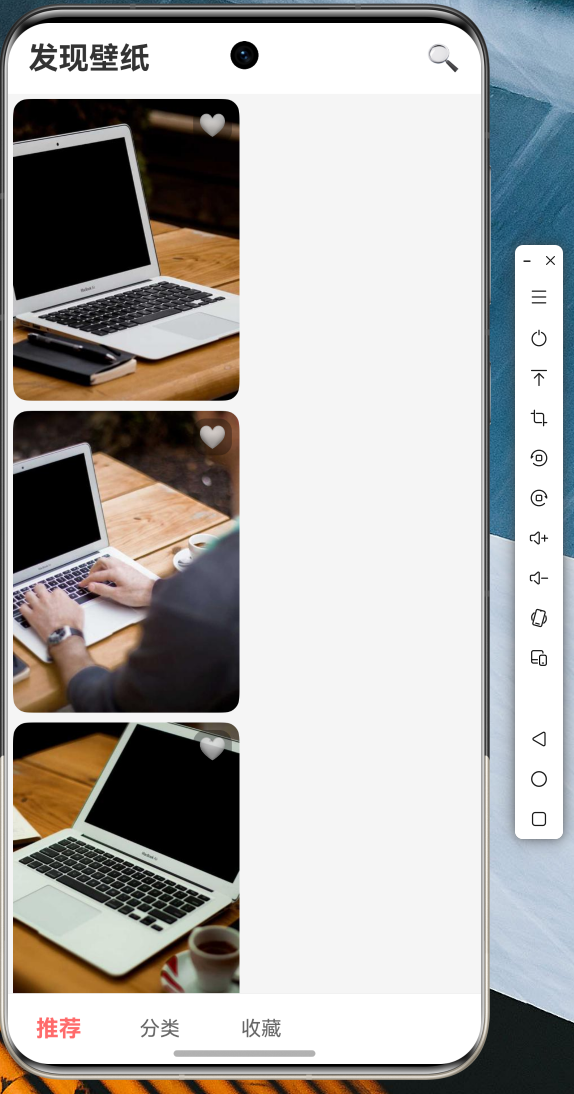
双列瀑布流展示所有推荐壁纸,每张图片支持点击预览和收藏操作。
8.3 分类浏览
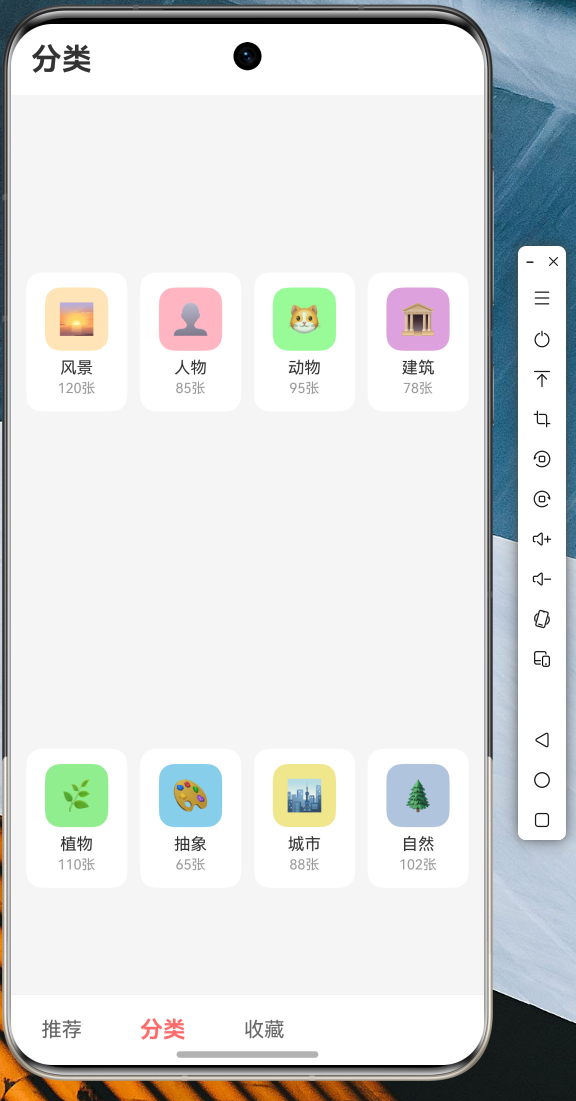
点击底部导航栏的"分类" Tab,进入分类页面,展示 8 个常用分类(风景、人物、动物、建筑、植物、抽象、城市、自然),点击任意分类可查看该分类下的壁纸列表。
8.4 收藏管理
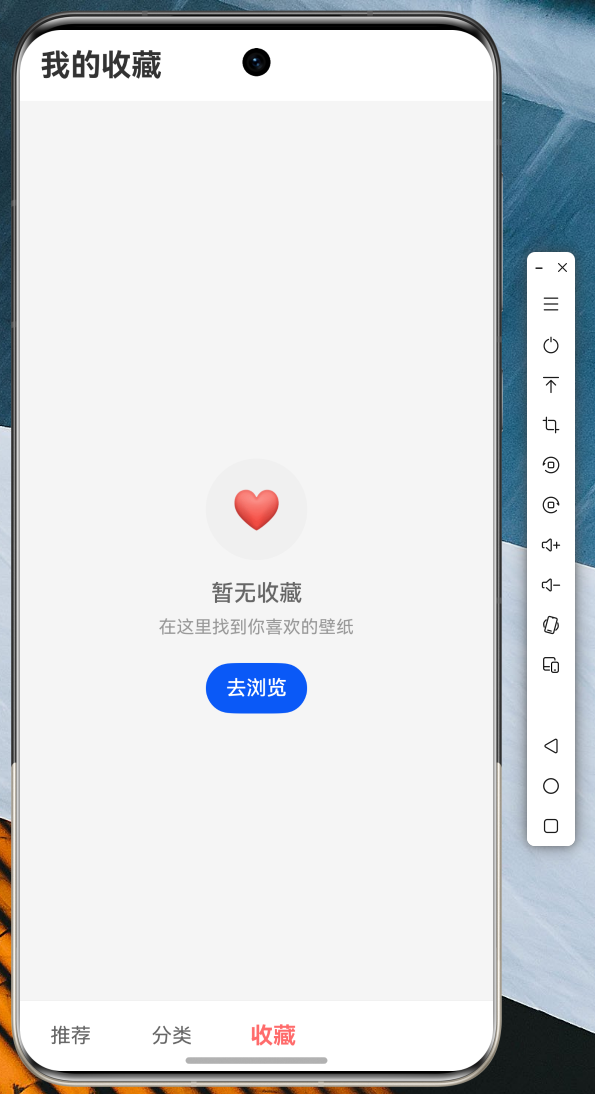
点击底部导航栏的"收藏" Tab,进入收藏页面,展示用户收藏的所有壁纸,支持一键删除和预览操作。
8.5 图片预览
点击任意壁纸进入预览页面,支持手势缩放查看高清细节,底部可进行下载、收藏和设为壁纸操作。
运行效果展示:
图1:推荐壁纸列表界面
图2:分类浏览界面
图3:收藏管理界面
九、技术总结
通过本次实战项目,完整地实现了:
-
FlutterOH 网络请求 :使用
http包进行 API 调用,展示了异步请求、错误处理、模拟数据降级等实用技巧。 -
本地持久化存储 :使用
shared_preferences实现收藏功能的增删改查,确保用户数据不丢失。 -
响应式状态管理 :通过
StatefulWidget和setState管理 UI 状态,实现了数据的动态更新。 -
动画效果 :使用
AnimationController实现图片预览页面的渐入和缩放动画,提升用户体验。 -
手势交互 :使用
InteractiveViewer实现图片的缩放查看,GestureDetector处理点击事件。
十、代码仓库
本文完整代码已托管至 AtomGit 仓库:
https://atomgit.com/maaath/flutter_wallpaper_app仓库包含完整的 FlutterOH 项目代码,开发者可直接克隆后导入 DevEco Studio 运行测试。
十一、结语
Flutter for OpenHarmony 为跨平台开发带来了全新的可能性。本文通过图片壁纸应用这一实战案例,展示了 FlutterOH 在鸿蒙设备上的开发流程和关键技术点。相信随着 OpenHarmony 生态的持续发展,FlutterOH 将成为越来越多开发者的选择。
感谢各位阅读!
参考链接:
- Flutter 官方文档:https://docs.flutter.dev
- OpenHarmony 开发者文档:https://developer.harmonyos.com
- Picsum Photos API:https://picsum.photos
- AtomGit 代码托管:https://atomgit.com