前面我们学习如何使用 Mybatis 框架来操作数据库,可以发现相比于 JDBC 来说,Mybatis 相当的简单,与 JDBC 繁琐的步骤不同,Mybatis 只需要创建一个接口类,然后可以选择使用注解的方式或者XML的方式来实现该接口类中的方法即可,后续Service层的代码只需要调用mapper接口类中的方法即可实现对应的SQL语句的功能。相比于XML的方式,注解的实现可谓是简单易上手,并且可读性也很好,但是XML也有它自己的好处,现在我们就来学习哪种场景下使用XML更好
我们在某些平台注册账号时,可能会遇到下面这种情况:有些参数必填,有些参数非必填。
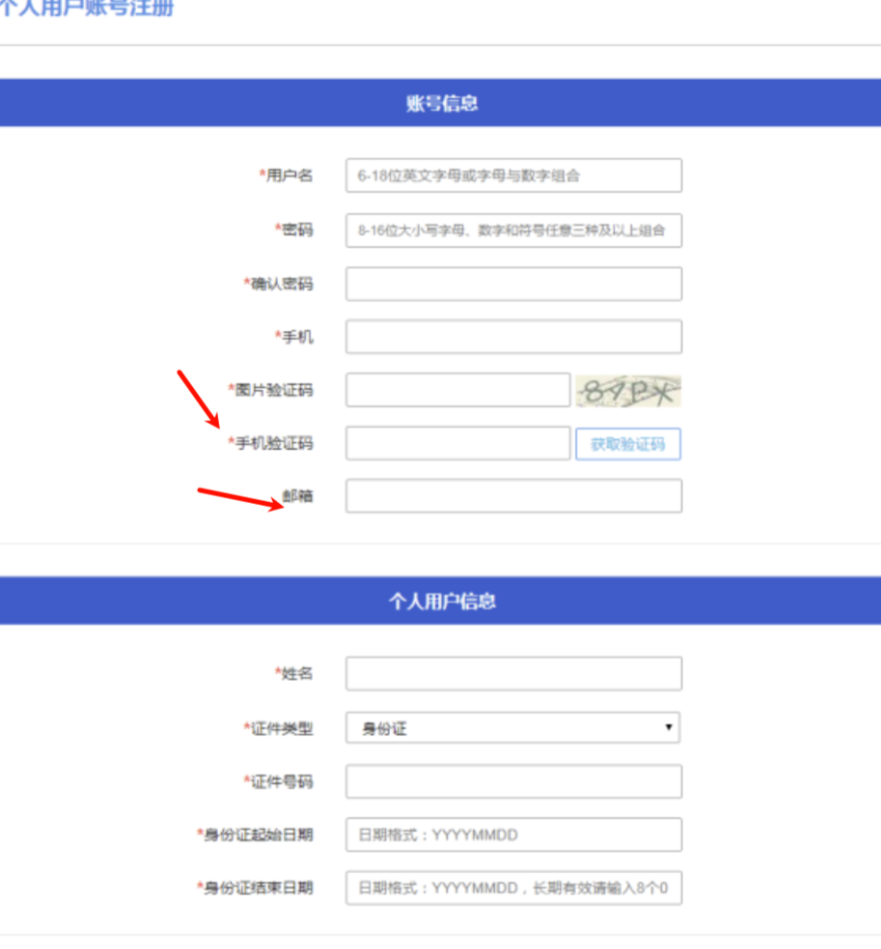
这种如何使用SQL语句实现呢?难道我们需要创建多个接口方法,每个接口方法都代表某些参数必填,某些参数非必填?如果这样实现的话,虽然最终的效果是一致的,但肯定不符合我们预期,我们希望的是一个方法就可以搞定全部了。
当我们遇到上面这种情况时,就需要使用到 动态SQL 了,下面我们就来学习 动态SQL。
<if> 标签
最开始我们想要实现的必传参数和非必传参数,就可以通过 if 标签来实现。
// if标签
Integer insertUserInfo(UserInfo userInfo);
<insert id="insertUserInfo">
insert into user_info (
username,
password,
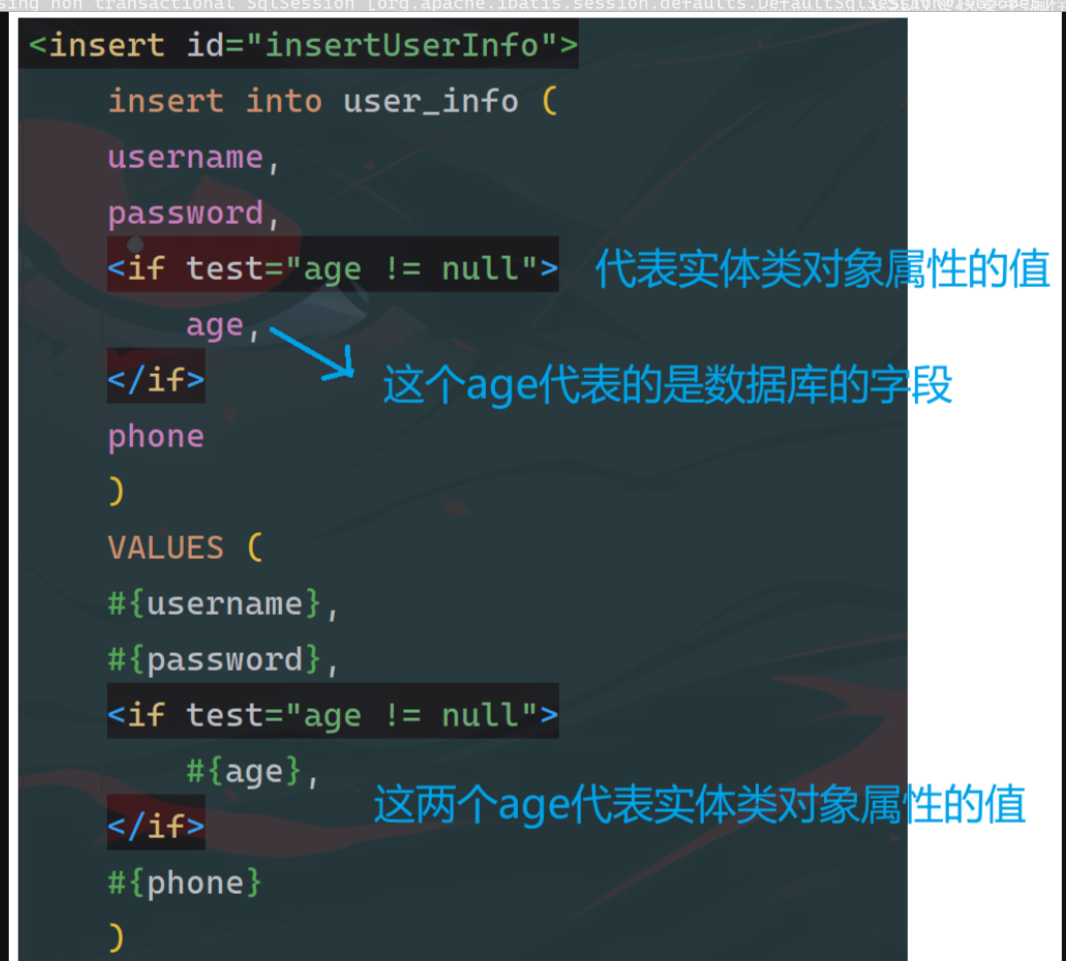
<if test="age != null">
age,
</if>
phone
)
VALUES (
#{username},
#{password},
<if test="age != null">
#{age},
</if>
#{phone}
)
</insert>
@Test
void insertUserInfo() {
UserInfo userInfo = new UserInfo();
userInfo.setUsername("admin");
userInfo.setPassword("admin");
userInfo.setPhone("123456789");
userInfoMapperXML2.insertUserInfo(userInfo);
}

注意:
1、键 和 值 要相互对应上,键里面设置了 if 标签,那么值也要设置 if 标签。
2、两个 if 标签内部的 test 值 和 #{} 内部的值,虽然在字面值上是相同的,但是两者所代表的含义完全不同
上述的 if 标签并不能完全解决 最开始的非必传参数和必传参数的问题,因为如果我们把phone字段也使用 if 标签包裹,并且最终phone字段不传参数的话,拼接出来的SQL语句是存在问题的:

从拼接出来的SQL语句不难看出错误的原因,是因为多了一个逗号。
<trim> 标签
trim 标签 有下面四个属性:
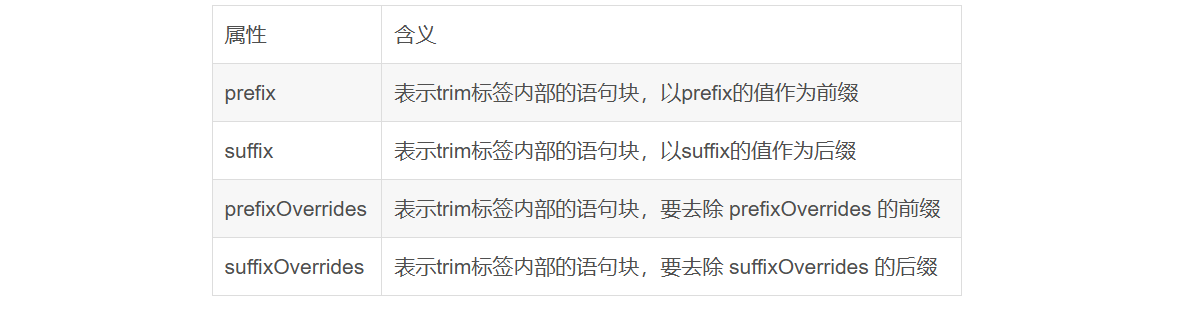
这里我们要解决的问题是去除 ,后缀。只需要将整体的语句块放置到 trim 标签内部,并将 , 赋值给 suffixOverrides 属性即可:
<insert id="insertUserInfo">
insert into user_info (
<trim suffixOverrides=",">
username,
password,
<if test="age != null">
age,
</if>
<if test="phone != null">
phone
</if>
</trim>
)
VALUES (
<trim suffixOverrides=",">
#{username},
#{password},
<if test="age != null">
#{age},
</if>
<if test="phone != null">
#{phone}
</if>
</trim>
)
</insert>
同样我们还可以把 ( 和 ) 作为 前缀 和 后缀给加上:
<insert id="insertUserInfo">
insert into user_info
<trim prefix="(" suffix=")" suffixOverrides=",">
username,
password,
<if test="age != null">
age,
</if>
<if test="phone != null">
phone
</if>
</trim>
VALUES
<trim prefix="(" suffix=")" suffixOverrides=",">
#{username},
#{password},
<if test="age != null">
#{age},
</if>
<if test="phone != null">
#{phone}
</if>
</trim>
</insert>
<where> 标签
在某些场景下,可能我们并不会根据任何条件来查询,也可能我们会通过一到两个条件来查询,这种情况下,如果我们还是使用 if 标签的话,根本就行不通,因为最外层的 where 关键字还是会保留,最终拼接出的SQL语句还是会报错,因此这里就需要用到一个新标签:where 标签。
<select id="selectUserInfo" resultType="com.springboot.mybatisdemo2.pojo.UserInfo">
<!-- 下面的代码虽然整体上没啥问题,但是当 username 和 password 都为null时,
where关键字会多余 -->
select * from user_info
where
<trim prefixOverrides="and" suffixOverrides="and">
<if test="username != null">
username = #{username}
</if>
and
<if test="password != null">
password = #{password}
</if>
</trim>
</select>
使用 where 标签 改编后:
<select id="selectUserInfo" resultType="com.springboot.mybatisdemo2.pojo.UserInfo">
select * from user_info
<!-- where标签会自动去除 前缀 and、or,
并且当 if 标签没有任何返回值时,不会添加where关键字 -->
<where>
<if test="username != null">
and username = #{username}
</if>
<if test="password != null">
and password = #{password}
</if>
</where>
</select>
<set> 标签
同样,在更新数据时,也可以提供给用户必传参数和非必传参数
// set标签
Integer updateUserInfo(UserInfo userInfo);
<update id="updateUserInfo">
update user_info
set
<trim suffixOverrides=",">
<if test="username != null">
username = #{username},
</if>
<if test="password != null">
password = #{password}
</if>
</trim>
where id = #{id}
</update>
@Test
void updateUserInfo() {
UserInfo userInfo = new UserInfo();
userInfo.setId(43 L);
userInfoMapperXML2.updateUserInfo(userInfo);
}

当修改的参数都为null时,这里的set关键字便是多余的,会导致SQL语句报错,因此这种情况下,就需要使用到set标签。
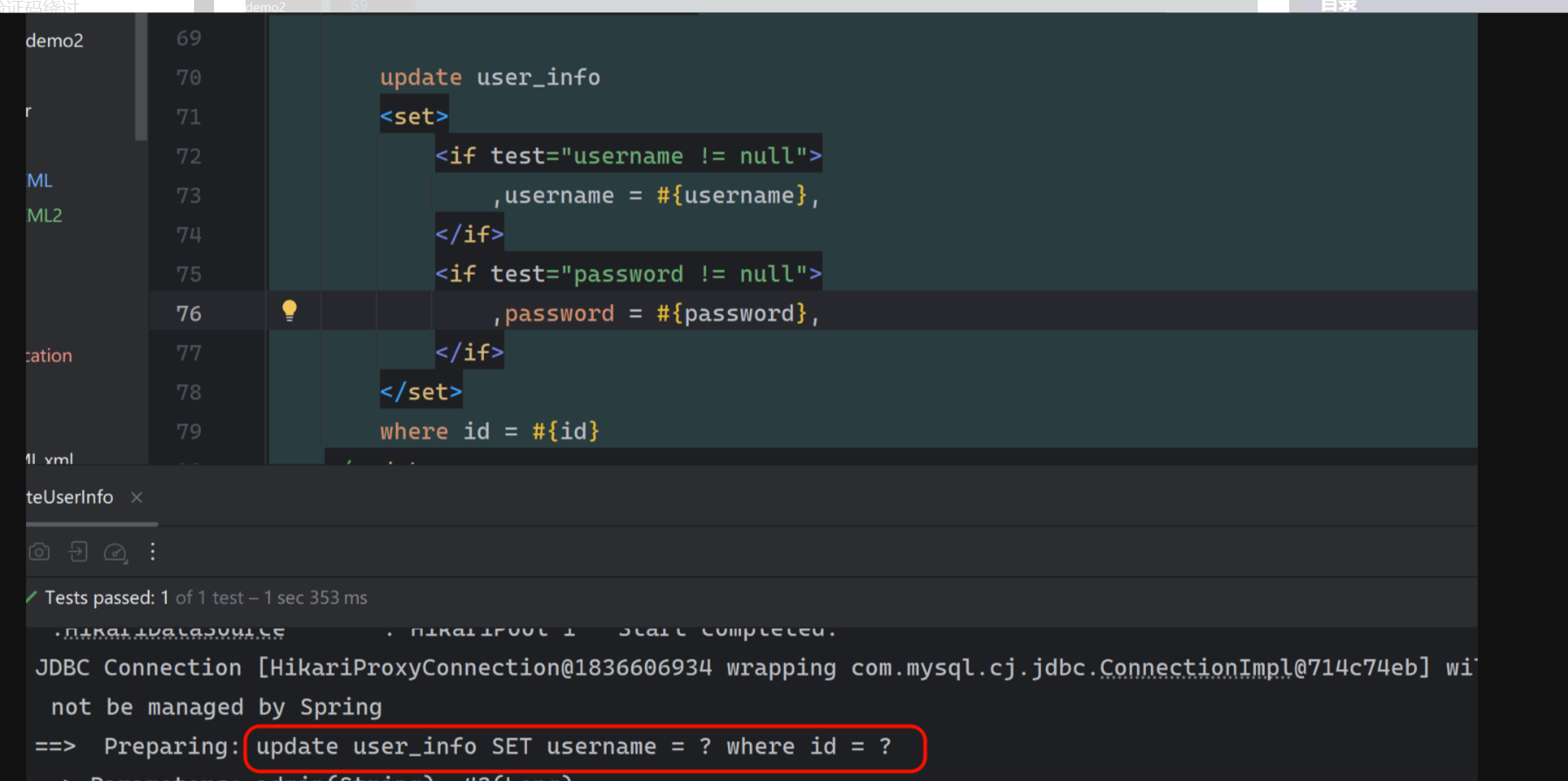
set标签会根据 if 标签的返回值来决定是否需要加上 set 关键字,并且可以去除前后缀的 ","。
注意:
1、当两者都没有值时,剩余的 where 子句也会导致最终的结果出错,这并不是我们需要考虑的,这是SQL语句本身的错误,而不是set标签可以解决的
<foreach> 标签
当我们需要遍历多个多个信息时,就可以使用 foreach 标签,类似于遍历集合的方式:
select * from user_info where id in (1,2,3);
foreach 标签可以实现上述SQL语句的效果,达到同时遍历多个对象的效果。
// foreach标签
List<UserInfo> selectByIds(List<Integer> ids);
<select id="selectByIds" resultType="com.springboot.mybatisdemo2.pojo.UserInfo">
select * from user_info where id in
<foreach collection="ids" item="id" separator="," open="(" close=")">
#{id}
</foreach>
</select>
@Test
void selectByIds() {
System.out.println(userInfoMapperXML2.selectByIds(List.of(1, 2, 3)));
}

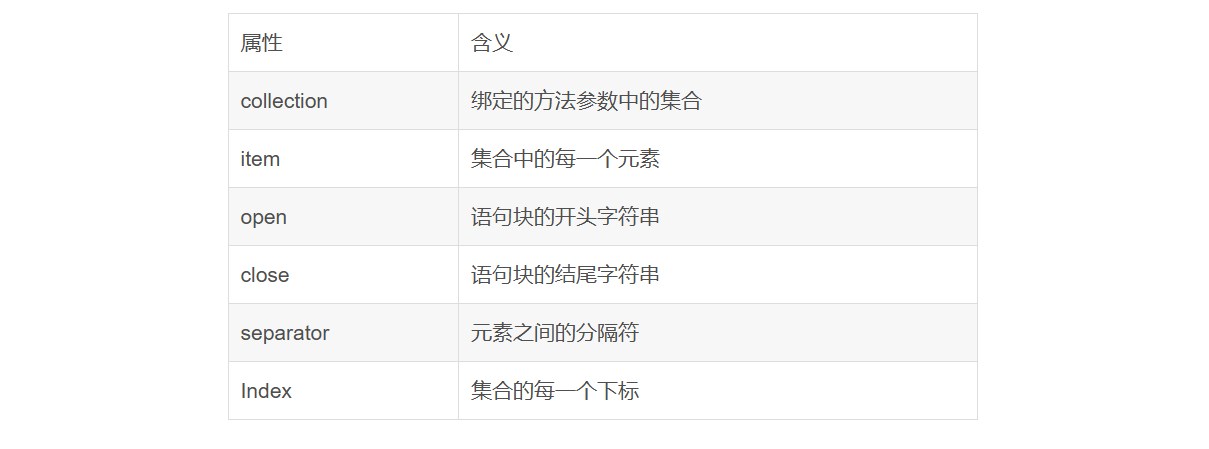
先来介绍一下 foreach 标签的属性:
<include> 标签
在 XML 文件中,可能会存在很多重复的SQL片段,这也就导致了很多SQL代码的冗余。如果将 重复的SQL片段,放置到 <sql> 标签内部,而使用 <include> 标签来当作占位符的话,最终就可以达到一处SQL,多处使用的效果。这也就避免了重复造轮子。
// include标签
List<UserInfo> selectById(Integer id);
<!-- id表示可以给后续的标签使用的SQL片段 -->
<sql id="baseSql">
select * from user_info
</sql>
<select id="selectById" resultType="com.springboot.mybatisdemo2.pojo.UserInfo">
<!-- refid 表示需要引用的SQL片段是谁 -->
<include refid="baseSql"></include>
where id = #{id}
</select>
@Test
void selectById() {
System.out.println(userInfoMapperXML2.selectById(1));
}