设置
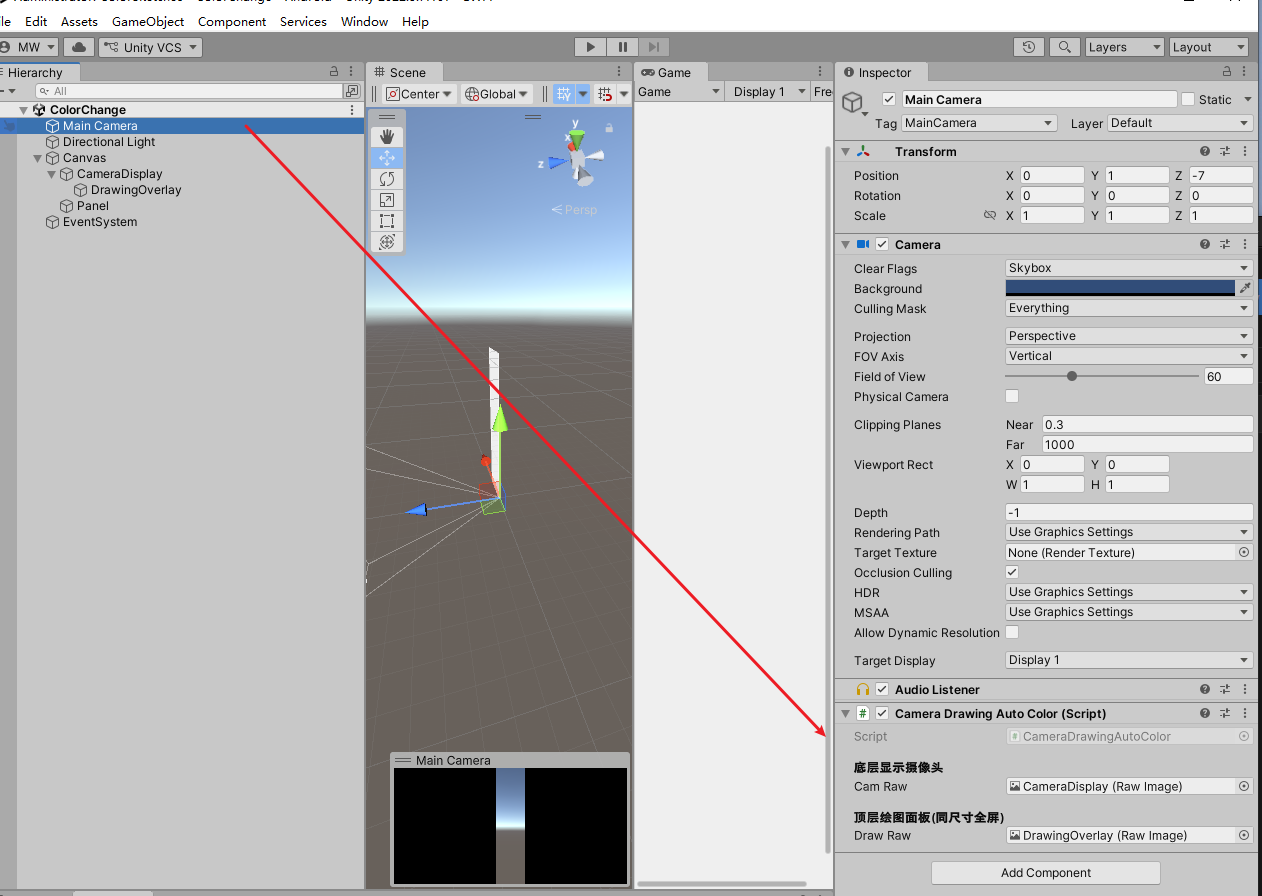
两个是RawImage一个是显示相机,一个是显示标记
两个的层级关系不能错,不然相机显示的会挡住标记。
CameraDrawingAutoColor.cs
cs
    using System;
using System.Collections.Generic;
using System.Linq;
using UnityEngine;
using UnityEngine.UI;

public class CameraDrawingAutoColor : MonoBehaviour
{
    [Header("底层显示摄像头")]
    public RawImage CamRaw;
    [Header("顶层绘图面板(同尺寸全屏)")]
    public RawImage DrawRaw;

    private WebCamTexture _camTex;
    private Texture2D _drawTex;
    private int _w, _h;

    private bool _isDraw;
    private List<Vector2> _curPoints = new List<Vector2>();
    private List<Stroke> _history = new List<Stroke>();

    private readonly Color[] _candColors =
    {
        Color.black,Color.white,Color.red,Color.green,
        Color.blue,Color.yellow,Color.cyan,Color.magenta
    };

    [Serializable]
    class Stroke
    {
        public List<Vector2> pts = new List<Vector2>();
        public Color col;
    }

    void Start()
    {
        // 初始化相机
        var device = WebCamTexture.devices[0];
        _camTex = new WebCamTexture(device.name, 1280, 720);
        _camTex.Play();
        CamRaw.texture = _camTex;

        // 初始化顶层绘图纹理
        Invoke(nameof(InitDrawTex), 0.5f);
    }

    void InitDrawTex()
    {
        _w = _camTex.width;
        _h = _camTex.height;
        _drawTex = new Texture2D(_w, _h, TextureFormat.RGBA32, false);
        _drawTex.wrapMode = TextureWrapMode.Clamp;
        ClearDrawTex();
        DrawRaw.texture = _drawTex;
    }

    void Update()
    {
        if (_drawTex == null) return;

        DealMouse();
        RenderDraw();

        // 快捷键
        if (Input.GetKeyDown(KeyCode.C)) ClearAll();
        if (Input.GetKeyDown(KeyCode.S)) SaveImg();
    }

    void DealMouse()
    {
        // 按下
        if (Input.GetMouseButtonDown(0))
        {
            _isDraw = true;
            _curPoints.Clear();
            _curPoints.Add(GetMouseTexPos());
        }
        // 拖动
        if (Input.GetMouseButton(0) && _isDraw)
        {
            var p = GetMouseTexPos();
            if (Vector2.Distance(p, _curPoints.Last()) > 2f)
                _curPoints.Add(p);
        }
        // 抬起
        if (Input.GetMouseButtonUp(0) && _isDraw)
        {
            _isDraw = false;
            if (_curPoints.Count < 2)
            {
                _curPoints.Clear();
                return;
            }
            // 自动选对比色
            Color bestCol = CalcStrokeColor(_curPoints);
            _history.Add(new Stroke { pts = new List<Vector2>(_curPoints), col = bestCol });
            _curPoints.Clear();
        }
    }

    // 鼠标屏幕坐标 → 纹理像素坐标
    Vector2 GetMouseTexPos()
    {
        RectTransform rect = DrawRaw.rectTransform;
        RectTransformUtility.ScreenPointToLocalPointInRectangle(rect, Input.mousePosition, null, out Vector2 local);

        float x = Mathf.Lerp(0, _w, (local.x / rect.rect.width) + 0.5f);
        float y = Mathf.Lerp(0, _h, (local.y / rect.rect.height) + 0.5f);

        x = Mathf.Clamp(x, 0, _w - 1);
        y = Mathf.Clamp(y, 0, _h - 1);
        return new Vector2(x, y);
    }

    // 渲染所有笔画
    void RenderDraw()
    {
        ClearDrawTex();

        // 历史正式线条
        foreach (var s in _history)
            DrawLineList(s.pts, s.col);

        // 当前临时灰色线
        if (_isDraw && _curPoints.Count > 1)
            DrawLineList(_curPoints, Color.red);

        _drawTex.Apply();
    }

    void DrawLineList(List<Vector2> pts, Color col)
    {
        for (int i = 0; i < pts.Count - 1; i++)
            DrawBresenham(pts[i], pts[i + 1], col, 3);
    }

    // 画线
    void DrawBresenham(Vector2 p1, Vector2 p2, Color col, int size)
    {
        int x0 = (int)p1.x, y0 = (int)p1.y;
        int x1 = (int)p2.x, y1 = (int)p2.y;

        int dx = Mathf.Abs(x1 - x0);
        int dy = Mathf.Abs(y1 - y0);
        int sx = x0 < x1 ? 1 : -1;
        int sy = y0 < y1 ? 1 : -1;
        int err = dx - dy;

        while (true)
        {
            DrawPoint(x0, y0, col, size);
            if (x0 == x1 && y0 == y1) break;
            int e2 = 2 * err;
            if (e2 > -dy) { err -= dy; x0 += sx; }
            if (e2 < dx) { err += dx; y0 += sy; }
        }
    }

    void DrawPoint(int x, int y, Color col, int r)
    {
        for (int dx = -r; dx <= r; dx++)
            for (int dy = -r; dy <= r; dy++)
            {
                if (dx * dx + dy * dy <= r * r)
                {
                    int px = x + dx;
                    int py = y + dy;
                    if (px >= 0 && px < _w && py >= 0 && py < _h)
                        _drawTex.SetPixel(px, py, col);
                }
            }
    }

    // 计算整条笔画最佳对比色
    Color CalcStrokeColor(List<Vector2> pts)
    {
        Dictionary<Color, int> vote = new Dictionary<Color, int>();
        foreach (var p in pts)
        {
            Color c = GetBestColor((int)p.x, (int)p.y);
            if (vote.ContainsKey(c)) vote[c]++;
            else vote[c] = 1;
        }
        return vote.OrderByDescending(k => k.Value).First().Key;
    }

    Color GetBestColor(int x, int y)
    {
        int win = 15;
        int x1 = Mathf.Max(0, x - win);
        int y1 = Mathf.Max(0, y - win);
        int x2 = Mathf.Min(_w - 1, x + win);
        int y2 = Mathf.Min(_h - 1, y + win);

        Color avg = Color.black;
        float r = 0, g = 0, b = 0;
        int cnt = 0;

        for (int yy = y1; yy <= y2; yy++)
            for (int xx = x1; xx <= x2; xx++)
            {
                Color c = _camTex.GetPixel(xx, yy);
                r += c.r; g += c.g; b += c.b; cnt++;
            }

        avg = new Color(r / cnt, g / cnt, b / cnt);
        float maxDis = -999;
        Color best = Color.red;

        foreach (var cc in _candColors)
        {
            float d = Mathf.Pow(cc.r - avg.r, 2) + Mathf.Pow(cc.g - avg.g, 2) + Mathf.Pow(cc.b - avg.b, 2);
            if (d > maxDis)
            {
                maxDis = d;
                best = cc;
            }
        }
        return best;
    }

    void ClearDrawTex()
    {
        if (_drawTex == null) return;
        Color[] clear = new Color[_w * _h];
        for (int i = 0; i < clear.Length; i++)
            clear[i] = Color.clear;
        _drawTex.SetPixels(clear);
    }

    void ClearAll()
    {
        _history.Clear();
        _curPoints.Clear();
        _isDraw = false;
        ClearDrawTex();
    }

    void SaveImg()
    {
        RenderTexture rt = new RenderTexture(_w, _h, 24);
        rt.Create();
        CamRaw.texture = _camTex;
        DrawRaw.texture = _drawTex;

        Texture2D saveTex = new Texture2D(_w, _h);
        saveTex.ReadPixels(new Rect(0, 0, _w, _h), 0, 0);
        saveTex.Apply();

        byte[] png = saveTex.EncodeToPNG();
        string path = Application.persistentDataPath + "/cam_draw.png";
        System.IO.File.WriteAllBytes(path, png);
        Debug.Log("保存成功:" + path);
    }

    void OnDestroy()
    {
        if (_camTex != null) _camTex.Stop();
    }
}