using System.Collections;
using System.Collections.Generic;
using UnityEngine;
using UnityEngine.UI;

public class DrawManager : MonoBehaviour
{
    [Header("References")]
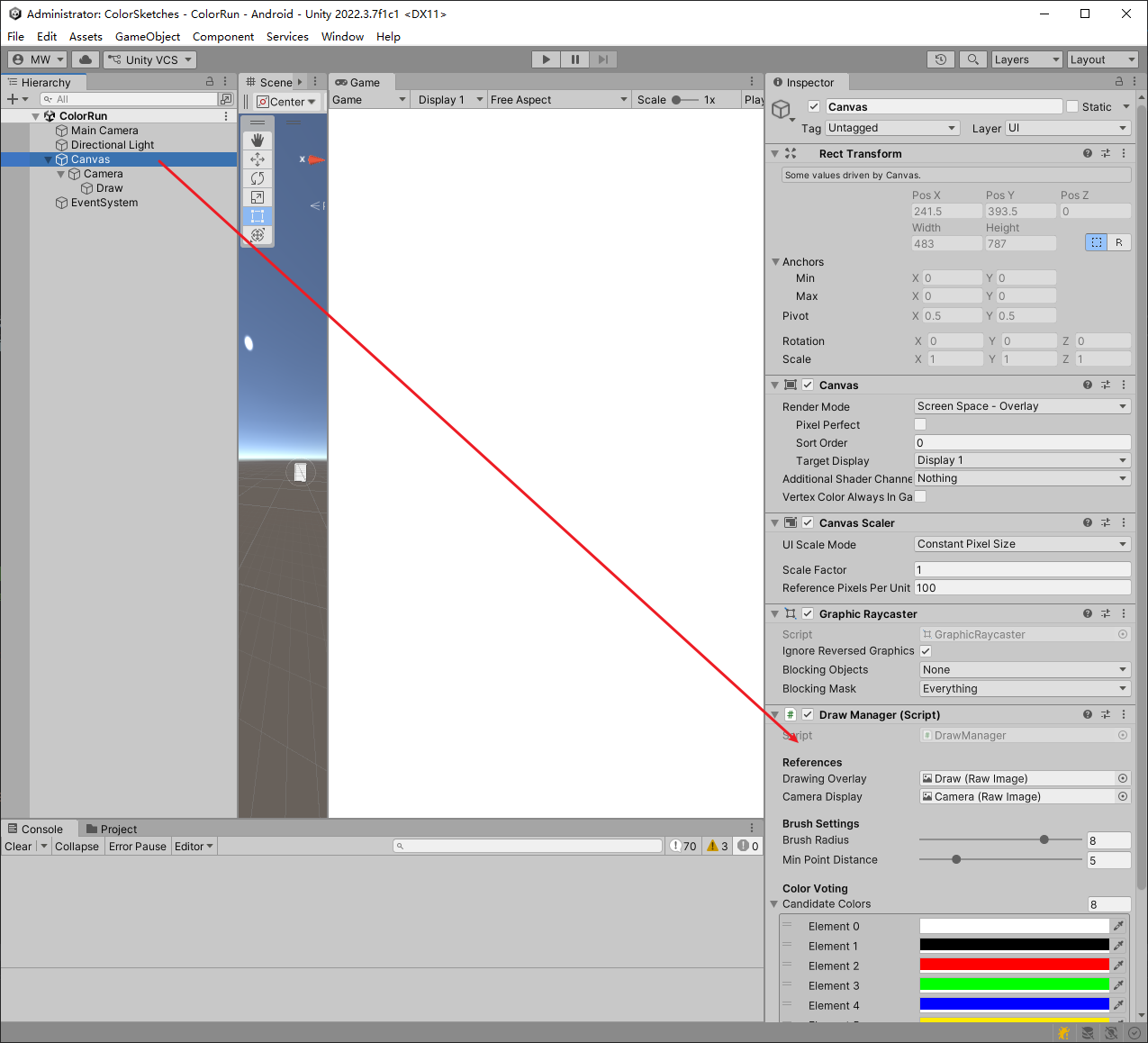
    [SerializeField] private RawImage drawingOverlay;   // 显示绘图的 RawImage
    [SerializeField] private RawImage cameraDisplay;    // 显示相机画面的 RawImage

    [Header("Brush Settings")]
    [SerializeField] [Range(1f, 10f)] private float brushRadius = 2f;
    [SerializeField] [Range(1f, 20f)] private float minPointDistance = 5f;

    [Header("Color Voting")]
    [SerializeField]
    private Color[] candidateColors = new Color[]
    {
        Color.white, Color.black, Color.red, Color.green, Color.blue,
        Color.yellow, Color.cyan, Color.magenta
    };
    [SerializeField] private int sampleWindowSize = 31;

    private Texture2D drawTexture;              // 永久绘图纹理
    private Texture2D combinedPreviewTexture;   // 预览纹理缓存
    private bool isReady = false;
    private bool isDrawing = false;
    private List<Vector2> currentStrokeUV = new List<Vector2>();

    void Start()
    {
        if (drawingOverlay == null || cameraDisplay == null)
        {
            Debug.LogError("? 请将 drawingOverlay 和 cameraDisplay 拖拽到 DrawManager 组件上");
            return;
        }
        StartCoroutine(Init());
    }

    IEnumerator Init()
    {
        while (CameraHandler.Instance == null || !CameraHandler.Instance.IsCameraReady)
            yield return null;
        Texture2D camTex = CameraHandler.Instance.CurrentFrame;
        while (camTex == null || camTex.width <= 0)
            yield return null;

        int w = camTex.width;
        int h = camTex.height;
        drawTexture = new Texture2D(w, h, TextureFormat.RGBA32, false);
        drawTexture.filterMode = FilterMode.Point;
        ClearTexture(drawTexture, Color.clear);

        drawingOverlay.texture = drawTexture;
        //drawingOverlay.SetNativeSize();  //这会使显示区域的中心为相机显示区域的右下角坐标就不了
        isReady = true;
        Debug.Log($"绘图就绪,纹理尺寸:{w}x{h}");
    }

    void ClearTexture(Texture2D tex, Color color)
    {
        Color[] cols = new Color[tex.width * tex.height];
        for (int i = 0; i < cols.Length; i++) cols[i] = color;
        tex.SetPixels(cols);
        tex.Apply();
    }

    void Update()
    {
        if (!isReady) return;

        if (Input.GetKeyDown(KeyCode.C))
        {
            ClearTexture(drawTexture, Color.clear);
            currentStrokeUV.Clear();
            isDrawing = false;
            Debug.Log("已清除所有标记");
            return;
        }

        if (Input.GetMouseButtonDown(0))
        {
            isDrawing = true;
            currentStrokeUV.Clear();
            Vector2 uv = ScreenToUV(Input.mousePosition);
            if (IsUVValid(uv))
                currentStrokeUV.Add(uv);
        }
        else if (Input.GetMouseButton(0) && isDrawing)
        {
            Vector2 uv = ScreenToUV(Input.mousePosition);
            if (!IsUVValid(uv)) return;

            if (currentStrokeUV.Count == 0)
            {
                currentStrokeUV.Add(uv);
                return;
            }

            Vector2 lastUV = currentStrokeUV[currentStrokeUV.Count - 1];
            float dist = Vector2.Distance(uv, lastUV) * Mathf.Max(drawTexture.width, drawTexture.height);
            if (dist > minPointDistance)
            {
                currentStrokeUV.Add(uv);
                RedrawWithCurrentStroke(Color.red); // 实时预览
            }
        }
        else if (Input.GetMouseButtonUp(0) && isDrawing)
        {
            if (currentStrokeUV.Count >= 2)
            {
                Color finalColor = GetAggregatedColor(currentStrokeUV);
                DrawUVStrokeOnTexture(drawTexture, currentStrokeUV, finalColor);
                Debug.Log($"笔画完成,投票颜色:{finalColor}");
            }
            currentStrokeUV.Clear();
            isDrawing = false;
            drawingOverlay.texture = drawTexture; // 恢复显示永久纹理
        }
    }

    void RedrawWithCurrentStroke(Color previewColor)
    {
        if (drawTexture == null) return;
        if (combinedPreviewTexture == null || combinedPreviewTexture.width != drawTexture.width)
        {
            combinedPreviewTexture = new Texture2D(drawTexture.width, drawTexture.height, TextureFormat.RGBA32, false);
        }
        Graphics.CopyTexture(drawTexture, combinedPreviewTexture);
        DrawUVStrokeOnTexture(combinedPreviewTexture, currentStrokeUV, previewColor);
        drawingOverlay.texture = combinedPreviewTexture;
    }

    void DrawUVStrokeOnTexture(Texture2D targetTex, List<Vector2> pointsUV, Color color)
    {
        if (targetTex == null || pointsUV.Count < 2) return;
        int w = targetTex.width;
        int h = targetTex.height;
        List<Vector2Int> pixelPoints = new List<Vector2Int>();
        foreach (Vector2 uv in pointsUV)
        {
            // 应用旋转校正:将 UV 映射到实际纹理像素时需要根据摄像头旋转角度调整
            Vector2 correctedUV = ApplyRotationToUV(uv);
            int x = Mathf.Clamp((int)(correctedUV.x * w), 0, w - 1);
            int y = Mathf.Clamp((int)(correctedUV.y * h), 0, h - 1);
            pixelPoints.Add(new Vector2Int(x, y));
        }
        for (int i = 0; i < pixelPoints.Count - 1; i++)
            DrawLineOnTexture(targetTex, pixelPoints[i], pixelPoints[i + 1], color);
        if (pixelPoints.Count > 0)
        {
            DrawCircleOnTexture(targetTex, pixelPoints[0], color);
            DrawCircleOnTexture(targetTex, pixelPoints[pixelPoints.Count - 1], color);
        }
        targetTex.Apply();
    }

    Vector2 ApplyRotationToUV(Vector2 uv)
    {
        // 根据摄像头的旋转角度,将显示画面的 UV 映射到原始纹理的 UV
        int angle = CameraHandler.Instance.TextureRotationAngle;
        switch (angle)
        {
            case 90: return new Vector2(uv.y, 1 - uv.x);
            case 180: return new Vector2(1 - uv.x, 1 - uv.y);
            case 270: return new Vector2(1 - uv.y, uv.x);
            default: return uv;
        }
    }

    // 以下方法保持不变(绘图辅助、投票等)
    void DrawLineOnTexture(Texture2D tex, Vector2Int p0, Vector2Int p1, Color color)
    {
        List<Vector2Int> points = GetLinePoints(p0, p1);
        foreach (var pt in points)
            DrawCircleOnTexture(tex, pt, color);
    }

    List<Vector2Int> GetLinePoints(Vector2Int p0, Vector2Int p1)
    {
        List<Vector2Int> points = new List<Vector2Int>();
        int dx = Mathf.Abs(p1.x - p0.x);
        int dy = Mathf.Abs(p1.y - p0.y);
        int sx = p0.x < p1.x ? 1 : -1;
        int sy = p0.y < p1.y ? 1 : -1;
        int err = dx - dy;
        int x = p0.x, y = p0.y;
        while (true)
        {
            points.Add(new Vector2Int(x, y));
            if (x == p1.x && y == p1.y) break;
            int e2 = 2 * err;
            if (e2 > -dy) { err -= dy; x += sx; }
            if (e2 < dx) { err += dx; y += sy; }
        }
        return points;
    }

    void DrawCircleOnTexture(Texture2D tex, Vector2Int center, Color color)
    {
        int r = Mathf.CeilToInt(brushRadius);
        for (int x = -r; x <= r; x++)
            for (int y = -r; y <= r; y++)
                if (x * x + y * y <= r * r)
                {
                    int px = center.x + x;
                    int py = center.y + y;
                    if (px >= 0 && px < tex.width && py >= 0 && py < tex.height)
                        tex.SetPixel(px, py, color);
                }
    }

    Color GetAggregatedColor(List<Vector2> pointsUV)
    {
        int[] votes = new int[candidateColors.Length];
        foreach (Vector2 uv in pointsUV)
        {
            int idx = GetBestColorIndex(uv);
            votes[idx]++;
        }
        int maxIdx = 0;
        for (int i = 1; i < votes.Length; i++)
            if (votes[i] > votes[maxIdx]) maxIdx = i;
        return candidateColors[maxIdx];
    }

    int GetBestColorIndex(Vector2 uv)
    {
        Texture2D bg = CameraHandler.Instance.CurrentFrame;
        if (bg == null) return 0;
        // 同样需要旋转校正
        Vector2 correctedUV = ApplyRotationToUV(uv);
        int px = Mathf.Clamp((int)(correctedUV.x * bg.width), 0, bg.width - 1);
        int py = Mathf.Clamp((int)(correctedUV.y * bg.height), 0, bg.height - 1);
        int half = sampleWindowSize / 2;
        int sx = Mathf.Max(0, px - half);
        int sy = Mathf.Max(0, py - half);
        int ww = Mathf.Min(bg.width - sx, sampleWindowSize);
        int hh = Mathf.Min(bg.height - sy, sampleWindowSize);
        Color[] samples = bg.GetPixels(sx, sy, ww, hh);
        if (samples.Length == 0) return 0;
        Color avg = Color.black;
        foreach (Color c in samples) avg += c;
        avg /= samples.Length;
        float maxDist = -1f;
        int best = 0;
        for (int i = 0; i < candidateColors.Length; i++)
        {
            float dist = Vector3.Distance(new Vector3(avg.r, avg.g, avg.b),
                                          new Vector3(candidateColors[i].r, candidateColors[i].g, candidateColors[i].b));
            if (dist > maxDist) { maxDist = dist; best = i; }
        }
        return best;
    }

    Vector2 ScreenToUV(Vector2 screenPos)
    {
        // 获取 cameraDisplay 的屏幕空间矩形(不受 Canvas 缩放影响)
        RectTransform rect = cameraDisplay.rectTransform;
        Vector2 localPoint;
        if (RectTransformUtility.ScreenPointToLocalPointInRectangle(rect, screenPos, null, out localPoint))
        {
            // 将局部坐标映射到 0~1 范围
            Vector2 uv = new Vector2(
                (localPoint.x / rect.rect.width) + 0.5f,
                (localPoint.y / rect.rect.height) + 0.5f
            );
            return uv;
        }
        return new Vector2(-1, -1);
    }

    bool IsUVValid(Vector2 uv) => uv.x >= 0 && uv.x <= 1 && uv.y >= 0 && uv.y <= 1;

    public void SaveScreenshot()
    {
        if (CameraHandler.Instance == null || CameraHandler.Instance.CurrentFrame == null || drawTexture == null)
            return;
        Texture2D background = CameraHandler.Instance.CurrentFrame;
        Texture2D combined = new Texture2D(background.width, background.height, TextureFormat.RGBA32, false);
        combined.SetPixels(background.GetPixels());
        Color[] drawPixels = drawTexture.GetPixels();
        Color[] bgPixels = combined.GetPixels();
        for (int i = 0; i < bgPixels.Length; i++)
        {
            if (drawPixels[i].a > 0.1f)
                bgPixels[i] = Color.Lerp(bgPixels[i], drawPixels[i], drawPixels[i].a);
        }
        combined.SetPixels(bgPixels);
        combined.Apply();
        byte[] bytes = combined.EncodeToPNG();
        string path = Application.persistentDataPath + "/screenshot.png";
        System.IO.File.WriteAllBytes(path, bytes);
        Debug.Log("截图保存至:" + path);
        Destroy(combined);
    }
}