一、ambari 的 主机界面无法 "启动/停止/重启"所有组件 restart all componnents,呈禁用 灰色图标状态。
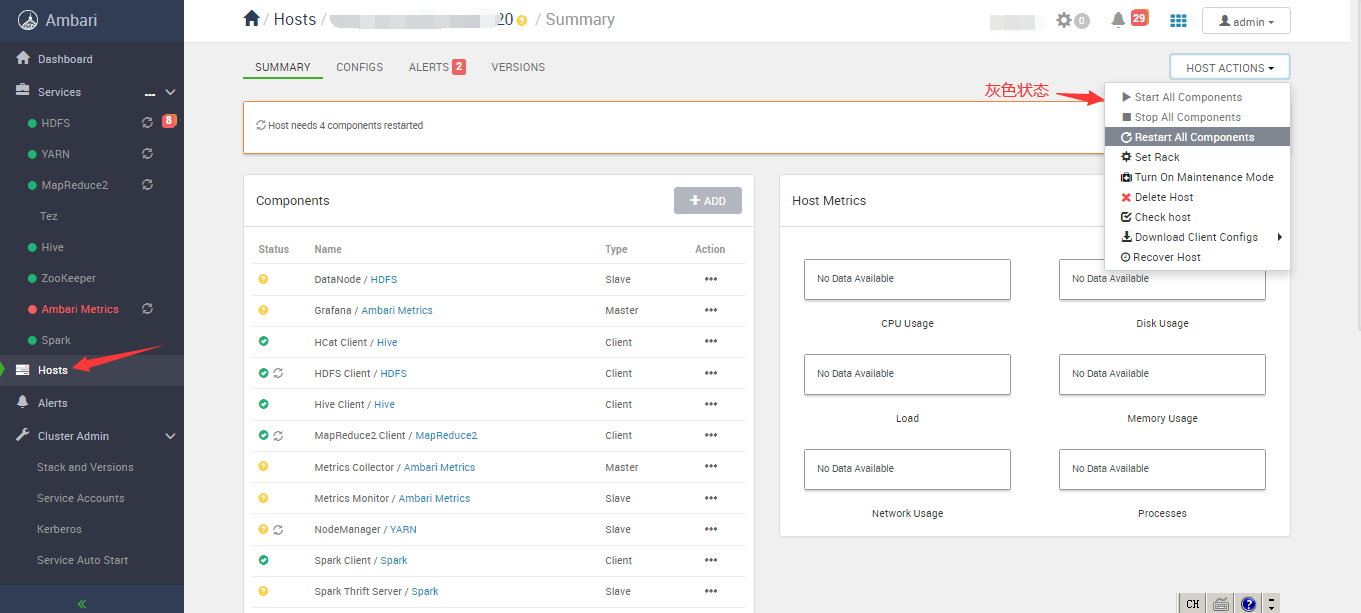
处理方法: 重启ambari-agent
shell
#第一次重启报错
ambari-agent restart
echo $?
cat  /var/log/ambari-agent/ambari-agent.out

netstat -naltp | grep 8670
ps -ef|grep 82051

#/usr/bin/python2 /usr/lib/ambari-agent/lib/ambari_agent/main.py restart
#杀相关进程,然后重启ambari-agent
kill -15 82051
ambari-agent restart
ambari-agent status
二、单节点mysql8.0.46启动报错ERROR! The server quit without updating PID file (/data/mysql8/data/mysql.pid)
环境信息:bclinux euler 21.10 。 单节点mysql 8.0.44 需要升级到 8.0.46
shell
#报错内容:
[root@xx data]# service mysql restart
 ERROR! MySQL server PID file could not be found!
Starting MySQL.Logging to '/data/mysql8/data/error.log'.
........ ERROR! The server quit without updating PID file (/data/mysql8/data/mysql.pid).
[root@xx data]# cat /data/mysql8/data/error.log
2026-04-28T08:26:43.505248Z 0 [Warning] [MY-010918] [Server] 'default_authentication_plugin' is deprecated and will be removed in a future release. Please use authentication_policy instead.
2026-04-28T08:26:43.505322Z 0 [System] [MY-010116] [Server] /usr/local/mysql8/bin/mysqld (mysqld 8.0.46) starting as process 233335
2026-04-28T08:26:43.510245Z 0 [Warning] [MY-013242] [Server] --character-set-server: 'utf8' is currently an alias for the character set UTF8MB3, but will be an alias for UTF8MB4 in a future release. Please consider using UTF8MB4 in order to be unambiguous.
2026-04-28T08:26:43.522394Z 0 [Warning] [MY-013907] [InnoDB] Deprecated configuration parameters innodb_log_file_size and/or innodb_log_files_in_group have been used to compute innodb_redo_log_capacity=1073741824. Please use innodb_redo_log_capacity instead.
2026-04-28T08:26:43.526947Z 1 [System] [MY-013576] [InnoDB] InnoDB initialization has started.
2026-04-28T08:26:47.961943Z 1 [System] [MY-013577] [InnoDB] InnoDB initialization has ended.
mysqld: File '/var/log/mysql/slow.log' not found (OS errno 2 - No such file or directory)
2026-04-28T08:26:48.464211Z 0 [ERROR] [MY-011263] [Server] Could not use /var/log/mysql/slow.log for logging (error 2 - No such file or directory). Turning logging off for the server process. To turn it on again: fix the cause, then either restart the query logging by using "SET GLOBAL SLOW_QUERY_LOG=ON" or restart the MySQL server.
2026-04-28T08:26:48.661507Z 0 [Warning] [MY-010068] [Server] CA certificate ca.pem is self signed.
2026-04-28T08:26:48.661591Z 0 [System] [MY-013602] [Server] Channel mysql_main configured to support TLS. Encrypted connections are now supported for this channel.
2026-04-28T08:26:48.672853Z 0 [Warning] [MY-011810] [Server] Insecure configuration for --pid-file: Location '/data' in the path is accessible to all OS users. Consider choosing a different directory.
2026-04-28T08:26:48.677931Z 0 [ERROR] [MY-000067] [Server] unknown variable 'query_cache_type=0'.
2026-04-28T08:26:48.678075Z 0 [ERROR] [MY-010119] [Server] Aborting
2026-04-28T08:26:51.389974Z 0 [System] [MY-010910] [Server] /usr/local/mysql8/bin/mysqld: Shutdown complete (mysqld 8.0.46)  MySQL Community Server - GPL.
[root@xx data]#
shell
#处理方法:
修改my.cnf 添加记录错误日志
#202604 add
log-error=/data/mysql8/data/error.log
pid-file=/data/mysql8/data/mysql.pid

my.cnf注释弃用报错的配置行,再启动即可。
#(MySQL5.X)查询缓存设置
#query_cache_type=0
#query_cache_size=0

不过有点奇怪,之前升级到8.0.44的时候,印象是没改动my.cnf ,那时候为啥没报错呢。 8.0.46此时就报错无法启动。
操作过程:
shell
#之前的/etc/my.cnf 配置信息:
[root@xx data]# vi /etc/my.cnf

[mysqld]
# 设置3306端口
port=3306

#配置主服务器
log-bin=mysql-bin
server-id=1

#202604 add
log-error=/data/mysql8/data/error.log
pid-file=/data/mysql8/data/mysql.pid

# 设置mysql的安装目录
basedir=/usr/local/mysql8

# 设置mysql数据库的数据存放目录
datadir=/data/mysql8/data

# 允许最大连接数
#max_connections=200

# 服务端使用的字符集默认为UTF8
character-set-server=utf8

# 创建新表时将使用的默认存储引擎
default-storage-engine=INNODB

# 认证方式(MySQL 8默认使用caching_sha2_password)
default_authentication_plugin=mysql_native_password

"/etc/my.cnf" 56L, 1502C written
[root@xx data]#
[root@xx data]# service mysql restart
 ERROR! MySQL server PID file could not be found!
Starting MySQL.Logging to '/data/mysql8/data/error.log'.
........ ERROR! The server quit without updating PID file (/data/mysql8/data/mysql.pid).
[root@xx data]# cat /data/mysql8/data/error.log
2026-04-28T08:26:43.505248Z 0 [Warning] [MY-010918] [Server] 'default_authentication_plugin' is deprecated and will be removed in a future release. Please use authentication_policy instead.
2026-04-28T08:26:43.505322Z 0 [System] [MY-010116] [Server] /usr/local/mysql8/bin/mysqld (mysqld 8.0.46) starting as process 233335
2026-04-28T08:26:43.510245Z 0 [Warning] [MY-013242] [Server] --character-set-server: 'utf8' is currently an alias for the character set UTF8MB3, but will be an alias for UTF8MB4 in a future release. Please consider using UTF8MB4 in order to be unambiguous.
2026-04-28T08:26:43.522394Z 0 [Warning] [MY-013907] [InnoDB] Deprecated configuration parameters innodb_log_file_size and/or innodb_log_files_in_group have been used to compute innodb_redo_log_capacity=1073741824. Please use innodb_redo_log_capacity instead.
2026-04-28T08:26:43.526947Z 1 [System] [MY-013576] [InnoDB] InnoDB initialization has started.
2026-04-28T08:26:47.961943Z 1 [System] [MY-013577] [InnoDB] InnoDB initialization has ended.
mysqld: File '/var/log/mysql/slow.log' not found (OS errno 2 - No such file or directory)
2026-04-28T08:26:48.464211Z 0 [ERROR] [MY-011263] [Server] Could not use /var/log/mysql/slow.log for logging (error 2 - No such file or directory). Turning logging off for the server process. To turn it on again: fix the cause, then either restart the query logging by using "SET GLOBAL SLOW_QUERY_LOG=ON" or restart the MySQL server.
2026-04-28T08:26:48.661507Z 0 [Warning] [MY-010068] [Server] CA certificate ca.pem is self signed.
2026-04-28T08:26:48.661591Z 0 [System] [MY-013602] [Server] Channel mysql_main configured to support TLS. Encrypted connections are now supported for this channel.
2026-04-28T08:26:48.672853Z 0 [Warning] [MY-011810] [Server] Insecure configuration for --pid-file: Location '/data' in the path is accessible to all OS users. Consider choosing a different directory.
2026-04-28T08:26:48.677931Z 0 [ERROR] [MY-000067] [Server] unknown variable 'query_cache_type=0'.
2026-04-28T08:26:48.678075Z 0 [ERROR] [MY-010119] [Server] Aborting
2026-04-28T08:26:51.389974Z 0 [System] [MY-010910] [Server] /usr/local/mysql8/bin/mysqld: Shutdown complete (mysqld 8.0.46)  MySQL Community Server - GPL.
[root@xx data]#
[root@xx data]#

[root@xx data]# mkdir -p /var/log/mysql
[root@xx data]# chown mysql:mysql /var/log/mysql
[root@xx data]# chmod 755 /var/log/mysql
[root@xx data]#

#########根据报错内容 修改/etc/my.cnf
[root@xx data]# vi /etc/my.cnf

[mysqld]
# 设置3306端口
port=3306

#配置主服务器
log-bin=mysql-bin
server-id=1

#202604 add
log-error=/data/mysql8/data/error.log
pid-file=/data/mysql8/data/mysql.pid

# 设置mysql的安装目录
basedir=/usr/local/mysql8

# 设置mysql数据库的数据存放目录
datadir=/data/mysql8/data

# 允许最大连接数
#max_connections=200

# 服务端使用的字符集默认为UTF8
character-set-server=utf8

# 创建新表时将使用的默认存储引擎
default-storage-engine=INNODB

# 认证方式(MySQL 8默认使用caching_sha2_password)
default_authentication_plugin=mysql_native_password

#MySql性能调优相关配置示例(/etc/my.cnf)
innodb_buffer_pool_size=10G     #调整为物理内存的60%-80%
innodb_log_file_size=512M       #Redo日志文件大小
max_connections=600            #最大连接
tmp_table_size=64M              #内存临时表大小
max_heap_table_size=64M         #MEMORY表最大大小(影响临时表)
sort_buffer_size=4M             #排序操作缓存
innodb_flush_log_at_trx_commit=1 #事务提交时刷新日志策略,保留强一致性
#(MySQL5.X)查询缓存设置
#query_cache_type=0              #0=禁用查询缓存
#query_cache_size=0
#慢查询日志开启
slow_query_log=1
long_query_time=2
slow_query_log_file=/var/log/mysql/slow.log

"/etc/my.cnf" 56L, 1504C written
[root@xx data]#
[root@xx data]# service mysql restart
 ERROR! MySQL server PID file could not be found!
Starting MySQL....... SUCCESS!
[root@xx data]#
[root@xx data]# service mysql status
 SUCCESS! MySQL running (249273)
[root@xx data]#
[root@xx data]# ss -naltp | grep mysql
LISTEN    0         70                       *:33060                  *:*        users:(("mysqld",pid=249273,fd=20))
LISTEN    0         128                      *:3306                   *:*        users:(("mysqld",pid=249273,fd=23))
[root@xx data]#

[root@xx data]#
[root@xx data]# ps -ef | grep mysql
root      248933       1  0 16:31 pts/0    00:00:00 /bin/sh /usr/local/mysql8/bin/mysqld_safe --datadir=/data/mysql8/data --pid-file=/data/mysql8/data/mysql.pid
mysql     249273  248933  4 16:31 pts/0    00:00:18 /usr/local/mysql8/bin/mysqld --basedir=/usr/local/mysql8 --datadir=/data/mysql8/data --plugin-dir=/usr/local/mysql8/lib/plugin --user=mysql --log-error=/data/mysql8/data/error.log --pid-file=/data/mysql8/data/mysql.pid --port=3306
root      254264   68896  0 16:37 pts/0    00:00:00 grep --color=auto mysql
[root@xx data]#
END