Flutter for OpenHarmony 实战:茶叶茶艺应用开发详解
欢迎加入开源鸿蒙跨平台社区:https://openharmonycrossplatform.csdn.net
作者:maaath
一、引言
随着 OpenHarmony 生态的蓬勃发展,Flutter 作为一款成熟的跨平台 UI 框架,正在加速适配 OpenHarmony 系统。本文将通过一个完整的「茶叶茶艺」应用实战案例,详细讲解如何利用 Flutter for OpenHarmony 开发一款具有中国传统文化特色的移动应用。
Flutter 框架的核心优势在于"一次开发、多端部署",而 OpenHarmony 作为国产操作系统的重要力量,正在构建一个开放且充满活力的应用生态。两者的结合,不仅能够大幅提升开发效率,更能让开发者将创意快速落地到鸿蒙设备上。
本文将带领读者从零开始,搭建 Flutter OpenHarmony 开发环境,并实现一个功能完善的茶叶茶艺应用,涵盖茶叶分类浏览、茶艺鉴赏、收藏管理、用户中心等核心功能。
二、项目概述
2.1 应用功能架构
茶叶茶艺应用是一款面向茶文化爱好者的综合型移动应用,主要功能模块包括:
首页展示模块:采用底部导航栏设计,提供茶叶、茶艺、收藏、我的四大入口,通过优雅的启动页引导用户进入主界面,启动页支持动态茶杯动画效果,营造沉浸式的品茶氛围。
茶叶浏览模块:实现分类筛选功能,支持全部、绿茶、乌龙茶、红茶、黑茶、白茶、花茶等分类标签。采用下拉刷新结合上拉加载的分页机制,确保大数据量下的流畅体验。每个茶叶卡片展示封面图、名称、别名、简介、评分、产地等信息。
茶艺鉴赏模块:展示各类茶艺冲泡技艺,包含入门、进阶、专业三个难度等级。每个茶艺详情页提供步骤演示、历史渊源、小贴士等丰富内容,帮助用户深入了解茶文化。
收藏管理模块:支持茶叶和茶艺的分别收藏,采用本地持久化存储,确保用户数据不丢失。收藏列表支持滑动删除,提供便捷的管理体验。
个人中心模块:展示用户统计信息,包括收藏数量、浏览记录等。提供编辑资料、查看历史、设置等基础功能入口。
2.2 技术选型
本应用基于 Flutter 3.x 框架开发,采用声明式 UI 范式,完全使用 Dart 语言实现业务逻辑。状态管理采用 Flutter 原生的 setState 机制,简单高效。数据存储利用 AppStorage 实现键值对持久化。页面路由采用 Navigator 2.0 的声明式导航方式。
三、核心代码实现
3.1 数据模型定义
应用的数据模型采用面向对象的设计理念,将茶叶、茶艺等实体抽象为独立的类,便于后续扩展和维护。
dart
// 茶叶数据模型
class TeaModel {
  final String id;           // 茶叶唯一标识
  final String name;         // 茶叶名称
  final String alias;        // 别名
  final String coverUrl;     // 封面图片地址
  final String origin;       // 产地
  final String category;     // 分类
  final String categoryId;   // 分类ID
  final String description;  // 简短描述
  final String detail;      // 详细介绍
  final String brewing;      // 冲泡方法
  final String storage;      // 保存方法
  final double rating;       // 评分
  final int favorites;       // 收藏数
  final List<String> tags;   // 标签列表
  final bool isFavorite;     // 是否已收藏

  TeaModel(
    this.id, this.name, this.alias, this.coverUrl,
    this.origin, this.category, this.categoryId,
    this.description, this.detail, this.brewing, this.storage,
    this.rating, this.favorites, this.tags, this.isFavorite
  );
}

// 茶艺步骤数据模型
class TeaArtStep {
  final int stepNumber;      // 步骤编号
  final String title;        // 步骤标题
  final String description;  // 步骤描述
  final String imageUrl;     // 步骤配图

  TeaArtStep(this.stepNumber, this.title, this.description, this.imageUrl);
}

// 茶艺数据模型
class TeaArtModel {
  final String id;
  final String name;
  final String coverUrl;
  final String origin;
  final String difficulty;
  final String duration;
  final String description;
  final List<TeaArtStep> steps;
  final String tips;
  final String history;
  final double rating;
  final int favorites;
  final List<String> tags;
  final bool isFavorite;

  TeaArtModel(
    this.id, this.name, this.coverUrl, this.origin, this.difficulty,
    this.duration, this.description, this.steps, this.tips, this.history,
    this.rating, this.favorites, this.tags, this.isFavorite
  );
}
3.2 常量配置管理
应用的常量采用集中管理模式,通过单例类封装主题颜色、字体大小、间距等配置,确保样式统一且易于维护。
dart
// 茶叶茶艺应用常量配置
class TeaConstants {
  // 主题颜色 - 棕色系(茶色)
  static const String primary = '#5D4037';
  static const String primaryLight = '#8B6B61';
  static const String secondary = '#A1887F';
  static const String accent = '#D7CCC8';
  static const String background = '#EFEBE9';
  static const String surface = '#FFFFFF';
  static const String textPrimary = '#3E2723';
  static const String textSecondary = '#5D4037';
  static const String textHint = '#A1887F';
  static const String star = '#FF8F00';
  static const String teacup = '#8D6E63';
  static const String water = '#90CAF9';

  // 字体大小
  static const double fontTiny = 10.0;
  static const double fontSmall = 12.0;
  static const double fontCaption = 14.0;
  static const double fontBody = 16.0;
  static const double fontSubtitle = 18.0;
  static const double fontTitle = 20.0;
  static const double fontLarge = 24.0;
  static const double fontHuge = 28.0;

  // 间距
  static const double spacingXs = 4.0;
  static const double spacingSm = 8.0;
  static const double spacingMd = 12.0;
  static const double spacingLg = 16.0;
  static const double spacingXl = 20.0;
  static const double spacingXxl = 24.0;

  // 圆角
  static const double radiusSm = 4.0;
  static const double radiusMd = 8.0;
  static const double radiusLg = 12.0;
  static const double radiusXl = 16.0;
  static const double radiusRound = 20.0;

  // 难度颜色
  static String getDifficultyColor(String level) {
    switch (level) {
      case '入门':
        return '#4CAF50';
      case '进阶':
        return '#FF9800';
      case '专业':
        return '#F44336';
      default:
        return '#5D4037';
    }
  }
}
3.3 启动页动画实现
启动页是用户的第一印象,本应用设计了一个具有中国传统文化韵味的茶杯动画,配合渐变色背景和优雅的文字展示,让用户在使用之初就能感受到茶文化的宁静与美好。
dart
class SplashPage extends StatefulWidget {
  @override
  State<SplashPage> createState() => _SplashPageState();
}

class _SplashPageState extends State<SplashPage>
    with SingleTickerProviderStateMixin {
  double _iconOpacity = 0.0;
  double _logoScale = 0.5;
  double _titleOpacity = 0.0;
  double _titleTranslateY = 30.0;
  double _subtitleOpacity = 0.0;
  double _loadingOpacity = 0.0;
  double _pageOpacity = 1.0;
  double _teaIconBounce = 0.0;

  @override
  void initState() {
    super.initState();
    _playAnimation();
  }

  void _playAnimation() {
    // 茶杯图标淡入并放大
    Future.delayed(Duration(milliseconds: 200), () {
      setState(() {
        _iconOpacity = 1.0;
        _logoScale = 1.0;
      });
    });

    // 标题淡入上移
    Future.delayed(Duration(milliseconds: 500), () {
      setState(() {
        _titleOpacity = 1.0;
        _titleTranslateY = 0.0;
      });
    });

    // 副标题淡入
    Future.delayed(Duration(milliseconds: 700), () {
      setState(() {
        _subtitleOpacity = 1.0;
      });
    });

    // 茶杯图标弹跳动画
    Future.delayed(Duration(milliseconds: 1500), () {
      _startTeaIconAnimation();
    });

    // 页面渐隐并跳转
    Future.delayed(Duration(milliseconds: 3000), () {
      setState(() {
        _pageOpacity = 0.0;
      });
      Future.delayed(Duration(milliseconds: 500), () {
        Navigator.pushReplacementNamed(context, '/home');
      });
    });
  }

  void _startTeaIconAnimation() {
    // 循环弹跳效果
    Timer.periodic(Duration(milliseconds: 1600), (timer) {
      if (!mounted) {
        timer.cancel();
        return;
      }
      setState(() => _teaIconBounce = -15.0);
      Future.delayed(Duration(milliseconds: 400), () {
        if (mounted) {
          setState(() => _teaIconBounce = 0.0);
        }
      });
    });
  }

  @override
  Widget build(BuildContext context) {
    return Scaffold(
      body: AnimatedOpacity(
        duration: Duration(milliseconds: 500),
        opacity: _pageOpacity,
        child: Container(
          decoration: BoxDecoration(
            gradient: LinearGradient(
              begin: Alignment.topLeft,
              end: Alignment.bottomRight,
              colors: [
                Color(0xFF5D4037),
                Color(0xFF8D6E63),
                Color(0xFFA1887F),
              ],
            ),
          ),
          child: Center(
            child: Column(
              mainAxisAlignment: MainAxisAlignment.center,
              children: [
                // 茶杯图标容器
                AnimatedContainer(
                  duration: Duration(milliseconds: 800),
                  curve: Curves.easeOut,
                  child: Stack(
                    alignment: Alignment.center,
                    children: [
                      // 外圈白色背景
                      Container(
                        width: 160,
                        height: 160,
                        decoration: BoxDecoration(
                          color: Colors.white,
                          shape: BoxShape.circle,
                          boxShadow: [
                            BoxShadow(
                              color: Colors.black26,
                              blurRadius: 30,
                              offset: Offset(0, 15),
                            ),
                          ],
                        ),
                      ],
                      // 内圈棕色渐变
                      Container(
                        width: 140,
                        height: 140,
                        decoration: BoxDecoration(
                          color: Color(0xFF8D6E63),
                          shape: BoxShape.circle,
                        ),
                      ),
                      // 茶杯图标
                      Transform.translate(
                        offset: Offset(0, _teaIconBounce),
                        child: Text('🍵', style: TextStyle(fontSize: 60)),
                      ),
                    ],
                  ),
                ),
                SizedBox(height: 40),
                // 标题
                AnimatedOpacity(
                  duration: Duration(milliseconds: 500),
                  opacity: _titleOpacity,
                  child: AnimatedContainer(
                    duration: Duration(milliseconds: 500),
                    transform: Matrix4.translationValues(0, _titleTranslateY, 0),
                    child: Column(
                      children: [
                        Text(
                          '茶叶茶艺',
                          style: TextStyle(
                            fontSize: 36,
                            fontWeight: FontWeight.bold,
                            color: Colors.white,
                          ),
                        ),
                        SizedBox(height: 8),
                        Text(
                          'TEA CULTURE',
                          style: TextStyle(
                            fontSize: 14,
                            color: Colors.white60,
                            letterSpacing: 3,
                          ),
                        ),
                      ],
                    ),
                  ),
                ),
                SizedBox(height: 20),
                // 副标题
                AnimatedOpacity(
                  duration: Duration(milliseconds: 500),
                  opacity: _subtitleOpacity,
                  child: Text(
                    '品茗人生,感悟茶道',
                    style: TextStyle(
                      fontSize: 15,
                      color: Colors.white50,
                    ),
                  ),
                ),
                SizedBox(height: 60),
                // 加载指示器
                AnimatedOpacity(
                  duration: Duration(milliseconds: 300),
                  opacity: _loadingOpacity,
                  child: Row(
                    mainAxisAlignment: MainAxisAlignment.center,
                    children: List.generate(3, (index) {
                      return Container(
                        margin: EdgeInsets.symmetric(horizontal: 6),
                        width: 8,
                        height: 8,
                        decoration: BoxDecoration(
                          color: Colors.white,
                          shape: BoxShape.circle,
                        ),
                      );
                    }),
                  ),
                ),
              ],
            ),
          ),
        ),
      ),
    );
  }
}
3.4 茶叶列表页面实现
茶叶列表页面是应用的核心页面之一,需要实现分类切换、列表展示、下拉刷新、上拉加载等功能。
dart
class TeaListPage extends StatefulWidget {
  @override
  State<TeaListPage> createState() => _TeaListPageState();
}

class _TeaListPageState extends State<TeaListPage> {
  String _currentCategory = 'all';
  List<TeaCategoryModel> _categories = [];
  List<TeaModel> _teas = [];
  bool _isLoading = false;
  bool _isRefreshing = false;
  int _currentPage = 1;
  bool _hasMore = true;

  @override
  void initState() {
    super.initState();
    _loadCategories();
    _loadTeas();
  }

  Future<void> _loadCategories() async {
    final categories = await TeaService.getCategoryList();
    setState(() => _categories = categories);
  }

  Future<void> _loadTeas({bool refresh = false}) async {
    if (refresh) {
      _currentPage = 1;
      _hasMore = true;
    }

    if (!_hasMore && !refresh) return;

    setState(() => _isLoading = true);

    final newTeas = await TeaService.getTeasByCategory(
      _currentCategory,
      _currentPage,
    );

    setState(() {
      if (refresh) {
        _teas = newTeas;
        _isRefreshing = false;
      } else {
        _teas = [..._teas, ...newTeas];
      }
      _hasMore = newTeas.length >= 20;
      _isLoading = false;
    });
  }

  @override
  Widget build(BuildContext context) {
    return Scaffold(
      backgroundColor: Color(0xFFEFEBE9),
      body: Column(
        children: [
          // 顶部标题栏
          _buildHeader(),
          // 分类标签栏
          _buildCategoryTabs(),
          // 茶叶列表
          Expanded(child: _buildTeaList()),
        ],
      ),
    );
  }

  Widget _buildHeader() {
    return Container(
      height: 56,
      padding: EdgeInsets.only(left: TeaConstants.spacingLg),
      decoration: BoxDecoration(
        color: Colors.white,
        boxShadow: [
          BoxShadow(
            color: Colors.black05,
            blurRadius: 8,
            offset: Offset(0, 2),
          ),
        ],
      ),
      child: Row(
        children: [
          Text(
            '🍵 茶叶',
            style: TextStyle(
              fontSize: TeaConstants.fontLg,
              fontWeight: FontWeight.bold,
              color: Color(0xFF3E2723),
            ),
          ),
        ],
      ),
    );
  }

  Widget _buildCategoryTabs() {
    return Container(
      height: 48,
      color: Colors.white,
      child: ListView.builder(
        scrollDirection: Axis.horizontal,
        itemCount: _categories.length,
        itemBuilder: (context, index) {
          final category = _categories[index];
          final isSelected = _currentCategory == category.id;
          return GestureDetector(
            onTap: () {
              setState(() => _currentCategory = category.id);
              _loadTeas(refresh: true);
            },
            child: Container(
              padding: EdgeInsets.symmetric(
                horizontal: TeaConstants.spacingMd,
                vertical: TeaConstants.spacingMd,
              ),
              child: Column(
                mainAxisSize: MainAxisSize.min,
                children: [
                  Text(
                    category.name,
                    style: TextStyle(
                      fontSize: TeaConstants.fontCaption,
                      color: isSelected
                          ? Color(0xFF5D4037)
                          : Color(0xFFA1887F),
                      fontWeight:
                          isSelected ? FontWeight.bold : FontWeight.normal,
                    ),
                  ),
                  SizedBox(height: 4),
                  AnimatedContainer(
                    duration: Duration(milliseconds: 200),
                    width: 24,
                    height: 2,
                    color: Color(0xFF5D4037),
                  ),
                ],
              ),
            ),
          );
        },
      ),
    );
  }

  Widget _buildTeaList() {
    return RefreshIndicator(
      onRefresh: () => _loadTeas(refresh: true),
      child: ListView.builder(
        padding: EdgeInsets.all(TeaConstants.spacingMd),
        itemCount: _teas.length + (_hasMore ? 1 : 0),
        itemBuilder: (context, index) {
          if (index == _teas.length) {
            // 加载更多指示器
            return Center(
              child: Padding(
                padding: EdgeInsets.all(16),
                child: _hasMore
                    ? CircularProgressIndicator(
                        color: Color(0xFF5D4037),
                      )
                    : SizedBox(),
              ),
            );
          }
          return _buildTeaCard(_teas[index]);
        },
      ),
    );
  }

  Widget _buildTeaCard(TeaModel tea) {
    return GestureDetector(
      onTap: () {
        Navigator.pushNamed(
          context,
          '/tea-detail',
          arguments: {'teaId': tea.id},
        );
      },
      child: Container(
        margin: EdgeInsets.only(bottom: TeaConstants.spacingSm),
        padding: EdgeInsets.all(TeaConstants.spacingMd),
        decoration: BoxDecoration(
          color: Colors.white,
          borderRadius: BorderRadius.circular(TeaConstants.radiusMd),
        ),
        child: Row(
          children: [
            // 茶叶封面图
            ClipRRect(
              borderRadius: BorderRadius.circular(TeaConstants.radiusMd),
              child: Image.network(
                tea.coverUrl,
                width: 100,
                height: 100,
                fit: BoxFit.cover,
              ),
            ),
            SizedBox(width: TeaConstants.spacingMd),
            // 茶叶信息
            Expanded(
              child: Column(
                crossAxisAlignment: CrossAxisAlignment.start,
                children: [
                  Text(
                    tea.name,
                    style: TextStyle(
                      fontSize: TeaConstants.fontCaption,
                      fontWeight: FontWeight.bold,
                      color: Color(0xFF3E2723),
                    ),
                    maxLines: 1,
                    overflow: TextOverflow.ellipsis,
                  ),
                  SizedBox(height: 2),
                  Text(
                    tea.alias,
                    style: TextStyle(
                      fontSize: TeaConstants.fontSmall,
                      color: Color(0xFFA1887F),
                    ),
                  ),
                  SizedBox(height: 4),
                  Text(
                    tea.description,
                    style: TextStyle(
                      fontSize: TeaConstants.fontSmall,
                      color: Color(0xFF5D4037),
                    ),
                    maxLines: 2,
                    overflow: TextOverflow.ellipsis,
                  ),
                  SizedBox(height: 6),
                  Row(
                    children: [
                      Text(
                        '⭐ ${tea.rating.toStringAsFixed(1)}',
                        style: TextStyle(
                          fontSize: TeaConstants.fontSmall,
                          color: Color(0xFFFF8F00),
                        ),
                      ),
                      Text(
                        ' | ${tea.origin}',
                        style: TextStyle(
                          fontSize: TeaConstants.fontSmall,
                          color: Color(0xFFA1887F),
                        ),
                      ),
                      Spacer(),
                      Container(
                        padding: EdgeInsets.symmetric(
                          horizontal: 6,
                          vertical: 2,
                        ),
                        decoration: BoxDecoration(
                          color: Color(0xFF5D4037).withOpacity(0.1),
                          borderRadius: BorderRadius.circular(4),
                        ),
                        child: Text(
                          tea.category,
                          style: TextStyle(
                            fontSize: TeaConstants.fontTiny,
                            color: Color(0xFF5D4037),
                          ),
                        ),
                      ),
                    ],
                  ),
                ],
              ),
            ),
          ],
        ),
      ),
    );
  }
}
3.5 茶杯动画组件
茶杯注水动画是本应用的一大亮点,通过 Flutter 的动画系统实现流畅的水位上升效果。
dart
class TeaCupAnimation extends StatefulWidget {
  @override
  State<TeaCupAnimation> createState() => _TeaCupAnimationState();
}

class _TeaCupAnimationState extends State<TeaCupAnimation> {
  double _waterLevel = 0.0;
  bool _isPouring = false;
  double _waterOpacity = 0.0;

  @override
  void initState() {
    super.initState();
    _startAnimation();
  }

  void _startAnimation() {
    setState(() {
      _isPouring = true;
      _waterLevel = 0.0;
      _waterOpacity = 0.0;
    });

    // 使用定时器实现水位上升动画
    Timer.periodic(Duration(milliseconds: 50), (timer) {
      if (!mounted) {
        timer.cancel();
        return;
      }
      setState(() {
        if (_waterLevel < 100) {
          _waterLevel += 2;
          _waterOpacity = (_waterOpacity + 0.05).clamp(0.0, 1.0);
        } else {
          _waterLevel = 100;
          _isPouring = false;
          timer.cancel();
        }
      });
    });
  }

  void _restartAnimation() {
    _startAnimation();
  }

  @override
  Widget build(BuildContext context) {
    return GestureDetector(
      onTap: _waterLevel >= 100 ? _restartAnimation : null,
      child: Container(
        padding: EdgeInsets.all(TeaConstants.spacingLg),
        child: Column(
          mainAxisAlignment: MainAxisAlignment.center,
          children: [
            // 茶杯区域
            SizedBox(
              height: 200,
              child: Stack(
                alignment: Alignment.center,
                children: [
                  // 茶杯阴影
                  Container(
                    width: 180,
                    height: 20,
                    decoration: BoxDecoration(
                      color: Colors.black12,
                      shape: BoxShape.ellipse,
                    ),
                  ),
                  // 茶杯主体
                  Container(
                    width: 150,
                    height: 120,
                    decoration: BoxDecoration(
                      color: Colors.white,
                      borderRadius: BorderRadius.only(
                        topLeft: Radius.circular(10),
                        topRight: Radius.circular(10),
                        bottomLeft: Radius.circular(40),
                        bottomRight: Radius.circular(40),
                      ),
                      border: Border.all(
                        color: Color(0xFF8D6E63),
                        width: 4,
                      ),
                    ),
                    child: Stack(
                      alignment: Alignment.bottomCenter,
                      children: [
                        // 水面
                        if (_waterLevel > 0)
                          AnimatedContainer(
                            duration: Duration(milliseconds: 50),
                            width: 142,
                            height: _waterLevel * 1.14,
                            decoration: BoxDecoration(
                              color: Color(0xFF90CAF9),
                              borderRadius: BorderRadius.only(
                                topLeft: Radius.circular(6),
                                topRight: Radius.circular(6),
                                bottomLeft: Radius.circular(36),
                                bottomRight: Radius.circular(36),
                              ),
                            ),
                            child: ClipRect(),
                          ),
                      ],
                    ),
                  ),
                  // 茶杯把手
                  Positioned(
                    right: 55,
                    child: Container(
                      width: 30,
                      height: 50,
                      decoration: BoxDecoration(
                        color: Colors.transparent,
                        border: Border.all(
                          color: Color(0xFF8D6E63),
                          width: 6,
                        ),
                        borderRadius: BorderRadius.circular(15),
                      ),
                    ),
                  ),
                ],
              ),
            ),
            SizedBox(height: 20),
            // 状态文字
            Text(
              _waterLevel >= 100 ? '✨ 品茶时光' : '💧 注水中...',
              style: TextStyle(
                fontSize: TeaConstants.fontBody,
                color: Color(0xFF3E2723),
              ),
            ),
            if (_waterLevel >= 100)
              TextButton(
                onPressed: _restartAnimation,
                child: Text(
                  '再来一杯',
                  style: TextStyle(
                    fontSize: TeaConstants.fontSmall,
                    color: Color(0xFF5D4037),
                  ),
                ),
              ),
            SizedBox(height: 8),
            Text(
              '💧 水位: ${_waterLevel.toInt()}%',
              style: TextStyle(
                fontSize: TeaConstants.fontSmall,
                color: Color(0xFFA1887F),
              ),
            ),
          ],
        ),
      ),
    );
  }
}
四、运行截图展示
4.1 启动页截图
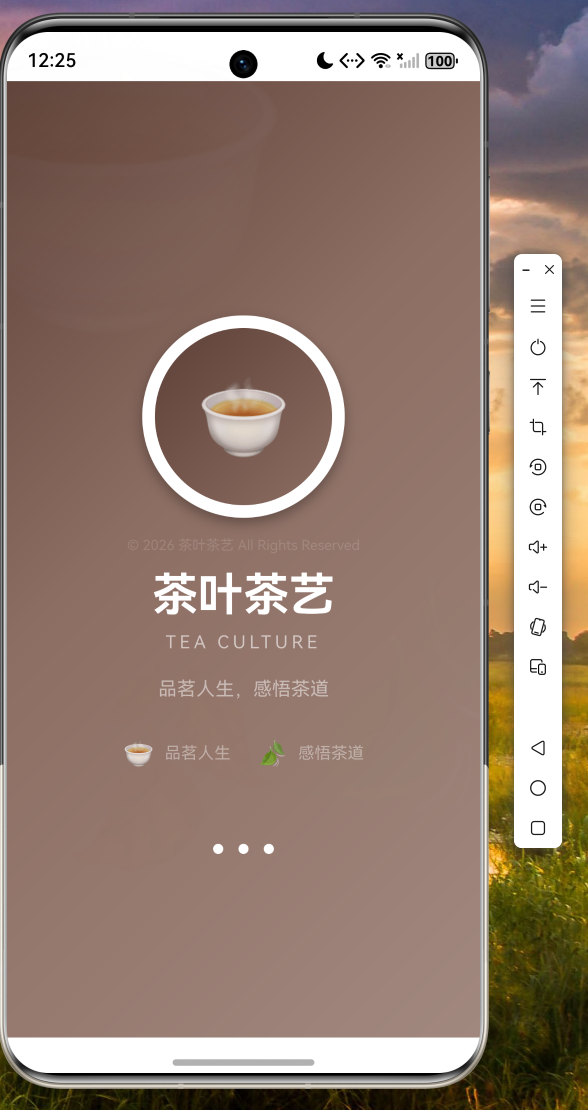
应用启动后,首先展示精心设计的启动页面。页面采用棕色渐变背景,配合茶杯图标动画效果,顶部有装饰性的茶杯和茶叶图标。中心位置展示茶杯 Logo,带有弹跳动画效果,下方依次显示"茶叶茶艺"标题和"品茗人生,感悟茶道"副标题。底部有三个加载指示点,营造优雅的品茶氛围。
4.2 主页截图
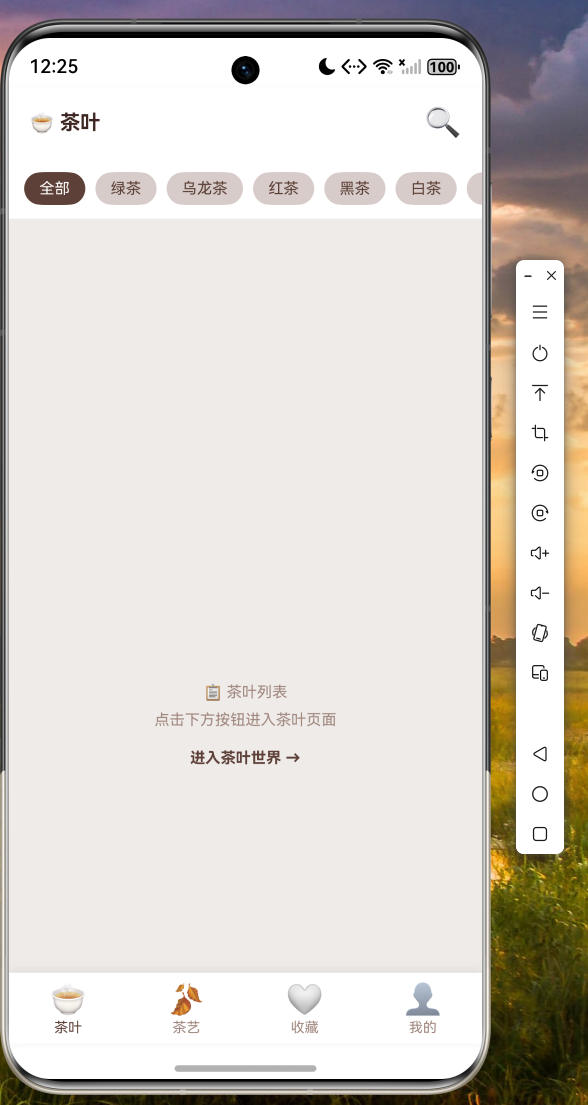
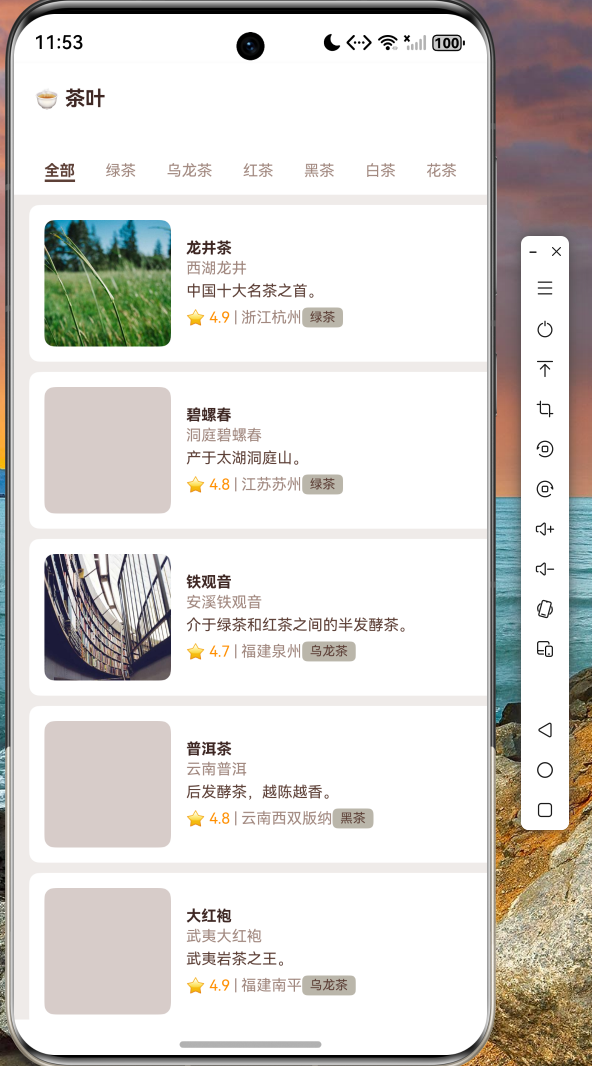
底部导航栏包含四个选项:茶叶、茶艺、收藏、我的。茶叶页面顶部显示标题,下方为分类标签栏,可滑动切换全部、绿茶、乌龙茶、红茶、黑茶、白茶、花茶等分类。列表展示茶叶卡片,包含封面图、名称、别名、描述、评分、产地和分类标签。卡片采用圆角设计,整体风格温馨典雅。
4.3 茶叶详情页截图
详情页顶部展示茶叶封面大图,下方显示茶叶名称、别名、评分、产地和分类信息。页面包含三个标签页:详情、冲泡方法、保存方法。详情页展示茶叶简介和详细介绍;冲泡方法页提供具体的水温和投茶量建议;保存方法页说明储存条件。底部固定展示茶杯注水动画组件,支持点击重置动画。
4.4 茶艺详情页截图
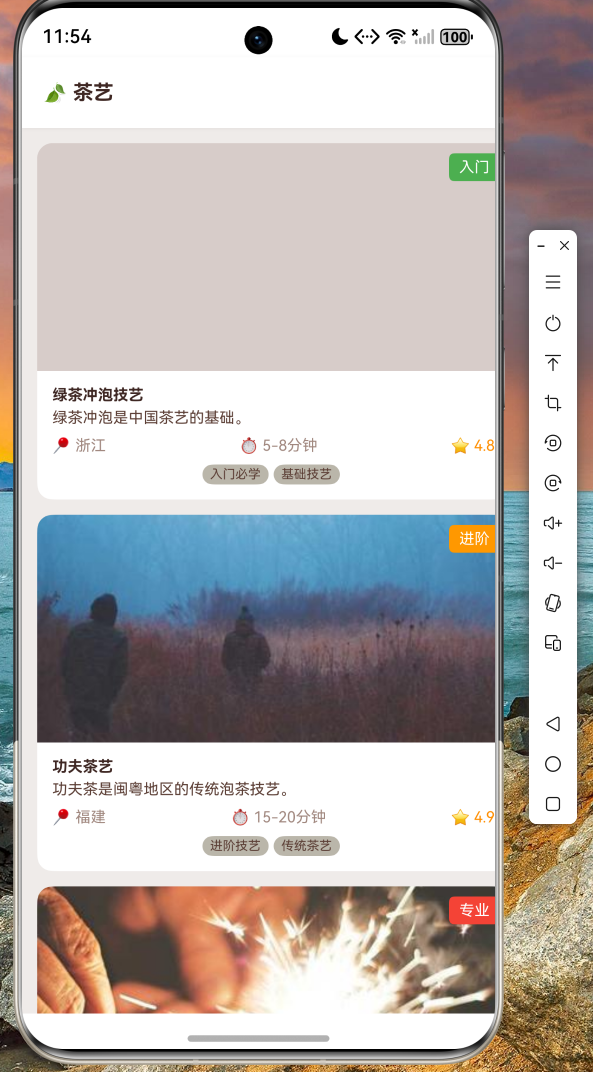
茶艺详情页顶部展示封面图和基本信息,包含茶艺名称、产地、时长和难度等级。页面分为四个部分:简介、历史渊源、冲泡步骤和小贴士。步骤展示区带有步骤指示器,点击可切换查看各步骤详情。底部小贴士区域配有相关配图,增强阅读体验。
五、项目总结
通过本文的实战讲解,我们成功使用 Flutter for OpenHarmony 开发了一款功能完善的茶叶茶艺应用。应用涵盖了启动页、首页、列表页、详情页、个人中心等完整功能模块,充分展示了 Flutter 跨平台开发的能力。
在开发过程中,我们重点解决了以下技术难点:
动画实现:利用 Flutter 的 AnimationController 和 Tween,实现了茶杯图标的弹跳动画和页面切换效果。
列表性能优化:采用分页加载机制,结合 RefreshIndicator 实现下拉刷新,确保大数据量下的流畅体验。
**主题