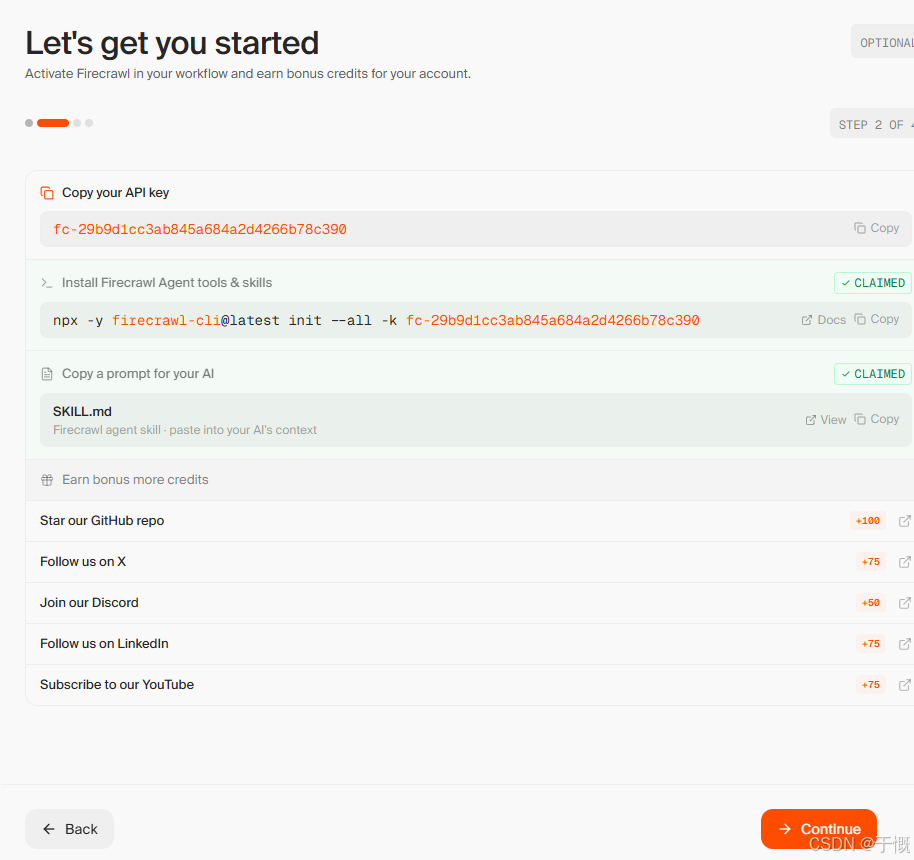
fc-29b9d1cc3ab845a684a2d4266b78c390

npx -y firecrawl-cli@latest init --all -k fc-29b9d1cc3ab845a684a2d4266b78c390

---
name: firecrawl
description: |
  Firecrawl gives AI agents and apps fast, reliable web context with
  strong search, scraping, and interaction tools. One install command
  sets up both live CLI tools and app-integration skills. Route the
  reader to the right usage path after install.
---

# Firecrawl

Firecrawl helps agents search first, scrape clean content, and interact
with live pages when plain extraction is not enough.

## Install

One command installs everything --- the Firecrawl CLI for live web work
**and** the build skills for integrating Firecrawl into application
code. It also opens browser auth so the human can sign in or create an
account.

```bash
npx -y firecrawl-cli@latest init --all --browser
```

This gives you:

- **CLI tools** --- `firecrawl search`, `firecrawl scrape`, `firecrawl interact`, and more
- **CLI skills** --- `firecrawl/cli`, `firecrawl-search`, `firecrawl-scrape`, `firecrawl-interact`, `firecrawl-crawl`, `firecrawl-map`
- **Build skills** --- `firecrawl-build`, `firecrawl-build-onboarding`, `firecrawl-build-scrape`, `firecrawl-build-search`, `firecrawl-build-interact`, `firecrawl-build-crawl`, `firecrawl-build-map`
- **Browser auth** --- walks the human through sign-in or account creation

Before doing real work, verify the install:

```bash
mkdir -p .firecrawl
firecrawl --status
firecrawl scrape "https://firecrawl.dev" -o .firecrawl/install-check.md
```

## Choose Your Path

Both paths use the same install above. The difference is what you do
next.

- **Need web data during this session** -> Path A (live tools)
- **Need to add Firecrawl to app code** -> Path B (app integration)
- **Need both** -> do both; the install already covers everything
- **Need an account or API key first** -> Path C (auth only)
- **Don't want to install anything** -> Path D (REST API directly)

---

## Path A: Live Web Tools

Use this when you need web data during your work: searching the web,
scraping known URLs, interacting with live pages, crawling docs, or
mapping a site.

After install, hand off to the CLI skill:

- `firecrawl/cli` for the overall command workflow
- `firecrawl-search` when you need search first
- `firecrawl-scrape` when you already have a URL
- `firecrawl-instruct` when the page needs clicks, forms, or login
- `firecrawl-crawl` for bulk extraction
- `firecrawl-map` for URL discovery

Default flow for live web work:

1. start with search when you need discovery
2. move to scrape when you have a URL
3. use interact only when the page needs clicks, forms, or login

If the task becomes "wire Firecrawl into product code," switch to Path B.

---

## Path B: Integrate Firecrawl Into an App

Use this when you're building an application, agent, or workflow that
calls the Firecrawl API from code and needs `FIRECRAWL_API_KEY` in
`.env` or runtime config.

The build skills are already installed from the same command above. No
separate install needed.

Choose the project mode before writing code:

- **Fresh project** -> pick the stack, install the SDK, add env vars, and run a smoke test
- **Existing project** -> inspect the repo first, then integrate Firecrawl where the project already handles APIs and secrets

If you already have a key, save it:

```dotenv
FIRECRAWL_API_KEY=fc-...
```

Then use:

- `firecrawl-build-onboarding` to finish auth and project setup
- `firecrawl-build` to choose the right endpoint
- the narrower `firecrawl-build-*` skills for implementation details

The required question in the build path is:

- **What should Firecrawl do in the product?**

Use the answer to route to `/search`, `/scrape`, `/interact`, `/crawl`, or `/map`, then run one real Firecrawl request as a smoke test.

If you do not have a key yet, do Path C first.

---

## Path C: Account Authorization Or API Key

Use this when the human still needs to sign up, sign in, authorize
access, or obtain an API key.

If you ran the install command above with `--browser`, the human was
already prompted to sign in. Check if the key is available before
running this flow.

If you already have a valid `FIRECRAWL_API_KEY`, skip this path.

If you're the human reading this in the browser, create an account or
sign in at:

- https://www.firecrawl.dev/signin?view=signup&source=agent-suggested

If you're an agent and need the human to authorize an API key, use this
flow:

**Step 1 --- Generate auth parameters:**

```bash
SESSION_ID=$(openssl rand -hex 32)
CODE_VERIFIER=$(openssl rand -base64 32 | tr '+/' '-_' | tr -d '=\n' | head -c 43)
CODE_CHALLENGE=$(printf '%s' "$CODE_VERIFIER" | openssl dgst -sha256 -binary | openssl base64 -A | tr '+/' '-_' | tr -d '=')
```

**Step 2 --- Ask the human to open this URL:**

```
https://www.firecrawl.dev/cli-auth?code_challenge=$CODE_CHALLENGE&source=coding-agent#session_id=$SESSION_ID
```

If they already have a Firecrawl account, they'll sign in and authorize.
If not, they'll create one first and then authorize. The API key comes
back to you automatically after they click "Authorize."

**Step 3 --- Poll for the API key:**

```bash
POST https://www.firecrawl.dev/api/auth/cli/status
Content-Type: application/json

{"session_id": "$SESSION_ID", "code_verifier": "$CODE_VERIFIER"}
```

Poll every 3 seconds. Responses:

- `{"status": "pending"}` --- keep polling
- `{"status": "complete", "apiKey": "fc-...", "teamName": "..."}` --- done

**Step 4 --- Save the key and continue:**

```bash
echo "FIRECRAWL_API_KEY=fc-..." >> .env
```

---

## Path D: Use Firecrawl Without Installing Anything

Use this when you don't want to install a CLI or skills package. This
works for both use cases:

- **Live web work** --- an agent calling the API directly for search,
  scrape, or interact during a session
- **Building with Firecrawl** --- integrating the REST API into app code

You still need an API key. Two ways to get one:

- **Human pastes it in** --- if you already have a key, just set
  `FIRECRAWL_API_KEY=fc-...` in your environment or pass it directly
- **Automated flow** --- do Path C to walk the human through browser auth
  and receive the key automatically

**Base URL:** `https://api.firecrawl.dev/v2`

**Auth header:** `Authorization: Bearer fc-YOUR_API_KEY`

### Available endpoints

- `POST /search` --- discover pages by query, returns results with optional full-page content
- `POST /scrape` --- extract clean markdown from a single URL
- `POST /interact` --- browser actions on live pages (clicks, forms, navigation)

### Documentation and references

The API docs are the source of truth for request/response schemas,
parameters, and SDKs:

- **API reference:** https://docs.firecrawl.dev
- **Skills repo** (for agent integration patterns): https://github.com/firecrawl/skills

---

## Session-specific auth

Use this API key for this onboarding session:

```dotenv
FIRECRAWL_API_KEY=fc-29b9d1cc3ab845a684a2d4266b78c390
```

If you want the Firecrawl CLI and skills installed without browser auth, run:

```bash
npx -y firecrawl-cli@latest init --all -k fc-29b9d1cc3ab845a684a2d4266b78c390
```