🎮 Super Pirate Maker - Python冒险岛游戏技术解析
📖 项目概述
Super Pirate Maker 是一款基于 Python + Pygame 开发的可自定义关卡的横版闯关游戏。游戏融合了关卡编辑器与闯关玩法,玩家不仅可以扮演勇敢的海盗角色在精心设计的关卡中冒险,还可以化身为关卡设计师,使用内置的强大编辑器创作属于自己的冒险地图。
🏗️ 项目架构
项目采用模块化设计,代码结构清晰,各模块职责明确:
Python冒险岛游戏/
├── code/
│   ├── main.py        # 游戏主入口 & 状态切换
│   ├── level.py       # 关卡逻辑实现
│   ├── editor.py      # 关卡编辑器
│   ├── sprites.py     # 游戏角色与精灵
│   ├── settings.py    # 全局配置常量
│   ├── support.py     # 工具函数库
│   ├── menu.py        # 编辑器菜单系统
│   └── timer.py       # 计时器工具
├── audio/             # 游戏音效
├── graphics/          # 游戏资源图片
│   ├── player/        # 玩家角色动画帧
│   ├── enemies/       # 敌人精灵图
│   ├── terrain/        # 地形砖块
│   ├── items/         # 道具(金币、钻石等)
│   └── palm/          # 棕榈树装饰
└── font/              # 游戏字体
⚙️ 核心配置 (settings.py)
游戏的所有全局配置集中管理,包括窗口尺寸、动画速度、编辑器数据等:
python
# 基础配置
TILE_SIZE = 64
WINDOW_WIDTH = 1280
WINDOW_HEIGHT = 720
ANIMATION_SPEED = 8

# 编辑器图块数据 - 定义了19种游戏对象
EDITOR_DATA = {
    0: {'style': 'player', 'type': 'object', ...},      # 玩家出生点
    2: {'style': 'terrain', 'type': 'tile', ...},      # 地形砖块
    3: {'style': 'water', 'type': 'tile', ...},        # 水面
    4-6: {'style': 'coin', ...},                        # 金币/银币/钻石
    7-10: {'style': 'enemy', ...},                      # 敌人(尖刺/牙齿/贝壳)
    11-18: {'style': 'palm', ...},                      # 棕榈树
}

# 层级系统 - 实现前后景深效果
LEVEL_LAYERS = {
    'clouds': 1,
    'ocean': 2,
    'bg': 3,
    'water': 4,
    'main': 5
}
🎯 双模式系统
游戏最核心的设计是编辑器模式 与闯关模式的切换机制:
状态切换流程
python
class Main:
    def __init__(self):
        self.editor_active = True  # 默认进入编辑模式
        self.editor = Editor(self.land_tiles, self.switch)

    def toggle(self):
        """切换游戏模式"""
        self.editor_active = not self.editor_active
        if self.editor_active:
            self.editor.editor_music.play()

    def switch(self, grid=None):
        """创建新关卡并切换"""
        self.transition.active = True
        if grid:
            self.level = Level(grid, self.switch, asset_dict, self.level_sounds)
过渡动画效果
采用圆形缩放过渡效果,实现平滑的模式切换:
python
class Transition:
    def display(self, dt):
        if self.active:
            self.border_width += 1000 * dt * self.direction
            if self.border_width >= self.threshold:
                self.direction = -1
                self.toggle()  # 切换模式

            if self.border_width < 0:
                self.active = False
                self.direction = 1
            # 绘制圆形遮罩
            pygame.draw.circle(self.display_surface, 'black',
                              self.center, self.radius, int(self.border_width))
🛠️ 关卡编辑器 (editor.py)
编辑器是游戏的核心亮点之一,提供完整的所见即所得编辑体验。
核心数据结构
python
class Editor:
    def __init__(self, land_tiles, switch):
        self.canvas_data = {}      # 画布数据
        self.origin = vector()     # 视角偏移
        self.pan_active = False    # 拖拽状态

    def get_current_cell(self, obj=None):
        """根据鼠标位置计算当前网格坐标"""
        distance_to_origin = vector(mouse_pos()) - self.origin
        col = int(distance_to_origin.x / TILE_SIZE)
        row = int(distance_to_origin.y / TILE_SIZE)
        return col, row
智能邻居检测
编辑器能自动识别地形边界,生成正确的瓦片:
python
def check_neighbors(self, cell_pos):
    """检测8个方向的邻居,自动匹配地形瓦片"""
    NEIGHBOR_DIRECTIONS = {
        'A': (0,-1), 'B': (1,-1), 'C': (1,0), 'D': (1,1),
        'E': (0,1),  'F': (-1,1), 'G': (-1,0), 'H': (-1,-1)
    }

    for cell in local_cluster:
        if cell in self.canvas_data:
            for name, side in NEIGHBOR_DIRECTIONS.items():
                neighbor_cell = (cell[0] + side[0], cell[1] + side[1])
                if neighbor_cell in self.canvas_data:
                    if self.canvas_data[neighbor_cell].has_terrain:
                        self.canvas_data[cell].terrain_neighbors.append(name)
资源导入系统
python
def imports(self):
    # 瓦片资源
    self.land_tiles = import_folder_dict('../graphics/terrain/land')

    # 动画资源
    self.animations = {}
    for key, value in EDITOR_DATA.items():
        if value['graphics']:
            graphics = import_folder(value['graphics'])
            self.animations[key] = {
                'frame index': 0,
                'frames': graphics,
                'length': len(graphics)
            }
🎮 关卡逻辑 (level.py)
精灵分组管理
采用分层分组策略,优化碰撞检测与渲染:
python
class Level:
    def __init__(self, grid, switch, asset_dict, audio):
        # 精灵分组
        self.all_sprites = CameraGroup(0, 2)           # 所有精灵
        self.coin_sprites = pygame.sprite.Group()       # 硬币组
        self.shell_sprites = pygame.sprite.Group()     # 贝壳敌人组
        self.damage_sprites = pygame.sprite.Group()    # 可造成伤害的敌人
        self.collision_sprites = pygame.sprite.Group() # 碰撞体积组
关卡构建
python
def build_level(self, grid, asset_dict, jump_sound):
    for layer_name, layer in grid.items():
        for pos, data in layer.items():
            match data:
                case 0:  # 玩家
                    self.player = Player(pos, asset_dict['player'], ...)
                case 2:  # 地形
                    Generic(pos, asset_dict['land'][data], [...])
                case 4: Coin('gold', ...)      # 金币
                case 7: Spikes(...)            # 尖刺陷阱
                case 8: Tooth(...)             # 牙齿敌人
                case 9: Shell(orientation='left', ...)
                case 10: Shell(orientation='right', ...)
物理与碰撞
python
def move(self, dt):
    # 水平移动
    self.pos.x += self.direction.x * self.speed * dt
    self.hitbox.centerx = round(self.pos.x)
    self.collision('horizontal')

    # 垂直移动 + 重力
    self.direction.y += self.gravity * dt
    self.pos.y += self.direction.y * self.speed * dt

def collision(self, direction):
    for sprite in self.collision_sprites:
        if sprite.rect.colliderect(self.hitbox):
            if direction == 'horizontal':
                # 水平碰撞处理
                self.hitbox.right = sprite.rect.left if self.direction.x > 0 else self.hitbox.right
            else:
                # 垂直碰撞处理
                self.hitbox.bottom = sprite.rect.top if self.direction.y > 0 else self.hitbox.bottom
👤 玩家角色 (sprites.py)
玩家状态机
python
class Player(Generic):
    def get_status(self):
        """根据运动状态更新动画状态"""
        if self.direction.y < 0:
            self.status = 'jump'      # 上升
        elif self.direction.y > 1:
            self.status = 'fall'      # 下落
        else:
            self.status = 'run' if self.direction.x != 0 else 'idle'
输入控制
python
def input(self):
    keys = pygame.key.get_pressed()
    if keys[pygame.K_d]:
        self.direction.x = 1
        self.orientation = 'right'
    elif keys[pygame.K_a]:
        self.direction.x = -1
        self.orientation = 'left'

    if keys[pygame.K_w] and self.on_floor:  # 跳跃
        self.direction.y = -2
        self.jump_sound.play()
👾 敌人系统
牙齿敌人 (Tooth)
具有巡逻 AI,能自动掉头:
python
class Tooth(Generic):
    def move(self, dt):
        right_gap = self.rect.bottomright + vector(1,1)
        right_block = self.rect.midright + vector(1,0)

        if self.direction.x > 0:  # 向右移动
            floor_sprites = [sprite for sprite in self.collision_sprites
                           if sprite.rect.collidepoint(right_gap)]
            wall_sprites = [sprite for sprite in self.collision_sprites
                          if sprite.rect.collidepoint(right_block)]
            if wall_sprites or not floor_sprites:
                self.direction.x *= -1
                self.orientation = 'left'
贝壳敌人 (Shell)
可发射珍珠攻击:
python
class Shell(Generic):
    def animate(self, dt):
        if int(self.frame_index) == 2 and self.status == 'attack' and not self.has_shot:
            pearl_direction = vector(-1,0) if self.orientation == 'left' else vector(1,0)
            Pearl(self.rect.center + offset, pearl_direction,
                  self.pearl_surf, [self.groups()[0], self.damage_sprites])
            self.has_shot = True
📷 相机系统
python
class CameraGroup(pygame.sprite.Group):
    def custom_draw(self, player):
        # 相机跟随玩家
        self.offset.x = player.rect.centerx - WINDOW_WIDTH / 2
        self.offset.y = player.rect.centery - WINDOW_HEIGHT / 2

        # 按层级绘制
        for sprite in self:
            for layer in LEVEL_LAYERS.values():
                if sprite.z == layer:
                    offset_rect = sprite.rect.copy()
                    offset_rect.center -= self.offset
                    self.display_surface.blit(sprite.image, offset_rect)
🎨 游戏资源管理
工具函数 (support.py)
python
def import_folder(path):
    """导入文件夹中的所有图片"""
    surface_list = []
    for folder_name, sub_folders, img_files in walk(path):
        for image_name in img_files:
            full_path = path + '/' + image_name
            image_surf = pygame.image.load(full_path).convert_alpha()
            surface_list.append(image_surf)
    return surface_list

def import_folder_dict(path):
    """导入为字典,键为文件名"""
    surface_dict = {}
    for folder_name, sub_folders, img_files in walk(path):
        for image_name in img_files:
            full_path = path + '/' + image_name
            surface_dict[image_name.split('.')[0]] = pygame.image.load(full_path).convert_alpha()
    return surface_dict
🎮 游戏操作指南
编辑器模式
| 操作 | 功能 |
|---|---|
| 鼠标左键 | 放置选中对象 |
| 鼠标右键 | 切换菜单选项 |
| 鼠标中键 | 切换前景/背景 |
| 滚轮 | 缩放/拖拽地图 |
| Enter | 进入闯关模式 |
| ESC | 保存并退出 |
闯关模式
| 按键 | 功能 |
|---|---|
| A/D | 左右移动 |
| W/空格 | 跳跃 |
| ESC | 返回编辑器 |
🚀 技术亮点
- 零外部依赖 - 仅使用 Pygame 标准库
- 模块化架构 - 低耦合、易扩展
- 自动地形拼接 - 智能检测邻居生成正确瓦片
- 状态机设计 - 玩家/敌人状态管理清晰
- 相机系统 - 实现平滑的视角跟随
- 编辑器一体化 - 所见即所得的编辑体验
📦 运行方式
bash
# 1. 安装 Python 3.10+
# 2. 安装依赖
pip install pygame

# 3. 运行游戏
cd code
python main.py
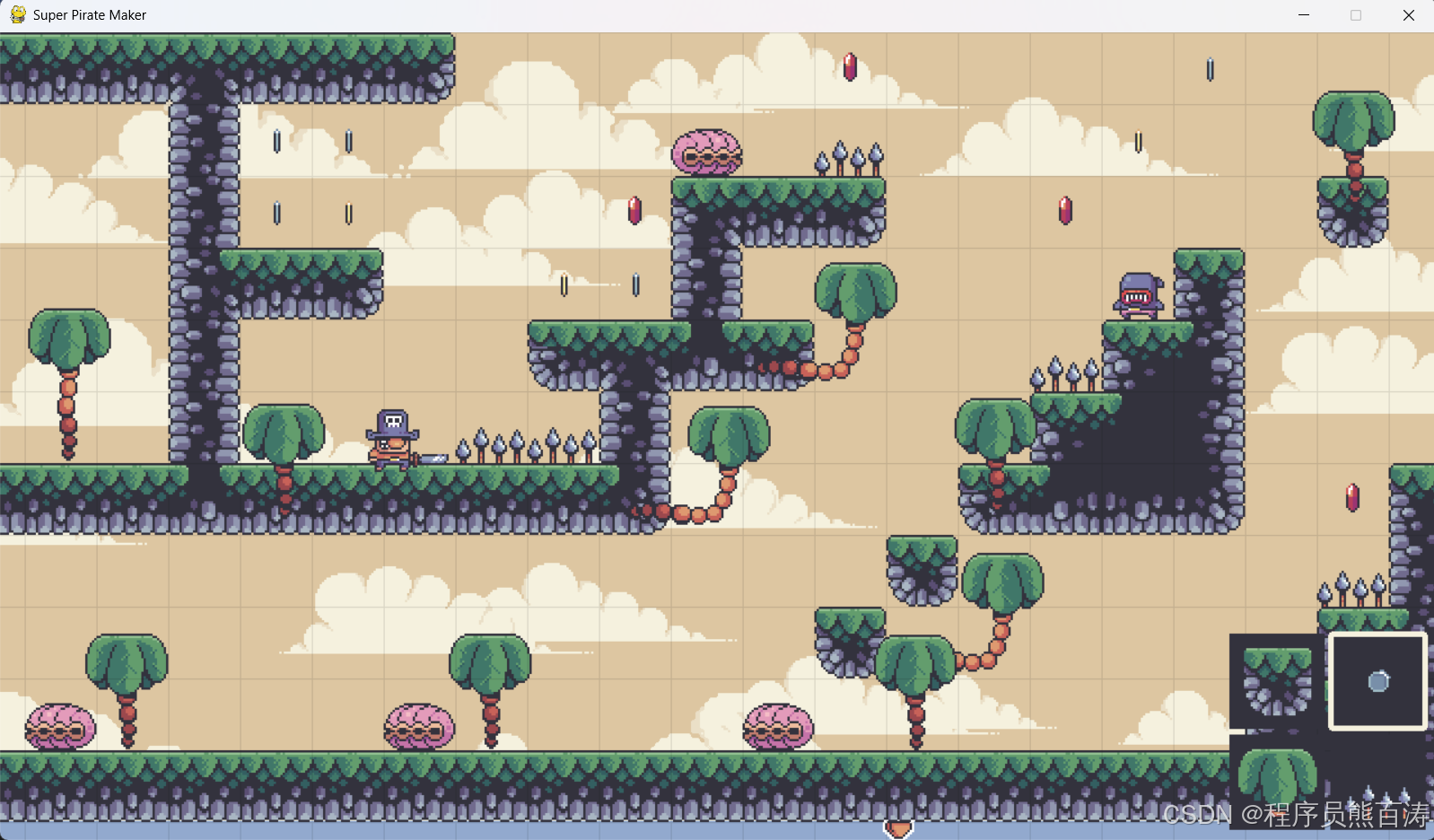
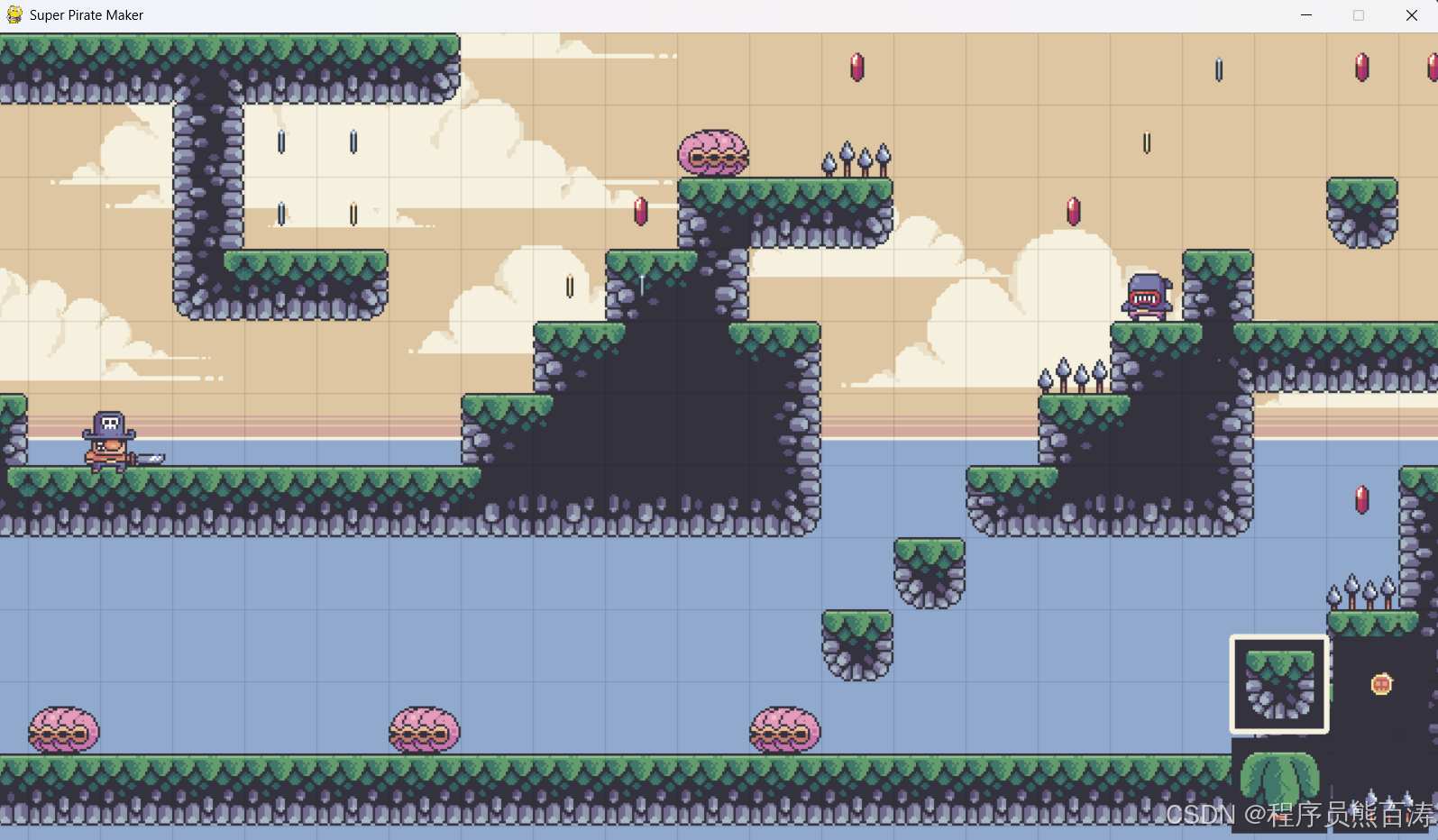
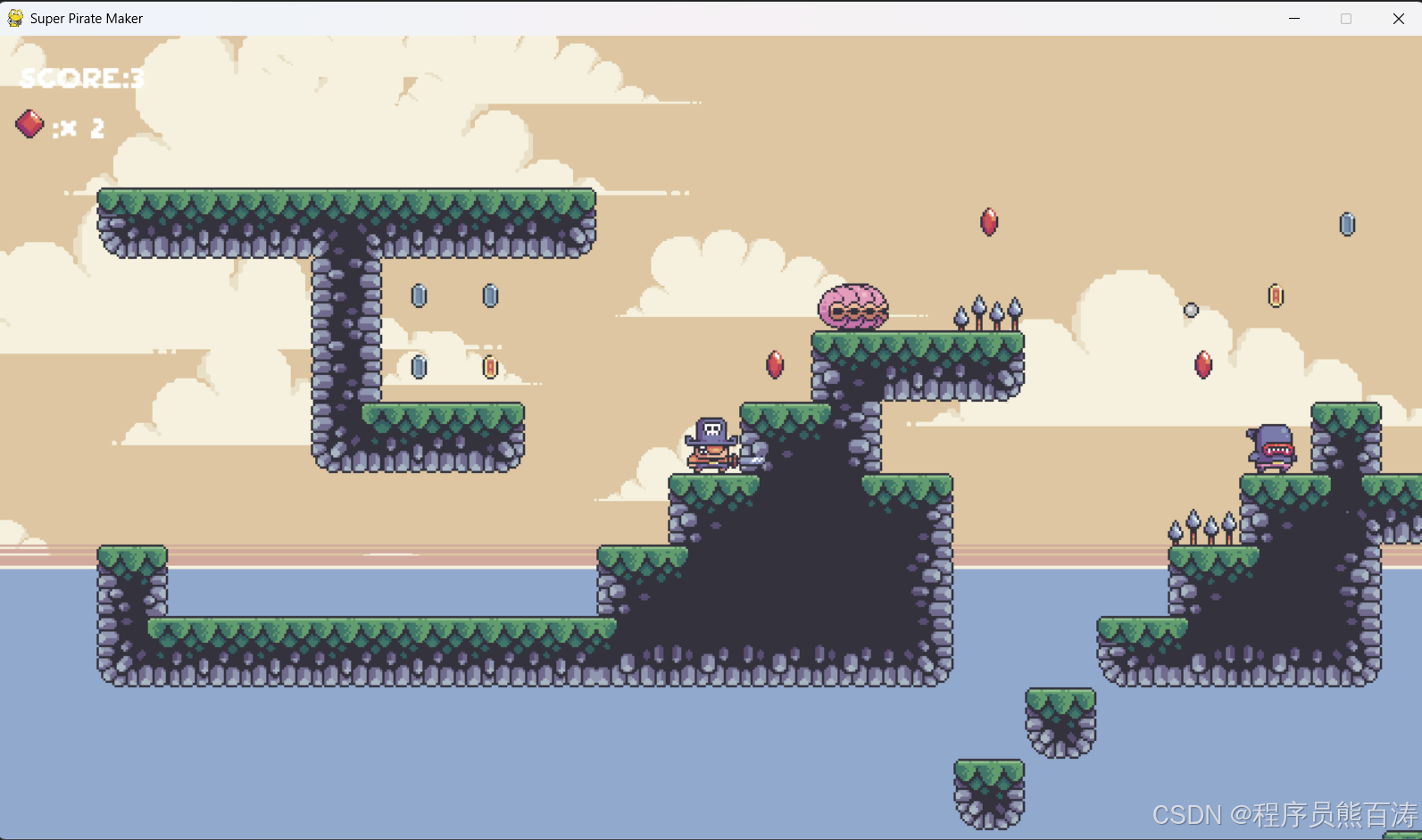
🎮 项目部分效果截图
🎯 总结
Super Pirate Maker 展示了一个完整的游戏开发流程,从项目架构设计到具体功能实现,都体现了良好的工程实践。无论是想学习游戏开发的新手,还是想深入了解 Pygame 的开发者,这都是一份值得研究的优秀项目!