Hermes Agent Dashboard 二次开发指南
参考: 官方 Web Dashboard、Extending the Dashboard
源码版本:
b63229016
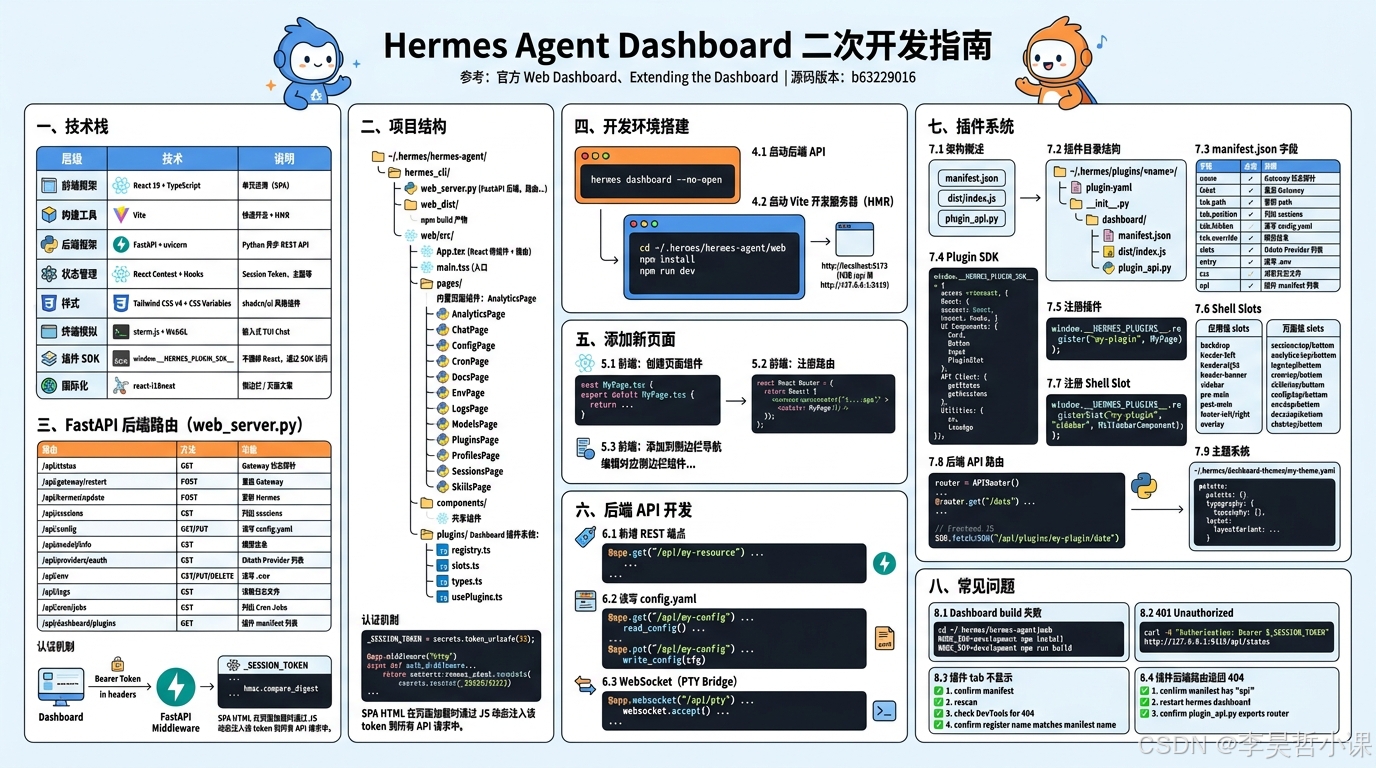
一、技术栈
| 层级 | 技术 | 说明 |
|---|---|---|
| 前端框架 | React 19 + TypeScript | 单页应用(SPA) |
| 构建工具 | Vite | 快速开发 + HMR |
| 后端框架 | FastAPI + uvicorn | Python 异步 REST API |
| 状态管理 | React Context + Hooks | Session Token、主题等 |
| 样式 | Tailwind CSS v4 + CSS Variables | shadcn/ui 风格组件 |
| 终端模拟 | xterm.js + WebGL | 嵌入式 TUI Chat |
| 插件 SDK | window.__HERMES_PLUGIN_SDK__ |
不捆绑 React,通过 SDK 访问 |
| 国际化 | react-i18next | 侧边栏 / 页面文案 |
二、项目结构
~/.hermes/hermes-agent/
├── hermes_cli/
│   ├── web_server.py          # FastAPI 后端(4,062 行)
│   │                              # 路由: /api/status、/api/config、/api/sessions 等
│   └── web_dist/               # npm build 产物(Vite 打包的 JS/CSS/HTML)
│
└── web/src/
    ├── App.tsx                  # React 根组件 + 路由配置
    ├── main.tsx                 # 入口
    ├── pages/                   # 内置页面组件
    │   ├── AnalyticsPage.tsx
    │   ├── ChatPage.tsx         # 嵌入式 TUI Chat(xterm.js)
    │   ├── ConfigPage.tsx
    │   ├── CronPage.tsx
    │   ├── DocsPage.tsx
    │   ├── EnvPage.tsx          # .env 编辑器(API Keys 页面)
    │   ├── LogsPage.tsx
    │   ├── ModelsPage.tsx       # 模型切换
    │   ├── PluginsPage.tsx
    │   ├── ProfilesPage.tsx
    │   ├── SessionsPage.tsx
    │   └── SkillsPage.tsx
    │
    ├── components/              # 共享组件
    │
    └── plugins/                 # Dashboard 插件系统
        ├── registry.ts          # 插件注册表
        ├── slots.ts             # Slot 定义
        ├── types.ts             # TypeScript 类型
        └── usePlugins.ts        # React Hook
三、FastAPI 后端路由(web_server.py)
完整端点一览
| 路由 | 方法 | 功能 |
|---|---|---|
/api/status |
GET | Gateway 状态探针 |
/api/gateway/restart |
POST | 重启 Gateway |
/api/hermes/update |
POST | 更新 Hermes |
/api/actions/{name}/status |
GET | 查询异步 Action 状态 |
/api/sessions |
GET | 列出 sessions(分页) |
/api/sessions/search |
GET | 搜索 sessions |
/api/sessions/{session_id} |
GET | Session 详情 |
/api/sessions/{session_id}/messages |
GET | 消息列表 |
/api/sessions/{session_id} |
DELETE | 删除 Session |
/api/config |
GET/PUT | 读写 config.yaml |
/api/config/defaults |
GET | 默认配置 |
/api/config/schema |
GET | 配置 schema |
/api/model/info |
GET | 模型信息 |
/api/model/options |
GET | 可用模型列表 |
/api/model/auxiliary |
GET | 辅助模型列表 |
/api/model/set |
POST | 设置主/辅模型 |
/api/providers/oauth |
GET | OAuth Provider 列表 |
/api/providers/oauth/{provider_id}/start |
POST | 启动 OAuth |
/api/providers/oauth/{provider_id}/submit |
POST | 提交 OAuth Code |
/api/providers/oauth/{provider_id}/poll/{session_id} |
GET | 轮询 OAuth 状态 |
/api/providers/oauth/{provider_id} |
DELETE | 断开 OAuth |
/api/env |
GET/PUT/DELETE | 读写 .env |
/api/env/reveal |
POST | 揭示掩码的 env 值 |
/api/logs |
GET | 读取日志文件 |
/api/cron/jobs |
GET | 列出 Cron Jobs |
/api/cron/jobs/{job_id} |
GET | Cron Job 详情 |
/api/cron/jobs/{job_id}/run |
POST | 手动触发 |
/api/cron/jobs/{job_id}/pause |
POST | 暂停 |
/api/cron/jobs/{job_id}/resume |
POST | 恢复 |
/api/dashboard/plugins |
GET | 插件 manifest 列表 |
/api/dashboard/plugins/rescan |
GET | 强制重新扫描插件目录 |
认证机制
Dashboard 使用随机 _SESSION_TOKEN,通过 Bearer token 验证:
python
_SESSION_TOKEN = secrets.token_urlsafe(32)

@app.middleware("http")
async def auth_middleware(request: Request, call_next):
    if request.url.path.startswith("/api/"):
        auth = request.headers.get("authorization", "")
        expected = f"Bearer {_SESSION_TOKEN}"
        if not hmac.compare_digest(auth.encode(), expected.encode()):
            raise HTTPException(status_code=401, detail="Unauthorized")
SPA HTML 在页面加载时通过 JS 动态注入该 token 到所有 API 请求中。
四、开发环境搭建
4.1 启动后端 API
bash
hermes dashboard --no-open4.2 启动 Vite 开发服务器(HMR)
bash
# Terminal 2
cd ~/.hermes/hermes-agent/web
npm install
npm run dev
Vite 开发服务器在 http://localhost:5173,代理 /api 请求到 http://127.0.0.1:9119。
五、添加新页面
5.1 前端: 创建页面组件
在 web/src/pages/ 下创建 MyPage.tsx:
tsx
import React from "react";

export default function MyPage() {
  return (
    <div className="p-6">
      <h1 className="text-2xl font-bold mb-4">My Page</h1>
      <p>This is a custom page.</p>
    </div>
  );
}
5.2 前端: 注册路由
在 App.tsx 中添加路由:
tsx
import MyPage from "./pages/MyPage";

function App() {
  return (
    <Routes>
      <Route path="/" element={<Layout />}>
        <Route index element={<ConfigPage />} />
        <Route path="my-page" element={<MyPage />} />
      </Route>
    </Routes>
  );
}
5.3 前端: 添加到侧边栏导航
编辑对应侧边栏组件,找到导航菜单配置,添加导航项。
六、后端 API 开发
6.1 新增 REST 端点
在 hermes_cli/web_server.py 中添加:
python
from fastapi import Request, HTTPException
import hmac

@app.get("/api/my-resource")
async def get_my_resource(request: Request):
    # 认证已由中间件处理
    return {"data": "hello"}
6.2 读写 config.yaml
python
from hermes_cli.config import read_config, write_config

@app.get("/api/my-config")
async def get_my_config():
    cfg = read_config()
    return cfg.get("my_section", {})

@app.put("/api/my-config")
async def update_my_config(body: dict):
    cfg = read_config()
    cfg["my_section"] = body
    write_config(cfg)
    return {"status": "ok"}
6.3 WebSocket(PTY Bridge)
python
from fastapi import WebSocket

@app.websocket("/api/pty")
async def pty_bridge(websocket: WebSocket):
    await websocket.accept()
    # 创建 PTY,将 xterm.js 数据转发到 PTY
    # 将 PTY 输出回传给前端
七、插件系统
7.1 架构概述
Dashboard 插件由三部分组成:
manifest.json     插件配置(tab、slots、entry、api)
dist/index.js     预编译 JS bundle(IIFE,无构建步骤)
plugin_api.py     后端 FastAPI 路由(可选)
7.2 插件目录结构
~/.hermes/plugins/<name>/
├── plugin.yaml              可选 --- CLI/Gateway 插件清单
├── __init__.py              可选 --- CLI/Gateway hooks
└── dashboard/               Dashboard 扩展(可选)
    ├── manifest.json         必选 --- tab 配置、icon、entry point
    ├── dist/
    │   ├── index.js         必选 --- 预编译 JS bundle(IIFE)
    │   └── style.css        可选 --- 自定义 CSS
    └── plugin_api.py        可选 --- 后端 FastAPI 路由
7.3 manifest.json 字段
| 字段 | 必选 | 说明 |
|---|---|---|
name |
是 | 唯一标识符 |
label |
是 | 导航栏显示名称 |
tab.path |
是 | URL 路径,如 /my-plugin |
tab.position |
否 | 位置: end(默认)、after:<path>、before:<path> |
tab.hidden |
否 | true 时仅注册 slots,不显示导航 tab |
tab.override |
否 | 设为内置路径可替换整个页面 |
slots |
否 | 此插件填充的 slot 名称列表 |
entry |
是 | JS bundle 路径,相对于 dashboard/ |
css |
否 | CSS 文件路径 |
api |
否 | Python 文件路径,FastAPI 路由 |
7.4 Plugin SDK
插件通过 window.__HERMES_PLUGIN_SDK__ 访问一切,不捆绑 React:
javascript
const SDK = window.__HERMES_PLUGIN_SDK__;

// React + hooks
SDK.React
SDK.hooks.useState
SDK.hooks.useEffect

// UI 组件(shadcn/ui 原语)
SDK.components.Card
SDK.components.Button
SDK.components.Input
SDK.components.PluginSlot  // 渲染命名 slot

// Hermes API 客户端
SDK.api.getStatus()
SDK.api.getSessions()

// 工具函数
SDK.utils.cn       // Tailwind class merger
SDK.utils.timeAgo  // "5m ago" from unix timestamp
7.5 注册插件
javascript
// ~/.hermes/plugins/my-plugin/dashboard/dist/index.js
(function () {
  "use strict";

  const SDK = window.__HERMES_PLUGIN_SDK__;
  const { React } = SDK;
  const { Card, CardHeader, CardTitle, CardContent } = SDK.components;

  function MyPage() {
    return React.createElement(Card, null,
      React.createElement(CardHeader, null,
        React.createElement(CardTitle, null, "My Plugin"),
      ),
      React.createElement(CardContent, null,
        React.createElement("p", { className: "text-sm text-muted-foreground" },
          "Hello from my custom dashboard tab."
        ),
      ),
    );
  }

  window.__HERMES_PLUGINS__.register("my-plugin", MyPage);
})();
7.6 Shell Slots
应用级 slots(在应用外壳任意位置注入组件):
| Slot | 位置 |
|---|---|
backdrop |
背景层(noise 层之上) |
header-left |
顶部栏左侧 |
header-right |
顶部栏右侧(主题/语言切换器左侧) |
header-banner |
导航栏下方全宽条幅 |
sidebar |
驾驶舱侧边栏(仅 layoutVariant: cockpit 时渲染) |
pre-main |
主内容区之前 |
post-main |
主内容区之后 |
footer-left / footer-right |
底部栏左右侧 |
overlay |
固定定位层(最顶层,用于覆盖物) |
页面级 slots (仅在指定页面渲染,page:top 为内容区顶部,page:bottom 为底部):
| Slot | 位置 |
|---|---|
sessions:top / sessions:bottom |
Sessions 页面 |
analytics:top / analytics:bottom |
Analytics 页面 |
logs:top / logs:bottom |
Logs 页面(:top 在过滤器工具栏上方,:bottom 在日志查看器下方) |
cron:top / cron:bottom |
Cron 页面 |
skills:top / skills:bottom |
Skills 页面 |
config:top / config:bottom |
Config 页面 |
env:top / env:bottom |
Keys(Env)页面 |
docs:top / docs:bottom |
Docs 页面 |
chat:top / chat:bottom |
Chat 页面(仅嵌入式 TUI 启用时) |
7.7 注册 Shell Slot
javascript
// 注册一个 sidebar slot
window.__HERMES_PLUGINS__.registerSlot("my-plugin", "sidebar", MySidebarComponent);

// 注册页面级 slot
window.__HERMES_PLUGINS__.registerSlot("my-plugin", "sessions:top", MyBannerComponent);
7.8 后端 API 路由
插件可注册 FastAPI 路由,路由挂载在 /api/plugins/<name>/*:
python
# ~/.hermes/plugins/my-plugin/dashboard/plugin_api.py
from fastapi import APIRouter

router = APIRouter()

@router.get("/data")
async def get_data():
    return {"items": ["one", "two", "three"]}

@router.post("/action")
async def do_action(body: dict):
    return {"ok": True, "received": body}
前端通过 SDK.fetchJSON("/api/plugins/my-plugin/data") 调用。
7.9 主题系统
主题是 YAML 文件,放在 ~/.hermes/dashboard-themes/ 目录:
yaml
# ~/.hermes/dashboard-themes/my-theme.yaml
name: my-theme
label: My Theme
description: Custom theme

palette:
  background: { hex: "#0a1628", alpha: 1.0 }
  midground: { hex: "#a8d0ff", alpha: 1.0 }
  foreground: { hex: "#ffffff", alpha: 0.0 }

typography:
  fontSans: "Poppins, system-ui, sans-serif"
  fontMono: "Fira Code, ui-monospace, monospace"
  baseSize: "15px"

layout:
  radius: "0.75rem"
  density: comfortable

layoutVariant: standard   # standard | cockpit | tiled
八、常见问题
8.1 Dashboard build 失败
bash
cd ~/.hermes/hermes-agent/web
NODE_ENV=development npm install
NODE_ENV=development npm run build
8.2 401 Unauthorized
bash
curl -H "Authorization: Bearer $_SESSION_TOKEN" http://127.0.0.1:9119/api/status8.3 插件 tab 不显示
- 确认 manifest 在
~/.hermes/plugins/<name>/dashboard/manifest.json - 强制重新扫描:
curl http://127.0.0.1:9119/api/dashboard/plugins/rescan - 浏览器 DevTools → Network 确认
manifest.json和index.js无 404 - 确认
window.__HERMES_PLUGINS__.register()的 name 与manifest.json:name一致
8.4 插件后端路由返回 404
- 确认 manifest 有
"api": "plugin_api.py" - 重启
hermes dashboard(插件 API 路由在启动时挂载,不支持热重载) - 确认
plugin_api.py导出router = APIRouter()