在两台机器上下载nginx,keepalived
yum install -y nginx keepalived
编辑文件 cp keepalived.conf.sample keepalived.conf
vim /etc/keepalived/keepalived.conf
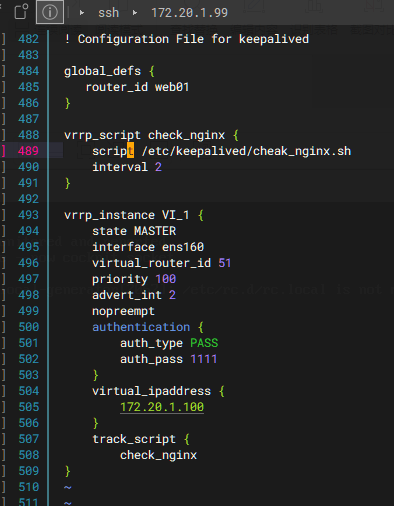
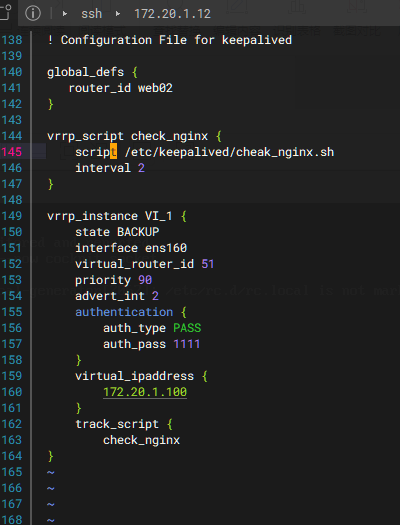
在每台服务器上开启服务:systemctl start keepalived.service
systemctl start nginx
写一个监测nginx是否运行的脚本
root@LB-1-master keepalived# vim /etc/keepalived/check_nginx.sh
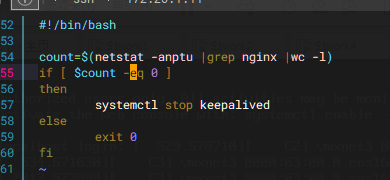
给执行权限 chmod +x check_nginx.sh
再写一个拉起脚本vim /etc/keepalived/rescure.sh
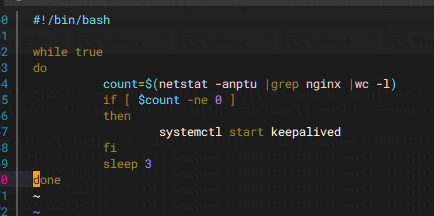
给执行权限 chmod +x rescure.sh
在后台运行:nohup /etc/keepalived/rescure.sh &
脚本有问题会在创建目录下nohup.out文件中体现
三台机器都要配置
编辑负载均衡 vim /etc/nginx/nginx.conf
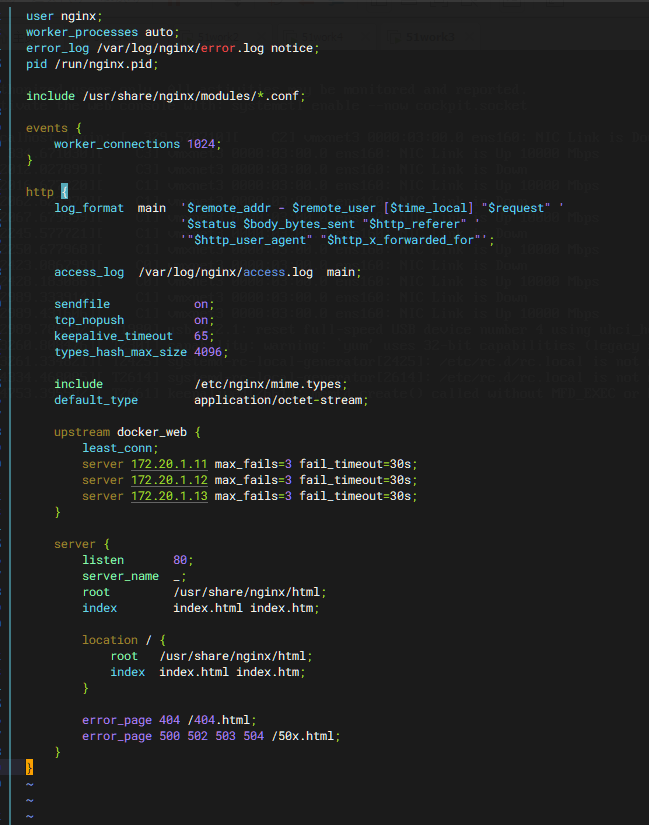
下载docker容器实现在三台服务器上运行其他网段web
第一步:配置阿里源
cat <<EOF >> /etc/yum.repos.d/docker-ce.repo
docker-ce-stable
name=Docker CE Stable - $basearch
baseurl=https://mirrors.aliyun.com/docker-ce/linux/centos/9/x86_64/stable/
enabled=1
gpgcheck=1
gpgkey=https://mirrors.aliyun.com/docker-ce/linux/centos/gpg
EOF
yum安装docker
yum install -y docker-ce
(ce安装是实验室环境下,ee是传统生产环境下)
启动docker,要给 docker 配置国内镜像加速
cat <<EOF >>/etc/docker/daemon.json
{
"registry-mirrors": [
"https://0vmzj3q6.mirror.aliyuncs.com",
"https://docker.m.daocloud.io",
"https://mirror.baidubce.com",
"https://dockerhub.timeweb.cloud",
"https://vlgh0kqj.mirror.aliyuncs.com"
]
}
EOF
更新配置后要重新读取:systemctl daemon-reload
设置开机自启:systemctl enable --now docker
拉取nginx:docker pull nginx
指定网桥
在三台服务器上都执行
docker network create \ --subnet=172.20.2.0/24 \ --gateway=172.20.2.1 \ mybridge
启动容器时,直接指定固定 IP
docker run -d \ --name nginx-web \ --restart always \ --net mybridge \ --ip 172.20.2.11 \ -p 8080:80 \ nginx:stable
docker run -d \ --name nginx-web \ --net mybridge \ --ip 172.20.2.12 \ -p 8080:80 \ nginx:stable
docker run -d \ --name nginx-web \ --net mybridge \ --ip 172.20.2.13 \ --restart always \ -p 8080:80 \ nginx:stable
做完以上docker操作,更改负载均衡配置文件
upstream backend { server 172.20.2.11:8080; server 172.20.2.12:8080; server 172.20.2.13:8080; }