前言
藉由開發可直接執行的簡單的語音助手專案,了解如何運用 python 語音套件:
-
語音輸入(SpeechRecognition),把「人講的話」轉成文字(Speech → Text)
-
語音輸出(pyttsx3),把「文字」轉成語音(Text → Speech)
簡單流程
- 開啟麥克風
- 接收聲音
- 將聲音送去辨識,呼叫語音辨識引擎
- 得到文字結果
- 將文字丟給 TTS(文字轉語音引擎)
- 由電腦播放出聲音
安裝所需套件
如果需要使用麥克風,建議安裝此套件
pip3 install pyaudio
註:
pyaudio 如出現問題 ->
note: This error originates from a subprocess, and is likely not a problem with pip. ERROR: Failed building wheel for pyaudio
原因 ->
pyaudio 需要編譯 C 擴展,但你的系統缺少底層音訊函式庫
macOS 處理->
步驟 1:安裝 PortAudio
brew install portaudio
步驟 2:重新安裝 PyAudio
pip3 install pyaudio
「文字轉語音(Text-to-Speech, TTS)」套件
pip3 install pyttsx3
「語音(音訊)」轉成「文字」
pip3 install SpeechRecognition
程式碼
python
import random
import speech_recognition as sr
import datetime
import pyttsx3

engine = pyttsx3.init()
engine.setProperty('rate', 160)

def speak(text):
    engine.say(text)
    engine.runAndWait()

intents = {
    "greeting": ["你好", "嗨", "您好"],
    "farewell": ["再見", "拜拜", "下次見"],
    "query": ["你是誰","幫助","你可以做什麼"],
    "time": ["現在幾點","現在時間",],
    "weather": ["今天天氣如何","天氣怎麼樣",]
}

responses = {
    "greeting": [
                "你好!很高興見到你!",
                "哈囉~今天過得如何?",
                "嗨,有什麼我可以幫忙的嗎?"
            ],
    "farewell": [
                "See you later!",
                "再見!祝你有美好的一天!",
                "拜拜~期待下次聊天!"
            ],
    "query": [
            "我是一個簡單的聊天機器人,隨時準備和你聊天!",
            "我很好,謝謝你的關心!你呢?",
            "我在這裡幫助你解答問題或是陪你聊天!"
            ],
    "weather": [
                "The weather is sunny today!",
                "我目前無法提供天氣資訊,但你可以試著問問其他問題!",
                "抱歉,我還在學習中,暫時無法回答天氣相關的問題。",
                "我還不太懂天氣,但我可以陪你聊聊其他話題!"
            ],
    "time": [
            "The current time is " + datetime.datetime.now().strftime("%I:%M %p") + ".",
            "我目前無法提供時間資訊,但你可以試著問問其他問題!",
            "抱歉,我還在學習中,暫時無法回答時間相關的問題。",
            "我還不太懂時間,但我可以陪你聊聊其他話題!"
            ]
}

def recognize_speech():
    recognizer = sr.Recognizer()
    with sr.Microphone() as source:
        print("請說話...")
        recognizer.adjust_for_ambient_noise(source, duration=1)
        audio = recognizer.listen(source, timeout=5)

    try:
        text = recognizer.recognize_google(audio, language="zh-TW")
        print(f"你說: {text}")
        return text
    except sr.UnknownValueError:
        print("抱歉,我聽不懂你在說什麼")
        return None
    except sr.RequestError:
        print("無法從 Google 服務取得結果")
        return None


if __name__ == "__main__":
    while True:
        user_input = recognize_speech()
        if user_input:
            response = None
            for intent, data in intents.items():
                for pattern in data:
                    if pattern in user_input:
                        response = random.choice(responses[intent])
                    break
            if response:
                print(f"AI: {response}")
                speak(response)
            elif user_input in ["退出", "離開", "結束"]:
                print("再見!")
                speak("再見!")
                break
            else:
                print("抱歉,我不太明白你的意思。")
                speak("抱歉,我不太明白你的意思。")
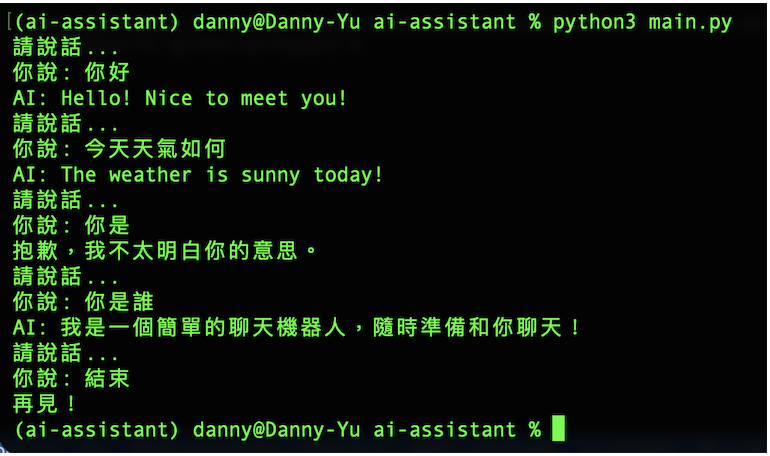
終端機 測試