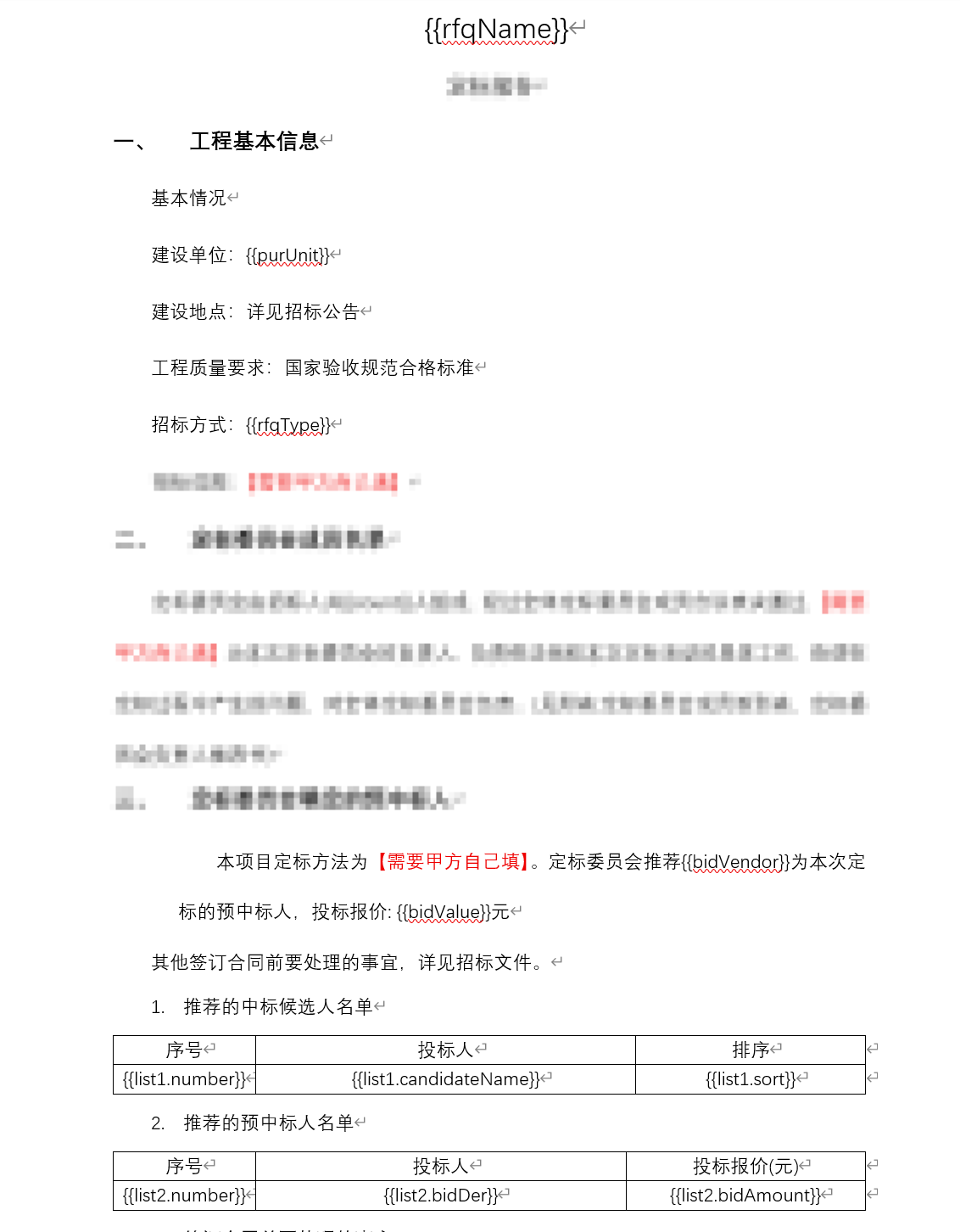
XML
  <!-- 添加 Apache POI 相关的依赖库,用于处理Word文档 -->
        <dependency>
            <groupId>org.apache.poi</groupId>
            <artifactId>poi-ooxml</artifactId>
            <version>5.2.3</version>
        </dependency>
        <dependency>
            <groupId>org.apache.poi</groupId>
            <artifactId>poi-ooxml-schemas</artifactId>
            <version>4.1.2</version>
</dependency>WordController
java
import org.springframework.beans.factory.annotation.Autowired;
import org.springframework.web.bind.annotation.PostMapping;
import org.springframework.web.bind.annotation.RequestBody;
import org.springframework.web.bind.annotation.RestController;

import javax.servlet.http.HttpServletResponse;
import java.io.IOException;
import java.util.Map;

@RestController
public class WordController {

    @Autowired
    private WordService wordService;

    @PostMapping("/generateWord")
    public String generateWord(HttpServletResponse response, @RequestBody Map<String, Object> requestData) {
        String templatePath = "E:\\word\\定标评审文件.docx"; // 模板文件路径
        try {
            wordService.fillTemplate(response,templatePath, requestData);
            return "Word文档生成成功!";
        } catch (IOException e) {
            return "生成文档时发生错误!" + e.getMessage();
        }
    }
}WordService
java
import lombok.Cleanup;
import org.apache.poi.xwpf.usermodel.*;
import org.springframework.stereotype.Service;

import javax.servlet.ServletOutputStream;
import javax.servlet.http.HttpServletResponse;
import java.io.FileInputStream;
import java.io.IOException;
import java.net.URLEncoder;
import java.util.*;
import java.util.regex.Matcher;
import java.util.regex.Pattern;

@Service
public class WordService {

    /**
     * 填充Word模板,支持简单变量替换和列表循环
     *
     * @param templatePath 模板路径
     * @param data         数据
     * @throws IOException IO异常
     */
    public void fillTemplate(HttpServletResponse response, String templatePath, Map<String, Object> data) throws IOException {
        try (XWPFDocument document = new XWPFDocument(new FileInputStream(templatePath))) {
            processTableLoops(document, data);

            for (XWPFParagraph paragraph : document.getParagraphs()) {
                replaceInParagraph(paragraph, data);
            }
            response.setHeader("Content-disposition", "attachment; filename=" + URLEncoder.encode("testout.docx", "UTF-8"));
            response.setHeader("content-type", "application/octet-stream");
            response.setCharacterEncoding("UTF-8");
            @Cleanup ServletOutputStream outputStream = null;
            try {
                outputStream = response.getOutputStream();
                document.write(outputStream);
            } catch (IOException e) {
                e.printStackTrace();
                throw e;
            } finally {
                document.close();
                if (outputStream != null) {
                    outputStream.close();
                }
            }
        }
    }

    /**
     * 在段落中替换简单变量
     */
    private void replaceInParagraph(XWPFParagraph paragraph, Map<String, Object> data) {
        // 获取段落完整文本
        String fullText = paragraph.getText();
        if (fullText == null || fullText.isEmpty()) {
            return;
        }

        // 检查是否包含任何占位符,避免不必要的处理
        boolean hasPlaceholder = false;
        for (String key : data.keySet()) {
            if (fullText.contains("{{" + key + "}}")) {
                hasPlaceholder = true;
                break;
            }
        }

        if (!hasPlaceholder) {
            return;
        }
        String newText = fullText;
        for (Map.Entry<String, Object> entry : data.entrySet()) {
            String key = entry.getKey();
            Object value = entry.getValue();
            // 跳过列表类型,列表已在表格处理中解决
            if (value instanceof List) {
                continue;
            }
            List<XWPFRun> runs = paragraph.getRuns();
            for (XWPFRun run : runs) {
                String text = run.getText(0);
                if("{{".equals(text)||"}}".equals(text)){
                    run.setText("", 0);
                }
                String placeholder =  key;
                System.out.println(text);
                if (text != null && text.contains(placeholder)) { // 替换文本条件
                    String newText2 = text.replace(placeholder,  value != null ? value.toString(): ""); // 替换文本
                    run.setText(newText2, 0);
                }
            }
        }
    }


    /**
     * 处理表格中的列表循环
     * 约定:模板表格中,包含 {{listKey.field}} 格式占位符的行将被视为模板行
     * 例如:userlist.userName -> 对应 data 中的 "userlist" 列表和字段 "userName"
     */
    private void processTableLoops(XWPFDocument document, Map<String, Object> data) {
        for (XWPFTable table : document.getTables()) {
            // 从下往上遍历行,避免删除行后索引错位
            for (int i = table.getNumberOfRows() - 1; i >= 0; i--) {
                XWPFTableRow row = table.getRow(i);

                // 检查该行是否包含列表占位符,例如 {{userlist.userName}}
                String rowText =getRowText(row);
                if (rowText == null || !rowText.contains("{{")) {
                    continue;
                }

                // 解析占位符,提取 listKey (如 userlist) 和 field (如 userName)
                // 这里简化处理:假设一行中所有的列表占位符都属于同一个 listKey
                String listKey = extractListKeyFromRow(row);

                if (listKey != null && data.containsKey(listKey)) {
                    Object listObj = data.get(listKey);
                    if (listObj instanceof List) {
                        List<?> itemList = (List<?>) listObj;
                        // 1. 为列表中的每个元素创建新行
                        for (Object item : itemList) {
                            if (item instanceof Map) {
                                Map<String, Object> itemData = (Map<String, Object>) item;
                                XWPFTableRow newRow = copyTableRow(table, row);
                                replaceInTableRow(newRow, itemData, listKey);
                            }
                        }

                        // 2. 删除原始的模板行
                        table.removeRow(i);
                    }
                }
            }
        }
    }

    private String getRowText(XWPFTableRow row) {
        StringBuilder sb = new StringBuilder();
        for (XWPFTableCell cell : row.getTableCells()) {
            for (XWPFParagraph paragraph : cell.getParagraphs()) {
                String text = paragraph.getText();
                if (text != null) {
                    sb.append(text);
                }
            }
        }
        return sb.toString();
    }

    private String extractListKeyFromRow(XWPFTableRow row) {
        String text = getRowText(row);
        // 简单正则匹配 {{key.field}}
        Pattern pattern = Pattern.compile("\\{\\{(\\w+)\\.\\w+\\}\\}");
        Matcher matcher = pattern.matcher(text);
        if (matcher.find()) {
            return matcher.group(1);
        }
        return null;
    }

    /**
     * 复制表格行
     */
    private XWPFTableRow copyTableRow(XWPFTable table, XWPFTableRow sourceRow) {
        // 创建新行
        XWPFTableRow newRow = table.createRow();

        // 复制单元格
        for (int i = 0; i < sourceRow.getTableCells().size(); i++) {
            XWPFTableCell sourceCell = sourceRow.getCell(i);
            XWPFTableCell newCell = newRow.getCell(i);
            if (newCell == null) {
                newCell = newRow.addNewTableCell();
            }
            // 复制单元格内容
            copyCellContent(sourceCell, newCell);
            // 复制单元格宽度等属性(可选)
            newCell.getCTTc().setTcPr(sourceCell.getCTTc().getTcPr());
        }
        return newRow;
    }

    /**
     * 复制单元格内容
     */
    private void copyCellContent(XWPFTableCell source, XWPFTableCell target) {
        // 清除目标单元格内容
        target.removeParagraph(0); // 至少有一个默认段落

        for (XWPFParagraph sp : source.getParagraphs()) {
            XWPFParagraph tp = target.addParagraph();
            // 复制段落属性
            tp.getCTP().setPPr(sp.getCTP().getPPr());

            for (XWPFRun sr : sp.getRuns()) {
                XWPFRun tr = tp.createRun();
                tr.getCTR().setRPr(sr.getCTR().getRPr()); // 复制样式
                tr.setText(sr.getText(0));
            }
        }
    }

    /**
     * 在表格行中替换变量
     * @param rowData 单个对象的数据
     * @param listKey 列表的键名,用于去除占位符前缀
     */
    private void replaceInTableRow(XWPFTableRow row, Map<String, Object> rowData, String listKey) {
        for (XWPFTableCell cell : row.getTableCells()) {
            for (XWPFParagraph paragraph : cell.getParagraphs()) {
                String fullText = paragraph.getText();
                if (fullText == null) continue;

                String newText = fullText;
                boolean changed = false;

                for (Map.Entry<String, Object> entry : rowData.entrySet()) {
                    String placeholder = "{{" + listKey + "." + entry.getKey() + "}}";
                    if (newText.contains(placeholder)) {
                        newText = newText.replace(placeholder, entry.getValue() != null ? entry.getValue().toString() : "");
                        changed = true;
                    }
                }

                if (changed) {
                    int runsSize = paragraph.getRuns().size();
                    for (int i = runsSize - 1; i >= 0; i--) {
                        paragraph.removeRun(i);
                    }
                    XWPFRun newRun = paragraph.createRun();
                    newRun.setText(newText);
                }
            }
        }
    }
}
请求JSON
java
{
  "rfqName": "测算定标报告",
  "purCompanyName": "公司名称",
  "rfqType": "定标采购",
  "count": "3",
  "bidVendor": "***有限公司",
  "bidValue": "22.442",
  "list1": [
    {
      "candidateName": "aaa",
      "sort": 1
    },
    {
      "candidateName": "bbb",
      "sort": 2
    }
  ],
  "list2": [
    {
      "bidDer": "ccc",
      "bidAmount": 33
    },
    {
      "bidDer": "ddd",
      "bidAmount": 44
    }
  ]
}
返回文件流前端下载
javascript
fetch('请求地址', {
    method: 'GET'
})
.then(response => response.blob()) // 获取blob链接
.then(blob => {
    const url = window.URL.createObjectURL(blob); // 创建一个临时的URL
    const a = document.createElement('a'); // 创建一个<a>元素
    a.style.display = 'none'; // 隐藏该元素
    a.href = url; // 设置href属性为目标URL
    a.download = '定标评审文件.docx'; // 设置下载后的文件名
    document.body.appendChild(a); // 将其添加到DOM中
    a.click(); // 触发点击事件开始下载
    window.URL.revokeObjectURL(url); // 释放之前创建的URL对象
    document.body.removeChild(a); // 下载完成后可以从DOM中移除该元素
})
.catch(error => console.error('文件下载失败:', error));
在Word中使用