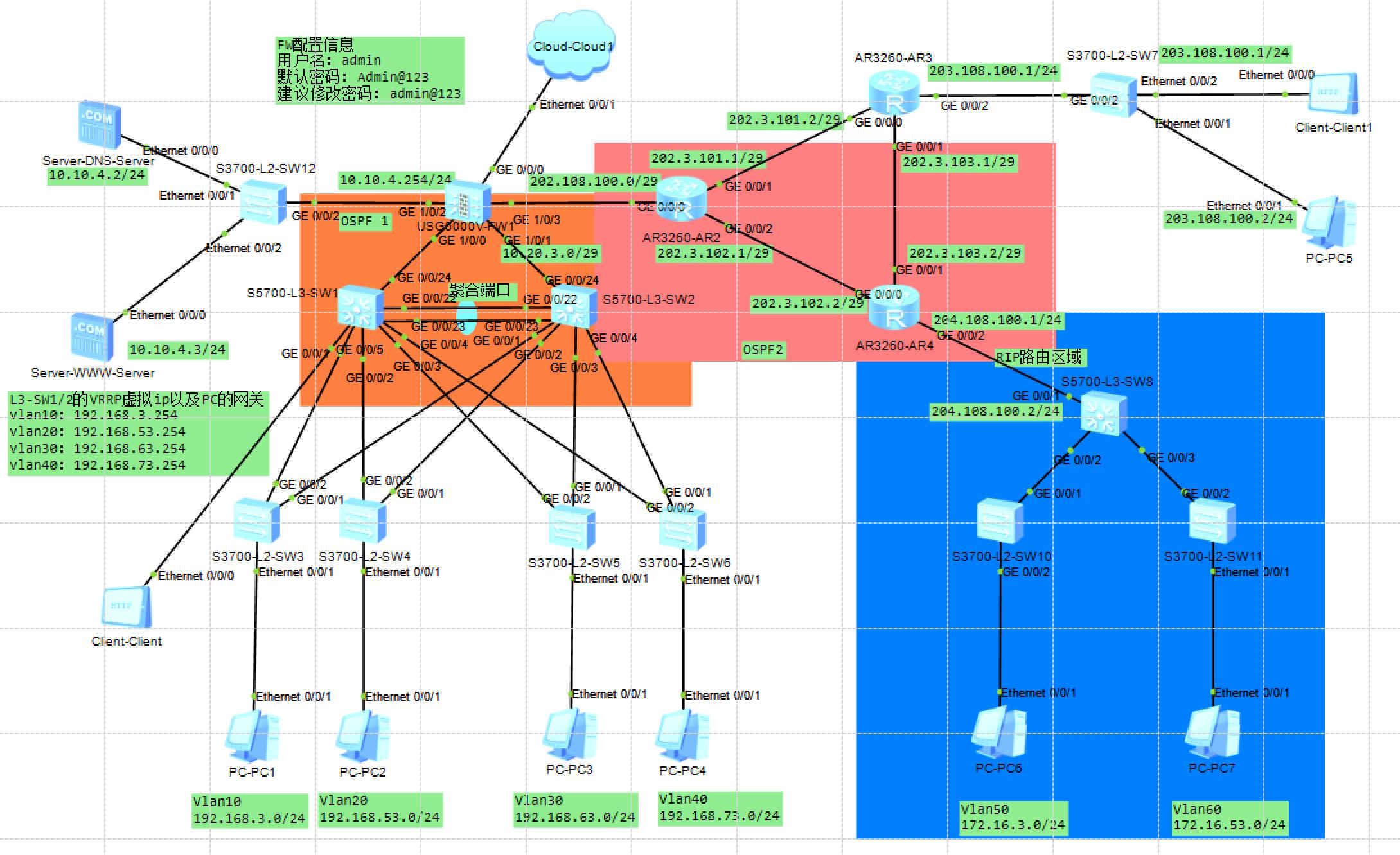
一、接入层交换机SW3配置
|----------------------------------------------------------------------------------------------------------------------------------------------------------------------------------------------------------------------------|
| Plain Text system-view sysname SW3 vlan 10 interface Ethernet0/0/1 port link-type access port default vlan 10 stp edged-port enable interface GigabitEthernet0/0/1 port link-type trunk port trunk allow-pass vlan 10 quit |
二、接入层交换机SW4配置
|----------------------------------------------------------------------------------------------------------------------------------------------------------------------------------------------------------------------------|
| Plain Text system-view sysname SW4 vlan 20 interface Ethernet0/0/1 port link-type access port default vlan 20 stp edged-port enable interface GigabitEthernet0/0/1 port link-type trunk port trunk allow-pass vlan 20 quit |
三、接入层交换机SW5配置
|----------------------------------------------------------------------------------------------------------------------------------------------------------------------------------------------------------------------------|
| Plain Text system-view sysname SW5 vlan 30 interface Ethernet0/0/1 port link-type access port default vlan 30 stp edged-port enable interface GigabitEthernet0/0/1 port link-type trunk port trunk allow-pass vlan 30 quit |
四、接入层交换机SW6配置
|----------------------------------------------------------------------------------------------------------------------------------------------------------------------------------------------------------------------------|
| Plain Text system-view sysname SW6 vlan 40 interface Ethernet0/0/1 port link-type access port default vlan 40 stp edged-port enable interface GigabitEthernet0/0/1 port link-type trunk port trunk allow-pass vlan 40 quit |
五、服务器接入交换机SW12配置
|------------------------------------------------------------------------------------------------------------------------------------------------------------------------------------------------------------------------------------------------------------------------------------|
| Plain Text system-view sysname SW12 vlan batch 100 interface Ethernet0/0/0 port link-type access port default vlan 100 interface Ethernet0/0/1 port link-type access port default vlan 100 interface GigabitEthernet0/0/2 port link-type trunk port trunk allow-pass vlan 100 quit |
六、主核心交换机SW1配置
|-------------------------------------------------------------------------------------------------------------------------------------------------------------------------------------------------------------------------------------------------------------------------------------------------------------------------------------------------------------------------------------------------------------------------------------------------------------------------------------------------------------------------------------------------------------------------------------------------------------------------------------------------------------------------------------------------------------------------------------------------------------------------------------------------------------------------------------------------------------------------------------------------------------------------------------------------------------------------------------------------------------------------------------------------------------------------------------------------------------------------------------------------------------------------------------------------------------------------------------------------------------------------------------------------------------------------------------------------------------------------|
| Plain Text system-view sysname SW1 vlan batch 10 20 30 40 100 interface Vlanif10 ip address 192.168.3.252 255.255.255.0 vrrp vrid 10 virtual-ip 192.168.3.254 vrrp vrid 10 priority 120 interface Vlanif20 ip address 192.168.53.252 255.255.255.0 vrrp vrid 20 virtual-ip 192.168.53.254 vrrp vrid 20 priority 120 interface Vlanif30 ip address 192.168.63.252 255.255.255.0 vrrp vrid 30 virtual-ip 192.168.63.254 interface Vlanif40 ip address 192.168.73.252 255.255.255.0 vrrp vrid 40 virtual-ip 192.168.73.254 interface GigabitEthernet0/0/1 port link-type trunk port trunk allow-pass vlan 10 20 interface GigabitEthernet0/0/2 port link-type trunk port trunk allow-pass vlan 30 40 interface Eth-Trunk1 mode lacp-static trunkport GigabitEthernet0/0/23 trunkport GigabitEthernet0/0/24 port link-type trunk port trunk allow-pass vlan 10 20 30 40 100 interface GigabitEthernet0/0/23 eth-trunk 1 interface GigabitEthernet0/0/24 eth-trunk 1 stp mode mstp stp region-configuration region-name MSTP-REGION instance 1 vlan 10 20 instance 2 vlan 30 40 active quit stp instance 1 root primary stp instance 2 root secondary ospf 1 router-id 1.1.1.1 area 0 network 192.168.3.0 0.0.0.255 network 192.168.53.0 0.0.0.255 network 192.168.63.0 0.0.0.255 network 192.168.73.0 0.0.0.255 network 10.10.4.0 0.0.0.255 network 10.20.3.0 0.0.0.31 quit |
七、备核心交换机SW2配置
|-------------------------------------------------------------------------------------------------------------------------------------------------------------------------------------------------------------------------------------------------------------------------------------------------------------------------------------------------------------------------------------------------------------------------------------------------------------------------------------------------------------------------------------------------------------------------------------------------------------------------------------------------------------------------------------------------------------------------------------------------------------------------------------------------------------------------------------------------------------------------------------------------------------------------------------------------------------------------------------------------------------------------------------------------------------------------------------------------------------------------------------------------------------------------------------------------------------------------------------------------------------------------------------------------------------------------------------------------------------------------|
| Plain Text system-view sysname SW2 vlan batch 10 20 30 40 100 interface Vlanif10 ip address 192.168.3.253 255.255.255.0 vrrp vrid 10 virtual-ip 192.168.3.254 interface Vlanif20 ip address 192.168.53.253 255.255.255.0 vrrp vrid 20 virtual-ip 192.168.53.254 interface Vlanif30 ip address 192.168.63.253 255.255.255.0 vrrp vrid 30 virtual-ip 192.168.63.254 vrrp vrid 30 priority 120 interface Vlanif40 ip address 192.168.73.253 255.255.255.0 vrrp vrid 40 virtual-ip 192.168.73.254 vrrp vrid 40 priority 120 interface GigabitEthernet0/0/1 port link-type trunk port trunk allow-pass vlan 10 20 interface GigabitEthernet0/0/2 port link-type trunk port trunk allow-pass vlan 30 40 interface Eth-Trunk1 mode lacp-static trunkport GigabitEthernet0/0/23 trunkport GigabitEthernet0/0/24 port link-type trunk port trunk allow-pass vlan 10 20 30 40 100 interface GigabitEthernet0/0/23 eth-trunk 1 interface GigabitEthernet0/0/24 eth-trunk 1 stp mode mstp stp region-configuration region-name MSTP-REGION instance 1 vlan 10 20 instance 2 vlan 30 40 active quit stp instance 1 root secondary stp instance 2 root primary ospf 1 router-id 2.2.2.2 area 0 network 192.168.3.0 0.0.0.255 network 192.168.53.0 0.0.0.255 network 192.168.63.0 0.0.0.255 network 192.168.73.0 0.0.0.255 network 10.10.4.0 0.0.0.255 network 10.20.3.0 0.0.0.31 quit |
八、防火墙FW1配置
|------------------------------------------------------------------------------------------------------------------------------------------------------------------------------------------------------------------------------------------------------------------------------------------------------------------------------------------------------------------------------------------------------------------------------------------------------------------------------------------------------------------------------------------------------------------------------------------------------------------------------------------------------------------------------------------------------------------------------------------------------------------------------------------------------------------------------------------------------------------------------------------------------|
| Plain Text system-view sysname FW1 undo info-center enable interface GigabitEthernet1/0/0 ip address 10.10.4.254 255.255.255.0 service-manage ping permit interface GigabitEthernet1/0/1 ip address 10.20.3.1 255.255.255.224 service-manage ping permit interface GigabitEthernet1/0/2 ip address 202.108.100.1 255.255.255.0 service-manage ping permit firewall zone trust add interface GigabitEthernet1/0/0 add interface GigabitEthernet1/0/1 firewall zone untrust add interface GigabitEthernet1/0/2 security-policy rule name trust_to_untrust source-zone trust destination-zone untrust source-address 192.168.0.0 mask 255.255.0.0 action permit quit nat-policy rule name nat_all source-zone trust destination-zone untrust action source-nat easy-ip quit ospf 1 router-id 3.3.3.3 area 0 network 10.10.4.0 0.0.0.255 network 10.20.3.0 0.0.0.31 network 202.108.100.0 0.0.0.255 quit |
九、外网路由器AR3配置
|---------------------------------------------------------------------------------------------------------------------------------------------------------------------------------------------------------------------------------------------------------------------------------------------------------------------------------------------------------------------------------------------------------------------------------|
| Plain Text system-view sysname AR3 interface GigabitEthernet0/0/0 ip address 202.3.101.2 255.255.255.224 interface GigabitEthernet0/0/1 ip address 202.3.103.1 255.255.255.224 interface GigabitEthernet0/0/2 ip address 203.108.100.1 255.255.255.0 ospf 1 router-id 4.4.4.4 area 0 network 202.3.101.0 0.0.0.31 network 202.3.103.0 0.0.0.31 network 203.108.100.0 0.0.0.255 quit ip route-static 0.0.0.0 0.0.0.0 202.3.101.1 |
十、外网路由器AR4配置
|--------------------------------------------------------------------------------------------------------------------------------------------------------------------------------------------------------------------------------------------------------------------------------------------------------------------------------------------------------------------------------------------------------------------------------------------------------------------------------|
| Plain Text system-view sysname AR4 interface GigabitEthernet0/0/0 ip address 202.3.102.2 255.255.255.224 interface GigabitEthernet0/0/1 ip address 202.3.103.2 255.255.255.224 interface GigabitEthernet0/0/2 ip address 204.108.100.1 255.255.255.0 ospf 2 router-id 5.5.5.5 area 0 network 202.3.102.0 0.0.0.31 network 202.3.103.0 0.0.0.31 network 204.108.100.0 0.0.0.255 quit rip 1 version 2 network 172.16.0.0 import-route ospf 2 quit ospf 2 import-route rip 1 quit |
十一、分支核心交换机SW8配置
|-------------------------------------------------------------------------------------------------------------------------------------------------------------------------------------------------------------------------------------------------------------------------------------------------------------------------------------------------------------------------------------------------------------------------------------------------------------------------------------|
| Plain Text system-view sysname SW8 vlan batch 50 60 interface Vlanif50 ip address 172.16.3.254 255.255.255.0 interface Vlanif60 ip address 172.16.53.254 255.255.255.0 interface GigabitEthernet0/0/1 ip address 204.108.100.2 255.255.255.0 rip 1 version 2 network 172.16.0.0 network 204.108.100.0 quit interface GigabitEthernet0/0/2 port link-type trunk port trunk allow-pass vlan 50 interface GigabitEthernet0/0/3 port link-type trunk port trunk allow-pass vlan 60 quit |
十二、分支接入交换机SW10配置
|-----------------------------------------------------------------------------------------------------------------------------------------------------------------------------------------------------------------------------|
| Plain Text system-view sysname SW10 vlan 50 interface Ethernet0/0/1 port link-type access port default vlan 50 stp edged-port enable interface GigabitEthernet0/0/1 port link-type trunk port trunk allow-pass vlan 50 quit |
十三、分支接入交换机SW11配置
|-----------------------------------------------------------------------------------------------------------------------------------------------------------------------------------------------------------------------------|
| Plain Text system-view sysname SW11 vlan 60 interface Ethernet0/0/1 port link-type access port default vlan 60 stp edged-port enable interface GigabitEthernet0/0/1 port link-type trunk port trunk allow-pass vlan 60 quit |
PC静态IP配置参考
- PC1:192.168.3.10/24(192.168.3.10/24) 网关192.168.3.254(192.168.3.254)
- PC2:192.168.53.10/24(192.168.53.10/24) 网关192.168.53.254(192.168.53.254)
- PC3:192.168.63.10/24(192.168.63.10/24) 网关192.168.63.254(192.168.63.254)
- PC4:192.168.73.10/24(192.168.73.10/24) 网关192.168.73.254(192.168.73.254)
- PC6:172.16.3.10/24(172.16.3.10/24) 网关172.16.3.254(172.16.3.254)
- PC7:172.16.53.10/24(172.16.53.10/24) 网关172.16.53.254(172.16.53.254)
- DNS服务器:10.10.4.2/24(10.10.4.2/24) 网关10.10.4.254(10.10.4.254)
- WWW服务器:10.10.4.3/24(10.10.4.3/24) 网关10.10.4.254(10.10.4.254)