一、太空大战
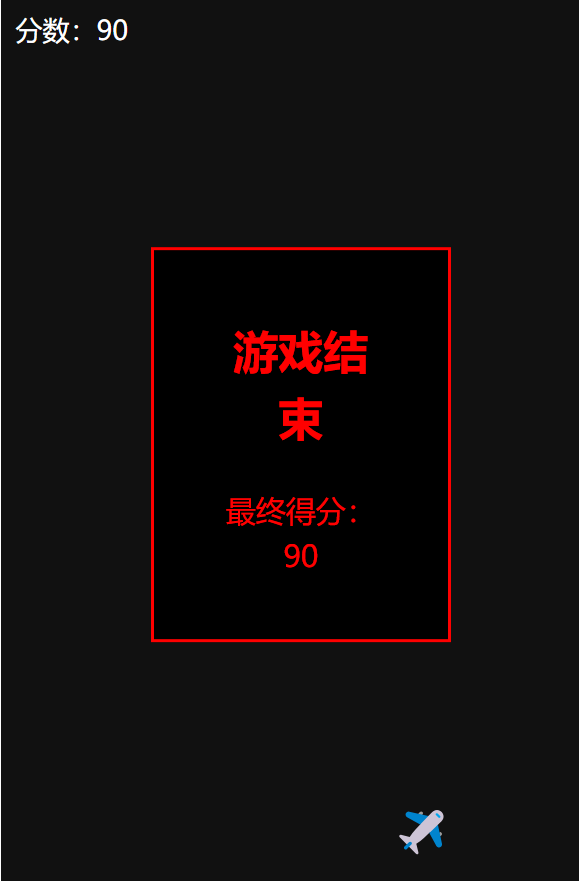
<template>
  <div class="game" @keydown="onKey" tabindex="0">
    <div class="score">分数:{{ score }}</div>

    <!-- 子弹 -->
    <div
      class="bullet"
      v-for="(b, i) in bullets"
      :key="i"
      :style="{ left: b.x + 'px', top: b.y + 'px' }"
    ></div>

    <!-- 怪物 -->
    <div
      class="enemy"
      v-for="(e, i) in enemys"
      :key="i"
      :style="{ left: e.x + 'px', top: e.y + 'px' }"
    >👾</div>

    <!-- 飞机 -->
    <div class="plane" :style="{ left: planeX + 'px' }">✈️</div>

    <!-- 游戏结束 -->
    <div class="game-over" v-if="gameOver">
      <h2>游戏结束</h2>
      <p>最终得分:{{ score }}</p>
    </div>
  </div>
</template>

<script setup>
import { ref } from 'vue'

const planeX = ref(200)
const bullets = ref([])
const enemys = ref([])
const score = ref(0)
const gameOver = ref(false)

// 左右移动 + 空格发射
const onKey = (e) => {
  if (gameOver.value) return
  if (e.key === 'ArrowLeft') planeX.value -= 15
  if (e.key === 'ArrowRight') planeX.value += 15
  if (e.key === ' ') {
    bullets.value.push({ x: planeX.value + 10, y: 550 })
  }
}

// 子弹飞行
setInterval(() => {
  if (gameOver.value) return
  bullets.value.forEach(b => b.y -= 8)
  bullets.value = bullets.value.filter(b => b.y > 0)
}, 30)

// 自动生成怪物
setInterval(() => {
  if (gameOver.value) return
  enemys.value.push({
    x: Math.random() * 350,
    y: 0
  })
}, 1000)

// 怪物下落
setInterval(() => {
  if (gameOver.value) return
  enemys.value.forEach(e => e.y += 3)

  // 怪物到底部 = 游戏结束
  enemys.value.forEach(e => {
    if (e.y > 570) gameOver.value = true
  })
}, 40)

// 碰撞检测 + 计分
setInterval(() => {
  if (gameOver.value) return
  bullets.value.forEach((b, bi) => {
    enemys.value.forEach((e, ei) => {
      if (Math.abs(b.x - e.x) < 20 && Math.abs(b.y - e.y) < 20) {
        bullets.value.splice(bi, 1)
        enemys.value.splice(ei, 1)
        score.value += 10
      }
    })
  })
}, 50)
</script>

<style>
.game {
  width: 400px;
  height: 600px;
  background: #111;
  margin: 20px auto;
  position: relative;
  outline: none;
  color: white;
  overflow: hidden;
}

.score {
  position: absolute;
  top: 10px;
  left: 10px;
  font-size: 18px;
  z-index: 10;
}

.plane {
  font-size: 30px;
  position: absolute;
  bottom: 20px;
}

.bullet {
  width: 4px;
  height: 12px;
  background: yellow;
  position: absolute;
}

.enemy {
  font-size: 24px;
  position: absolute;
}

.game-over {
  position: absolute;
  top: 50%;
  left: 50%;
  transform: translate(-50%, -50%);
  text-align: center;
  color: red;
  font-size: 20px;
  background: #000;
  padding: 20px 40px;
  border: 2px solid red;
}
</style>