一、开篇:从模块到系统
前面我们已经完成了 RAG 系统所有核心模块的开发:
- 第一篇:文档加载、清洗、分块
- 第二、三篇:嵌入模型、向量数据库、混合检索
- 第四篇:RAG 提示词、上下文管理、引用溯源、大模型集成
本篇我们将把这些模块有机整合起来,形成一个完整的、可交互的 Naive RAG 系统,并通过科学的评估方法验证系统效果。
二、完整 RAG 核心逻辑与 FastAPI 后端实现
2.1 RAG 系统整体架构
我们的 Naive RAG 系统采用分层架构,分为数据层、核心层、接口层、展示层四个部分:
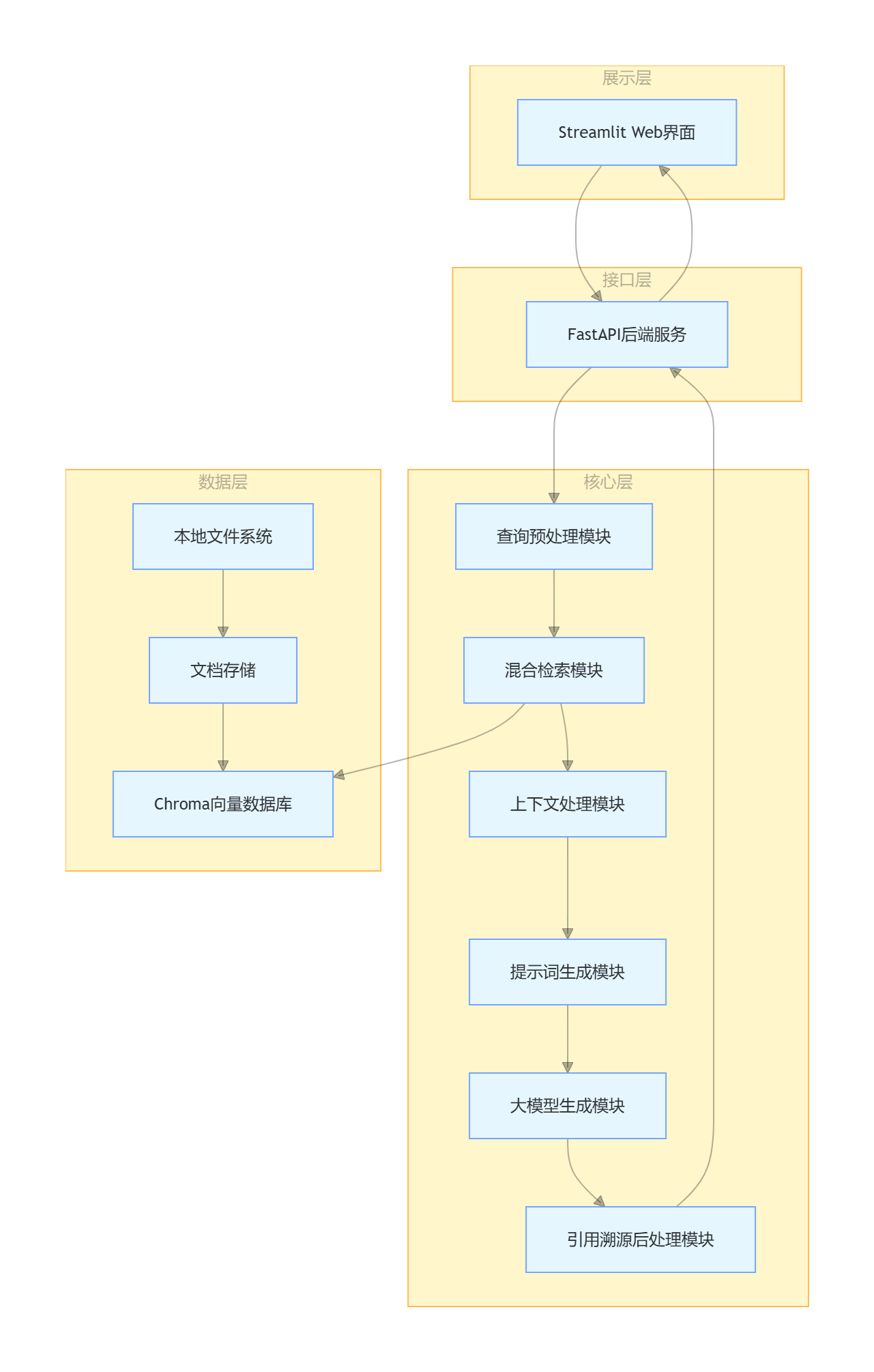
2.2 RAG 核心类实现
创建rag_core.py文件,整合所有核心模块,实现 RAG 系统的完整逻辑:
python
import os
import json
from datetime import datetime
from 完整的混合检索技术_20260505 import HybridRetriever
from LLMClient import LLMClient
from 上下文处理流水线_20260507 import process_context  # 复用上下文管理函数
from 引用溯源_20260506 import format_citations  # 复用引用溯源函数
import tiktoken


class RAGSystem:
    def __init__(self,
                 chunks_path="processed_chunks.jsonl",
                 db_path="./chroma_db",
                 collection_name="rag_knowledge_base",
                 model_type="doubao",
                 model_name=None):
        """
        初始化RAG系统
        :param chunks_path: 第一周生成的文档分块文件路径
        :param db_path: Chroma数据库路径
        :param collection_name: 向量集合名称
        :param model_type: 大模型类型
        :param model_name: 具体模型名称
        """
        # 1. 加载文档分块
        self.chunks = self._load_chunks(chunks_path)

        # 2. 初始化混合检索器
        self.retriever = HybridRetriever(
            chunks=self.chunks,
            collection_name=collection_name,
            db_path=db_path
        )

        # 3. 初始化大模型客户端
        self.llm = LLMClient(model_type=model_type, model_name=model_name)

        # 4. 加载RAG提示词模板
        self.qa_prompt = """
【角色设定】
你是一位专业、严谨的知识库助手,擅长基于提供的参考文档回答用户问题。

【核心规则(必须严格遵守)】
1. 只能使用【参考文档】中提供的信息回答问题,绝对不能编造任何没有依据的内容
2. 如果【参考文档】中没有相关信息,或者信息不足以回答问题,请直接说:"抱歉,知识库中没有找到相关信息,无法回答您的问题。"
3. 回答中引用的每个信息都必须标注对应的来源编号,格式为[数字]
4. 不要添加任何个人观点、推测或解释,只陈述参考文档中的事实
5. 回答要简洁、准确、有条理

【参考文档】
{context}

【用户问题】
{question}

【回答】
"""

        # 5. 初始化Token编码器
        self.encoding = tiktoken.get_encoding("cl100k_base")

    def _load_chunks(self, chunks_path):
        """加载文档分块数据"""
        if not os.path.exists(chunks_path):
            raise FileNotFoundError(f"文档分块文件不存在:{chunks_path}")

        chunks = []
        with open(chunks_path, 'r', encoding='utf-8') as f:
            for line in f:
                chunk = json.loads(line)
                chunks.append(chunk)

        print(f"成功加载{len(chunks)}个文档分块")
        return chunks

    def _preprocess_query(self, query):
        """查询预处理"""
        # 去除首尾空白字符
        query = query.strip()
        # 去除多余的空格和换行
        query = ' '.join(query.split())
        return query

    def query(self, question, top_k=5, stream=False, max_context_tokens=12000):
        """
        问答接口
        :param question: 用户问题
        :param top_k: 检索返回的文档数量
        :param stream: 是否流式输出
        :param max_context_tokens: 上下文最大Token数
        :return: 回答(非流式)或生成器(流式)
        """
        # 1. 查询预处理
        processed_question = self._preprocess_query(question)
        if not processed_question:
            return "请输入有效的问题。"

        # 2. 混合检索
        retrieved_docs = self.retriever.hybrid_search(
            query=processed_question,
            top_k=top_k,
            fusion_method="weighted",
            semantic_weight=0.7,
            bm25_weight=0.3
        )

        if not retrieved_docs:
            return "抱歉,知识库中没有找到相关信息,无法回答您的问题。"

        # 3. 上下文处理
        context_text, processed_docs = process_context(
            documents=retrieved_docs,
            question=processed_question,
            max_tokens=max_context_tokens,
            compress=False
        )

        # 4. 生成提示词
        prompt = self.qa_prompt.format(
            context=context_text,
            question=processed_question
        )

        # 5. 大模型生成
        if stream:
            return self._stream_answer(prompt, processed_docs)
        else:
            answer = self.llm.chat(prompt, temperature=0.1, max_tokens=1000)
            # 6. 引用溯源后处理
            final_answer = format_citations(answer, processed_docs)
            return final_answer

    def _stream_answer(self, prompt, processed_docs):
        """流式生成回答并处理引用"""
        # 先生成完整回答,再处理引用(流式处理引用较复杂,入门阶段先采用这种方式)
        answer = self.llm.chat(prompt, temperature=0.1, max_tokens=1000)
        final_answer = format_citations(answer, processed_docs)

        # 模拟流式输出
        for char in final_answer:
            yield char + ""
            import time
            time.sleep(0.01)  # 控制输出速度


# 测试RAG核心系统
if __name__ == "__main__":
    # 初始化RAG系统
    rag = RAGSystem(
        chunks_path="processed_chunks.jsonl",
        model_type="doubao"  # 替换为你的模型类型
    )

    # 测试问答
    question = "什么是RAG?它的核心原理是什么?"
    print(f"问题:{question}")
print(f"回答:\n{rag.query(question)}")运行结果示例:
2.3 FastAPI 后端服务实现
创建main.py文件,开发 RESTful API 接口,提供文档上传、问答、知识库管理等功能:
python
from fastapi import FastAPI, UploadFile, File, HTTPException
from fastapi.middleware.cors import CORSMiddleware
from fastapi.responses import StreamingResponse
from pydantic import BaseModel
import os
import shutil
from rag_core import RAGSystem
from document_processor import process_single_document  # 复用第一周的文档处理函数

app = FastAPI(title="个人知识库助手API", version="1.0")

# 配置CORS,允许前端访问
app.add_middleware(
    CORSMiddleware,
    allow_origins=["*"],  # 生产环境改为具体的前端域名
    allow_credentials=True,
    allow_methods=["*"],
    allow_headers=["*"],
)

# 全局初始化RAG系统
rag_system = RAGSystem()

# 请求模型
class QueryRequest(BaseModel):
    question: str
    top_k: int = 5
    stream: bool = False

# 响应模型
class QueryResponse(BaseModel):
    answer: str

# 健康检查接口
@app.get("/health")
async def health_check():
    return {"status": "ok", "message": "知识库助手服务运行正常"}

# 文档上传接口
@app.post("/api/upload")
async def upload_document(file: UploadFile = File(...)):
    """上传文档并添加到知识库"""
    try:
        # 创建临时目录
        os.makedirs("temp", exist_ok=True)
        file_path = f"temp/{file.filename}"

        # 保存文件
        with open(file_path, "wb") as buffer:
            shutil.copyfileobj(file.file, buffer)

        # 处理文档
        new_chunks = process_single_document(file_path)

        # 添加到RAG系统
        rag_system.retriever.add_documents(new_chunks)

        # 删除临时文件
        os.remove(file_path)

        return {
            "status": "success",
            "message": f"文档上传成功,生成{len(new_chunks)}个分块",
            "file_name": file.filename,
            "chunks_count": len(new_chunks)
        }

    except Exception as e:
        raise HTTPException(status_code=500, detail=f"文档上传失败:{str(e)}")

# 问答接口(同步)
@app.post("/api/query", response_model=QueryResponse)
async def query(request: QueryRequest):
    """同步问答接口"""
    try:
        answer = rag_system.query(
            question=request.question,
            top_k=request.top_k,
            stream=False
        )
        return {"answer": answer}

    except Exception as e:
        raise HTTPException(status_code=500, detail=f"问答失败:{str(e)}")

# 问答接口(流式)
@app.post("/api/query/stream")
async def query_stream(request: QueryRequest):
    """流式问答接口"""
    try:
        return StreamingResponse(
            rag_system.query(
                question=request.question,
                top_k=request.top_k,
                stream=True
            ),
            media_type="text/plain"
        )

    except Exception as e:
        raise HTTPException(status_code=500, detail=f"流式问答失败:{str(e)}")

# 获取知识库信息接口
@app.get("/api/knowledge_base")
async def get_knowledge_base_info():
    """获取知识库基本信息"""
    return {
        "total_documents": len(rag_system.chunks),
        "collection_name": rag_system.retriever.collection.name,
        "db_path": rag_system.retriever.client._path
    }

if __name__ == "__main__":
    import uvicorn
    uvicorn.run(app, host="0.0.0.0", port=8000)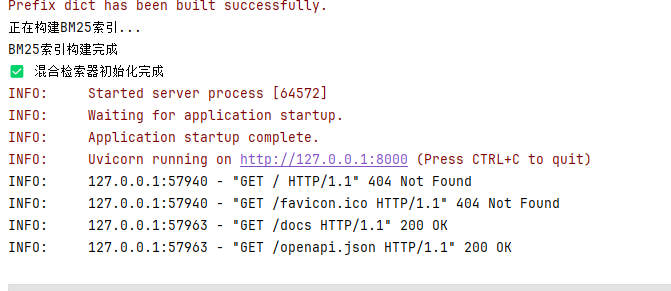
三、Streamlit Web 界面开发
Streamlit 是一个非常适合快速构建数据应用和 AI 应用的 Python 框架,我们用它来开发一个简单美观的聊天式 Web 界面。
3.1 界面整体设计
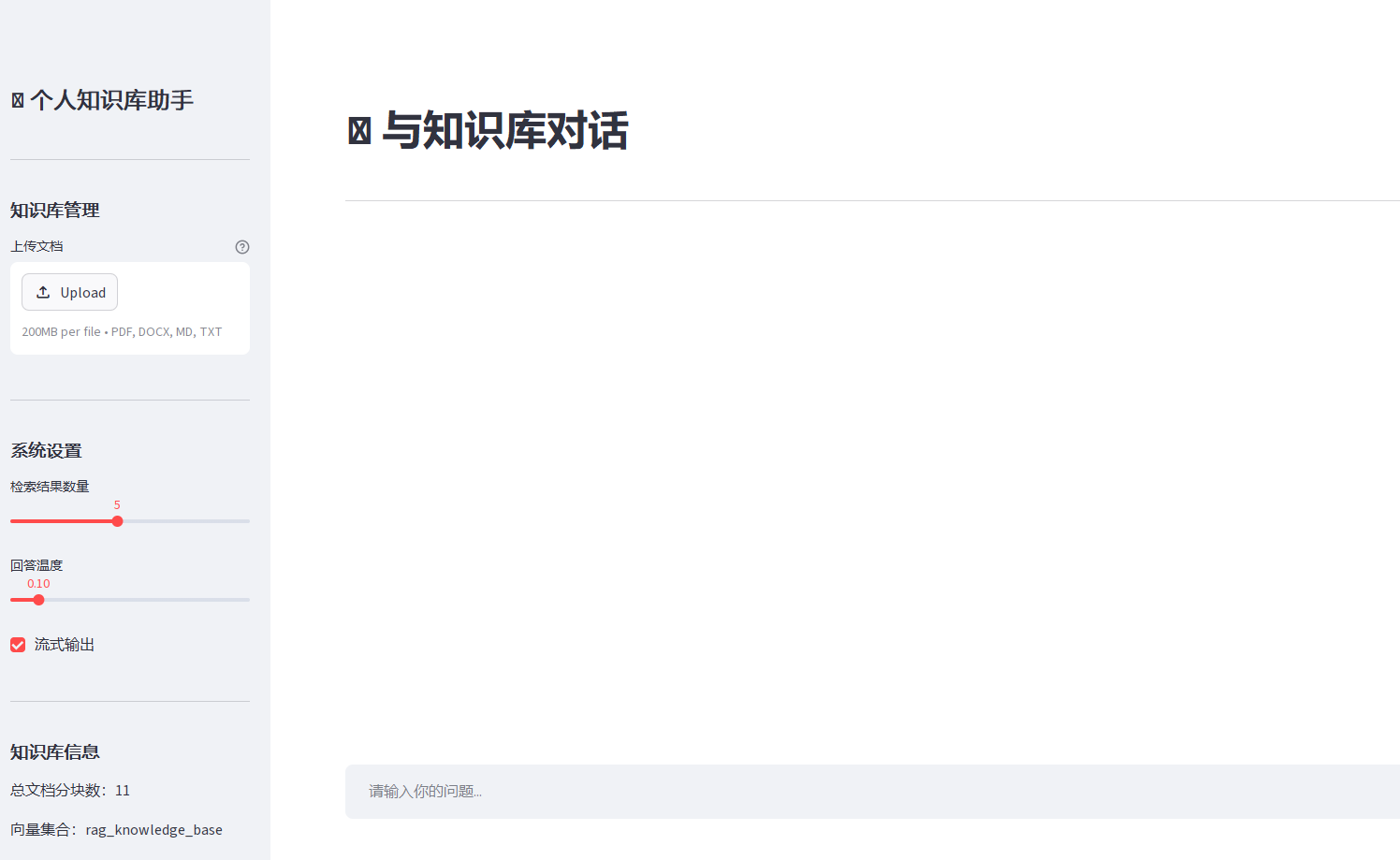
我们的 Web 界面包含三个主要部分:
- 侧边栏:知识库管理、系统设置
- 主界面:聊天窗口、输入框
- 引用展示区:点击回答中的引用编号,展示对应的原始文档片段
3.2 完整 Web 界面代码
创建app.py文件,写入以下代码:
python
import streamlit as st
import requests
import json

# 页面配置
st.set_page_config(
    page_title="个人知识库助手",
    page_icon="📚",
    layout="wide",
    initial_sidebar_state="expanded"
)

# API基础地址
API_BASE_URL = "http://localhost:8000/api"

# 初始化会话状态
if "messages" not in st.session_state:
    st.session_state.messages = []

if "uploaded_files" not in st.session_state:
    st.session_state.uploaded_files = []

# 侧边栏
with st.sidebar:
    st.title("📚 个人知识库助手")
    st.divider()

    # 知识库管理
    st.subheader("知识库管理")
    uploaded_file = st.file_uploader(
        "上传文档",
        type=["pdf", "docx", "md", "txt"],
        help="支持PDF、Word、Markdown、TXT格式"
    )

    if uploaded_file is not None:
        if st.button("上传到知识库"):
            with st.spinner("正在处理文档..."):
                files = {"file": (uploaded_file.name, uploaded_file.getvalue())}
                response = requests.post(f"{API_BASE_URL}/upload", files=files)

                if response.status_code == 200:
                    result = response.json()
                    st.success(f"文档上传成功!生成{result['chunks_count']}个分块")
                    st.session_state.uploaded_files.append(result["file_name"])
                else:
                    st.error(f"上传失败:{response.json()['detail']}")

    # 已上传文件列表
    if st.session_state.uploaded_files:
        st.subheader("已上传文档")
        for file in st.session_state.uploaded_files:
            st.text(f"✅ {file}")

    st.divider()

    # 系统设置
    st.subheader("系统设置")
    top_k = st.slider("检索结果数量", min_value=1, max_value=10, value=5)
    temperature = st.slider("回答温度", min_value=0.0, max_value=1.0, value=0.1, step=0.1)
    stream_output = st.checkbox("流式输出", value=True)

    st.divider()

    # 知识库信息
    st.subheader("知识库信息")
    try:
        response = requests.get(f"{API_BASE_URL}/knowledge_base")
        if response.status_code == 200:
            info = response.json()
            st.text(f"总文档分块数:{info['total_documents']}")
            st.text(f"向量集合:{info['collection_name']}")
    except:
        st.error("无法连接到后端服务")

# 主界面
st.title("💬 与知识库对话")
st.divider()

# 聊天历史
for message in st.session_state.messages:
    with st.chat_message(message["role"]):
        st.markdown(message["content"])

# 用户输入
if prompt := st.chat_input("请输入你的问题..."):
    # 添加用户消息到历史
    st.session_state.messages.append({"role": "user", "content": prompt})
    with st.chat_message("user"):
        st.markdown(prompt)

    # 生成助手回答
    with st.chat_message("assistant"):
        message_placeholder = st.empty()
        full_response = ""

        try:
            # 调用流式接口
            if stream_output:
                response = requests.post(
                    f"{API_BASE_URL}/query/stream",
                    json={
                        "question": prompt,
                        "top_k": top_k,
                        "stream": True
                    },
                    stream=True
                )

                if response.status_code == 200:
                    for chunk in response.iter_content(chunk_size=1, decode_unicode=True):
                        if chunk:
                            full_response += chunk
                            message_placeholder.markdown(full_response + "▌")
                    message_placeholder.markdown(full_response)
                else:
                    st.error(f"请求失败:{response.json()['detail']}")

            # 调用同步接口
            else:
                response = requests.post(
                    f"{API_BASE_URL}/query",
                    json={
                        "question": prompt,
                        "top_k": top_k,
                        "stream": False
                    }
                )

                if response.status_code == 200:
                    full_response = response.json()["answer"]
                    message_placeholder.markdown(full_response)
                else:
                    st.error(f"请求失败:{response.json()['detail']}")

        except Exception as e:
            st.error(f"发生错误:{str(e)}")
            full_response = "抱歉,发生了一个错误,请稍后再试。"
            message_placeholder.markdown(full_response)

    # 添加助手消息到历史
    st.session_state.messages.append({"role": "assistant", "content": full_response})

# 清空聊天历史按钮
if st.session_state.messages:
    if st.button("清空聊天历史"):
        st.session_state.messages = []
        st.rerun()
3.3 运行 Web 界面
- 确保后端服务正在运行(http://localhost:8000)
- 启动 Streamlit 应用
bash
PS E:\Python-Technology\LLM> streamlit run ./RAG/app_Streamlit_20260509.py

      Welcome to Streamlit!

      If you'd like to receive helpful onboarding emails, news, offers, promotions,
      and the occasional swag, please enter your email address below. Otherwise,
      leave this field blank.

      Email:
E:\softroot\python3.12.1\Lib\site-packages\requests\__init__.py:113: RequestsDependencyWarning: urllib3 (2.5.0) or chardet (6.0.0.post1)/charset_normalizer (3.4.4) doesn't match a supported version!
  warnings.warn(

  You can find our privacy policy at https://streamlit.io/privacy-policy

  Summary:
  - This open source library collects usage statistics.
  - We cannot see and do not store information contained inside Streamlit apps,
    such as text, charts, images, etc.
  - Telemetry data is stored in servers in the United States.
  - If you'd like to opt out, add the following to %userprofile%/.streamlit/config.toml,
    creating that file if necessary:

    [browser]
    gatherUsageStats = false

2026-05-09 22:37:14.432 Uvicorn server started on 0.0.0.0:8501

  You can now view your Streamlit app in your browser.

  Local URL: http://localhost:8501
Network URL: http://192.168.0.100:8501- 浏览器会自动打开界面,地址为:http://localhost:8501
四、系统测试、评估与优化
4.1性能测试
使用locust工具进行简单的性能测试,验证系统的并发处理能力:
- 安装 locust:
pip install locust - 创建
locustfile.py:
python
from locust import HttpUser, task, between

class RAGUser(HttpUser):
    wait_time = between(1, 3)

    @task
    def query(self):
        self.client.post("/api/query", json={
            "question": "什么是RAG?",
            "top_k": 5
})- 运行性能测试:
locust -f locustfile.py --host=http://localhost:8000 - 访问http://localhost:8089,设置并发用户数,开始测试
4.2 RAG 系统生成效果评估(Ragas 框架)
Ragas 是专门为 RAG 系统设计的评估框架,它提供了多个自动化评估指标,能客观衡量 RAG 系统的生成效果。
4.2.1 核心评估指标
| 指标 | 含义 | 取值范围 | 目标值 |
|---|---|---|---|
| Faithfulness(忠实度) | 回答是否忠实于检索到的上下文,没有编造信息 | 0-1 | >0.8 |
| Answer Relevancy(回答相关性) | 回答是否与用户问题相关 | 0-1 | >0.8 |
| Context Precision(上下文精确率) | 检索到的上下文中有多少是相关的 | 0-1 | >0.7 |
| Context Recall(上下文召回率) | 所有相关的上下文有多少被检索到了 | 0-1 | >0.8 |
4.2.2 构建评估数据集
创建evaluation_dataset.json文件,包含至少 20 个问题和对应的标准答案:
python
[
  {
    "question": "什么是RAG?",
    "ground_truth": "RAG(检索增强生成)是一种大模型应用技术,核心思想是先检索外部知识库中的相关信息,再让大模型基于检索到的信息生成答案,主要用于解决大模型的幻觉、知识截止和私有数据隔离问题。"
  },
  {
    "question": "RAG和微调有什么区别?",
    "ground_truth": "RAG通过检索外部知识增强大模型,成本低、知识更新快、可解释性好;微调通过在特定数据上继续训练大模型,成本高、知识更新困难、可解释性差。RAG适合注入私有知识和实时知识,微调适合风格对齐和专业术语理解。"
  }
]
4.2.3 运行 Ragas 评估
创建evaluate_rag.py文件:
python
import json
from ragas import evaluate
from ragas.metrics import (
    faithfulness,
    answer_relevancy,
    context_precision,
    context_recall
)
from datasets import Dataset
from rag_core import RAGSystem

# 初始化RAG系统
rag = RAGSystem()

# 加载评估数据集
with open("evaluation_dataset.json", "r", encoding="utf-8") as f:
    eval_data = json.load(f)

# 生成RAG系统的回答和检索上下文
questions = []
ground_truths = []
answers = []
contexts = []

for item in eval_data:
    question = item["question"]
    questions.append(question)
    ground_truths.append(item["ground_truth"])

    # 获取RAG系统的回答
    answer = rag.query(question)
    answers.append(answer)

    # 获取检索到的上下文
    retrieved_docs = rag.retriever.hybrid_search(question, top_k=5)
    context = [doc["text"] for doc in retrieved_docs]
    contexts.append(context)

# 构建Ragas数据集
dataset = Dataset.from_dict({
    "question": questions,
    "ground_truth": ground_truths,
    "answer": answers,
    "contexts": contexts
})

# 运行评估
result = evaluate(
    dataset=dataset,
    metrics=[
        faithfulness,
        answer_relevancy,
        context_precision,
        context_recall
    ]
)

# 打印评估结果
print("RAG系统评估结果:")
print(result)

# 保存评估报告
with open("rag_evaluation_report.json", "w", encoding="utf-8") as f:
    json.dump(result.to_dict(), f, ensure_ascii=False, indent=2)

print("\n评估报告已保存到 rag_evaluation_report.json")