1. 从 Echo 到业务扩展的演进
1.1 Echo Server 的局限
之前的 Echo Server 只能做一件事:把客户端发来的消息原样返回。
客户端发送: "hello"
服务器返回: "echo# hello"问题:
业务逻辑写死在
Service()里想换个功能(比如翻译、计算)就得改
TcpServer.hpp
TcpServer类 和业务逻辑强耦合
1.2 新需求:让服务器"可编程"
我们希望:
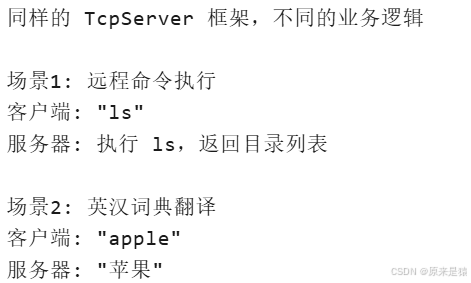
核心思路 :把业务逻辑从 TcpServer 中抽出来,通过回调函数注入。
2. func_t ------ 回调函数类型的艺术
2.1 什么是 func_t?
using func_t = std::function<std::string(const std::string &, InetAddr &)>;逐层拆解 :
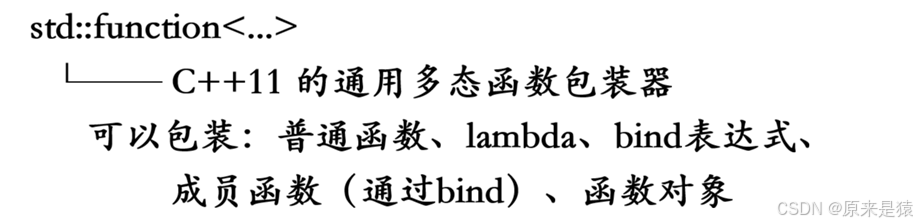
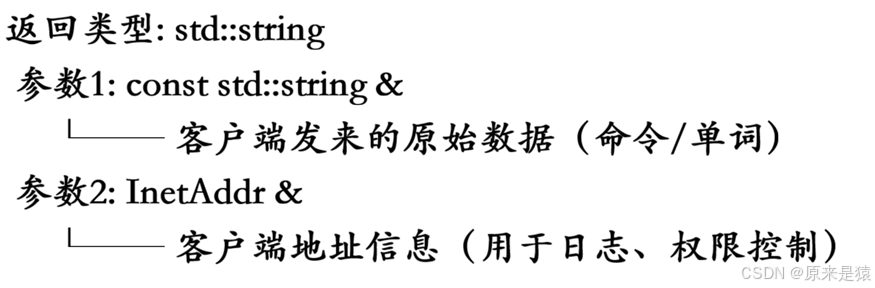
为什么用 std::function 而不是函数指针?
| 特性 | 函数指针 (*fp)(...) |
std::function |
|---|---|---|
| 包装普通函数 | ✅ | ✅ |
| 包装 Lambda | ❌ | ✅ |
| 包装成员函数 | ❌(需额外处理) | ✅(通过 bind) |
| 包装函数对象 | ❌ | ✅ |
| 类型安全 | 弱 | 强 |
| 可存储在容器中 | 困难 | 容易 |
2.2 func_t 的三种绑定方式
// 方式1:普通函数
std::string defaulthhandler(const std::string &word, InetAddr &addr) {
    return "haha, " + word;
}
func_t f1 = defaulthhandler;

// 方式2:Lambda 表达式
func_t f2 = [](const std::string &word, InetAddr &addr) -> std::string {
    return "echo: " + word;
};

// 方式3:bind 绑定成员函数(最常用!)
Command cmd;
func_t f3 = std::bind(&Command::Execute, &cmd,
                      std::placeholders::_1, std::placeholders::_2);
2.3 std::bind 详解
std::bind(&Command::Execute, &cmd,
          std::placeholders::_1, std::placeholders::_2)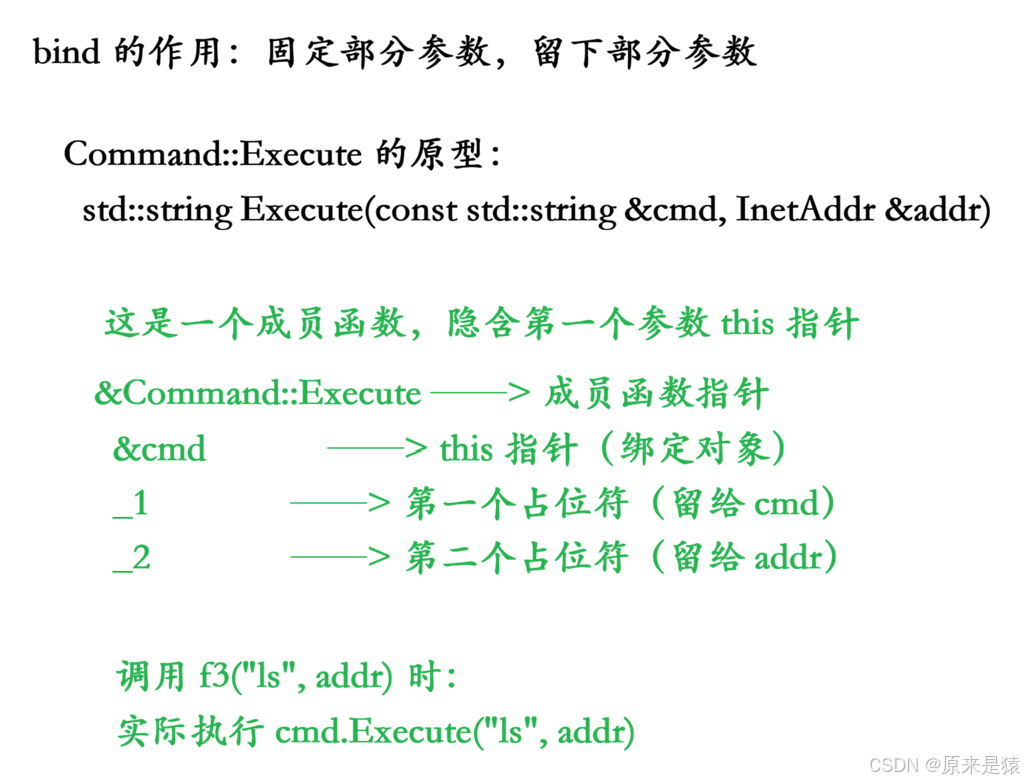
// 方式A:先创建对象,再 bind
Command cmd;
func_t f = std::bind(&Command::Execute, &cmd,
                     std::placeholders::_1, std::placeholders::_2);
std::unique_ptr<TcpServer> tsvr = std::make_unique<TcpServer>(port, f);

// 方式B:Lambda 捕获(更灵活)
Dict d;
std::unique_ptr<TcpServer> tsvr = std::make_unique<TcpServer>(port,
    [&d](const std::string &word, InetAddr &addr) {
        return d.Translate(word, addr);
    });
3. TcpServer 改造:注入业务逻辑
3.1 改造前后的对比
改造前(Echo 版本) :
class TcpServer : public NoCopy {
    // ...
    void Service(int sockfd, InetAddr &peer) {
        // 业务逻辑写死在这里
        std::string echo_string = "echo# " + buffer;
        write(sockfd, echo_string.c_str(), echo_string.size());
    }
};
改造后(回调版本) :
using func_t = std::function<std::string(const std::string &, InetAddr &)>;

class TcpServer : public NoCopy {
public:
    TcpServer(uint16_t port, func_t func)  // 构造函数接收回调
        : _port(port),
          _listensockfd(defaultsockfd),
          _isrunning(false),
          _func(func)  // 保存回调
    {}

    void Service(int sockfd, InetAddr &peer) {
        // ...
        std::string echo_string = _func(buffer, peer);  // 调用回调!
        write(sockfd, echo_string.c_str(), echo_string.size());
    }

private:
    func_t _func;  // 业务回调函数
};
3.2 调用链完整流程
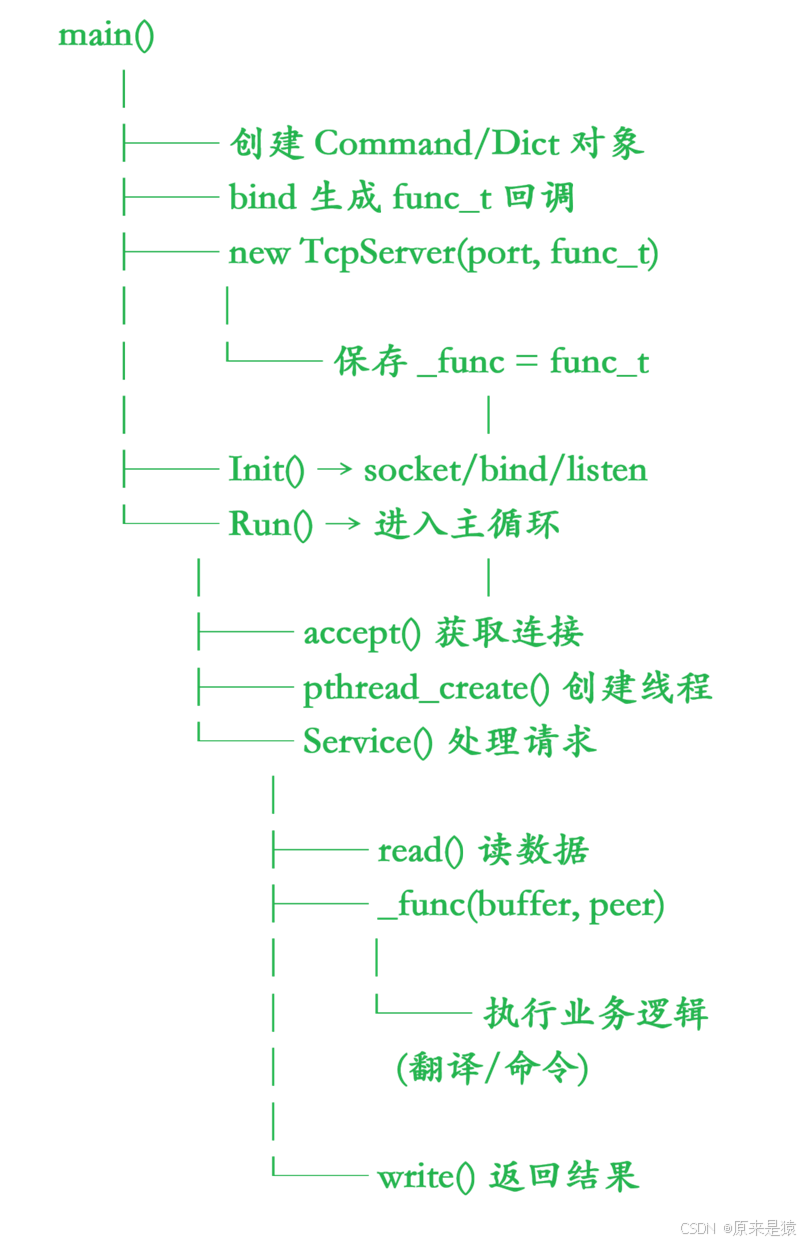
4. Command 类:安全的远程命令执行
4.1 为什么需要白名单?
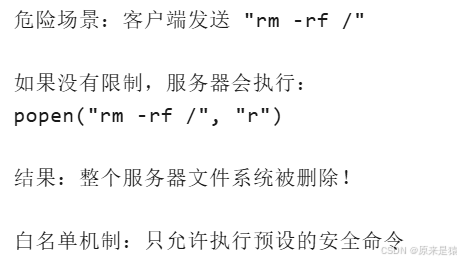
4.2 Command 类完整解析
class Command {
public:
    Command() {
        // 严格匹配白名单
        _WhiteListCommands.insert("ls");
        _WhiteListCommands.insert("pwd");
        _WhiteListCommands.insert("ls -l");
        _WhiteListCommands.insert("touch haha.txt");
        _WhiteListCommands.insert("who");
        _WhiteListCommands.insert("whoami");
    }

    bool IsSafeCommand(const std::string &cmd) {
        auto iter = _WhiteListCommands.find(cmd);
        return iter != _WhiteListCommands.end();
    }

    std::string Execute(const std::string &cmd, InetAddr &addr) {
        // 1. 安全检查
        if (!IsSafeCommand(cmd)) {
            return std::string("坏人");  // 拒绝执行
        }

        std::string who = addr.StringAddr();  // "127.0.0.1:8080"

        // 2. 执行命令
        FILE* fp = popen(cmd.c_str(), "r");
        if (nullptr == fp) {
            return std::string("要执行的命令不存在: ") + cmd;
        }

        // 3. 读取输出
        std::string res;
        char line[1024];
        while (fgets(line, sizeof(line), fp)) {
            res += line;  // 逐行读取命令输出
        }
        pclose(fp);

        // 4. 组装结果
        std::string result = who + " execute done, result is:\n" + res;
        LOG(LogLevel::DEBUG) << result;
        return result;
    }

private:
    std::set<std::string> _WhiteListCommands;
};
4.3 为什么用 std::set 而不是 std::vector?
| 容器 | 查找复杂度 | 适用场景 |
|---|---|---|
std::vector |
O(n) 线性查找 | 数据量小、频繁遍历 |
std::set |
O(log n) 红黑树 | 需要快速查找、去重 |
std::unordered_set |
O(1) 哈希表 | 大量数据、极致性能 |
这里用 set 是因为命令数量少,且 find 语义清晰。
5. Dict 类:英汉词典翻译
5.1 设计思路
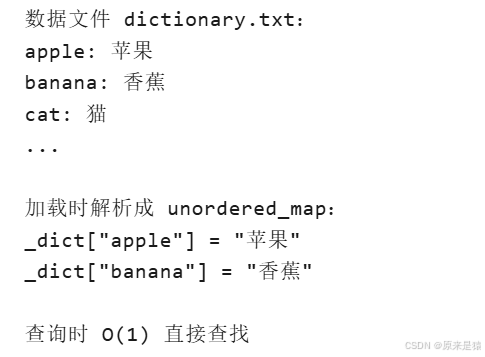
5.2 核心代码解析
#pragma once

#include <iostream>
#include <string>
#include <unordered_map>
#include "fstream"
#include "Log.hpp"
#include "InetAddr.hpp"

using namespace LogModule;
const std::string defaultdict = "./dictionary.txt";
const std::string sep = ": ";

class Dict
{
public:
    Dict(const std::string &path = defaultdict) : _dict_path(path) {};
    bool LoadDict()
    {
        std::ifstream in(_dict_path);
        if (!in.is_open())
        {
            LOG(LogLevel::DEBUG) << "打开字典: " << _dict_path << " 错误";
            return false;
        }
        std::string line;
        while (std::getline(in, line))
        {
            //"apple: 苹果"
            auto pos = line.find(sep);
            if (pos == std::string::npos)
            {
                LOG(LogLevel::WARNING) << "解析: " << line << " 失败";
                continue;
            }
            std::string english = line.substr(0, pos); // 前闭后开
            std::string chinese = line.substr(pos + sep.size());
            if (english.empty() || chinese.empty())
            {
                LOG(LogLevel::WARNING) << "没有有效内容: " << line;
                continue;
            }
            _dict.insert(std::make_pair(english, chinese));
            LOG(LogLevel::DEBUG) << "加载: " << line;
        }

        in.close();
        return true;
    }
    std::string Translate(const std::string &word, InetAddr &client)
    {
        auto iter = _dict.find(word);
        if (iter == _dict.end())
        {
            LOG(LogLevel::DEBUG) << "进入到了翻译模块, [" << client.Ip() << " " << client.Port() << "]" << word << "->" << "None";
            return "None";
        }
        LOG(LogLevel::DEBUG) << "进入到了翻译模块, [" << client.Ip() << " " << client.Port() << "]" << word << "->" << iter->second;
        return iter->second;
    }
    ~Dict() {};

private:
    std::string _dict_path; // 路径+文件名
    std::unordered_map<std::string, std::string> _dict;
};
5.3 Lambda 捕获 Dict 对象
Dict d;
d.LoadDict();  // 先加载字典

// Lambda 以引用方式捕获 d
std::unique_ptr<TcpServer> tsvr = std::make_unique<TcpServer>(port,
    [&d](const std::string &word, InetAddr &addr) -> std::string {
        return d.Translate(word, addr);
});捕获方式对比:
| 语法 | 含义 | 生命周期注意 |
|---|---|---|
[&d] |
引用捕获 | d 必须在 TcpServer 生命周期内有效 |
[d] |
值捕获(拷贝) | 安全但开销大 |
[=] |
隐式值捕获所有 | 可能不必要的拷贝 |
[&] |
隐式引用捕获所有 | 需注意所有变量的生命周期 |
6. popen() / pclose() 深度解析
6.1 为什么不用 system()?
// system() 的问题:
int system(const char *command);
// 返回值复杂(包含退出码、信号等)
// 无法直接获取命令输出
// 安全性差(直接执行 shell)
6.2 popen() 原理图
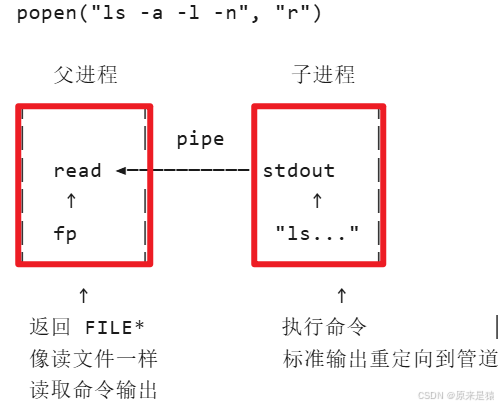
6.3 popen() 参数详解
FILE *popen(const char *command, const char *type);| 参数 | 值 | 含义 |
|---|---|---|
command |
"ls" |
要执行的 shell 命令 |
type |
"r" |
读取模式:从命令的标准输出读 |
type |
"w" |
写入模式:向命令的标准输入写 |
返回值:
-
成功:返回
FILE*文件指针,可用fgets()fread()读取 -
失败:返回
NULL
6.4 完整读取流程
FILE* fp = popen(cmd.c_str(), "r");
if (nullptr == fp) {
    return "命令执行失败";
}

std::string res;
char line[1024];

// fgets 逐行读取,直到 EOF
while (fgets(line, sizeof(line), fp)) {
    res += line;  // line 包含换行符 \n
}

pclose(fp);  // 必须关闭!比 fclose 多做一件事:等待子进程结束
pclose() vs fclose() :
| 函数 | 作用 |
|---|---|
fclose() |
仅关闭文件流 |
pclose() |
关闭文件流 + waitpid() 等待子进程结束 + 返回子进程退出状态 |
6.5 安全注意事项
// ❌ 危险:直接拼接用户输入
std::string cmd = user_input;
popen(cmd.c_str(), "r");  // 用户输入 "rm -rf /" 就完了

// ✅ 安全:白名单校验 + 严格匹配
if (!IsSafeCommand(cmd)) {
    return "坏人";
}
popen(cmd.c_str(), "r");  // 只允许预设命令
7. 业务解耦的设计哲学
7.1 什么是解耦?
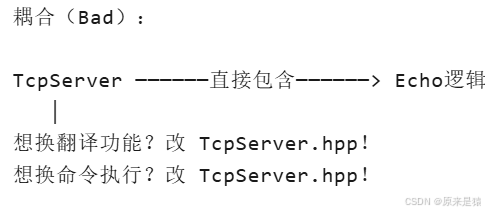
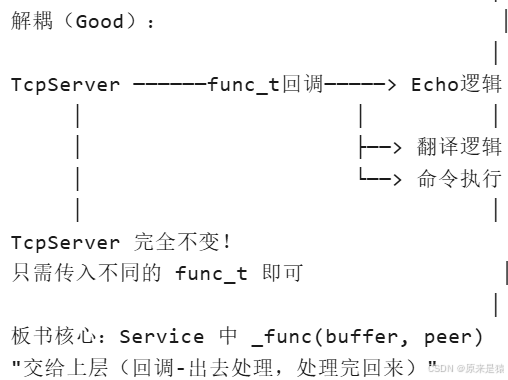
7.2 解耦的好处
| 方面 | 耦合设计 | 解耦设计 |
|---|---|---|
| 修改业务 | 改核心类 | 只改业务类 |
| 测试 | 困难 | 单独测试业务类 |
| 复用 | 无法复用 | 同一框架不同业务 |
| 团队协作 | 冲突多 | 各写各的业务模块 |
| 扩展 | 改源码 | 新增业务类即可 |
7.3 架构图
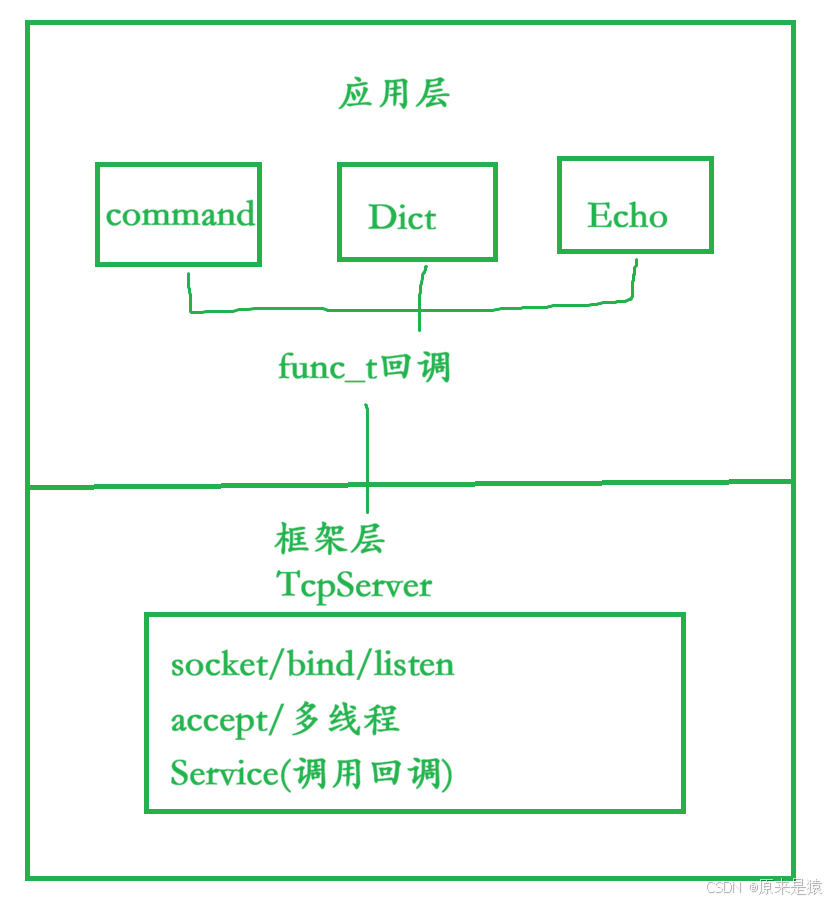
8. 完整代码汇总
8.1 改造后的 TcpServer.hpp
#pragma once
#include <iostream>
#include <string>
#include <cstring>
#include <memory> //可能会用到智能指针
#include "Common.hpp"
#include "Log.hpp"
#include "InetAddr.hpp"
#include <sys/wait.h>
#include <pthread.h>
#include "ThreadPool.hpp"
#include <signal.h>

using namespace LogModule;
using namespace ThreadPoolModule;

// using task_t = std::function<void()>;
using func_t = std::function<std::string(const std::string &, InetAddr &)>;

const static int defaultsockfd = -1;
const static int backlog = 8;
// 服务器往往是禁止拷贝的
class TcpServer : public NoCopy
{
public:
    TcpServer(uint16_t port, func_t func)
        : _port(port),
          _listensockfd(defaultsockfd),
          _isrunning(false),
          _func(func)
    {
    }
    void Init()
    {
        // signal(SIGCHLD,SIG_IGN); //忽略

        // 1.创建套接字
        _listensockfd = socket(AF_INET, SOCK_STREAM, 0);
        if (_listensockfd < 0)
        {
            LOG(LogLevel::DEBUG) << "socket error";
            exit(SOCKET_ERR);
        }
        LOG(LogLevel::INFO) << "socket success: " << _listensockfd; // 3

        // 2.bind总所周知的端口号
        InetAddr local(_port);
        int n = bind(_listensockfd, local.NetAddrPtr(), local.NetAddrLen());
        if (n < 0)
        {
            LOG(LogLevel::FATAL) << "bind error";
            exit(BIND_ERR);
        }
        LOG(LogLevel::INFO) << "bind success: " << _listensockfd; // 3

        // 3.设置socket状态为listen
        n = listen(_listensockfd, backlog);
        if (n < 0)
        {
            LOG(LogLevel::FATAL) << "listen error";
            exit(LISTEN_ERR);
        }
        LOG(LogLevel::INFO) << "listen success: " << _listensockfd;
    }

    class ThreadData
    {
        // InetAddr无需构造
    public:
        ThreadData(int fd, InetAddr &ar, TcpServer *s) : sockfd(fd), addr(ar), tsvr(s)
        {
        }

    public:
        int sockfd;
        InetAddr addr;
        TcpServer *tsvr;
    };

    // 长服务 -- 你不退出,它不退:多进程多线程合适
    void Service(int sockfd, InetAddr &peer)
    {
        char buffer[1024];
        while (true)
        {
            // 1.先读取数据
            // a.n > 0 读取成功
            // b.n < 0 读取失败
            // c.n ==0 对端把链接关闭,读到了文件结尾 -- pipe
            ssize_t n = read(sockfd, buffer, sizeof(buffer) - 1);
            if (n > 0)
            {
                // buffer是一个英文单词 or 是一个命令字符串

                buffer[n] = 0; // 设置为C风格的字符串  n<=sizeof(buffer)-1
                LOG(LogLevel::DEBUG) << peer.StringAddr() << " say#" << buffer;
                // 2.写回数据
                std::string echo_string = _func(buffer, peer); // 交给上层(回调-出去处理,处理完回来)
                // std::string echo_string = "echo# ";
                // echo_string += buffer;
                write(sockfd, echo_string.c_str(), echo_string.size());
            }
            else if (n == 0)
            {
                LOG(LogLevel ::DEBUG) << peer.StringAddr() << "退出了...";
                close(sockfd);
                break;
            }
            else
            {
                LOG(LogLevel ::DEBUG) << peer.StringAddr() << "异常了...";
                close(sockfd);
                break;
            }
        }
    }

    static void *Routine(void *args)
    {
        pthread_detach(pthread_self());
        ThreadData *td = static_cast<ThreadData *>(args);
        td->tsvr->Service(td->sockfd, td->addr);
        delete td;
        return nullptr;
    }

    void Run()
    {
        _isrunning = true;
        while (_isrunning)
        {
            // a.服务器必须先获取链接
            struct sockaddr_in peer;
            socklen_t len = sizeof(sockaddr_in);
            // 如果没有连接,accept就会阻塞
            int sockfd = accept(_listensockfd, CONV(peer), &len);
            if (sockfd < 0)
            {
                LOG(LogLevel::WARNING) << "accept error";
                continue;
            }
            InetAddr addr(peer);
            LOG(LogLevel::INFO) << "accept success, peer addr: " << addr.StringAddr();

            // version0 -- test version -- 单进程程序 -- 不会存在的
            // Service(sockfd, addr);

            // version1 -- 多进程版本
            // pid_t id = fork(); //父进程
            // if (id < 0)
            // {
            //     LOG(LogLevel::FATAL) << "fork error";
            //     exit(FORK_ERR);
            // }
            // else if (id == 0)
            // {
            //     // 子进程,子进程除了看到 sockfd,能看到listensocket?
            //     //我们不想让子进程访问listensocket
            //     close(_listensockfd);

            //     if(fork() > 0) //再次fork,子进程退出
            //         exit(OK);

            //     Service(sockfd,addr);  //孙子进程,孤儿进程,1,系统回收
            //     exit(OK);  //正确处理完任务
            // }
            // else
            // {
            //     // 父进程
            //     close(sockfd);

            //     //父进程是不是要等待子进程?否则会僵尸
            //     pid_t rid = waitpid(id,nullptr,0); //阻塞?不会,因为子进程立马退出了
            //     (void)rid;
            // }

            // version2:多线程版本
            ThreadData *td = new ThreadData(sockfd, addr, this);
            pthread_t tid;
            pthread_create(&tid, nullptr, Routine, td);

            // version3: 线程池版本,线程池一般适合处理短服务
            // 将新链接和客户端构建一个新任务,push到线程池中
            // ThreadPool<task_t>::GetInstance()->Enqueue([this, &sockfd, &addr]()
            //                                            { this->Service(sockfd, addr); });
        }
        _isrunning = false;
    }
    ~TcpServer() {}

private:
    uint16_t _port;
    int _listensockfd; // 监听套接字

    bool _isrunning;
    func_t _func; // 设置回调处理
};
8.2 Command.hpp
#pragma once
#include <iostream>
#include <string>
#include <cstdio>
#include <set>
#include "Common.hpp"
#include "InetAddr.hpp"
#include "Log.hpp"

using namespace LogModule;

class Command {
public:
    Command() {
        _WhiteListCommands.insert("ls");
        _WhiteListCommands.insert("pwd");
        _WhiteListCommands.insert("ls -l");
        _WhiteListCommands.insert("touch haha.txt");
        _WhiteListCommands.insert("who");
        _WhiteListCommands.insert("whoami");
    }

    bool IsSafeCommand(const std::string &cmd) {
        return _WhiteListCommands.find(cmd) != _WhiteListCommands.end();
    }

    std::string Execute(const std::string &cmd, InetAddr &addr) {
        if (!IsSafeCommand(cmd)) {
            return std::string("坏人");
        }

        std::string who = addr.StringAddr();
        FILE* fp = popen(cmd.c_str(), "r");
        if (nullptr == fp) {
            return std::string("要执行的命令不存在: ") + cmd;
        }

        std::string res;
        char line[1024];
        while (fgets(line, sizeof(line), fp)) {
            res += line;
        }
        pclose(fp);

        std::string result = who + " execute done, result is:\n" + res;
        LOG(LogLevel::DEBUG) << result;
        return result;
    }

    ~Command() {}

private:
    std::set<std::string> _WhiteListCommands;
};
8.3 Dict.hpp
#pragma once
#include <iostream>
#include <string>
#include <unordered_map>
#include <fstream>
#include "Log.hpp"
#include "InetAddr.hpp"

using namespace LogModule;
const std::string defaultdict = "./dictionary.txt";
const std::string sep = ": ";

class Dict {
public:
    Dict(const std::string &path = defaultdict) : _dict_path(path) {}

    bool LoadDict() {
        std::ifstream in(_dict_path);
        if (!in.is_open()) {
            LOG(LogLevel::DEBUG) << "打开字典: " << _dict_path << " 错误";
            return false;
        }
        std::string line;
        while (std::getline(in, line)) {
            auto pos = line.find(sep);
            if (pos == std::string::npos) {
                LOG(LogLevel::WARNING) << "解析: " << line << " 失败";
                continue;
            }
            std::string english = line.substr(0, pos);
            std::string chinese = line.substr(pos + sep.size());
            if (english.empty() || chinese.empty()) continue;
            _dict.insert(std::make_pair(english, chinese));
            LOG(LogLevel::DEBUG) << "加载: " << line;
        }
        in.close();
        return true;
    }

    std::string Translate(const std::string &word, InetAddr &client) {
        auto iter = _dict.find(word);
        if (iter == _dict.end()) {
            LOG(LogLevel::DEBUG) << "[" << client.Ip() << " " << client.Port()
                               << "] " << word << " -> None";
            return "None";
        }
        LOG(LogLevel::DEBUG) << "[" << client.Ip() << " " << client.Port()
                           << "] " << word << " -> " << iter->second;
        return iter->second;
    }

    ~Dict() {}

private:
    std::string _dict_path;
    std::unordered_map<std::string, std::string> _dict;
};
8.4 TcpServer.cc(命令执行版本)
#include "Tcpserver.hpp"
#include "Log.hpp"
#include "Command.hpp"

using namespace LogModule;

void Usage(std::string proc) {
    std::cerr << "Usage: " << proc << " port" << std::endl;
}

int main(int argc, char *argv[]) {
    if (argc != 2) {
        Usage(argv[0]);
        exit(USAGE_ERR);
    }
    uint16_t port = std::stoi(argv[1]);
    Enable_Console_Log_Stratege();

    Command cmd;
    // bind 绑定成员函数,生成 func_t 回调
    func_t f = std::bind(&Command::Execute, &cmd,
                         std::placeholders::_1, std::placeholders::_2);

    std::unique_ptr<TcpServer> tsvr = std::make_unique<TcpServer>(port, f);
    tsvr->Init();
    tsvr->Run();
    return 0;
}
8.5 TcpServer.cc(词典翻译版本)
#include "Tcpserver.hpp"
#include "Log.hpp"
#include "Dict.hpp"

using namespace LogModule;

void Usage(std::string proc) {
    std::cerr << "Usage: " << proc << " port" << std::endl;
}

int main(int argc, char *argv[]) {
    if (argc != 2) {
        Usage(argv[0]);
        exit(USAGE_ERR);
    }
    uint16_t port = std::stoi(argv[1]);
    Enable_Console_Log_Stratege();

    Dict d;
    d.LoadDict();  // 加载字典文件

    // Lambda 捕获 Dict 对象
    std::unique_ptr<TcpServer> tsvr = std::make_unique<TcpServer>(port,
        [&d](const std::string &word, InetAddr &addr) -> std::string {
            return d.Translate(word, addr);
        });

    tsvr->Init();
    tsvr->Run();
    return 0;
}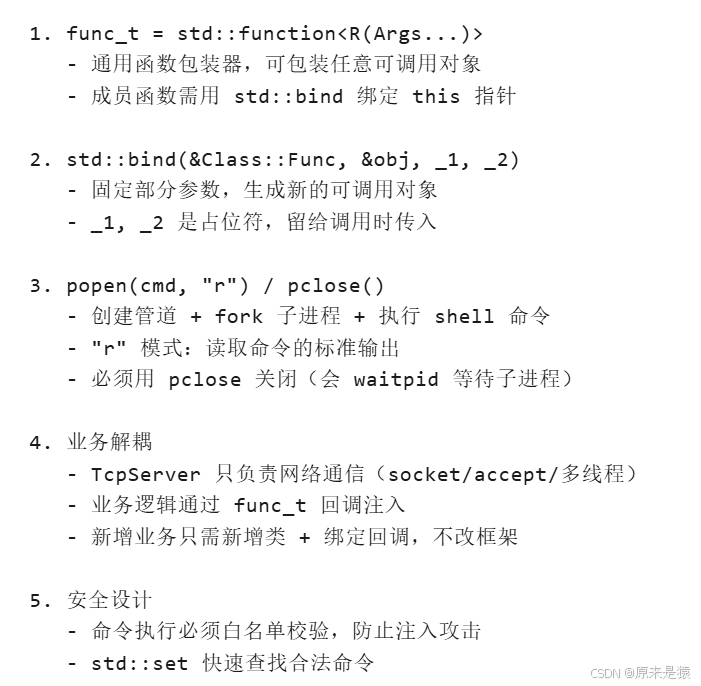
回调函数是 C++ 中实现解耦的核心机制。通过 std::function 和 std::bind,我们可以将网络框架与业务逻辑彻底分离,实现"同一个 TcpServer,不同的业务"的灵活架构。popen() 则为我们提供了在程序中安全执行外部命令的能力,但务必注意安全性校验。