效果图
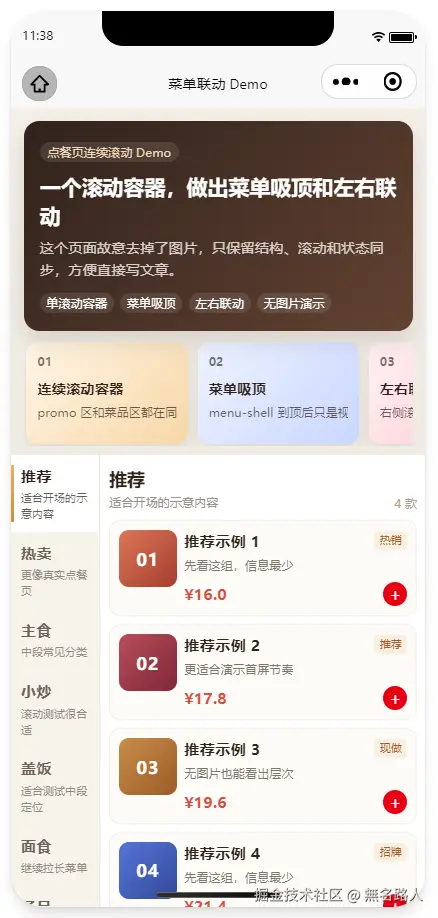
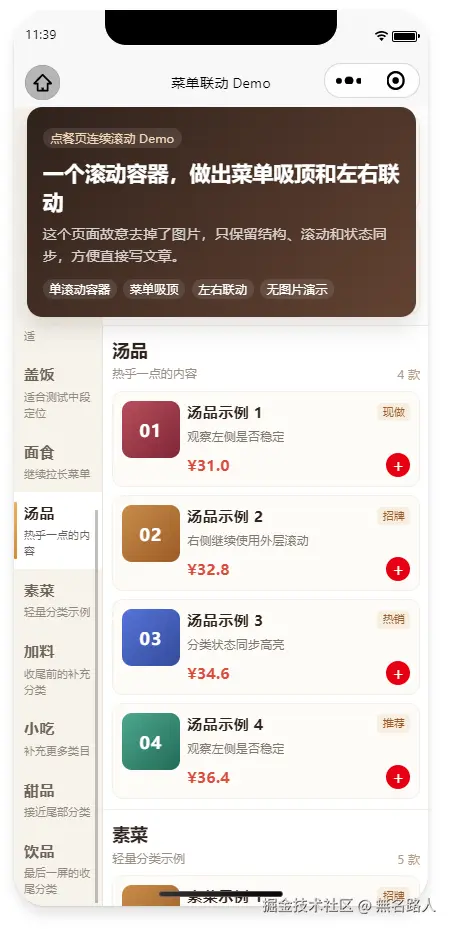
小程序点餐页的连续滚动,关键不是锚点,而是滚动权
做点餐页的时候,很容易遇到一个看起来不大的体验问题:页面刚进来时,上面有门店信息、活动区、推荐位;继续往下滑,菜单区域吸顶,左边是分类,右边是菜品。产品想要的效果通常是"像外卖小程序那样顺",手指一路滑下去,内容自然收起,菜单自然顶住,右侧菜品继续滚。
这个"顺"听起来简单,真正写起来却很容易卡一下。
最常见的实现方式是把页面拆成两个滚动阶段:先让外层页面滚动,等菜单吸顶之后,再让右侧菜品 scroll-view 开始滚。逻辑上很清楚,但体感上经常会出问题。用户手指没有松开,滚动权却从外层切到了内层,小程序需要在这一刻完成边界判断、吸顶状态切换、内部滚动接管。只要其中任意一步慢半拍,就会出现那种很微妙的停顿感。
我后来发现,点餐页想要丝滑,重点不是先找一个锚点组件,而是先问清楚一件事:这一整段手势,到底由谁来滚?
不要在吸顶点切换滚动容器
最后采用的方案是把 promo-area、菜单区域、右侧菜品列表都放进同一个纵向 scroll-view 里。也就是说,从活动区被收上去,到菜单吸顶,再到菜品继续滚动,始终是同一个容器在接收滚动。
页面结构大概是这样:
text
demo-hero        fixed
scroll-view
  promo-area     normal
  menu-shell
    menu-side    sticky + inner scroll-view
    menu-content normal
demo-hero 固定在页面顶部,用来模拟门店头部或者顶部信息区。promo-area 是普通内容,它会跟着外层 scroll-view 自然滚走。menu-shell 到顶部之后,左侧分类通过 sticky 留在可视区里,右侧菜品不单独开一个新的纵向滚动容器,而是继续跟着外层滚。
这套结构最大的好处是,吸顶只是视觉位置发生变化,滚动权没有变化。用户手指下面一直是同一个 scroll-view,所以不会在吸顶那一刻出现"外层到头了,内层还没接上"的断点。
promo 要能收上去,菜单要能留下来
点餐页里经常会有活动卡片、优惠券、推荐入口之类的区域。它们不应该和菜单一起固定住,而应该像普通内容一样被收上去。
所以 promo-area 不要做 fixed,也不要做 sticky。它只需要在外层滚动容器里正常占位:
vue
<scroll-view class="menu-page__scroll" scroll-y :scroll-top="menuBodyTargetScrollTop">
  <view class="menu-scroll-content">
    <view class="promo-area">
      活动区内容
    </view>

    <view class="menu-shell">
      <view class="menu-side">分类</view>
      <view class="menu-content">菜品</view>
    </view>
  </view>
</scroll-view>
这样活动区可以被完整收起,菜单区域又能自然顶到顶部信息区下面。整个过程不需要切换容器,只是内容在同一个滚动坐标系里移动。
左侧分类不能跟着菜品一起滚走
真实点餐页的分类通常很多,左侧分类栏不能被外层页面一起带走。更自然的状态是:右侧菜品继续纵向滚动,左侧分类固定在顶部信息区下方;如果分类太多,左侧自己内部滚。
这里可以让左侧栏使用 position: sticky,并给它一个剩余视口高度:
ts
const menuSideStickyStyle = {
  top: `${demoHeroHeight + menuShellGap}px`,
  height: `calc(100vh - ${demoHeroHeight + menuShellGap}px)`,
}
右侧内容则不要给固定宽度,让它直接吃掉剩余空间:
scss
.menu-section {
  display: flex;
  align-items: flex-start;
}

.menu-side {
  position: sticky;
  flex: 0 0 160rpx;
}

.menu-content {
  flex: 1 1 0;
  min-width: 0;
}
这个地方有个小坑:左侧如果不是内部滚动,而是跟着整体内容一起撑开,分类多了以后它会把页面高度拉得很奇怪;右侧如果宽度写死,又容易在不同屏幕上变窄。一个固定宽度的左栏,加一个自适应的右栏,通常更稳。
左右联动其实就是一张位置表
右侧滚动时,左侧要知道当前应该高亮哪个分类。这个逻辑不需要复杂化,本质上就是先测出每个分类块在滚动容器里的位置,再用当前 scrollTop 去查表。
测量时,把每个 .menu-group 相对滚动内容顶部的位置存下来:
ts
categoryOffsets.value = rects.map((rect, index) => ({
  id: menuCategories.value[index].id,
  top: Math.max(0, rect.top - contentTop),
}))
滚动时,用一个锚点位置去反推当前分类:
ts
const anchorTop = scrollTop + fixedHeaderOffset + 24

for (let index = categoryOffsets.length - 1; index >= 0; index -= 1) {
  if (anchorTop >= categoryOffsets[index].top) {
    activeCategoryId = categoryOffsets[index].id
    break
  }
}
这里的 fixedHeaderOffset 很重要。因为顶部有固定区域,左侧菜单也要贴在它下面,所以判断当前分类时不能只看原始 scrollTop。否则右侧标题看起来已经到位了,左侧高亮却会慢半拍。
点击分类时,别让三套机制同时动
点击左侧分类跳转右侧内容,是另一个容易抖的地方。
一开始我也会自然地想到 scroll-with-animation、scroll-into-view、scroll-anchoring 这些能力。但在这个场景里,它们叠在一起反而容易互相抢控制权:外层在动画滚,左侧也在动画滚,滚动锚定还可能做一次补偿;同时点击后如果马上重新测量布局,滚动事件又可能带着旧位置回来,把高亮状态短暂算回上一个分类。
更稳的做法是:点击时先高亮目标分类,锁住自动联动,然后使用已经缓存好的分类偏移量直接设置外层 scrollTop。
ts
function jumpCategory(category) {
  activeCategoryId.value = category.id
  manualScrollLock.value = true

  const targetOffset = categoryOffsets.value.find(item => item.id === category.id)
  const nextScrollTop = targetOffset.top - fixedHeaderOffset.value

  pendingJumpTarget.value = {
    categoryId: category.id,
    scrollTop: nextScrollTop,
  }

  menuBodyTargetScrollTop.value = Math.max(0, nextScrollTop)
}
滚动事件回来时,如果还没接近目标位置,就不要急着重新计算高亮。等它到达目标附近,再解锁自动联动:
ts
function handleMenuBodyScroll(event) {
  const nextScrollTop = event.detail.scrollTop

  if (manualScrollLock.value && pendingJumpTarget.value) {
    const reachedTarget = Math.abs(nextScrollTop - pendingJumpTarget.value.scrollTop) <= 8

    if (reachedTarget) {
      manualScrollLock.value = false
      pendingJumpTarget.value = null
    }

    return
  }

  syncActiveCategoryByScrollTop(nextScrollTop)
}
这个锁很小,但它能明显减少点击时的"抖一下"。目标小程序里的思路也类似:点击分类后先进入一个点击滚动中的状态,滚到目标位置后再恢复自动选中。
滚到底部还要做一次纠偏
还有一个细节是底部分类。
很多菜单页滚到最底部时,最后一个分类不一定会被选中。原因是最后一组内容可能不够高,还没有真正进入锚点判断区,滚动就已经到底了。用户看到的是最后一屏,但左侧可能还停在倒数第二项。
解决方式很直接:当 scrollTop 接近最大滚动距离时,直接选中最后一个分类。
ts
const maxScrollTop = menuBodyScrollHeight - menuBodyViewportHeight

if (scrollTop >= maxScrollTop - 4) {
  activeCategoryId.value = lastCategoryId
  return
}
这不是很炫的技术点,但这种小修正对点餐页体感很重要。用户不会关心锚点算法是不是优雅,只会觉得"我都滑到底了,左边为什么没选中最后一个?"
为什么没有直接用 Sidebar 锚点示例
组件库里的 sidebar + scroll-view 锚点示例当然有价值,它适合"左侧导航,右侧内容定位"的常规页面。但这个点餐页的问题不只是锚点定位,而是连续滚动手感。
这里同时有顶部固定区、可收起的 promo 区、菜单吸顶、左侧内部滚动、右侧内容联动。如果直接套一个锚点示例,通常还是会回到"外层滚一段,内层再滚一段"的结构,吸顶处就容易出现那一下停顿。
所以这次我没有把重点放在组件 API 上,而是先重构滚动模型:让整个页面只有一个主要纵向滚动容器。只要滚动权稳定,后面的吸顶、联动、点击跳转、底部纠偏都只是围绕同一套坐标系做计算。
Demo 放在这里
我做了一个去掉图片和业务逻辑的 demo,只保留结构和滚动联动,方便单独看效果:
text
src/pages-demo/menu-scroll-linkage.vue如果你也在做类似点餐页,我的建议是先不要急着套锚点组件。先把滚动权想清楚:谁负责主滚动,谁只是固定在视觉位置上,谁需要内部滚。这个问题想明白之后,页面就不会在吸顶那一刻突然"换挡",手感自然会顺很多。
代码
ts
<script lang="ts" setup>
import { computed, getCurrentInstance, nextTick, onBeforeUnmount, onMounted, ref } from 'vue'

definePage({
  style: {
    navigationStyle: 'default',
    navigationBarTitleText: '菜单联动 Demo',
  },
})

interface PromoCard {
  title: string
  desc: string
  mark: string
  bg: string
}

interface DishItem {
  id: string
  no: string
  name: string
  desc: string
  badge: string
  price: string
  thumbBackground: string
}

interface MenuCategory {
  id: string
  name: string
  subtitle: string
  dishes: DishItem[]
}

interface CategorySeed {
  id: string
  name: string
  subtitle: string
  desc: string[]
}

const instance = getCurrentInstance()
const promoCards: PromoCard[] = [
  {
    title: '连续滚动容器',
    desc: 'promo 区和菜品区都在同一个 scroll-view 里',
    mark: '01',
    bg: 'linear-gradient(135deg, #fff5e6 0%, #f7d6a6 100%)',
  },
  {
    title: '菜单吸顶',
    desc: 'menu-shell 到顶后只是视觉固定,不切换滚动容器',
    mark: '02',
    bg: 'linear-gradient(135deg, #eef3ff 0%, #c8d6ff 100%)',
  },
  {
    title: '左右联动',
    desc: '右侧滚动时,左侧分类会跟着高亮',
    mark: '03',
    bg: 'linear-gradient(135deg, #fff0f3 0%, #ffc7d3 100%)',
  },
]

const categorySeeds: CategorySeed[] = [
  {
    id: 'recommend',
    name: '推荐',
    subtitle: '适合开场的示意内容',
    desc: ['先看这组,信息最少', '更适合演示首屏节奏', '无图片也能看出层次'],
  },
  {
    id: 'popular',
    name: '热卖',
    subtitle: '更像真实点餐页',
    desc: ['这里故意放得稍长一点', '方便看滚动时的联动', '也方便看底部选中状态'],
  },
  {
    id: 'main',
    name: '主食',
    subtitle: '中段常见分类',
    desc: ['文字和色块代替图片', '重点只保留结构关系', '方便直接发文章'],
  },
  {
    id: 'wok',
    name: '小炒',
    subtitle: '滚动测试很合适',
    desc: ['这一组卡片数量再多一点', '能更明显看出吸顶效果', '也能看出左右同步'],
  },
  {
    id: 'rice',
    name: '盖饭',
    subtitle: '适合测试中段定位',
    desc: ['分类数量变多之后', '左侧需要自己内部滚动', '外层不应该带着它上移'],
  },
  {
    id: 'noodle',
    name: '面食',
    subtitle: '继续拉长菜单',
    desc: ['模拟真实长菜单', '点击类目后对齐到顶部', '不要被 sticky 头部盖住'],
  },
  {
    id: 'soup',
    name: '汤品',
    subtitle: '热乎一点的内容',
    desc: ['观察左侧是否稳定', '右侧继续使用外层滚动', '分类状态同步高亮'],
  },
  {
    id: 'vegetable',
    name: '素菜',
    subtitle: '轻量分类示例',
    desc: ['这组用于测试快速滚动', '左侧 scroll-into-view 要跟上', '右侧锚点要准确'],
  },
  {
    id: 'extras',
    name: '加料',
    subtitle: '收尾前的补充分类',
    desc: ['短列表用于测试切换', '防止底部选中失效', '也方便验证最后一项'],
  },
  {
    id: 'snack',
    name: '小吃',
    subtitle: '补充更多类目',
    desc: ['继续增加分类数量', '左侧应该只在内部滚', '页面外层负责菜品滚动'],
  },
  {
    id: 'dessert',
    name: '甜品',
    subtitle: '接近尾部分类',
    desc: ['用于验证底部纠偏', '滚动到底仍要选中类目', '不要出现空选中'],
  },
  {
    id: 'drinks',
    name: '饮品',
    subtitle: '最后一屏的收尾分类',
    desc: ['滚到这里就能触发底部纠偏', '左侧会自动锁定最后一项', '手感和真实页面一致'],
  },
]

const badgeList = ['热销', '推荐', '现做', '招牌']
const thumbBackgrounds = [
  'linear-gradient(135deg, #d97757 0%, #a63c2f 100%)',
  'linear-gradient(135deg, #b84e5b 0%, #7e2636 100%)',
  'linear-gradient(135deg, #c88d4a 0%, #9b5a26 100%)',
  'linear-gradient(135deg, #5673d8 0%, #334a9a 100%)',
  'linear-gradient(135deg, #4ea78f 0%, #216a57 100%)',
]

function buildDishes(seed: CategorySeed, categoryIndex: number) {
  const count = 4 + (categoryIndex % 2)

  return Array.from({ length: count }, (_, dishIndex) => ({
    id: `${seed.id}-${dishIndex + 1}`,
    no: String(dishIndex + 1).padStart(2, '0'),
    name: `${seed.name}示例 ${dishIndex + 1}`,
    desc: seed.desc[dishIndex % seed.desc.length],
    badge: badgeList[(categoryIndex + dishIndex) % badgeList.length],
    price: (16 + categoryIndex * 2.5 + dishIndex * 1.8).toFixed(1),
    thumbBackground: thumbBackgrounds[(categoryIndex + dishIndex) % thumbBackgrounds.length],
  }))
}

const menuCategories = ref<MenuCategory[]>(
  categorySeeds.map((seed, categoryIndex) => ({
    id: seed.id,
    name: seed.name,
    subtitle: seed.subtitle,
    dishes: buildDishes(seed, categoryIndex),
  })),
)

const heroChips = ['单滚动容器', '菜单吸顶', '左右联动', '无图片演示']
const activeCategoryId = ref(menuCategories.value[0]?.id || '')
const leftScrollIntoView = ref(`left-cat-${activeCategoryId.value}`)
const demoHeroTopGap = ref(0)
const demoHeroHeight = ref(0)
const demoHeroBottomGap = ref(0)
const menuShellGap = ref(0)
const menuBodyTargetScrollTop = ref(0)
const menuBodyCurrentScrollTop = ref(0)
const menuBodyViewportHeight = ref(0)
const menuBodyScrollHeight = ref(0)
const categoryOffsets = ref<Array<{ id: string, top: number }>>([])
const manualScrollLock = ref(false)
const pendingJumpTarget = ref<{ categoryId: string, scrollTop: number } | null>(null)
const fixedHeaderOffset = computed(() => demoHeroTopGap.value + demoHeroHeight.value + menuShellGap.value)
const menuScrollContentStyle = computed(() => ({
  paddingTop: demoHeroHeight.value
    ? `${demoHeroTopGap.value + demoHeroHeight.value + demoHeroBottomGap.value}px`
    : '430rpx',
}))
const menuSideStickyStyle = computed(() => ({
  top: `${fixedHeaderOffset.value}px`,
  height: `calc(100vh - ${fixedHeaderOffset.value}px)`,
}))

let measureTimer: ReturnType<typeof setTimeout> | null = null
let scrollTimer: ReturnType<typeof setTimeout> | null = null

function scheduleMenuMeasure() {
  if (measureTimer) {
    clearTimeout(measureTimer)
  }

  nextTick(() => {
    measureMenuShellGap()
    measureDemoHero()
    measureCategoryOffsets()
  })

  measureTimer = setTimeout(() => {
    measureMenuShellGap()
    measureDemoHero()
    measureCategoryOffsets()
  }, 160)
}

function measureMenuShellGap() {
  const { windowWidth = 375 } = uni.getSystemInfoSync()
  demoHeroTopGap.value = 0
  demoHeroBottomGap.value = 20 * windowWidth / 750
  menuShellGap.value = 16 * windowWidth / 750
}

function measureDemoHero() {
  if (!instance?.proxy) {
    return
  }

  const query = uni.createSelectorQuery().in(instance.proxy)
  query.select('.demo-hero').boundingClientRect()
  query.exec((results: any[]) => {
    const heroRect = Array.isArray(results) ? results[0] : null
    demoHeroHeight.value = Number(heroRect?.height || demoHeroHeight.value || 0)
  })
}

function measureCategoryOffsets() {
  if (!instance?.proxy || !menuCategories.value.length) {
    categoryOffsets.value = []
    return
  }

  const query = uni.createSelectorQuery().in(instance.proxy)
  query.select('.menu-scroll-content').boundingClientRect()
  query.selectAll('.menu-group').boundingClientRect()
  query.select('.menu-page__scroll').boundingClientRect()
  query.exec((results: any[]) => {
    const contentRect = Array.isArray(results) ? results[0] : null
    const rects = Array.isArray(results?.[1]) ? results[1] : []
    const scrollRect = Array.isArray(results) ? results[2] : null
    const contentTop = Number(contentRect?.top || 0)

    menuBodyViewportHeight.value = Number(scrollRect?.height || menuBodyViewportHeight.value || 0)
    menuBodyScrollHeight.value = Number(contentRect?.height || menuBodyScrollHeight.value || 0)
    categoryOffsets.value = rects.map((rect: any, index: number) => ({
      id: menuCategories.value[index]?.id || String(index),
      top: Math.max(0, Number(rect?.top || 0) - contentTop),
    }))

    if (!manualScrollLock.value) {
      syncActiveCategoryByScrollTop(menuBodyCurrentScrollTop.value)
    }
  })
}

function releaseManualScrollLock() {
  if (scrollTimer) {
    clearTimeout(scrollTimer)
    scrollTimer = null
  }

  const pendingTarget = pendingJumpTarget.value
  manualScrollLock.value = false
  pendingJumpTarget.value = null

  if (pendingTarget) {
    activeCategoryId.value = pendingTarget.categoryId
  }
}

function scheduleManualScrollUnlock(delay = 360) {
  if (scrollTimer) {
    clearTimeout(scrollTimer)
  }

  scrollTimer = setTimeout(releaseManualScrollLock, delay)
}

function setMenuBodyScrollTop(scrollTop: number) {
  const nextScrollTop = Math.max(0, scrollTop - fixedHeaderOffset.value)
  const isAlreadyThere = Math.abs(menuBodyCurrentScrollTop.value - nextScrollTop) <= 2

  if (isAlreadyThere) {
    return nextScrollTop
  }

  menuBodyCurrentScrollTop.value = nextScrollTop
  menuBodyTargetScrollTop.value = menuBodyTargetScrollTop.value === nextScrollTop
    ? nextScrollTop + 1
    : nextScrollTop

  return nextScrollTop
}

function queryCategoryScrollTop(categoryId: string, callback: (scrollTop: number) => void) {
  if (!instance?.proxy) {
    callback(0)
    return
  }

  const query = uni.createSelectorQuery().in(instance.proxy)
  query.select('.menu-scroll-content').boundingClientRect()
  query.select(`#right-cat-${categoryId}`).boundingClientRect()
  query.exec((results: any[]) => {
    const contentRect = Array.isArray(results) ? results[0] : null
    const targetRect = Array.isArray(results) ? results[1] : null

    if (!targetRect) {
      callback(0)
      return
    }

    callback(Math.max(0, Number(targetRect.top || 0) - Number(contentRect?.top || 0)))
  })
}

function syncActiveCategoryByScrollTop(scrollTop: number) {
  if (!categoryOffsets.value.length) {
    return
  }

  const maxScrollTop = Math.max(0, menuBodyScrollHeight.value - menuBodyViewportHeight.value)
  if (maxScrollTop > 0 && scrollTop >= maxScrollTop - 4) {
    const lastId = categoryOffsets.value[categoryOffsets.value.length - 1].id
    if (String(lastId) !== String(activeCategoryId.value)) {
      activeCategoryId.value = lastId
      leftScrollIntoView.value = `left-cat-${lastId}`
    }
    return
  }

  const anchorTop = scrollTop + fixedHeaderOffset.value + 24
  let currentId = categoryOffsets.value[0].id

  for (let index = categoryOffsets.value.length - 1; index >= 0; index -= 1) {
    if (anchorTop >= categoryOffsets.value[index].top) {
      currentId = categoryOffsets.value[index].id
      break
    }
  }

  if (String(currentId) !== String(activeCategoryId.value)) {
    activeCategoryId.value = currentId
    leftScrollIntoView.value = `left-cat-${currentId}`
  }
}

function handleMenuBodyScroll(event: Record<string, any>) {
  const nextScrollTop = Number(event.detail?.scrollTop || 0)

  if (manualScrollLock.value) {
    const pendingTarget = pendingJumpTarget.value
    if (pendingTarget) {
      const maxScrollTop = Math.max(0, menuBodyScrollHeight.value - menuBodyViewportHeight.value)
      const reachedTarget = Math.abs(nextScrollTop - pendingTarget.scrollTop) <= 8
      const reachedBottomTarget = pendingTarget.scrollTop >= maxScrollTop - 4 && nextScrollTop >= maxScrollTop - 4

      if (reachedTarget || reachedBottomTarget) {
        menuBodyCurrentScrollTop.value = nextScrollTop
        activeCategoryId.value = pendingTarget.categoryId
        scheduleManualScrollUnlock(80)
      }

      return
    }

    menuBodyCurrentScrollTop.value = nextScrollTop
    return
  }

  menuBodyCurrentScrollTop.value = nextScrollTop
  syncActiveCategoryByScrollTop(nextScrollTop)
}

function jumpCategory(category: MenuCategory) {
  activeCategoryId.value = category.id
  manualScrollLock.value = true

  if (scrollTimer) {
    clearTimeout(scrollTimer)
    scrollTimer = null
  }

  const applyCategoryScrollTop = (scrollTop: number) => {
    const nextScrollTop = setMenuBodyScrollTop(scrollTop)
    pendingJumpTarget.value = {
      categoryId: category.id,
      scrollTop: nextScrollTop,
    }
    scheduleManualScrollUnlock()
  }

  const targetOffset = categoryOffsets.value.find(item => String(item.id) === String(category.id))
  if (targetOffset) {
    applyCategoryScrollTop(targetOffset.top)
  }
  else {
    queryCategoryScrollTop(category.id, applyCategoryScrollTop)
  }
}

function handleDemoAction(name: string) {
  uni.showToast({
    title: `演示:${name}`,
    icon: 'none',
  })
}

onMounted(() => {
  scheduleMenuMeasure()
})

onBeforeUnmount(() => {
  if (measureTimer) {
    clearTimeout(measureTimer)
  }
  if (scrollTimer) {
    clearTimeout(scrollTimer)
  }
})
</script>

<template>
  <view class="demo-page">
    <view class="demo-hero">
      <view class="demo-hero__eyebrow">
        点餐页连续滚动 Demo
      </view>
      <view class="demo-hero__title">
        一个滚动容器,做出菜单吸顶和左右联动
      </view>
      <view class="demo-hero__desc">
        这个页面故意去掉了图片,只保留结构、滚动和状态同步,方便直接写文章。
      </view>

      <view class="demo-hero__chips">
        <text v-for="chip in heroChips" :key="chip" class="demo-chip">
          {{ chip }}
        </text>
      </view>
    </view>

    <scroll-view
      class="menu-page__scroll"
      scroll-y
      enhanced
      :scroll-top="menuBodyTargetScrollTop"
      :show-scrollbar="false"
      @scroll="handleMenuBodyScroll"
    >
      <view class="menu-scroll-content" :style="menuScrollContentStyle">
        <view class="promo-area">
          <scroll-view class="promo-scroll" scroll-x :show-scrollbar="false">
            <view class="promo-list">
              <view
                v-for="card in promoCards"
                :key="card.title"
                class="promo-card"
                :style="{ background: card.bg }"
              >
                <view class="promo-card__mark">
                  {{ card.mark }}
                </view>
                <view class="promo-card__title">
                  {{ card.title }}
                </view>
                <view class="promo-card__desc">
                  {{ card.desc }}
                </view>
              </view>
            </view>
          </scroll-view>
        </view>

        <view class="menu-shell">
          <view class="menu-section">
            <view class="menu-side" :style="menuSideStickyStyle">
              <scroll-view
                class="menu-side__scroll"
                scroll-y
                :scroll-into-view="leftScrollIntoView"
                :show-scrollbar="false"
              >
                <view
                  v-for="category in menuCategories"
                  :id="`left-cat-${category.id}`"
                  :key="category.id"
                  class="menu-side__item"
                  :class="{ 'menu-side__item--active': String(activeCategoryId) === String(category.id) }"
                  @tap.stop="jumpCategory(category)"
                >
                  <text class="menu-side__item-name">
                    {{ category.name }}
                  </text>
                  <text class="menu-side__item-sub">
                    {{ category.subtitle }}
                  </text>
                </view>
              </scroll-view>
            </view>

            <view class="menu-content">
              <view
                v-for="category in menuCategories"
                :id="`right-cat-${category.id}`"
                :key="category.id"
                class="menu-group"
              >
                <view class="menu-group__head">
                  <view class="menu-group__title-wrap">
                    <text class="menu-group__title">
                      {{ category.name }}
                    </text>
                    <text class="menu-group__subtitle">
                      {{ category.subtitle }}
                    </text>
                  </view>
                  <text class="menu-group__count">
                    {{ category.dishes.length }} 款
                  </text>
                </view>

                <view
                  v-for="dish in category.dishes"
                  :key="dish.id"
                  class="dish-card"
                >
                  <view class="dish-card__thumb" :style="{ background: dish.thumbBackground }">
                    {{ dish.no }}
                  </view>

                  <view class="dish-card__main">
                    <view class="dish-card__head">
                      <text class="dish-card__name">
                        {{ dish.name }}
                      </text>
                      <text class="dish-card__badge">
                        {{ dish.badge }}
                      </text>
                    </view>

                    <text class="dish-card__desc">
                      {{ dish.desc }}
                    </text>

                    <view class="dish-card__foot">
                      <text class="dish-card__price">
                        ¥{{ dish.price }}
                      </text>
                      <view class="dish-card__action" @tap.stop="handleDemoAction(dish.name)">
                        +
                      </view>
                    </view>
                  </view>
                </view>
              </view>

              <view class="menu-content__bottom-space" />
            </view>
          </view>
        </view>
      </view>
    </scroll-view>
  </view>
</template>

<style scoped lang="scss">
.demo-page {
  min-height: 100vh;
  background: linear-gradient(180deg, #f4efe8 0%, #efebe3 40%, #f7f5f0 100%);
}

.menu-page__scroll {
  position: fixed;
  inset: 0;
  z-index: 10;
}

.menu-scroll-content {
  min-height: 100%;
  padding: 430rpx 0 44rpx;
  box-sizing: border-box;
}

.demo-hero {
  position: fixed;
  top: 0;
  left: 24rpx;
  right: 24rpx;
  z-index: 40;
  padding: 30rpx 28rpx 32rpx;
  border-radius: 28rpx;
  color: #fff;
  background: linear-gradient(135deg, #2f221c 0%, #634232 100%);
  box-shadow: 0 20rpx 40rpx rgb(54 39 29 / 14%);
  backdrop-filter: blur(10px);
  transform: translate3d(0, 0, 0);
}

.demo-hero__eyebrow {
  display: inline-flex;
  padding: 0 14rpx;
  height: 36rpx;
  border-radius: 999rpx;
  align-items: center;
  font-size: 22rpx;
  color: #f8d7b6;
  background: rgb(255 255 255 / 10%);
}

.demo-hero__title {
  margin-top: 18rpx;
  font-size: 38rpx;
  line-height: 54rpx;
  font-weight: 700;
}

.demo-hero__desc {
  margin-top: 14rpx;
  font-size: 26rpx;
  line-height: 40rpx;
  color: rgb(255 255 255 / 78%);
}

.demo-hero__chips {
  display: flex;
  flex-wrap: wrap;
  gap: 12rpx;
  margin-top: 20rpx;
}

.demo-chip {
  display: inline-flex;
  align-items: center;
  height: 38rpx;
  padding: 0 12rpx;
  border-radius: 999rpx;
  background: rgb(255 255 255 / 10%);
  color: #fff;
  font-size: 22rpx;
}

.promo-area {
  margin: 0 24rpx;
  position: relative;
  z-index: 1;
}

.promo-scroll {
  white-space: nowrap;
}

.promo-list {
  display: inline-flex;
  gap: 18rpx;
  padding: 0 4rpx 4rpx;
}

.promo-card {
  width: 292rpx;
  min-height: 184rpx;
  padding: 20rpx;
  border-radius: 22rpx;
  box-sizing: border-box;
  color: #2f221c;
  box-shadow: 0 14rpx 28rpx rgb(47 34 28 / 8%);
  overflow: hidden;
}

.promo-card__mark {
  font-size: 22rpx;
  font-weight: 700;
  opacity: 0.64;
}

.promo-card__title {
  margin-top: 18rpx;
  font-size: 26rpx;
  line-height: 36rpx;
  font-weight: 700;
  display: -webkit-box;
  overflow: hidden;
  -webkit-box-orient: vertical;
  -webkit-line-clamp: 2;
}

.promo-card__desc {
  margin-top: 10rpx;
  font-size: 22rpx;
  line-height: 32rpx;
  color: rgb(47 34 28 / 72%);
  display: -webkit-box;
  overflow: hidden;
  -webkit-box-orient: vertical;
  -webkit-line-clamp: 2;
}

.menu-shell {
  margin-top: 16rpx;
  width: 100vw;
  background: #f5f1ea;
  box-sizing: border-box;
}

.menu-section {
  display: flex;
  width: 100%;
  align-items: flex-start;
  overflow: visible;
}

.menu-side {
  position: sticky;
  flex: 0 0 160rpx;
  overflow: hidden;
  background: rgba(247, 243, 236, 0.94);
  border-right: 1rpx solid #eee5d8;
  backdrop-filter: blur(10px);
}

.menu-side__scroll {
  height: 100%;
}

.menu-side__item {
  position: relative;
  min-height: 102rpx;
  padding: 18rpx 12rpx 18rpx 18rpx;
  box-sizing: border-box;
  display: flex;
  flex-direction: column;
  justify-content: center;
  gap: 6rpx;
  color: #6e6258;
}

.menu-side__item::before {
  content: '';
  position: absolute;
  left: 0;
  top: 18rpx;
  bottom: 18rpx;
  width: 6rpx;
  border-radius: 999rpx;
  background: transparent;
}

.menu-side__item--active {
  background: #fff;
  color: #2f221c;
}

.menu-side__item--active::before {
  background: linear-gradient(180deg, #e5b268 0%, #d08a39 100%);
}

.menu-side__item-name {
  font-size: 28rpx;
  line-height: 40rpx;
  font-weight: 700;
}

.menu-side__item-sub {
  font-size: 20rpx;
  line-height: 30rpx;
  color: inherit;
  opacity: 0.74;
}

.menu-content {
  flex: 1 1 0;
  width: auto;
  min-width: 0;
  background: #fff;
}

.menu-group {
  padding: 22rpx 16rpx 18rpx;
  border-bottom: 1rpx solid #f2ece3;
}

.menu-group__head {
  display: flex;
  align-items: flex-end;
  justify-content: space-between;
  margin-bottom: 16rpx;
}

.menu-group__title-wrap {
  min-width: 0;
}

.menu-group__title {
  display: block;
  font-size: 32rpx;
  line-height: 46rpx;
  font-weight: 700;
  color: #2f221c;
}

.menu-group__subtitle {
  display: block;
  margin-top: 4rpx;
  font-size: 22rpx;
  line-height: 32rpx;
  color: #9a8f84;
}

.menu-group__count {
  flex-shrink: 0;
  font-size: 22rpx;
  color: #b59b84;
}

.dish-card {
  display: flex;
  gap: 14rpx;
  padding: 16rpx;
  border-radius: 20rpx;
  background: #fdfcf8;
  border: 1rpx solid #f4eee5;
  box-sizing: border-box;
}

.dish-card + .dish-card {
  margin-top: 14rpx;
}

.dish-card__thumb {
  width: 104rpx;
  height: 104rpx;
  border-radius: 18rpx;
  flex-shrink: 0;
  display: flex;
  align-items: center;
  justify-content: center;
  color: #fff;
  font-size: 30rpx;
  font-weight: 700;
  letter-spacing: 2rpx;
}

.dish-card__main {
  flex: 1;
  min-width: 0;
}

.dish-card__head {
  display: flex;
  align-items: center;
  justify-content: space-between;
  gap: 10rpx;
}

.dish-card__name {
  font-size: 28rpx;
  line-height: 40rpx;
  font-weight: 600;
  color: #2f221c;
}

.dish-card__badge {
  flex-shrink: 0;
  padding: 0 10rpx;
  height: 34rpx;
  border-radius: 8rpx;
  background: #f7eee1;
  color: #9b5a26;
  font-size: 20rpx;
  line-height: 34rpx;
}

.dish-card__desc {
  display: block;
  margin-top: 8rpx;
  font-size: 22rpx;
  line-height: 34rpx;
  color: #7f746b;
}

.dish-card__foot {
  margin-top: 14rpx;
  display: flex;
  align-items: center;
  justify-content: space-between;
}

.dish-card__price {
  font-size: 28rpx;
  line-height: 40rpx;
  font-weight: 700;
  color: #d94b3e;
}

.dish-card__action {
  width: 44rpx;
  height: 44rpx;
  border-radius: 999rpx;
  display: flex;
  align-items: center;
  justify-content: center;
  background: #e60012;
  color: #fff;
  font-size: 30rpx;
  line-height: 44rpx;
}

.menu-content__bottom-space {
  height: 180rpx;
}
</style>