目录
[1 运行界面](#1 运行界面)
[2 目录结构](#2 目录结构)
[3 源码](#3 源码)
[4 遇到的问题](#4 遇到的问题)
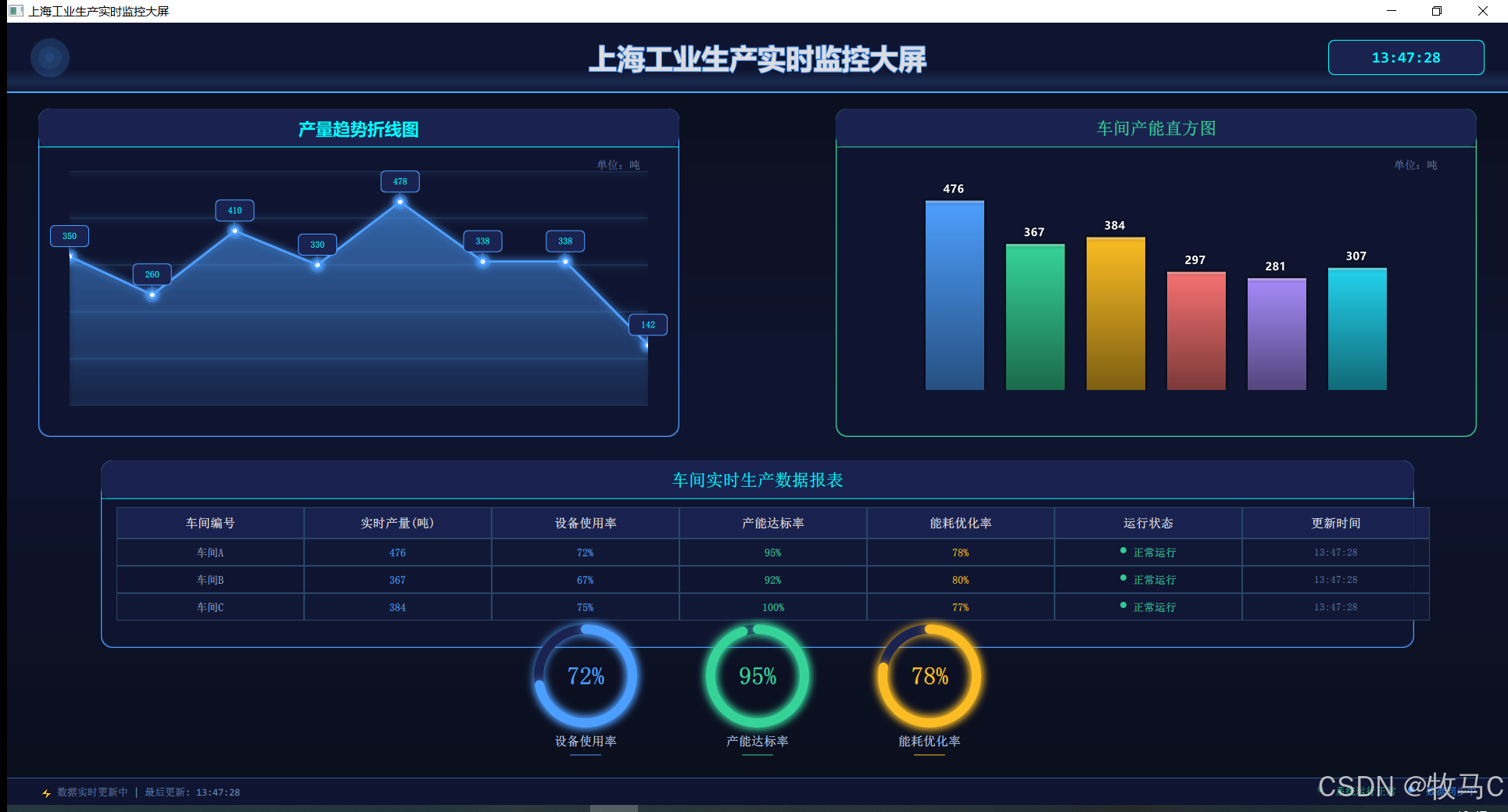
1 运行界面
2 目录结构
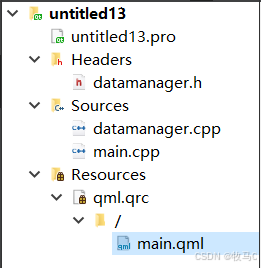
QT 5.12 + MINGW64
3 源码
cpp
QT += quick
QT += core network

CONFIG += c++11

# The following define makes your compiler emit warnings if you use
# any Qt feature that has been marked deprecated (the exact warnings
# depend on your compiler). Refer to the documentation for the
# deprecated API to know how to port your code away from it.
DEFINES += QT_DEPRECATED_WARNINGS

# You can also make your code fail to compile if it uses deprecated APIs.
# In order to do so, uncomment the following line.
# You can also select to disable deprecated APIs only up to a certain version of Qt.
#DEFINES += QT_DISABLE_DEPRECATED_BEFORE=0x060000    # disables all the APIs deprecated before Qt 6.0.0

SOURCES += \
        datamanager.cpp \
        main.cpp

RESOURCES += qml.qrc

# Additional import path used to resolve QML modules in Qt Creator's code model
QML_IMPORT_PATH =

# Additional import path used to resolve QML modules just for Qt Quick Designer
QML_DESIGNER_IMPORT_PATH =

# Default rules for deployment.
qnx: target.path = /tmp/$${TARGET}/bin
else: unix:!android: target.path = /opt/$${TARGET}/bin
!isEmpty(target.path): INSTALLS += target

HEADERS += \
    datamanager.h
datamanager.h
cpp
#ifndef DATAMANAGER_H
#define DATAMANAGER_H

#include <QObject>
#include <QTimer>
#include <QVector>
#include <QRandomGenerator>

class DataManager : public QObject
{
    Q_OBJECT
    Q_PROPERTY(QVector<int> lineData READ lineData NOTIFY lineDataChanged)
    Q_PROPERTY(QVector<int> barData READ barData NOTIFY barDataChanged)
    Q_PROPERTY(int deviceUsage READ deviceUsage NOTIFY deviceUsageChanged)
    Q_PROPERTY(int capacityRate READ capacityRate NOTIFY capacityRateChanged)
    Q_PROPERTY(int energyRate READ energyRate NOTIFY energyRateChanged)
    Q_PROPERTY(QString lastUpdateTime READ lastUpdateTime NOTIFY lastUpdateTimeChanged)

public:
    static DataManager* instance();

    // Getter方法
    QVector<int> lineData() const { return m_lineData; }
    QVector<int> barData() const { return m_barData; }
    int deviceUsage() const { return m_deviceUsage; }
    int capacityRate() const { return m_capacityRate; }
    int energyRate() const { return m_energyRate; }
    QString lastUpdateTime() const { return m_lastUpdateTime; }

signals:
    void lineDataChanged();
    void barDataChanged();
    void deviceUsageChanged();
    void capacityRateChanged();
    void energyRateChanged();
    void lastUpdateTimeChanged();
    void dataUpdated();  // 总体数据更新信号

private slots:
    void updateData();    // 定时更新数据
    void simulateRealTimeData(); // 模拟实时数据变化

private:
    DataManager(QObject *parent = nullptr);
    ~DataManager();

    void initData();      // 初始化数据
    void generateRandomData(); // 生成随机数据

    QTimer* m_updateTimer;      // 数据更新定时器
    QTimer* m_realtimeTimer;    // 实时数据模拟定时器

    QVector<int> m_lineData;    // 折线图数据
    QVector<int> m_barData;     // 直方图数据
    int m_deviceUsage;           // 设备使用率
    int m_capacityRate;          // 产能达标率
    int m_energyRate;            // 能耗优化率
    QString m_lastUpdateTime;    // 最后更新时间

    QRandomGenerator* m_random;  // 随机数生成器
};

#endif // DATAMANAGER_H
datamanager.cpp
cpp
#include "datamanager.h"
#include <QDateTime>
#include <QDebug>

DataManager* DataManager::instance()
{
    static DataManager* instance = nullptr;
    if (!instance) {
        instance = new DataManager();
    }
    return instance;
}

DataManager::DataManager(QObject *parent) : QObject(parent)
{
    m_random = new QRandomGenerator(QRandomGenerator::securelySeeded());
    m_updateTimer = new QTimer(this);
    m_realtimeTimer = new QTimer(this);

    // 初始化数据
    initData();

    // 设置定时器:每5秒更新一次基础数据
    connect(m_updateTimer, &QTimer::timeout, this, &DataManager::updateData);
    m_updateTimer->start(5000);

    // 设置定时器:每2秒模拟实时数据微小变化
    connect(m_realtimeTimer, &QTimer::timeout, this, &DataManager::simulateRealTimeData);
    m_realtimeTimer->start(2000);
}

DataManager::~DataManager()
{
    delete m_random;
}

void DataManager::initData()
{
    // 初始化折线图数据(8个时间点)
    m_lineData = {120, 280, 190, 350, 260, 410, 330, 480};

    // 初始化直方图数据(6个车间)
    m_barData = {480, 390, 380, 320, 260, 290};

    // 初始化环形图数据
    m_deviceUsage = 83;
    m_capacityRate = 92;
    m_energyRate = 76;

    // 更新时间
    m_lastUpdateTime = QDateTime::currentDateTime().toString("hh:mm:ss");

    qDebug() << "数据管理器初始化完成";
}

void DataManager::updateData()
{
    qDebug() << "开始更新数据...";

    // 更新折线图数据(模拟新数据点,滚动更新)
    int newValue = m_random->bounded(100, 500);
    m_lineData.push_back(newValue);
    if (m_lineData.size() > 8) {
        m_lineData.removeFirst();
    }
    emit lineDataChanged();

    // 更新直方图数据
    for (int i = 0; i < m_barData.size(); i++) {
        int change = m_random->bounded(-20, 21); // -20 到 +20 的变化
        m_barData[i] = qBound(100, m_barData[i] + change, 550);
    }
    emit barDataChanged();

    // 更新环形图数据(在合理范围内波动)
    m_deviceUsage = qBound(70, m_deviceUsage + m_random->bounded(-5, 6), 98);
    m_capacityRate = qBound(80, m_capacityRate + m_random->bounded(-3, 4), 99);
    m_energyRate = qBound(65, m_energyRate + m_random->bounded(-4, 5), 95);

    emit deviceUsageChanged();
    emit capacityRateChanged();
    emit energyRateChanged();

    // 更新时间戳
    m_lastUpdateTime = QDateTime::currentDateTime().toString("hh:mm:ss");
    emit lastUpdateTimeChanged();

    // 触发整体数据更新信号
    emit dataUpdated();

    qDebug() << "数据更新完成 - 设备使用率:" << m_deviceUsage
             << "% 产能达标率:" << m_capacityRate
             << "% 能耗优化率:" << m_energyRate;
}

void DataManager::simulateRealTimeData()
{
    // 模拟实时数据的微小变化(让图表看起来更生动)
    static int counter = 0;

    // 每2秒轻微调整折线图最后一个数据点
    if (m_lineData.size() > 0) {
        int lastValue = m_lineData.last();
        int adjustment = m_random->bounded(-15, 16);
        m_lineData.last() = qBound(80, lastValue + adjustment, 550);
        emit lineDataChanged();
    }

    // 轻微调整环形图数据(1-2%的波动)
    int usageChange = m_random->bounded(-2, 3);
    int capacityChange = m_random->bounded(-1, 2);
    int energyChange = m_random->bounded(-2, 3);

    m_deviceUsage = qBound(70, m_deviceUsage + usageChange, 98);
    m_capacityRate = qBound(80, m_capacityRate + capacityChange, 99);
    m_energyRate = qBound(65, m_energyRate + energyChange, 95);

    emit deviceUsageChanged();
    emit capacityRateChanged();
    emit energyRateChanged();

    // 每10次更新(20秒)更新一次时间戳
    if (++counter % 10 == 0) {
        m_lastUpdateTime = QDateTime::currentDateTime().toString("hh:mm:ss");
        emit lastUpdateTimeChanged();
    }
}

void DataManager::generateRandomData()
{
    // 生成随机测试数据(备用方法)
    m_lineData.clear();
    for (int i = 0; i < 8; i++) {
        m_lineData.append(m_random->bounded(100, 500));
    }

    m_barData.clear();
    for (int i = 0; i < 6; i++) {
        m_barData.append(m_random->bounded(200, 500));
    }

    m_deviceUsage = m_random->bounded(70, 98);
    m_capacityRate = m_random->bounded(80, 99);
    m_energyRate = m_random->bounded(65, 95);

    emit lineDataChanged();
    emit barDataChanged();
    emit deviceUsageChanged();
    emit capacityRateChanged();
    emit energyRateChanged();
}
main.cpp
cpp
#include <QGuiApplication>
#include <QQmlApplicationEngine>
#include <QQmlContext>
#include <qqml.h>
#include "datamanager.h"
// 单例创建函数
static QObject* dataManagerSingletonProvider(QQmlEngine *engine, QJSEngine *scriptEngine)
{
    Q_UNUSED(engine)
    Q_UNUSED(scriptEngine)
    return DataManager::instance();
}

int main(int argc, char *argv[])
{
    QCoreApplication::setAttribute(Qt::AA_EnableHighDpiScaling);

    QGuiApplication app(argc, argv);

    // 注册为单例类型(必须在加载 QML 之前)
    qmlRegisterSingletonType<DataManager>("IndustrialMonitor", 1, 0, "DataManager", dataManagerSingletonProvider);
    QQmlApplicationEngine engine;
    // 方式1:设置上下文属性
    DataManager* dataMgr = DataManager::instance();
    engine.rootContext()->setContextProperty("dataManager", dataMgr);
    const QUrl url(QStringLiteral("qrc:/main.qml"));
    QObject::connect(&engine, &QQmlApplicationEngine::objectCreated,
                     &app, [url](QObject *obj, const QUrl &objUrl) {
        if (!obj && url == objUrl)
            QCoreApplication::exit(-1);
    }, Qt::QueuedConnection);
    engine.load(url);

    return app.exec();
}
main.qml
javascript
import QtQuick 2.12
import QtQuick.Window 2.12
import QtQuick.Controls 2.12
import IndustrialMonitor 1.0
Window {
id: mainWindow
width: 1920
height: 1080
visible: true
title: "上海工业生产实时监控大屏"
color: "#0A0E1A"
property int refreshCounter: 0
property int glowAnimation: 0
Timer {
interval: 50
running: true
repeat: true
onTriggered: glowAnimation = (glowAnimation + 1) % 360
}
// 动态渐变背景
Rectangle {
anchors.fill: parent
gradient: Gradient {
GradientStop { position: 0.0; color: "#0A0E1A" }
GradientStop { position: 0.5; color: "#0F1530" }
GradientStop { position: 1.0; color: "#0A0E1A" }
}
// 科技网格背景
Grid {
anchors.fill: parent
columns: 24
rows: 14
opacity: 0.05
Repeater {
model: 336
Rectangle {
width: parent.width / 24
height: parent.height / 14
color: "#4D9FFF"
opacity: 0.05
border.color: "#4D9FFF"
border.width: 0.5
}
}
}
}
// 监听C++数据更新信号
Connections {
target: dataManager
enabled: true
onDataUpdated: {
console.log("收到 dataUpdated 信号")
lineCanvas.requestPaint()
barCanvas.requestPaint()
ringCanvas1.requestPaint()
ringCanvas2.requestPaint()
ringCanvas3.requestPaint()
}
onLineDataChanged: {
console.log("收到 lineDataChanged 信号,数据:", dataManager.lineData)
lineCanvas.requestPaint()
}
onBarDataChanged: {
console.log("收到 barDataChanged 信号")
barCanvas.requestPaint()
}
onDeviceUsageChanged: {
console.log("收到 deviceUsageChanged 信号,值:", dataManager.deviceUsage)
ringCanvas1.requestPaint()
}
onCapacityRateChanged: {
console.log("收到 capacityRateChanged 信号")
ringCanvas2.requestPaint()
}
onEnergyRateChanged: {
console.log("收到 energyRateChanged 信号")
ringCanvas3.requestPaint()
}
}
// ========== 顶部标题栏(炫酷版) ==========
Rectangle {
anchors.top: parent.top
anchors.left: parent.left
anchors.right: parent.right
height: 90
color: "#0F1530"
// 顶部发光边框
Rectangle {
anchors.bottom: parent.bottom
anchors.left: parent.left
anchors.right: parent.right
height: 2
gradient: Gradient {
GradientStop { position: 0.0; color: "transparent" }
GradientStop { position: 0.2; color: "#4D9FFF" }
GradientStop { position: 0.5; color: "#00FFFF" }
GradientStop { position: 0.8; color: "#4D9FFF" }
GradientStop { position: 1.0; color: "transparent" }
}
}
// 顶部光晕
Rectangle {
anchors.bottom: parent.bottom
anchors.left: parent.left
anchors.right: parent.right
height: 30
gradient: Gradient {
GradientStop { position: 0.0; color: "transparent" }
GradientStop { position: 0.5; color: "#4D9FFF" }
GradientStop { position: 1.0; color: "transparent" }
}
opacity: 0.15
}
Text {
anchors.centerIn: parent
text: "上海工业生产实时监控大屏"
color: "#ffffff"
font.pixelSize: 36
font.bold: true
font.family: "Microsoft YaHei"
style: Text.Outline
styleColor: "#4D9FFF"
SequentialAnimation on opacity {
loops: Animation.Infinite
NumberAnimation { from: 0.85; to: 1; duration: 2000 }
NumberAnimation { from: 1; to: 0.85; duration: 2000 }
}
}
// 时间显示框
Rectangle {
anchors.right: parent.right
anchors.rightMargin: 30
anchors.verticalCenter: parent.verticalCenter
width: 200
height: 45
color: "#1A2350"
radius: 8
border.color: "#00FFFF"
border.width: 1
Text {
anchors.centerIn: parent
text: dataManager.lastUpdateTime
color: "#00FFFF"
font.pixelSize: 20
font.family: "Consolas"
font.bold: true
SequentialAnimation on scale {
loops: Animation.Infinite
NumberAnimation { from: 1; to: 1.03; duration: 1000 }
NumberAnimation { from: 1.03; to: 1; duration: 1000 }
}
}
}
// 左侧装饰
Rectangle {
anchors.left: parent.left
anchors.leftMargin: 30
anchors.verticalCenter: parent.verticalCenter
width: 50
height: 50
radius: 25
color: "#4D9FFF"
opacity: 0.2
Rectangle {
anchors.centerIn: parent
width: 30
height: 30
radius: 15
color: "#4D9FFF"
opacity: 0.5
Rectangle {
anchors.centerIn: parent
width: 15
height: 15
radius: 7.5
color: "#4D9FFF"
SequentialAnimation on scale {
loops: Animation.Infinite
NumberAnimation { from: 0.8; to: 1.2; duration: 1500 }
NumberAnimation { from: 1.2; to: 0.8; duration: 1500 }
}
}
}
}
}
// ========== 左侧:产量趋势折线图(炫酷版) ==========
Rectangle {
id: lineChart
anchors.top: parent.top
anchors.topMargin: 110
anchors.left: parent.left
anchors.leftMargin: 40
width: 820
height: 420
color: "#0F1530"
radius: 15
// 渐变边框
border.width: 1
border.color: "#4D9FFF"
// 外发光效果
Rectangle {
anchors.fill: parent
radius: 15
color: "transparent"
border.width: 2
border.color: "#4D9FFF"
opacity: 0.3
}
// 标题栏
Rectangle {
anchors.top: parent.top
anchors.left: parent.left
anchors.right: parent.right
height: 50
color: "#1A2350"
radius: 15
clip: true
Text {
anchors.centerIn: parent
text: "产量趋势折线图"
color: "#00FFFF"
font.pixelSize: 22
font.bold: true
font.family: "Microsoft YaHei"
}
Rectangle {
anchors.bottom: parent.bottom
anchors.left: parent.left
anchors.right: parent.right
height: 2
gradient: Gradient {
GradientStop { position: 0.0; color: "transparent" }
GradientStop { position: 0.5; color: "#00FFFF" }
GradientStop { position: 1.0; color: "transparent" }
}
}
}
Text {
anchors.top: parent.top
anchors.topMargin: 65
anchors.right: parent.right
anchors.rightMargin: 50
text: "单位:吨"
color: "#6B8CC0"
font.pixelSize: 14
}
Item {
id: chartContainer
anchors.fill: parent
anchors.margins: 40
anchors.topMargin: 80
Canvas {
id: lineCanvas
anchors.fill: parent
property variant cachedData: []
onPaint: {
var ctx = getContext("2d");
ctx.clearRect(0, 0, width, height);
var data = dataManager.lineData;
if (!data || data.length === 0) return;
cachedData = data.slice()
var maxY = 550;
var step = width/(data.length-1);
// 网格线
ctx.shadowBlur = 0;
ctx.strokeStyle = "#2A4A6B";
ctx.lineWidth = 0.8;
for(var i=0;i<=5;i++){
ctx.beginPath();
ctx.moveTo(0, height/5*i);
ctx.lineTo(width, height/5*i);
ctx.stroke();
ctx.fillStyle = "#6B8CC0";
ctx.font = "12px 'Microsoft YaHei'";
ctx.fillText(maxY - i*(maxY/5), -30, height/5*i + 4);
}
// X轴标签
var xLabels = ["08:00", "10:00", "12:00", "14:00", "16:00", "18:00", "20:00", "22:00"];
ctx.fillStyle = "#6B8CC0";
ctx.font = "12px 'Microsoft YaHei'";
for(var i=0;i<data.length;i++){
ctx.fillText(xLabels[i], step*i - 15, height + 20);
}
// 渐变填充区域
ctx.beginPath();
ctx.moveTo(0, height);
ctx.lineTo(0, height-data[0]/maxY*height);
for(var i=1;i<data.length;i++){
ctx.lineTo(step*i, height-data[i]/maxY*height);
}
ctx.lineTo(width, height);
var gradient = ctx.createLinearGradient(0, 0, 0, height);
gradient.addColorStop(0, "rgba(77, 159, 255, 0.4)");
gradient.addColorStop(1, "rgba(77, 159, 255, 0.05)");
ctx.fillStyle = gradient;
ctx.fill();
// 折线
ctx.beginPath();
ctx.moveTo(0, height-data[0]/maxY*height);
for(var i=1;i<data.length;i++){
ctx.lineTo(step*i, height-data[i]/maxY*height);
}
ctx.strokeStyle = "#4D9FFF";
ctx.lineWidth = 3;
ctx.shadowBlur = 8;
ctx.shadowColor = "#4D9FFF";
ctx.stroke();
// 数据点
for(var i=0;i<data.length;i++){
var x = step*i;
var y = height-data[i]/maxY*height;
// 外光晕
ctx.beginPath();
ctx.arc(x, y, 10, 0, Math.PI*2);
ctx.fillStyle = "rgba(77, 159, 255, 0.3)";
ctx.fill();
// 内圆点
ctx.beginPath();
ctx.arc(x, y, 6, 0, Math.PI*2);
ctx.fillStyle = "#4D9FFF";
ctx.fill();
ctx.beginPath();
ctx.arc(x, y, 3, 0, Math.PI*2);
ctx.fillStyle = "#FFFFFF";
ctx.fill();
}
ctx.shadowBlur = 0;
}
}
// 数据点数值标签
Repeater {
id: valueLabels
model: dataManager.lineData.length
delegate: Item {
id: labelItem
width: 50
height: 28
property real step: lineCanvas.width / (dataManager.lineData.length - 1)
property real value: dataManager.lineData[index]
property real posX: step * index - 25
property real posY: lineCanvas.height - (value / 550 * lineCanvas.height) - 40
x: posX
y: posY
Connections {
target: dataManager
onLineDataChanged: {
labelItem.step = lineCanvas.width / (dataManager.lineData.length - 1)
labelItem.value = dataManager.lineData[index]
labelItem.posX = labelItem.step * index - 25
labelItem.posY = lineCanvas.height - (labelItem.value / 550 * lineCanvas.height) - 40
}
}
Rectangle {
anchors.fill: parent
color: "#1A2350"
border.color: "#4D9FFF"
border.width: 1
radius: 6
Text {
anchors.centerIn: parent
text: labelItem.value
color: "#00FFFF"
font.pixelSize: 12
font.bold: true
}
}
// 指向线
Rectangle {
anchors.horizontalCenter: parent.horizontalCenter
anchors.top: parent.bottom
width: 1
height: 12
color: "#4D9FFF"
opacity: 0.6
}
}
}
}
}
// ========== 右侧:车间产能直方图(炫酷版) ==========
Rectangle {
id: barChart
anchors.top: parent.top
anchors.topMargin: 110
anchors.right: parent.right
anchors.rightMargin: 40
width: 820
height: 420
color: "#0F1530"
radius: 15
border.width: 1
border.color: "#36D399"
Rectangle {
anchors.fill: parent
radius: 15
color: "transparent"
border.width: 2
border.color: "#36D399"
opacity: 0.3
}
Rectangle {
anchors.top: parent.top
anchors.left: parent.left
anchors.right: parent.right
height: 50
color: "#1A2350"
radius: 15
clip: true
Text {
anchors.centerIn: parent
text: "车间产能直方图"
color: "#36D399"
font.pixelSize: 22
font.bold: true
}
Rectangle {
anchors.bottom: parent.bottom
anchors.left: parent.left
anchors.right: parent.right
height: 2
gradient: Gradient {
GradientStop { position: 0.0; color: "transparent" }
GradientStop { position: 0.5; color: "#36D399" }
GradientStop { position: 1.0; color: "transparent" }
}
}
}
Text {
anchors.top: parent.top
anchors.topMargin: 65
anchors.right: parent.right
anchors.rightMargin: 50
text: "单位:吨"
color: "#6B8CC0"
font.pixelSize: 14
}
Rectangle {
id: barContainer
anchors.bottom: parent.bottom
anchors.bottomMargin: 60
anchors.horizontalCenter: parent.horizontalCenter
width: 650
height: 280
color: "transparent"
Canvas {
id: barCanvas
anchors.fill: parent
onPaint: {
var ctx = getContext("2d");
ctx.clearRect(0, 0, width, height);
var data = dataManager.barData;
if (!data || data.length === 0) return;
var barWidth = 75;
var gap = 28;
var startX = (width - (barWidth * data.length + gap * (data.length - 1))) / 2;
var colors = ["#4D9FFF", "#36D399", "#FBBD23", "#F87272", "#A78BFA", "#22D3EE"];
for(var i=0;i<data.length;i++){
var barHeight = (data[i] / 550) * height;
var x = startX + i * (barWidth + gap);
var y = height - barHeight;
// 渐变柱子
var gradient = ctx.createLinearGradient(x, y, x, y + barHeight);
gradient.addColorStop(0, colors[i % colors.length]);
gradient.addColorStop(1, Qt.darker(colors[i % colors.length]));
ctx.fillStyle = gradient;
ctx.fillRect(x, y, barWidth, barHeight);
// 柱子顶部高光
ctx.fillStyle = "rgba(255,255,255,0.3)";
ctx.fillRect(x, y, barWidth, 3);
// 数值标签
ctx.fillStyle = "#FFFFFF";
ctx.font = "bold 14px 'Microsoft YaHei'";
ctx.shadowBlur = 4;
ctx.shadowColor = "black";
ctx.fillText(data[i], x + barWidth/2 - 15, y - 10);
// X轴标签
var labels = ["车间A", "车间B", "车间C", "车间D", "车间E", "车间F"];
ctx.fillStyle = "#C0D8FF";
ctx.font = "12px 'Microsoft YaHei'";
ctx.fillText(labels[i], x + barWidth/2 - 20, height + 25);
}
ctx.shadowBlur = 0;
}
}
}
}
// ========== 新增:炫酷实时数据表格(完美无报错版) ==========
Rectangle {
anchors.top: lineChart.bottom
anchors.topMargin: 30
anchors.horizontalCenter: parent.horizontalCenter
width: 1680
height: 240
color: "#0F1530"
radius: 15
border.color: "#4D9FFF"
border.width: 1
// 外发光效果
Rectangle {
anchors.fill: parent
radius: 15
color: "transparent"
border.width: 2
border.color: "#4D9FFF"
opacity: 0.3
}
// 表格标题
Rectangle {
anchors.top: parent.top
anchors.left: parent.left
anchors.right: parent.right
height: 50
color: "#1A2350"
radius: 15
clip: true
Text {
anchors.centerIn: parent
text: "车间实时生产数据报表"
color: "#00FFFF"
font.pixelSize: 22
font.bold: true
}
Rectangle {
anchors.bottom: parent.bottom
anchors.left: parent.left
anchors.right: parent.right
height: 2
gradient: Gradient {
GradientStop { position: 0.0; color: "transparent" }
GradientStop { position: 0.5; color: "#00FFFF" }
GradientStop { position: 1.0; color: "transparent" }
}
}
}
// 表格表头
Row {
anchors.top: parent.top
anchors.topMargin: 60
anchors.horizontalCenter: parent.horizontalCenter
width: parent.width - 40
height: 40
spacing: 0
Rectangle { width: 240; height: 40; color: "#1A2350"; border.color: "#2A4A6B"; border.width:1; Text { anchors.centerIn: parent; text: "车间编号"; color: "#fff"; font.bold:true; font.pixelSize:16 } }
Rectangle { width: 240; height: 40; color: "#1A2350"; border.color: "#2A4A6B"; border.width:1; Text { anchors.centerIn: parent; text: "实时产量(吨)"; color: "#fff"; font.bold:true; font.pixelSize:16 } }
Rectangle { width: 240; height: 40; color: "#1A2350"; border.color: "#2A4A6B"; border.width:1; Text { anchors.centerIn: parent; text: "设备使用率"; color: "#fff"; font.bold:true; font.pixelSize:16 } }
Rectangle { width: 240; height: 40; color: "#1A2350"; border.color: "#2A4A6B"; border.width:1; Text { anchors.centerIn: parent; text: "产能达标率"; color: "#fff"; font.bold:true; font.pixelSize:16 } }
Rectangle { width: 240; height: 40; color: "#1A2350"; border.color: "#2A4A6B"; border.width:1; Text { anchors.centerIn: parent; text: "能耗优化率"; color: "#fff"; font.bold:true; font.pixelSize:16 } }
Rectangle { width: 240; height: 40; color: "#1A2350"; border.color: "#2A4A6B"; border.width:1; Text { anchors.centerIn: parent; text: "运行状态"; color: "#fff"; font.bold:true; font.pixelSize:16 } }
Rectangle { width: 240; height: 40; color: "#1A2350"; border.color: "#2A4A6B"; border.width:1; Text { anchors.centerIn: parent; text: "更新时间"; color: "#fff"; font.bold:true; font.pixelSize:16 } }
}
// 表格内容行
Column {
anchors.top: parent.top
anchors.topMargin: 100
anchors.horizontalCenter: parent.horizontalCenter
width: parent.width - 40
spacing: 0
// 车间A
Row {
width: parent.width; height: 35; spacing: 0
Rectangle { width:240; height:35; color: "#111835"; border.color: "#2A4A6B"; border.width:1; Text { anchors.centerIn: parent; text: "车间A"; color: "#C0D8FF"; font.pixelSize:14 } }
Rectangle { width:240; height:35; color: "#111835"; border.color: "#2A4A6B"; border.width:1; Text { anchors.centerIn: parent; text: dataManager.barData[0]; color: "#4D9FFF"; font.bold:true; font.pixelSize:14 } }
Rectangle { width:240; height:35; color: "#111835"; border.color: "#2A4A6B"; border.width:1; Text { anchors.centerIn: parent; text: dataManager.deviceUsage + "%"; color: "#4D9FFF"; font.bold:true; font.pixelSize:14 } }
Rectangle { width:240; height:35; color: "#111835"; border.color: "#2A4A6B"; border.width:1; Text { anchors.centerIn: parent; text: dataManager.capacityRate + "%"; color: "#36D399"; font.bold:true; font.pixelSize:14 } }
Rectangle { width:240; height:35; color: "#111835"; border.color: "#2A4A6B"; border.width:1; Text { anchors.centerIn: parent; text: dataManager.energyRate + "%"; color: "#FBBD23"; font.bold:true; font.pixelSize:14 } }
Rectangle { width:240; height:35; color: "#111835"; border.color: "#2A4A6B"; border.width:1; Row { anchors.centerIn: parent; spacing:8; Rectangle { width:8; height:8; radius:4; color:"#36D399" } Text { text:"正常运行"; color:"#36D399"; font.bold:true; font.pixelSize:14 } } }
Rectangle { width:240; height:35; color: "#111835"; border.color: "#2A4A6B"; border.width:1; Text { anchors.centerIn: parent; text: dataManager.lastUpdateTime; color: "#6B8CC0"; font.pixelSize:13 } }
}
// 车间B
Row {
width: parent.width; height: 35; spacing: 0
Rectangle { width:240; height:35; color: "#0F1530"; border.color: "#2A4A6B"; border.width:1; Text { anchors.centerIn: parent; text: "车间B"; color: "#C0D8FF"; font.pixelSize:14 } }
Rectangle { width:240; height:35; color: "#0F1530"; border.color: "#2A4A6B"; border.width:1; Text { anchors.centerIn: parent; text: dataManager.barData[1]; color: "#4D9FFF"; font.bold:true; font.pixelSize:14 } }
Rectangle { width:240; height:35; color: "#0F1530"; border.color: "#2A4A6B"; border.width:1; Text { anchors.centerIn: parent; text: dataManager.deviceUsage-5 + "%"; color: "#4D9FFF"; font.bold:true; font.pixelSize:14 } }
Rectangle { width:240; height:35; color: "#0F1530"; border.color: "#2A4A6B"; border.width:1; Text { anchors.centerIn: parent; text: dataManager.capacityRate-3 + "%"; color: "#36D399"; font.bold:true; font.pixelSize:14 } }
Rectangle { width:240; height:35; color: "#0F1530"; border.color: "#2A4A6B"; border.width:1; Text { anchors.centerIn: parent; text: dataManager.energyRate+2 + "%"; color: "#FBBD23"; font.bold:true; font.pixelSize:14 } }
Rectangle { width:240; height:35; color: "#0F1530"; border.color: "#2A4A6B"; border.width:1; Row { anchors.centerIn: parent; spacing:8; Rectangle { width:8; height:8; radius:4; color:"#36D399" } Text { text:"正常运行"; color:"#36D399"; font.bold:true; font.pixelSize:14 } } }
Rectangle { width:240; height:35; color: "#0F1530"; border.color: "#2A4A6B"; border.width:1; Text { anchors.centerIn: parent; text: dataManager.lastUpdateTime; color: "#6B8CC0"; font.pixelSize:13 } }
}
// 车间C
Row {
width: parent.width; height: 35; spacing: 0
Rectangle { width:240; height:35; color: "#111835"; border.color: "#2A4A6B"; border.width:1; Text { anchors.centerIn: parent; text: "车间C"; color: "#C0D8FF"; font.pixelSize:14 } }
Rectangle { width:240; height:35; color: "#111835"; border.color: "#2A4A6B"; border.width:1; Text { anchors.centerIn: parent; text: dataManager.barData[2]; color: "#4D9FFF"; font.bold:true; font.pixelSize:14 } }
Rectangle { width:240; height:35; color: "#111835"; border.color: "#2A4A6B"; border.width:1; Text { anchors.centerIn: parent; text: dataManager.deviceUsage+3 + "%"; color: "#4D9FFF"; font.bold:true; font.pixelSize:14 } }
Rectangle { width:240; height:35; color: "#111835"; border.color: "#2A4A6B"; border.width:1; Text { anchors.centerIn: parent; text: dataManager.capacityRate+5 + "%"; color: "#36D399"; font.bold:true; font.pixelSize:14 } }
Rectangle { width:240; height:35; color: "#111835"; border.color: "#2A4A6B"; border.width:1; Text { anchors.centerIn: parent; text: dataManager.energyRate-1 + "%"; color: "#FBBD23"; font.bold:true; font.pixelSize:14 } }
Rectangle { width:240; height:35; color: "#111835"; border.color: "#2A4A6B"; border.width:1; Row { anchors.centerIn: parent; spacing:8; Rectangle { width:8; height:8; radius:4; color:"#36D399" } Text { text:"正常运行"; color:"#36D399"; font.bold:true; font.pixelSize:14 } } }
Rectangle { width:240; height:35; color: "#111835"; border.color: "#2A4A6B"; border.width:1; Text { anchors.centerIn: parent; text: dataManager.lastUpdateTime; color: "#6B8CC0"; font.pixelSize:13 } }
}
}
// 呼吸动画
SequentialAnimation on opacity {
loops: Animation.Infinite
NumberAnimation { from: 0.95; to: 1; duration: 1500 }
NumberAnimation { from: 1; to: 0.95; duration: 1500 }
}
}
// ========== 底部环形图(炫酷版) ==========
// ========== 底部环形图(缩小 + 移到右侧,不遮挡表格) ==========
Row {
anchors.horizontalCenter: parent.horizontalCenter
anchors.bottom: parent.bottom
anchors.bottomMargin: 60
spacing: 40 // 缩小间距
// 设备使用率 - 缩小
Item {
width: 180
height: 180
Canvas {
id: ringCanvas1
anchors.fill: parent
onPaint: {
var ctx = getContext("2d");
ctx.clearRect(0, 0, width, height);
var cx = width/2;
var cy = height/2 - 15;
var r = 60; // 缩小半径
var w = 12; // 缩小环宽
var percent = dataManager.deviceUsage;
ctx.shadowBlur = 10;
ctx.shadowColor = "#4D9FFF";
ctx.beginPath();
ctx.arc(cx, cy, r, 0, Math.PI * 2);
ctx.strokeStyle = "#1A2350";
ctx.lineWidth = w;
ctx.stroke();
var startAngle = -Math.PI / 2;
var endAngle = startAngle + (Math.PI * 2 * percent / 100);
ctx.beginPath();
ctx.arc(cx, cy, r, startAngle, endAngle);
ctx.strokeStyle = "#4D9FFF";
ctx.lineWidth = w;
ctx.lineCap = "round";
ctx.stroke();
ctx.shadowBlur = 0;
}
}
Text {
anchors.centerIn: parent
anchors.verticalCenterOffset: -15
text: dataManager.deviceUsage + "%"
color: "#4D9FFF"
font.pixelSize: 32
font.bold: true
}
Text {
anchors.top: parent.top
anchors.topMargin: 150
anchors.horizontalCenter: parent.horizontalCenter
text: "设备使用率"
color: "#C0D8FF"
font.pixelSize: 16
font.bold: true
}
Rectangle {
anchors.top: parent.top
anchors.topMargin: 175
anchors.horizontalCenter: parent.horizontalCenter
width: 40
height: 2
color: "#4D9FFF"
opacity: 0.5
}
}
// 产能达标率 - 缩小
Item {
width: 180
height: 180
Canvas {
id: ringCanvas2
anchors.fill: parent
onPaint: {
var ctx = getContext("2d");
ctx.clearRect(0, 0, width, height);
var cx = width/2;
var cy = height/2 - 15;
var r = 60;
var w = 12;
var percent = dataManager.capacityRate;
ctx.shadowBlur = 10;
ctx.shadowColor = "#36D399";
ctx.beginPath();
ctx.arc(cx, cy, r, 0, Math.PI * 2);
ctx.strokeStyle = "#1A2350";
ctx.lineWidth = w;
ctx.stroke();
var startAngle = -Math.PI / 2;
var endAngle = startAngle + (Math.PI * 2 * percent / 100);
ctx.beginPath();
ctx.arc(cx, cy, r, startAngle, endAngle);
ctx.strokeStyle = "#36D399";
ctx.lineWidth = w;
ctx.lineCap = "round";
ctx.stroke();
ctx.shadowBlur = 0;
}
}
Text {
anchors.centerIn: parent
anchors.verticalCenterOffset: -15
text: dataManager.capacityRate + "%"
color: "#36D399"
font.pixelSize: 32
font.bold: true
}
Text {
anchors.top: parent.top
anchors.topMargin: 150
anchors.horizontalCenter: parent.horizontalCenter
text: "产能达标率"
color: "#C0D8FF"
font.pixelSize: 16
font.bold: true
}
Rectangle {
anchors.top: parent.top
anchors.topMargin: 175
anchors.horizontalCenter: parent.horizontalCenter
width: 40
height: 2
color: "#36D399"
opacity: 0.5
}
}
// 能耗优化率 - 缩小
Item {
width: 180
height: 180
Canvas {
id: ringCanvas3
anchors.fill: parent
onPaint: {
var ctx = getContext("2d");
ctx.clearRect(0, 0, width, height);
var cx = width/2;
var cy = height/2 - 15;
var r = 60;
var w = 12;
var percent = dataManager.energyRate;
ctx.shadowBlur = 10;
ctx.shadowColor = "#FBBD23";
ctx.beginPath();
ctx.arc(cx, cy, r, 0, Math.PI * 2);
ctx.strokeStyle = "#1A2350";
ctx.lineWidth = w;
ctx.stroke();
var startAngle = -Math.PI / 2;
var endAngle = startAngle + (Math.PI * 2 * percent / 100);
ctx.beginPath();
ctx.arc(cx, cy, r, startAngle, endAngle);
ctx.strokeStyle = "#FBBD23";
ctx.lineWidth = w;
ctx.lineCap = "round";
ctx.stroke();
ctx.shadowBlur = 0;
}
}
Text {
anchors.centerIn: parent
anchors.verticalCenterOffset: -15
text: dataManager.energyRate + "%"
color: "#FBBD23"
font.pixelSize: 32
font.bold: true
}
Text {
anchors.top: parent.top
anchors.topMargin: 150
anchors.horizontalCenter: parent.horizontalCenter
text: "能耗优化率"
color: "#C0D8FF"
font.pixelSize: 16
font.bold: true
}
Rectangle {
anchors.top: parent.top
anchors.topMargin: 175
anchors.horizontalCenter: parent.horizontalCenter
width: 40
height: 2
color: "#FBBD23"
opacity: 0.5
}
}
}
// ========== 底部状态栏(炫酷版) ==========
Rectangle {
anchors.bottom: parent.bottom
anchors.left: parent.left
anchors.right: parent.right
height: 35
color: "#0F1530"
Rectangle {
anchors.top: parent.top
anchors.left: parent.left
anchors.right: parent.right
height: 1
gradient: Gradient {
GradientStop { position: 0.0; color: "transparent" }
GradientStop { position: 0.5; color: "#4D9FFF" }
GradientStop { position: 1.0; color: "transparent" }
}
opacity: 0.5
}
Text {
anchors.left: parent.left
anchors.leftMargin: 40
anchors.verticalCenter: parent.verticalCenter
text: "⚡ 数据实时更新中 | 最后更新: " + dataManager.lastUpdateTime
color: "#6B8CC0"
font.pixelSize: 13
font.family: "Consolas"
}
Row {
anchors.right: parent.right
anchors.rightMargin: 40
anchors.verticalCenter: parent.verticalCenter
spacing: 15
Rectangle {
width: 8
height: 8
radius: 4
color: "#36D399"
SequentialAnimation on opacity {
loops: Animation.Infinite
NumberAnimation { from: 0.3; to: 1; duration: 1000 }
NumberAnimation { from: 1; to: 0.3; duration: 1000 }
}
}
Text {
text: "系统运行正常"
color: "#36D399"
font.pixelSize: 13
}
Rectangle {
width: 8
height: 8
radius: 4
color: "#4D9FFF"
SequentialAnimation on opacity {
loops: Animation.Infinite
NumberAnimation { from: 0.3; to: 1; duration: 800 }
NumberAnimation { from: 1; to: 0.3; duration: 800 }
}
}
Text {
text: "数据同步中"
color: "#4D9FFF"
font.pixelSize: 13
}
}
}
}4 遇到的问题
1 qml收不到信号
Connections {
    target: dataManager
    onLineDataChanged: {
        console.log("信号收到")
        lineCanvas.requestPaint()
    }
}
正确
Connections {
    target: dataManager
    function onLineDataChanged() {
        console.log("信号收到")
        lineCanvas.requestPaint()
    }
}
有问题
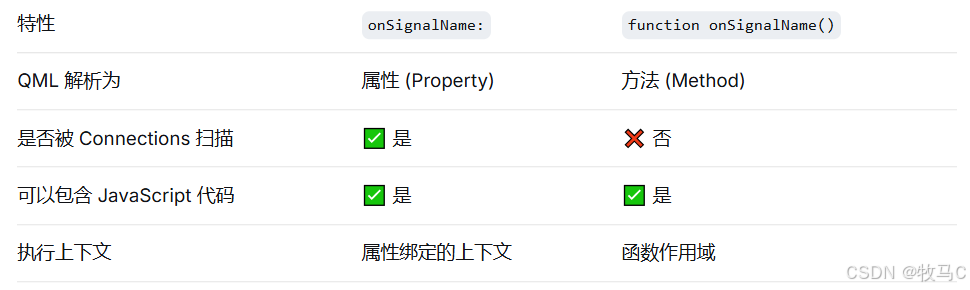
信号处理格式 : 使用 onSignalName: 而不是 function onSignalName()
2 像C++那样改为全局200ms刷新卡顿
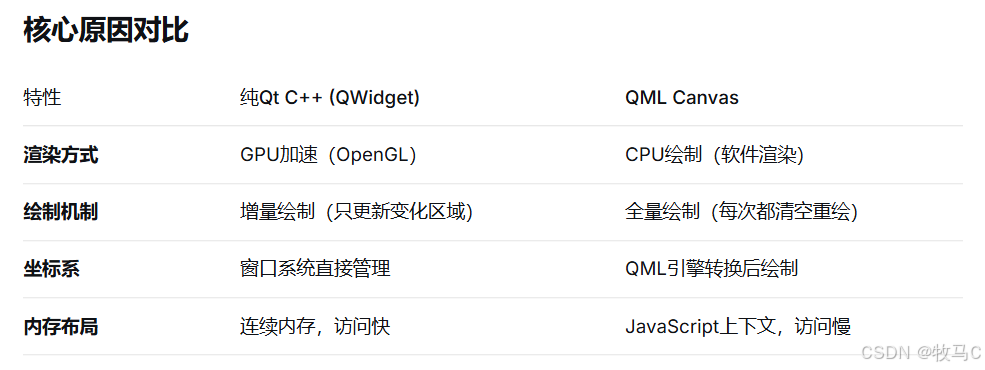
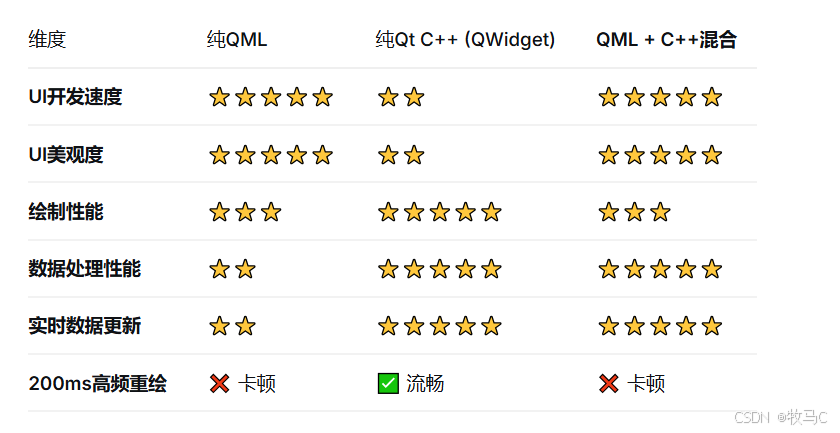
解决方案对比
方案1:使用 QML 的图形类型(推荐)
方案2:使用 QQuickPaintedItem (C++)
方案3:改用 QML + Shader (最强性能)