搭建模型
选用DeepSeek-V4-Flash
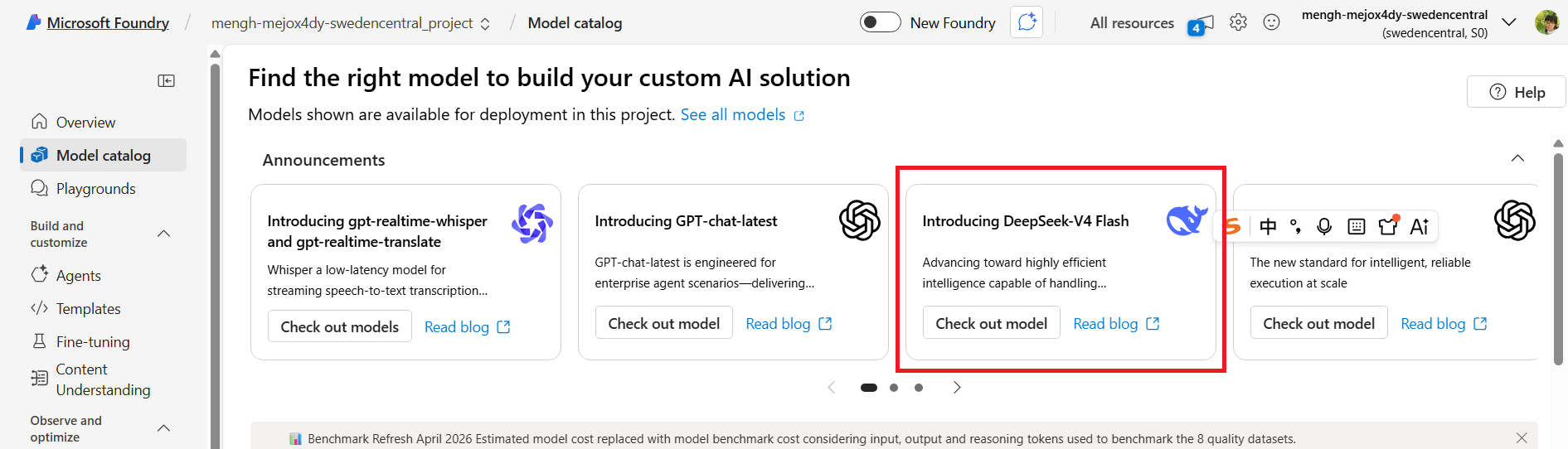
- 总参数:284B(超大) ,实际激活仅 13B(推理成本低、速度快)
- 上下文窗口:100 万 token(超长对话、超长文档直接喂,LangGraph 多轮记忆无压力)
选这个主要是应该对中文友好一些
Agent例子
简单例子
LangGraph LangGraph - LangChain 教程
为什么要用:普通 LLM 会乱跑、乱回答、乱调用工具。LangGraph 让 AI 严格按流程图走。(而且也没有钱和时间训练,甚至微调大模型。。。)
代码如下:
javascript
import { createReactAgent } from "@langchain/langgraph/prebuilt";
import { ChatOpenAI } from "@langchain/openai";
import { tool } from "@langchain/core/tools";
import { z } from "zod";

// ======================
// 你的 Azure DeepSeek
// ======================
const llm = new ChatOpenAI({
  model: "DeepSeek-V4-Flash",
  apiKey: "your key",
  configuration: {
    baseURL: "https://mengh-mejox4dy-swedencentral.services.ai.azure.com/openai/v1/",
  },
  temperature: 0.1,
});

// ======================
// 定义工具(超级简单!)
// ======================
const calculator = tool(
  async ({ a, b, op }) => {
    switch (op) {
      case "+": return a + b;
      case "-": return a - b;
      case "*": return a * b;
      case "/": return b !== 0 ? a / b : "除数不能为 0";
      default: return "不支持的操作";
    }
  },
  {
    name: "calculator",
    description: "做加减乘除计算",
    schema: z.object({
      a: z.number(),
      b: z.number(),
      op: z.enum(["+", "-", "*", "/"]),
    }),
  }
);

// ======================
// ✅ 一行创建 Agent(官网标准!)
// ======================
const agent = createReactAgent({
  llm,
  tools: [calculator],
});

// ======================
// 运行
// ======================
const result = await agent.invoke({
  messages: [
    {
      role: "user",
      content: "帮我算 123 * 456",
    },
  ],
});

console.log(result.messages.at(-1).content);
返回结果

多轮对话
核心就是把message都带入每次对话
- 每次调用都会把历史传给 LLM
- 自动记忆、自动上下文
- 工具调用 + 记忆 同时支持
javascript
import { createReactAgent } from "@langchain/langgraph/prebuilt";
import { ChatOpenAI } from "@langchain/openai";
import { tool } from "@langchain/core/tools";
import { z } from "zod";

// 你的 Azure DeepSeek
const llm = new ChatOpenAI({
  model: "DeepSeek-V4-Flash",
  apiKey: "key",
  configuration: {
    baseURL: "https://mengh-mejox4dy-swedencentral.services.ai.azure.com/openai/v1/",
  },
  temperature: 0.1,
});

// 计算器工具
const calculator = tool(
  async ({ a, b, op }) => {
    switch (op) {
      case "+": return a + b;
      case "-": return a - b;
      case "*": return a * b;
      case "/": return b !== 0 ? a / b : "不能除以0";
    }
  },
  {
    name: "calculator",
    description: "做加减乘除",
    schema: z.object({
      a: z.number(),
      b: z.number(),
      op: z.enum(["+", "-", "*", "/"]),
    }),
  }
);

// 一行创建 Agent
const agent = createReactAgent({
  llm,
  tools: [calculator],
});

// ==============================================
// 👇 这就是 多轮对话(会记住历史消息)
// ==============================================
const messages = []; // 消息历史(核心!)

async function chat(input) {
  messages.push({ role: "user", content: input });

  const result = await agent.invoke({
    messages: messages, // 把历史一起传进去
  });

  const reply = result.messages.at(-1).content;
  messages.push({ role: "assistant", content: reply });

  console.log("Agent:", reply);
}

// 测试多轮
await chat("我想算 10 + 20");
await chat("再乘以 2");
await chat("再减去 15");
做成循环
javascript
import { createReactAgent } from "@langchain/langgraph/prebuilt";
import { ChatOpenAI } from "@langchain/openai";
import { tool } from "@langchain/core/tools";
import { z } from "zod";
import readline from 'readline';

// ======================
// 你的 Azure DeepSeek
// ======================
const llm = new ChatOpenAI({
  model: "DeepSeek-V4-Flash",
  apiKey: "你的API_KEY",
  configuration: {
    baseURL: "https://mengh-mejox4dy-swedencentral.services.ai.azure.com/openai/v1/",
    defaultHeaders: {
      "api-key": "你的API_KEY",
    },
  },
  temperature: 0.1,
});

// ======================
// 工具(计算器)
// ======================
const calculator = tool(
  async ({ a, b, op }) => {
    switch (op) {
      case "+": return a + b;
      case "-": return a - b;
      case "*": return a * b;
      case "/": return b !== 0 ? a / b : "不能除以0";
    }
  },
  {
    name: "calculator",
    description: "做加减乘除计算",
    schema: z.object({
      a: z.number(),
      b: z.number(),
      op: z.enum(["+", "-", "*", "/"]),
    }),
  }
);

// ======================
// ✅ 官方 React Agent(最简)
// ======================
const agent = createReactAgent({
  llm,
  tools: [calculator],
});

// ======================
// 🚀 无限循环聊天(像 ChatGPT)
// ======================
const messages = []; // 永久保存上下文

const rl = readline.createInterface({
  input: process.stdin,
  output: process.stdout
});

console.log("✅ 无限聊天已启动!输入 exit 退出\n");

async function chatLoop() {
  rl.question("你:", async (input) => {
    if (input.toLowerCase() === "exit") {
      console.log("结束聊天");
      rl.close();
      return;
    }

    // 把用户输入加入历史
    messages.push({ role: "user", content: input });

    // 调用 Agent(自带记忆)
    const res = await agent.invoke({ messages });

    // 获取回答
    const reply = res.messages.at(-1).content;
    console.log("Agent:", reply);

    // 把回答也加入历史(实现多轮)
    messages.push({ role: "assistant", content: reply });

    // 继续循环
    chatLoop();
  });
}

// 启动
chatLoop();
文件读写+联网
javascript
import { createReactAgent } from "@langchain/langgraph/prebuilt";
import { ChatOpenAI } from "@langchain/openai";
import { tool } from "@langchain/core/tools";
import { z } from "zod";
import fs from "fs-extra";
import path from "path";
import { SerpAPI } from "@langchain/community/tools/serpapi";

// ========== Azure DeepSeek 鉴权配置(彻底修复ByteString报错) ==========
const llm = new ChatOpenAI({
  model: "DeepSeek-V4-Flash",
  apiKey: "你的纯净Azure API Key",
  configuration: {
    baseURL: "https://mengh-mejox4dy-swedencentral.services.ai.azure.com/openai/v1/",
    authToken: null,
    defaultHeaders: {
      "api-key": "你的纯净Azure API Key",
    },
  },
  temperature: 0.1,
});

// ========== 工具1:联网搜索 ==========
const searchTool = new SerpAPI("你的SerpAPI Key", {
  hl: "zh-cn",
});

// ========== 工具2:读取本地文件 ==========
const readFileTool = tool(
  async ({ filePath }) => {
    const fullPath = path.resolve(filePath);
    return await fs.readFile(fullPath, "utf8");
  },
  {
    name: "read_file",
    description: "读取本地文本文件内容,传入相对路径",
    schema: z.object({
      filePath: z.string().describe("文件路径,如 ./test.txt"),
    }),
  }
);

// ========== 工具3:写入本地文件 ==========
const writeFileTool = tool(
  async ({ filePath, content }) => {
    const fullPath = path.resolve(filePath);
    await fs.writeFile(fullPath, content, "utf8");
    return `✅ 已成功写入文件:${fullPath}`;
  },
  {
    name: "write_file",
    description: "将文本内容写入本地文件,覆盖原有内容",
    schema: z.object({
      filePath: z.string().describe("文件保存路径"),
      content: z.string().describe("要写入的内容"),
    }),
  }
);

// ========== 创建全能 Agent ==========
const agent = createReactAgent({
  llm,
  tools: [searchTool, readFileTool, writeFileTool],
});

// ========== 单次调用示例 ==========
(async () => {
  // 示例指令:联网查2025AI趋势 + 写入本地文件
  const result = await agent.invoke({
    messages: [
      { role: "user", content: "搜索2025年AI最新发展趋势,整理成要点,保存到 ./ai_trend.txt" }
    ],
  });

  console.log("Agent 输出:", result.messages.at(-1).content);
})();
ReAct 机制
ReAct = Reasoning(思考) + Acting(行动)
思考 → 判断要不要调用工具 → 调用工具 → 拿到结果 → 再思考 → 输出答案
javascript
import { createReactAgent } from "@langchain/langgraph/prebuilt";
import { ChatOpenAI } from "@langchain/openai";
import { tool } from "@langchain/core/tools";
import { z } from "zod";

// Azure 配置(你的 DeepSeek)
const llm = new ChatOpenAI({
  model: "DeepSeek-V4-Flash",
  apiKey: "你的Azure密钥",
  configuration: {
    baseURL: "https://mengh-mejox4dy-swedencentral.services.ai.azure.com/openai/v1/"
  },
  temperature: 0.1,
});

// 工具:获取当前时间
const getTime = tool(async () => new Date().toLocaleString("zh-CN"), {
  name: "get_time",
  description: "获取当前系统时间",
  schema: z.object({}),
});

// 工具:简单加法
const add = tool(async ({ a, b }) => a + b, {
  name: "add",
  description: "两数相加",
  schema: z.object({ a: z.number(), b: z.number() }),
});

// 创建 ReAct Agent
const agent = createReactAgent({ llm, tools: [getTime, add] });

// 测试:触发完整 ReAct 循环
(async () => {
  const res = await agent.invoke({
    messages: [{ role: "user", content: "现在几点?10+20等于多少?" }],
  });

  console.log("最终回答:", res.messages.at(-1).content);
})();
Agent 自动循环,不需要你手动控制,这就是 ReAct 最强大的地方
回答错误的处理
ReAct Agent 出错一般就 4 类:
- 工具调用错:选错工具、参数传错(路径不对、搜索关键词不对)
- 幻觉:没查工具直接瞎编答案
- 推理链错:思考步骤跳步、逻辑错误
- 工具返回信息不全 / 过时:搜索不到、文件读不到
ReAct 里加 自我反思
人工反馈修正
实践 查询混凝土强度
写了一个函数,用于查询混凝土强度等级为用户输入的所有实例的总和
javascript
import express from "express";
import cors from "cors";
import { createReactAgent } from "@langchain/langgraph/prebuilt";
import { ChatOpenAI } from "@langchain/openai";
import { tool } from "@langchain/core/tools";
import { z } from "zod";
import path from "path";
import { IModelHost, SnapshotDb } from "@itwin/core-backend";
import { fileURLToPath } from "url";

const app = express();
const __filename = fileURLToPath(import.meta.url);
const __dirname = path.dirname(__filename);
// 提供静态文件
app.use(express.static(path.join(__dirname, 'public')));
app.get('/', (req, res) => {
    res.sendFile(path.join(__dirname, 'public', 'index.html'));
});
app.use(cors());
app.use(express.json());
const PORT = 5666;

await IModelHost.startup();

// ========== 1. 你的 Azure DeepSeek LLM 配置 ==========
const llm = new ChatOpenAI({
    model: "DeepSeek-V4-Flash",
    apiKey: "your key",
    configuration: {
        baseURL: "https://mengh-mejox4dy-swedencentral.services.ai.azure.com/openai/v1/",
    },
    temperature: 0.1,
});

// ========== 2. 工具集:本地 iModel 文件 ECSQL 查询 ==========
const queryIModelTool = tool(async ({ filePath, propertyDisplayLabel, value }) => {
    const fullPath = path.resolve(filePath);
    const iModel = SnapshotDb.openFile(fullPath);

    try {
        // 第一步:查询所有包含指定属性的 表名 + 真实字段名
        const getClassAndPropSql = `
      SELECT
        c.Name AS ClassName,
        p.Name AS PropName
      FROM meta.ECPropertyDef p
      JOIN meta.ECClassDef c ON p.Class.Id = c.EcInstanceId
      WHERE p.DisplayLabel = '${propertyDisplayLabel}'
        AND c.Schema.Id = 21
    `;

        const classPropList = [];
        const reader = iModel.createQueryReader(getClassAndPropSql);
        for await (const row of reader) {
            const data = row.toRow();
            classPropList.push(data);
        }

        if (classPropList.length === 0) {
            return `未找到属性 "${propertyDisplayLabel}" 相关数据`;
        }

        // 第二步:遍历所有表,查询指定值的数据
        const results = [];
        const idList = [];
        for (const item of classPropList) {
            const { ClassName, PropName } = item;
            const tableName = `RevitDynamic.${ClassName}`;

            const querySql = `
        SELECT EcInstanceId, ${PropName}
        FROM ${tableName}
        WHERE ${PropName} = '${value}'
      `;

            const dataReader = iModel.createQueryReader(querySql);
            for await (const row of dataReader) {
                results.push(row.toRow());
                idList.push(row.toRow().ECInstanceId);
            }
        }
        console.log(`查询完成,找到 ${results.length} 条数据`);
        return idList.length > 0 ? idList.length : `未找到数据`;

    } finally {
        iModel.close();
    }
}, {
    name: "query_iModel",
    description: "查询本地 iModel 文件中指定属性的实例数据的总和",
    schema: z.object({
        filePath: z.string().describe("本地 iModel (.bim) 文件路径"),
        propertyDisplayLabel: z.string().describe("属性显示名称,如 '混凝土强度等级'"),
        value: z.string().describe("要查询的属性值,如 'C80'"),
    }),
});

// ========== 3. 实例化 Agent ==========
const agent = createReactAgent({
    llm,
    tools: [queryIModelTool],
});

// ========== 4. 静态文件服务 ==========
// app.use(express.static(path.join(process.cwd(), 'public')));
app.get('/', (req, res) => {
    res.sendFile(path.join(__dirname, 'public', 'index.html'));
});

// ========== 5. 生产接口:接收前端输入,调用Agent ==========
app.post("/api/agent/chat", async (req, res) => {
    try {
        const { question, filePath } = req.body;
        if (!question) return res.status(400).json({ error: "问题不能为空" });

        // 解析用户查询,提取属性和值
        const match = question.match(/查询(.+?)为(.+)的所有实例/i);
        if (!match) {
            return res.status(400).json({ error: "查询格式不正确,请使用:查询[属性]为[值]的所有实例" });
        }

        const propertyDisplayLabel = match[1].trim();
        const value = match[2].trim();
        console.log(`用户查询解析结果 - 属性: ${propertyDisplayLabel}, 值: ${value}`);

        // 调用LangGraph Agent
        const result = await agent.invoke({
            messages: [{
                role: "user",
                content: `
调用query_iModel工具,参数:
${filePath}
${propertyDisplayLabel}
${value}

强制规则:
1. 工具返回什么,你就**原封不动直接输出**
2. 禁止总结、禁止只说一句话
3. 不要加任何多余文字,只输出总数
`
//                 content: `
// 直接调用query_iModel工具。
// 参数已给:
// filePath=${filePath}
// propertyDisplayLabel=${propertyDisplayLabel}
// value=${value}
// 不许向用户询问参数,不许解释。
// 查询后只逐行输出ECInstanceId。
// `
            }],
        });

        // 返回Agent最终回答
        res.json({
            answer: result.messages.at(-1).content,
        });
    } catch (err) {
        res.status(500).json({ error: err.message });
    }
});

// 启动服务
app.listen(PORT, () => {
    console.log(`✅ Agent服务已启动:http://localhost:${PORT}`);
});
最后的输出
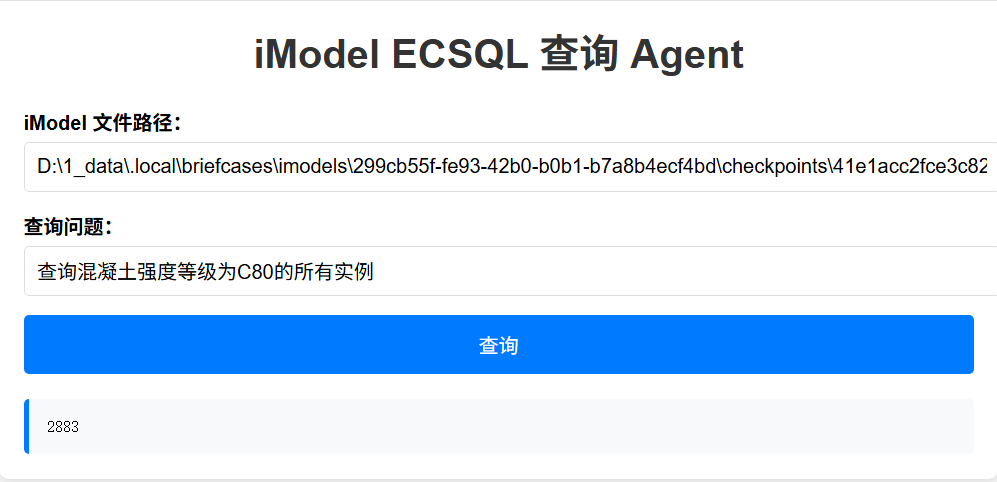
总结
1 如果返回值很大,接口反应很慢,我这里本来是想返回所有的实例Id,结果json太多了
2 提示词写的很崩溃~这里再学习下吧