场景
Spring AI 整合 Ollama 实现工具调用:从入门到实战全解:
https://blog.csdn.net/BADAO_LIUMANG_QIZHI/article/details/161009153
在上面调用tool的基础上,实现Prompt提示词与PromptTemplate提示词模板的使用示例。
在 Spring AI 中,Prompt 和 PromptTemplate 是构建与 LLM 交互的核心组件。
掌握了它们,你就能灵活地在提示词中注入动态变量、组装系统消息、上下文和用户消息,以及控制模型的行为。
Prompt 与 PromptTemplate 概念
1.1 Prompt
Prompt 是一条或多条 Message 的集合,它代表了即将发送给 LLM 的完整文本序列。
Spring AI 中的 Prompt 对象包含:
messages:消息列表,每条消息有明确的角色(系统、用户、助手、工具等)。
options:调用选项(温度、最大 token 数等),可覆盖全局默认值。
1.2 PromptTemplate
PromptTemplate 是模板引擎,允许你创建带有占位符({variable})的文本模板。
通过传入变量值就能生成具体的 Prompt。它支持:
占位符替换:{name} 在运行时被替换为实际值。
条件表达式:内置的 StringTemplate 引擎支持简单的条件逻辑(取决于 Spring AI 版本)。
资源加载:模板可以从外部文件(如 classpath:/prompts/xxx.st)加载,便于集中管理提示词。
1.3 在工具调用中应用 PromptTemplate
在之前的工具调用示例中,ChatClient 的 .user() 方法只接收了原始的用户消息。
通过 PromptTemplate,我们可以:
动态构建系统指令:告诉模型它的角色、工具的使用方式等。
参数化用户消息:根据业务上下文动态生成用户问题。
集中管理模板:将提示词作为外部文件,方便非代码人员调整。
注:
博客:
https://blog.csdn.net/badao_liumang_qizhi
实现
更新 application.yml
确保增加了日志配置,以便观察提示词内容
server:
port: 886
spring:
ai:
ollama:
base-url: http://localhost:11434
chat:
model: qwen2.5:7b-instruct
options:
temperature: 0.7
num-ctx: 4096 # 上下文窗口大小
logging:
level:
org.springframework.ai.chat.client: DEBUG # 查看工具调用详情
com.badao.ai: DEBUG # 观察生成的 prompt
新增服务类 PromptService.java
此类封装了 PromptTemplate 的使用:从类路径加载模板,生成系统消息和用户消息,并调用 ChatClient。
package com.badao.ai.service;

import org.springframework.ai.chat.client.ChatClient;
import org.springframework.ai.chat.messages.Message;
import org.springframework.ai.chat.prompt.Prompt;
import org.springframework.ai.chat.prompt.PromptTemplate;
import org.springframework.core.io.Resource;
import org.springframework.core.io.ResourceLoader;
import org.springframework.stereotype.Service;
import java.util.Map;

@Service
public class PromptService {

    private final ChatClient chatClient;
    private final ResourceLoader resourceLoader;

    public PromptService(ChatClient chatClient, ResourceLoader resourceLoader) {
        this.chatClient = chatClient;
        this.resourceLoader = resourceLoader;
    }

    /**
     * 使用 PromptTemplate 从外部文件加载系统提示,并参数化用户消息。
     *
     * @param city 城市名,替换到模板中
     * @param language 语言,替换到用户消息模板中
     */
    public String chatWithTemplate(String city, String language) {
        // 1. 创建系统消息(从类路径 templates/system-message.st 加载)
        Resource systemResource = resourceLoader.getResource("classpath:prompts/system-message.st");
        PromptTemplate systemPromptTemplate = new PromptTemplate(systemResource);
        // 系统消息可能不含占位符,直接生成
        Message systemMessage = systemPromptTemplate.createMessage();

        // 2. 创建用户消息模板,并替换占位符
        String userTemplate = "请用 {language} 回答:{city} 今天的天气怎么样?如果需要,可以调用工具查询。";
        PromptTemplate userPromptTemplate = new PromptTemplate(userTemplate);
        Message userMessage = userPromptTemplate.createMessage(Map.of("language", language, "city", city));

        // 3. 组装 Prompt
        Prompt prompt = new Prompt(java.util.List.of(systemMessage, userMessage));

        // 4. 调用 ChatClient
        return chatClient.prompt(prompt)
                .call()
                .content();
    }

    /**
     * 使用 ChatClient 的便捷 API 直接设置系统消息和用户消息。
     */
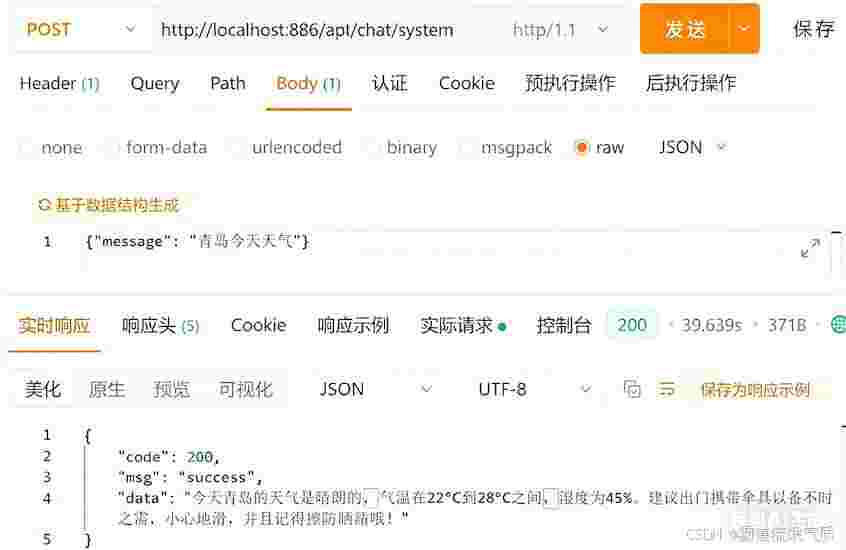
    public String chatWithSystemAndUser(String userMessageText) {
        return chatClient.prompt()
                .system("你是一个乐于助人的助手,如果用户询问实时信息(如天气、时间),请调用工具获取。并且在回答的最后提醒用户注意带伞,小心地滑,注意擦防晒霜")
                .user(userMessageText)
                .call()
                .content();
    }
}
外部模板文件(可选)
在 src/main/resources/prompts/system-message.st 中创建文件:
你是一个智能生活助手。你可以查询天气、时间以及进行数学计算。请使用工具获取实时数据,并用友好的语气回答用户。
如果不想用外部文件,也可以直接在代码中定义字符串模板。
控制器扩展
在原有控制器中增加两个新端点:
package com.badao.ai.controller;

import com.badao.ai.service.PromptService;
import org.springframework.ai.chat.client.ChatClient;
import org.springframework.web.bind.annotation.*;

@RestController
@RequestMapping("/api")
public class ToolChatController {

    private final ChatClient chatClient;
    private final PromptService promptService;

    public ToolChatController(ChatClient chatClient, PromptService promptService) {
        this.chatClient = chatClient;
        this.promptService = promptService;
    }

    // 原有的通用对话接口
    @PostMapping("/chat")
    public ChatResponse chat(@RequestBody ChatRequest request) {
        String result = chatClient.prompt()
                .user(request.message())
                .call()
                .content();
        return new ChatResponse(200, "success", result);
    }

    // 新端点:使用模板构建提示词
    @PostMapping("/chat/template")
    public ChatResponse chatTemplate(@RequestBody TemplateRequest request) {
        String result = promptService.chatWithTemplate(request.city(), request.language());
        return new ChatResponse(200, "success", result);
    }

    // 新端点:使用系统消息 + 用户消息
    @PostMapping("/chat/system")
    public ChatResponse chatSystem(@RequestBody ChatRequest request) {
        String result = promptService.chatWithSystemAndUser(request.message());
        return new ChatResponse(200, "success", result);
    }

    public record ChatRequest(String message) {}
    public record TemplateRequest(String city, String language) {}
    public record ChatResponse(int code, String msg, String data) {}
}
测试
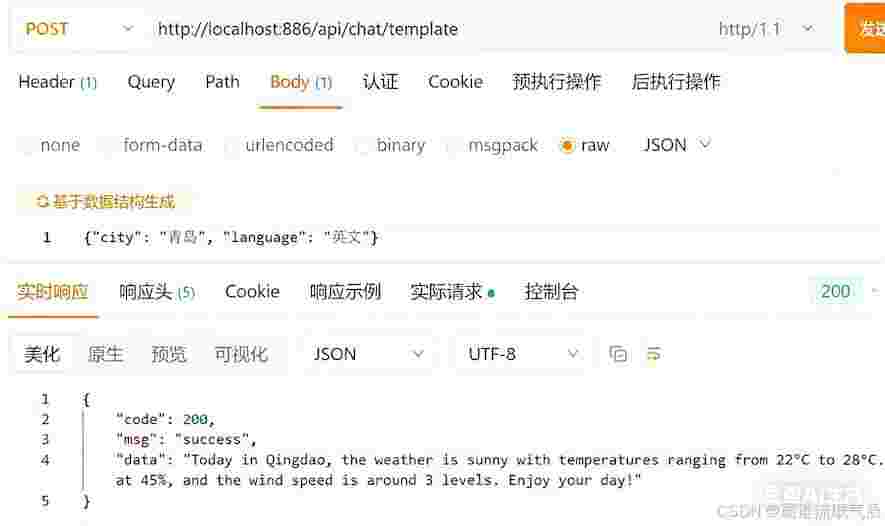
使用模板的天气查询(英文)
curl -X POST http://localhost:886/api/chat/template \
-H "Content-Type: application/json" \
-d '{"city": "青岛", "language": "英文"}'
使用自定义提示词
知识点小结
Prompt 消息列表 + 选项,代表一次完整的模型调用
PromptTemplate 支持占位符 {var} 的模板引擎,可动态生成 Prompt
SystemMessage 提示词中的系统角色消息,用于设定助手的行为、边界和工具使用策略
UserMessage 提示词中的用户消息,可使用 PromptTemplate 动态生成
外部模板 将提示词模板存放于 classpath:/prompts/ 目录,便于维护和国际化