单点登录
架构:springcloud2023.x+springboot3.x+mysql+nacos3.x+gateway
介绍:
mysql_sso是postman测试的功能分支。这个分支是正常的调转和回调地址。
加了gateways统一处理gateway的模块.
一、整体架构图
┌─────────────────────────────────────────────────────────────────────────────┐
│ 前端/浏览器 │
└─────────────────────────────────────────────────────────────────────────────┘
│
▼
┌─────────────────────────────────────────────────────────────────────────────┐
│ Gateway (8082) - 统一入口 │
│ ┌─────────────────────────────────────────────────────────────────────┐ │
│ │ • OAuth2 客户端(接收回调) │ │
│ │ • TokenRelay 过滤器(转发 Token) │ │
│ │ • 路由转发(/api/** → resource) │ │
│ │ • Session 管理(存储认证信息) │ │
│ └─────────────────────────────────────────────────────────────────────┘ │
└─────────────────────────────────────────────────────────────────────────────┘
│ │
▼ ▼
┌─────────────────────────┐ ┌─────────────────────────────────────────────┐
│ Auth Server (9001) │ │ Resource Server (9002) │
│ ┌───────────────────┐ │ │ ┌───────────────────────────────────────┐ │
│ │ • 授权端点 │ │ │ │ • JWT 验证 │ │
│ │ • Token 端点 │ │ │ │ • 权限校验 (SCOPE_*) │ │
│ │ • JWK 端点 │ │ │ │ • 业务 API (/api/user/info) │ │
│ │ • 用户认证 │ │ │ └───────────────────────────────────────┘ │
│ │ • 客户端管理 │ │ └─────────────────────────────────────────────┘
│ │ • 授权码模式 │ │
│ └───────────────────┘ │
└─────────────────────────┘
│
▼
┌─────────────────────────────────────────────────────────────────────────────┐
│ Nacos (8848) - 服务发现 │
│ auth / resource / gateways │
└─────────────────────────────────────────────────────────────────────────────┘
│
▼
┌─────────────────────────────────────────────────────────────────────────────┐
│ MySQL - 数据持久化 │
│ • oauth2_registered_client(客户端注册) │
│ • oauth2_authorization(授权码/Token) │
│ • sys_user / sys_role(用户角色) │
└─────────────────────────────────────────────────────────────────────────────┘
二、技术栈清单
1. 核心框架
| 技术 | 版本 | 用途 |
|---|---|---|
| Spring Boot | 3.2.5 | 基础框架 |
| Spring Security | 6.2.4 | 安全框架 |
| Spring Authorization Server | 1.2.4 | OAuth2 授权服务器 |
| Spring Cloud | 2023.0.1 | 微服务框架 |
| Spring Cloud Gateway | 4.1.2 | API 网关 |
| Spring Cloud Alibaba | 2023.0.1.0 | 阿里云微服务组件 |
2. 服务发现与配置
| 技术 | 用途 |
|---|---|
| Nacos | 服务注册与发现 |
3. 数据层
| 技术 | 版本 | 用途 |
|---|---|---|
| MySQL | 8.0.33 | 关系型数据库 |
| MyBatis-Plus | 3.5.7 | ORM 框架 |
| HikariCP | 5.0.1 | 数据库连接池 |
4. 安全相关
| 技术 | 用途 |
|---|---|
| JWT (JJWT) | JSON Web Token 生成与验证 |
| BCrypt | 密码加密 |
| RSA | JWT 签名(非对称加密) |
| OAuth2 / OIDC | 授权协议 |
5. 开发工具
| 工具 | 用途 |
|---|---|
| Lombok | 简化 Java 代码 |
| Maven | 项目构建 |
| IntelliJ IDEA | 开发 IDE |
| Postman | API 测试 |
三、SSO 单点登录流程
核心流程
text
┌─────────────────────────────────────────────────────────────────────────────┐
│                         SSO 登录流程                                         │
├─────────────────────────────────────────────────────────────────────────────┤
│                                                                             │
│  用户 → Gateway (8082/api/user/info)                                        │
│           │                                                                 │
│           │ 1. 未登录,302 重定向                                           │
│           ▼                                                                 │
│  Auth Server (9001/login)                                                   │
│           │                                                                 │
│           │ 2. 用户输入用户名/密码                                           │
│           ▼                                                                 │
│  认证成功,生成授权码                                                        │
│           │                                                                 │
│           │ 3. 302 重定向到 Gateway 回调                                    │
│           ▼                                                                 │
│  Gateway (8082/login/oauth2/code/...)                                       │
│           │                                                                 │
│           │ 4. 用授权码换 Token                                             │
│           ▼                                                                 │
│  获取 Access Token,存入 Session                                            │
│           │                                                                 │
│           │ 5. 302 重定向回 /api/user/info                                  │
│           ▼                                                                 │
│  Gateway 带着 Token 转发请求到 Resource                                      │
│           │                                                                 │
│           ▼                                                                 │
│  Resource 验证 JWT,返回用户信息                                             │
│           │                                                                 │
│           ▼                                                                 │
│  用户看到登录成功页面                                                        │
│                                                                             │
└─────────────────────────────────────────────────────────────────────────────┘
SSO 关键点
| 特性 | 实现方式 |
|---|---|
| 一次登录,多系统访问 | Gateway Session 共享 |
| Token 无状态 | JWT 自包含,无需服务端存储 |
| 客户端注册 | oauth2_registered_client 表 |
| 授权码模式 | 最安全的 OAuth2 流程 |
| Token 转发 | Gateway TokenRelay 过滤器 |
四、模块职责
| 模块 | 端口 | 职责 |
|---|---|---|
| auth | 9001 | 授权服务器:认证、颁发 Token、管理客户端 |
| resource | 9002 | 资源服务器:提供业务 API,验证 JWT |
| gateways | 8082 | API 网关:统一入口、OAuth2 客户端、路由转发 |
| Nacos | 8848 | 服务注册与发现 |
五、关键技术点
1. OAuth2 授权码模式
http
# 1. 获取授权码
GET /oauth2/authorize?response_type=code&client_id=xxx&redirect_uri=xxx

# 2. 用授权码换 Token
POST /oauth2/token
    grant_type=authorization_code&code=xxx

# 3. 用 Token 访问资源
GET /api/user/info
Authorization: Bearer {access_token}
2. JWT 结构
json
{
  "header": {"alg": "RS256", "kid": "xxx"},
  "payload": {
    "sub": "admin",
    "scope": ["openid", "profile", "admin"],
    "iss": "http://localhost:9001",
    "exp": 1778585139
  },
  "signature": "RSA 签名"
}
3. Gateway Token 转发
yaml
filters:
  - TokenRelay   # 自动将用户 Token 转发到下游服务
4. Resource JWT 验证
yaml
spring:
  security:
    oauth2:
      resourceserver:
        jwt:
          jwk-set-uri: http://localhost:9001/oauth2/jwks
六、项目结构
text
alibaba_jwt_sso_2023/
├── auth/                          # 授权服务器
│   ├── AuthServerConfig.java     # OAuth2 授权服务器配置
│   ├── CustomUserDetailsService  # 用户详情服务
│   └── 表: sys_user, sys_role, oauth2_*
│
├── resource/                      # 资源服务器
│   ├── ResourceServerConfig.java # JWT 验证配置
│   └── UserController.java       # 业务 API
│
├── gateways/                      # API 网关
│   ├── GatewayApplication.java   # 启动类
│   ├── GatewaySecurityConfig.java # OAuth2 登录配置
│   └── application.yml           # 路由配置
│
├── pom.xml                        # 父依赖管理
└── .gitignore                     # Git 忽略配置
七、代码
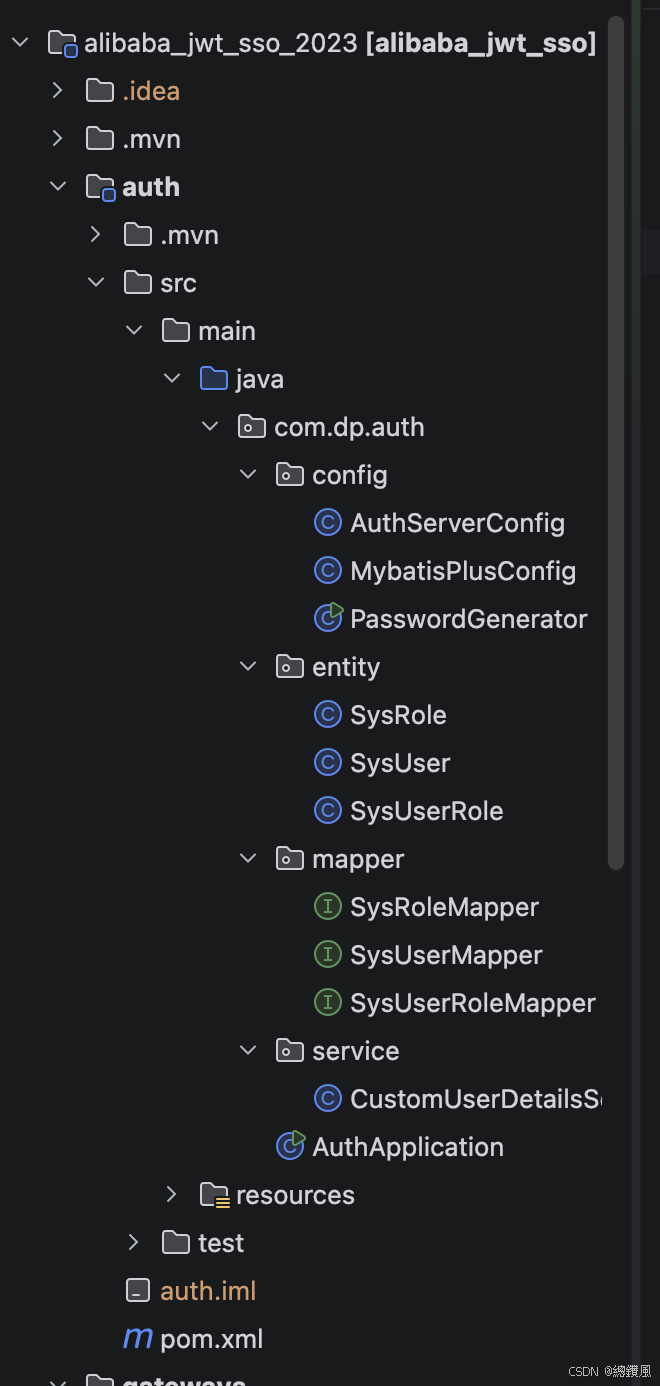
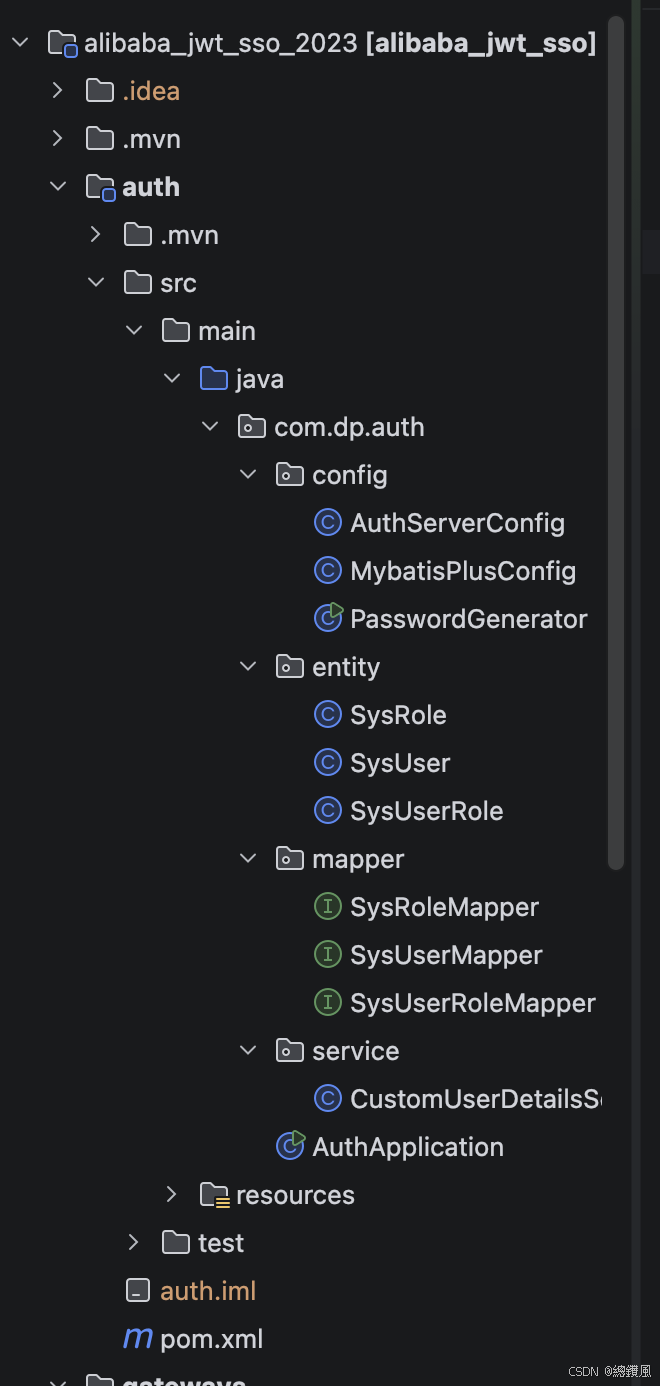
核心文件:
项目的pom
java
<?xml version="1.0" encoding="UTF-8"?>
<project xmlns="http://maven.apache.org/POM/4.0.0" xmlns:xsi="http://www.w3.org/2001/XMLSchema-instance"
xsi:schemaLocation="http://maven.apache.org/POM/4.0.0 https://maven.apache.org/xsd/maven-4.0.0.xsd">
<modelVersion>4.0.0</modelVersion>
<parent>
<groupId>org.springframework.boot</groupId>
<artifactId>spring-boot-starter-parent</artifactId>
<version>3.2.5</version>
<relativePath/>
</parent>
<groupId>com.dp</groupId>
<artifactId>alibaba_jwt_sso_2023</artifactId>
<version>1.0.0</version>
<name>alibaba_jwt_sso</name>
<description>alibaba_jwt_sso</description>
<packaging>pom</packaging>
<modules>
<module>auth</module>
<module>resource</module>
<module>gateways</module>
</modules>
<properties>
<java.version>17</java.version>
<spring-cloud.version>2023.0.1</spring-cloud.version>
<spring-cloud-alibaba.version>2023.0.1.0</spring-cloud-alibaba.version>
<spring-auth-server.version>1.2.4</spring-auth-server.version>
<jjwt.version>0.11.5</jjwt.version>
<!-- 新增 -->
<mybatis-plus.version>3.5.7</mybatis-plus.version>
<mysql.version>8.0.33</mysql.version>
</properties>
<dependencyManagement>
<dependencies>
<!-- Spring Cloud -->
<dependency>
<groupId>org.springframework.cloud</groupId>
<artifactId>spring-cloud-dependencies</artifactId>
<version>${spring-cloud.version}</version>
<type>pom</type>
<scope>import</scope>
</dependency>
<!-- Spring Cloud Alibaba -->
<dependency>
<groupId>com.alibaba.cloud</groupId>
<artifactId>spring-cloud-alibaba-dependencies</artifactId>
<version>${spring-cloud-alibaba.version}</version>
<type>pom</type>
<scope>import</scope>
</dependency>
<dependency>
<groupId>org.springframework.security</groupId>
<artifactId>spring-security-oauth2-authorization-server</artifactId>
<version>${spring-auth-server.version}</version>
</dependency>
<!-- JJWT -->
<dependency>
<groupId>io.jsonwebtoken</groupId>
<artifactId>jjwt-api</artifactId>
<version>${jjwt.version}</version>
</dependency>
<dependency>
<groupId>io.jsonwebtoken</groupId>
<artifactId>jjwt-impl</artifactId>
<version>${jjwt.version}</version>
<scope>runtime</scope>
</dependency>
<dependency>
<groupId>io.jsonwebtoken</groupId>
<artifactId>jjwt-jackson</artifactId>
<version>${jjwt.version}</version>
<scope>runtime</scope>
</dependency>
<dependency>
<groupId>com.mysql</groupId>
<artifactId>mysql-connector-j</artifactId>
<version>${mysql.version}</version>
</dependency>
<dependency>
<groupId>com.baomidou</groupId>
<artifactId>mybatis-plus-spring-boot3-starter</artifactId>
<version>${mybatis-plus.version}</version>
</dependency>
<!-- <!– Spring Cloud Gateway –>-->
<!-- <dependency>-->
<!-- <groupId>org.springframework.cloud</groupId>-->
<!-- <artifactId>spring-cloud-starter-gateway</artifactId>-->
<!-- </dependency>-->
<!-- <!– Spring Cloud LoadBalancer –>-->
<!-- <dependency>-->
<!-- <groupId>org.springframework.cloud</groupId>-->
<!-- <artifactId>spring-cloud-starter-loadbalancer</artifactId>-->
<!-- <version>4.1.0</version>-->
<!-- </dependency>-->
</dependencies>
</dependencyManagement>
<build>
<plugins>
<plugin>
<groupId>org.springframework.boot</groupId>
<artifactId>spring-boot-maven-plugin</artifactId>
</plugin>
</plugins>
</build>
</project>auth / AuthServerConfig.java
java
package com.dp.auth.config;

import com.dp.auth.service.CustomUserDetailsService;
import com.nimbusds.jose.jwk.JWKSet;
import com.nimbusds.jose.jwk.RSAKey;
import com.nimbusds.jose.jwk.source.ImmutableJWKSet;
import com.nimbusds.jose.jwk.source.JWKSource;
import com.nimbusds.jose.proc.SecurityContext;
import lombok.RequiredArgsConstructor;
import lombok.extern.slf4j.Slf4j;
import org.springframework.context.annotation.Bean;
import org.springframework.context.annotation.Configuration;
import org.springframework.core.annotation.Order;
import org.springframework.jdbc.core.JdbcOperations;
import org.springframework.jdbc.core.JdbcTemplate;
import org.springframework.security.config.Customizer;
import org.springframework.security.config.annotation.web.builders.HttpSecurity;
import org.springframework.security.config.annotation.web.configuration.EnableWebSecurity;
import org.springframework.security.core.userdetails.User;
import org.springframework.security.core.userdetails.UserDetails;
import org.springframework.security.core.userdetails.UserDetailsService;
import org.springframework.security.crypto.bcrypt.BCryptPasswordEncoder;
import org.springframework.security.crypto.password.DelegatingPasswordEncoder;
import org.springframework.security.crypto.password.NoOpPasswordEncoder;
import org.springframework.security.crypto.password.PasswordEncoder;
import org.springframework.security.oauth2.core.AuthorizationGrantType;
import org.springframework.security.oauth2.core.ClientAuthenticationMethod;
import org.springframework.security.oauth2.jwt.JwtDecoder;
import org.springframework.security.oauth2.server.authorization.JdbcOAuth2AuthorizationConsentService;
import org.springframework.security.oauth2.server.authorization.JdbcOAuth2AuthorizationService;
import org.springframework.security.oauth2.server.authorization.OAuth2AuthorizationConsentService;
import org.springframework.security.oauth2.server.authorization.OAuth2AuthorizationService;
import org.springframework.security.oauth2.server.authorization.client.InMemoryRegisteredClientRepository;
import org.springframework.security.oauth2.server.authorization.client.JdbcRegisteredClientRepository;
import org.springframework.security.oauth2.server.authorization.client.RegisteredClient;
import org.springframework.security.oauth2.server.authorization.client.RegisteredClientRepository;
import org.springframework.security.oauth2.server.authorization.config.annotation.web.configuration.OAuth2AuthorizationServerConfiguration;
import org.springframework.security.oauth2.server.authorization.config.annotation.web.configurers.OAuth2AuthorizationServerConfigurer;
import org.springframework.security.oauth2.server.authorization.settings.AuthorizationServerSettings;
import org.springframework.security.oauth2.server.authorization.settings.ClientSettings;
import org.springframework.security.oauth2.server.authorization.settings.TokenSettings;
import org.springframework.security.provisioning.InMemoryUserDetailsManager;
import org.springframework.security.web.SecurityFilterChain;
import org.springframework.security.web.savedrequest.HttpSessionRequestCache;
import org.springframework.security.web.savedrequest.RequestCache;
import org.springframework.security.web.savedrequest.SavedRequest;

import javax.sql.DataSource;
import java.security.KeyPair;
import java.security.KeyPairGenerator;
import java.security.interfaces.RSAPrivateKey;
import java.security.interfaces.RSAPublicKey;
import java.time.Duration;
import java.util.HashMap;
import java.util.Map;
import java.util.UUID;

/**
 * 认证服务器配置(新版 Spring Authorization Server)
 */
@Slf4j
@Configuration
@EnableWebSecurity
@RequiredArgsConstructor
public class AuthServerConfig {
    private final DataSource dataSource;
    private final CustomUserDetailsService customUserDetailsService;


    // ==================== 1. 用户认证配置(保持不变) ====================

    /**
     * 密码编码器. 使用 BCrypt 加密,存储时自动加盐
     */
    @Bean
    public PasswordEncoder passwordEncoder() {
        log.info("【2.Bean初始化】passwordEncoder - 密码编码器创建(支持bcrypt和noop)");
        // 创建支持多种编码方式的密码编码器
        String defaultEncoding = "bcrypt";
        Map<String, PasswordEncoder> encoders = new HashMap<>();
        encoders.put("bcrypt", new BCryptPasswordEncoder());
        encoders.put("noop", NoOpPasswordEncoder.getInstance());
        DelegatingPasswordEncoder delegatingPasswordEncoder = new DelegatingPasswordEncoder(defaultEncoding, encoders);
        delegatingPasswordEncoder.setDefaultPasswordEncoderForMatches(new BCryptPasswordEncoder());
        log.info("密码编码器配置完成 - 默认使用BCrypt算法");
        return delegatingPasswordEncoder;
    }


    @Bean
    public UserDetailsService userDetailsService() {
        log.info("【3.Bean初始化】userDetailsService - 用户详情服务创建(使用CustomUserDetailsService)");
        return customUserDetailsService;
    }
    // ==================== 2. OAuth2 客户端配置(替代 AuthorizationServerConfig) ====================

    /**
     * 创建 JdbcTemplate 用于数据库操作
     * ==================== 1. 数据基础设施 ====================
     */
    @Bean
    public JdbcOperations jdbcOperations() {
        log.info("【1.Bean初始化】jdbcOperations - JDBC操作模板创建");
        return new JdbcTemplate(dataSource);
    }

    /**
     * 客户端注册信息仓库
     */
    @Bean
    public RegisteredClientRepository registeredClientRepository(JdbcOperations jdbcOperations) {
        log.info("【Bean初始化】registeredClientRepository - 客户端仓库创建");
        JdbcRegisteredClientRepository repository = new JdbcRegisteredClientRepository(jdbcOperations);
        // 检查是否已存在客户端,如果不存在则初始化默认客户端
        if (repository.findByClientId("gateway-client") == null) {
            // 创建默认客户端(实际生产环境应该通过 SQL 初始化)
            // 这里保留代码逻辑作为备选,但推荐使用 SQL 脚本初始化
        }
        return repository;
    }

    // ==================== 3. JWT 配置(替代 JwtAccessTokenConverter) ====================

    /**
     * OAuth2 授权记录服务(存储到 MySQL)
     */
    @Bean
    public OAuth2AuthorizationService authorizationService(JdbcOperations jdbcOperations,
                                                           RegisteredClientRepository registeredClientRepository) {
        log.info("【Bean初始化】authorizationService - OAuth2授权记录服务创建(存储到MySQL)");
        log.info("  作用:存储授权码、Access Token、Refresh Token到数据库");
        log.info("  表名:oauth2_authorization");
        return new JdbcOAuth2AuthorizationService(jdbcOperations, registeredClientRepository);
    }

    /**
     * OAuth2 授权确认服务(存储到 MySQL)
     */
    @Bean
    public OAuth2AuthorizationConsentService authorizationConsentService(JdbcOperations jdbcOperations,
                                                                         RegisteredClientRepository registeredClientRepository) {
        log.info("【Bean初始化】authorizationConsentService - OAuth2授权确认服务创建(存储到MySQL)");
        log.info("  作用:记录用户同意授权的权限范围");
        log.info("  表名:oauth2_authorization_consent");
        return new JdbcOAuth2AuthorizationConsentService(jdbcOperations, registeredClientRepository);
    }

    /**
     * JWT 密钥源 - 生成 RSA 密钥对
     * 替代旧版的 JwtAccessTokenConverter
     */
    @Bean
    public JWKSource<SecurityContext> jwkSource() {
        log.info("【Bean初始化】jwkSource - JWT密钥源创建");
        KeyPair keyPair = generateRsaKey();
        RSAPublicKey publicKey = (RSAPublicKey) keyPair.getPublic();
        RSAPrivateKey privateKey = (RSAPrivateKey) keyPair.getPrivate();

        RSAKey rsaKey = new RSAKey.Builder(publicKey)
                .privateKey(privateKey)
                .keyID(UUID.randomUUID().toString())
                .build();
        log.info("【JWK配置】密钥: {}", rsaKey);
        JWKSet jwkSet = new JWKSet(rsaKey);
        return new ImmutableJWKSet<>(jwkSet);
    }

    /**
     * 生成 RSA 密钥对
     * 用于 JWT 签名和验证
     */
    private static KeyPair generateRsaKey() {
        try {
            log.info("【RSA密钥生成】开始生成2048位RSA密钥对");
            KeyPairGenerator generator = KeyPairGenerator.getInstance("RSA");
            generator.initialize(2048);
            return generator.generateKeyPair();
        } catch (Exception ex) {
            throw new IllegalStateException(ex);
        }
    }

    /**
     * JWT 解码器
     * 用于验证 Token
     */
    @Bean
    public JwtDecoder jwtDecoder(JWKSource<SecurityContext> jwkSource) {
        return OAuth2AuthorizationServerConfiguration.jwtDecoder(jwkSource);
    }

    /**
     * Token 存储(新版使用 JwtDecoder,不需要单独的 TokenStore)
     * 注意:新版不需要 TokenStore Bean,JwtDecoder 已经处理
     */

    // ==================== 4. 安全过滤器链配置(替代 WebSecurityConfigurerAdapter) ====================

    /**
     * OAuth2 授权服务器安全配置(优先级最高)
     * 替代旧版的 AuthorizationServerSecurityConfigurer
     */
    @Bean
    @Order(1)
    public SecurityFilterChain authorizationServerSecurityFilterChain(HttpSecurity http) throws Exception {
        log.info("【Bean初始化】authorizationServerSecurityFilterChain - OAuth2授权服务器安全配置(@Order(1),最高优先级)");
        log.info("  保护的端点:/oauth2/authorize, /oauth2/token, /oauth2/jwks, /userinfo");
        log.info("  请求匹配:所有OAuth2相关的端点");
        // 应用默认的 OAuth2 授权服务器配置
        OAuth2AuthorizationServerConfiguration.applyDefaultSecurity(http);
        // 启用 OIDC 协议
        http.getConfigurer(OAuth2AuthorizationServerConfigurer.class)
                .oidc(Customizer.withDefaults());
        log.info("  ✅ OIDC协议已启用");
        log.info("  ✅ 表单登录已启用");
        // 启用表单登录(替代旧版的 allowFormAuthenticationForClients)
        return http.formLogin(Customizer.withDefaults()).build();
    }

    /**
     * 默认安全配置(优先级次之)
     * 替代旧版的 SecurityConfig 内部类
     * 对应旧版的 configure(HttpSecurity http) 方法
     */
    @Bean
    @Order(2)
    public SecurityFilterChain defaultSecurityFilterChain(HttpSecurity http) throws Exception {
        log.info("【Bean初始化】defaultSecurityFilterChain - 默认安全配置(@Order(2),次优先级)");
        log.info("  保护的端点:/login, /logout, 所有其他端点(除了/.well-known/**)");
        log.info("  作用:提供登录页面、处理登录请求、会话管理");
        RequestCache requestCache = new HttpSessionRequestCache();
        http
                .authorizeHttpRequests(authorize -> authorize
                        .requestMatchers("/.well-known/**", "/favicon.ico", "/error").permitAll()
                        .anyRequest().authenticated()
                )
                .userDetailsService(customUserDetailsService)
                // 不指定 loginPage,使用 Spring Security 默认的登录页面
                .formLogin(form -> form
                        .successHandler((request, response, authentication) -> {
                            SavedRequest savedRequest = (SavedRequest) request.getSession()
                                    .getAttribute("SPRING_SECURITY_SAVED_REQUEST");

                            if (savedRequest != null) {
                                String targetUrl = savedRequest.getRedirectUrl();
                                response.sendRedirect(targetUrl);
                            } else {
                                response.sendRedirect("/");
                            }
                        })
                        .permitAll()
                )
                .logout(logout -> logout
                        .logoutSuccessUrl("/login?logout")
                        .permitAll()
                )
                .requestCache(cache -> cache.requestCache(requestCache));

        return http.build();
    }

    /**
     * 授权服务器设置
     * 配置授权服务器的基础 URL 和端点
     */
    @Bean
    public AuthorizationServerSettings authorizationServerSettings() {
        log.info("【Bean初始化】authorizationServerSettings - 授权服务器端点配置");
        log.info("  Issuer URI: http://localhost:9001");
        log.info("  授权端点: /oauth2/authorize");
        log.info("  Token端点: /oauth2/token");
        log.info("  JWK端点: /oauth2/jwks");
        log.info("  用户信息端点: /userinfo");
        return AuthorizationServerSettings.builder()
                .issuer("http://localhost:9001")                    // 服务签发者
                .authorizationEndpoint("/oauth2/authorize")         // 授权端点(对应旧版的 /oauth/authorize)
                .tokenEndpoint("/oauth2/token")                     // Token 端点(对应旧版的 /oauth/token)
                .jwkSetEndpoint("/oauth2/jwks")                     // JWK 端点
                .oidcUserInfoEndpoint("/userinfo")                  // 用户信息端点
                .build();
    }

}
auth / pom.xml
java
<?xml version="1.0" encoding="UTF-8"?>
<project xmlns="http://maven.apache.org/POM/4.0.0" xmlns:xsi="http://www.w3.org/2001/XMLSchema-instance"
         xsi:schemaLocation="http://maven.apache.org/POM/4.0.0 https://maven.apache.org/xsd/maven-4.0.0.xsd">
    <modelVersion>4.0.0</modelVersion>
    <parent>
        <groupId>com.dp</groupId>
        <artifactId>alibaba_jwt_sso_2023</artifactId>
        <version>1.0.0</version>
    </parent>
    <artifactId>auth</artifactId>
    <name>auth</name>
    <description>auth</description>
    <properties>
        <java.version>17</java.version>
    </properties>
    <dependencies>
        <dependency>
            <groupId>org.springframework.boot</groupId>
            <artifactId>spring-boot-starter-web</artifactId>
        </dependency>
        <!-- Spring Security -->
        <dependency>
            <groupId>org.springframework.boot</groupId>
            <artifactId>spring-boot-starter-security</artifactId>
        </dependency>
        <dependency>
            <groupId>org.springframework.security</groupId>
            <artifactId>spring-security-oauth2-authorization-server</artifactId>
        </dependency>
        <!-- JJWT -->
        <dependency>
            <groupId>io.jsonwebtoken</groupId>
            <artifactId>jjwt-api</artifactId>
        </dependency>
        <dependency>
            <groupId>io.jsonwebtoken</groupId>
            <artifactId>jjwt-impl</artifactId>
            <scope>runtime</scope>
        </dependency>
        <dependency>
            <groupId>io.jsonwebtoken</groupId>
            <artifactId>jjwt-jackson</artifactId>
            <scope>runtime</scope>
        </dependency>
        <!-- Nacos Discovery -->
        <dependency>
            <groupId>com.alibaba.cloud</groupId>
            <artifactId>spring-cloud-starter-alibaba-nacos-discovery</artifactId>
        </dependency>
        <!-- Lombok -->
        <dependency>
            <groupId>org.projectlombok</groupId>
            <artifactId>lombok</artifactId>
            <optional>true</optional>
        </dependency>
        <dependency>
            <groupId>com.mysql</groupId>
            <artifactId>mysql-connector-j</artifactId>
        </dependency>
        <dependency>
            <groupId>com.baomidou</groupId>
            <artifactId>mybatis-plus-spring-boot3-starter</artifactId>
        </dependency>
    </dependencies>

    <build>
        <plugins>
            <plugin>
                <groupId>org.springframework.boot</groupId>
                <artifactId>spring-boot-maven-plugin</artifactId>
            </plugin>
        </plugins>
    </build>

</project>
auth / application.yml
java
server:
  port: 9001
spring:
  application:
    name: auth
  datasource:
    driver-class-name: com.mysql.cj.jdbc.Driver
    url: jdbc:mysql://localhost:3306/oauth2_auth?useUnicode=true&characterEncoding=utf-8&useSSL=false&serverTimezone=Asia/Shanghai&allowPublicKeyRetrieval=true
    username: root
    password: xx
    hikari:
      maximum-pool-size: 10
      minimum-idle: 5
      connection-timeout: 30000
      idle-timeout: 600000
      max-lifetime: 1800000
  cloud:
    nacos:
      discovery:
        server-addr: localhost:8848
        namespace: public


mybatis-plus:
  mapper-locations: classpath*:mapper/**/*.xml
  type-aliases-package: com.dp.auth.entity
  configuration:
    map-underscore-to-camel-case: true
    log-impl: org.apache.ibatis.logging.stdout.StdOutImpl
  global-config:
    db-config:
      id-type: auto
      logic-delete-field: deleted
      logic-delete-value: 1
      logic-not-delete-value: 0

logging:
  level:
    org.springframework.security: DEBUG
    org.springframework.security.oauth2: DEBUG
    com.dp.auth.mapper: DEBUG
gateways / GatewaySecurityConfig.java
java
package com.dp.gateways.config;

import org.springframework.context.annotation.Bean;
import org.springframework.context.annotation.Configuration;
import org.springframework.security.config.annotation.web.reactive.EnableWebFluxSecurity;
import org.springframework.security.config.web.server.ServerHttpSecurity;
import org.springframework.security.web.server.SecurityWebFilterChain;
import org.springframework.security.web.server.authentication.RedirectServerAuthenticationSuccessHandler;
import org.springframework.security.web.server.authentication.logout.RedirectServerLogoutSuccessHandler;

import java.net.URI;

@Configuration
@EnableWebFluxSecurity
public class GatewaySecurityConfig {

    @Bean
    public SecurityWebFilterChain springSecurityFilterChain(ServerHttpSecurity http) {
        // 登录成功处理器
        RedirectServerAuthenticationSuccessHandler loginSuccessHandler =
                new RedirectServerAuthenticationSuccessHandler("/");

        // 退出成功处理器
        RedirectServerLogoutSuccessHandler logoutSuccessHandler =
                new RedirectServerLogoutSuccessHandler();
        logoutSuccessHandler.setLogoutSuccessUrl(URI.create("/login?logout"));

        return http
                .csrf(csrf -> csrf.disable())
                .authorizeExchange(exchange -> exchange
                        .pathMatchers("/", "/login", "/logout", "/favicon.ico").permitAll()
                        .anyExchange().authenticated()
                )
                .oauth2Login(oauth2 -> oauth2
                        .authenticationSuccessHandler(loginSuccessHandler)
                )
                .logout(logout -> logout
                        .logoutUrl("/logout")
                        .logoutSuccessHandler(logoutSuccessHandler)
                )
                .build();
    }
}
gateways / application.yml
java
server:
  port: 8082

spring:
  application:
    name: gateways

  cloud:
    gateway:
      discovery:
        locator:
          enabled: true
          lower-case-service-id: true
      routes:
        - id: resource-module
          uri: lb://resource  # 通过 Nacos 发现,会自动找到 9002
          predicates:
            - Path=/api/**
          filters:
            - TokenRelay

    nacos:
      discovery:
        server-addr: localhost:8848

  security:
    oauth2:
      client:
        registration:
          gateway-client:
            provider: auth-server
            client-id: gateway-client
            client-secret: gateway-secret
            authorization-grant-type: authorization_code
            redirect-uri: "http://localhost:8082/login/oauth2/code/gateway-client"
            scope: openid,profile,admin
        provider:
          auth-server:
            issuer-uri: http://localhost:9001

logging:
  level:
    com.dp.gateways: DEBUG
    org.springframework.security: DEBUG
gateways / pom.xml
java
<?xml version="1.0" encoding="UTF-8"?>
<project xmlns="http://maven.apache.org/POM/4.0.0" xmlns:xsi="http://www.w3.org/2001/XMLSchema-instance"
         xsi:schemaLocation="http://maven.apache.org/POM/4.0.0 https://maven.apache.org/xsd/maven-4.0.0.xsd">
    <modelVersion>4.0.0</modelVersion>
    <parent>
        <groupId>com.dp</groupId>
        <artifactId>alibaba_jwt_sso_2023</artifactId>
        <version>1.0.0</version>
    </parent>
    <artifactId>gateways</artifactId>
    <name>gateways</name>
    <description>gateways</description>

    <properties>
        <java.version>17</java.version>
    </properties>
    <dependencies>
        <!-- Gateway(已包含 webflux,不需要单独加) -->
        <dependency>
            <groupId>org.springframework.cloud</groupId>
            <artifactId>spring-cloud-starter-gateway</artifactId>
        </dependency>

        <!-- Nacos 服务发现 -->
        <dependency>
            <groupId>com.alibaba.cloud</groupId>
            <artifactId>spring-cloud-starter-alibaba-nacos-discovery</artifactId>
        </dependency>

        <!-- OAuth2 Client -->
        <dependency>
            <groupId>org.springframework.boot</groupId>
            <artifactId>spring-boot-starter-oauth2-client</artifactId>
        </dependency>

        <!-- Spring Security(Gateway 需要响应式版本) -->
        <dependency>
            <groupId>org.springframework.boot</groupId>
            <artifactId>spring-boot-starter-security</artifactId>
        </dependency>

        <dependency>
            <groupId>org.projectlombok</groupId>
            <artifactId>lombok</artifactId>
            <optional>true</optional>
        </dependency>
        <dependency>
            <groupId>org.springframework.cloud</groupId>
            <artifactId>spring-cloud-starter-loadbalancer</artifactId>
        </dependency>
        <dependency>
            <groupId>org.springframework.boot</groupId>
            <artifactId>spring-boot-starter-test</artifactId>
            <scope>test</scope>
        </dependency>
    </dependencies>

    <build>
        <plugins>
            <plugin>
                <groupId>org.springframework.boot</groupId>
                <artifactId>spring-boot-maven-plugin</artifactId>
            </plugin>
        </plugins>
    </build>

</project>
resource / pom.xml
java
<?xml version="1.0" encoding="UTF-8"?>
<project xmlns="http://maven.apache.org/POM/4.0.0" xmlns:xsi="http://www.w3.org/2001/XMLSchema-instance"
         xsi:schemaLocation="http://maven.apache.org/POM/4.0.0 https://maven.apache.org/xsd/maven-4.0.0.xsd">
    <modelVersion>4.0.0</modelVersion>
    <parent>
        <groupId>com.dp</groupId>
        <artifactId>alibaba_jwt_sso_2023</artifactId>
        <version>1.0.0</version>
    </parent>
    <artifactId>resource</artifactId>
    <name>resource</name>
    <description>resource</description>
    <properties>
        <java.version>17</java.version>
    </properties>
    <dependencies>
        <!-- Spring Boot Web -->
        <dependency>
            <groupId>org.springframework.boot</groupId>
            <artifactId>spring-boot-starter-web</artifactId>
        </dependency>
        <!-- Spring Security OAuth2 Resource Server -->
        <dependency>
            <groupId>org.springframework.security</groupId>
            <artifactId>spring-security-oauth2-authorization-server</artifactId>
        </dependency>
        <!-- JJWT -->
        <dependency>
            <groupId>io.jsonwebtoken</groupId>
            <artifactId>jjwt-api</artifactId>
        </dependency>
        <dependency>
            <groupId>io.jsonwebtoken</groupId>
            <artifactId>jjwt-impl</artifactId>
            <scope>runtime</scope>
        </dependency>
        <dependency>
            <groupId>io.jsonwebtoken</groupId>
            <artifactId>jjwt-jackson</artifactId>
            <scope>runtime</scope>
        </dependency>
        <!-- Nacos Discovery -->
        <dependency>
            <groupId>com.alibaba.cloud</groupId>
            <artifactId>spring-cloud-starter-alibaba-nacos-discovery</artifactId>
        </dependency>
        <!-- Lombok -->
        <dependency>
            <groupId>org.projectlombok</groupId>
            <artifactId>lombok</artifactId>
            <optional>true</optional>
        </dependency>
    </dependencies>

    <build>
        <plugins>
            <plugin>
                <groupId>org.springframework.boot</groupId>
                <artifactId>spring-boot-maven-plugin</artifactId>
            </plugin>
        </plugins>
    </build>

</project>
resource / ResourceServerConfig.java
java
//package com.dp.resource.config;
//
//import org.springframework.context.annotation.Bean;
//import org.springframework.context.annotation.Configuration;
//import org.springframework.security.config.annotation.method.configuration.EnableMethodSecurity;
//import org.springframework.security.config.annotation.web.builders.HttpSecurity;
//import org.springframework.security.config.annotation.web.configuration.EnableWebSecurity;
//import org.springframework.security.oauth2.jwt.JwtDecoder;
//import org.springframework.security.oauth2.jwt.NimbusJwtDecoder;
//import org.springframework.security.web.SecurityFilterChain;
//
/// **
// * 资源服务器配置(新版)
// * 使用 RSA 公钥验证 JWT 签名
// */
//@Configuration
//@EnableWebSecurity
//@EnableMethodSecurity
//public class ResourceServerConfig {
//
//    /**
//     * 授权服务器的 JWK 端点地址
//     * 资源服务器从这里获取公钥来验证 JWT
//     */
//    private static final String JWK_SET_URI = "http://localhost:9001/oauth2/jwks";
//
//    @Bean
//    public JwtDecoder jwtDecoder() {
//        // 从授权服务器的 JWK 端点获取公钥
//        return NimbusJwtDecoder.withJwkSetUri(JWK_SET_URI).build();
//    }
//
//    @Bean
//    public SecurityFilterChain securityFilterChain(HttpSecurity http) throws Exception {
//        http
//                .authorizeHttpRequests(authorize -> authorize
//                        .requestMatchers("/api/public/**").permitAll()
//                        .requestMatchers("/api/user/**").hasAnyAuthority("SCOPE_profile", "SCOPE_openid")
//                        .requestMatchers("/api/admin/**").hasAnyAuthority("SCOPE_admin", "ROLE_ADMIN")
//                        .anyRequest().authenticated()
//                )
//                .oauth2ResourceServer(oauth2 -> oauth2
//                        .jwt(jwt -> jwt.decoder(jwtDecoder()))
//                )
//                .csrf(csrf -> csrf.disable());
//
//        return http.build();
//    }
//
//}

package com.dp.resource.config;

import org.springframework.context.annotation.Bean;
import org.springframework.context.annotation.Configuration;
import org.springframework.security.config.annotation.method.configuration.EnableMethodSecurity;
import org.springframework.security.config.annotation.web.builders.HttpSecurity;
import org.springframework.security.config.annotation.web.configuration.EnableWebSecurity;
import org.springframework.security.oauth2.jwt.JwtDecoder;
import org.springframework.security.oauth2.jwt.NimbusJwtDecoder;
import org.springframework.security.web.SecurityFilterChain;

@Configuration
@EnableWebSecurity
@EnableMethodSecurity
public class ResourceServerConfig {

    private static final String JWK_SET_URI = "http://localhost:9001/oauth2/jwks";

    @Bean
    public JwtDecoder jwtDecoder() {
        return NimbusJwtDecoder.withJwkSetUri(JWK_SET_URI).build();
    }

    @Bean
    public SecurityFilterChain securityFilterChain(HttpSecurity http) throws Exception {
        http
                .authorizeHttpRequests(authorize -> authorize
                        // 公开接口 - 不需要认证
                        .requestMatchers("/api/public/**").permitAll()

                        // 用户接口 - 需要 profile 或 openid scope
                        // SCOPE_ 前缀是 OAuth2 scope 的标准写法
                        .requestMatchers("/api/user/**").hasAnyAuthority("SCOPE_profile", "SCOPE_openid")

                        // 管理员接口 - 需要 admin scope 或 ADMIN 角色
                        .requestMatchers("/api/admin/**").hasAnyAuthority("SCOPE_admin", "ROLE_ADMIN")

                        // 其他接口需要认证
                        .anyRequest().authenticated()
                )
                .oauth2ResourceServer(oauth2 -> oauth2
                        .jwt(jwt -> jwt.decoder(jwtDecoder()))
                )
                .csrf(csrf -> csrf.disable());

        return http.build();
    }
}
resources / yml
java
server:
  port: 9002

spring:
  application:
    name: resource
  cloud:
    nacos:
      discovery:
        server-addr: localhost:8848
        namespace: public
  security:
    oauth2:
      resourceserver:
        jwt:
          # 从 auth 模块获取公钥来验证 JWT
          jwk-set-uri: http://localhost:9001/oauth2/jwks

# JWT 签名密钥(必须与认证服务器一致)
jwt:
  secret: sso-secret-key-2024

logging:
  level:
    org.springframework.security: DEBUG
resource / pom
java
<?xml version="1.0" encoding="UTF-8"?>
<project xmlns="http://maven.apache.org/POM/4.0.0" xmlns:xsi="http://www.w3.org/2001/XMLSchema-instance"
         xsi:schemaLocation="http://maven.apache.org/POM/4.0.0 https://maven.apache.org/xsd/maven-4.0.0.xsd">
    <modelVersion>4.0.0</modelVersion>
    <parent>
        <groupId>com.dp</groupId>
        <artifactId>alibaba_jwt_sso_2023</artifactId>
        <version>1.0.0</version>
    </parent>
    <artifactId>resource</artifactId>
    <name>resource</name>
    <description>resource</description>
    <properties>
        <java.version>17</java.version>
    </properties>
    <dependencies>
        <!-- Spring Boot Web -->
        <dependency>
            <groupId>org.springframework.boot</groupId>
            <artifactId>spring-boot-starter-web</artifactId>
        </dependency>
        <!-- Spring Security OAuth2 Resource Server -->
        <dependency>
            <groupId>org.springframework.security</groupId>
            <artifactId>spring-security-oauth2-authorization-server</artifactId>
        </dependency>
        <!-- JJWT -->
        <dependency>
            <groupId>io.jsonwebtoken</groupId>
            <artifactId>jjwt-api</artifactId>
        </dependency>
        <dependency>
            <groupId>io.jsonwebtoken</groupId>
            <artifactId>jjwt-impl</artifactId>
            <scope>runtime</scope>
        </dependency>
        <dependency>
            <groupId>io.jsonwebtoken</groupId>
            <artifactId>jjwt-jackson</artifactId>
            <scope>runtime</scope>
        </dependency>
        <!-- Nacos Discovery -->
        <dependency>
            <groupId>com.alibaba.cloud</groupId>
            <artifactId>spring-cloud-starter-alibaba-nacos-discovery</artifactId>
        </dependency>
        <!-- Lombok -->
        <dependency>
            <groupId>org.projectlombok</groupId>
            <artifactId>lombok</artifactId>
            <optional>true</optional>
        </dependency>
    </dependencies>

    <build>
        <plugins>
            <plugin>
                <groupId>org.springframework.boot</groupId>
                <artifactId>spring-boot-maven-plugin</artifactId>
            </plugin>
        </plugins>
    </build>

</project>
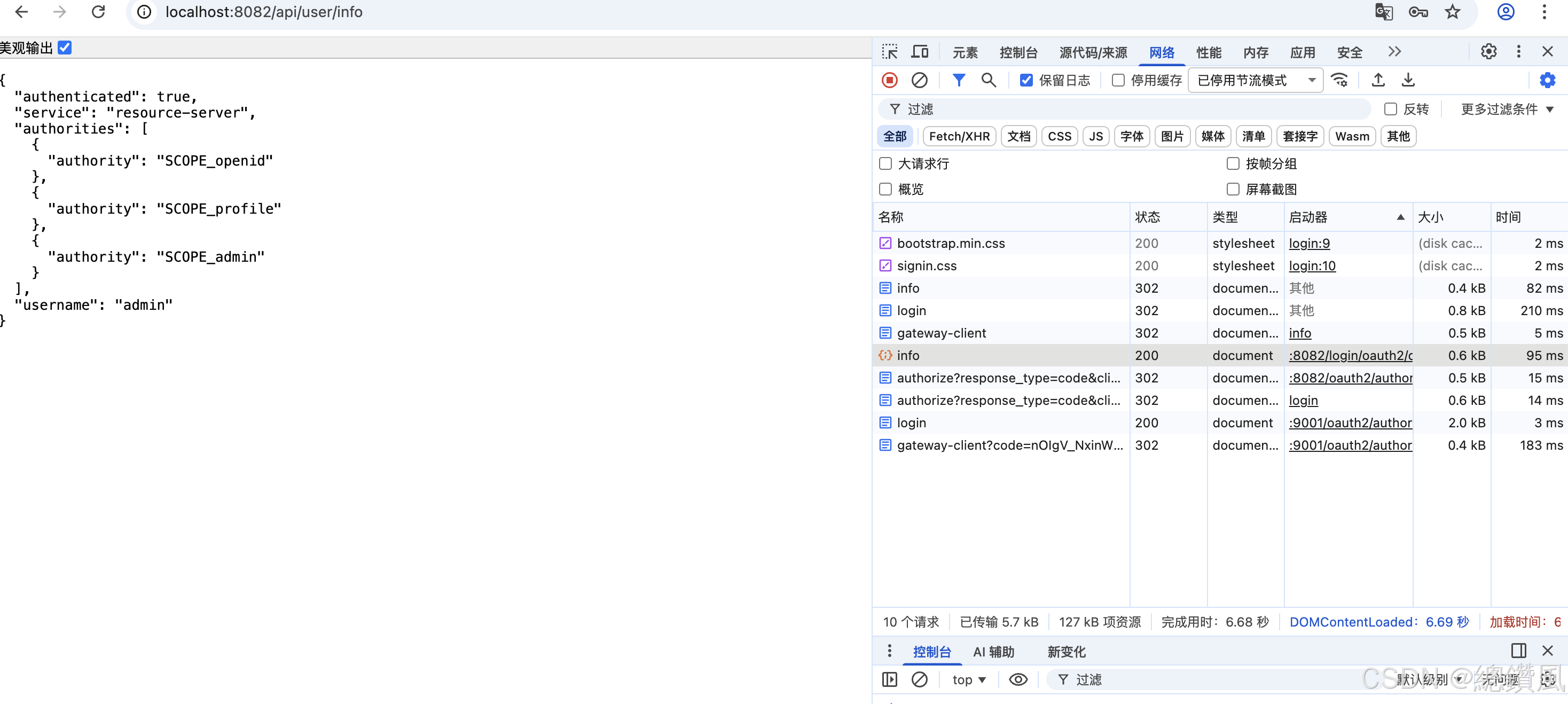
八、测试
启动nacos -> auth -> resource -> gateways
http://localhost:8082/api/user/info
返回如图即成功。
九、总结
| 层级 | 技术 | 作用 |
|---|---|---|
| 接入层 | Spring Cloud Gateway | 统一入口,SSO 认证 |
| 认证层 | Spring Authorization Server | OAuth2 授权服务器 |
| 业务层 | Spring Boot + Security | 资源服务器,JWT 验证 |
| 服务发现 | Nacos | 服务注册与发现 |
| 数据层 | MySQL + MyBatis-Plus | 数据持久化 |
| 安全 | JWT + RSA + BCrypt | 令牌加密传输 |
这是一个企业级的 OAuth2 + JWT + SSO 微服务架构,支持多系统单点登录,可水平扩展。