下面是我正在做的一个抛物线演示动画。
需求很简单:展示一个二次函数 y=x2−2x−1 的图像,并在上面标注几个关键点。
问题来了:
- 当我想调整函数参数时(比如把 −2x 改成 −3x),所有点的坐标都要手动重算
- 计算 x=1.5 时的函数值?掏出计算器 → 1.52−2×1.5−1=−1.75 → 再手动填回代码
- 顶点坐标?求导 → 令导数等于0 → 解方程 → 计算 y 值 → 再填回代码
- 对称轴和 x 轴的交点?求根公式 → 计算器 → 填代码
一个参数改动,我要重新计算七八个坐标值。这哪是在做动画,分明是在做数学作业!
直到我发现了 SymPy 这个神器。
SymPy 是什么?为什么 Manim 动画需要它?
简单说,SymPy 是一个 Python 的符号计算库。
别被"符号计算"这个词吓到,用大白话讲就是:
让计算机帮你"列式子、解方程、求导数",而不是你自己手算。
数值计算 vs 符号计算
看一个更直观的对比,你会立刻明白符号计算的强大:
python
import math
import sympy as sp

# ========== 场景:计算 sin(π/3) 的精确值 ==========
# 数值计算 - 得到近似小数
result_num = math.sin(math.pi / 3)
print(f"数值计算: {result_num}")
# 输出: 0.8660254037844386  ← 这是近似值,不知道它等于 √3/2

# 符号计算 - 得到精确表达式
x = sp.Symbol('x')
result_sym = sp.sin(sp.pi / 3)
print(f"符号计算: {result_sym}")
# 输出: sqrt(3)/2  ← 精确的数学表达式!


# 场景1:求平方
print("\n=== 求 (sin(π/3))² ===")
# 数值计算 - 精度损失
square_num = result_num ** 2
print(f"数值: {square_num}")
# 输出: 0.7499999999999999  ← 本应是 0.75,有浮点误差!

# 符号计算 - 精确化简
square_sym = result_sym ** 2
print(f"符号: {square_sym}")
# 输出: 3/4  ← 精确值!
关键对比总结
| 特性 | 数值计算 (math) | 符号计算 (sympy) |
|---|---|---|
sin(π/3) |
0.86602540378... |
√3/2 |
| 平方后 | 0.749999999999... |
3/4 |
| 能否继续代数运算 | ❌ 只能数值近似 | ✅ 可代入方程、求导、化简 |
| 浮点精度问题 | ⚠️ 存在误差累积 | ✅ 完全精确 |
符号计算的灵活性体现在:
- 保持数学形式 :
√3/2比0.866...更有数学意义 - 自动化简 :
(√3/2)²自动变成3/4 - 代数兼容:可以继续解方程、求导、积分,保持精确形式
这对 Manim 动画尤为重要------你不仅需要坐标值,更需要数学关系的可视化,而符号计算保留了这种关系!
避免累积误差
符号计算在累积的计算中,能够有效的降低误差。
比如公式: In=1−n×In−1其中 I0=e−1。分别累积计算以后:
| n | 符号计算 | 数值计算 (模拟8位小数精度) | 误差分析 |
|---|---|---|---|
| 0 | e−1 | 0.71828183 | 初始误差: ≈1.5×10⁻⁹ |
| 1 | 2−e | 0.28171817 | 误差微小 |
| 2 | 2e−5 | 0.43656366 | 误差开始累积 |
| 3 | 16−6e | 0.30860902 | |
| 4 | 24e−65 | 0.23687292 | |
| 5 | 326−120e | 0.18276460 | 误差开始显现 |
| 6 | 1956e−5315 | 0.15054840 | |
| 7 | 13692−5040e | 0.12145720 | |
| 8 | 109536e−298325 | 0.10364240 | |
| 9 | 985824−2691360e | 0.08385840 | |
| 10 | 26913600e−73309365 | 0.07515840 | 偏差明显 |
| 11 | 296049600−807408000e | 0.09173440 | |
| 12 | 9688896000e−26384952005 | -0.08345440 | 灾难性错误:符号反转! |
| 13 | 342938611200−1258293216000e | 2.10490720 | 完全失控 |
使用Sympy的话,可以在需要某一步结果的时候再代入 e去具体计算出来,不会累积误差。
SymPy 核心入门:把变量当作"符号"
在 SymPy 中,我们首先要定义符号变量:
python
import sympy as sp

# 定义符号 - 告诉 SymPy "x 是一个数学变量,不是具体的数"
x = sp.Symbol('x')
y = sp.Symbol('y')

# 现在可以构建表达式了
expr = x**2 - 2*x - 1  # y = x² - 2x - 1
print(expr)  # 输出: x**2 - 2*x - 1
核心操作:代入求值 .subs()
有了表达式,我们可以轻松计算任意 x 对应的 y 值:
python
# 计算 x=1.5 时的函数值
result = expr.subs(x, 1.5)
print(result)  # 输出: -1.75000000000000
print(float(result))  # 转换为浮点数: -1.75
自动求导和解方程
这才是真正解放双手的功能:
python
# 求导数
derivative = sp.diff(expr, x)  # 对 x 求导
print(derivative)  # 输出: 2*x - 2

# 解方程:导数=0(找顶点)
vertex_x = sp.solve(derivative, x)[0]  # 解得 x=1
vertex_y = expr.subs(x, vertex_x)      # 代入求 y
print(f"顶点坐标: ({vertex_x}, {vertex_y})")  # 输出: (1, -2)

# 解方程:y=0(找与x轴交点)
roots = sp.solve(expr, x)
print(f"与x轴交点: {roots}")  # 输出: [1 - sqrt(2), 1 + sqrt(2)]
看到了吗? 原本需要手动计算的所有值,现在 SymPy 全自动搞定了!
SymPy 和 Manim 结合示例
现在我们把 SymPy 和 Manim 结合起来,做一个参数可调的抛物线动画。
核心代码示例
python
from manim import *
import sympy as sp

class AutoParabola(Scene):
    def construct(self):
        # ========== SymPy 自动计算部分 ==========
        x = sp.Symbol('x')
        a, b, c = 1, -2, -1                      # 抛物线参数:y = ax² + bx + c
        expr = a * x**2 + b * x + c              # SymPy 符号表达式

        # 自动求顶点:令导数为 0
        derivative = sp.diff(expr, x)            # 求导:2ax + b
        vertex_x = float(sp.solve(derivative, x)[0])
        vertex_y = float(expr.subs(x, vertex_x))

        # 自动求与 x 轴交点
        roots = sp.solve(expr, x)                # 解方程 ax² + bx + c = 0
        root_points = [(float(r), 0) for r in roots if r.is_real]

        # ========== Manim 可视化部分 ==========
        axes = Axes(x_range=[-2, 4, 1], y_range=[-3, 3, 1], axis_config={"color": BLUE})

        # 用 SymPy 表达式直接作为绘图函数
        parabola = axes.plot(
            lambda x_val: float(expr.subs(x, x_val)),  # SymPy 实时计算 y 值
            color=YELLOW, stroke_width=3,
        )

        # 顶点(使用 SymPy 算出的坐标)
        vertex_dot = Dot(axes.c2p(vertex_x, vertex_y), color=RED)
        vertex_label = MathTex(
            f"({vertex_x:.1f}, {vertex_y:.1f})", font_size=24, color=RED
        ).next_to(vertex_dot, UP)

        # x 轴交点
        root_dots = VGroup(*[
            Dot(axes.c2p(rx, ry), color=GREEN) for rx, ry in root_points
        ])

        # ========== 动画播放 ==========
        self.play(Create(axes))
        self.play(Create(parabola))
        self.play(Create(vertex_dot), Write(vertex_label))
        self.play(Create(root_dots))
        self.wait(2)
代码核心解析
关键点1:无缝衔接
python
# SymPy 计算出的值是符号类型,需要转为 float 给 Manim 使用
vertex_x = float(sp.solve(derivative, x)[0])
关键点2:动态函数映射
python
# 用 lambda 将 SymPy 表达式"翻译"成 Manim 能理解的数值函数
parabola = axes.plot(
    lambda x_val: float(expr.subs(x, x_val)),
    color=YELLOW,
)
关键点3:坐标系转换
python
# 数学坐标 → 屏幕坐标
vertex_dot = Dot(axes.c2p(vertex_x, vertex_y))
效果展示说明
运行这段代码后,你会看到:
- 坐标轴自动建立,范围根据函数特点自适应
- 抛物线精确绘制,形状由 SymPy 实时计算
- 红色顶点自动标注在正确位置,坐标值精确显示
- 绿色交点标记出抛物线与 x 轴的交点
- 白色虚线标出对称轴位置
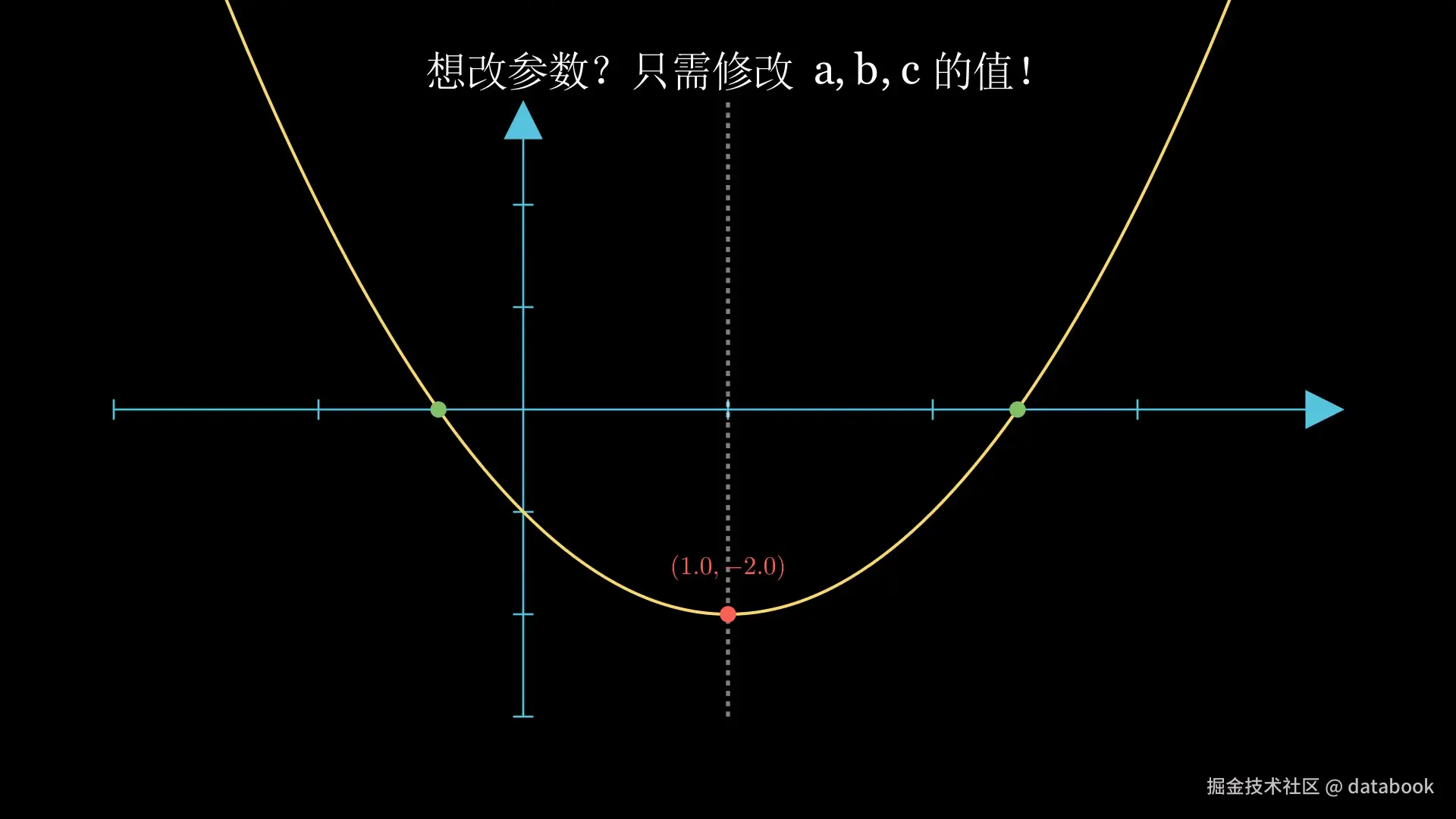
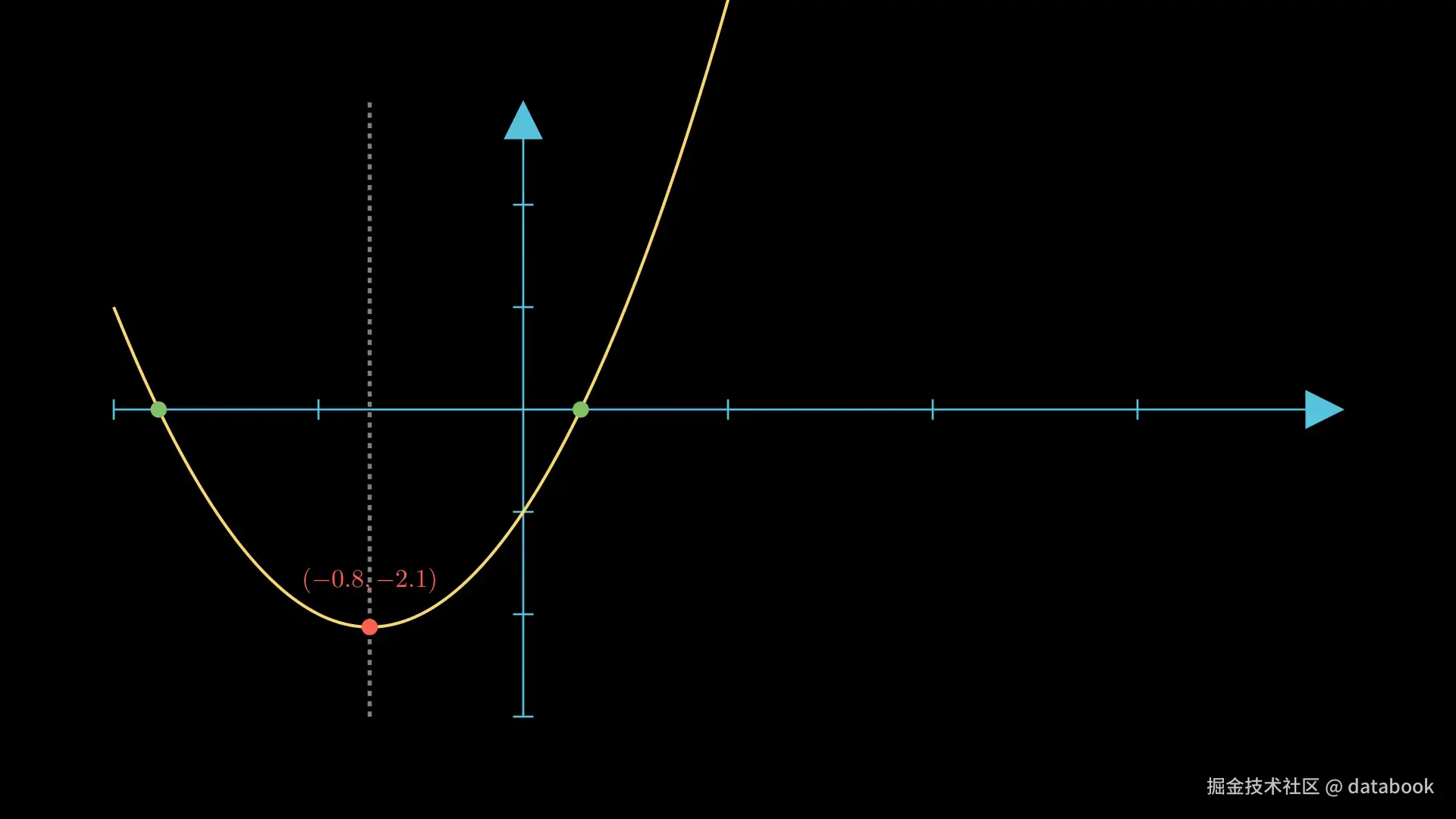
最神奇的是 :如果你想改成 y=2x2+3x−1,只需要修改第 11 行的参数:
python
a, b, c = 2, 3, -1 # 其他代码完全不用动!所有的点、线、标注都会自动更新到正确位置!修改后:
小结
今天我们解决了 Manim 动画制作中的一大痛点:手动计算坐标。
通过 SymPy 的符号计算能力,我们实现了:
- ✅ 表达式精确计算:告别计算器
- ✅ 适合数学思维表达:将公式推导直接映射成代码
- ✅ 自动求导找顶点:告别手算求导
- ✅ 自动解方程找交点:告别求根公式
- ✅ 等等... ...
核心代码模板:
python
import sympy as sp
x = sp.Symbol('x')
expr = x**2 - 2*x - 1  # 你的表达式
y_value = float(expr.subs(x, x_value))  # 计算任意点的值