1.mobx-miniprogram
mobx-miniprogram是针对小程序开发的一个简单,高效,且轻量级的状态管理库,能提升小程序开发效率
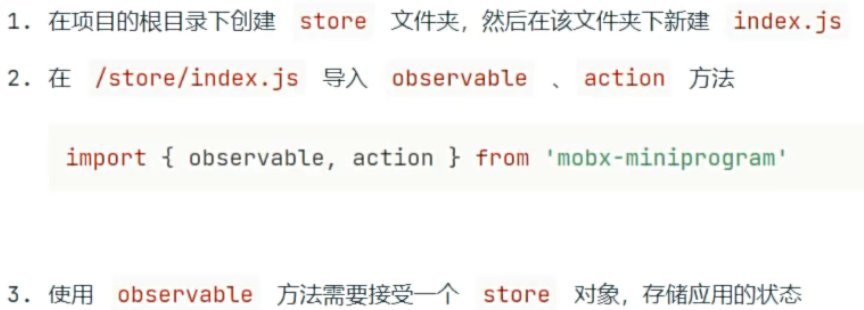
2.创建store对象

详细使用步骤
javascript
import { observable, action } from 'mobx-miniprogram'

export const numStore = observable({

  numA: 1,
  numB: 2,

  update: action(function () {
    this.numA+=1
    this.numB+=1
  }),

  get sum() {
    return this.numA + this.numB;
  }

})
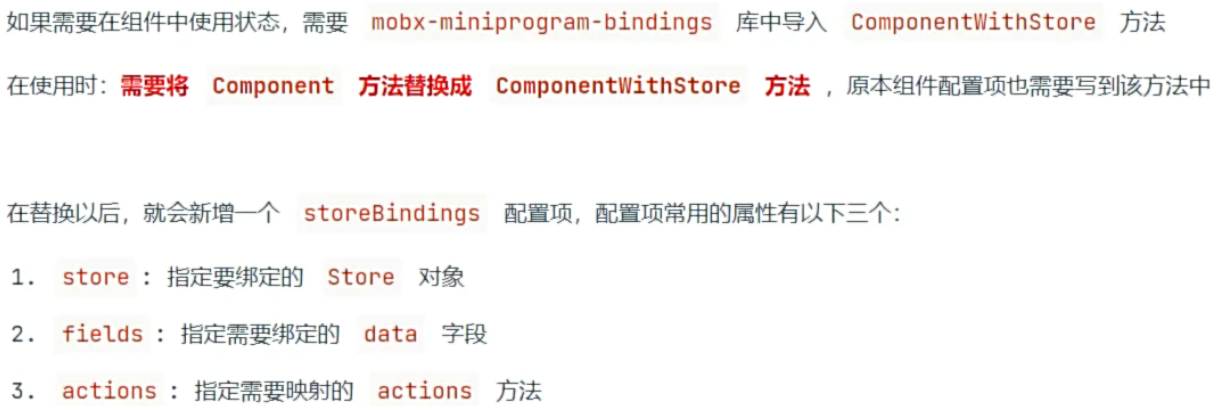
在组件中使用store数据
方法1
在index.js中
javascript
import { ComponentWithStore } from 'mobx-miniprogram-bindings'
import { numStore } from '../../stores/numstore'

ComponentWithStore({
  data: {
    someData: '...'
  },
  storeBindings: {
    store: numStore,
    fields: ['numA', 'numB', 'sum'],
    actions: ['update']
  }
}
方法2
在behavior.js中
javascript
import { BehaviorWithStore } from 'mobx-miniprogram-bindings'
import { numStore } from '../../stores/numstore'

export const indexBehavior = BehaviorWithStore({
  storeBindings: {
    store: numStore,
    fields: ['numA', 'numB', 'sum'],
    actions: ['update'],
  }
})
在index.js中
javascript
import { indexBehavior } from './behavior'

Page({
  behaviors: [indexBehavior]

})
3.fields,actions对象写法
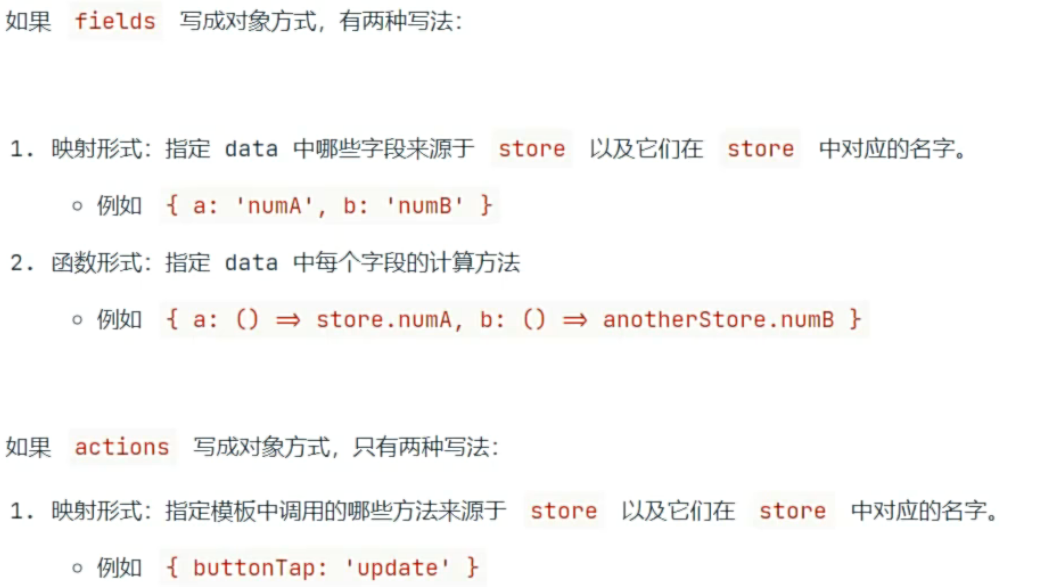
fields,actions有两种写法,数组或对象
javascript
import { ComponentWithStore } from 'mobx-miniprogram-bindings'
import { numStore } from '../../stores/numstore'

ComponentWithStore({
  data: {
    someData: '...'
  },
  storeBindings: {
    store: numStore,
    fields: {

      a: 'numA',

      b: () => store.numB,

      total: 'sub'
    },


    actions: {
      buttonTap: 'update'
    }
  }
})
4.绑定多个store以及命名空间
一个页面或组件可能会绑定多个store,这时可以将storeBinding改造成数组,数组每一项就是一个个遥绑定的store
javascript
import { BehaviorWithStore } from 'mobx-miniprogram-bindings'
import { numStore } from '../../stores/numstore'

export const indexBehavior = BehaviorWithStore({
  storeBindings: [
    {
      namespace: 'numStore',
      store: numStore,
      fields: ['numA', 'numB', 'sum'],
      actions: ['update'],
    }
  ]
})
5.miniprogram-computed
小程序框架没有提供计算属性相关的Api,但是官方为开发者提供了拓展工具库miniprogram-computed
该库提供了两个功能
计算属性 computed
监听器 watch
在component.js中引入miniprogram-computed
计算属性
javascript
import { ComponentWithComputed } from 'miniprogram-computed'

ComponentWithComputed({
  data: {
    a: 1,
    b: 1
  },

  computed: {
    total(data) {

      console.log('~~~~~')

      return data.a + data.b
    }
  }
})
监听器
javascript
import { ComponentWithComputed } from 'miniprogram-computed'

ComponentWithComputed({

  data: {
    a: 1,
    b: 1
  },

  computed: {
    total(data) {
      return data.a + data.b
    }
  }

  watch: {
    'a, b': function (a, b) {
      this.setData({
        total: a + b
      })
    }
  },

  methods: {
    updateData() {
      this.setData({
        a: this.data.a + 1,
        b: this.data.b + 1
      })
    }
  }
})
6.用户登录
什么是token

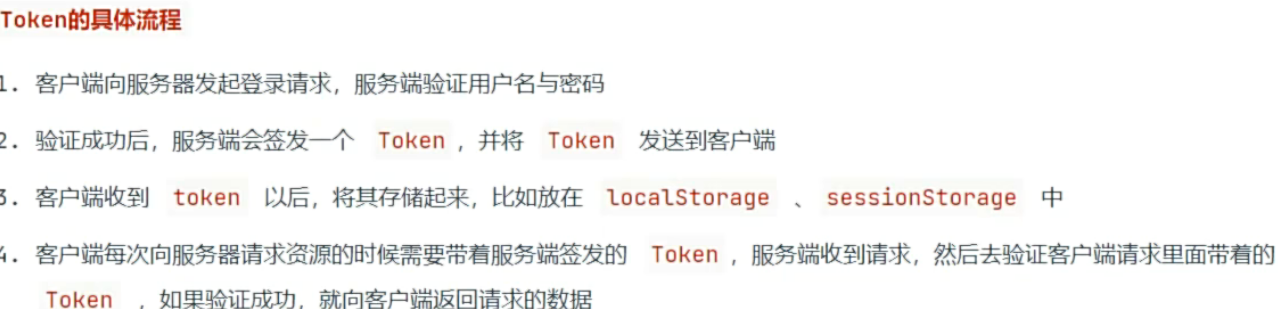
登录流程介绍
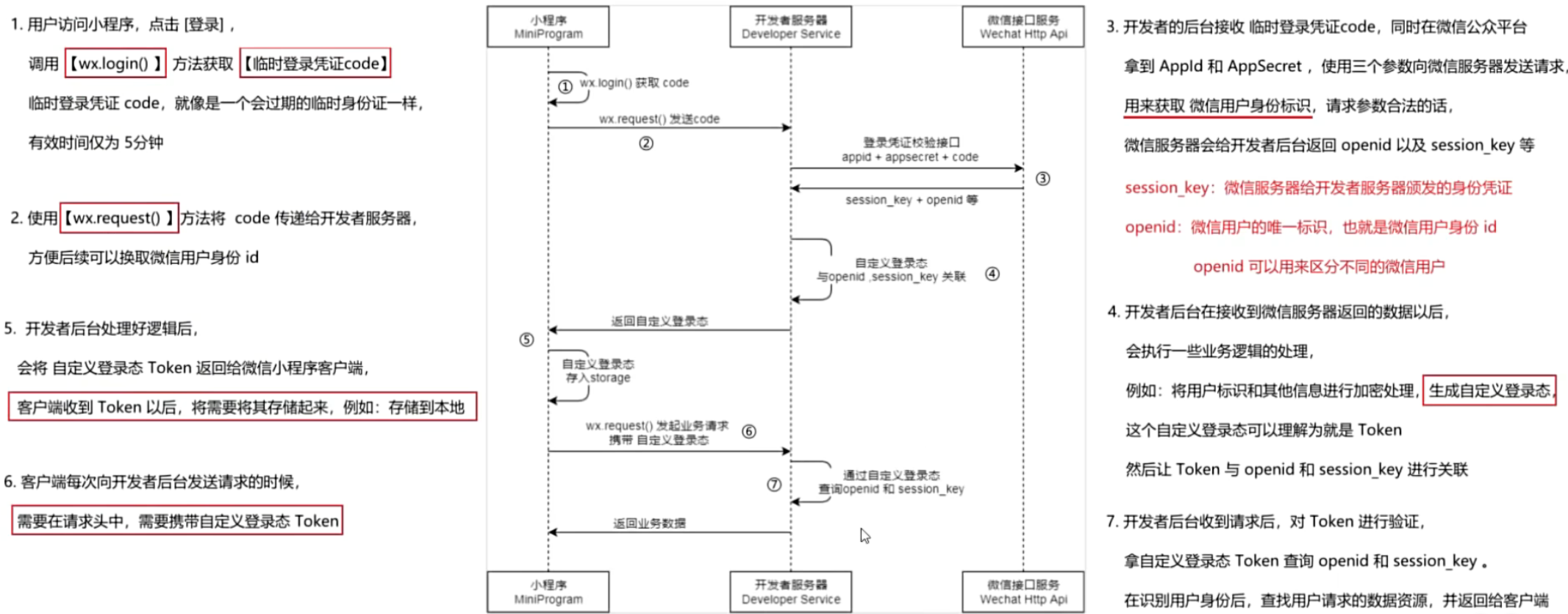
登录功能
javascript
import http from '../utils/http'


export const reqLogin = (code) => {
  return http.get(`/weixin/wxLogin/${code}`)
}
javascript
import { reqLogin } from '../../api/user'
import { toast } from '../../utils/extendApi'

Page({
  login() {
    wx.login({
      success: async ({ code }) => {
        if (code) {
          const res = await reqLogin(code)

          wx.setStorageSync('token', res.data.token)

          wx.navigateBack()
        } else {
          toast({ title: '授权失败,请稍后再试~~~' })
        }
      }
    })
  }
})
7.token保存到store
javascript
import { observable, action } from 'mobx-miniprogram'
import { getStorage } from '../utils/storage'

export const userStore = observable({
  token: getStorage('token') || '',

  setToken: action(function (token) {
    this.token = token
  })
})
javascript
import { reqLogin } from '../../api/user'
 import { userStore } from '../../api/userstore'

 import { ComponentWithStore } from 'mobx-miniprogram-bindings'

 ComponentWithStore({

   storeBindings: {
     store: userStore,
     fields: ['token'],
     actions: ['setToken']
   }

   methods: {
    login() {
      wx.login({
        success: async ({ code }) => {
          if (code) {
            const { data } = await reqLogin(code)

            setStorage('token', data.token)

             this.setToken(data.token)
          } else {
            toast({ title: '授权失败,请重新授权' })
          }
        }
      })
    }
   }
})
8.用户信息存储到store
javascript
export const reqUserInfo = () => {
  return http.get(`/mall-api/weixin/getuserInfo`)
}
javascript
import { toast } from '../../utils/extendApi'

import { setStorage } from '../../utils/storage'

 import { reqLogin, reqUserInfo } from '../../api/user'


import { ComponentWithStore } from 'mobx-miniprogram-bindings'

import { userStore } from '../../stores/userstore'

ComponentWithStore({
  storeBindings: {
    store: userStore,
     fields: ['token', 'userInfo'],
     actions: ['setToken', 'setUserInfo']
  },

  methods: {
    login() {
      wx.login({
        success: async ({ code }) => {
          if (code) {
            const { data } = await reqLogin(code)

            setStorage('token', data.token)

            this.setToken(data.token)

           this.getUserInfo()
          } else {
            toast({ title: '授权失败,请重新授权' })
          }
        }
      })
    },

    async getUserInfo() {
      const { data } = await reqUserInfo()
      setStorage('userInfo', data)
     this.setUserInfo(data)
    }
  }
})
9.使用数据渲染用户信息
javascript
 import { ComponentWithStore } from 'mobx-miniprogram-bindings'

 ComponentWithStore({

   storeBindings: {
     store: userStore,
     fields: ['token', 'userInfo']
   }

})
javascript
<view class="container bg">
  <view class="top-show">
    <image mode="widthFix" class="top-show-img" src="/static/images/banner.jpg"></image>
  </view>
  <view class="wrap">

     <view class="user-container section" wx:if="{{ !token }}" bindtap="toLoginPage">
      <view class="avatar-container">
        <image src="/static/images/avatar.png"></image>
        <view class="no-login">
          <text class="ellipsis">未登录</text>
          <text>点击授权登录</text>
        </view>
      </view>
    </view>

     <view wx:else class="user-container section">
       <view class="avatar-container">
         <image src="{{ userInfo.headimgurl }}"></image>
         <view class="no-login">
           <text class="ellipsis">{{ userInfo.nickname }}</text>
         </view>
       </view>
       <view class="setting">
         设置
       </view>
     </view>

    <view class="order section">
      <view class="order-title-wrap">
        <text class="title">我的订单</text>
        <text class="more">查看更多></text>
      </view>
      <view class="order-content-wrap">
        <view class="order-content-item" wx:for="{{ initpanel }}">
           <navigator url="{{ token ? item.url : '/pages/login/login' }}">
            <view class="iconfont {{ item.iconfont }}"></view>
            <text>{{ item.title }}</text>
          </navigator>
        </view>
      </view>
    </view>

    <view class="after-scale section">
    </view>


  </view>
</view>