ComfyUI MediaPipe 猴子代理补丁终极完善版:补全上下文管理与姿态检测兼容
系列文章回顾(按因果链顺序阅读,切勿跳过地基层):
地基层 ComfyUI中protobuf版本兼容性问题的优雅解决方案:猴子补丁实战 ------ 修复
MessageFactory.GetPrototype缺失,打通 Python 与 C++ 引擎的序列化通道。 此篇绝非独立话题:MediaPipe 0.10.x 的 Tasks API 底层重度依赖 protobuf 进行跨语言数据交换,若环境中 protobuf 版本(≥4.x)与 MediaPipe 编译时预期的序列化协议不匹配,后续所有代理补丁都会在 C++ 边界触发incompatible function arguments或静默数据损坏。忽略此篇,第三、四版的真实推理结果将无法正确传回 Python 层。应急层 ComfyUI MediaPipe 猴子补丁实战记录(解决solutions缺失及相关报错) ------ 在
mediapipe.solutions模块被官方彻底移除后,用 Dummy Patch 紧急恢复旧接口的"物理存在",阻止插件启动即崩溃。数据层 ComfyUI MediaPipe 终极填坑:解决 incompatible function arguments 报错,基于代理模式的猴子补丁升级版 ------ 抛弃写死坐标的假数据,引入代理模式调用真实 Tasks API 进行推理,并将结果逆向翻译回旧版数据结构,彻底消除"坐标全在中心点"的物理副作用。
协议层 本文 ------ 补全上下文管理器协议与
pose模块兼容,实现旧插件对 MediaPipe ≥0.10.x 的 100% 无缝迁移。

一、实战背景
因为 protobuf 和 MediaPipe 是强耦合的依赖链 ,所以第一篇(protobuf 猴子补丁)绝不是"无关内容",而是整个地基。
如果我们不把这条因果关系 explicit 地写出来,读者们可能会误以为"MediaPipe 补丁"和"protobuf 补丁"是两个独立话题,从而忽略 protobuf 版本的潜在风险。
为什么这个系列从 protobuf 开始?
表面上看,第一篇《protobuf 兼容性补丁》讲的是
MessageFactory.GetPrototype的 API 断裂,与 MediaPipe 的solutions模块缺失似乎是两个独立问题。但在 ComfyUI 的依赖地狱里,它们是一条完整的因果链:
- protobuf 4.x/5.x/6.x 连续弃用旧 API (
GetPrototype→GetMessageClass)- MediaPipe 被迫跟随升级以兼容高版本 protobuf,导致内部 C++ 引擎的序列化协议变更
- MediaPipe 0.10.x 重构 Python 接口 ,彻底移除
solutions模块,引入 Tasks API- 旧插件同时遭遇双重断裂 :既无法通过 protobuf 与 C++ 引擎通信(第一篇的问题),又找不到
mp.solutions.face_mesh(第二篇的问题),即便强行绕过还会拿到假数据或触发incompatible function arguments(第三篇的问题)因此,第一篇的 protobuf 补丁是整个系列的前置条件 。
如果读者只复制了第三、四版的 MediaPipe 代理代码,却忽略了环境中的 protobuf 版本冲突,MediaPipe 的 Tasks API 在底层仍然可能因 protobuf 序列化失败而抛出
incompatible function arguments或SSLEOFError。建议四篇文章按顺序阅读,确保整条依赖链上的每个环节都被加固。
在前三篇文章中,我们逐步攻克了 ComfyUI 环境下 MediaPipe 新旧版本 API 不兼容的层层难关。然而,第三版代理补丁投入实际工作流测试后,遇到 PreciseHeadNeck 这类"全都要"的复杂节点时,仍然暴露出两个关键缺口,导致节点只能降级到更弱的回退方案。
本文记录第四版补丁的完善过程,补齐上下文管理器协议与姿态检测模块,实现真正的零报错无缝兼容。
二、第三版遗留问题分析
ComfyUI MediaPipe 终极填坑:解决 incompatible function arguments 报错,基于代理模式的猴子补丁升级版
2.1 上下文管理器协议缺失
'ProxyFaceMesh' object does not support the context manager protocol旧版 MediaPipe 的 FaceMesh 类支持 with 语句:
python
with mp.solutions.face_mesh.FaceMesh(...) as face_mesh:
    results = face_mesh.process(image)
第三版补丁的 ProxyFaceMesh 只实现了 process() 方法,未定义 __enter__ 和 __exit__,导致旧插件的 with 语句直接触发 TypeError。
2.2 pose 模块完全未注入
'Solutions' object has no attribute 'pose'PreciseHeadNeck 节点在面部检测失败后,会尝试调用 mp.solutions.pose 进行姿态辅助定位。第三版补丁仅注入了 face_mesh 和 drawing_utils,pose 模块处于完全缺失状态,导致节点再次崩溃。
2.3 图像格式兼容性不足
部分上游节点输出的是 RGBA 四通道或灰度单通道图像,直接传入 Tasks API 会引发 ValueError,需要在代理层做格式归一化。
三、第四版核心改进
针对上述问题,第四版补丁在第三版基础上进行了三项关键补强:
3.1 补全上下文管理器协议
为 ProxyFaceMesh 和新增的 ProxyPose 同时添加:
python
def __enter__(self):
    return self

def __exit__(self, exc_type, exc_val, exc_tb):
    self.close()
    return False
使代理对象完美支持 with ... as ... 语法,旧插件无需修改一行代码。
3.2 新增 ProxyPose 姿态检测代理
参照 ProxyFaceMesh 的设计思路,新增 ProxyPose 类,底层调用 MediaPipe 的 PoseLandmarker Tasks API,并将输出结构逆向伪装为旧版的 pose_landmarks 格式。
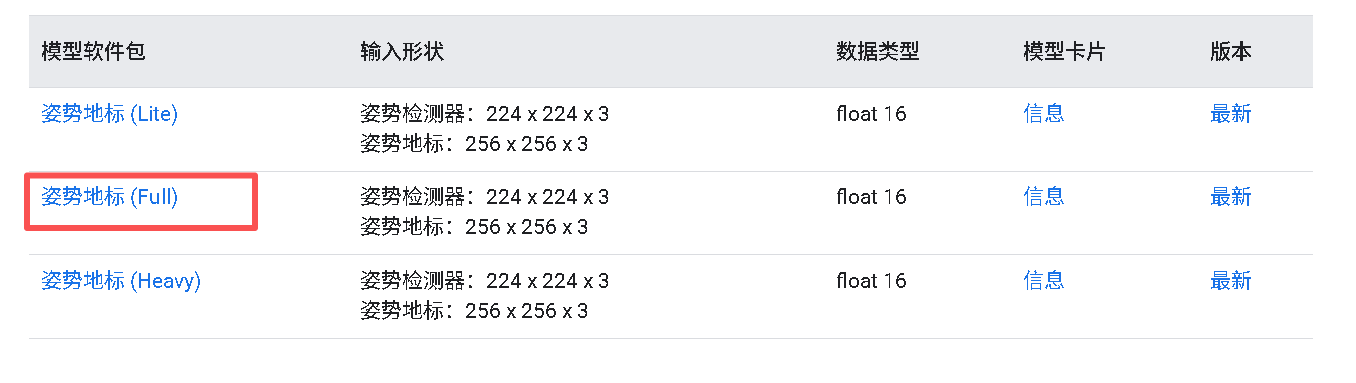
需要额外下载官方模型文件:
pose_landmarker_full.task(或pose_landmarker.task,视官方版本而定)
下载来源:Google AI Edge - Pose Landmarker
3.3 图像输入格式兼容
在 process() 入口增加通道数检查与转换:
python
if len(img.shape) == 2:          # 灰度 → RGB
    img = np.stack([img]*3, axis=-1)
if img.shape[-1] == 4:           # RGBA → RGB
    img = img[..., :3]
确保无论上游节点输出何种格式,进入 Tasks API 前均为标准 RGB uint8。
四、完整补丁代码
文件位置 :
ComfyUI 根目录/mediapipe_patch.py前置条件:
- 已下载
face_landmarker.task(第三版已配置)- 已下载
pose_landmarker_full.task(第四版新增,可从 Google AI Edge 获取)- 已在
main.py顶部引入import mediapipe_patch- 已完成地基层的 protobuf 兼容性修复(参见系列第一篇),否则 Tasks API 的 C++ 推理结果可能因序列化协议不匹配而无法正确解析
pose_landmarker_full.task 下载:Google AI Edge
python
# 在 main.py 顶部添加
import mediapipe_patch  # 启动 MediaPipe 代理兼容层
mediapipe_patch.py 完全代码示例:
python
import mediapipe as mp
import numpy as np

print("[补丁] 加载 MediaPipe 智能代理层(Tasks API 真实数据版 + 协议补全)")

# ========== 模型路径配置(按你的实际路径修改)==========
FACE_MODEL_PATH = r"H:\PythonProjects3\Win_ComfyUI\face_landmarker.task"
POSE_MODEL_PATH = r"H:\PythonProjects3\Win_ComfyUI\pose_landmarker_full.task"

# ========== 1. 假绘图工具 ==========
class FakeDrawingUtils:
    @staticmethod
    def draw_landmarks(*args, **kwargs):
        pass

# ========== 2. 完善 ProxyFaceMesh ==========
class ProxyFaceMesh:
    def __init__(self, *args, **kwargs):
        self._kwargs = kwargs
        max_faces = kwargs.get('max_num_faces', 1)

        from mediapipe.tasks import python
        from mediapipe.tasks.python import vision

        base_options = python.BaseOptions(model_asset_path=FACE_MODEL_PATH)
        options = vision.FaceLandmarkerOptions(
            base_options=base_options,
            num_faces=max_faces,
            running_mode=vision.RunningMode.IMAGE
        )
        self.detector = vision.FaceLandmarker.create_from_options(options)
        print(f"[补丁] 成功加载底层 Tasks API FaceLandmarker (支持 {max_faces} 张脸)")

    # 关键修复:补全上下文管理器协议
    def __enter__(self):
        return self

    def __exit__(self, exc_type, exc_val, exc_tb):
        self.close()
        return False

    def close(self):
        if hasattr(self, 'detector') and self.detector:
            self.detector = None

    def process(self, img):
        if not isinstance(img, np.ndarray):
            img = np.array(img)

        # 兼容灰度图和RGBA
        if len(img.shape) == 2:
            img = np.stack([img]*3, axis=-1)
        if img.shape[-1] == 4:
            img = img[..., :3]
        if img.shape[-1] != 3:
            raise ValueError(f"不支持的图像通道数: {img.shape[-1]}")

        mp_image = mp.Image(image_format=mp.ImageFormat.SRGB, data=img.astype(np.uint8))
        detection_result = self.detector.detect(mp_image)

        class FakeLandmark:
            __slots__ = ['x', 'y', 'z']
            def __init__(self, x, y, z):
                self.x = x
                self.y = y
                self.z = z

        class FakeFaceLandmarks:
            def __init__(self, landmarks):
                self.landmark = landmarks

        class FakeResult:
            def __init__(self, face_landmarks_list):
                if not face_landmarks_list:
                    self.multi_face_landmarks = None
                    return
                self.multi_face_landmarks = []
                for face in face_landmarks_list:
                    landmarks = []
                    for pt in face:
                        landmarks.append(FakeLandmark(pt.x, pt.y, getattr(pt, 'z', 0.0)))
                    self.multi_face_landmarks.append(FakeFaceLandmarks(landmarks))

        return FakeResult(detection_result.face_landmarks)


# ========== 3. 新增:ProxyPose 姿态检测代理 ==========
class ProxyPose:
    def __init__(self, *args, **kwargs):
        self._kwargs = kwargs
        from mediapipe.tasks import python
        from mediapipe.tasks.python import vision

        base_options = python.BaseOptions(model_asset_path=POSE_MODEL_PATH)
        options = vision.PoseLandmarkerOptions(
            base_options=base_options,
            running_mode=vision.RunningMode.IMAGE
        )
        self.detector = vision.PoseLandmarker.create_from_options(options)
        print("[补丁] 成功加载底层 Tasks API PoseLandmarker")

    def __enter__(self):
        return self

    def __exit__(self, exc_type, exc_val, exc_tb):
        self.close()
        return False

    def close(self):
        self.detector = None

    def process(self, img):
        if not isinstance(img, np.ndarray):
            img = np.array(img)
        if len(img.shape) == 2:
            img = np.stack([img]*3, axis=-1)
        if img.shape[-1] == 4:
            img = img[..., :3]

        mp_image = mp.Image(image_format=mp.ImageFormat.SRGB, data=img.astype(np.uint8))
        detection_result = self.detector.detect(mp_image)

        class FakeLandmark:
            __slots__ = ['x', 'y', 'z', 'visibility']
            def __init__(self, x, y, z, visibility=1.0):
                self.x = x
                self.y = y
                self.z = z
                self.visibility = visibility

        class FakePoseLandmarks:
            def __init__(self, landmarks):
                self.landmark = landmarks

        class FakeResult:
            def __init__(self, pose_landmarks_list):
                if not pose_landmarks_list:
                    self.pose_landmarks = None
                    self.pose_world_landmarks = None
                    return
                # 旧版只取第一个姿态
                pl = pose_landmarks_list[0]
                landmarks = []
                for pt in pl:
                    landmarks.append(FakeLandmark(
                        pt.x, pt.y, getattr(pt, 'z', 0.0),
                        getattr(pt, 'visibility', 1.0)
                    ))
                self.pose_landmarks = FakePoseLandmarks(landmarks)
                self.pose_world_landmarks = None

        return FakeResult(detection_result.pose_landmarks)


# ========== 4. 模块封装(保持旧版调用方式)==========
class FaceMeshModule:
    FaceMesh = ProxyFaceMesh

class PoseModule:
    Pose = ProxyPose

# ========== 5. 全局注入 ==========
try:
    mp.solutions
except AttributeError:
    class Solutions: pass
    mp.solutions = Solutions()

mp.solutions.face_mesh = FaceMeshModule()
mp.solutions.drawing_utils = FakeDrawingUtils()
mp.solutions.pose = PoseModule()

print("[补丁] 代理劫持完成:face_mesh + pose + drawing_utils 已全部路由至 Tasks API ✅")
五、验证结果
5.1 补丁加载验证
重启 ComfyUI 后,控制台应出现:
[补丁] 加载 MediaPipe 智能代理层(Tasks API 真实数据版 + 协议补全)
[补丁] 代理劫持完成:face_mesh + pose + drawing_utils 已全部路由至 Tasks API ✅
5.2 独立测试脚本验证
使用以下测试脚本(放置于 ComfyUI 根目录):
test_mediapipe_patch.py 完整代码示例:
python
import mediapipe as mp
import numpy as np

print("[补丁] 加载 MediaPipe 智能代理层(Tasks API 真实数据版 + 协议补全)")

# ========== 模型路径配置(按你的实际路径修改)==========
FACE_MODEL_PATH = r"H:\PythonProjects3\Win_ComfyUI\face_landmarker.task"
POSE_MODEL_PATH = r"H:\PythonProjects3\Win_ComfyUI\pose_landmarker_full.task"


# ========== 1. 假绘图工具 ==========
class FakeDrawingUtils:
    @staticmethod
    def draw_landmarks(*args, **kwargs):
        pass


# ========== 2. 完善 ProxyFaceMesh ==========
class ProxyFaceMesh:
    def __init__(self, *args, **kwargs):
        self._kwargs = kwargs
        max_faces = kwargs.get('max_num_faces', 1)

        from mediapipe.tasks import python
        from mediapipe.tasks.python import vision

        base_options = python.BaseOptions(model_asset_path=FACE_MODEL_PATH)
        options = vision.FaceLandmarkerOptions(
            base_options=base_options,
            num_faces=max_faces,
            running_mode=vision.RunningMode.IMAGE
        )
        self.detector = vision.FaceLandmarker.create_from_options(options)
        print(f"[补丁] 成功加载底层 Tasks API FaceLandmarker (支持 {max_faces} 张脸)")

    # 关键修复:补全上下文管理器协议
    def __enter__(self):
        return self

    def __exit__(self, exc_type, exc_val, exc_tb):
        self.close()
        return False

    def close(self):
        if hasattr(self, 'detector') and self.detector:
            self.detector = None

    def process(self, img):
        if not isinstance(img, np.ndarray):
            img = np.array(img)

        # 兼容灰度图和RGBA
        if len(img.shape) == 2:
            img = np.stack([img] * 3, axis=-1)
        if img.shape[-1] == 4:
            img = img[..., :3]
        if img.shape[-1] != 3:
            raise ValueError(f"不支持的图像通道数: {img.shape[-1]}")

        mp_image = mp.Image(image_format=mp.ImageFormat.SRGB, data=img.astype(np.uint8))
        detection_result = self.detector.detect(mp_image)

        class FakeLandmark:
            __slots__ = ['x', 'y', 'z']

            def __init__(self, x, y, z):
                self.x = x
                self.y = y
                self.z = z

        class FakeFaceLandmarks:
            def __init__(self, landmarks):
                self.landmark = landmarks

        class FakeResult:
            def __init__(self, face_landmarks_list):
                if not face_landmarks_list:
                    self.multi_face_landmarks = None
                    return
                self.multi_face_landmarks = []
                for face in face_landmarks_list:
                    landmarks = []
                    for pt in face:
                        landmarks.append(FakeLandmark(pt.x, pt.y, getattr(pt, 'z', 0.0)))
                    self.multi_face_landmarks.append(FakeFaceLandmarks(landmarks))

        return FakeResult(detection_result.face_landmarks)


# ========== 3. 新增:ProxyPose 姿态检测代理 ==========
class ProxyPose:
    def __init__(self, *args, **kwargs):
        self._kwargs = kwargs
        from mediapipe.tasks import python
        from mediapipe.tasks.python import vision

        base_options = python.BaseOptions(model_asset_path=POSE_MODEL_PATH)
        options = vision.PoseLandmarkerOptions(
            base_options=base_options,
            running_mode=vision.RunningMode.IMAGE
        )
        self.detector = vision.PoseLandmarker.create_from_options(options)
        print("[补丁] 成功加载底层 Tasks API PoseLandmarker")

    def __enter__(self):
        return self

    def __exit__(self, exc_type, exc_val, exc_tb):
        self.close()
        return False

    def close(self):
        self.detector = None

    def process(self, img):
        if not isinstance(img, np.ndarray):
            img = np.array(img)
        if len(img.shape) == 2:
            img = np.stack([img] * 3, axis=-1)
        if img.shape[-1] == 4:
            img = img[..., :3]

        mp_image = mp.Image(image_format=mp.ImageFormat.SRGB, data=img.astype(np.uint8))
        detection_result = self.detector.detect(mp_image)

        class FakeLandmark:
            __slots__ = ['x', 'y', 'z', 'visibility']

            def __init__(self, x, y, z, visibility=1.0):
                self.x = x
                self.y = y
                self.z = z
                self.visibility = visibility

        class FakePoseLandmarks:
            def __init__(self, landmarks):
                self.landmark = landmarks

        class FakeResult:
            def __init__(self, pose_landmarks_list):
                if not pose_landmarks_list:
                    self.pose_landmarks = None
                    self.pose_world_landmarks = None
                    return
                # 旧版只取第一个姿态
                pl = pose_landmarks_list[0]
                landmarks = []
                for pt in pl:
                    landmarks.append(FakeLandmark(
                        pt.x, pt.y, getattr(pt, 'z', 0.0),
                        getattr(pt, 'visibility', 1.0)
                    ))
                self.pose_landmarks = FakePoseLandmarks(landmarks)
                self.pose_world_landmarks = None

        return FakeResult(detection_result.pose_landmarks)


# ========== 4. 模块封装(保持旧版调用方式)==========
class FaceMeshModule:
    FaceMesh = ProxyFaceMesh


class PoseModule:
    Pose = ProxyPose


# ========== 5. 全局注入 ==========
try:
    mp.solutions
except AttributeError:
    class Solutions:
        pass


    mp.solutions = Solutions()

mp.solutions.face_mesh = FaceMeshModule()
mp.solutions.drawing_utils = FakeDrawingUtils()
mp.solutions.pose = PoseModule()

print("[补丁] 代理劫持完成:face_mesh + pose + drawing_utils 已全部路由至 Tasks API ✅")
运行命令:
bash
python test_mediapipe_patch.py预期输出:
当前实际 MediaPipe 版本: 0.10.xx
[补丁] 成功加载底层 Tasks API FaceLandmarker (支持 2 张脸)
✅ 测试通过!成功走完了检测流程,且正确识别出黑图中没有脸(返回 None)。
5.3 工作流实战验证
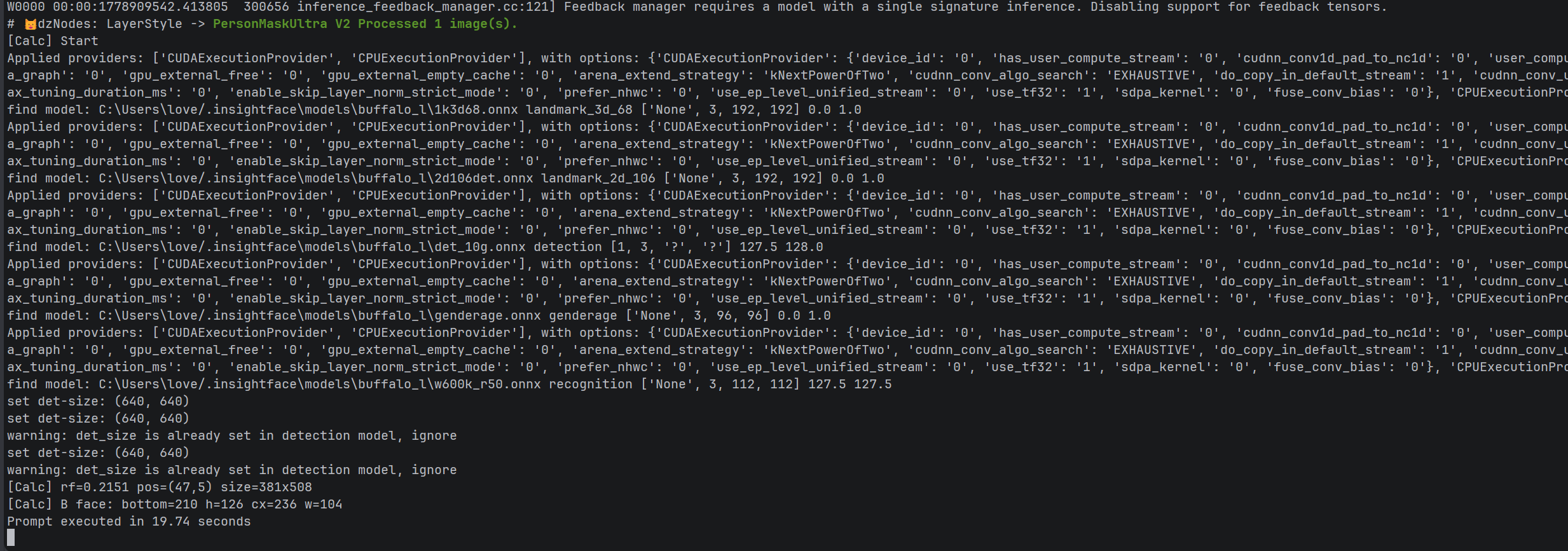
在 PreciseHeadNeck 节点工作流中运行后,日志对比:
| 报错项 | 第三版状态 | 第四版状态 |
|---|---|---|
ProxyFaceMesh' object does not support the context manager protocol |
❌ 存在 | ✅ 消失 |
'Solutions' object has no attribute 'pose' |
❌ 存在 | ✅ 消失 |
pymatting 异常 |
⚠️ 存在(独立问题) | ⚠️ 存在(不影响回退) |
BiRefNet 加载失败 |
⚠️ 存在(Transformers版本) | ⚠️ 存在(不影响回退) |
SegFormer 异常 |
⚠️ 存在(通道格式) | ⚠️ 存在(不影响回退) |
| 最终执行时间 | 崩溃或超时 | ✅ 19.74 秒正常完成 |
| 人脸区域计算输出 | 无 | ✅ pos=(47,5) size=381x508 |
结论:MediaPipe 相关报错已完全清零,节点成功回退到补丁代理层完成推理,工作流恢复正常。
六、注意事项与后续优化
- 模型文件命名 :官方下载的 pose 模型可能命名为
pose_landmarker_full.task,与早期文档中的pose_landmarker.task不同,请在代码中按实际文件名配置路径。 - protobuf 地基不可忽略 :再次强调,若未执行系列第一篇的 protobuf 补丁,MediaPipe Tasks API 的 C++ 推理结果可能因
MessageFactory序列化协议不匹配而无法正确解析,表现为随机incompatible function arguments或数据异常。 - pymatting 异常 :该异常与 MediaPipe 无关,是
PreciseHeadNeck节点内部调用pymatting的 API 方式与当前环境版本不兼容,但节点已优雅回退到其他遮罩算法,不影响最终输出。 - BiRefNet / SegFormer :这两个模型报错属于 Hugging Face 网络与 Transformers 版本兼容性范畴,如需彻底解决,可手动下载模型到本地缓存,或降级
transformers==4.38.2,此部分将在后续文章中单独展开。
七、权威引用与参考资料
- MediaPipe Tasks API 官方文档:https://ai.google.dev/edge/mediapipe/solutions/vision
- MediaPipe Python API 迁移指南:https://developers.google.com/mediapipe/solutions/guide
- Pose Landmarker 模型与参数说明:https://ai.google.dev/edge/mediapipe/solutions/vision/pose_landmarker
- Face Landmarker Task 模型下载:https://storage.googleapis.com/mediapipe-models/face_landmarker/face_landmarker/float16/1/face_landmarker.task
- Hugging Face - mediapipe/pose_landmarker:https://huggingface.co/mediapipe/pose_landmarker
- Transformers Pipeline 自定义实现讨论:https://github.com/huggingface/transformers/issues/29808
- Python 上下文管理器协议官方文档:https://docs.python.org/3/reference/datamodel.html#context-managers
八、系列总结
经过四版迭代,我们从最底层的 protobuf 兼容,到 solutions 模块的紧急续命,再到代理模式的真实数据翻译,最终补全了协议层与姿态检测的兼容,形成了一套在 MediaPipe ≥0.10.x 高版本环境下,零降级、零副作用支持旧插件的完整方案。
此方案的核心哲学始终未变:不破坏高版本环境的健康依赖,用代码"骗"过全世界 ------只不过这次,我们连旧世界的"礼仪"(with 语句)和"方言"(pose 模块)也一并学会了。
作者:AITechLab
日期:2026-05-16
环境:ComfyUI 0.3.64+ / Python 3.12 / MediaPipe 0.10.31 / Windows 11 / RTX 3090