用于代码多线程执行,配合专用于Job System的Burst compiler 性能更好;
unity通过其原生job system,在多个工作线程(worker threads)执行代码;
job system会自动根据cpu的核数来决定线程数量,派发任务时无须考虑cpu核数;
Work stealing:闲的工作线程会窃取忙碌线程的任务来执行;
Safety system:
job里的数据是主线程数据的拷贝,而不是直接传递引用,这样隔离数据避免冲突;
Job types:
IJob:执行单个任务;
IJobParallelFor:并行执行Job里的代码;
IJobParallelForTransform:用于并行处理Transform;
IJobFor:
线程安全类型:
Burst不支持托管对象;为了jobs执行性能,jobs里的数据类型需要非托管的 blittable 类型,或unity的NativeContainer;
NativeContainer是原生内存线程安全的c#包装,同时也允许job和主线程共享数据;
unity内置NativeContainer对象:
NativeArray;
NativeSlice:NativeArray内的一段内存;
Collections package包含额外的NativeContainer;
读写权限:
job里的NativeContainer默认有读写权限,但会影响性能;
job system不允许同时有两个job对NativeContainer有写的权限;
因此需要用ReadOnly属性声明:
cs
[ReadOnly]
public NativeArray<int> input;
Memory allocators:
创建NativeContainer对象时,需要指定内存分配类型;
Allocator.Temp:
最快的,寿命在一帧内, 不能用于jobs里的成员;
Allocator.TempJob:
寿命在四帧内,必须在四帧内Dispose,否则告警,常用于jobs;
cs
NativeArray<float> result = new NativeArray<float>(1, Allocator.TempJob);Allocator.Persistent:
性能最慢,可存在任意时长;
NativeContainer safety system:
NativeContainer对象内置safety system,记录哪些job对其读写;
在schedule新的job时,如果有两个独立的job同时具体写的权限,则安全系统抛出异常;
同样适用于主线程,不能在job写完前读取,或在job使用时写入;
NativeContainers 没有实现ref return,不能直接更改NativeContainer的内容:
cs
MyStruct temp = myNativeArray[i];
temp.memberVariable = 0;
myNativeArray[i] = temp;
实现一个自定义的 native container:
类添加 NativeContainer 属性;
与safety system集成;
Usage tracking:让unity记录已分配的jobs对NativeContainer的使用情况;
Leak tracking:内存泄露检查;
实现usage tracking:
包含一个类型为结构体 AtomicSafetyHandle ,名 m_Safety 的字段;
AtomicSafetyHandle持有一个引用,指向safety system中为该 native container存储的信息;
AtomicSafetyHandle还存储一些标记,用于指示当前环境可以执行的操作;
job包含一个NativeContainer时,job system自动配置相关标志;
两个job包含同一个NativeContainer,由于NativeContainer和AtomicSafetyHandle为结构体,两个job有不同的标志;
实现 leak tracking:
unity原生代码已经实现的内存泄露跟踪;
使用UnsafeUtility.MallocTracked来分配内存,使用UnsafeUtility.FreeTracked来Dispose;
为了识别NativeContainer创建,可设置NativeLeakDetection.Mode,或者编辑器
Preferences > Jobs > Leak Detection Level;
native containers不支持嵌套native containers;
AtomicSafetyHandle.SetNestedContainer;
AtomicSafetyHandle支持Safety IDs and error messages
ativeContainer structures复制原理:
NativeContainer为结构体,复制指向存储数据的指针;
AtomicSafetyHandle指向相同的safety data,但有不同的标记;
Version numbers:
NativeContainer释放后,对应存储数据的内存被释放,指针引用无效,其他复制的NativeContainer结构体应识别无效;
AtomicSafetyHandle 指向的central record不会被释放,而是被其他NativeContainer复用;
每个record包含一个version number,AtomicSafetyHandle中也包含一个,当释放NativeContainer时,unity增加central record中的version number,然后可被其他复用;
AtomicSafetyHandle通过比较自身和指向的record中的version number来判断是否有效,如CheckReadAndThrow和CheckWriteAndThrow;
Static views of dynamic native containers:
动态原生容器长度可变,如Collections package中的NativeList<T>;
通过叫为view的接口来直接访问数据,view不会复制数据或获取数据的所有权;
如NativeList<T>.AsArray;
在动态容器长度变更时,会重新分配内存,导致view持有的指针失效;
由于引入Secondary version numbers:
safety system在AtomicSafetyHandle中包含第二个version number,与第一个version numer相独立;
创建view前,首先使用AtomicSafetyHandle.CheckGetSecondaryDataPointerAndThrow复制指针安全;
然后复制当前容器的AtomicSafetyHandle,使用UseSecondaryVersion标记新复制的Handle;
变更长度时,使用CheckWriteAndBumpSecondaryVersion替换CheckWriteAndThrow;
AtomicSafetyHandle.SetBumpSecondaryVersionOnScheduleWrite在具有写权限的job派发时自动使view失效;
cs
    public NativeArray<T> AsArray()
    {
#if ENABLE_UNITY_COLLECTIONS_CHECKS
        // Check that it's safe for you to use the buffer pointer to construct a view right now.
        AtomicSafetyHandle.CheckGetSecondaryDataPointerAndThrow(m_Safety);

        // Make a copy of the AtomicSafetyHandle, and mark the copy to use the secondary version instead of the primary
        AtomicSafetyHandle handleForArray = m_Safety;
        AtomicSafetyHandle.UseSecondaryVersion(ref handleForArray);
#endif

        // Create a new NativeArray which aliases the buffer, using the current size. This doesn't allocate or copy
        // any data, it just sets up a NativeArray<T> which points at the m_Buffer.
        var array = NativeArrayUnsafeUtility.ConvertExistingDataToNativeArray<T>(m_Buffer, m_Length, Allocator.None);

#if ENABLE_UNITY_COLLECTIONS_CHECKS
        // Set the AtomicSafetyHandle on the newly created NativeArray to be the one that you copied from your handle
        // and made to use the secondary version.
        NativeArrayUnsafeUtility.SetAtomicSafetyHandle(ref array, handleForArray);
#endif

        return array;
    }
特殊的handles:
GetTempMemoryHandle(IsTempMemoryHandle.);
GetTempUnsafePtrSliceHandle;
cs
using System;
using System.Runtime.InteropServices;
using Unity.Collections.LowLevel.Unsafe;
using Unity.Collections;

// Marks the struct as a NativeContainer. This tells the job system that it contains an AtomicSafetyHandle.
[NativeContainer]
public unsafe struct NativeAppendOnlyList<T> : IDisposable where T : unmanaged
{
    // Raw pointers aren't usually allowed inside structures that are passed to jobs, but because it's protected
    // with the safety system, you can disable that restriction for it
    [NativeDisableUnsafePtrRestriction]
    internal void* m_Buffer;
    internal int m_Length;
    internal Allocator m_AllocatorLabel;

    // You should only declare and use safety system members with the ENABLE_UNITY_COLLECTIONS_CHECKS define.
    // In final builds of projects, the safety system is disabled for performance reasons, so these APIs aren't
    // available in those builds.
#if ENABLE_UNITY_COLLECTIONS_CHECKS

    // The AtomicSafetyHandle field must be named exactly 'm_Safety'.
    internal AtomicSafetyHandle m_Safety;

    // Statically register this type with the safety system, using a name derived from the type itself
    internal static readonly int s_staticSafetyId = AtomicSafetyHandle.NewStaticSafetyId<NativeAppendOnlyList<T>>();
#endif

    public NativeAppendOnlyList(Allocator allocator, params T[] initialItems)
    {
        m_Length = initialItems.Length;
        m_AllocatorLabel = allocator;

        // Calculate the size of the initial buffer in bytes, and allocate it
        int totalSize = UnsafeUtility.SizeOf<T>() * m_Length;
        m_Buffer = UnsafeUtility.MallocTracked(totalSize, UnsafeUtility.AlignOf<T>(), m_AllocatorLabel, 1);

        // Copy the data from the array into the buffer
        var handle = GCHandle.Alloc(initialItems, GCHandleType.Pinned);
        try
        {
            UnsafeUtility.MemCpy(m_Buffer, handle.AddrOfPinnedObject().ToPointer(), totalSize);
        }
        finally
        {
            handle.Free();
        }

#if ENABLE_UNITY_COLLECTIONS_CHECKS
        // Create the AtomicSafetyHandle and DisposeSentinel
        m_Safety = AtomicSafetyHandle.Create();

        // Set the safety ID on the AtomicSafetyHandle so that error messages describe this container type properly.
        AtomicSafetyHandle.SetStaticSafetyId(ref m_Safety, s_staticSafetyId);

        // Automatically bump the secondary version any time this container is scheduled for writing in a job
        AtomicSafetyHandle.SetBumpSecondaryVersionOnScheduleWrite(m_Safety, true);

        // Check if this is a nested container, and if so, set the nested container flag
        if (UnsafeUtility.IsNativeContainerType<T>())
            AtomicSafetyHandle.SetNestedContainer(m_Safety, true);
#endif
    }

    public int Length
    {
        get
        {
#if ENABLE_UNITY_COLLECTIONS_CHECKS
            // Check that you are allowed to read information about the container
            // This throws InvalidOperationException if you aren't allowed to read from the native container,
            // or if the native container has been disposed
            AtomicSafetyHandle.CheckReadAndThrow(m_Safety);
#endif
            return m_Length;
        }
    }

    public T this[int index]
    {
        get
        {
#if ENABLE_UNITY_COLLECTIONS_CHECKS
            // Check that you can read from the native container right now.
            AtomicSafetyHandle.CheckReadAndThrow(m_Safety);
#endif

            // Read from the buffer and return the value
            return UnsafeUtility.ReadArrayElement<T>(m_Buffer, index);
        }

        set
        {
#if ENABLE_UNITY_COLLECTIONS_CHECKS
            // Check that you can write to the native container right now.
            AtomicSafetyHandle.CheckWriteAndThrow(m_Safety);
#endif
            // Write the value into the buffer
            UnsafeUtility.WriteArrayElement(m_Buffer, index, value);
        }
    }

    public void Add(T value)
    {
#if ENABLE_UNITY_COLLECTIONS_CHECKS
        // Check that you can modify (write to) the native container right now, and if so, bump the secondary version so that
        // any views are invalidated, because you are going to change the size and pointer to the buffer
        AtomicSafetyHandle.CheckWriteAndBumpSecondaryVersion(m_Safety);
#endif

        // Replace the current buffer with a new one that has space for an extra element
        int newTotalSize = (m_Length + 1) * UnsafeUtility.SizeOf<T>();
        void* newBuffer = UnsafeUtility.MallocTracked(newTotalSize, UnsafeUtility.AlignOf<T>(), m_AllocatorLabel, 1);
        UnsafeUtility.MemCpy(newBuffer, m_Buffer, m_Length * UnsafeUtility.SizeOf<T>());
        UnsafeUtility.FreeTracked(m_Buffer, m_AllocatorLabel);
        m_Buffer = newBuffer;

        // Put the new element at the end of the buffer and increase the length
        UnsafeUtility.WriteArrayElement(m_Buffer, m_Length++, value);
    }

    public NativeArray<T> AsArray()
    {
#if ENABLE_UNITY_COLLECTIONS_CHECKS
        // Check that it's safe for you to use the buffer pointer to construct a view right now.
        AtomicSafetyHandle.CheckGetSecondaryDataPointerAndThrow(m_Safety);

        // Make a copy of the AtomicSafetyHandle, and mark the copy to use the secondary version instead of the primary
        AtomicSafetyHandle handleForArray = m_Safety;
        AtomicSafetyHandle.UseSecondaryVersion(ref handleForArray);
#endif

        // Create a new NativeArray which aliases the buffer, using the current size. This doesn't allocate or copy
        // any data, it just sets up a NativeArray<T> which points at the m_Buffer.
        var array = NativeArrayUnsafeUtility.ConvertExistingDataToNativeArray<T>(m_Buffer, m_Length, Allocator.None);

#if ENABLE_UNITY_COLLECTIONS_CHECKS
        // Set the AtomicSafetyHandle on the newly created NativeArray to be the one that you copied from your handle
        // and made to use the secondary version.
        NativeArrayUnsafeUtility.SetAtomicSafetyHandle(ref array, handleForArray);
#endif

        return array;
    }

    public void Dispose()
    {
#if ENABLE_UNITY_COLLECTIONS_CHECKS
        AtomicSafetyHandle.CheckDeallocateAndThrow(m_Safety);
        AtomicSafetyHandle.Release(m_Safety);
#endif

        // Free the buffer
        UnsafeUtility.FreeTracked(m_Buffer, m_AllocatorLabel);
        m_Buffer = null;
        m_Length = 0;
    }
}
创建和运行一个 job:
创建job:实现IJob接口;
实现Execute方法,worker thread执行job时调用;
Schedule job:在job上调用Schedule方法;
只能在主线程调用;
还有个Run方法,在主线程同步执行;
等等job完成:在JobHandle上调用Complete方法,然后访问结果数据;
尽可能迟调用,尽量在job执行完成调用,否则会阻塞主线程;
从job中直接访问非readonly或可变静态数据没有保护措施;
主线程在空闲时也会执行job,因此要注意job需在一帧内完成;
cs
public class TempTest : MonoBehaviour
{
    // Create a native array of a single float to store the result. Using a
    // NativeArray is the only way you can get the results of the job, whether
    // you're getting one value or an array of values.
    NativeArray<float> result;
    // Create a JobHandle for the job
    JobHandle handle;

    // Set up the job
    public struct MyJob : IJob
    {
        public float a;
        public float b;
        public NativeArray<float> result;

        public void Execute()
        {
            result[0] = a + b;
        }
    }

    // Update is called once per frame
    void Update()
    {
        // Set up the job data
        result = new NativeArray<float>(1, Allocator.TempJob);

        MyJob jobData = new MyJob
        {
            a = 10,
            b = 10,
            result = result
        };

        // Schedule the job
        handle = jobData.Schedule();
    }

    private void LateUpdate()
    {
        // Sometime later in the frame, wait for the job to complete before accessing the results.
        handle.Complete();

        // All copies of the NativeArray point to the same memory, you can access the result in "your" copy of the NativeArray
        float aPlusB = result[0];

        // Free the memory allocated by the result array
        result.Dispose();
    }
}
对于IJobParallelFor,注意增加 batch size来减少执行的线程数;
cs
MyParallelJob jobData = new MyParallelJob();
jobData.result = result;
// Use half the available worker threads, clamped to a minimum of 1 worker thread
int numBatches = Math.Max(1, JobsUtility.JobWorkerCount / 2);
int totalItems = result.Length;
int batchSize = totalItems / numBatches;
// Schedule the job with one Execute per index in the results array and batchSize items per processing batch
JobHandle handle = jobData.Schedule(totalItems, batchSize);
Job 依赖:
一个job可依赖另一个job的执行结果,job system等依赖的job完成时才执行当前的job;
cs
JobHandle firstJobHandle = firstJob.Schedule();
secondJob.Schedule(firstJobHandle);
多个依赖时:
cs
NativeArray<JobHandle> handles = new NativeArray<JobHandle>(numJobs, Allocator.TempJob);

// Populate `handles` with `JobHandles` from multiple scheduled jobs...

JobHandle jh = JobHandle.CombineDependencies(handles);
Parallel jobs:
同时对多个对象执行相同的操作,多核运行,每个核上一个job,处理若干batch;
cs
public struct MyParallelJob : IJobParallelFor
{
    public NativeArray<float> result;

    public void Execute(int index)
    {
        result[index] = index;
    }
}
Schedule时需要指定数据长度和batch大小:
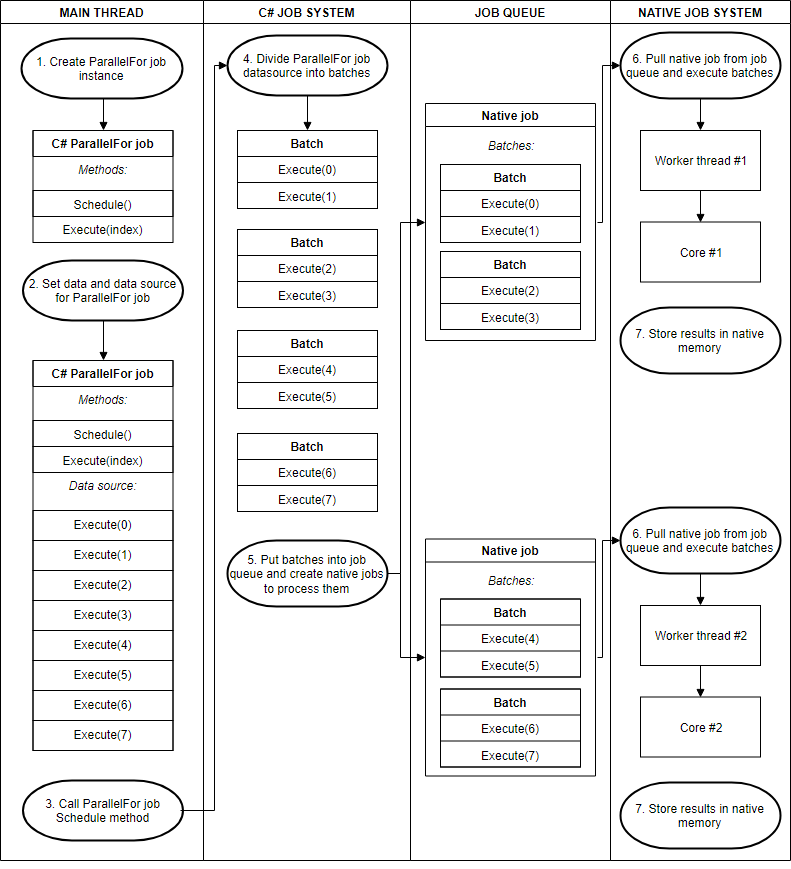
未执行的Batch也会被空闲的job窃取,每次窃取剩余的一半;
ParallelForTransform:
专门操作Transform的IJobParallelFor;