目录
连接和加载
》1.静态库是如何形成可执行程序的---弱化
• .symtab节 :SymbolTable符号表,就是源码里面那些函数名、变量名和代码的对应关系。
字符串表
只要记录起始、偏移量
char类型数组
ELF header 包含了理解整个文件所需的所有关键信息。
操作系统拿着ELF首先要判定这个是ELF格式
通过Magic随机值判定
[user1@iZ5waahoxw3q2bZ ~]$ readelf -h /usr/bin/ls
ELF Header:
  Magic:   7f 45 4c 46 02 01 01 00 00 00 00 00 00 00 00 00
  Class:                             ELF64
  Data:                              2's complement, little endian
  Version:                           1 (current)
  OS/ABI:                            UNIX - System V
  ABI Version:                       0
  Type:                              EXEC (Executable file)
  Machine:                           Advanced Micro Devices X86-64
  Version:                           0x1
  Entry point address:               0x4042d4
  Start of program headers:          64 (bytes into file)
  Start of section headers:          115696 (bytes into file)
  Flags:                             0x0
  Size of this header:               64 (bytes)
  Size of program headers:           56 (bytes)
  Number of program headers:         9
  Size of section headers:           64 (bytes)
  Number of section headers:         31
  Section header string table index: 30
Entry point address: 0x68c0----- 入口地址
静态链接
[user1@iZ5waahoxw3q2bZ 26-5-18.3]$ cat code.c
#include<stdio.h>

void run()
{
    printf("running...\n");
}
[user1@iZ5waahoxw3q2bZ 26-5-18.3]$ cat hello.c
#include<stdio.h>

void run();

int main()
{
    printf("hello world!\n");
    run();
    return 0;
}

[user1@iZ5waahoxw3q2bZ 26-5-18.3]$ gcc -c *.c
[user1@iZ5waahoxw3q2bZ 26-5-18.3]$ readelf -h code.o
ELF Header:
  Magic:   7f 45 4c 46 02 01 01 00 00 00 00 00 00 00 00 00
  Class:                             ELF64
  Data:                              2's complement, little endian
  Version:                           1 (current)
  OS/ABI:                            UNIX - System V
  ABI Version:                       0
  Type:                              REL (Relocatable file)
  Machine:                           Advanced Micro Devices X86-64
  Version:                           0x1
  Entry point address:               0x0
  Start of program headers:          0 (bytes into file)
  Start of section headers:          664 (bytes into file)
  Flags:                             0x0
  Size of this header:               64 (bytes)
  Size of program headers:           0 (bytes)
  Number of program headers:         0
  Size of section headers:           64 (bytes)
  Number of section headers:         13
  Section header string table index: 12
[user1@iZ5waahoxw3q2bZ 26-5-18.3]$ readelf -h hello.o
ELF Header:
  Magic:   7f 45 4c 46 02 01 01 00 00 00 00 00 00 00 00 00
  Class:                             ELF64
  Data:                              2's complement, little endian
  Version:                           1 (current)
  OS/ABI:                            UNIX - System V
  ABI Version:                       0
  Type:                              REL (Relocatable file)
  Machine:                           Advanced Micro Devices X86-64
  Version:                           0x1
  Entry point address:               0x0
  Start of program headers:          0 (bytes into file)
  Start of section headers:          728 (bytes into file)
  Flags:                             0x0
  Size of this header:               64 (bytes)
  Size of program headers:           0 (bytes)
  Number of program headers:         0
  Size of section headers:           64 (bytes)
  Number of section headers:         13
  Section header string table index: 12
[user1@iZ5waahoxw3q2bZ 26-5-18.3]$ readelf -S hello.o
There are 13 section headers, starting at offset 0x2d8:

Section Headers:
  [Nr] Name              Type             Address           Offset
       Size              EntSize          Flags  Link  Info  Align
  [ 0]                   NULL             0000000000000000  00000000
       0000000000000000  0000000000000000           0     0     0
  [ 1] .text             PROGBITS         0000000000000000  00000040
       000000000000001f  0000000000000000  AX       0     0     1
  [ 2] .rela.text        RELA             0000000000000000  00000210
       0000000000000048  0000000000000018   I      10     1     8
  [ 3] .data             PROGBITS         0000000000000000  0000005f
       0000000000000000  0000000000000000  WA       0     0     1
  [ 4] .bss              NOBITS           0000000000000000  0000005f
       0000000000000000  0000000000000000  WA       0     0     1
  [ 5] .rodata           PROGBITS         0000000000000000  0000005f
       000000000000000d  0000000000000000   A       0     0     1
  [ 6] .comment          PROGBITS         0000000000000000  0000006c
       000000000000002e  0000000000000001  MS       0     0     1
  [ 7] .note.GNU-stack   PROGBITS         0000000000000000  0000009a
       0000000000000000  0000000000000000           0     0     1
  [ 8] .eh_frame         PROGBITS         0000000000000000  000000a0
       0000000000000038  0000000000000000   A       0     0     8
  [ 9] .rela.eh_frame    RELA             0000000000000000  00000258
       0000000000000018  0000000000000018   I      10     8     8
  [10] .symtab           SYMTAB           0000000000000000  000000d8
       0000000000000120  0000000000000018          11     9     8
  [11] .strtab           STRTAB           0000000000000000  000001f8
       0000000000000017  0000000000000000           0     0     1
  [12] .shstrtab         STRTAB           0000000000000000  00000270
       0000000000000061  0000000000000000           0     0     1
Key to Flags:
  W (write), A (alloc), X (execute), M (merge), S (strings), I (info),
  L (link order), O (extra OS processing required), G (group), T (TLS),
  C (compressed), x (unknown), o (OS specific), E (exclude),
  l (large), p (processor specific)
[user1@iZ5waahoxw3q2bZ 26-5-18.3]$ readelf -S code.o
There are 13 section headers, starting at offset 0x298:

Section Headers:
  [Nr] Name              Type             Address           Offset
       Size              EntSize          Flags  Link  Info  Align
  [ 0]                   NULL             0000000000000000  00000000
       0000000000000000  0000000000000000           0     0     0
  [ 1] .text             PROGBITS         0000000000000000  00000040
       0000000000000010  0000000000000000  AX       0     0     1
  [ 2] .rela.text        RELA             0000000000000000  000001e8
       0000000000000030  0000000000000018   I      10     1     8
  [ 3] .data             PROGBITS         0000000000000000  00000050
       0000000000000000  0000000000000000  WA       0     0     1
  [ 4] .bss              NOBITS           0000000000000000  00000050
       0000000000000000  0000000000000000  WA       0     0     1
  [ 5] .rodata           PROGBITS         0000000000000000  00000050
       000000000000000b  0000000000000000   A       0     0     1
  [ 6] .comment          PROGBITS         0000000000000000  0000005b
       000000000000002e  0000000000000001  MS       0     0     1
  [ 7] .note.GNU-stack   PROGBITS         0000000000000000  00000089
       0000000000000000  0000000000000000           0     0     1
  [ 8] .eh_frame         PROGBITS         0000000000000000  00000090
       0000000000000038  0000000000000000   A       0     0     8
  [ 9] .rela.eh_frame    RELA             0000000000000000  00000218
       0000000000000018  0000000000000018   I      10     8     8
  [10] .symtab           SYMTAB           0000000000000000  000000c8
       0000000000000108  0000000000000018          11     9     8
  [11] .strtab           STRTAB           0000000000000000  000001d0
       0000000000000011  0000000000000000           0     0     1
  [12] .shstrtab         STRTAB           0000000000000000  00000230
       0000000000000061  0000000000000000           0     0     1
Key to Flags:
  W (write), A (alloc), X (execute), M (merge), S (strings), I (info),
  L (link order), O (extra OS processing required), G (group), T (TLS),
  C (compressed), x (unknown), o (OS specific), E (exclude),
  l (large), p (processor specific)
[user1@iZ5waahoxw3q2bZ 26-5-18.3]$ gcc -o main.exe *.o
[user1@iZ5waahoxw3q2bZ 26-5-18.3]$ ll
total 28
-rw-rw-r-- 1 user1 user1   62 May 17 15:44 code.c
-rw-rw-r-- 1 user1 user1 1496 May 17 15:45 code.o
-rw-rw-r-- 1 user1 user1  103 May 17 15:44 hello.c
-rw-rw-r-- 1 user1 user1 1560 May 17 15:45 hello.o
-rwxrwxr-x 1 user1 user1 8504 May 17 15:46 main.exe
[user1@iZ5waahoxw3q2bZ 26-5-18.3]$ ./main.exe
hello world!
running...
•⽆论是自己的.o,还是静态库中的.o,本质都是把.o⽂件进行连接的过程
• 所以:研究静态链接,本质就是研究.o是如何链接的
objdump对目标文件进行反汇编
objdump -d命令:将代码段(.text)进行反汇编查看
[user1@iZ5waahoxw3q2bZ 26-5-18.3]$ objdump -d code.o

code.o:     file format elf64-x86-64


Disassembly of section .text:

0000000000000000 <run>:
   0:	55                   	push   %rbp
   1:	48 89 e5             	mov    %rsp,%rbp
   4:	bf 00 00 00 00       	mov    $0x0,%edi
   9:	e8 00 00 00 00       	callq  e <run+0xe>
   e:	5d                   	pop    %rbp
   f:	c3                   	retq
[user1@iZ5waahoxw3q2bZ 26-5-18.3]$ objdump -d code.o >code.s
[user1@iZ5waahoxw3q2bZ 26-5-18.3]$ objdump -d hello.o > hello.s
[user1@iZ5waahoxw3q2bZ 26-5-18.3]$ ll
total 36
-rw-rw-r-- 1 user1 user1   62 May 17 15:44 code.c
-rw-rw-r-- 1 user1 user1 1496 May 17 15:45 code.o
-rw-rw-r-- 1 user1 user1  348 May 17 15:48 code.s
-rw-rw-r-- 1 user1 user1  103 May 17 15:44 hello.c
-rw-rw-r-- 1 user1 user1 1560 May 17 15:45 hello.o
-rw-rw-r-- 1 user1 user1  491 May 17 15:49 hello.s
-rwxrwxr-x 1 user1 user1 8504 May 17 15:46 main.exe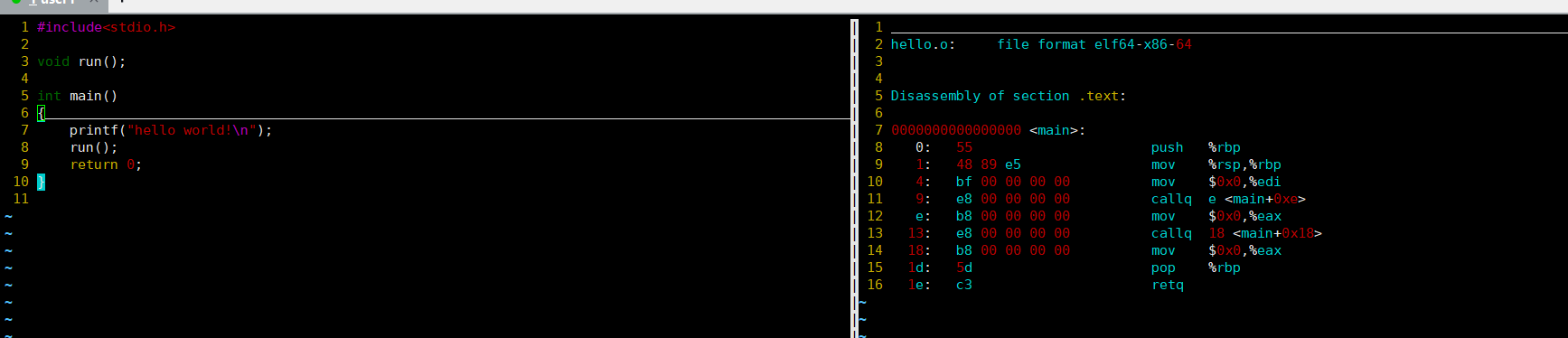
我们可以看到这⾥的call指令,它们分别对应之前调用的printf和run函数,但是你会发现他们的跳转地址都被设成了0。那这是为什么呢?
其实就是在编译hello.c 的时候,编译器是完全不知道printf 和run 函数的存在的,⽐如他们
位于内存的哪个区块,代码长什么样都是不知道的。因此,编译器只能将这两个函数的跳转地址先暂时设为0。
**这个地址会在哪个时候被修正?链接的时候!**为了让链接器将来在链接时能够正确定位到这些被修正的地址,在代码块(.data)中还存在⼀个重定位表,这张表将来在链接的时候,就会根据表⾥记录的地址将其修正。
[user1@iZ5waahoxw3q2bZ 26-5-18.3]$ readelf -s code.o

Symbol table '.symtab' contains 11 entries:
   Num:    Value          Size Type    Bind   Vis      Ndx Name
     0: 0000000000000000     0 NOTYPE  LOCAL  DEFAULT  UND
     1: 0000000000000000     0 FILE    LOCAL  DEFAULT  ABS code.c
     2: 0000000000000000     0 SECTION LOCAL  DEFAULT    1
     3: 0000000000000000     0 SECTION LOCAL  DEFAULT    3
     4: 0000000000000000     0 SECTION LOCAL  DEFAULT    4
     5: 0000000000000000     0 SECTION LOCAL  DEFAULT    5
     6: 0000000000000000     0 SECTION LOCAL  DEFAULT    7
     7: 0000000000000000     0 SECTION LOCAL  DEFAULT    8
     8: 0000000000000000     0 SECTION LOCAL  DEFAULT    6
     9: 0000000000000000    16 FUNC    GLOBAL DEFAULT    1 run
    10: 0000000000000000     0 NOTYPE  GLOBAL DEFAULT  UND puts
[user1@iZ5waahoxw3q2bZ 26-5-18.3]$ readelf -s hello.o

Symbol table '.symtab' contains 12 entries:
   Num:    Value          Size Type    Bind   Vis      Ndx Name
     0: 0000000000000000     0 NOTYPE  LOCAL  DEFAULT  UND
     1: 0000000000000000     0 FILE    LOCAL  DEFAULT  ABS hello.c
     2: 0000000000000000     0 SECTION LOCAL  DEFAULT    1
     3: 0000000000000000     0 SECTION LOCAL  DEFAULT    3
     4: 0000000000000000     0 SECTION LOCAL  DEFAULT    4
     5: 0000000000000000     0 SECTION LOCAL  DEFAULT    5
     6: 0000000000000000     0 SECTION LOCAL  DEFAULT    7
     7: 0000000000000000     0 SECTION LOCAL  DEFAULT    8
     8: 0000000000000000     0 SECTION LOCAL  DEFAULT    6
     9: 0000000000000000    31 FUNC    GLOBAL DEFAULT    1 main
    10: 0000000000000000     0 NOTYPE  GLOBAL DEFAULT  UND puts
    11: 0000000000000000     0 NOTYPE  GLOBAL DEFAULT  UND run
当两个.o还没有链接,所以他们的方法都是未定义的。所以我们将来怎么讲两个.o进行链接?
hello.o拿着自己UND符号去找能找到一个定义的run函数。两个.o的puts又跟库函数进行链接找到。
其实就是拿自己未定义的符号去其他区域找。
[user1@iZ5waahoxw3q2bZ 26-5-18.3]$ readelf -s main.exe

Symbol table '.dynsym' contains 4 entries:
   Num:    Value          Size Type    Bind   Vis      Ndx Name
     0: 0000000000000000     0 NOTYPE  LOCAL  DEFAULT  UND
     1: 0000000000000000     0 FUNC    GLOBAL DEFAULT  UND puts@GLIBC_2.2.5 (2)
     2: 0000000000000000     0 FUNC    GLOBAL DEFAULT  UND __libc_start_main@GLIBC_2.2.5 (2)
     3: 0000000000000000     0 NOTYPE  WEAK   DEFAULT  UND __gmon_start__

Symbol table '.symtab' contains 66 entries:
   Num:    Value          Size Type    Bind   Vis      Ndx Name
     0: 0000000000000000     0 NOTYPE  LOCAL  DEFAULT  UND
     1: 0000000000400238     0 SECTION LOCAL  DEFAULT    1
     2: 0000000000400254     0 SECTION LOCAL  DEFAULT    2
     3: 0000000000400274     0 SECTION LOCAL  DEFAULT    3
     4: 0000000000400298     0 SECTION LOCAL  DEFAULT    4
     5: 00000000004002b8     0 SECTION LOCAL  DEFAULT    5
     6: 0000000000400318     0 SECTION LOCAL  DEFAULT    6
     7: 0000000000400356     0 SECTION LOCAL  DEFAULT    7
     8: 0000000000400360     0 SECTION LOCAL  DEFAULT    8
     9: 0000000000400380     0 SECTION LOCAL  DEFAULT    9
    10: 0000000000400398     0 SECTION LOCAL  DEFAULT   10
    11: 00000000004003c8     0 SECTION LOCAL  DEFAULT   11
    12: 00000000004003f0     0 SECTION LOCAL  DEFAULT   12
    13: 0000000000400420     0 SECTION LOCAL  DEFAULT   13
    14: 0000000000400430     0 SECTION LOCAL  DEFAULT   14
    15: 00000000004005c4     0 SECTION LOCAL  DEFAULT   15
    16: 00000000004005d0     0 SECTION LOCAL  DEFAULT   16
    17: 00000000004005f8     0 SECTION LOCAL  DEFAULT   17
    18: 0000000000400638     0 SECTION LOCAL  DEFAULT   18
    19: 0000000000600e10     0 SECTION LOCAL  DEFAULT   19
    20: 0000000000600e18     0 SECTION LOCAL  DEFAULT   20
    21: 0000000000600e20     0 SECTION LOCAL  DEFAULT   21
    22: 0000000000600e28     0 SECTION LOCAL  DEFAULT   22
    23: 0000000000600ff8     0 SECTION LOCAL  DEFAULT   23
    24: 0000000000601000     0 SECTION LOCAL  DEFAULT   24
    25: 0000000000601028     0 SECTION LOCAL  DEFAULT   25
    26: 000000000060102c     0 SECTION LOCAL  DEFAULT   26
    27: 0000000000000000     0 SECTION LOCAL  DEFAULT   27
    28: 0000000000000000     0 FILE    LOCAL  DEFAULT  ABS crtstuff.c
    29: 0000000000600e20     0 OBJECT  LOCAL  DEFAULT   21 __JCR_LIST__
    30: 0000000000400460     0 FUNC    LOCAL  DEFAULT   14 deregister_tm_clones
    31: 0000000000400490     0 FUNC    LOCAL  DEFAULT   14 register_tm_clones
    32: 00000000004004d0     0 FUNC    LOCAL  DEFAULT   14 __do_global_dtors_aux
    33: 000000000060102c     1 OBJECT  LOCAL  DEFAULT   26 completed.6355
    34: 0000000000600e18     0 OBJECT  LOCAL  DEFAULT   20 __do_global_dtors_aux_fin
    35: 00000000004004f0     0 FUNC    LOCAL  DEFAULT   14 frame_dummy
    36: 0000000000600e10     0 OBJECT  LOCAL  DEFAULT   19 __frame_dummy_init_array_
    37: 0000000000000000     0 FILE    LOCAL  DEFAULT  ABS code.c
    38: 0000000000000000     0 FILE    LOCAL  DEFAULT  ABS hello.c
    39: 0000000000000000     0 FILE    LOCAL  DEFAULT  ABS crtstuff.c
    40: 0000000000400748     0 OBJECT  LOCAL  DEFAULT   18 __FRAME_END__
    41: 0000000000600e20     0 OBJECT  LOCAL  DEFAULT   21 __JCR_END__
    42: 0000000000000000     0 FILE    LOCAL  DEFAULT  ABS
    43: 0000000000600e18     0 NOTYPE  LOCAL  DEFAULT   19 __init_array_end
    44: 0000000000600e28     0 OBJECT  LOCAL  DEFAULT   22 _DYNAMIC
    45: 0000000000600e10     0 NOTYPE  LOCAL  DEFAULT   19 __init_array_start
    46: 00000000004005f8     0 NOTYPE  LOCAL  DEFAULT   17 __GNU_EH_FRAME_HDR
    47: 0000000000601000     0 OBJECT  LOCAL  DEFAULT   24 _GLOBAL_OFFSET_TABLE_
    48: 00000000004005c0     2 FUNC    GLOBAL DEFAULT   14 __libc_csu_fini
    49: 0000000000601028     0 NOTYPE  WEAK   DEFAULT   25 data_start
    50: 0000000000000000     0 FUNC    GLOBAL DEFAULT  UND puts@@GLIBC_2.2.5
    51: 000000000060102c     0 NOTYPE  GLOBAL DEFAULT   25 _edata
    52: 000000000040051d    16 FUNC    GLOBAL DEFAULT   14 run
    53: 00000000004005c4     0 FUNC    GLOBAL DEFAULT   15 _fini
    54: 0000000000000000     0 FUNC    GLOBAL DEFAULT  UND __libc_start_main@@GLIBC_
    55: 0000000000601028     0 NOTYPE  GLOBAL DEFAULT   25 __data_start
    56: 0000000000000000     0 NOTYPE  WEAK   DEFAULT  UND __gmon_start__
    57: 00000000004005d8     0 OBJECT  GLOBAL HIDDEN    16 __dso_handle
    58: 00000000004005d0     4 OBJECT  GLOBAL DEFAULT   16 _IO_stdin_used
    59: 0000000000400550   101 FUNC    GLOBAL DEFAULT   14 __libc_csu_init
    60: 0000000000601030     0 NOTYPE  GLOBAL DEFAULT   26 _end
    61: 0000000000400430     0 FUNC    GLOBAL DEFAULT   14 _start
    62: 000000000060102c     0 NOTYPE  GLOBAL DEFAULT   26 __bss_start
    63: 000000000040052d    31 FUNC    GLOBAL DEFAULT   14 main
    64: 0000000000601030     0 OBJECT  GLOBAL HIDDEN    25 __TMC_END__
    65: 00000000004003c8     0 FUNC    GLOBAL DEFAULT   11 _init
两个.o进行合并之后,在最终的可执行程序中,就找到了run
0000000000001149:其实是地址,后⾯说FUNC:表示run符号类型是个函数16:就是run函数所在的section被合并最终的那⼀个section中了,16就是下标
**最终:
- 两个.o的代码段合并到了⼀起,并进行了统⼀的编址
- 链接的时候,会修改.o中没有确定的函数地址,在合并完成之后,进行相关call地址,完成代码调用**
静态链接就是把库中的.o进行合并,和上述过程⼀样
所以链接其实就是将编译之后的所有目标文件连同用到的⼀些静态库运行时库组合,拼装成⼀个独立的可执行文件 。其中就包括我们之前提到的地址修正,当所有模块组合在⼀起之后,链接器会根据我们的.o⽂件或者静态库中的重定位表找到那些需要被重定位的函数全局变量,从⽽修正它们的地址。这其实就是静态链接的过程。
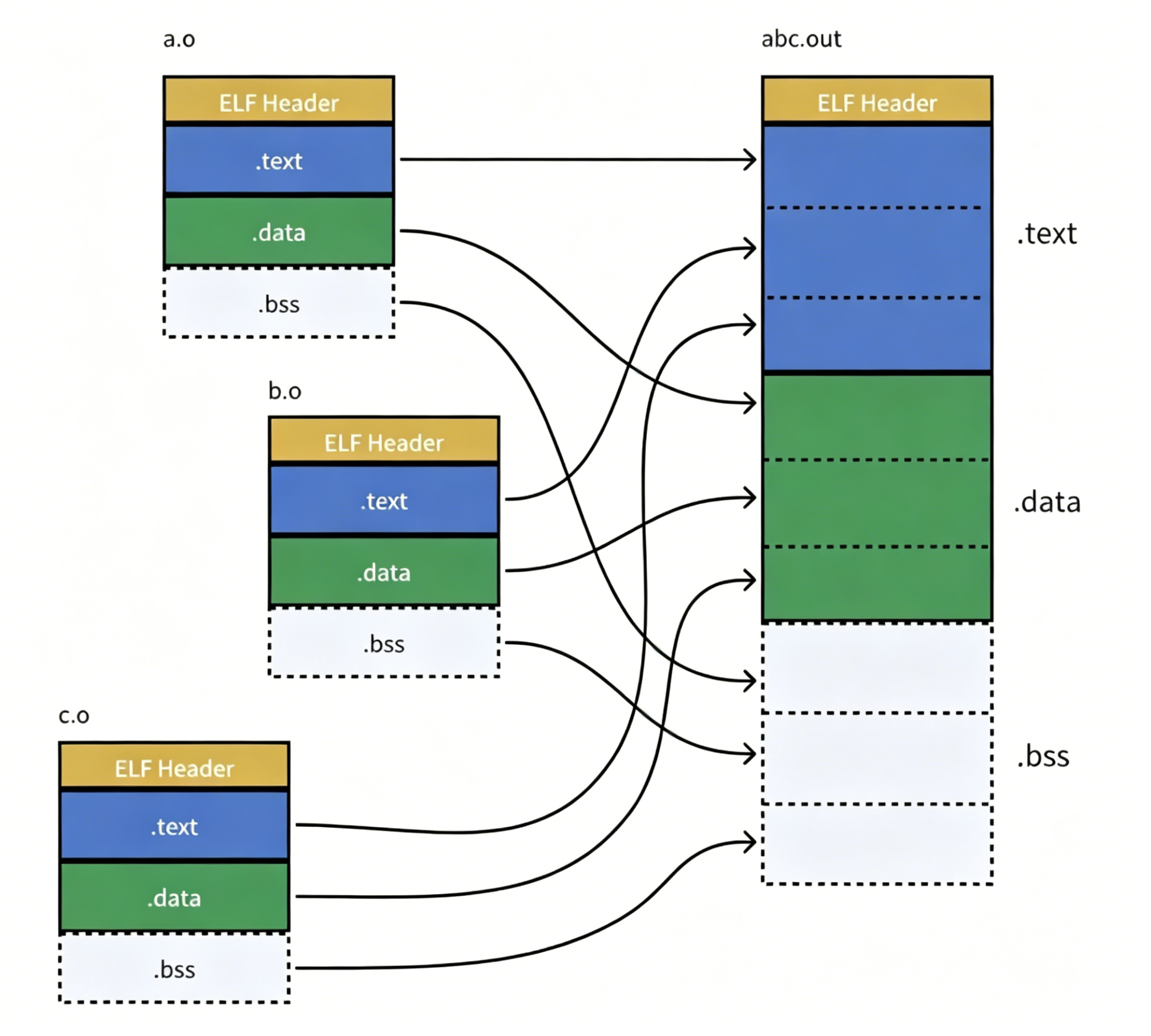
所以,链接过程中会涉及到对.o中外部符号进行地址重定位。这是一种链接重定位
所以.o为什么叫做可重定位目标文件,.o链接时地址会被重新修改
感谢你的观看,期待我们下次再见!