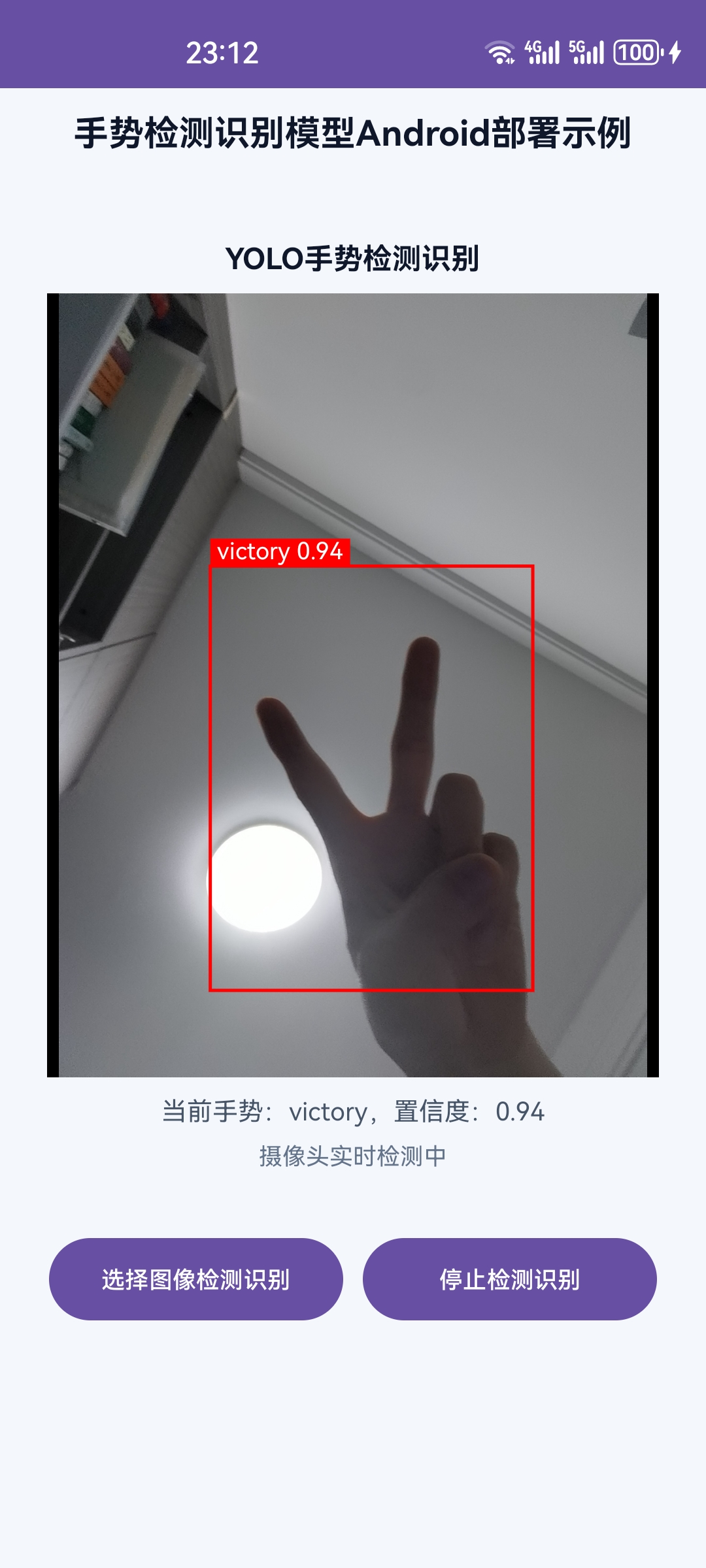
本文介绍如何将训练好的YOLO手势识别模型部署到Android端。
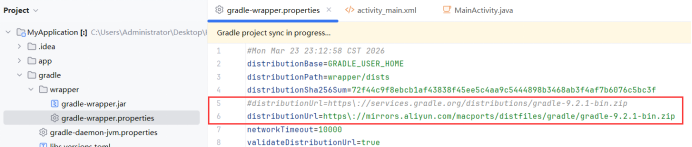
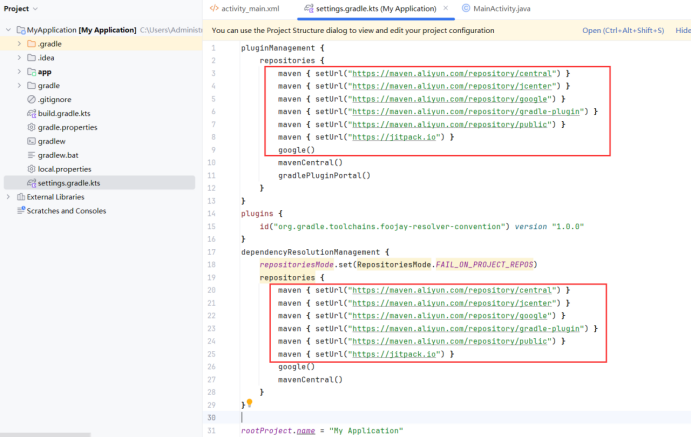
step1 新建Android工程,若加载速度过慢,更换国内镜像源,修改如下。
修改-->gradle/wrapper/gradle-wrapper.properties
python
distributionUrl=https\://mirrors.aliyun.com/macports/distfiles/gradle/gradle-9.2.1-bin.zip修改-->settings.gradle.kts
python
        maven { setUrl("https://maven.aliyun.com/repository/central") }
        maven { setUrl("https://maven.aliyun.com/repository/jcenter") }
        maven { setUrl("https://maven.aliyun.com/repository/google") }
        maven { setUrl("https://maven.aliyun.com/repository/gradle-plugin") }
        maven { setUrl("https://maven.aliyun.com/repository/public") }
        maven { setUrl("https://jitpack.io") }
        google()
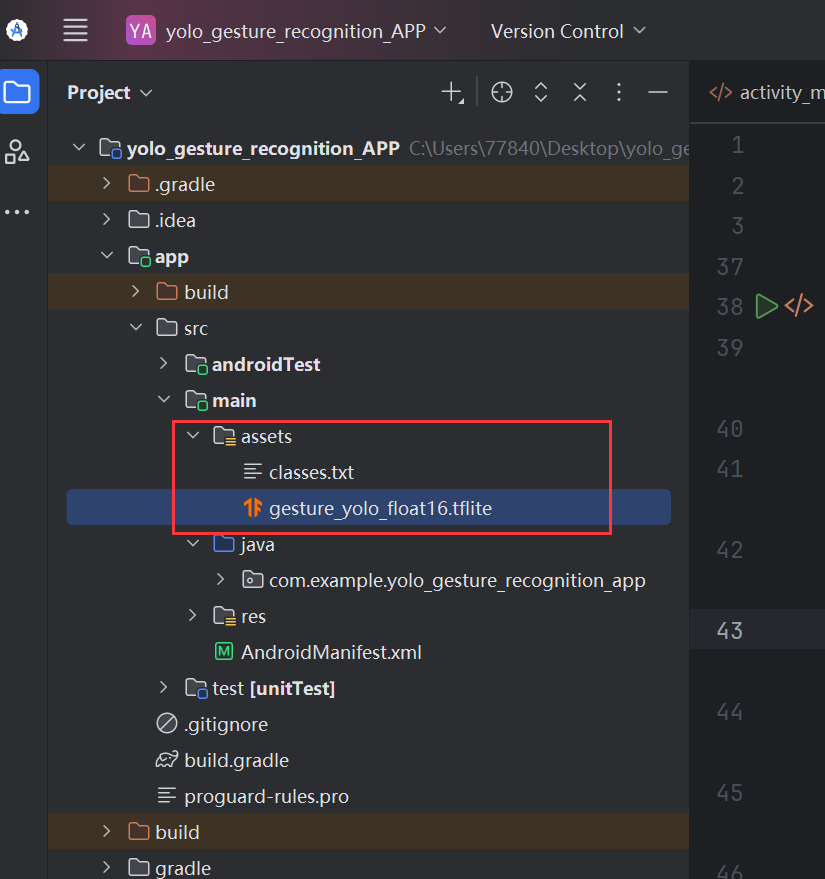
step2: 将转换好tflite格式的yolo模型及标签文件移植到Android工程中的如下目录。
step3: 编写UI界面activity_main.xml
XML
<?xml version="1.0" encoding="utf-8"?>
<ScrollView xmlns:android="http://schemas.android.com/apk/res/android"
    xmlns:app="http://schemas.android.com/apk/res-auto"
    android:layout_width="match_parent"
    android:layout_height="match_parent"
    android:background="#F4F7FB"
    android:fillViewport="true"
    android:overScrollMode="never">

    <LinearLayout
        android:layout_width="match_parent"
        android:layout_height="wrap_content"
        android:orientation="vertical"
        android:paddingStart="12dp"
        android:paddingTop="10dp"
        android:paddingEnd="12dp"
        android:paddingBottom="12dp">

        <TextView
            android:layout_width="wrap_content"
            android:layout_height="wrap_content"
            android:layout_gravity="center_horizontal"
            android:text="手势检测识别模型Android部署示例"
            android:textColor="#0F172A"
            android:textSize="18sp"
            android:textStyle="bold" />

            <LinearLayout
                android:layout_width="match_parent"
                android:layout_height="wrap_content"
                android:orientation="vertical"
                android:padding="12dp"
                android:layout_marginTop="30dp">

                <TextView
                    android:layout_width="wrap_content"
                    android:layout_height="wrap_content"
                    android:layout_gravity="center_horizontal"
                    android:text="YOLO手势检测识别"
                    android:textColor="#0F172A"
                    android:textSize="15sp"
                    android:textStyle="bold" />

                <FrameLayout
                    android:layout_width="match_parent"
                    android:layout_height="400dp"
                    android:layout_marginTop="8dp"
                    android:background="#E2E8F0">

                    <!-- 用于显示选择的图片 -->
                    <ImageView
                        android:id="@+id/image_view"
                        android:layout_width="match_parent"
                        android:layout_height="match_parent"
                        android:scaleType="fitCenter"
                        android:visibility="gone" />

                    <!-- 用于显示摄像头预览 -->
                    <androidx.camera.view.PreviewView
                        android:id="@+id/preview_view"
                        android:layout_width="match_parent"
                        android:layout_height="match_parent"
                        android:visibility="gone" />

                    <!-- 检测框绘制层 -->
                    <com.example.yolo_gesture_recognition_app.DetectionOverlayView
                        android:id="@+id/detection_overlay"
                        android:layout_width="match_parent"
                        android:layout_height="match_parent" />

                </FrameLayout>

                <TextView
                    android:id="@+id/tv_gesture"
                    android:layout_width="wrap_content"
                    android:layout_height="wrap_content"
                    android:layout_gravity="center_horizontal"
                    android:layout_marginTop="8dp"
                    android:text="当前手势:等待识别"
                    android:textColor="#475569"
                    android:textSize="13sp" />

                <TextView
                    android:id="@+id/tv_gesture_hint"
                    android:layout_width="match_parent"
                    android:layout_height="wrap_content"
                    android:layout_marginTop="6dp"
                    android:gravity="center"
                    android:text="请允许相机权限后,将手放在画面中央"
                    android:textColor="#64748B"
                    android:textSize="12sp" />
                <LinearLayout
                    android:layout_width="match_parent"
                    android:layout_height="50dp"
                    android:orientation="horizontal"
                    android:gravity="center"
                    android:layout_marginTop="30dp">
                    <Button
                        android:id="@+id/btn_select_img_rec"
                        android:layout_width="150dp"
                        android:layout_height="match_parent"
                        android:text="选择图像检测识别"
                        android:textSize="12sp"/>

                    <Button
                        android:id="@+id/camera_rel_tim_rec"
                        android:layout_width="150dp"
                        android:layout_height="match_parent"
                        android:layout_marginLeft="10dp"
                        android:text="摄像头检测识别"
                        android:textSize="12sp"/>

                </LinearLayout>
            </LinearLayout>


    </LinearLayout>
</ScrollView>
step4: 添加权限 AndroidManifest.xml
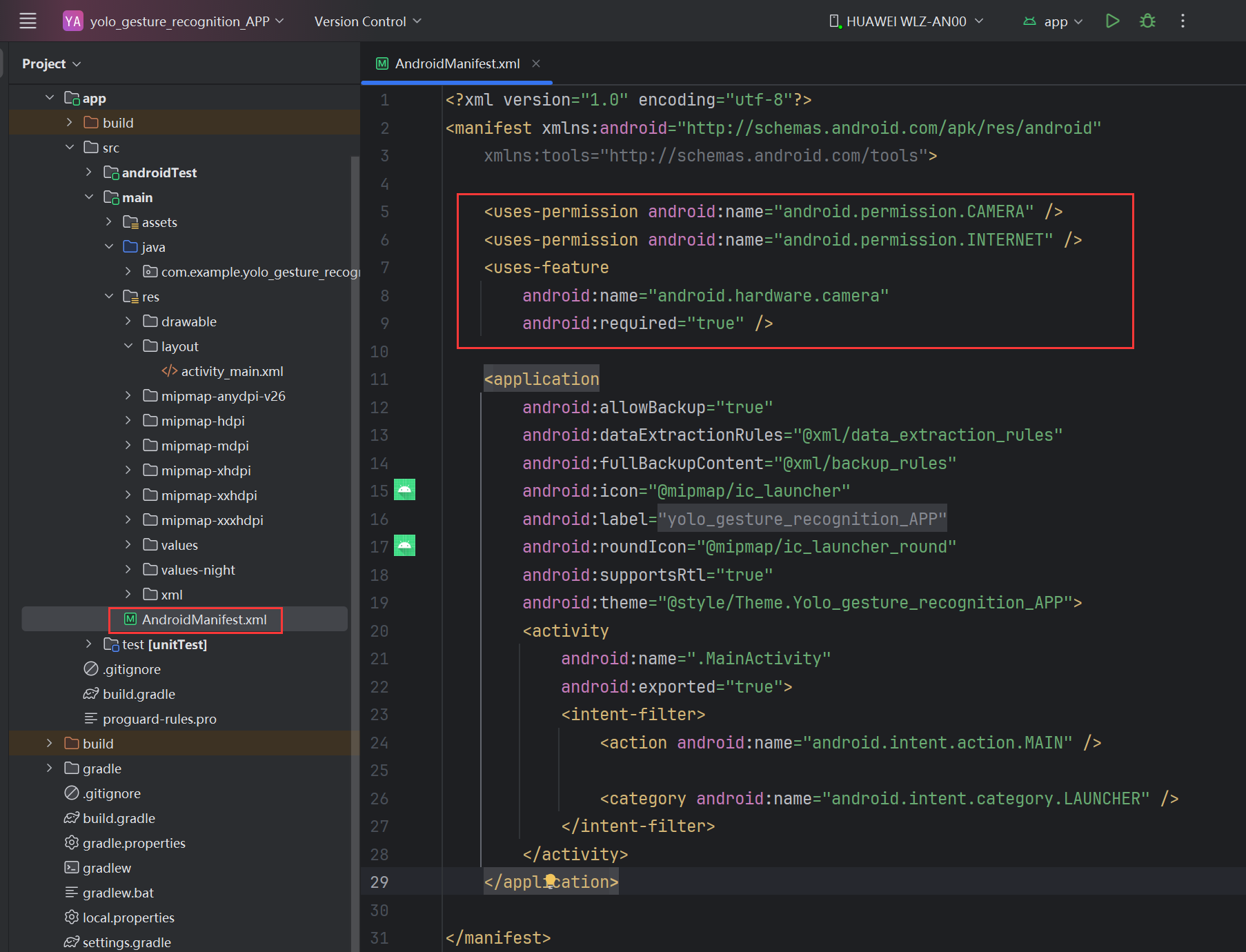
XML
    <uses-permission android:name="android.permission.CAMERA" />
    <uses-permission android:name="android.permission.INTERNET" />
    <uses-feature
        android:name="android.hardware.camera"
        android:required="true" />
step5: 添加依赖
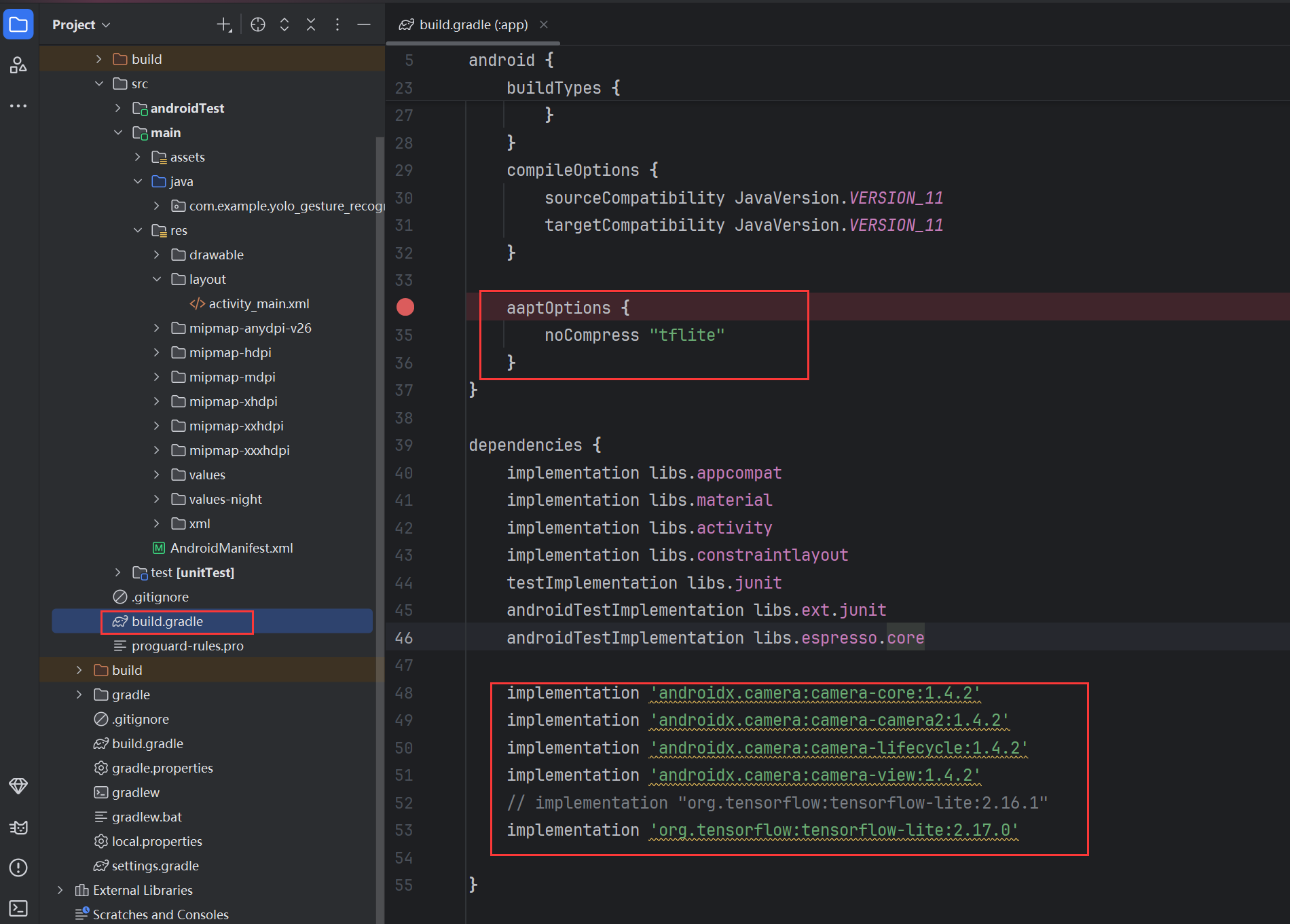
XML
    aaptOptions {
        noCompress "tflite"
    }
XML
    implementation 'androidx.camera:camera-core:1.4.2'
    implementation 'androidx.camera:camera-camera2:1.4.2'
    implementation 'androidx.camera:camera-lifecycle:1.4.2'
    implementation 'androidx.camera:camera-view:1.4.2'
    // implementation "org.tensorflow:tensorflow-lite:2.16.1"
    implementation 'org.tensorflow:tensorflow-lite:2.17.0'
step6: 编写Java代码
①新建DetectionOverlayView.java类
java
package com.example.yolo_gesture_recognition_app;


import android.content.Context;
import android.graphics.Canvas;
import android.graphics.Color;
import android.graphics.Paint;
import android.graphics.RectF;
import android.util.AttributeSet;
import android.view.View;

import java.util.ArrayList;
import java.util.List;

public class DetectionOverlayView extends View {

    private final List<Detection> detections = new ArrayList<>();

    // 检测框坐标基于原始图片/视频帧尺寸,绘制时需要按 View 尺寸等比例缩放。
    private int imageWidth = 1;
    private int imageHeight = 1;

    private final Paint boxPaint = new Paint();
    private final Paint textPaint = new Paint();
    private final Paint textBgPaint = new Paint();

    public DetectionOverlayView(Context context) {
        super(context);
        init();
    }

    public DetectionOverlayView(Context context, AttributeSet attrs) {
        super(context, attrs);
        init();
    }

    private void init() {
        boxPaint.setColor(Color.RED);
        boxPaint.setStyle(Paint.Style.STROKE);
        boxPaint.setStrokeWidth(5f);
        boxPaint.setAntiAlias(true);

        textPaint.setColor(Color.WHITE);
        textPaint.setTextSize(36f);
        textPaint.setAntiAlias(true);
        textPaint.setStyle(Paint.Style.FILL);

        textBgPaint.setColor(Color.RED);
        textBgPaint.setStyle(Paint.Style.FILL);
        textBgPaint.setAntiAlias(true);
    }

    public void setResults(List<Detection> results, int imgWidth, int imgHeight) {
        // 每次推理完成后刷新当前帧结果,避免上一帧的框残留在画面上。
        detections.clear();
        if (results != null) {
            detections.addAll(results);
        }

        imageWidth = Math.max(1, imgWidth);
        imageHeight = Math.max(1, imgHeight);

        postInvalidate();
    }

    public void clear() {
        detections.clear();
        postInvalidate();
    }

    @Override
    protected void onDraw(Canvas canvas) {
        super.onDraw(canvas);

        if (detections.isEmpty()) {
            return;
        }

        float viewWidth = getWidth();
        float viewHeight = getHeight();

        // 与 ImageView/PreviewView 的 fitCenter 保持一致:等比例缩放并居中留边。
        float scale = Math.min(viewWidth / imageWidth, viewHeight / imageHeight);
        float offsetX = (viewWidth - imageWidth * scale) / 2f;
        float offsetY = (viewHeight - imageHeight * scale) / 2f;

        for (Detection det : detections) {
            RectF src = det.box;

            // 模型结果坐标先乘缩放比例,再加上居中偏移,得到屏幕上的绘制坐标。
            RectF dst = new RectF(
                    src.left * scale + offsetX,
                    src.top * scale + offsetY,
                    src.right * scale + offsetX,
                    src.bottom * scale + offsetY
            );

            canvas.drawRect(dst, boxPaint);

            String text = det.label + " " + String.format("%.2f", det.score);

            float textWidth = textPaint.measureText(text);
            float textHeight = 42f;

            float bgLeft = dst.left;
            float bgTop = Math.max(0, dst.top - textHeight);
            float bgRight = dst.left + textWidth + 20f;
            float bgBottom = bgTop + textHeight;

            canvas.drawRect(bgLeft, bgTop, bgRight, bgBottom, textBgPaint);
            canvas.drawText(text, bgLeft + 10f, bgBottom - 10f, textPaint);
        }
    }
}
②新建Detection.java类
java
package com.example.yolo_gesture_recognition_app;


import android.graphics.RectF;

public class Detection {
    public RectF box;
    public float score;
    public int classId;
    public String label;

    public Detection(RectF box, float score, int classId, String label) {
        this.box = box;
        this.score = score;
        this.classId = classId;
        this.label = label;
    }
}
③新建YoloTFLiteDetector.java类
java
package com.example.yolo_gesture_recognition_app;

import android.content.Context;
import android.graphics.Bitmap;
import android.graphics.RectF;
import android.util.Log;

import org.tensorflow.lite.Interpreter;
import org.tensorflow.lite.Tensor;

import java.io.BufferedReader;
import java.io.ByteArrayOutputStream;
import java.io.InputStream;
import java.io.InputStreamReader;
import java.nio.ByteBuffer;
import java.nio.ByteOrder;
import java.util.ArrayList;
import java.util.Arrays;
import java.util.List;

public class YoloTFLiteDetector {

    private static final String TAG = "YoloTFLiteDetector";

    private final Interpreter interpreter;
    private final List<String> labels = new ArrayList<>();

    private int inputWidth = 320;
    private int inputHeight = 320;

    private final float confThreshold = 0.45f;
    private final float iouThreshold = 0.45f;
    private final int maxDetections = 20;

    public YoloTFLiteDetector(Context context, String modelName, String labelName) throws Exception {
        Interpreter.Options options = new Interpreter.Options();
        options.setNumThreads(4);

        interpreter = new Interpreter(loadModelFile(context, modelName), options);

        loadLabels(context, labelName);

        printModelInfo();
    }

    private void printModelInfo() {
        Tensor inputTensor = interpreter.getInputTensor(0);
        int[] inputShape = inputTensor.shape();

        Log.d(TAG, "Input shape: " + Arrays.toString(inputShape));
        Log.d(TAG, "Input type: " + inputTensor.dataType());

        if (inputShape.length == 4) {
            // TFLite 常见格式:[1, height, width, 3]
            inputHeight = inputShape[1];
            inputWidth = inputShape[2];
        }

        Tensor outputTensor = interpreter.getOutputTensor(0);
        Log.d(TAG, "Output shape: " + Arrays.toString(outputTensor.shape()));
        Log.d(TAG, "Output type: " + outputTensor.dataType());

        Log.d(TAG, "Labels size: " + labels.size());
        for (int i = 0; i < labels.size(); i++) {
            Log.d(TAG, "label[" + i + "] = " + labels.get(i));
        }
    }

    private ByteBuffer loadModelFile(Context context, String modelName) throws Exception {
        // 不使用 openFd(),避免 tflite 被压缩或打包方式变化时无法拿到文件描述符。
        try (InputStream inputStream = context.getAssets().open(modelName);
             ByteArrayOutputStream outputStream = new ByteArrayOutputStream()) {
            byte[] buffer = new byte[16 * 1024];
            int bytesRead;

            while ((bytesRead = inputStream.read(buffer)) != -1) {
                outputStream.write(buffer, 0, bytesRead);
            }

            byte[] modelBytes = outputStream.toByteArray();
            ByteBuffer modelBuffer = ByteBuffer.allocateDirect(modelBytes.length);
            modelBuffer.order(ByteOrder.nativeOrder());
            modelBuffer.put(modelBytes);
            modelBuffer.rewind();

            return modelBuffer;
        }
    }

    private void loadLabels(Context context, String labelName) throws Exception {
        labels.clear();

        BufferedReader reader = new BufferedReader(
                new InputStreamReader(context.getAssets().open(labelName))
        );

        String line;
        while ((line = reader.readLine()) != null) {
            line = line.trim();

            if (!line.isEmpty()) {
                labels.add(line);
            }
        }

        reader.close();
    }

    public List<Detection> detect(Bitmap bitmap) {
        List<Detection> results = new ArrayList<>();

        if (bitmap == null) {
            return results;
        }

        int originalWidth = bitmap.getWidth();
        int originalHeight = bitmap.getHeight();

        Bitmap inputBitmap = Bitmap.createScaledBitmap(bitmap, inputWidth, inputHeight, true);

        ByteBuffer inputBuffer = bitmapToFloatBuffer(inputBitmap);

        int[] outputShape = interpreter.getOutputTensor(0).shape();

        Log.d(TAG, "Current output shape: " + Arrays.toString(outputShape));

        if (outputShape.length != 3) {
            Log.e(TAG, "不支持的输出维度: " + Arrays.toString(outputShape));
            return results;
        }

        int dim1 = outputShape[1];
        int dim2 = outputShape[2];

        float[][][] output = new float[outputShape[0]][dim1][dim2];

        interpreter.run(inputBuffer, output);

        int yoloVectorSize = 4 + labels.size();
        int yoloVectorSizeWithObjectness = 5 + labels.size();

        // 兼容 YOLO raw 输出,例如当前模型:[1, 10, 2100] = [1, 4 + 6 类, boxes]
        if (dim1 == yoloVectorSize) {
            parseYoloOutput(output, results, originalWidth, originalHeight, true, false);
        } else if (dim2 == yoloVectorSize) {
            parseYoloOutput(output, results, originalWidth, originalHeight, false, false);
        }
        // 兼容 YOLOv5/部分导出格式:[1, 11, boxes] 或 [1, boxes, 11],包含 objectness
        else if (dim1 == yoloVectorSizeWithObjectness) {
            parseYoloOutput(output, results, originalWidth, originalHeight, true, true);
        } else if (dim2 == yoloVectorSizeWithObjectness) {
            parseYoloOutput(output, results, originalWidth, originalHeight, false, true);
        }
        // 兼容 [1, 300, 6]
        else if (dim2 == 6) {
            parseOutput300x6(output, results, originalWidth, originalHeight);
        }
        // 兼容 [1, 6, 300]
        else if (dim1 == 6) {
            parseOutput6x300(output, results, originalWidth, originalHeight);
        } else {
            Log.e(TAG, "当前代码不支持该输出格式: " + Arrays.toString(outputShape));
        }

        results = nonMaxSuppression(results);

        Log.d(TAG, "检测结果数量: " + results.size());

        return results;
    }

    private void parseYoloOutput(
            float[][][] output,
            List<Detection> results,
            int originalWidth,
            int originalHeight,
            boolean channelsFirst,
            boolean hasObjectness
    ) {
        int numDetections = channelsFirst ? output[0][0].length : output[0].length;
        int classOffset = hasObjectness ? 5 : 4;

        for (int i = 0; i < numDetections; i++) {
            float centerX = getYoloValue(output, channelsFirst, 0, i);
            float centerY = getYoloValue(output, channelsFirst, 1, i);
            float width = getYoloValue(output, channelsFirst, 2, i);
            float height = getYoloValue(output, channelsFirst, 3, i);

            if (width <= 0 || height <= 0) {
                continue;
            }

            float objectness = hasObjectness
                    ? getYoloValue(output, channelsFirst, 4, i)
                    : 1.0f;

            int bestClassId = -1;
            float bestScore = 0.0f;

            for (int classId = 0; classId < labels.size(); classId++) {
                float classScore = getYoloValue(output, channelsFirst, classOffset + classId, i);
                float score = objectness * classScore;

                if (score > bestScore) {
                    bestScore = score;
                    bestClassId = classId;
                }
            }

            if (bestClassId < 0) {
                continue;
            }

            float x1 = centerX - width / 2.0f;
            float y1 = centerY - height / 2.0f;
            float x2 = centerX + width / 2.0f;
            float y2 = centerY + height / 2.0f;

            addDetection(
                    results,
                    x1,
                    y1,
                    x2,
                    y2,
                    bestScore,
                    bestClassId,
                    originalWidth,
                    originalHeight
            );
        }
    }

    private float getYoloValue(float[][][] output, boolean channelsFirst, int channel, int index) {
        if (channelsFirst) {
            return output[0][channel][index];
        }

        return output[0][index][channel];
    }

    private void parseOutput300x6(
            float[][][] output,
            List<Detection> results,
            int originalWidth,
            int originalHeight
    ) {
        int numDetections = output[0].length;

        for (int i = 0; i < numDetections; i++) {
            float x1 = output[0][i][0];
            float y1 = output[0][i][1];
            float x2 = output[0][i][2];
            float y2 = output[0][i][3];
            float score = output[0][i][4];
            int classId = Math.round(output[0][i][5]);

            addDetection(
                    results,
                    x1,
                    y1,
                    x2,
                    y2,
                    score,
                    classId,
                    originalWidth,
                    originalHeight
            );
        }
    }

    private void parseOutput6x300(
            float[][][] output,
            List<Detection> results,
            int originalWidth,
            int originalHeight
    ) {
        int numDetections = output[0][0].length;

        for (int i = 0; i < numDetections; i++) {
            float x1 = output[0][0][i];
            float y1 = output[0][1][i];
            float x2 = output[0][2][i];
            float y2 = output[0][3][i];
            float score = output[0][4][i];
            int classId = Math.round(output[0][5][i]);

            addDetection(
                    results,
                    x1,
                    y1,
                    x2,
                    y2,
                    score,
                    classId,
                    originalWidth,
                    originalHeight
            );
        }
    }

    private void addDetection(
            List<Detection> results,
            float x1,
            float y1,
            float x2,
            float y2,
            float score,
            int classId,
            int originalWidth,
            int originalHeight
    ) {
        if (score < confThreshold) {
            return;
        }

        if (classId < 0 || classId >= labels.size()) {
            Log.w(TAG, "类别索引越界: " + classId + ", labels.size=" + labels.size());
            return;
        }

        Log.d(TAG, "raw det: x1=" + x1 + ", y1=" + y1 +
                ", x2=" + x2 + ", y2=" + y2 +
                ", score=" + score + ", classId=" + classId);

        // 情况1:输出是 0~1 归一化坐标
        if (x1 <= 1.5f && y1 <= 1.5f && x2 <= 1.5f && y2 <= 1.5f) {
            x1 *= inputWidth;
            x2 *= inputWidth;
            y1 *= inputHeight;
            y2 *= inputHeight;
        }

        // 情况2:输出是 inputWidth/inputHeight 尺寸下的坐标
        float scaleX = originalWidth * 1.0f / inputWidth;
        float scaleY = originalHeight * 1.0f / inputHeight;

        RectF box = new RectF(
                clamp(x1 * scaleX, 0, originalWidth),
                clamp(y1 * scaleY, 0, originalHeight),
                clamp(x2 * scaleX, 0, originalWidth),
                clamp(y2 * scaleY, 0, originalHeight)
        );

        // 防止无效框
        if (box.width() <= 2 || box.height() <= 2) {
            return;
        }

        results.add(new Detection(
                box,
                score,
                classId,
                labels.get(classId)
        ));
    }

    private List<Detection> nonMaxSuppression(List<Detection> detections) {
        if (detections.size() <= 1) {
            return detections;
        }

        detections.sort((left, right) -> Float.compare(right.score, left.score));

        List<Detection> kept = new ArrayList<>();
        boolean[] removed = new boolean[detections.size()];

        for (int i = 0; i < detections.size(); i++) {
            if (removed[i]) {
                continue;
            }

            Detection current = detections.get(i);
            kept.add(current);

            if (kept.size() >= maxDetections) {
                break;
            }

            for (int j = i + 1; j < detections.size(); j++) {
                Detection candidate = detections.get(j);

                if (removed[j] || candidate.classId != current.classId) {
                    continue;
                }

                if (iou(current.box, candidate.box) > iouThreshold) {
                    removed[j] = true;
                }
            }
        }

        return kept;
    }

    private float iou(RectF a, RectF b) {
        float left = Math.max(a.left, b.left);
        float top = Math.max(a.top, b.top);
        float right = Math.min(a.right, b.right);
        float bottom = Math.min(a.bottom, b.bottom);

        float intersectionWidth = Math.max(0.0f, right - left);
        float intersectionHeight = Math.max(0.0f, bottom - top);
        float intersectionArea = intersectionWidth * intersectionHeight;

        float unionArea = a.width() * a.height() + b.width() * b.height() - intersectionArea;
        if (unionArea <= 0.0f) {
            return 0.0f;
        }

        return intersectionArea / unionArea;
    }

    private ByteBuffer bitmapToFloatBuffer(Bitmap bitmap) {
        ByteBuffer buffer = ByteBuffer.allocateDirect(1 * inputWidth * inputHeight * 3 * 4);
        buffer.order(ByteOrder.nativeOrder());

        int[] pixels = new int[inputWidth * inputHeight];
        bitmap.getPixels(pixels, 0, inputWidth, 0, 0, inputWidth, inputHeight);

        for (int pixel : pixels) {
            int r = (pixel >> 16) & 0xFF;
            int g = (pixel >> 8) & 0xFF;
            int b = pixel & 0xFF;

            // YOLO TFLite 一般使用 RGB + 0~1 归一化
            buffer.putFloat(r / 255.0f);
            buffer.putFloat(g / 255.0f);
            buffer.putFloat(b / 255.0f);
        }

        buffer.rewind();
        return buffer;
    }

    private float clamp(float value, float min, float max) {
        return Math.max(min, Math.min(value, max));
    }

    public void close() {
        interpreter.close();
    }
}
④修改MainActivity.java类
java
package com.example.yolo_gesture_recognition_app;

import android.Manifest;
import android.content.pm.PackageManager;
import android.graphics.Bitmap;
import android.graphics.Matrix;
import android.net.Uri;
import android.os.Build;
import android.os.Bundle;
import android.provider.MediaStore;
import android.util.Log;
import android.util.Size;
import android.view.View;
import android.widget.Button;
import android.widget.ImageView;
import android.widget.TextView;
import android.graphics.ImageDecoder;

import androidx.activity.result.ActivityResultLauncher;
import androidx.activity.result.contract.ActivityResultContracts;
import androidx.annotation.NonNull;
import androidx.appcompat.app.AppCompatActivity;
import androidx.camera.core.CameraSelector;
import androidx.camera.core.ImageAnalysis;
import androidx.camera.core.ImageProxy;
import androidx.camera.core.Preview;
import androidx.camera.lifecycle.ProcessCameraProvider;
import androidx.camera.view.PreviewView;
import androidx.core.content.ContextCompat;

import com.google.common.util.concurrent.ListenableFuture;

import java.nio.ByteBuffer;
import java.util.List;
import java.util.concurrent.ExecutorService;
import java.util.concurrent.Executors;

public class MainActivity extends AppCompatActivity {

    private static final String TAG = "MainActivity";

    private PreviewView previewView;
    private ImageView imageView;
    private DetectionOverlayView detectionOverlay;
    private TextView tvGesture;
    private TextView tvGestureHint;
    private Button btnSelectImgRec;
    private Button btnCameraRealTimeRec;

    private YoloTFLiteDetector detector;

    private ExecutorService cameraExecutor;
    private ProcessCameraProvider cameraProvider;

    private boolean isCameraRunning = false;
    private long lastAnalyzeTime = 0L;

    // assets 中的模型和类别文件名;切换模型时保持输出格式与后处理兼容。
    private static final String MODEL_NAME = "gesture_yolo_float16.tflite";
    private static final String LABEL_NAME = "classes.txt";

    // 图片识别入口:用户从相册选择图片后,回调到 detectSelectedImage。
    private final ActivityResultLauncher<String> pickImageLauncher =
            registerForActivityResult(new ActivityResultContracts.GetContent(), uri -> {
                if (uri != null) {
                    detectSelectedImage(uri);
                }
            });

    // 摄像头权限申请入口:授权成功后立即启动实时检测。
    private final ActivityResultLauncher<String> cameraPermissionLauncher =
            registerForActivityResult(new ActivityResultContracts.RequestPermission(), granted -> {
                if (granted) {
                    startCameraDetection();
                } else {
                    tvGesture.setText("当前手势:未授权相机权限");
                    tvGestureHint.setText("请在系统设置中允许相机权限");
                }
            });

    @Override
    protected void onCreate(Bundle savedInstanceState) {
        super.onCreate(savedInstanceState);
        setContentView(R.layout.activity_main);

        initViews();
        initDetector();
        initListeners();

        cameraExecutor = Executors.newSingleThreadExecutor();
    }

    private void initViews() {
        previewView = findViewById(R.id.preview_view);
        imageView = findViewById(R.id.image_view);
        detectionOverlay = findViewById(R.id.detection_overlay);

        tvGesture = findViewById(R.id.tv_gesture);
        tvGestureHint = findViewById(R.id.tv_gesture_hint);

        btnSelectImgRec = findViewById(R.id.btn_select_img_rec);
        btnCameraRealTimeRec = findViewById(R.id.camera_rel_tim_rec);

        previewView.setScaleType(PreviewView.ScaleType.FIT_CENTER);

        imageView.setVisibility(View.GONE);
        previewView.setVisibility(View.GONE);
    }

    private void initDetector() {
        try {
            // 应用启动时初始化一次模型,后面图片和摄像头检测共用同一个 detector。
            detector = new YoloTFLiteDetector(this, MODEL_NAME, LABEL_NAME);
            tvGesture.setText("当前手势:模型加载成功");
            tvGestureHint.setText("可以选择图片检测,或打开摄像头实时检测");
        } catch (Exception e) {
            Log.e(TAG, "模型加载失败", e);
            tvGesture.setText("当前手势:模型加载失败");
            tvGestureHint.setText(getErrorMessage(e));
        }
    }

    private void initListeners() {
        btnSelectImgRec.setOnClickListener(v -> {
            stopCameraIfRunning();
            clearDisplay();

            imageView.setVisibility(View.VISIBLE);
            previewView.setVisibility(View.GONE);

            pickImageLauncher.launch("image/*");
        });

        btnCameraRealTimeRec.setOnClickListener(v -> {
            if (isCameraRunning) {
                stopCameraIfRunning();
                clearDisplay();
                btnCameraRealTimeRec.setText("摄像头检测识别");
                tvGesture.setText("当前手势:等待识别");
                tvGestureHint.setText("摄像头检测已停止");
            } else {
                clearDisplay();
                imageView.setVisibility(View.GONE);
                previewView.setVisibility(View.VISIBLE);

                if (ContextCompat.checkSelfPermission(this, Manifest.permission.CAMERA)
                        == PackageManager.PERMISSION_GRANTED) {
                    startCameraDetection();
                } else {
                    cameraPermissionLauncher.launch(Manifest.permission.CAMERA);
                }
            }
        });
    }

    private void detectSelectedImage(Uri uri) {
        if (detector == null) {
            tvGesture.setText("当前手势:模型未加载");
            return;
        }

        try {
            // 先把用户选中的图片转成 ARGB_8888,保证后续读取 RGB 通道稳定。
            Bitmap bitmap = loadBitmapFromUri(uri);

            imageView.setImageBitmap(bitmap);

            // 对静态图片做一次推理,并把结果交给 overlay 绘制。
            List<Detection> results = detector.detect(bitmap);

            detectionOverlay.setResults(results, bitmap.getWidth(), bitmap.getHeight());

            updateGestureText(results);

            if (results.isEmpty()) {
                tvGestureHint.setText("未检测到手势,请换一张更清晰的图片");
            } else {
                tvGestureHint.setText("图片检测完成");
            }

        } catch (Exception e) {
            Log.e(TAG, "图片检测失败", e);
            tvGesture.setText("当前手势:图片检测失败");
            tvGestureHint.setText(getErrorMessage(e));
        }
    }

    private Bitmap loadBitmapFromUri(Uri uri) throws Exception {
        Bitmap bitmap;

        if (Build.VERSION.SDK_INT >= Build.VERSION_CODES.P) {
            ImageDecoder.Source source = ImageDecoder.createSource(getContentResolver(), uri);
            bitmap = ImageDecoder.decodeBitmap(source);
        } else {
            bitmap = MediaStore.Images.Media.getBitmap(getContentResolver(), uri);
        }

        return bitmap.copy(Bitmap.Config.ARGB_8888, true);
    }

    private void startCameraDetection() {
        if (detector == null) {
            tvGesture.setText("当前手势:模型未加载");
            return;
        }

        ListenableFuture<ProcessCameraProvider> cameraProviderFuture =
                ProcessCameraProvider.getInstance(this);

        cameraProviderFuture.addListener(() -> {
            try {
                cameraProvider = cameraProviderFuture.get();

                // Preview 负责画面预览,ImageAnalysis 负责把帧送进模型。
                Preview preview = new Preview.Builder().build();
                preview.setSurfaceProvider(previewView.getSurfaceProvider());

                ImageAnalysis imageAnalysis = new ImageAnalysis.Builder()
                        // 分析分辨率不需要太高,模型输入最终会缩放到 320x320。
                        .setTargetResolution(new Size(640, 480))
                        .setBackpressureStrategy(ImageAnalysis.STRATEGY_KEEP_ONLY_LATEST)
                        // 使用 RGBA 输出,便于直接转换为 Bitmap 后送入 TFLite。
                        .setOutputImageFormat(ImageAnalysis.OUTPUT_IMAGE_FORMAT_RGBA_8888)
                        .build();

                imageAnalysis.setAnalyzer(cameraExecutor, imageProxy -> {
                    long now = System.currentTimeMillis();

                    // 控制检测频率,避免手机卡顿。
                    if (now - lastAnalyzeTime < 200) {
                        imageProxy.close();
                        return;
                    }

                    lastAnalyzeTime = now;

                    try {
                        // CameraX 帧先转 Bitmap,再按设备方向旋转到用户看到的方向。
                        Bitmap bitmap = imageProxyToBitmap(imageProxy);
                        Bitmap rotatedBitmap = rotateBitmap(
                                bitmap,
                                imageProxy.getImageInfo().getRotationDegrees()
                        );

                        // 推理放在后台线程,UI 更新切回主线程。
                        List<Detection> results = detector.detect(rotatedBitmap);

                        runOnUiThread(() -> {
                            detectionOverlay.setResults(
                                    results,
                                    rotatedBitmap.getWidth(),
                                    rotatedBitmap.getHeight()
                            );

                            updateGestureText(results);

                            if (results.isEmpty()) {
                                tvGestureHint.setText("请将手放在画面中央");
                            } else {
                                tvGestureHint.setText("摄像头实时检测中");
                            }
                        });

                    } catch (Exception e) {
                        e.printStackTrace();
                    } finally {
                        imageProxy.close();
                    }
                });

                // 切换摄像头:DEFAULT_FRONT_CAMERA 为前置,DEFAULT_BACK_CAMERA 为后置。
                CameraSelector cameraSelector = CameraSelector.DEFAULT_FRONT_CAMERA;

                cameraProvider.unbindAll();
                cameraProvider.bindToLifecycle(
                        this,
                        cameraSelector,
                        preview,
                        imageAnalysis
                );

                isCameraRunning = true;
                btnCameraRealTimeRec.setText("停止检测识别");
                tvGesture.setText("当前手势:摄像头检测中");
                tvGestureHint.setText("请将手放在画面中央");

            } catch (Exception e) {
                Log.e(TAG, "摄像头启动失败", e);
                tvGesture.setText("当前手势:摄像头启动失败");
                tvGestureHint.setText(getErrorMessage(e));
            }

        }, ContextCompat.getMainExecutor(this));
    }

    private Bitmap imageProxyToBitmap(ImageProxy imageProxy) {
        ImageProxy.PlaneProxy planeProxy = imageProxy.getPlanes()[0];
        ByteBuffer buffer = planeProxy.getBuffer();

        int width = imageProxy.getWidth();
        int height = imageProxy.getHeight();

        int pixelStride = planeProxy.getPixelStride();
        int rowStride = planeProxy.getRowStride();

        int[] pixels = new int[width * height];

        // CameraX 的 RGBA_8888 每行可能有 padding,所以必须按 rowStride/pixelStride 取像素。
        for (int y = 0; y < height; y++) {
            int rowStart = y * rowStride;

            for (int x = 0; x < width; x++) {
                int pixelStart = rowStart + x * pixelStride;

                int r = buffer.get(pixelStart) & 0xFF;
                int g = buffer.get(pixelStart + 1) & 0xFF;
                int b = buffer.get(pixelStart + 2) & 0xFF;
                int a = buffer.get(pixelStart + 3) & 0xFF;

                // Bitmap.Config.ARGB_8888 需要 ARGB 排列,这里从 RGBA 手动重组。
                pixels[y * width + x] = (a << 24) | (r << 16) | (g << 8) | b;
            }
        }

        Bitmap bitmap = Bitmap.createBitmap(width, height, Bitmap.Config.ARGB_8888);
        bitmap.setPixels(pixels, 0, width, 0, 0, width, height);

        return bitmap;
    }

    private Bitmap rotateBitmap(Bitmap bitmap, int rotationDegrees) {
        if (rotationDegrees == 0) {
            return bitmap;
        }

        // 后置摄像头预览帧可能带旋转角度,模型检测前先校正方向。
        Matrix matrix = new Matrix();
        matrix.postRotate(rotationDegrees);

        return Bitmap.createBitmap(
                bitmap,
                0,
                0,
                bitmap.getWidth(),
                bitmap.getHeight(),
                matrix,
                true
        );
    }

    private String getErrorMessage(Exception e) {
        String message = e.getMessage();
        if (message == null || message.trim().isEmpty()) {
            message = e.toString();
        }

        return message;
    }

    private void updateGestureText(List<Detection> results) {
        if (results == null || results.isEmpty()) {
            tvGesture.setText("当前手势:未检测到");
            return;
        }

        // 多个框同时存在时,顶部文字只展示置信度最高的手势。
        Detection best = results.get(0);

        for (Detection det : results) {
            if (det.score > best.score) {
                best = det;
            }
        }

        tvGesture.setText(
                "当前手势:" + best.label + ",置信度:" + String.format("%.2f", best.score)
        );
    }

    private void stopCameraIfRunning() {
        if (cameraProvider != null) {
            cameraProvider.unbindAll();
        }

        isCameraRunning = false;
        btnCameraRealTimeRec.setText("摄像头检测识别");
    }

    private void clearDisplay() {
        detectionOverlay.clear();

        imageView.setImageDrawable(null);
        imageView.setVisibility(View.GONE);

        previewView.setVisibility(View.GONE);

        tvGesture.setText("当前手势:等待识别");
        tvGestureHint.setText("请选择图片或打开摄像头进行检测识别");
    }

    @Override
    protected void onDestroy() {
        super.onDestroy();

        stopCameraIfRunning();

        if (cameraExecutor != null) {
            cameraExecutor.shutdown();
        }

        if (detector != null) {
            detector.close();
        }
    }
}
step7: 测试