1.介绍
Google Guava 是 Google 公司开源的 Java 核心工具库,被称为 "Java 工具库的瑞士军刀"。它包含了大量 Google 内部项目使用的核心库,是提升 Java 开发效率的利器。
1.1 Guava 包含的核心模块
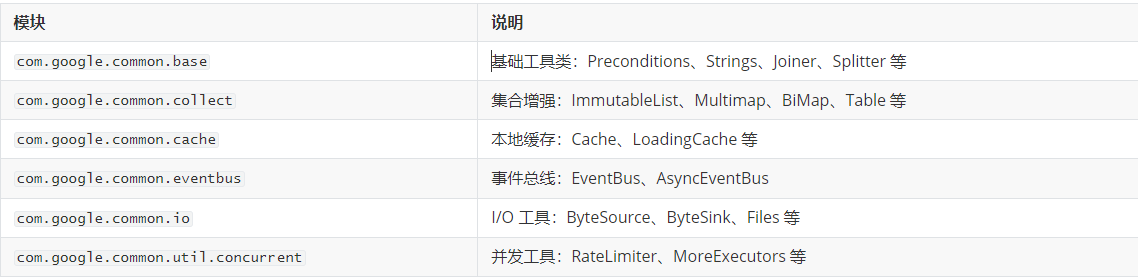
2. Google Guava 版本选择
xml
<!-- Guava 核心库 -->
<dependency>
    <groupId>com.google.guava</groupId>
    <artifactId>guava</artifactId>
    <version>32.1.3-jre</version>
</dependency>
3. guava 核心工具集
3.1 Joiner - 字符串连接器
java
import com.google.common.base.Joiner;
import java.util.Arrays;
import java.util.LinkedHashMap;
import java.util.Map;

public class JoinerDemo {

    public static void main(String[] args) {
        // 1. 基本字符串数组连接
        Joiner joiner = Joiner.on(", ");
        String result = joiner.join(Arrays.asList("A", "B", "C"));
        System.out.println("基本连接: " + result);
        // 输出: A, B, C

        // 2. 跳过 null 值
        Joiner skipNullJoiner = Joiner.on(", ").skipNulls();
        String result2 = skipNullJoiner.join(Arrays.asList("A", null, "B", "C"));
        System.out.println("跳过Null: " + result2);
        // 输出: A, B, C

        // 3. null 值替换为指定字符串
        Joiner useNullJoiner = Joiner.on(", ").useForNull("NULL");
        String result3 = useNullJoiner.join(Arrays.asList("A", null, "B", "C"));
        System.out.println("Null替换: " + result3);
        // 输出: A, NULL, B, C

        // 4. Map 连接
        Map<String, String> map = new LinkedHashMap<>();
        map.put("name", "张三");
        map.put("age", "18");
        String mapResult = Joiner.on(", ").withKeyValueSeparator("=").join(map);
        System.out.println("Map连接: " + mapResult);
        // 输出: name=张三, age=18
    }
}
3.2 Splitter - 字符串分割器
java
import com.google.common.base.Splitter;
import com.google.common.base.CharMatcher;
import java.util.List;
import java.util.Map;
import java.util.regex.Pattern;

public class SplitterDemo {

    public static void main(String[] args) {
        // 1. 基本分割
        Iterable<String> result1 = Splitter.on(',').split("a,b,c,d");
        System.out.println("基本分割: " + result1);
        // 输出: [a, b, c, d]

        // 2. 去除空白
        Iterable<String> result2 = Splitter.on(',').trimResults().split(" a , b , c ");
        System.out.println("去除空白: " + result2);
        // 输出: [a, b, c]

        // 3. 过滤空白
        Iterable<String> result3 = Splitter.on(',').omitEmptyStrings().split("a,,b,,c");
        System.out.println("过滤空白: " + result3);
        // 输出: [a, b, c]

        // 4. 固定数量分割
        Iterable<String> result4 = Splitter.on(',').limit(3).split("a,b,c,d,e");
        System.out.println("限制数量: " + result4);
        // 输出: [a, b,   c,d,e]

        // 5. Map 解析
        String mapStr = "name=张三&age=18&city=北京";
        Map<String, String> map = Splitter.on('&')
                .withKeyValueSeparator('=')
                .split(mapStr);
        System.out.println("Map解析: " + map);
        // 输出: {name=张三, age=18, city=北京}
    }
}
3.3 Strings 工具类
java
import com.google.common.base.Strings;

public class StringsDemo {

    public static void main(String[] args) {
        // 1. 判断字符串是否为空
        System.out.println("isNullOrEmpty(null): " + Strings.isNullOrEmpty(null));
        System.out.println("isNullOrEmpty(''): " + Strings.isNullOrEmpty(""));
        System.out.println("isNullOrEmpty('a'): " + Strings.isNullOrEmpty("a"));
        // 输出: true, true, false

        // 2. 字符串填充
        System.out.println("padStart: '" + Strings.padStart("5", 3, '0') + "'");
        System.out.println("padEnd: '" + Strings.padEnd("abc", 6, '*') + "'");
        // 输出: '005', 'abc***'

        // 3. 字符串重复
        System.out.println("repeat: " + Strings.repeat("ab", 3));
        // 输出: ababab

        // 4. 获取公共前缀/后缀
        System.out.println("commonPrefix: " + Strings.commonPrefix("Hello", "Hell"));
        System.out.println("commonSuffix: " + Strings.commonSuffix("Hell", "Tell"));
        // 输出: Hell, ell
    }
}
3.4 Preconditions 前置条件检查
用于在方法开头验证参数是否符合预期
java
import com.google.common.base.Preconditions;

public class PreconditionsDemo {

    public static void main(String[] args) {
        // 1. 检查参数非空
        try {
            checkNotNull(null);
        } catch (NullPointerException e) {
            System.out.println("checkNotNull 异常: " + e.getMessage());
        }

        // 2. 检查条件为 true
        try {
            checkArgument(false, "参数不合法");
        } catch (IllegalArgumentException e) {
            System.out.println("checkArgument 异常: " + e.getMessage());
        }

        // 3. 检查状态
        try {
            checkState(false, "状态错误");
        } catch (IllegalStateException e) {
            System.out.println("checkState 异常: " + e.getMessage());
        }

        // 正常情况
        System.out.println("正常执行: " + checkNotNull("正常值"));
    }

    public static <T> T checkNotNull(T obj) {
        return Preconditions.checkNotNull(obj, "对象不能为空");
    }

    public static void checkArgument(boolean condition, String message) {
        Preconditions.checkArgument(condition, message);
    }

    public static void  checkState(boolean state, String message) {
        Preconditions.checkState(state, message);
    }
}
运行结果
java
checkNotNull 异常: 对象不能为空
checkArgument 异常: 参数不合法
checkState 异常: 状态错误
正常执行: 正常值
4. 函数式编程
4.1 Functions 与 Predicates
Functions 提供了函数式编程的支持,Predicates 提供了断言/谓词功能
java
import com.google.common.base.Function;
import com.google.common.base.Functions;
import com.google.common.base.Predicate;
import com.google.common.base.Predicates;
import com.google.common.collect.Iterables;
import com.google.common.collect.Lists;
import java.util.Arrays;
import java.util.List;

public class FunctionPredicateDemo {

    public static void main(String[] args) {
        // ===== Functions =====

        // 1. 函数组合 - compose
        Function<String, Integer> composed = Functions.compose(
                String::length,  //第二个执行:计算长度
                String::trim   // 第一个执行,去掉空格
        );
        System.out.println("函数组合: " + composed.apply("  abc  "));
        // 输出: 3

        // 2. Map 转换
        List<String> names = Arrays.asList("Tom", "Jerry", "Mike");
        List<Integer> lengths = Lists.transform(names, String::length);
        System.out.println("Map转换: " + lengths);
        // 输出: [3, 5, 4]

        // ===== Predicates =====
        List<Integer> numbers = Arrays.asList(1, 2, 3, 4, 5, 6, 7, 8, 9, 10);

        // 3. 基本断言
        Predicate<Integer> isEven = n -> n % 2 == 0;

        // 4. 过滤集合
        List<Integer> evens = Lists.newArrayList(Iterables.filter(numbers, isEven));
        System.out.println("偶数: " + evens);
        // 输出: [2, 4, 6, 8, 10]

        // 5. 断言组合 - and
        Predicate<Integer> isEvenAndGreaterThan5 = Predicates.and(
                isEven,
                n -> n > 5
        );
        List<Integer> result1 = Lists.newArrayList(Iterables.filter(numbers, isEvenAndGreaterThan5));
        System.out.println("偶数且大于5: " + result1);
        // 输出: [6, 8, 10]

        // 6. 判断是否满足条件
        System.out.println("全部偶数? " + Iterables.all(numbers, isEven));
        System.out.println("包含偶数? " + Iterables.any(numbers, isEven));
        // 输出: false, true

        // 7. find - 查找第一个匹配的
        Integer found = Iterables.find(numbers, isEven);
        System.out.println("第一个偶数: " + found);
        // 输出: 2
    }
}
4.2 Suppliers 供应者模式
Suppliers 提供了延迟加载/缓存功能,是实现懒加载和缓存的利器
java
import com.google.common.base.Supplier;
import com.google.common.base.Suppliers;
import java.util.concurrent.TimeUnit;

public class SuppliersDemo {

    public static void main(String[] args) throws Exception {
        // 1. 基础 Supplier
        Supplier<String> supplier = new Supplier<String>() {
            @Override
            public String get() {
                System.out.println("Supplier 被调用...");
                return "Hello Guava";
            }
        };

        System.out.println("调用1: " + supplier.get());
        System.out.println("调用2: " + supplier.get());

        System.out.println("=================");

        // 2. Memoizing Supplier (记忆化 - 缓存结果)
        Supplier<String> memoizingSupplier = Suppliers.memoize(supplier);

        System.out.println("Memoizing 调用1: " + memoizingSupplier.get());
        System.out.println("Memoizing 调用2: " + memoizingSupplier.get());

        System.out.println("=================");

        // 3. ExpiringMemoizingSupplier (带过期时间)
        Supplier<String> expiringSupplier = Suppliers.memoizeWithExpiration(
                () -> {
                    System.out.println("ExpiringSupplier 被调用...");
                    return "Expiring: " + System.currentTimeMillis();
                },
                2, // 2秒后过期
                TimeUnit.SECONDS
        );

        System.out.println("过期缓存 调用1: " + expiringSupplier.get());
        Thread.sleep(1000);
        System.out.println("过期缓存 调用2: " + expiringSupplier.get());
        Thread.sleep(1500);
        System.out.println("过期缓存 调用3: " + expiringSupplier.get());
    }
}
运行效果
java
Supplier 被调用...
调用1: Hello Guava
Supplier 被调用...
调用2: Hello Guava
=================
Supplier 被调用...
Memoizing 调用1: Hello Guava
Memoizing 调用2: Hello Guava
=================
ExpiringSupplier 被调用...
过期缓存 调用1: Expiring: 170...
过期缓存 调用2: Expiring: 170...  (未过期,不调用)
ExpiringSupplier 被调用...  (已过期,重新调用)
过期缓存 调用3: Expiring: 170...
5. 集合增强
5.1 不可变集合
Guava 提供了不可变集合(Immutable Collections),一旦创建就不能修改,可以安全地在多线程环境中使用。
java
import com.google.common.collect.ImmutableList;
import com.google.common.collect.ImmutableMap;
import com.google.common.collect.ImmutableSet;
import java.util.Arrays;
import java.util.List;

public class ImmutableCollectionsDemo {

    public static void main(String[] args) {
        // 1. 创建不可变 List
        ImmutableList<String> immutableList = ImmutableList.of("A", "B", "C", "D");
        System.out.println("ImmutableList: " + immutableList);
        // 输出: [A, B, C, D]

        // 2. 不可变 List 特性 - 不能修改
        try {
            immutableList.add("E");  // 抛出 UnsupportedOperationException
        } catch (UnsupportedOperationException e) {
            System.out.println("不能添加: true");
        }

        // 3. 使用 Builder 创建
        ImmutableList<String> builderList = ImmutableList.<String>builder()
                .add("a")
                .add("b")
                .addAll(immutableList)
                .build();
        System.out.println("Builder创建: " + builderList);
        // 输出: [a, b, A, B, C, D]

        // 4. 不可变 Set
        ImmutableSet<Integer> immutableSet = ImmutableSet.of(1, 2, 3, 4, 5);

        // 5. 不可变 Map
        ImmutableMap<String, Integer> immutableMap = ImmutableMap.of(
                "one", 1,
                "two", 2,
                "three", 3
        );
        System.out.println("ImmutableMap: " + immutableMap);
        // 输出: {one=1, two=2, three=3}
    }
}
5.2 Multimap 多值映射
Multimap 允许一个 key 对应多个 value,解决了 Map<K, List> 的繁琐操作
java
import com.google.common.collect.ArrayListMultimap;
import com.google.common.collect.HashMultimap;
import com.google.common.collect.Multimap;
import java.util.Collection;

public class MultimapDemo {

    public static void main(String[] args) {
        // 1. 基本使用 - ArrayListMultimap
        Multimap<String, String> multimap = ArrayListMultimap.create();

        // 添加值 (一个 key 对应多个 value)
        multimap.put("水果", "苹果");
        multimap.put("水果", "香蕉");
        multimap.put("水果", "橙子");
        multimap.put("蔬菜", "白菜");
        multimap.put("蔬菜", "萝卜");

        System.out.println("所有映射: " + multimap);
        // 输出: {水果=[苹果, 香蕉, 橙子], 蔬菜=[白菜, 萝卜]}

        // 2. 获取单个 key 的所有值
        Collection<String> fruits = multimap.get("水果");
        System.out.println("水果: " + fruits);
        // 输出: [苹果, 香蕉, 橙子]

        // 3. 获取不存在的 key
        Collection<String> notExist = multimap.get("不存在");
        System.out.println("不存在的key: " + notExist);
        // 输出: [] (返回空集合,不是 null)

        // 4. HashMultimap - value 不重复
        HashMultimap<String, String> hashMultimap = HashMultimap.create();
        hashMultimap.put("标签", "Java");
        hashMultimap.put("标签", "Java");  // 重复,不会添加
        hashMultimap.put("标签", "Python");

        System.out.println("HashMultimap: " + hashMultimap.get("标签"));
        // 输出: [Java, Python]
    }
}
5.3 BiMap 双向映射
BiMap 实现了 Key-Value 的双向映射,可以通过 value 获取 key
java
import com.google.common.collect.EnumHashBiMap;
import com.google.common.collect.HashBiMap;
import com.google.common.collect.EnumBiMap;

public class BiMapDemo {

    public static void main(String[] args) {
        // 1. 基本使用 - HashBiMap
        HashBiMap<String, String> biMap = HashBiMap.create();

        biMap.put("CN", "中国");
        biMap.put("US", "美国");
        biMap.put("JP", "日本");

        System.out.println("正向: " + biMap);
        // 输出: {CN=中国, US=美国, JP=日本}

        // 2. 反向获取
        System.out.println("反向-中国: " + biMap.inverse().get("中国"));
        System.out.println("反向-美国: " + biMap.inverse().get("美国"));
        // 输出: CN, US

        // 3. 通过 value 获取 key
        String countryKey = biMap.inverse().get("日本");
        System.out.println("通过value获取key: " + countryKey);
        // 输出: JP

        // 4. forcePut 强制覆盖
        biMap.forcePut("CN", "中华人民共和国");
        System.out.println("强制覆盖后: " + biMap);

        // 5. value 不能重复 (会抛出异常)
        try {
            biMap.put("CN2", "中华人民共和国");  // 抛出 IllegalArgumentException
        } catch (Exception e) {
            System.out.println("Value重复异常: " + e.getMessage());
        }

        System.out.println("=================");

        // 6. EnumBiMap - 枚举类型
        EnumHashBiMap<Status, String> enumHashBiMap = EnumHashBiMap.create(Status.class);
        enumHashBiMap.put(Status.ACTIVE, "激活");
        enumHashBiMap.put(Status.INACTIVE, "未激活");
        System.out.println("EnumHashBiMap: " + enumHashBiMap);
        System.out.println("通过value获取key: " + enumHashBiMap.inverse().get("激活"));
    }

    enum Status {
        ACTIVE, INACTIVE
    }
}
5.4 Table 表格结构
Table 提供了类似 Excel 表格的数据结构,适合存储二维关系数据
java
import com.google.common.collect.HashBasedTable;
import com.google.common.collect.Table;
import java.util.Map;
import java.util.Set;

public class TableDemo {

    public static void main(String[] args) {
        // 1. 创建 Table
        Table<String, String, Integer> table = HashBasedTable.create();

        // 2. 添加数据 (行, 列, 值)
        table.put("张三", "语文", 85);
        table.put("张三", "数学", 90);
        table.put("张三", "英语", 88);

        table.put("李四", "语文", 92);
        table.put("李四", "数学", 78);
        table.put("李四", "英语", 95);

        System.out.println("表格数据: " + table);

        // 3. 获取某个学生的所有成绩
        Map<String, Integer> zhangScores = table.row("张三");
        System.out.println("张三成绩: " + zhangScores);
        // 输出: {语文=85, 数学=90, 英语=88}

        // 4. 获取某一科目的所有成绩
        Map<String, Integer> chineseScores = table.column("语文");
        System.out.println("语文成绩: " + chineseScores);
        // 输出: {张三=85, 李四=92}

        // 5. 获取某个具体值
        Integer score = table.get("张三", "数学");
        System.out.println("张三数学: " + score);
        // 输出: 90


    }
}
6. 本地缓存
6.1 缓存构建器模式
Guava Cache 使用构建器模式来配置缓存,语法清晰灵活
java
import com.google.common.cache.Cache;
import com.google.common.cache.CacheBuilder;
import java.util.concurrent.TimeUnit;

public class CacheBuilderDemo {

    public static void main(String[] args) throws Exception {
        // 1. 基本构建
        Cache<String, String> cache = CacheBuilder.newBuilder()
                .maximumSize(100)           // 最大缓存数量
                .expireAfterWrite(10, TimeUnit.MINUTES)  // 写入后10分钟过期
                .build();

        cache.put("key1", "value1");
        System.out.println("基本缓存: " + cache.getIfPresent("key1"));

        // 2. 基于容量的淘汰
        Cache<String, String> sizeCache = CacheBuilder.newBuilder()
                .maximumSize(2)
                .build();

        sizeCache.put("a", "1");
        sizeCache.put("b", "2");
        sizeCache.put("c", "3");  // 超过容量,会淘汰最早的

        System.out.println("容量淘汰 a=" + sizeCache.getIfPresent("a"));
        System.out.println("容量淘汰 c=" + sizeCache.getIfPresent("c"));
        // 输出: null, 3

        // 3. 基于权重的淘汰
        Cache<String, String> weightCache = CacheBuilder.newBuilder()
                .maximumWeight(100)
                .weigher((String key, String value) -> key.length() + value.length())
                .build();

        weightCache.put("xx", "yy");  // 权重为4
        weightCache.put("longkey", "longvalue");// 权重为16

        System.out.println("容量淘汰 xx=" + sizeCache.getIfPresent("xx"));


        System.out.println("权重淘汰后数量: " + weightCache.size());
    }
}
6.2 缓存使用
java
import com.google.common.cache.*;
import java.util.concurrent.TimeUnit;

public class CacheUseDemo {

    public static void main(String[] args) throws Exception {
        // 1. 手动加载
        Cache<String, String> cache = CacheBuilder.newBuilder()
                .maximumSize(10)
                .build();

        cache.put("key1", "value1");
        System.out.println("getIfPresent: " + cache.getIfPresent("key1"));

        // 2. 自动加载 - get(key, loader)
        String value = cache.get("key2", () -> {
            System.out.println("从数据库加载...");
            return "database_value";
        });
        System.out.println("自动加载: " + value);

        // 3. LoadingCache - 预定义的自动加载缓存
        LoadingCache<String, String> loadingCache = CacheBuilder.newBuilder()
                .maximumSize(10)
                .build(new CacheLoader<String, String>() {
                    @Override
                    public String load(String key) throws Exception {
                        return "loaded_" + key;
                    }
                });

        // 4. 缓存过期时间
        Cache<String, String> expireCache = CacheBuilder.newBuilder()
                .maximumSize(100)
                .expireAfterWrite(1, TimeUnit.SECONDS)   // 写入后过期
                .expireAfterAccess(2, TimeUnit.SECONDS) // 访问后过期
                .build();

        expireCache.put("expire", "test");
        System.out.println("写入后立即获取: " + expireCache.getIfPresent("expire"));
        Thread.sleep(1500);
        System.out.println("写入1.5秒后获取: " + expireCache.getIfPresent("expire"));

        // 5. 统计信息
        Cache<String, String> statsCache = CacheBuilder.newBuilder()
                .maximumSize(100)
                .recordStats()  // 开启统计
                .build();

        statsCache.put("a", "1");
        statsCache.getIfPresent("a");
        statsCache.getIfPresent("nonexistent");

        CacheStats stats = statsCache.stats();
        System.out.println("命中率: " + stats.hitRate());
        System.out.println("请求次数: " + stats.requestCount());
    }
}
7. EventBus 事件总线
7.1 同步事件总线
EventBus 是 Guava 提供的发布-订阅模式的事件总线
java
import com.google.common.eventbus.EventBus;
import com.google.common.eventbus.Subscribe;

public class EventBusDemo {

    public static void main(String[] args) {
        // 1. 创建事件总线
        EventBus eventBus = new EventBus("myEventBus");

        // 2. 注册订阅者
        eventBus.register(new OrderEventListener());
        eventBus.register(new PaymentEventListener());

        // 3. 发布事件
        System.out.println("发布订单事件:");
        eventBus.post(new OrderEvent("订单-001", 100.0));

        System.out.println("发布支付事件:");
        eventBus.post(new PaymentEvent("支付-001", "支付宝"));
    }

    // 事件类
    static class OrderEvent {
        private String orderId;
        private double amount;

        public OrderEvent(String orderId, double amount) {
            this.orderId = orderId;
            this.amount = amount;
        }

        public String getOrderId() { return orderId; }
        public double getAmount() { return amount; }
    }

    static class PaymentEvent {
        private String paymentId;
        private String method;

        public PaymentEvent(String paymentId, String method) {
            this.paymentId = paymentId;
            this.method = method;
        }

        public String getPaymentId() { return paymentId; }
        public String getMethod() { return method; }
    }

    // 订单事件监听器
    static class OrderEventListener {
        @Subscribe
        public void handleOrderEvent(OrderEvent event) {
            System.out.println("  [OrderListener] 收到订单: " + event.getOrderId()
                    + ", 金额: " + event.getAmount());
        }
    }

    // 支付事件监听器
    static class PaymentEventListener {
        @Subscribe
        public void handlePaymentEvent(PaymentEvent event) {
            System.out.println("  [PaymentListener] 收到支付: " + event.getPaymentId()
                    + ", 方式: " + event.getMethod());
        }
    }
}
7.2 异步事件总线
AsyncEventBus 是异步事件总线,适用于耗时操作
java
import com.google.common.eventbus.AsyncEventBus;
import com.google.common.eventbus.Subscribe;
import java.util.concurrent.*;

public class AsyncEventBusDemo {

    public static void main(String[] args) throws Exception {
        // 1. 创建线程池
        ExecutorService executor = Executors.newFixedThreadPool(4);

        // 2. 创建异步事件总线
        AsyncEventBus asyncEventBus = new AsyncEventBus(executor);

        // 3. 注册订阅者
        asyncEventBus.register(new AsyncEventListener());

        // 4. 发布事件 (异步执行)
        System.out.println("发布异步事件1:");
        asyncEventBus.post(new AsyncEvent("事件-A", 1));

        System.out.println("发布异步事件2:");
        asyncEventBus.post(new AsyncEvent("事件-B", 2));

        // 等待异步任务完成
        Thread.sleep(2000);
        System.out.println("主线程结束");

        executor.shutdown();
    }

    static class AsyncEvent {
        private String name;
        private int id;

        public AsyncEvent(String name, int id) {
            this.name = name;
            this.id = id;
        }

        public String getName() { return name; }
        public int getId() { return id; }
    }

    static class AsyncEventListener {
        @Subscribe
        public void handleAsyncEvent(AsyncEvent event) {
            System.out.println("  [AsyncListener] 处理: " + event.getName()
                    + " 线程: " + Thread.currentThread().getName());
            try {
                Thread.sleep(500);
            } catch (InterruptedException e) {
                e.printStackTrace();
            }
            System.out.println("  [AsyncListener] 完成: " + event.getName());
        }
    }
}
8. I/O 工具
8.1 文件操作
java
import com.google.common.io.Files;
import java.io.File;
import java.nio.charset.StandardCharsets;
import java.util.List;

public class FileDemo {

    public static void main(String[] args) throws Exception {
        // 1. 读取文件内容
        File tempFile = File.createTempFile("test", ".txt");
        Files.write("Hello Guava", tempFile, StandardCharsets.UTF_8);

        String content = Files.toString(tempFile, StandardCharsets.UTF_8);
        System.out.println("读取文件: " + content);

        // 2. 复制文件
        File destFile = new File(tempFile.getParent(), "copy.txt");
        Files.copy(tempFile, destFile);
        System.out.println("复制文件: " + destFile.exists());

        // 3. 移动文件
        File moveFile = new File(tempFile.getParent(), "move.txt");
        Files.move(tempFile, moveFile);
        System.out.println("移动文件: " + moveFile.exists());

        // 4. 读取行
        List<String> lines = Files.readLines(moveFile, StandardCharsets.UTF_8);
        System.out.println("读取行: " + lines);

        // 5. 文件操作
        File newFile = new File("new.txt");
        Files.touch(newFile);
        System.out.println("创建文件: " + newFile.exists());

        // 清理
        destFile.delete();
        moveFile.delete();
        newFile.delete();
    }
}
8.2 BaseEncoding 编解码
java
import com.google.common.io.BaseEncoding;

public class BaseEncodingDemo {

    public static void main(String[] args) {
        // 1. Base64 编码
        String original = "Hello Guava! 你好";
        String base64 = BaseEncoding.base64().encode(original.getBytes());
        System.out.println("Base64编码: " + base64);

        // 2. Base64 解码
        String decoded = new String(BaseEncoding.base64().decode(base64));
        System.out.println("Base64解码: " + decoded);

        // 3. Base64 URL 安全编码
        String urlSafe = BaseEncoding.base64Url().encode(original.getBytes());
        System.out.println("Base64URL: " + urlSafe);

        // 4. 16进制编码
        String hex = BaseEncoding.base16().encode(original.getBytes());
        System.out.println("16进制编码: " + hex);

        // 5. 16进制解码
        String hexDecoded = new String(BaseEncoding.base16().decode(hex));
        System.out.println("16进制解码: " + hexDecoded);
    }
}
运行结果
java
Base64编码: SGVsbG8gR3VavYeQ!
Base64解码: Hello Guava! 你好
Base64URL: SGVsbG8gR3VavYeQ
16进制编码: 48656C6C6F20475C7661E59B8E21
16进制解码: Hello Guava! 你好
9. 限流 RateLimiter
RateLimiter 是 Guava 提供的限流工具,基于令牌桶算法实现
java
import com.google.common.util.concurrent.RateLimiter;
import java.util.concurrent.TimeUnit;

public class RateLimiterDemo {
    //基于令牌桶算法的限流器,允许在固定时间内处理一定数量的请求,超过限制的请求将被阻塞或拒绝。
    public static void main(String[] args) {
        // 1. 创建限流器 - 每秒产生 5 个令牌
        RateLimiter limiter = RateLimiter.create(5.0);

        System.out.println("=== 令牌桶限流 ===");

        // 2. 获取令牌 (阻塞等待)
        for (int i = 0; i < 10; i++) {
            double waitTime = limiter.acquire();
            System.out.println("第" + (i + 1) + "次获取令牌, 等待时间: "
                    + String.format("%.3f", waitTime) + "s");
        }

        System.out.println("==================");

        // 3. 尝试获取令牌 (非阻塞)
        RateLimiter tryLimiter = RateLimiter.create(10);
        try {
            Thread.sleep(5000);
        } catch (InterruptedException e) {
            throw new RuntimeException(e);
        }
        System.out.println("=== 尝试获取令牌 ===");
        for (int i = 0; i < 15; i++) {
            boolean acquired = tryLimiter.tryAcquire(1);
            System.out.println("第" + (i + 1) + "次: " + (acquired ? "获取成功" : "获取失败"));
        }

    }
}
运行效果
java
=== 令牌桶限流 ===
第1次获取令牌, 等待时间: 0.000s
第2次获取令牌, 等待时间: 0.198s
第3次获取令牌, 等待时间: 0.199s
第4次获取令牌, 等待时间: 0.199s
第5次获取令牌, 等待时间: 0.199s
第6次获取令牌, 等待时间: 0.199s
第7次获取令牌, 等待时间: 0.199s
第8次获取令牌, 等待时间: 0.199s
第9次获取令牌, 等待时间: 0.199s
第10次获取令牌, 等待时间: 0.199s
==================
=== 尝试获取令牌 ===
第1次: 获取成功
第2次: 获取成功
...
第15次: 获取失败
==================
=== 带超时获取 ===
第1次: 立即获取
第2次: 等待 0.499s 后获取
...