一、环境规划
| 节点角色 | 主机名 | 示例 IP | 系统版本 |
|---|---|---|---|
| Master | k8s-master | 192.168.192.20 | openEuler‑24.03‑LTS‑SP1 x86_64 |
| Node01 | k8s-node01 | 192.168.192.21 | openEuler‑24.03‑LTS‑SP1 x86_64 |
| Node02 | k8s-node02 | 192.168.192.22 | openEuler‑24.03‑LTS‑SP1 x86_64 |
K8s 版本:v1.35.5 软件源:阿里云 kubernetes-new
二、所有节点通用前置配置(3 台全部执行)
2.1 主机名 & hosts 解析
# Master执行
hostnamectl set-hostname k8s-master
# Node01执行
hostnamectl set-hostname k8s-node01
# Node02执行
hostnamectl set-hostname k8s-node02

# 所有节点写入hosts
cat >> /etc/hosts <<EOF
192.168.192.20 k8s-master
192.168.192.21 k8s-node01
192.168.192.22 k8s-node02
EOF
2.2 关闭防火墙、SELinux、Swap
systemctl stop firewalld
systemctl disable firewalld

setenforce 0
sed -i 's/^SELINUX=.*/SELINUX=disabled/' /etc/selinux/config

swapoff -a
sed -i '/swap/s/^/#/' /etc/fstab
2.3 内核模块 + 系统参数(根治 ip_forward 被覆盖问题)
使用
98-k8s.conf高优先级配置,注释系统默认冲突项,避免sysctl --system后 ip_forward 重置为 0
# 加载内核模块
modprobe overlay
modprobe br_netfilter

# 注释系统默认配置中ip_forward,防止覆盖
sed -i 's/^net.ipv4.ip_forward/#net.ipv4.ip_forward/' /etc/sysctl.conf
sed -i 's/^net.ipv4.ip_forward/#net.ipv4.ip_forward/' /etc/sysctl.d/99-sysctl.conf

# 写入高优先级K8s网络配置(数字越大越晚加载,覆盖所有默认配置)
cat > /etc/sysctl.d/98-k8s.conf <<EOF
net.bridge.bridge-nf-call-iptables  = 1
net.bridge.bridge-nf-call-ip6tables = 1
net.ipv4.ip_forward                 = 1
EOF

# 生效并验证
sysctl --system
cat /proc/sys/net/ipv4/ip_forward
# 必须输出 1
2.4 开启 cgroup v2(openEuler BIOS/UEFI 通用,解决 K8s1.35 + 强制校验)
K8s v1.35.5 弃用 cgroup v1,v1.36 将彻底移除,生产环境必须开启 v2
# 写入内核参数(BIOS/UEFI自动适配,无需手动找grub路径)
grubby --update-kernel=ALL --args="systemd.unified_cgroup_hierarchy=1"

# 重启生效
reboot

# 重启后验证cgroup v2
mount | grep cgroup
# 输出包含 cgroup2 即为成功
2.5 安装 containerd 容器运行时
dnf install -y containerd
systemctl enable --now containerd

# 生成配置并开启systemd cgroup驱动(cgroup v2必需)
containerd config default > /etc/containerd/config.toml
sed -i 's/SystemdCgroup \= false/SystemdCgroup \= true/g' /etc/containerd/config.toml
# 配置阿里云镜像加速
sed -i 's#registry.k8s.io#registry.aliyuncs.com/google_containers#g' /etc/containerd/config.toml

systemctl restart containerd
2.6 配置阿里云 K8s yum 源
rm -f /etc/yum.repos.d/kubernetes.repo
cat > /etc/yum.repos.d/kubernetes.repo <<EOF
[kubernetes]
name=Kubernetes
baseurl=https://mirrors.aliyun.com/kubernetes-new/core/stable/v1.35/rpm/
enabled=1
gpgcheck=1
gpgkey=https://mirrors.aliyun.com/kubernetes-new/core/stable/v1.35/rpm/repodata/repomd.xml.key
EOF

# 清理缓存,安装精准版本(匹配阿里云rpm包)
dnf clean all
dnf makecache
dnf install -y kubeadm-1.35.5-150500.1.1.x86_64 kubelet-1.35.5-150500.1.1.x86_64 kubectl-1.35.5-150500.1.1.x86_64

# kubelet开机自启
systemctl enable --now kubelet

# 验证版本
kubeadm version
kubectl version --client
kubelet --version
三、Master 节点初始化集群
3.1 kubeadm init 初始化
kubeadm init \
  --apiserver-advertise-address=192.168.192.20 \
  --kubernetes-version=v1.35.5 \
  --image-repository=registry.aliyuncs.com/google_containers \
  --pod-network-cidr=10.244.0.0/16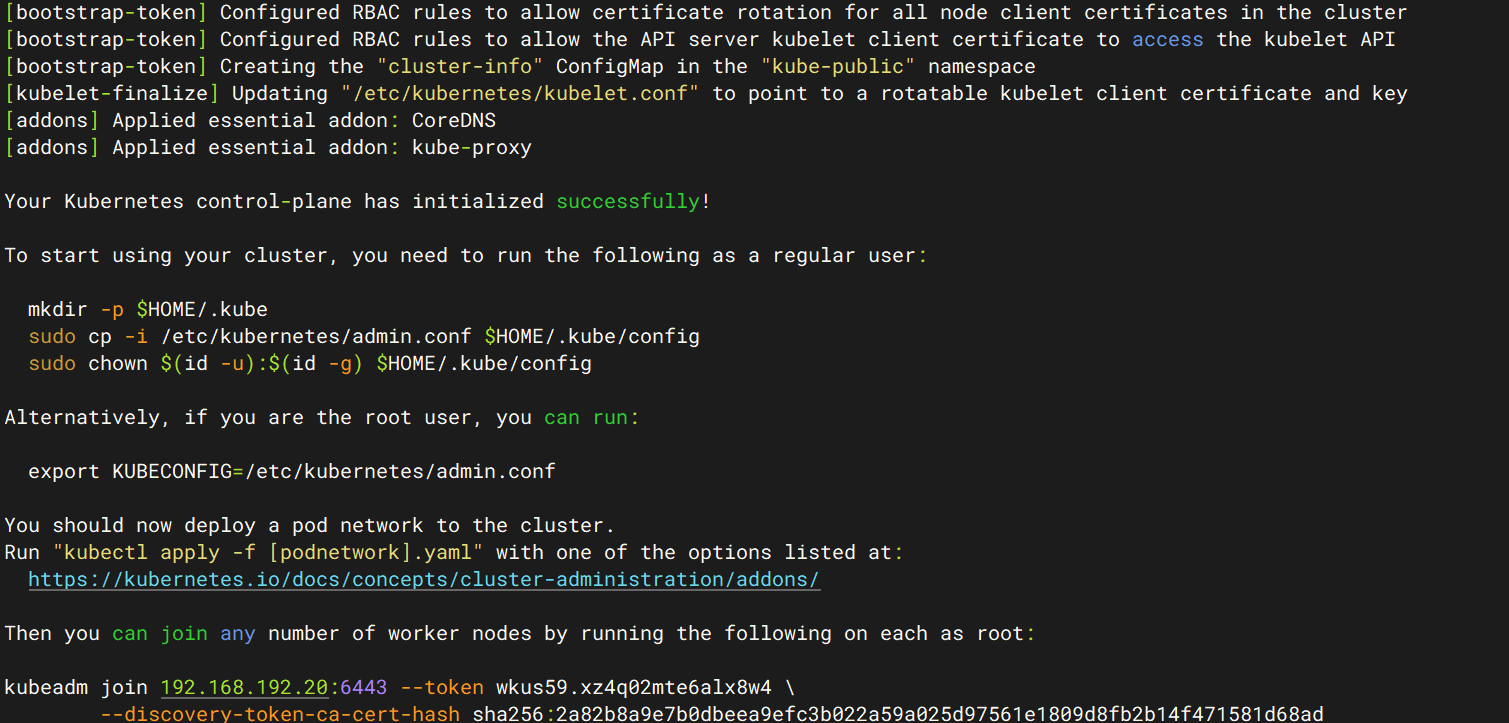
3.2 配置 kubectl 权限
mkdir -p $HOME/.kube
cp -i /etc/kubernetes/admin.conf $HOME/.kube/config
chown $(id -u):$(id -g) $HOME/.kube/config
3.3 获取节点加入命令
# token过期重建
kubeadm token create --print-join-command
四、Node 节点加入集群(node01、node02 执行)
kubeadm join 192.168.192.20:6443 --token xxxxxx --discovery-token-ca-cert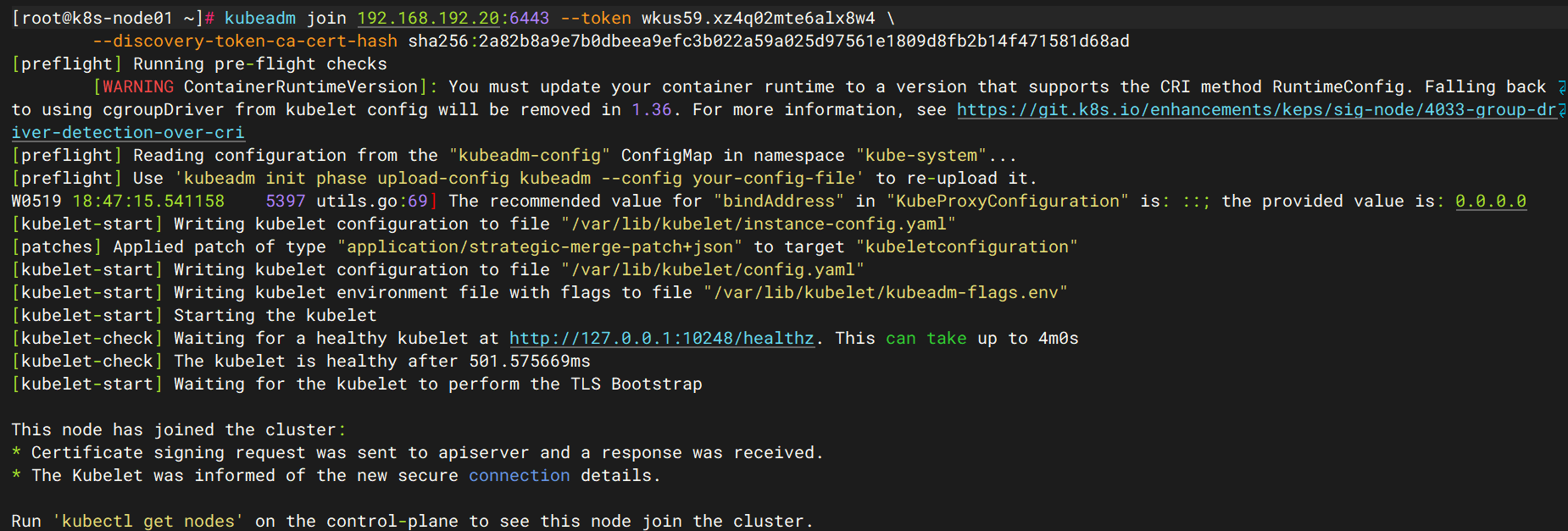
五、K8S集群网络插件calico部署
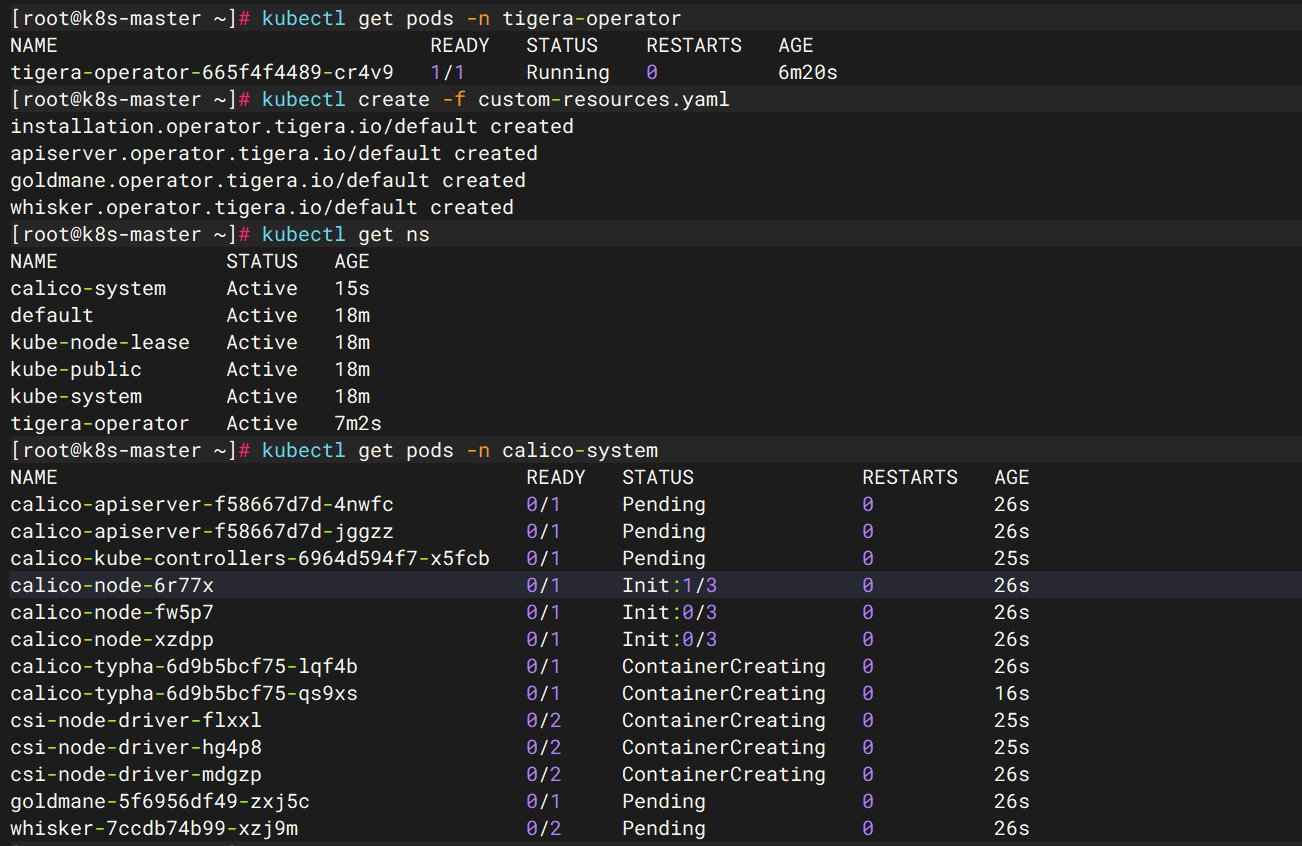
root@k8s-master01:~# kubectl create -f https://raw.githubusercontent.com/projectcalico/calico/v3.32.0/manifests/tigera-operator.yaml
namespace/tigera-operator created
serviceaccount/tigera-operator created
clusterrole.rbac.authorization.k8s.io/tigera-operator-secrets created
clusterrole.rbac.authorization.k8s.io/tigera-operator created
clusterrolebinding.rbac.authorization.k8s.io/tigera-operator created
rolebinding.rbac.authorization.k8s.io/tigera-operator-secrets created
deployment.apps/tigera-operator created
root@k8s-master01:~# kubectl get ns
NAME              STATUS   AGE
default           Active   23m
kube-node-lease   Active   23m
kube-public       Active   23m
kube-system       Active   23m
tigera-operator   Active   28s
root@k8s-master01:~# kubectl get pods -n tigera-operator
NAME                               READY   STATUS    RESTARTS   AGE
tigera-operator-85dbff4478-5g8cc   1/1     Running   0          101s

wget https://raw.githubusercontent.com/projectcalico/calico/v3.32.0/manifests/custom-resources.yaml
root@k8s-master01:~# vim custom-resources.yaml
root@k8s-master01:~# cat custom-resources.yaml
# This section includes base Calico installation configuration.
# For more information, see: https://docs.tigera.io/calico/latest/reference/installation/api#operator.tigera.io/v1.Installation
apiVersion: operator.tigera.io/v1
kind: Installation
metadata:
  name: default
spec:
  # Configures Calico networking.
  calicoNetwork:
    ipPools:
      - name: default-ipv4-ippool
        blockSize: 26
        cidr: 10.244.0.0/16
        encapsulation: VXLANCrossSubnet
        natOutgoing: Enabled
        nodeSelector: all()

---
# This section configures the Calico API server.
# For more information, see: https://docs.tigera.io/calico/latest/reference/installation/api#operator.tigera.io/v1.APIServer
apiVersion: operator.tigera.io/v1
kind: APIServer
metadata:
  name: default
spec: {}

---
# Configures the Calico Goldmane flow aggregator.
apiVersion: operator.tigera.io/v1
kind: Goldmane
metadata:
  name: default

---
# Configures the Calico Whisker observability UI.
apiVersion: operator.tigera.io/v1
kind: Whisker
metadata:
  name: default

root@k8s-master01:~# kubectl create -f custom-resources.yaml
installation.operator.tigera.io/default created
apiserver.operator.tigera.io/default created
goldmane.operator.tigera.io/default created
whisker.operator.tigera.io/default created
root@k8s-master01:~# kubectl get ns
NAME              STATUS   AGE
calico-system     Active   65s
default           Active   33m
kube-node-lease   Active   33m
kube-public       Active   33m
kube-system       Active   33m
tigera-operator   Active   10m
root@k8s-master01:~# kubectl get pods -n calico-system
NAME                                       READY   STATUS    RESTARTS   AGE
calico-apiserver-54fbf8cf48-57j8c          1/1     Running   0          9m44s
calico-apiserver-54fbf8cf48-74fw4          1/1     Running   0          9m44s
calico-kube-controllers-5d9b8b74d4-2rh6s   1/1     Running   0          9m41s
calico-node-2drd9                          1/1     Running   0          9m42s
calico-node-wflnz                          1/1     Running   0          9m42s
calico-node-zp865                          1/1     Running   0          9m42s
calico-typha-7c897c85b9-sq4n8              1/1     Running   0          9m39s
calico-typha-7c897c85b9-w5pz4              1/1     Running   0          9m43s
csi-node-driver-kvss7                      2/2     Running   0          9m41s
csi-node-driver-m2rpg                      2/2     Running   0          9m42s
csi-node-driver-q82wm                      2/2     Running   0          9m41s
goldmane-6885dcb7d-kfdzb                   1/1     Running   0          9m43s
whisker-56594889f8-9jpg8                   2/2     Running   0          7m18s