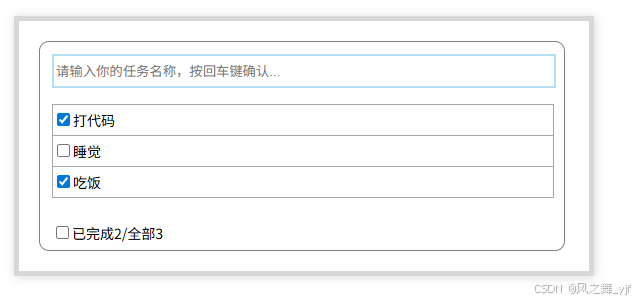
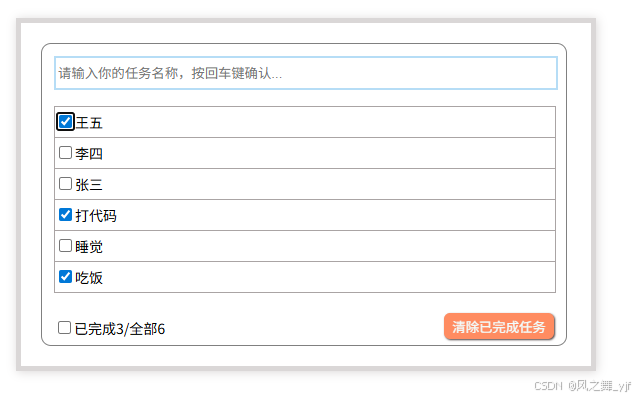
TodoList案例总结:
1.组件化编码流程:
(1)拆分静态组件 :组件要按照功能点拆分,命名不要与html元素 冲突。
(2)实现动态组件 :考虑好数据的存放位置,数据是一个组件在用,还是一些组件在用?
一个组件在用 一些组件在用 放在组件自身即可。 放在他们共同的父组件上(状态提升) (3)实现交互:从绑定事件开始。
2.props适用于:
| 父组件==>子组件 | 子组件==>父组件 |
|---|---|
| 父亲给子传递数据【通信】 | 子给父亲传递数据【通信】(要求父先给子一个函数) |
3.使用v-model时要切记:
v-model 绑定的值不能是props传过来的值,因为props是不可以修改的。
4.props传过来的如果是对象类型的值:
修改对象中的属性时Vue不会报错,但不推荐这样做。
示例:main.js
javascript
// 引入Vue
import Vue from "vue";
// 引入App
import App from "./App.vue";
// 关闭生产提示
Vue.config.productionTip = false;

// 去除浏览器默认样式
import './assets/reset.css'

// 引入插件
// import plugins from "./plugins";

// 应用(使用)插件【多次调用同一插件时,只生效一次】
// Vue.use(plugins,1,2,3);

// 创建vm
new Vue({
    el: '#app',
    render: h => h(App)
})
App.vue
javascript
<template>
  <div class="box">
    <div class="container">
      <HeadSection :AddListItem="AddListItem" />
      <ListSection
        :ListObj="ListObj"
        :UpdateCheckboxLi="UpdateCheckbox"
        :DeleteButtonLi="DeleteButton"
      />
      <FootSection
        :CountAllChecked="CountAllChecked"
        :CheckBoxTotal="CheckBoxTotal"
        :UpdateAllCheckbox="UpdateAllCheckbox"
      />
    </div>
  </div>
</template>

<script>
import FootSection from "./components/FootSection.vue";
import HeadSection from "./components/HeadSection.vue";
import ListSection from "./components/ListSection.vue";

export default {
  name: "App",
  data() {
    return {
      ListObj: [
        { id: "001", title: "打代码", completed: true },
        { id: "002", title: "睡觉", completed: false },
        { id: "003", title: "吃饭", completed: true },
      ],
    };
  },
  computed: {
    // 统计用户勾选列表的数量
    CountAllChecked() {
      return this.ListObj.reduce(
        (per, value) => per + (value.completed ? 1 : 0),
        0
      );
    },
    CheckBoxTotal() {
      return this.ListObj.length;
    },
  },
  methods: {
    // 用户输入字符时,添加一个列表项。
    AddListItem(e) {
      this.ListObj.unshift(e);
    },
    // 用户点击列表中某一列表项的复选框时,更新该列表项的checked值(布尔值)。
    UpdateCheckbox(x) {
      this.ListObj.forEach((item) => {
        if (item.id == x) {
          item.completed = !item.completed;
        }
      });
    },
    // 删除用户点击的某个列表项。
    DeleteButton(val) {
      if (confirm("确实要删除吗?")) {
        const index = this.ListObj.indexOf(val);
        this.ListObj.splice(index, 1);
      }
    },
    // 【全选/全不选】用户点击最底层的复选框时,更新所有列表项的checked值(布尔值)。
    UpdateAllCheckbox(value) {
        this.ListObj.forEach((item) => {
            item.completed = value;
        });
      }
  },
  components: {
    ListSection,
    FootSection,
    HeadSection,
  },
};
</script>

<style scoped>
.box {
  width: 570px;
  border: 5px rgb(218, 215, 215) solid;
  margin: 20px;
  box-shadow: 1px 1px 10px rgb(218, 215, 215);
}

.container {
  width: 520px;
  min-height: 50px;
  border: 1px solid gray;
  border-radius: 10px 10px 10px 10px;
  padding: 2px;
  margin: 20px;
}
</style>
HeadSection.vue
javascript
<template>
  <div>
    <input
      type="text"
      name="UserInformation"
      placeholder="请输入你的任务名称,按回车键确认..."
      @keyup.enter="ReceiveListItem"
    />
  </div>
</template>

<script>
import { nanoid } from "nanoid";
export default {
  name: "HeadSection",
  data() {
    return {};
  },
  methods: {
    ReceiveListItem(e) {
      // 校验数据。trim():去掉空格。清空内容。
      if (!e.target.value.trim()) {
        e.target.value = "";
        return alert("输入不能为空");
      }
      // 把输入的字符包装成一个列表项(对象)
      const NewListItem = {
        id: nanoid(),
        title: e.target.value,
        completed: false,
      };
      // 以函数调用的形式向父组件(App.vue)传递参数。
      this.AddListItem(NewListItem);
      // 清空输入的内容。
      e.target.value = "";
    },
  },
  props: ["AddListItem"],
};
</script>

<style scoped>
div {
  width: 500px;
  height: 30px;
  margin-left: 10px;
  margin-top: 10px;
}

input {
  width: 496px;
  height: 28px;
  border: 2px rgb(182, 221, 246) solid;
}
</style>
ListSection.vue
javascript
<template>
  <ul>
    <UserItem
      v-for="ListItem in ListObj"
      :key="ListItem.id"
      :todo="ListItem"
      :UpdateCheckboxIt="UpdateCheckboxLi"
      :DeleteButtonIt="DeleteButtonLi"
    />
  </ul>
</template>

<script>
import UserItem from "./UserItem.vue";

export default {
  name: "ListSection",
  data() {
    return {};
  },
  props: ["ListObj", "UpdateCheckboxLi", "DeleteButtonLi"],
  components: {
    UserItem,
  },
};
</script>

<style>
</style>
UserItem.vue
javascript
<template>
  <li>
    <span><input type="checkbox" :checked="todo.completed" @change="UpdateCheck(todo.id)"/>{{ todo.title }}</span>
    <input type="button" value="删除"  class="UsersDeleteButton" @click="DeleteButton(todo)"/>
  </li>
</template>

<script>
export default {
  name: "UserItem",
  props: ['todo',"UpdateCheckboxIt",'DeleteButtonIt'],
  methods:{
    UpdateCheck(a){
      this.UpdateCheckboxIt(a);
    },
    DeleteButton(t){
      this.DeleteButtonIt(t);
    }
  }
}
</script>

<style scoped>
li {
  display: flex;
  justify-content: space-between;
  align-items: center;
  width: 500px;
  height: 30px;
  line-height: 30px;
  border: 1px rgb(170, 164, 164) solid;
  border-bottom: none;
  margin-left: 10px;
  font-size: 14px;
}

li:hover {
  background-color: rgb(231, 226, 226);
}

/* 列表第一行与输入框的边距 */
ul > li:first-child {
  margin-top: 20px;
}

/* 列表最后一行底边框添加样式 */
ul > li:last-child {
  border-bottom: 1px rgb(170, 164, 164) solid;
}

/* li子元素span,左对齐 */
li > span {
  justify-content: flex-start;
}

/* li子元素.UsersDeleteButton右对齐 */
li > .UsersDeleteButton {
  justify-content: flex-end;
  border-radius: 6px;
  box-shadow: 1px 1px 2px rgb(54, 41, 41);
}

/* 为li子元素 【删除按钮(.UsersDeleteButton)】 设置样式 */
.UsersDeleteButton {
  width: 50px;
  height: 26px;
  border: none;
  font-weight: bold;
  background-color:coral;
  opacity: 0.6;
  color: azure;
  margin-right: 20px;
  visibility: hidden;
}

li:hover .UsersDeleteButton {
  visibility: visible;
}

.UsersDeleteButton:hover {
  opacity: 1;
}
</style>
FootSection.vue
javascript
<template>
  <div v-show="CheckBoxTotal">
    <span>
      <input type="checkbox" v-model="CheckedStatus" />已完成{{CountAllChecked}}/全部{{ CheckBoxTotal }}
    </span>
    <input type="button" value="清除已完成任务" class="DeleteTaskBut" />
  </div>
</template>

<script>
export default {
  computed: {
    CheckedStatus: {
      get() {
        return (
          this.CountAllChecked == this.CheckBoxTotal && this.CheckBoxTotal > 0
        );
      },
      set(value) {
        this.UpdateAllCheckbox(value);
      },
    },
  },
  props: ["CountAllChecked", "CheckBoxTotal", "UpdateAllCheckbox"],
};
</script>

<style scoped>
div {
  display: flex;
  justify-content: space-between;
  width: 500px;
  height: 30px;
  line-height: 30px;
  margin-top: 20px;
  margin-left: 10px;
  font-size: 14px;
}

/* 为【清除任务按钮】设置样式 */
.DeleteTaskBut {
  width: 110px;
  height: 26px;
  border: none;
  color: azure;
  background-color: coral;
  opacity: 0.9;
  border-radius: 6px;
  box-shadow: 1px 1px 2px rgb(54, 41, 41);
  visibility: hidden;
}

div:hover .DeleteTaskBut {
  visibility: visible;
}

.DeleteTaskBut:hover {
  opacity: 1;
}
</style>