更新日期:2026年5月20日。
项目源码:获取项目源码
索引
- [中国象棋【Chinese Chess】](#中国象棋【Chinese Chess】)
中国象棋【Chinese Chess】
本篇的目标是开发一个中国象棋【Chinese Chess】小游戏,可以与你的好同(ji)事(you)进行局域网对战。
一、游戏最终效果
Unity编辑器小游戏:中国象棋局域网对战
二、玩法简介
本游戏的玩法与标准中国象棋的规则一致,当轮到己方走棋时,通过鼠标左键点击选择棋子,然后点击棋盘位置移动棋子,当达到获胜或失败条件时,游戏结束。
三、正式开始
1.定义游戏窗口类
首先,定义中国象棋的游戏窗口类MiniGame_ChineseChess,其继承至MiniGameWindow【小游戏窗口基类】:
csharp
    /// <summary>
    /// 中国象棋
    /// </summary>
    public class MiniGame_ChineseChess : MiniGameWindow
    {

    }
2.规划游戏窗口、视口区域
通过覆写虚属性实现规划游戏视口区域大小:
csharp
        /// <summary>
        /// 游戏名称
        /// </summary>
        public override string Name => "中国象棋 [Chinese Chess]";
        /// <summary>
        /// 游戏窗体大小
        /// </summary>
        public override Vector2 WindowSize => new Vector2(480, 330);
        /// <summary>
        /// 游戏视口区域
        /// </summary>
        public override Rect ViewportRect => new Rect(5, 25, 300, 300);
注意:游戏窗体大小必须 > 游戏视口区域。
然后通过代码打开此游戏窗口:
csharp
        [MenuItem("MiniGame/中国象棋 [Chinese Chess]", priority = 13)]
        private static void Open_MiniGame_ChineseChess()
        {
            MiniGameWindow.OpenWindow<MiniGame_ChineseChess>();
}便可以看到游戏的窗口、视口区域如下(左侧深色凹陷区域为视口区域):
3.游戏状态
游戏状态有如下几种:
csharp
        /// <summary>
        /// 游戏状态
        /// </summary>
        public enum GameState : byte
        {
            /// <summary>
            /// 开始界面
            /// </summary>
            Start = 0,
            /// <summary>
            /// 创建房间
            /// </summary>
            Create = 1,
            /// <summary>
            /// 加入房间
            /// </summary>
            Join = 2,
            /// <summary>
            /// 进行中
            /// </summary>
            Playing = 3,
            /// <summary>
            /// 结束
            /// </summary>
            End = 4
        }
①.开始界面
当游戏窗口打开时,默认进入开始界面,通过在OnGameViewportGUI方法中绘制开始界面的UI内容:
csharp
        /// <summary>
        /// 游戏状态
        /// </summary>
        public GameState State {get; private set;}

        protected override void OnInit()
        {
            base.OnInit();

			//默认进入开始界面
            State = GameState.Start;
        }
        protected override void OnGameViewportGUI()
        {
            base.OnGameViewportGUI();

            switch (State)
            {
                case GameState.Start: OnGameViewportGUI_StartState(); break;
            }
        }

		//开始界面通过此方法绘制UI内容
        private void OnGameViewportGUI_StartState()
        {
            Rect rect = new Rect(ViewportRect.width * 0.5f - 80, ViewportRect.height * 0.5f - 30, 160, 60);
            GUI.Label(rect, "中国象棋", _titleGS);

            rect.y += 60;
            rect.height = 20;
            if (GUI.Button(rect, "创建房间"))
            {
                State = GameState.Create;
            }

            rect.y += 25;
            rect.height = 20;
            if (GUI.Button(rect, "加入房间"))
            {
                State = GameState.Join;
            }
        }
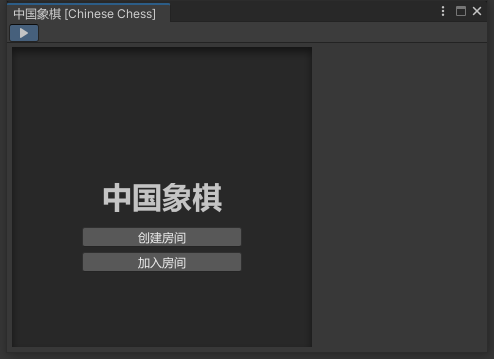
开始界面如下:
玩家在开始界面可以选择创建房间还是加入房间。
②.创建房间
玩家点击创建房间按钮,即切换到了创建房间状态,依然在OnGameViewportGUI方法中绘制创建房间的UI内容:
csharp
		//房间的IP地址
        private string _createIP = "127.0.0.1";
        //房间的端口号
        private int _createPort = 12580;
        //房间的监听Socket
        private Socket _listenSocket;
        //是否正在监听中
        private bool _isListening = false;

        protected override void OnGameViewportGUI()
        {
            base.OnGameViewportGUI();

            switch (State)
            {
                case GameState.Start: OnGameViewportGUI_StartState(); break;
                case GameState.Create: OnGameViewportGUI_CreateState(); break;
            }
        }

        private void OnGameViewportGUI_CreateState()
        {
            Rect rect = new Rect(ViewportRect.width * 0.5f - 80, ViewportRect.height * 0.5f - 100, 160, 40);
            GUI.Label(rect, "创建房间", _createTitleGS);

            bool enabled = GUI.enabled;
            GUI.enabled = !_isListening;

            rect.x = ViewportRect.width * 0.5f - 80;
            rect.y += 60;
            rect.width = 30;
            rect.height = 20;
            GUI.Label(rect, "IP");
            rect.x += 30;
            rect.width = 130;
            _createIP = EditorGUI.TextField(rect, _createIP);

            rect.x = ViewportRect.width * 0.5f - 80;
            rect.y += 25;
            rect.width = 30;
            rect.height = 20;
            GUI.Label(rect, "端口");
            rect.x += 30;
            rect.width = 130;
            _createPort = EditorGUI.IntField(rect, _createPort);

            rect.x = ViewportRect.width * 0.5f - 80;
            rect.y += 25;
            rect.width = 160;
            if (GUI.Button(rect, "创建"))
            {
                StartListen();

                if (_isListening)
                {
                    ListenAsync();
                }
            }

            GUI.enabled = enabled;

            if (_isListening)
            {
                rect.x = ViewportRect.width * 0.5f - 80;
                rect.y += 25;
                rect.width = 160;
                GUI.Label(rect, "创建成功,等待玩家加入......");
            }
        }
创建房间界面如下:
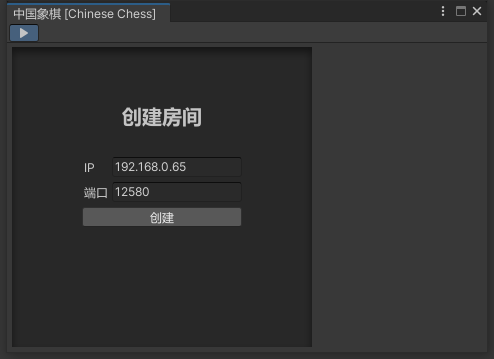
由于中国象棋是双人对战棋牌,所以我们的房间只能容纳两人,当玩家创建了一个房间后,IP地址和端口号也即是房间的唯一标识,会启动一个Socket监听该IP地址和端口号,等待另一位成员的加入。
csharp
        /// <summary>
        /// 开始监听其他玩家连接
        /// </summary>
        private void StartListen()
        {
            if (_listenSocket == null)
                _listenSocket = new Socket(AddressFamily.InterNetwork, SocketType.Stream, ProtocolType.Tcp);

            try
            {
            	//启动监听Socket
                _listenSocket.Bind(new IPEndPoint(IPAddress.Parse(_createIP), _createPort));
                _listenSocket.Listen(1);
                _isListening = true;
            }
            catch (Exception e)
            {
                Debug.LogError(e.Message);
                _isListening = false;
            }
        }
当监听到其他玩家的加入后,创建房间成功,双方便开始棋局。
csharp
        /// <summary>
        /// 监听其他玩家连接中
        /// </summary>
        private async void ListenAsync()
        {
            try
            {
                _connectSocket = await _listenSocket.AcceptAsync().ConfigureAwait(true);
            }
            catch (Exception)
            {
            }

            //成员玩家成功接入
            if (IsConnected)
            {
            	//结束监听,同一房间只允许一名成员加入
                EndListen();

                //随机自身阵营
                bool isRed = UnityEngine.Random.Range(0, 10) >= 5;

                //开始游戏(传入参数:自身阵营)
                StartGame(isRed ? PieceCamp.Red : PieceCamp.Black);

                //启动接收消息循环
                ReceiveMessage();

				//发送开始游戏消息到对手(传入参数:对手阵营)
                SendMessage_StartGame(isRed ? PieceCamp.Black : PieceCamp.Red);
            }
        }

        /// <summary>
        /// 停止监听其他玩家连接
        /// </summary>
        private void EndListen()
        {
            if (_listenSocket != null)
            {
                try
                {
                    _listenSocket.Shutdown(SocketShutdown.Both);
                }
                catch (Exception)
                {
                }
                _listenSocket.Close();
                _listenSocket = null;
            }
            _isListening = false;
        }
③.加入房间
玩家点击加入房间按钮,即切换到了加入房间状态,依然在OnGameViewportGUI方法中绘制加入房间的UI内容:
csharp
		//房间的IP地址
		private string _joinIP = "";
		//房间的端口号
		private int _joinPort = 12580;
		//与对手保持通信的Socket
		private Socket _connectSocket;
		//是否正在连接中
		private bool _isConnecting = false;

        protected override void OnGameViewportGUI()
        {
            base.OnGameViewportGUI();

            switch (State)
            {
                case GameState.Start: OnGameViewportGUI_StartState(); break;
                case GameState.Create: OnGameViewportGUI_CreateState(); break;
                case GameState.Join: OnGameViewportGUI_JoinState(); break;
            }
        }

        private void OnGameViewportGUI_JoinState()
        {
            Rect rect = new Rect(ViewportRect.width * 0.5f - 80, ViewportRect.height * 0.5f - 100, 160, 40);
            GUI.Label(rect, "加入房间", _joinTitleGS);

            bool enabled = GUI.enabled;
            GUI.enabled = !_isConnecting;

            rect.x = ViewportRect.width * 0.5f - 80;
            rect.y += 60;
            rect.width = 30;
            rect.height = 20;
            GUI.Label(rect, "IP");
            rect.x += 30;
            rect.width = 130;
            _joinIP = EditorGUI.TextField(rect, _joinIP);

            rect.x = ViewportRect.width * 0.5f - 80;
            rect.y += 25;
            rect.width = 30;
            rect.height = 20;
            GUI.Label(rect, "端口");
            rect.x += 30;
            rect.width = 130;
            _joinPort = EditorGUI.IntField(rect, _joinPort);

            rect.x = ViewportRect.width * 0.5f - 80;
            rect.y += 25;
            rect.width = 160;
            if (GUI.Button(rect, "加入"))
            {
                StartConnect();
            }

            GUI.enabled = enabled;

            if (_isConnecting)
            {
                rect.x = ViewportRect.width * 0.5f - 80;
                rect.y += 25;
                rect.width = 160;
                GUI.Label(rect, "正在加入房间......");
            }
        }
加入房间界面如下:
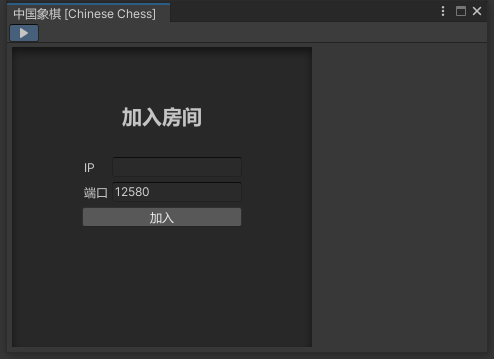
通过其他途径获取到了他人创建的房间IP地址及端口号后,在此处输入并点击加入按钮便可加入该房间(也即是与房主建立双向连接):
csharp
        /// <summary>
        /// 开始连接房主
        /// </summary>
        private async void StartConnect()
        {
            if (_connectSocket == null)
                _connectSocket = new Socket(AddressFamily.InterNetwork, SocketType.Stream, ProtocolType.Tcp);

            try
            {
                _isConnecting = true;
                await _connectSocket.ConnectAsync(new IPEndPoint(IPAddress.Parse(_joinIP), _joinPort)).ConfigureAwait(true);
            }
            catch (Exception e)
            {
                Debug.LogError(e.Message);
                _isConnecting = false;
            }

            //连接房主成功
            if (IsConnected)
            {
                //启动接收消息循环
                ReceiveMessage();
            }
}成员玩家不会主动开始游戏,连接房主成功后,房主会发送开始游戏的消息,收到消息后成员玩家才会进入游戏棋局。
④.游戏棋局
房主和成员玩家都是通过调用StartGame开始游戏棋局:
csharp
        /// <summary>
        /// 开始棋局
        /// </summary>
        /// <param name="selfCamp">自身阵营</param>
        private void StartGame(PieceCamp selfCamp)
        {
        	//获取对手的远端地址信息,作为对手姓名
            OpponentName = (_connectSocket.RemoteEndPoint as IPEndPoint).Address.ToString();
            SelfCamp = selfCamp;
            //按中国象棋规则,红先黑后
            PlayCamp = PieceCamp.Red;
            State = GameState.Playing;
}只不过房主是主动调用,成员玩家则是收到房主的开始游戏消息后再调用,关于消息通信我们暂时放到后面,与游戏棋局逻辑一起讲。
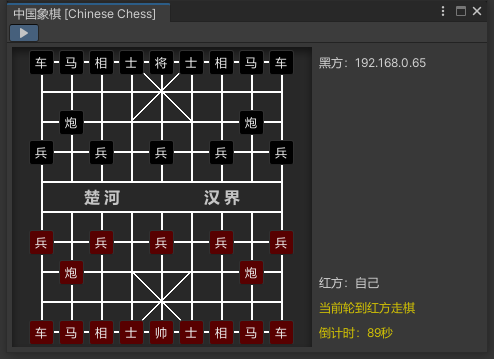
游戏棋局界面如下:
⑤.结束界面
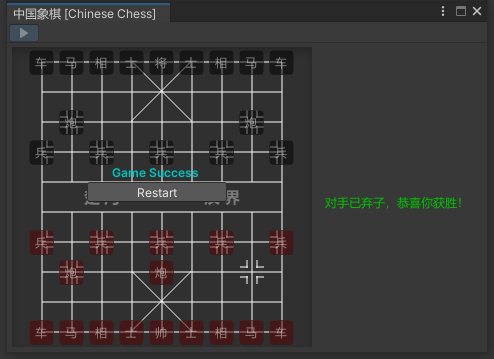
当一局棋局结束时,进入结束界面,对弈双方一方是获胜方,一方是失败方,通过调用EndGame方法结束棋局:
csharp
        /// <summary>
        /// 结束棋局
        /// </summary>
        /// <param name="isSuccessed">自身是否获胜</param>
        /// <param name="endDetails">获胜、失败描述细节</param>
        private void EndGame(bool isSuccessed, string endDetails)
        {
            if (isSuccessed) IsGameSuccessed = true;
            else IsGameOvered = true;

            EndDetails = endDetails;
            State = GameState.End;
        }
结束界面如下: