关键词:Mapbox GL JS、Turf.js、多边形分割、前端 GIS、GeoJSON 处理
在 WebGIS 开发中,多边形分割 是一个高频且复杂的需求------无论是土地管理中的地块拆分,还是城市规划中的区域调整,都需要在浏览器端完成"画线切分"的交互操作。本文将分享一套基于 Mapbox GL JS + Mapbox Draw + Turf.js 的完整前端分割方案,重点讲解坐标校验、MultiPolygon 兼容、以及分割算法的核心实现
主要是优化这篇文章里面的方法以及封装工具
mapbox 基于 Turf.js 实现高精度多边形分割(支持带空洞 / 坐标无损)-CSDN博客
一、需求场景与技术选型
1.1 为什么选前端分割?
传统的 GIS 分割往往依赖后端服务(如 PostGIS、ArcGIS Server),但在以下场景中,纯前端方案更具优势:
-
实时交互:用户画线后立即预览分割结果,无需等待服务端响应
-
离线可用:在弱网或无网环境下仍可正常使用
-
降低服务端压力:大量几何计算下沉到客户端,减轻服务器负担
1.2 技术栈
表格
| 库/工具 | 作用 |
|---|---|
| Mapbox GL JS | 地图渲染引擎,提供高性能的矢量瓦片渲染 |
| Mapbox Draw | 地图绘制插件,支持绘制分割线(LineString) |
| Turf.js | 地理空间分析库,提供 lineSplit、polygonize 等核心算法 |
| Element Plus | UI 组件库,用于操作提示(ElMessage) |
二、核心架构设计
2.1 类结构设计
我们采用 面向对象 的方式封装分割逻辑,将状态管理、事件绑定、几何计算解耦:
javascript
export class MapPureSplitTool {
    private map: mapboxgl.Map
    private draw: MapboxDraw

    private isSplitting = false        // 是否处于分割模式
    private isDrawingSplitLine = false // 是否正在画分割线
    private targetSplitFeature: any = null  // 待分割的目标图斑

    onSplitComplete?: (original: any, result: any) => void  // 分割完成回调
    onError?: () => void  // 错误回调
}
2.2 交互流程
plain
复制
[启动分割] → [点击选中图斑] → [高亮显示] → [绘制分割线] → [执行分割] → [回调结果]
    ↑                                                              ↓
   [重置/退出] ←───────────────────────────────────────────────────┘
三、关键实现详解
3.1 严格的几何校验------拦截 90% 的异常
前端分割最大的痛点是数据质量不可控 。用户加载的 GeoJSON 可能来自各种数据源,坐标缺失、格式错误、类型不匹配等问题层出不穷。我们在点击选中的第一时间进行递归坐标校验:
TypeScript
复制
javascript
private handleClick = (e: any) => {
    const feature = e.features[0]
    const geometry = feature.geometry

    // 1. 基础类型校验
    if (!geometry || !geometry.type) {
        ElMessage.error('图斑几何数据无效,无法分割')
        return
    }
    if (!['Polygon', 'MultiPolygon'].includes(geometry.type)) {
        ElMessage.warning('仅支持多边形/多多边形分割')
        return
    }

    // 2. 坐标存在性校验
    const coords = geometry.coordinates
    if (!coords || coords.length === 0) {
        ElMessage.error('该图斑的几何坐标为空或损坏,无法分割')
        return
    }

    // 3. 递归校验坐标有效性(防止嵌套空数组)
    const isValidCoords = (arr: any[]): boolean => {
        if (!Array.isArray(arr) || arr.length === 0) return false
        if (Array.isArray(arr[0])) {
            return arr.every(item => isValidCoords(item))
        }
        // 检查单个坐标 [lon, lat]
        return arr.length === 2 &&
               typeof arr[0] === 'number' &&
               typeof arr[1] === 'number'
    }

    if (!isValidCoords(coords)) {
        ElMessage.error('该图斑的几何坐标格式损坏,无法分割')
        return
    }

    // 校验通过,进入绘制阶段
    this.targetSplitFeature = feature
    this.isDrawingSplitLine = true
    this.draw.changeMode('draw_line_string')
}设计意图:将校验逻辑前置,避免将脏数据传入 Turf.js 导致不可预期的错误。递归校验能处理 Polygon、MultiPolygon 以及带孔洞(holes)的复杂情况。
3.2 MultiPolygon 自动降级
Turf.js 的 polygonize 方法对 MultiPolygon 支持不佳,因此我们做了一个兼容性处理:将 MultiPolygon 取其第一个 Polygon 进行分割,业务上通常也符合"对主区域进行切割"的需求。
TypeScript
复制
javascript
let targetFeature = this.targetSplitFeature
if (targetFeature.geometry.type === 'MultiPolygon') {
    targetFeature = {
        ...targetFeature,
        geometry: {
            type: 'Polygon',
            coordinates: targetFeature.geometry.coordinates[0]
        }
    }
}
3.3 分割算法核心------基于 Turf.js 的线面切割
分割的核心思路来自社区成熟的 "线化面 + 求交点 + 重组多边形" 方案:
-
面化为线:将 Polygon 边界转换为 LineString
-
计算交点:获取分割线与多边形边界的所有交点
-
互相切割:用交点分别切割多边形边界线和分割线
-
重组多边形 :通过
polygonize将线段组合成闭合多边形 -
过滤外部多边形 :通过质心判断(
booleanWithin)保留位于原多边形内部的结果
TypeScript
复制
javascript
// splitPolygon 核心逻辑(简化版)
function splitPolygon(outerPolygon, line) {
    // 1. 精度截断,避免浮点误差
    let truncatedSplitter = turf.truncate(
        turf.lineString(outerPolygon.geometry.coordinates[0]),
        { precision: 7 }
    )

    // 2. 求交点(至少2个交点才能分割)
    let intersectCollection = turf.lineIntersect(line, truncatedSplitter)
    if (intersectCollection.features.length < 2) return null

    // 3. 合并交点为 MultiPoint
    let intersectCombined = turf.combine(intersectCollection).features[0]

    // 4. 分别切割两条线
    let outerPieces = turf.lineSplit(truncatedSplitter, intersectCombined)
    let splitterPieces = turf.lineSplit(line, intersectCombined)

    // 5. 合并所有线段并重组多边形
    let allPieces = turf.featureCollection(
        outerPieces.features.concat(splitterPieces.features)
    )
    let polygonCollection = turf.polygonize(allPieces)

    // 6. 过滤:只保留质心在原多边形内部的
    return polygonCollection.features.filter(polygon => {
        let center = turf.centroid(polygon)
        return turf.booleanWithin(center, outerPolygon)
    })
}
精度陷阱 :Turf.js 的
lineSplit内部会对 splitter 做truncate处理(保留7位小数),如果直接用线A切线B和线B切线A,得到的切割点可能不一致,导致polygonize失败。解决方案是先统一计算交点,再用交点分别切割两条线。
四、Mapbox 集成与事件管理
4.1 图层过滤------避免误触
Mapbox 地图上往往叠加了数十个图层(道路、标注、栅格等),我们需要过滤掉非业务图层,只让用户点击有效的图斑:
TypeScript
复制
javascript
const COMMON_EXCLUDE_LAYER_PATTERNS = [
    /^g-draw-/,    // Mapbox Draw 自身图层
    /.cold$/,      // Draw 冷态图层
    /-hover$/,     // 悬停效果
    /_road$/,      // 道路
    /raster/,      // 栅格
    /outline/,     // 边界线
    /city-label/,  // 城市标注
    /.hot$/,       // Draw 热态图层
    /^guizhou/,    // 特定业务图层
    'point', 'polyline'
]

private getValidLayers(): string[] {
    return this.map.getStyle().layers
        .map(l => l.id)
        .filter(id => !COMMON_EXCLUDE_LAYER_PATTERNS.some(p =>
            p instanceof RegExp ? p.test(id) : p === id
        ))
}
4.2 事件绑定与清理
内存泄漏是前端地图开发的隐形杀手。我们在每次状态切换时,必须显式移除旧的事件监听:
TypeScript
复制
javascript
startSplit() {
    // 先清理,再绑定,防止重复监听
    layers.forEach(layerId => {
        this.map.off('click', layerId, this.handleClick)
        this.map.on('click', layerId, this.handleClick)
    })
}

reset() {
    this.map.off('draw.create', this.onLineDone)
    this.draw?.deleteAll()
    this.draw?.changeMode('simple_select')
    // 清理高亮图层...
}
五、完整使用示例
5.1、mapSplitTool.ts,直接复制
javascript
import { ElMessage } from 'element-plus'
import { trimPolygon } from '@/utils/polygonTrimmer'
import { nextTick } from 'vue'

export class MapPlasticTools {
  private map: any
  private draw: any
  private isPlasticSurgery = false
  private isDrawingTrimLine = false
  private targetPlasticFeature: any = null
  private clearPlasticHighlight: () => void = () => { }

  public onResult: (oldFeature: any, newFeatures: any) => void = null

  constructor(map: any, draw: any) {
    this.map = map
    this.draw = draw
  }

  enterPlasticMode() {
    if (!this.map || !this.draw) {
      ElMessage.warning('地图未初始化')
      return
    }

    this.exitPlasticMode()
    this.isPlasticSurgery = true
    ElMessage.info('请选择需要整形的面')
    this.bindLayerClick()
  }

  // ==============================
  // 【提取】更新后重新进入整形
  // ==============================
  reEnterPlasticMode() {
    if (!this.map || !this.draw) return

    nextTick(() => {
      try {
        // 强制重置
        this.draw.changeMode('simple_select')
        this.draw.deleteAll()

        // 重置内部状态
        this.isDrawingTrimLine = false
        this.isPlasticSurgery = true

        // 重新绑定事件
        this.unbindLayerClick()
        this.bindLayerClick()

        ElMessage.info('已重新进入整形模式')
      } catch (err) {
        console.error('重新进入整形失败', err)
      }
    })
  }

  private bindLayerClick() {
    const layers = this.getValidLayers()
    layers.forEach(id => {
      this.map.off('click', id, this.onFeatureClick)
      this.map.on('click', id, this.onFeatureClick)
    })
  }

  private unbindLayerClick() {
    const layers = this.getValidLayers()
    layers.forEach(id => {
      this.map.off('click', id, this.onFeatureClick)
    })
  }

  private onFeatureClick = (e: any) => {
    if (this.isDrawingTrimLine || !e.features?.length) return

    const feature = e.features[0]
    if (!['Polygon', 'MultiPolygon'].includes(feature.geometry.type)) return

    this.targetPlasticFeature = feature
    ElMessage.info('已选中,请绘制整形线')
    this.highlightFeature(feature)

    this.isDrawingTrimLine = true
    this.draw.changeMode('draw_line_string')
    this.map.once('draw.create', this.onTrimLineCreated)
  }

  private onTrimLineCreated = async (e: any) => {
    try {
      const line = e.features[0]
      if (!line) {
        ElMessage.error('整形线无效')
        this.resetPlasticState()
        return
      }

      const result = trimPolygon(this.targetPlasticFeature, line)

      if (!result) {
        ElMessage.error('整形失败')
        this.draw.delete(line.id)
        this.resetPlasticState()
        return
      }

      ElMessage.success('整形完成!')

      if (this.onResult) {
        this.onResult(this.targetPlasticFeature, result)
      }

      this.resetPlasticState()

    } catch (err) {
      console.error('整形出错:', err)
      ElMessage.error('整形失败')
      this.resetPlasticState()
    }
  }

  private highlightFeature(feature: any) {
    const id = 'plastic-highlight'
    if (this.map.getLayer(id)) this.map.removeLayer(id)
    if (this.map.getSource(id)) this.map.removeSource(id)

    this.map.addSource(id, { type: 'geojson', data: feature })
    this.map.addLayer({
      id, type: 'line', source: id, paint: { 'line-color': '#ff00ff', 'line-width': 3 }
    })
    this.clearPlasticHighlight = () => {
      if (this.map.getLayer(id)) this.map.removeLayer(id)
      if (this.map.getSource(id)) this.map.removeSource(id)
    }
  }

  resetPlasticState() {
    this.isDrawingTrimLine = false
    this.targetPlasticFeature = null
    this.clearPlasticHighlight?.()

    if (this.draw) {
      this.draw.deleteAll()
      this.draw.changeMode('simple_select')
    }
  }

  exitPlasticMode() {
    this.unbindLayerClick()
    this.isPlasticSurgery = false
    this.resetPlasticState()
    this.map.off('draw.create', this.onTrimLineCreated)
  }

  private getValidLayers(): string[] {
    if (!this.map) return []
    const exclude = [/draw/, /hover/, /outline/, /point/, /label/, /symbol/, /plastic-highlight/]
    return this.map.getStyle().layers.map(l => l.id).filter(id => !exclude.some(r => r.test(id)))
  }
  public clearHighlight() {
    this.clearPlasticHighlight()
  }
}
5.2、涉及的相关组件 trimPolygon.ts 直接复制
javascript
import * as turf from '@turf/turf';

class PolygonTrimmer {
  constructor() {
    this.turf = turf;
    this.EPS = 1e-8;        // 坐标精度容差(和分割工具一致)
    this.tolerance = 1e-10; // 浮点判断精度
  }

  /**
   * 核心方法:修整多边形(模拟ArcGIS修整工具)- 生成两个候选面后保留面积大的
   * @param {Object} polygonGeoJSON - 原始多边形 GeoJSON (Polygon/MultiPolygon)
   * @param {Object} lineGeoJSON - 修整线 GeoJSON (LineString)
   * @returns {Object|null} 修整后的多边形 GeoJSON(面积大的那个),失败返回null
   */
  trimPolygon(polygonGeoJSON, lineGeoJSON) {
    try {
      // 1. 基础校验(和分割工具保持一致)
      if (!polygonGeoJSON) throw new Error('未传入目标多边形');
      if (!lineGeoJSON) throw new Error('未传入修整线');

      // 统一转为单Polygon处理
      const polygonFeature = this._normalizeToPolygon(polygonGeoJSON);
      const lineFeature = this.turf.feature(lineGeoJSON.geometry);

      if (lineFeature.geometry.type !== 'LineString') {
        console.error('仅支持LineString类型的修整线');
        return null;
      }

      // 2. 提取多边形外环和空洞
      const originalOuterRing = polygonFeature.geometry.coordinates[0];
      const originalHoles = polygonFeature.geometry.coordinates.slice(1);
      const polygonBoundary = this.turf.lineString(originalOuterRing); // 转为边界线

      // 3. 查找修整线与多边形边界的有效交点对(参考分割工具逻辑)
      const validIntersections = this._findValidIntersectionPair(polygonBoundary, lineFeature);
      if (!validIntersections || validIntersections.length < 2) {
        console.warn('修整线必须与多边形边界相交两次');
        return null;
      }
      const [p1, p2] = validIntersections;
      console.log('有效交点对:', p1, p2);
      console.log('交点距离:', this.turf.distance(this.turf.point(p1), this.turf.point(p2)));
      console.log('交点1是否在多边形边界:', this._isPointOnSegment(p1, originalOuterRing[0], originalOuterRing[1]));

      // 4. 手动切割外环(100%保留原始坐标,参考分割工具_manualSplitRing)
      const [clippedRing1, clippedRing2] = this._manualSplitRing(originalOuterRing, p1, p2);

      // 5. 手动切割修整线(仅保留交点间的线段)
      const clippedTrimLineCoords = this._manualSplitLine(lineFeature.geometry.coordinates, p1, p2);

      // 6. 拼接两个候选面的外环(参考分割工具_connectLine)
      const poly1Outer = this._connectRingAndLine(clippedRing1, clippedTrimLineCoords);
      const poly2Outer = this._connectRingAndLine(clippedRing2, clippedTrimLineCoords);

      // 7. 处理空洞归属(参考分割工具的空洞逻辑)
      const { poly1Holes, poly2Holes } = this._assignHolesToPolygons(originalHoles, poly1Outer, poly2Outer);

      // 8. 构建两个完整的候选多边形
      const candidateA = this.turf.polygon([poly1Outer, ...poly1Holes], polygonFeature.properties);
      const candidateB = this.turf.polygon([poly2Outer, ...poly2Holes], polygonFeature.properties);

      // 9. 清理坐标(修复自相交,保留原始精度)
      const cleanedA = this._cleanPolygon(candidateA);
      const cleanedB = this._cleanPolygon(candidateB);

      // 10. 面积对比:保留大面、移除小面
      const areaA = this.turf.area(cleanedA);
      const areaB = this.turf.area(cleanedB);
      const minValidArea = 0.0001; // 极小面过滤阈值

      // 校验有效面积
      if (areaA < minValidArea && areaB < minValidArea) {
        console.error('两个候选面面积均过小,修整失败');
        return null;
      }

      // 选择面积大的面作为最终结果
      let finalResult;
      if (areaA >= areaB) {
        finalResult = cleanedA;
        console.log(`保留候选面A(面积:${areaA.toFixed(6)}),移除候选面B(面积:${areaB.toFixed(6)})`);
      } else {
        finalResult = cleanedB;
        console.log(`保留候选面B(面积:${areaB.toFixed(6)}),移除候选面A(面积:${areaA.toFixed(6)})`);
      }

      // 补充属性(参考分割工具的属性规则)
      finalResult.properties = {
        ...polygonFeature.properties,
        trim: true,
        trimTime: Date.now(),
        trimId: `${polygonFeature.properties.gid || 'poly'}_trim_0`,
        candidateAreaA: areaA,
        candidateAreaB: areaB,
        selectedByArea: true,
        selectedCandidate: areaA >= areaB ? 'A' : 'B',
        innerRingsCount: finalResult.geometry.coordinates.length - 1,
        originalInnerRingsCount: originalHoles.length
      };
      const originalArea = this.turf.area(polygonFeature);
const finalArea = this.turf.area(finalResult);
console.log('原始面积:', originalArea.toFixed(6));
console.log('修整后面积:', finalArea.toFixed(6));

// 检查几何是否一致
const isSameGeometry = JSON.stringify(finalResult.geometry.coordinates) === JSON.stringify(polygonFeature.geometry.coordinates);
if (isSameGeometry) {
  console.warn('修整后几何与原始几何一致,可能是修整线无效');
}

      return finalResult;
    } catch (error) {
      console.error('修整多边形失败:', error);
      return null;
    }
  }

  /**
   * 归一化为单Polygon(处理MultiPolygon)
   * @private
   */
  _normalizeToPolygon(geoJSON) {
    const feature = this.turf.feature(geoJSON.geometry);
    if (feature.geometry.type === 'MultiPolygon') {
      // 取第一个Polygon(和分割工具逻辑一致)
      return this.turf.polygon(feature.geometry.coordinates[0], feature.properties);
    } else if (feature.geometry.type === 'Polygon') {
      return feature;
    } else {
      throw new Error(`仅支持Polygon/MultiPolygon类型,当前为${feature.geometry.type}`);
    }
  }

  /**
   * 查找修整线与多边形边界的有效交点对(参考分割工具_setFloors)
   * @private
   */
  _findValidIntersectionPair(boundaryLine, trimLine) {
     const intersections = this.turf.lineIntersect(boundaryLine, trimLine).features;
  if (intersections.length < 2) return null;

  // 1. 过滤无效交点(必须在边界线段上,非顶点)
  const validPoints = [];
  for (const p of intersections) {
    const pt = p.geometry.coordinates;
    let isOnSegment = false;
    // 检查是否在边界线段上(非顶点)
    for (let i = 0; i < boundaryLine.geometry.coordinates.length - 1; i++) {
      const a = boundaryLine.geometry.coordinates[i];
      const b = boundaryLine.geometry.coordinates[i + 1];
      if (this._isPointOnSegment(pt, a, b) &&
          this.turf.distance(this.turf.point(pt), this.turf.point(a)) > this.EPS &&
          this.turf.distance(this.turf.point(pt), this.turf.point(b)) > this.EPS) {
        isOnSegment = true;
        break;
      }
    }
    if (isOnSegment) validPoints.push(pt);
  }

  if (validPoints.length < 2) return null;

  // 2. 去重(距离 > EPS)
  const uniquePoints = [];
  for (const pt of validPoints) {
    const isDuplicate = uniquePoints.some(u =>
      this.turf.distance(this.turf.point(u), this.turf.point(pt)) < this.EPS
    );
    if (!isDuplicate) uniquePoints.push(pt);
  }

  if (uniquePoints.length < 2) return null;

  // 3. 按修整线方向排序
  uniquePoints.sort((a, b) => {
    const distA = this.turf.nearestPointOnLine(trimLine, this.turf.point(a)).properties.location;
    const distB = this.turf.nearestPointOnLine(trimLine, this.turf.point(b)).properties.location;
    return distA - distB;
  });

  return uniquePoints.slice(0, 2);
  }

  /**
   * 手动切割外环(100%保留原始坐标,参考分割工具_manualSplitRing)
   * @private
   */
  _manualSplitRing(ringCoords, p1, p2) {
    // 移除闭合点,保留原始坐标
  const ring = [...ringCoords.slice(0, -1)];

  // 修复:遍历到倒数第一个点(i < ring.length - 1)
  const insertPoint = (pt) => {
    // 先检查是否已存在该点
    for (let i = 0; i < ring.length; i++) {
      if (this.turf.distance(this.turf.point(ring[i]), this.turf.point(pt)) < this.EPS) {
        return; // 已存在,无需插入
      }
    }
    // 插入到线段中间
    for (let i = 0; i < ring.length - 1; i++) {
      const a = ring[i], b = ring[i + 1];
      if (this._isPointOnSegment(pt, a, b)) {
        ring.splice(i + 1, 0, pt);
        return;
      }
    }
    // 无有效线段,返回null(切割失败)
    throw new Error(`交点 ${pt} 不在多边形外环线段上`);
  };

  try {
    insertPoint(p1);
    insertPoint(p2);
  } catch (e) {
    console.error('插入交点失败:', e);
    return [ringCoords, ringCoords]; // 返回原环,避免报错
  }

  // 查找交点索引
  const idx1 = this._findPointIndex(ring, p1);
  const idx2 = this._findPointIndex(ring, p2);

  if (idx1 === -1 || idx2 === -1 || idx1 === idx2) {
    console.warn('交点索引无效,切割失败');
    return [ringCoords, ringCoords];
  }

  // 切割为两段
  let part1, part2;
  if (idx1 < idx2) {
    part1 = ring.slice(idx1, idx2 + 1);
    part2 = ring.slice(idx2).concat(ring.slice(0, idx1 + 1));
  } else {
    part1 = ring.slice(idx2, idx1 + 1);
    part2 = ring.slice(idx1).concat(ring.slice(0, idx2 + 1));
  }

  // 闭合环(确保首尾一致)
  part1 = [...part1, part1[0]];
  part2 = [...part2, part2[0]];

  // 验证切割结果
  console.log('切割后环1长度:', part1.length);
  console.log('切割后环2长度:', part2.length);
  return [part1, part2];
  }

  /**
   * 手动切割修整线(参考分割工具_manualSplitLine)
   * @private
   */
  _manualSplitLine(lineCoords, p1, p2) {
    const line = [...lineCoords];

    // 插入交点到线中
    const insertPoint = (pt) => {
      for (let i = 0; i < line.length; i++) {
        const a = line[i], b = line[i + 1];
        if (this._isPointOnSegment(pt, a, b)) {
          line.splice(i + 1, 0, pt);
          return;
        }
      }
      line.push(pt);
    };
    insertPoint(p1);
    insertPoint(p2);

    // 查找交点索引并切割
    const idx1 = this._findPointIndex(line, p1);
    const idx2 = this._findPointIndex(line, p2);
    return idx1 < idx2 ? line.slice(idx1, idx2 + 1) : line.slice(idx2, idx1 + 1);
  }

  /**
   * 拼接环和修整线(参考分割工具_connectLine)
   * @private
   */
  _connectRingAndLine(ring, lineCoords) {
    if (lineCoords.length < 2) return ring; // 空修整线,返回原环

  const ringEnd = ring[ring.length - 2]; // 倒数第二个点(排除闭合点)
  const lineStart = lineCoords[0];
  const lineEnd = lineCoords[lineCoords.length - 1];

  // 修复:增加距离阈值,避免精度误差
  const distToStart = this.turf.distance(this.turf.point(ringEnd), this.turf.point(lineStart));
  const distToEnd = this.turf.distance(this.turf.point(ringEnd), this.turf.point(lineEnd));

  let mergedLine;
  if (distToStart < this.EPS * 10) {
    mergedLine = [...ring.slice(0, -1), ...lineCoords.slice(1)];
  } else if (distToEnd < this.EPS * 10) {
    mergedLine = [...ring.slice(0, -1), ...lineCoords.reverse().slice(1)];
  } else {
    // 无匹配端点,直接拼接(避免返回原环)
    mergedLine = [...ring.slice(0, -1), ...lineCoords];
  }

  // 闭合环并去重
  mergedLine = [...new Set(mergedLine.map(pt => pt.join(',')))].map(str => str.split(',').map(Number));
  mergedLine.push(mergedLine[0]);

  // 验证拼接结果
  console.log('拼接前环长度:', ring.length);
  console.log('拼接后环长度:', mergedLine.length);
  return mergedLine;
  }

  /**
   * 空洞归属判断(参考分割工具_singleClip)
   * @private
   */
  _assignHolesToPolygons(holes, poly1Outer, poly2Outer) {
    const poly1Holes = [], poly2Holes = [];
    const tempPoly1 = this.turf.polygon([poly1Outer]);
    const tempPoly2 = this.turf.polygon([poly2Outer]);

    for (const hole of holes) {
      const center = this.turf.centroid(this.turf.polygon([hole]));
      const in1 = this.turf.booleanPointInPolygon(center, tempPoly1);
      const in2 = this.turf.booleanPointInPolygon(center, tempPoly2);

      if (in1 && !in2) {
        poly1Holes.push(hole);
      } else if (in2 && !in1) {
        poly2Holes.push(hole);
      } else if (in1 && in2) {
        // 同时在两个面内时,按距离交点的远近分配
        const p1 = this.turf.point(poly1Outer[0]);
        const d1 = this.turf.distance(center, p1);
        const d2 = this.turf.distance(center, this.turf.point(poly2Outer[0]));
        d1 < d2 ? poly1Holes.push(hole) : poly2Holes.push(hole);
      }
    }

    return { poly1Holes, poly2Holes };
  }

  /**
   * 清理多边形(修复自相交,保留原始坐标)
   * @private
   */
  _cleanPolygon(poly) {
    let cleaned = this.turf.cleanCoords(poly);
    // 修复自相交(不简化坐标)
    const kinks = this.turf.kinks(cleaned);
    if (kinks.features.length > 0) {
      cleaned = this.turf.polygon(
        cleaned.geometry.coordinates,
        cleaned.properties
      );
    }
    return cleaned;
  }

  /**
   * 查找点在坐标数组中的索引(参考分割工具_findPointIndex)
   * @private
   */
  _findPointIndex(coords, pt) {
    for (let i = 0; i < coords.length; i++) {
      if (this.turf.distance(this.turf.point(coords[i]), this.turf.point(pt)) < this.EPS) {
        return i;
      }
    }
    return -1;
  }

  /**
   * 判断点是否在线段上(参考分割工具_isPointOnSegment)
   * @private
   */
  _isPointOnSegment(pt, a, b) {
    const cross = (pt[0] - a[0]) * (b[1] - a[1]) - (pt[1] - a[1]) * (b[0] - a[0]);
    if (Math.abs(cross) > this.EPS) return false;

    const minX = Math.min(a[0], b[0]), maxX = Math.max(a[0], b[0]);
    const minY = Math.min(a[1], b[1]), maxY = Math.max(a[1], b[1]);

    return pt[0] >= minX - this.EPS && pt[0] <= maxX + this.EPS &&
      pt[1] >= minY - this.EPS && pt[1] <= maxY + this.EPS;
  }

  /**
   * 移除小面积碎块(保留空洞,兼容原有方法)
   * @public
   */
  removeSmallFragments(polygonGeoJSON, minArea) {
    const multiPolygon = this.turf.geomType(polygonGeoJSON) === 'Polygon'
      ? this.turf.multiPolygon([polygonGeoJSON.geometry.coordinates])
      : polygonGeoJSON;

    const validPolygons = [];
    multiPolygon.geometry.coordinates.forEach(coords => {
      const poly = this.turf.polygon(coords);
      const area = this.turf.area(poly);
      if (area >= minArea) {
        validPolygons.push(coords);
      }
    });

    const result = this.turf.multiPolygon(validPolygons);
    result.properties = {
      ...polygonGeoJSON.properties,
      cleaned: true,
      cleanTime: Date.now(),
      innerRingsPreserved: true
    };
    return validPolygons.length ? result : polygonGeoJSON;
  }
}

// ========== 导出风格对齐分割工具 ==========
const polygonTrimmer = new PolygonTrimmer();

/**
 * 对外暴露的整形方法(和splitPolygon写法一致)
 * @param {Object} targetPolygon - 目标多边形GeoJSON
 * @param {Object} trimLine - 整形线GeoJSON
 * @returns {Object|null} 整形结果(面积大的那个面)
 */
export function trimPolygon(targetPolygon, trimLine) {
  try {
    const trimResult = polygonTrimmer.trimPolygon(targetPolygon, trimLine);
    // 统一返回数组格式(和splitPolygon的返回值对齐)
    return trimResult ? [trimResult] : null;
  } catch (error) {
    console.error('多边形整形出错:', error);
    return null;
  }
}

/**
 * 对外暴露的移除小碎块方法
 * @param {Object} targetPolygon - 目标多边形GeoJSON
 * @param {number} minArea - 最小保留面积
 * @returns {Object|null} 清理结果
 */
export function removeSmallFragments(targetPolygon, minArea) {
  try {
    return polygonTrimmer.removeSmallFragments(targetPolygon, minArea);
  } catch (error) {
    console.error('移除小碎块出错:', error);
    return null;
  }
}

/**
 * 创建整形线(和createSplitLine写法一致)
 * @param {Array} start - 起点 [x,y]
 * @param {Array} end - 终点 [x,y]
 * @returns {Object|null} 整形线GeoJSON
 */
export function createTrimLine(start, end) {
  if (!start || !end || start.length !== 2 || end.length !== 2) return null;
  return turf.lineString([start, end], { name: 'trim-line' });
}
5.3 地图页面使用,分步骤的,不可直接复制,地图涉及到的刷新结果可以参考博主写的这篇文章:
Mapbox GL JS 自研面要素整形工具开发实录-CSDN博客
javascript
import { MapPureSplitTool } from '@/utils/map/mapSplitTool'
//分割
let splitTool: MapPureSplitTool | null = null;
let isSplitMode = false

// 初始化分割工具
splitTool = new MapPureSplitTool(map, draw);

const segmentation = () => {
    console.log("进入分割");
    if (!map) {
        ElMessage.warning("地图未初始化完成,无法分割");
        return;
    }
    // 已激活 → 直接退出
    if (!splitTool) return
    // 已经开启 → 直接彻底关闭
    if (isSplitMode) {
        splitTool.exitSplit()  // 关闭工具
        closeDrawLayer()                // 清理地图
        isSplitMode = false
        startFeatureSelect()
        return
    }
    stopFeatureSelect()
    // 未开启 → 只进入一次
    isSplitMode = true
    // 启动分割
    splitTool.startSplit()
    splitTool.onSplitComplete = (originalFeature, splitResult) => {
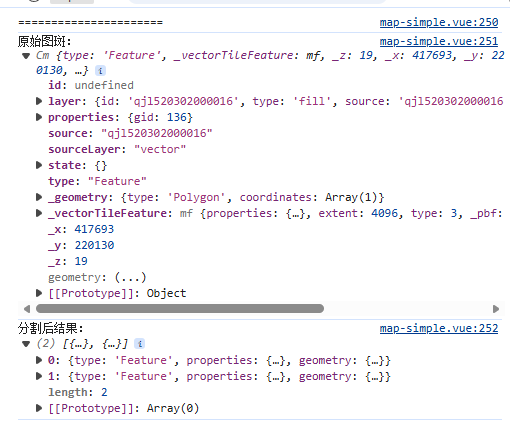
        console.log('======================')
        console.log('原始图斑:', originalFeature)
        console.log('分割后结果:', splitResult)
        console.log('======================')
        //提交到后端
        submitSplitSurgery(originalFeature, splitResult)
        isSplitMode = false;
        setTimeout(() => {
            segmentation();
        }, 100);
    }
    splitTool.onError = () => {
        isSplitMode = false;
        setTimeout(() => {
            segmentation();
        }, 200);
    };
};


const submitSplitSurgery = async (oldData, newData) => {
    const res = await savePlasticToServer(oldData, newData)
    if (res.success) {
        // 成功 → 刷新图层
        layerRefresh.refreshLayer(oldData.layer.id, cancelSplit)

    }
};

// 取消分割
const cancelSplit = () => {
    if (!draw || !map) return
    // 1. 退出模式
    splitTool?.exitSplit()
    // 1. 切回普通选择模式
    draw.changeMode('simple_select')
    // 2. 清空地图上画的线/面
    draw.deleteAll()
    // 3. 彻底关闭状态
    isSplitMode = false
    startFeatureSelect()
}
5.4 打印结果