如下是组件信息
1.顺时针旋转
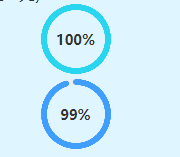
2.逆时针旋转
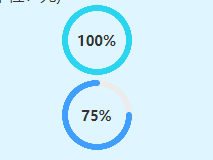
bash
<template>
	<!-- 圆环组件 -->
	<view class="circle-box" :style="{width: size + 'px', height: size + 'px'}">
		<canvas type="2d" id="ringCanvas" class="canvas" :style="{width: size + 'px', height: size + 'px'}"></canvas>
		<!-- 中间文字:显示原始值 -->
		<view class="num-text" v-if="showText">{{ percent }}%</view>
	</view>
</template>

<script>
	export default {
		props: {
			// 百分比数值
			percent: {
				type: Number,
				default: 50
			},
			// 圆环背景色
			bgColor: {
				type: String,
				default: '#ECECEC'
			},
			// 圆环填充色
			activeColor: {
				type: String,
				default: '#409EFF'
			},
			// 线条宽度
			lineWidth: {
				type: Number,
				default: 6
			},
			// 宽高大小
			size: {
				type: Number,
				default: 150
			},
			// 是否现在中间文字
			showText: {
				type: Boolean,
				default: false
			}
		},
		data() {
			return {
				drawTimer: null
			}
		},
		watch: {
			percent: {
				handler() {
					this.debounceDraw()
				},
				immediate: true
			},
			activeColor() {
				this.debounceDraw()
			},
			lineWidth() {
				this.debounceDraw()
			},
			size() {
				this.debounceDraw()
			},
			bgColor() {
				this.debounceDraw()
			}
		},
		onReady() {
			// 确保 Canvas 节点真实渲染后再绘制
			setTimeout(() => {
				this.drawRing()
			}, 30)
		},
		beforeDestroy() {
			if (this.drawTimer) clearTimeout(this.drawTimer)
		},
		methods: {
			debounceDraw() {
				if (this.drawTimer) clearTimeout(this.drawTimer)
				this.drawTimer = setTimeout(() => {
					this.drawRing()
				}, 10)
			},
			drawRing() {
				const query = uni.createSelectorQuery().in(this)
				query.select('#ringCanvas')
					.fields({
						node: true,
						size: true
					})
					.exec(res => {
						if (!res || !res[0] || !res[0].node) return

						const canvas = res[0].node
						const ctx = canvas.getContext('2d')
						const dpr = uni.getSystemInfoSync().pixelRatio || 2

						canvas.width = this.size * dpr
						canvas.height = this.size * dpr
						ctx.scale(dpr, dpr)

						const cx = this.size / 2
						const cy = this.size / 2
						const r = cx - this.lineWidth / 2

						ctx.clearRect(0, 0, this.size, this.size)

						// 1. 绘制背景圆环
						ctx.beginPath()
						ctx.arc(cx, cy, r, 0, 2 * Math.PI)
						ctx.lineWidth = this.lineWidth
						ctx.strokeStyle = this.bgColor
						ctx.stroke()

						// 真实绘制百分比
						let realPercent = Math.max(0, Math.min(100, this.percent))
						let drawPercent = realPercent

						// 只有100%才闭合,非满圈保留缺口
						const isFull = realPercent >= 100
						if (!isFull) {
							drawPercent = Math.min(realPercent, 95)
						}

						// ==============================================
						// 顺时针绘制(从顶部开始)
						// ==============================================
						const startRad = -Math.PI / 2 // 顶部起点
						// const endRad = startRad + (drawPercent / 100) * 2 * Math.PI  //顺时针
						const endRad = startRad - (drawPercent / 100) * 2 * Math.PI //逆时针

						ctx.beginPath()
						ctx.arc(cx, cy, r, startRad, endRad, true) // false = 顺时针  true = 逆时针
						ctx.strokeStyle = this.activeColor
						ctx.lineWidth = this.lineWidth
						ctx.lineCap = 'round'
						ctx.stroke()
					})
			}
		}
	}
</script>

<style scoped>
	.circle-box {
		position: relative;
		margin: 0 auto;
	}

	.canvas {
		display: block;
		width: 100%;
		height: 100%;
	}

	.num-text {
		position: absolute;
		top: 50%;
		left: 50%;
		transform: translate(-50%, -50%);
		font-size: 28rpx;
		color: #333;
		font-weight: bold;
		pointer-events: none;
	}
</style>
顺时针/逆时针的代码差别
bash
const endRad = startRad + (drawPercent / 100) * 2 * Math.PI  //顺时针
const endRad = startRad - (drawPercent / 100) * 2 * Math.PI   //逆时针


ctx.arc(cx, cy, r, startRad, endRad, true) // false = 顺时针  true = 逆时针