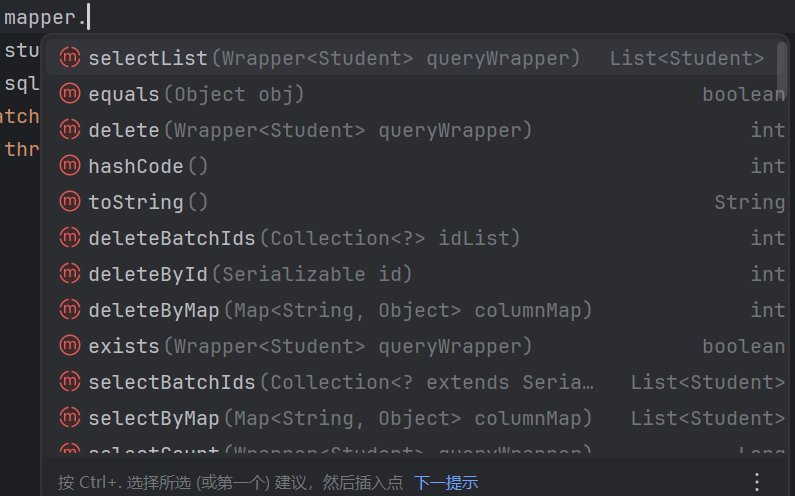
今天针对SpringBoot中使用junit进行测试,整合MyBatis进行数据库操作展开了学习:
1.在使用junit进行单元测试的时候要注意junit的测试单元所在包要与主程序中入口类的包层级相同或者在其子包中,要不然就需要使用
java
@SpringBootTest(classes = Day4SpringBootJuintApplication.class)来指明入口类的位置
2.Spring整合MyBatis
对应的pom.xml文件
XML
<?xml version="1.0" encoding="UTF-8"?>
<project xmlns="http://maven.apache.org/POM/4.0.0" xmlns:xsi="http://www.w3.org/2001/XMLSchema-instance"
         xsi:schemaLocation="http://maven.apache.org/POM/4.0.0 https://maven.apache.org/xsd/maven-4.0.0.xsd">
    <modelVersion>4.0.0</modelVersion>
    <groupId>org.example</groupId>
    <artifactId>day04_spring_boot_mybatis</artifactId>
    <version>0.0.1-SNAPSHOT</version>
    <name>day04_spring_boot_mybatis</name>
    <description>day04_spring_boot_mybatis</description>
    <properties>
        <java.version>11</java.version>
        <project.build.sourceEncoding>UTF-8</project.build.sourceEncoding>
        <project.reporting.outputEncoding>UTF-8</project.reporting.outputEncoding>
        <spring-boot.version>2.6.13</spring-boot.version>
    </properties>
    <dependencies>
        <dependency>
            <groupId>org.springframework.boot</groupId>
            <artifactId>spring-boot-starter-web</artifactId>
        </dependency>
        <dependency>
            <groupId>org.mybatis.spring.boot</groupId>
            <artifactId>mybatis-spring-boot-starter</artifactId>
            <version>2.2.2</version>
        </dependency>

        <dependency>
            <groupId>org.springframework.boot</groupId>
            <artifactId>spring-boot-devtools</artifactId>
            <scope>runtime</scope>
            <optional>true</optional>
        </dependency>
        <dependency>
            <groupId>com.mysql</groupId>
            <artifactId>mysql-connector-j</artifactId>
            <scope>runtime</scope>
        </dependency>
        <dependency>
            <groupId>org.projectlombok</groupId>
            <artifactId>lombok</artifactId>
            <optional>true</optional>
        </dependency>
        <dependency>
            <groupId>org.springframework.boot</groupId>
            <artifactId>spring-boot-starter-test</artifactId>
            <scope>test</scope>
        </dependency>
        <dependency>
            <groupId>io.springfox</groupId>
            <artifactId>springfox-boot-starter</artifactId>
            <version>3.0.0</version>
        </dependency>
        <dependency>
            <groupId>com.github.pagehelper</groupId>
            <artifactId>pagehelper-spring-boot-starter</artifactId>
            <version>1.4.1</version>
        </dependency>
    </dependencies>
    <dependencyManagement>
        <dependencies>
            <dependency>
                <groupId>org.springframework.boot</groupId>
                <artifactId>spring-boot-dependencies</artifactId>
                <version>${spring-boot.version}</version>
                <type>pom</type>
                <scope>import</scope>
            </dependency>
        </dependencies>
    </dependencyManagement>

    <build>
        <plugins>
            <plugin>
                <groupId>org.apache.maven.plugins</groupId>
                <artifactId>maven-compiler-plugin</artifactId>
                <version>3.8.1</version>
                <configuration>
                    <source>11</source>
                    <target>11</target>
                    <encoding>UTF-8</encoding>
                </configuration>
            </plugin>
            <plugin>
                <groupId>org.springframework.boot</groupId>
                <artifactId>spring-boot-maven-plugin</artifactId>
                <version>${spring-boot.version}</version>
                <configuration>
                    <mainClass>com.djw.Day04SpringBootMybatisApplication</mainClass>
                    <skip>true</skip>
                </configuration>
                <executions>
                    <execution>
                        <id>repackage</id>
                        <goals>
                            <goal>repackage</goal>
                        </goals>
                    </execution>
                </executions>
            </plugin>
        </plugins>
    </build>

</project>
接下来需要配置yml文件,在yml文件中配置数据源的相关信息:
XML
spring:
  datasource:
    driver-class-name: com.mysql.cj.jdbc.Driver
    url: jdbc:mysql://localhost:3306/mybatis?serverTimezone=GMT%2B8
    username: 账户名
    password: 密码
  mvc:
    pathmatch:
      matching-strategy: ant_path_matcher
mybatis:
  configuration:
    log-impl: org.apache.ibatis.logging.stdout.StdOutImpl
并且通过log-impl也可以配置好日志管理
编写对应Mapper,Mapper.xml,Service,entity类我就不放上来了这个都是固定的
主要的是我们整合MyBatis和SpringBoot的时候需要配置Mapper的扫描
有两种方式:
1.通过在入口类使用@MapperScan(basePackages="mapper所在包")
java
package com.djw;

import org.mybatis.spring.annotation.MapperScan;
import org.springframework.boot.SpringApplication;
import org.springframework.boot.autoconfigure.SpringBootApplication;

@SpringBootApplication
@MapperScan(basePackages = "com.djw.mapper")
public class Day04SpringBootMybatisApplication {

    public static void main(String[] args) {
        SpringApplication.run(Day04SpringBootMybatisApplication.class, args);
    }

}
2.在Mapper接口处使用@Mapper
java
package com.djw.mapper;

import com.djw.entity.Student;
import org.apache.ibatis.annotations.*;

import java.util.List;

/**
 * @author djw
 */
@Mapper
public interface StudentMapper {
    @Select("select * from student")
    List<Student> selectList();
    @Insert("insert into student values(null,#{name},#{age},#{gender})")
    void insert(Student student);
    @Update("update student set name = #{name},age = #{age},gender = #{gender} where id = #{id}")
    void update(Student student);
    @Delete("delete student where id = #{id}")
    void delete(int id);
}
3.MyBatis中引入MyBatis-Plus
我们知道MyBatis在使用时要编写对应的mapper,有一些格式化的SQL编写起来会浪费时间,所以我们引入MyBatis-Plus可以直接给我们的一些简单的固定化的SQL来进行实现
对应的pom.xml文件
XML
<?xml version="1.0" encoding="UTF-8"?>
<project xmlns="http://maven.apache.org/POM/4.0.0"
         xmlns:xsi="http://www.w3.org/2001/XMLSchema-instance"
         xsi:schemaLocation="http://maven.apache.org/POM/4.0.0 http://maven.apache.org/xsd/maven-4.0.0.xsd">
    <modelVersion>4.0.0</modelVersion>

    <groupId>org.example</groupId>
    <artifactId>day04_mybatis_mybatis-plus</artifactId>
    <version>1.0-SNAPSHOT</version>

    <properties>
        <maven.compiler.source>11</maven.compiler.source>
        <maven.compiler.target>11</maven.compiler.target>
        <project.build.sourceEncoding>UTF-8</project.build.sourceEncoding>
    </properties>

    <dependencies>
        <dependency>
            <groupId>mysql</groupId>
            <artifactId>mysql-connector-java</artifactId>
            <version>8.0.28</version>
        </dependency>
        <dependency>
            <groupId>org.mybatis</groupId>
            <artifactId>mybatis</artifactId>
            <version>3.5.9</version>
        </dependency>
        <dependency>
            <groupId>org.projectlombok</groupId>
            <artifactId>lombok</artifactId>
            <version>1.18.22</version>
        </dependency>
        <dependency>
            <groupId>junit</groupId>
            <artifactId>junit</artifactId>
            <version>4.13.2</version>
            <scope>test</scope>
        </dependency>
        <dependency>
            <groupId>org.slf4j</groupId>
            <artifactId>slf4j-log4j12</artifactId>
            <version>2.0.0-alpha7</version>
        </dependency>
        <dependency>
            <groupId>org.springframework</groupId>
            <artifactId>spring-core</artifactId>
            <version>5.3.15</version>
        </dependency>
        <dependency>
            <groupId>com.baomidou</groupId>
            <artifactId>mybatis-plus</artifactId>
            <version>3.5.1</version>
        </dependency>
    </dependencies>
    <build>
        <resources>
            <resource>
                <directory>src/main/java</directory>
                <includes>
                    <include>**/*.properties</include>
                    <include>**/*.xml</include>
                </includes>
            </resource>
        </resources>
    </build>
</project>
在使用时我们原来需要在mapper接口进行方法的注册,但是如果我们想获取到MyBatis-Plus为我们提供的方法的话我们可以直接让mapper接口继承BaseMapper<实体类名>
java
package com.djw.mapper;

import com.baomidou.mybatisplus.core.mapper.BaseMapper;
import com.djw.entity.Student;
import org.apache.ibatis.annotations.Select;

import java.util.List;

/**
 * @author djw
 */
public interface StudentMapper extends BaseMapper<Student> {
}
然后我们在创建SqlSession的时候MyBatis顶层的需要一个SqlSessionFactoryBuilder,我们如果使用MyBatisPlus提供的方法的话我们需要使用SqlSessionFactoryBuilder的子类MyBatisSqlSessionFactoryBuilder,这样下来我们就可以直接获取到MyBatis-plus为我们提供的方法了:
java
package com.djw.test;

import com.baomidou.mybatisplus.core.MybatisSqlSessionFactoryBuilder;
import com.djw.entity.Student;
import com.djw.mapper.StudentMapper;
import org.apache.ibatis.io.Resources;
import org.apache.ibatis.session.SqlSession;
import org.apache.ibatis.session.SqlSessionFactoryBuilder;

import java.io.IOException;
import java.util.List;

/**
 * @author djw
 */
public class Test {
    public static void main(String[] args) {
        SqlSessionFactoryBuilder sfb = new MybatisSqlSessionFactoryBuilder();
        try {
            SqlSession sqlSession = sfb.build(Resources.getResourceAsStream("sqlConfig.xml")).openSession();
            StudentMapper mapper = sqlSession.getMapper(StudentMapper.class);
            List<Student> students = mapper.selectList(null);
            students.forEach(System.out::println);
            sqlSession.close();
        } catch (IOException e) {
            throw new RuntimeException(e);
        }
    }
}