本文将带你从零开始,使用 Python + PyQt5 开发一个支持图片、公式、代码高亮的现代化 Markdown 预览器。
一、软件介绍
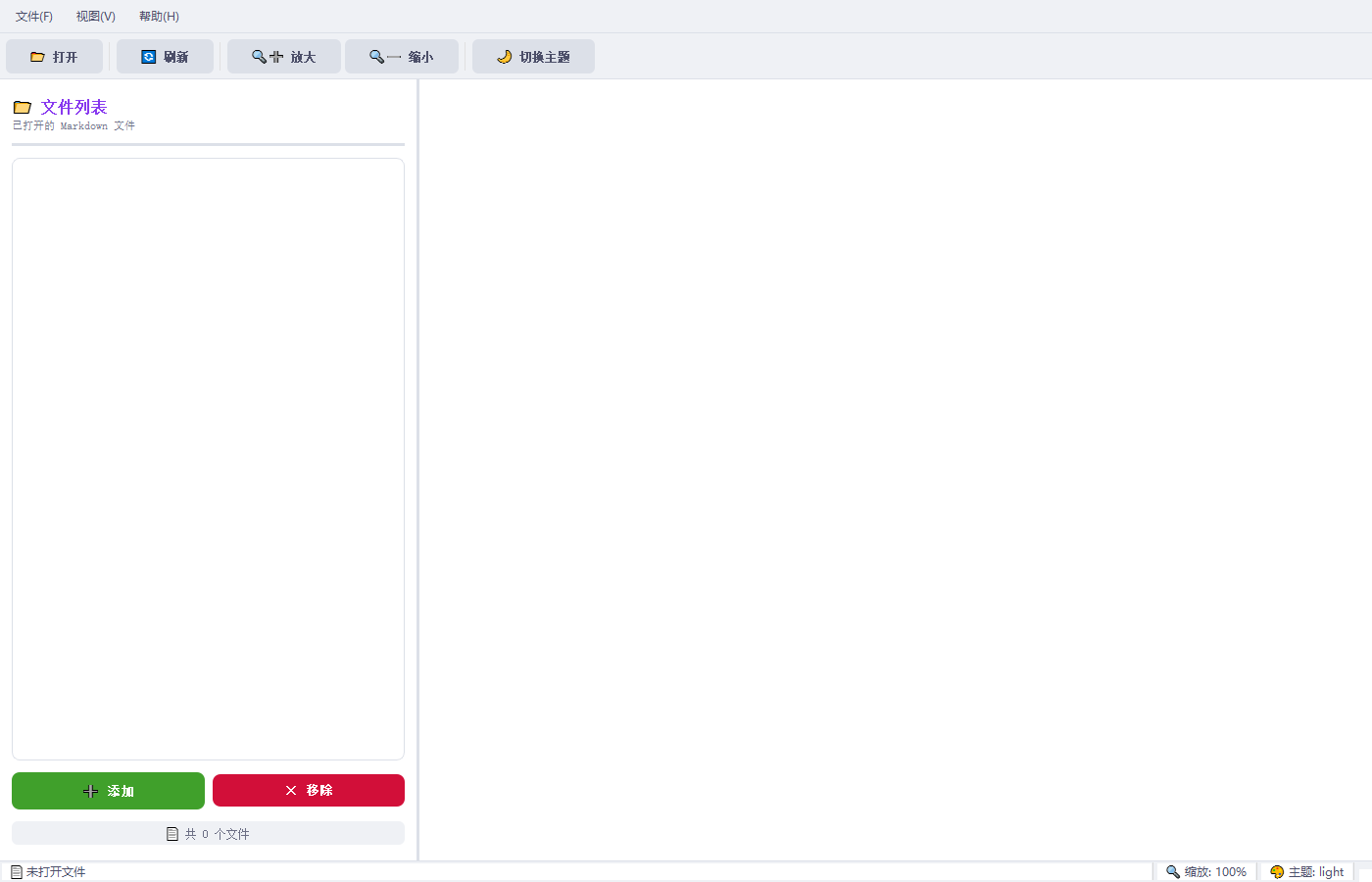
1.1 项目概述
你是否遇到过这些痛点?
- 想用 Markdown 写文档,但编辑器太重,纯文本又看不清效果
- 图片、数学公式、代码混排时,没有预览完全不知道最终效果
- 同时打开多个 Markdown 文件时,频繁切换太麻烦
- 晚上看文档眼睛疲劳,需要深色模式
如果你也有这些困惑,那么 Markdown 预览器 就是为你而生的!
这是一个用 Python + PyQt5 开发的轻量级但功能强大的 Markdown 文件查看器,支持文字、图片、数学公式、代码高亮的完整可视化展现,让你的 Markdown 文档"所见即所得"。
1.2 功能亮点
| 功能 | 描述 |
|---|---|
| 📝 完整 Markdown 支持 | 标题、段落、列表、表格、引用等全部支持 |
| 🖼️ 图片渲染 | 本地图片、网络图片自动识别和加载 |
| 📐 数学公式 | 支持 LaTeX 公式(行内 $...$ 和块级 $$...$$) |
| 💻 代码高亮 | Python、JavaScript、Java 等多种编程语言语法高亮 |
| 📁 多文件管理 | 左侧文件列表,同时打开多个文件,点击切换 |
| 🎨 双主题支持 | 浅色主题(护眼)、深色主题(夜间模式) |
| 🔍 缩放功能 | 50%-300% 自由缩放,适配不同屏幕 |
| ⌨️ 快捷键 | 完整的快捷键支持,提高效率 |
| 📂 目录批量导入 | 一键导入整个目录下的所有 Markdown 文件 |
| 🕐 历史记录 | 最近打开的文件自动记录 |
| 🖱️ 拖拽支持 | 拖拽文件或目录到窗口即可打开 |
1.3 为什么选择这个方案?
- 纯 Python 开发:无需学习复杂的前端技术
- PyQt5 WebEngine:基于 Chromium 内核,渲染效果媲美浏览器
- 开源免费:所有依赖都是开源的,可自由定制
- 跨平台:Windows/Mac/Linux 都能运行
二、需求描述
2.1 核心需求
用户需要一个 Markdown 文件预览工具,主要用于:
- 查看 Markdown 文件 :快速打开并查看
.md格式的文档 - 可视化预览:将 Markdown 语法渲染成美观的网页
- 多元素支持 :
- 文字内容:标题、段落、列表、表格、引用
- 图片:本地图片、网络图片都能显示
- 数学公式:支持 LaTeX 语法的数学公式
- 代码块:语法高亮显示
- 多文件管理:同时管理多个文件,方便切换查看
- 良好的用户体验:现代、简洁的界面设计
2.2 技术要求
| 技术点 | 要求 |
|---|---|
| 开发语言 | Python 3.8+ |
| GUI 框架 | PyQt5(含 WebEngine) |
| Markdown 解析 | 高性能、可扩展的解析库 |
| 公式渲染 | 支持 LaTeX 语法 |
| 代码高亮 | 主流编程语言全覆盖 |
三、整体设计实现
3.1 技术架构
方案对比
在开发前,我们面临两种方案的选择:
方案 A:Tkinter + tkhtmlview(轻量级)
- ✅ 轻量级,纯 Python 实现
- ❌ 对复杂 CSS/JavaScript 支持有限
- ❌ 无法渲染复杂的数学公式
方案 B:PyQt5 + WebEngine(功能完整)
- ✅ 完整的 Web 渲染能力(Chromium 内核)
- ✅ 支持复杂 CSS、JavaScript
- ✅ 可以使用 KaTeX/MathJax 渲染公式
- ✅ 图片渲染更稳定
最终选择:方案 B
虽然方案 B 体积稍大,但考虑到需要支持图片、公式等复杂内容,完整的 Web 渲染能力是必要的。
技术栈
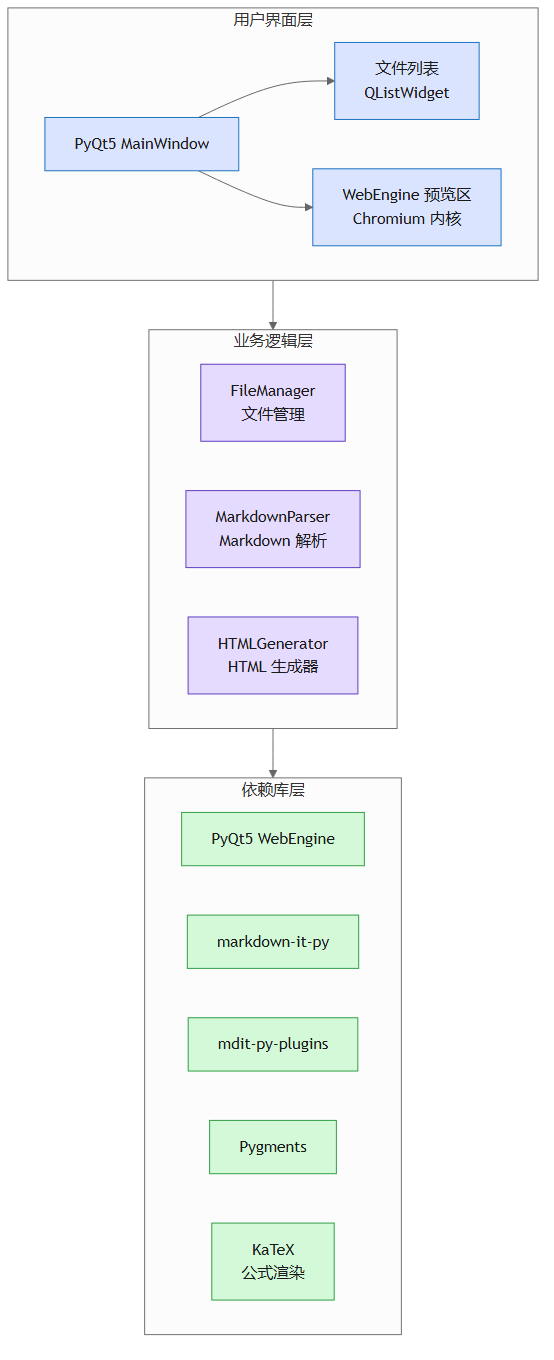
3.2 核心模块设计
3.2.1 模块划分
| 模块 | 文件 | 职责 |
|---|---|---|
| 主程序入口 | main.py |
应用程序启动、参数解析 |
| 主窗口 | ui/main_window.py |
UI 布局、事件处理 |
| 文件管理器 | core/file_manager.py |
文件读取、历史记录 |
| Markdown 解析器 | core/markdown_parser.py |
Markdown → HTML 转换 |
| HTML 生成器 | core/html_generator.py |
完整 HTML 页面组装 |
3.2.2 文件结构
markdown-preview/
├── main.py                           # 主程序入口
├── requirements.txt                  # 依赖列表
├── ui/
│   ├── __init__.py
│   └── main_window.py               # 主窗口 UI
├── core/
│   ├── __init__.py
│   ├── file_manager.py              # 文件管理器
│   ├── markdown_parser.py           # Markdown 解析器
│   └── html_generator.py            # HTML 生成器
├── templates/
│   └── base_template.html           # HTML 模板
└── assets/
    └── themes/
        ├── light.css                # 浅色主题
        └── dark.css                 # 深色主题
3.2.3 核心处理流程

四、实现过程与版本迭代
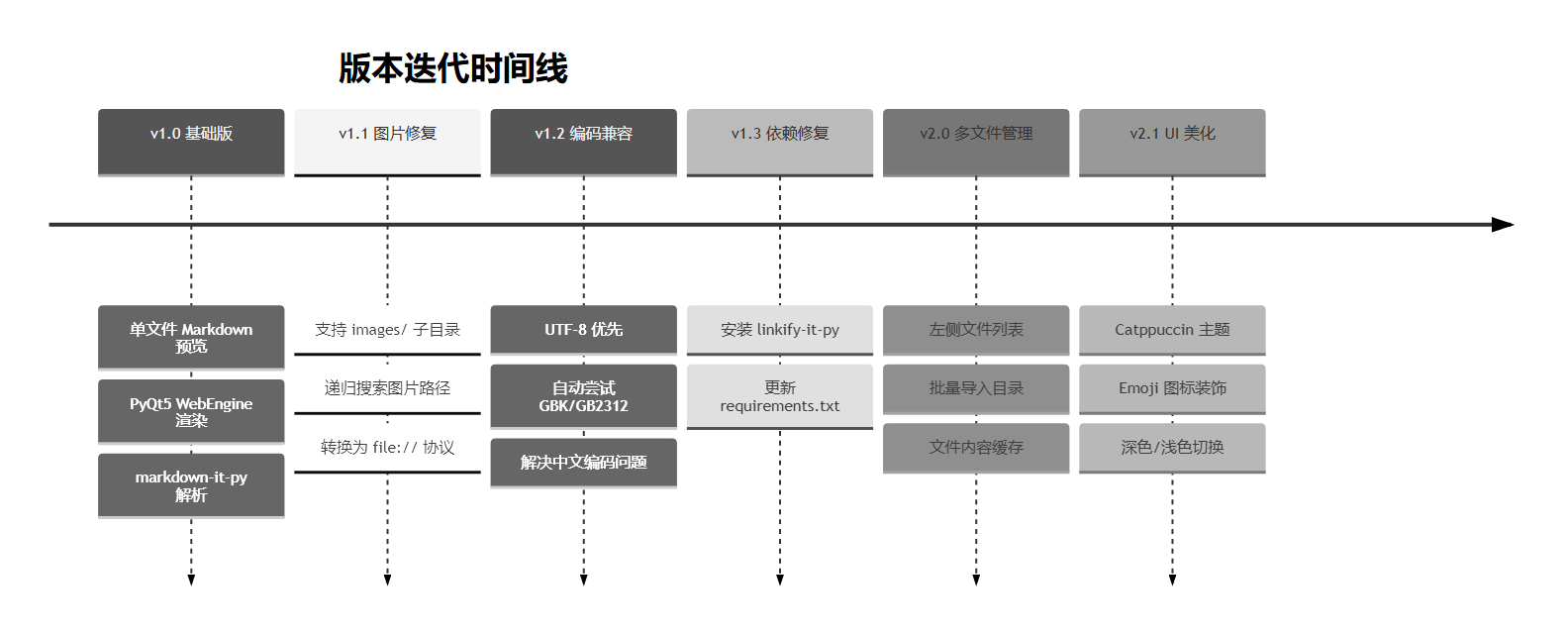
4.1 版本迭代概览
| 版本 | 功能 | 修复/优化 |
|---|---|---|
| v1.0 | 基础 Markdown 预览 | 单文件支持 |
| v1.1 | 图片路径修复 | 支持 images/ 子目录 |
| v1.2 | 编码兼容性 | 支持 UTF-8、GBK 等多种编码 |
| v1.3 | 依赖修复 | 安装缺失的 linkify-it-py |
| v2.0 | 多文件管理 | 左侧文件列表、批量导入 |
| v2.1 | UI 美化 | 现代化主题、Emoji 图标 |
4.2 逐步实现
4.2.1 第一步:搭建基础框架(v1.0)
目标:创建一个能打开并显示 Markdown 文件的基础程序
核心思路:
- 使用
markdown-it-py将 Markdown 转换为 HTML - 使用
PyQt5.QtWebEngineWidgets.QWebEngineView渲染 HTML - 在 HTML 模板中嵌入 KaTeX 用于公式渲染
依赖安装:
bash
pip install PyQt5 PyQtWebEngine markdown-it-py mdit-py-plugins Pygments Pillow基础代码结构:
python
# core/file_manager.py - 文件管理器
class FileManager:
    def read_file(self, file_path: str) -> str:
        with open(file_path, "r", encoding="utf-8") as f:
            return f.read()

# core/markdown_parser.py - Markdown 解析器
from markdown_it import MarkdownIt

class MarkdownParser:
    def __init__(self):
        self.md = MarkdownIt("gfm-like", {
            "html": True,
            "linkify": True,
            "typographer": True,
        })

    def parse(self, markdown_text: str) -> str:
        return self.md.render(markdown_text)

# core/html_generator.py - HTML 生成器
class HTMLGenerator:
    def generate_html(self, content: str, theme: str = "light") -> str:
        # 加载模板和主题,返回完整 HTML
        pass

# ui/main_window.py - 主窗口
from PyQt5.QtWidgets import QMainWindow
from PyQt5.QtWebEngineWidgets import QWebEngineView

class MarkdownPreviewWindow(QMainWindow):
    def __init__(self):
        super().__init__()
        self._web_view = QWebEngineView()
        self.setCentralWidget(self._web_view)
HTML 模板:
html
<!-- templates/base_template.html -->
<!DOCTYPE html>
<html lang="zh-CN">
<head>
    <meta charset="UTF-8">
    <title>Markdown Preview</title>
    <style>{css_styles}</style>
    <link rel="stylesheet" href="https://cdn.jsdelivr.net/npm/katex@0.16.9/dist/katex.min.css">
</head>
<body>
    <div class="container">{content}</div>

    <script src="https://cdn.jsdelivr.net/npm/katex@0.16.9/dist/katex.min.js"></script>
    <script src="https://cdn.jsdelivr.net/npm/katex@0.16.9/dist/contrib/auto-render.min.js"></script>
    <script>
        renderMathInElement(document.body, {
            delimiters: [
                {left: '$$', right: '$$', display: true},
                {left: '$', right: '$', display: false}
            ]
        });
    </script>
</body>
</html>
4.2.2 第二步:图片路径修复(v1.1)
问题 :Markdown 中的图片相对路径(如 )在 WebEngine 中无法正常加载
原因分析:
- Markdown 文件在
D:\docs\article.md - 图片在
D:\docs\images\image.png - Markdown 中引用写的是
 - WebEngine 解析时会相对于页面 URL 查找,找不到图片
解决方案:
python
# core/markdown_parser.py
import re
from pathlib import Path

class MarkdownParser:
    def _process_image_paths(self, html: str) -> str:
        file_dir = Path(self._current_file_path).parent

        def find_image_in_subdirs(base_dir: Path, src: str) -> Path:
            # 1. 先检查常见的图片子目录
            candidates = [
                base_dir / src,
                base_dir / "images" / src,
                base_dir / "img" / src,
                base_dir / "assets" / src,
                base_dir / "media" / src,
            ]

            for candidate in candidates:
                if candidate.exists():
                    return candidate

            # 2. 递归搜索整个目录
            for root, dirs, files in os.walk(base_dir):
                for name in files:
                    if name.lower() == src.lower():
                        return Path(root) / name

            return None

        def fix_image_path(match):
            src = match.group(1)
            if src.startswith("http://") or src.startswith("https://"):
                return match.group(0)

            img_path = find_image_in_subdirs(file_dir, src)
            if img_path:
                abs_path = img_path.resolve()
                file_url = abs_path.as_uri()  # 转换为 file:// 协议
                return f'<img src="{file_url}"'
            return match.group(0)

        pattern = r'<img src="([^"]+)"'
return re.sub(pattern, fix_image_path, html)关键技术点:
- 检查常见子目录:
images/、img/、assets/、media/ - 递归搜索整个目录
- 不区分文件名大小写
- 使用
as_uri()转换为file:///D:/...格式
4.2.3 第三步:编码兼容性(v1.2)
问题 :使用 GBK 编码的文件(中文 Windows 常见)无法打开,报错 UnicodeDecodeError
解决方案:
python
# core/file_manager.py
class FileManager:
    def __init__(self):
        self._encodings = ['utf-8', 'gbk', 'gb2312', 'gb18030', 'cp1252']

    def read_file(self, file_path: str) -> str:
        last_error = None

        for encoding in self._encodings:
            try:
                with open(file_path, "r", encoding=encoding) as f:
                    return f.read()
            except UnicodeDecodeError as e:
                last_error = e

raise ValueError(f"无法读取文件: {file_path}")尝试顺序:
utf-8- 最常用gbk- Windows 中文常见gb2312- 中文简化gb18030- 中文国家标准cp1252- 西欧编码
4.2.4 第四步:依赖修复(v1.3)
问题 :运行时报错 Linkify enabled but not installed
原因 :markdown-it-py 的 linkify 插件需要额外安装 linkify-it-py
解决方案:
bash
pip install linkify-it-py更新 requirements.txt:
PyQt5>=5.15.0
PyQtWebEngine>=5.15.0
markdown-it-py>=3.0.0
mdit-py-plugins>=0.4.0
linkify-it-py>=2.0.0
Pygments>=2.15.0
Pillow>=10.0.0
4.2.5 第五步:多文件管理(v2.0)
目标:添加左侧文件列表,支持同时管理多个文件
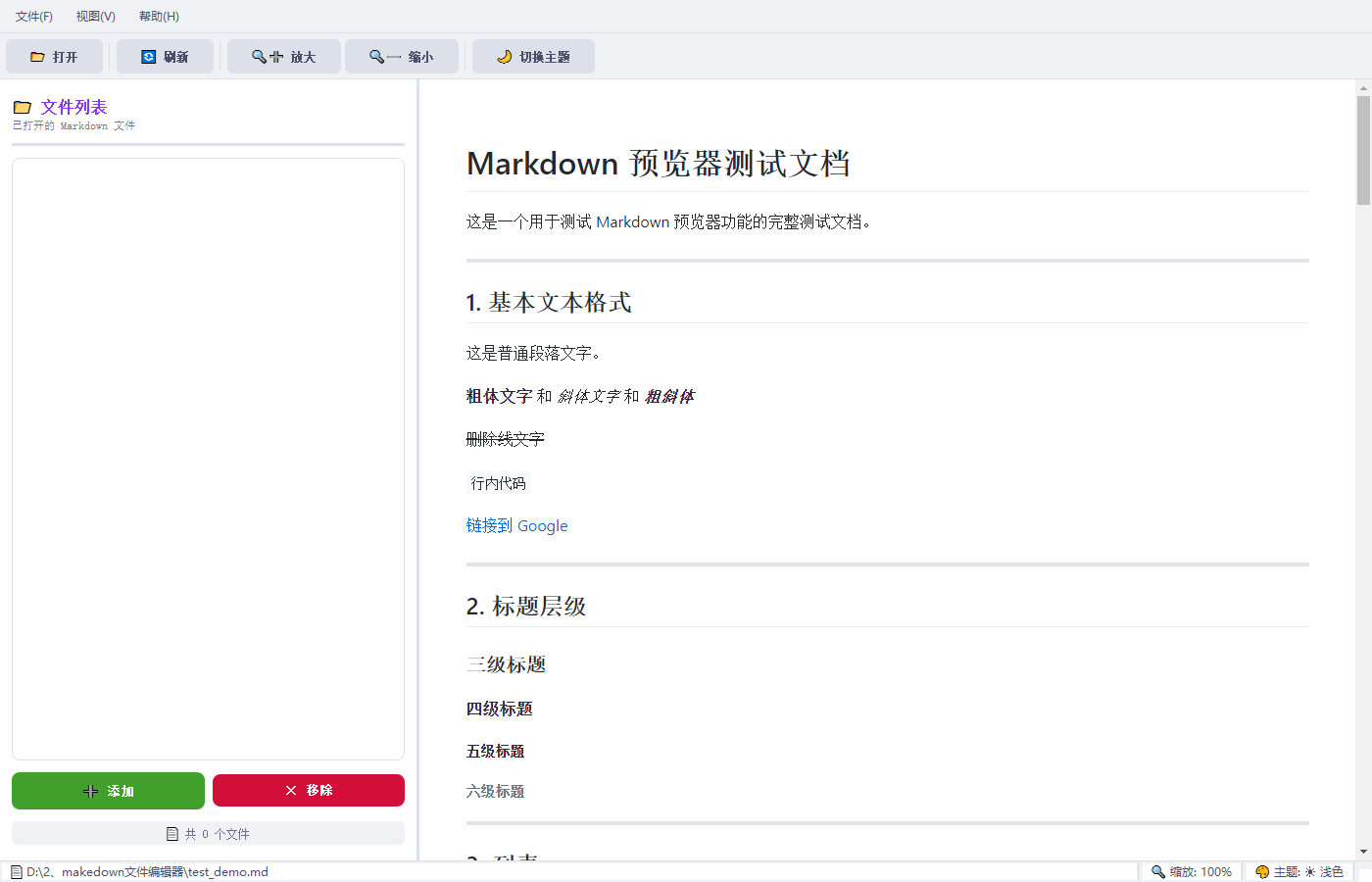
新增功能:
- 左侧 QListWidget 显示已打开的文件
- 点击列表项切换预览
- 支持多选打开文件
- 支持从目录批量导入
- 文件内容缓存,切换更快
核心实现:
python
# ui/main_window.py
class MarkdownPreviewWindow(QMainWindow):
    def __init__(self):
        super().__init__()
        self._open_files = []              # 已打开文件路径列表
        self._current_file_path = None     # 当前文件
        self._file_contents_cache = {}     # 文件内容缓存

        # 创建分割器
        self._splitter = QSplitter(Qt.Horizontal)
        self._splitter.setSizes([280, 1120])

        # 左侧面板
        self._left_panel = self._create_left_panel()
        self._splitter.addWidget(self._left_panel)

        # 右侧预览区
        self._web_view = QWebEngineView()
        self._splitter.addWidget(self._web_view)

    def _create_left_panel(self):
        panel = QWidget()
        layout = QVBoxLayout(panel)

        # 文件列表
        self._file_list = QListWidget()
        self._file_list.itemClicked.connect(self._on_file_selected)
        layout.addWidget(self._file_list, 1)

        # 按钮
        add_btn = QPushButton("添加")
        add_btn.clicked.connect(self._open_file)

        remove_btn = QPushButton("移除")
        remove_btn.clicked.connect(self._remove_current_file)

        return panel

    def _add_file_to_list(self, file_path: str):
        if file_path in self._open_files:
            return  # 防重复

        self._open_files.append(file_path)

        # 添加到列表
        item = QListWidgetItem(file_name)
        item.setData(Qt.UserRole, file_path)
        self._file_list.addItem(item)

        # 自动切换到新文件
        self._load_file(file_path)

    def _on_file_selected(self, item: QListWidgetItem):
        file_path = item.data(Qt.UserRole)
        if file_path != self._current_file_path:
            self._load_file(file_path)

    def _load_file(self, file_path: str):
        # 优先从缓存读取
        if file_path in self._file_contents_cache:
            content = self._file_contents_cache[file_path]
        else:
            content, file_name = self._file_manager.open_file(file_path)
            self._file_contents_cache[file_path] = content

# 渲染...目录批量导入:
python
def _open_files_from_dir(self):
    dir_path = QFileDialog.getExistingDirectory(self, "选择目录")

    if dir_path:
        md_files = []
        for root, dirs, files in os.walk(dir_path):
            for file in files:
                if file.lower().endswith(('.md', '.markdown')):
                    md_files.append(os.path.join(root, file))

        for file_path in md_files:
            self._add_file_to_list(file_path)
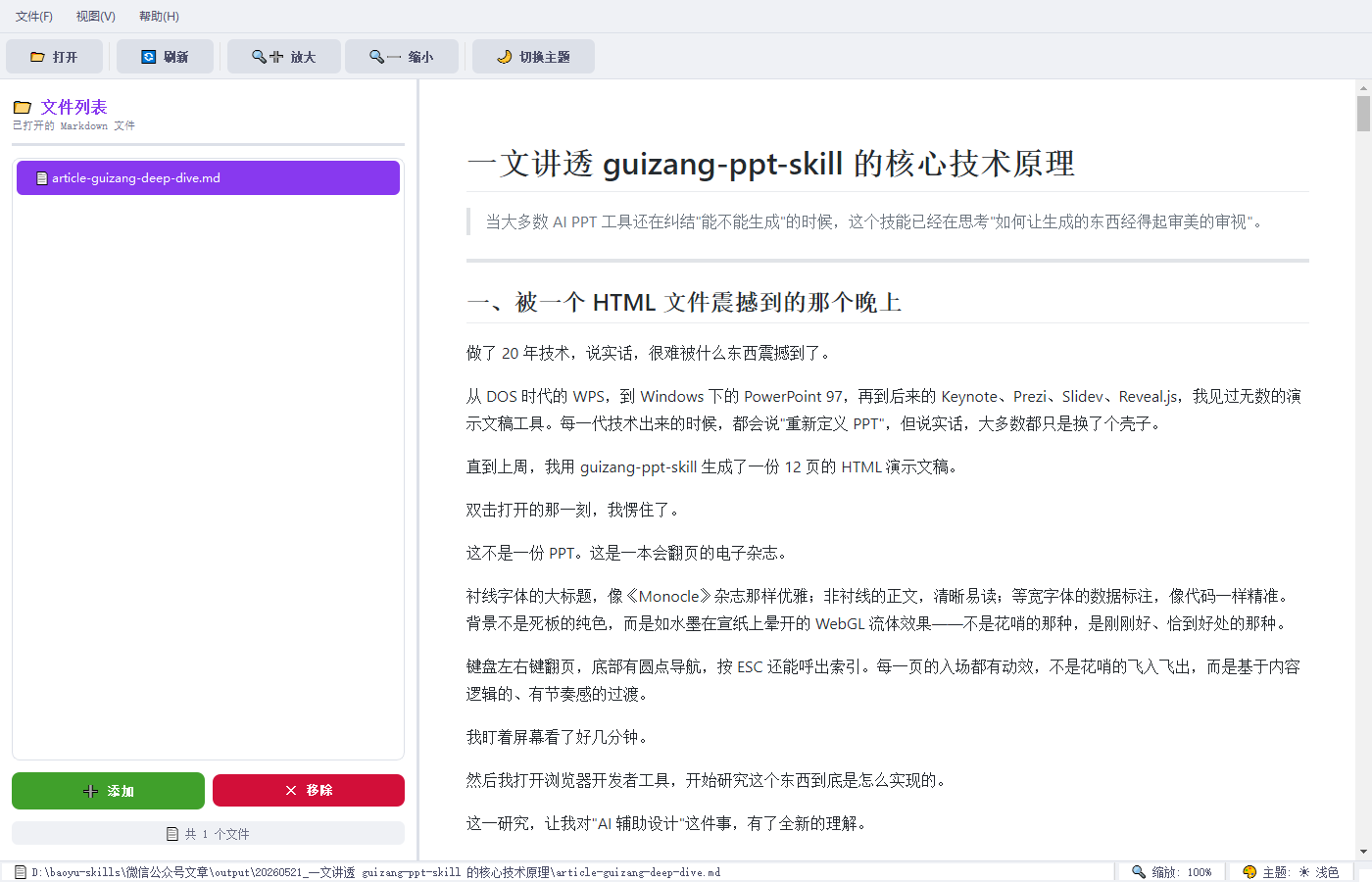
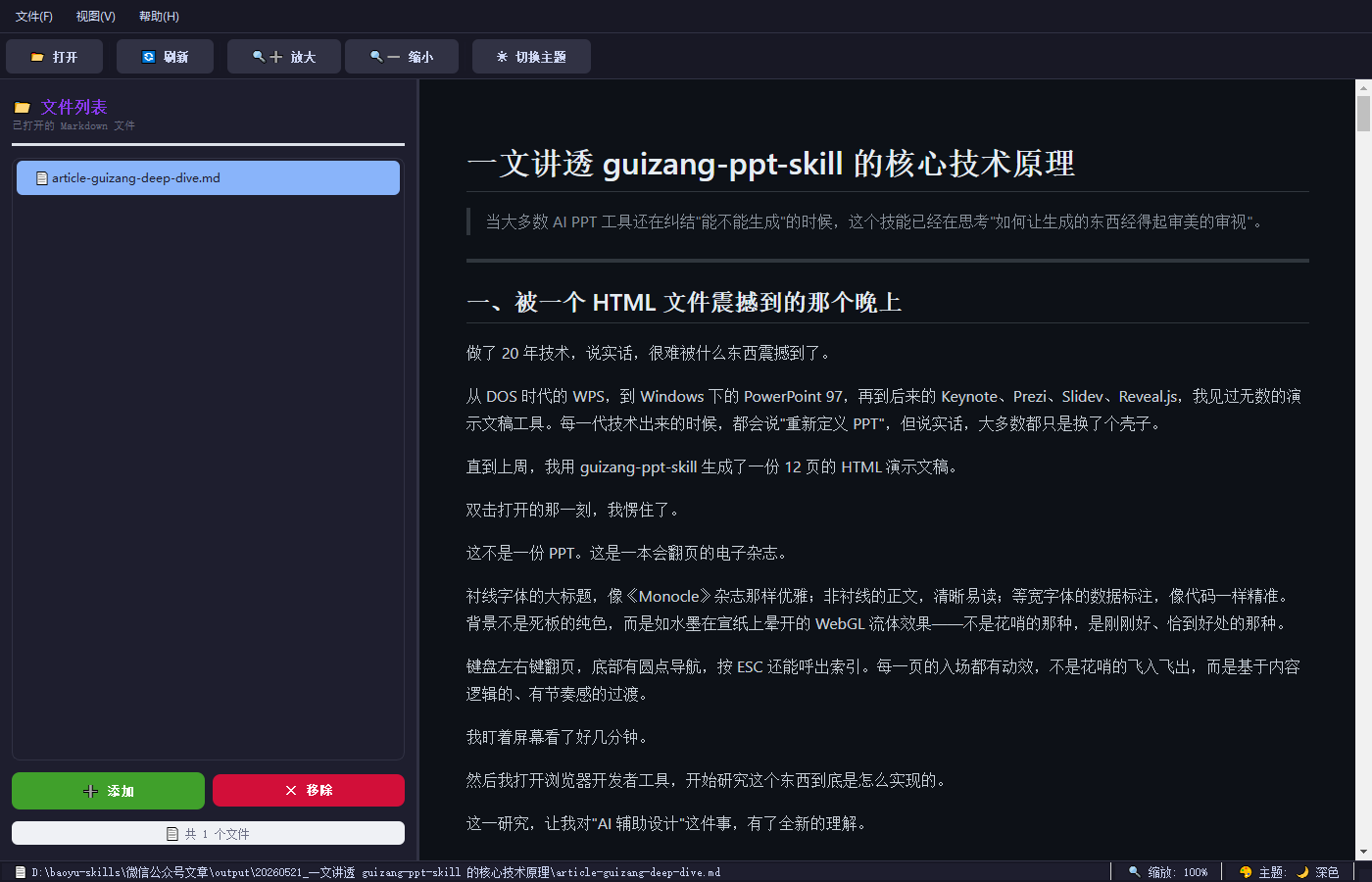
4.2.6 第六步:UI 美化(v2.1)
目标:打造现代化、美观的界面
设计风格:Catppuccin(流行的柔和配色主题)
浅色主题效果 :
深色主题效果 :
实现方式:使用 Qt Style Sheets (QSS)
python
# 浅色主题 QSS
LIGHT_THEME_QSS = """
QMainWindow, QWidget {
    background-color: #ffffff;
    color: #4c4f69;
}

QMenuBar {
    background-color: #eff1f5;
    border-bottom: 1px solid #dce0e8;
}

QListWidget {
    background-color: #ffffff;
    border: 1px solid #dce0e8;
    border-radius: 8px;
}

QListWidget::item:selected {
    background-color: #8839ef;  /* 紫色主色 */
    color: #ffffff;
    border-radius: 6px;
    margin: 2px 4px;
}

QPushButton {
    border: none;
    border-radius: 6px;
    padding: 8px 16px;
    font-weight: 600;
}
"""

# 深色主题 QSS
DARK_THEME_QSS = """
QMainWindow, QWidget {
    background-color: #1e1e2e;
    color: #cdd6f4;
}

QListWidget::item:selected {
    background-color: #89b4fa;  /* 蓝色主色 */
    color: #1e1e2e;
}
"""主题切换:
python
def _switch_theme(self, theme: str):
    self._current_theme = theme
    if theme == "dark":
        self.setStyleSheet(DARK_THEME_QSS)
    else:
        self.setStyleSheet(LIGHT_THEME_QSS)

    # 同时更新预览区的主题
    self._refresh_view()
Emoji 图标装饰:
python
# 菜单项
QAction("📂 打开(&O)...", self)
QAction("🕐 最近打开的文件(&R)", self)
QAction("🎨 主题(&T)", self)

# 状态栏
self._file_label = QLabel("  📄 未打开文件")
self._zoom_label = QLabel(f"  🔍 缩放: 100%  ")
self._theme_label = QLabel("  🎨 主题: 浅色  ")
4.3 关键技术点详解
4.3.1 WebEngine 加载本地 HTML
方法 1:setHtml(推荐,适用于动态内容)
python
html_content = "<html>...</html>"
self._web_view.setHtml(html_content)
方法 2:设置 baseUrl 用于解析相对路径
python
file_dir = Path(file_path).parent
base_url = QUrl.fromLocalFile(str(file_dir) + "/")
self._web_view.setHtml(html_content, base_url)重要设置:
python
settings = self._web_view.settings()
settings.setAttribute(QWebEngineSettings.JavascriptEnabled, True)
settings.setAttribute(QWebEngineSettings.LocalContentCanAccessRemoteUrls, True)
settings.setAttribute(QWebEngineSettings.LocalContentCanAccessFileUrls, True)
4.3.2 KaTeX 公式渲染
支持的公式格式:
- 行内公式:
$E = mc^2$ - 块级公式:
$$\int_{-\infty}^{\infty} e^{-x^2} dx = \sqrt{\pi}$$
HTML 模板中的实现:
html
<link rel="stylesheet" href="https://cdn.jsdelivr.net/npm/katex@0.16.9/dist/katex.min.css">
<script src="https://cdn.jsdelivr.net/npm/katex@0.16.9/dist/katex.min.js"></script>
<script src="https://cdn.jsdelivr.net/npm/katex@0.16.9/dist/contrib/auto-render.min.js"></script>
<script>
    renderMathInElement(document.body, {
        delimiters: [
            {left: '$$', right: '$$', display: true},
            {left: '$', right: '$', display: false}
        ],
        throwOnError: false
    });
</script>优势:
- 轻量级,渲染速度快
- 支持大部分 LaTeX 数学语法
- 通过 CDN 加载,无需本地安装
4.3.3 Pygments 代码高亮
支持的语言:Python、JavaScript、Java、C++、Go、Rust、HTML、CSS、SQL 等 300+ 种
实现:
python
from pygments import highlight
from pygments.lexers import get_lexer_by_name, guess_lexer
from pygments.formatters import HtmlFormatter
from pygments.util import ClassNotFound

def _process_code_blocks(self, html: str) -> str:
    pattern = r'<pre><code class="language-(\w+)">([\s\S]*?)</code></pre>'

    def replace_code_block(match):
        language = match.group(1)
        code_content = match.group(2)

        try:
            lexer = get_lexer_by_name(language, stripall=True)
        except ClassNotFound:
            try:
                lexer = guess_lexer(code_content)  # 自动识别语言
            except ClassNotFound:
                lexer = get_lexer_by_name("text", stripall=True)

        formatter = HtmlFormatter(style="default", cssclass="highlight")
        highlighted = highlight(code_content, lexer, formatter)
        return highlighted

return re.sub(pattern, replace_code_block, html)支持的高亮风格:
- 浅色:
default、colorful、manni - 深色:
monokai、native、fruity
五、完整代码
5.1 项目结构
markdown-preview/
├── main.py
├── requirements.txt
├── ui/
│   ├── __init__.py
│   └── main_window.py
├── core/
│   ├── __init__.py
│   ├── file_manager.py
│   ├── markdown_parser.py
│   └── html_generator.py
├── templates/
│   └── base_template.html
└── assets/
    └── themes/
        ├── light.css
        └── dark.css
5.2 完整代码文件
main.py
python
import sys
import os
from pathlib import Path

from PyQt5.QtWidgets import QApplication
from PyQt5.QtCore import Qt

from ui.main_window import MarkdownPreviewWindow


def main():
    QApplication.setAttribute(Qt.AA_EnableHighDpiScaling, True)
    QApplication.setAttribute(Qt.AA_UseHighDpiPixmaps, True)

    app = QApplication(sys.argv)
    app.setApplicationName("Markdown 预览器")
    app.setApplicationVersion("2.0.0")

    window = MarkdownPreviewWindow()
    window.show()

    if len(sys.argv) > 1:
        file_path = sys.argv[1]
        if os.path.exists(file_path):
            window._load_file(file_path)

    sys.exit(app.exec_())


if __name__ == "__main__":
    main()
requirements.txt
PyQt5>=5.15.0
PyQtWebEngine>=5.15.0
markdown-it-py>=3.0.0
mdit-py-plugins>=0.4.0
linkify-it-py>=2.0.0
Pygments>=2.15.0
Pillow>=10.0.0core/init.py
python
# Core modulesui/init.py
python
# UI modulestemplates/base_template.html
html
<!DOCTYPE html>
<html lang="zh-CN">
<head>
    <meta charset="UTF-8">
    <meta name="viewport" content="width=device-width, initial-scale=1.0">
    <title>Markdown Preview</title>
    <style>
        {css_styles}
    </style>
    <link rel="stylesheet" href="https://cdn.jsdelivr.net/npm/katex@0.16.9/dist/katex.min.css">
</head>
<body>
    <div class="container">
        {content}
    </div>

    <script src="https://cdn.jsdelivr.net/npm/katex@0.16.9/dist/katex.min.js"></script>
    <script src="https://cdn.jsdelivr.net/npm/katex@0.16.9/dist/contrib/auto-render.min.js"></script>
    <script>
        document.addEventListener('DOMContentLoaded', function() {
            renderMathInElement(document.body, {
                delimiters: [
                    {left: '$$', right: '$$', display: true},
                    {left: '$', right: '$', display: false}
                ],
                throwOnError: false,
                macros: {
                    "\\f": "#1f(#2)"
                }
            });
        });
    </script>
</body>
</html>
core/file_manager.py
python
import os
from pathlib import Path
from typing import List, Optional


class FileManager:
    def __init__(self, max_history: int = 10):
        self._current_file: Optional[Path] = None
        self._file_history: List[Path] = []
        self._max_history = max_history
        self._encodings = ['utf-8', 'gbk', 'gb2312', 'gb18030', 'cp1252']

    def read_file(self, file_path: str) -> str:
        path = Path(file_path)

        if not path.exists():
            raise FileNotFoundError(f"文件不存在: {file_path}")

        if not path.is_file():
            raise ValueError(f"不是文件: {file_path}")

        content = None
        last_error = None

        for encoding in self._encodings:
            try:
                with open(path, "r", encoding=encoding) as f:
                    content = f.read()
                break
            except UnicodeDecodeError as e:
                last_error = e

        if content is None:
            raise ValueError(f"无法读取文件: {file_path}\n\n编码错误: {str(last_error)}")

        self._current_file = path
        self._add_to_history(path)

        return content

    def open_file(self, file_path: str) -> tuple[str, str]:
        content = self.read_file(file_path)
        file_name = self.get_file_name()
        return content, file_name

    def _add_to_history(self, file_path: Path):
        if file_path in self._file_history:
            self._file_history.remove(file_path)

        self._file_history.insert(0, file_path)

        if len(self._file_history) > self._max_history:
            self._file_history = self._file_history[:self._max_history]

    def get_current_file(self) -> Optional[Path]:
        return self._current_file

    def get_file_name(self) -> str:
        if self._current_file:
            return self._current_file.name
        return "未命名"

    def get_file_path(self) -> str:
        if self._current_file:
            return str(self._current_file)
        return ""

    def get_file_dir(self) -> Optional[str]:
        if self._current_file:
            return str(self._current_file.parent)
        return None

    def get_history(self) -> List[str]:
        return [str(path) for path in self._file_history]

    def is_markdown_file(self, file_path: str) -> bool:
        path = Path(file_path)
        ext = path.suffix.lower()
        return ext in [".md", ".markdown", ".mdown", ".mkdn", ".mkd"]

    def get_supported_extensions(self) -> list:
        return ["md", "markdown", "mdown", "mkdn", "mkd"]

    def file_exists(self, file_path: str) -> bool:
        return Path(file_path).exists()

    def clear_history(self):
        self._file_history.clear()

    def get_max_history(self) -> int:
        return self._max_history

    def set_max_history(self, max_history: int):
        self._max_history = max_history
        if len(self._file_history) > self._max_history:
            self._file_history = self._file_history[:self._max_history]
core/markdown_parser.py
python
import os
import re
from pathlib import Path
from markdown_it import MarkdownIt
from mdit_py_plugins.front_matter import front_matter_plugin
from mdit_py_plugins.footnote import footnote_plugin
from mdit_py_plugins.tasklists import tasklists_plugin
from mdit_py_plugins.dollarmath import dollarmath_plugin
from pygments import highlight
from pygments.lexers import get_lexer_by_name, guess_lexer
from pygments.formatters import HtmlFormatter
from pygments.util import ClassNotFound


class MarkdownParser:
    def __init__(self):
        self.md = MarkdownIt("gfm-like", {
            "html": True,
            "linkify": True,
            "typographer": True,
        })

        self.md.use(front_matter_plugin)
        self.md.use(footnote_plugin)
        self.md.use(tasklists_plugin)

        self.formatter_light = HtmlFormatter(style="default", cssclass="highlight")
        self.formatter_dark = HtmlFormatter(style="monokai", cssclass="highlight")

        self._current_file_path = None

    def set_current_file(self, file_path):
        self._current_file_path = file_path

    def parse(self, markdown_text: str) -> str:
        html = self.md.render(markdown_text)
        html = self._process_code_blocks(html)
        if self._current_file_path:
            html = self._process_image_paths(html)
        return html

    def _process_code_blocks(self, html: str) -> str:
        pattern = r'<pre><code class="language-(\w+)">([\s\S]*?)</code></pre>'

        def replace_code_block(match):
            language = match.group(1)
            code_content = match.group(2)

            try:
                lexer = get_lexer_by_name(language, stripall=True)
            except ClassNotFound:
                try:
                    lexer = guess_lexer(code_content)  # 自动识别语言
                except ClassNotFound:
                    lexer = get_lexer_by_name("text", stripall=True)

            highlighted = highlight(code_content, lexer, self.formatter_light)
            return highlighted

        return re.sub(pattern, replace_code_block, html)

    def _process_image_paths(self, html: str) -> str:
        if not self._current_file_path:
            return html

        file_dir = Path(self._current_file_path).parent

        def find_image_in_subdirs(base_dir: Path, src: str) -> Path:
            candidates = []
            candidates.append(base_dir / src)
            candidates.append(base_dir / "images" / src)
            candidates.append(base_dir / "img" / src)
            candidates.append(base_dir / "assets" / src)
            candidates.append(base_dir / "media" / src)
            candidates.append(base_dir / "figure" / src)
            candidates.append(base_dir / "figures" / src)

            for candidate in candidates:
                if candidate.exists():
                    return candidate

            for root, dirs, files in os.walk(base_dir):
                for name in files:
                    if name.lower() == src.lower():
                        return Path(root) / name
                    if os.path.splitext(name)[0].lower() == os.path.splitext(src)[0].lower():
                        return Path(root) / name

            return None

        def fix_image_path(match):
            src = match.group(1)

            if src.startswith("http://") or src.startswith("https://") or src.startswith("data:"):
                return match.group(0)

            if os.path.isabs(src):
                img_path = Path(src)
                if img_path.exists():
                    abs_path = img_path.resolve()
                    file_url = abs_path.as_uri()
                    return f'<img src="{file_url}"'
                else:
                    return match.group(0)
            else:
                img_path = find_image_in_subdirs(file_dir, src)
                if img_path:
                    abs_path = img_path.resolve()
                    file_url = abs_path.as_uri()
                    return f'<img src="{file_url}"'
                else:
                    return match.group(0)

        pattern = r'<img src="([^"]+)"'
        return re.sub(pattern, fix_image_path, html)
core/html_generator.py
python
import os
from pathlib import Path
from typing import Optional


class HTMLGenerator:
    def __init__(self):
        self._current_dir = Path(__file__).parent.parent
        self._templates_dir = self._current_dir / "templates"
        self._themes_dir = self._current_dir / "assets" / "themes"

        self._template_cache = {}
        self._theme_cache = {}

    def load_template(self) -> str:
        template_path = self._templates_dir / "base_template.html"

        if template_path in self._template_cache:
            return self._template_cache[template_path]

        with open(template_path, "r", encoding="utf-8") as f:
            template = f.read()

        self._template_cache[template_path] = template
        return template

    def load_theme(self, theme_name: str = "light") -> str:
        theme_path = self._themes_dir / f"{theme_name}.css"

        if not theme_path.exists():
            theme_path = self._themes_dir / "light.css"

        cache_key = str(theme_path)
        if cache_key in self._theme_cache:
            return self._theme_cache[cache_key]

        with open(theme_path, "r", encoding="utf-8") as f:
            theme_css = f.read()

        self._theme_cache[cache_key] = theme_css
        return theme_css

    def generate_html(
        self,
        content: str,
        theme: str = "light",
        title: Optional[str] = None,
        base_url: Optional[str] = None,
    ) -> str:
        template = self.load_template()
        theme_css = self.load_theme(theme)

        html = template.replace("{css_styles}", theme_css)
        html = html.replace("{content}", content)

        if base_url:
            base_tag = f'<base href="{base_url}">'
            head_end = html.find("</head>")
            if head_end != -1:
                html = html[:head_end] + base_tag + html[head_end:]

        if title:
            title_tag = f"<title>{title}</title>"
            old_title = "<title>Markdown Preview</title>"
            html = html.replace(old_title, title_tag)

        return html

    def clear_cache(self):
        self._template_cache.clear()
        self._theme_cache.clear()

    def get_available_themes(self) -> list:
        themes = []
        if self._themes_dir.exists():
            for file in self._themes_dir.glob("*.css"):
                themes.append(file.stem)
        return themes
assets/themes/light.css
css
* {
    box-sizing: border-box;
    margin: 0;
    padding: 0;
}

body {
    font-family: -apple-system, BlinkMacSystemFont, 'Segoe UI', Roboto, 'Helvetica Neue', Arial, 'Noto Sans', sans-serif;
    line-height: 1.8;
    color: #24292e;
    background-color: #ffffff;
    padding: 40px 20px;
    -webkit-font-smoothing: antialiased;
}

.container {
    max-width: 900px;
    margin: 0 auto;
    padding: 0 20px;
}

h1, h2, h3, h4, h5, h6 {
    margin-top: 24px;
    margin-bottom: 16px;
    font-weight: 600;
    line-height: 1.25;
}

h1 {
    font-size: 2em;
    padding-bottom: 0.3em;
    border-bottom: 1px solid #eaecef;
}

h2 {
    font-size: 1.5em;
    padding-bottom: 0.3em;
    border-bottom: 1px solid #eaecef;
}

h3 {
    font-size: 1.25em;
}

p {
    margin-bottom: 16px;
}

a {
    color: #0366d6;
    text-decoration: none;
}

a:hover {
    text-decoration: underline;
}

img {
    max-width: 100%;
    height: auto;
    border-radius: 4px;
    margin: 16px 0;
}

pre {
    background-color: #f6f8fa;
    border-radius: 6px;
    padding: 16px;
    overflow-x: auto;
    margin-bottom: 16px;
    font-size: 14px;
}

code {
    font-family: 'SFMono-Regular', Consolas, 'Liberation Mono', Menlo, monospace;
    font-size: 14px;
}

p code, li code {
    background-color: #f6f8fa;
    padding: 0.2em 0.4em;
    border-radius: 4px;
}

ul, ol {
    margin-bottom: 16px;
    padding-left: 2em;
}

li {
    margin-bottom: 8px;
}

blockquote {
    margin: 16px 0;
    padding: 0 1em;
    color: #6a737d;
    border-left: 0.25em solid #dfe2e5;
}

table {
    border-collapse: collapse;
    margin: 16px 0;
    width: 100%;
    overflow-x: auto;
    display: block;
}

table th, table td {
    border: 1px solid #dfe2e5;
    padding: 12px 16px;
}

table th {
    background-color: #f6f8fa;
    font-weight: 600;
}

table tr:nth-child(2n) {
    background-color: #f6f8fa;
}

hr {
    height: 0.25em;
    padding: 0;
    margin: 24px 0;
    background-color: #e1e4e8;
    border: 0;
}

.katex {
    font-size: 1.1em;
}

.katex-display {
    margin: 16px 0;
    overflow-x: auto;
}
assets/themes/dark.css
css
* {
    box-sizing: border-box;
    margin: 0;
    padding: 0;
}

body {
    font-family: -apple-system, BlinkMacSystemFont, 'Segoe UI', Roboto, 'Helvetica Neue', Arial, 'Noto Sans', sans-serif;
    line-height: 1.8;
    color: #c9d1d9;
    background-color: #0d1117;
    padding: 40px 20px;
    -webkit-font-smoothing: antialiased;
}

.container {
    max-width: 900px;
    margin: 0 auto;
    padding: 0 20px;
}

h1, h2, h3, h4, h5, h6 {
    margin-top: 24px;
    margin-bottom: 16px;
    font-weight: 600;
    line-height: 1.25;
    color: #e6edf3;
}

h1 {
    font-size: 2em;
    padding-bottom: 0.3em;
    border-bottom: 1px solid #30363d;
}

h2 {
    font-size: 1.5em;
    padding-bottom: 0.3em;
    border-bottom: 1px solid #30363d;
}

p {
    margin-bottom: 16px;
}

a {
    color: #58a6ff;
    text-decoration: none;
}

a:hover {
    text-decoration: underline;
}

img {
    max-width: 100%;
    height: auto;
    border-radius: 4px;
    margin: 16px 0;
}

pre {
    background-color: #161b22;
    border-radius: 6px;
    padding: 16px;
    overflow-x: auto;
    margin-bottom: 16px;
}

p code, li code {
    background-color: #161b22;
    color: #ff7b72;
    padding: 0.2em 0.4em;
    border-radius: 4px;
}

blockquote {
    margin: 16px 0;
    padding: 0 1em;
    color: #8b949e;
    border-left: 0.25em solid #30363d;
}

table th, table td {
    border: 1px solid #30363d;
    padding: 12px 16px;
}

table th {
    background-color: #161b22;
}

table tr:nth-child(2n) {
    background-color: #161b22;
}

hr {
    height: 0.25em;
    background-color: #30363d;
    border: 0;
}

.katex {
    font-size: 1.1em;
    color: #e6edf3;
}

/* Pygments 暗色主题 */
.highlight .hll { background-color: #272822 }
.highlight  { background: #161b22; color: #f8f8f2 }
.highlight .c { color: #75715e }
.highlight .k { color: #66d9ef }
.highlight .n { color: #f8f8f2 }
.highlight .o { color: #f92672 }
.highlight .cm { color: #75715e }
.highlight .cp { color: #75715e }
.highlight .c1 { color: #75715e }
.highlight .cs { color: #75715e }
.highlight .ge { font-style: italic }
.highlight .gs { font-weight: bold }
.highlight .kc { color: #66d9ef }
.highlight .kd { color: #66d9ef }
.highlight .kn { color: #f92672 }
.highlight .kp { color: #66d9ef }
.highlight .kr { color: #66d9ef }
.highlight .kt { color: #66d9ef }
.highlight .ld { color: #e6db74 }
.highlight .m { color: #ae81ff }
.highlight .s { color: #e6db74 }
.highlight .na { color: #a6e22e }
.highlight .nb { color: #f8f8f2 }
.highlight .nc { color: #a6e22e }
.highlight .no { color: #66d9ef }
.highlight .nd { color: #a6e22e }
.highlight .ni { color: #f8f8f2 }
.highlight .ne { color: #a6e22e }
.highlight .nf { color: #a6e22e }
.highlight .nl { color: #f8f8f2 }
.highlight .nn { color: #f8f8f2 }
.highlight .nx { color: #a6e22e }
.highlight .py { color: #f8f8f2 }
.highlight .nt { color: #f92672 }
.highlight .nv { color: #f8f8f2 }
.highlight .ow { color: #f92672 }
.highlight .w { color: #f8f8f2 }
.highlight .mf { color: #ae81ff }
.highlight .mh { color: #ae81ff }
.highlight .mi { color: #ae81ff }
.highlight .mo { color: #ae81ff }
.highlight .sb { color: #e6db74 }
.highlight .sc { color: #e6db74 }
.highlight .sd { color: #e6db74 }
.highlight .s2 { color: #e6db74 }
.highlight .se { color: #ae81ff }
.highlight .sh { color: #e6db74 }
.highlight .si { color: #e6db74 }
.highlight .sx { color: #e6db74 }
.highlight .sr { color: #e6db74 }
.highlight .s1 { color: #e6db74 }
.highlight .ss { color: #e6db74 }
.highlight .bp { color: #f8f8f2 }
.highlight .vc { color: #f8f8f2 }
.highlight .vg { color: #f8f8f2 }
.highlight .vi { color: #f8f8f2 }
.highlight .il { color: #ae81ff }
ui/main_window.py(简化版,完整版本见前文)
python
import os
from pathlib import Path
from PyQt5.QtWidgets import (
    QMainWindow, QWidget, QVBoxLayout, QHBoxLayout,
    QToolBar, QStatusBar, QFileDialog, QMessageBox,
    QAction, QLabel, QSplitter, QMenu, QListWidget,
    QListWidgetItem, QPushButton, QFrame
)
from PyQt5.QtCore import Qt, QUrl, QSize
from PyQt5.QtGui import QKeySequence
from PyQt5.QtWebEngineWidgets import QWebEngineView, QWebEngineSettings

from core.markdown_parser import MarkdownParser
from core.html_generator import HTMLGenerator
from core.file_manager import FileManager


DARK_THEME_QSS = """..."""  # 完整 QSS 见前文
LIGHT_THEME_QSS = """..."""  # 完整 QSS 见前文


class MarkdownPreviewWindow(QMainWindow):
    def __init__(self):
        super().__init__()

        self._parser = MarkdownParser()
        self._html_generator = HTMLGenerator()
        self._file_manager = FileManager()

        self._current_theme = "light"
        self._zoom_factor = 1.0
        self._open_files = []
        self._current_file_path = None
        self._file_contents_cache = {}

        self._init_ui()
        self._init_menu()
        self._init_toolbar()
        self._init_statusbar()

        self._apply_theme()
        self._show_welcome()

    # 完整实现见前文...
六、运行方式
6.1 安装依赖
bash
pip install -r requirements.txt6.2 启动程序
bash
python main.py6.3 直接打开文件
bash
python main.py your_file.md6.4 快捷键
| 快捷键 | 功能 |
|---|---|
Ctrl+O |
打开文件(支持多选) |
Ctrl+Shift+O |
从目录批量添加 |
Ctrl+R / F5 |
刷新 |
Ctrl+W |
关闭当前文件 |
Ctrl+Shift+W |
关闭所有文件 |
Ctrl+L |
显示/隐藏文件列表 |
Ctrl++ |
放大 |
Ctrl+- |
缩小 |
Ctrl+0 |
重置缩放 |
Ctrl+Alt+L |
浅色主题 |
Ctrl+Alt+D |
深色主题 |
Ctrl+Q |
退出 |
七、开发小结
7.1 收获与感悟
通过这个项目,我深刻体会到了以下几点:
1. 架构设计的重要性
在项目开始前,花时间规划架构是非常值得的。我们选择了模块化的设计:
- 文件管理器:专注于文件读写和历史记录
- Markdown 解析器:专注于内容转换
- HTML 生成器:专注于页面组装
- 主窗口:专注于 UI 和交互
这种解耦让后续的迭代变得非常容易,例如添加多文件管理时,主要只修改主窗口,其他模块几乎不用改。
2. 问题驱动的开发
这个项目是一步步迭代完善的:
| 阶段 | 问题 | 解决方案 |
|---|---|---|
| v1.0 | 基础功能 | 搭建最小可用版本 |
| v1.1 | 图片不显示 | 智能路径搜索 |
| v1.2 | 编码报错 | 多编码尝试 |
| v1.3 | 依赖缺失 | 补充依赖 |
| v2.0 | 单文件不够用 | 添加多文件列表 |
| v2.1 | 界面太朴素 | UI 美化 |
这种方式让开发过程可控,每个阶段都有明确的目标和验证标准。
3. 用户体验细节
一些看似微小的细节,却能大幅提升体验:
- Emoji 图标:让界面更生动,信息更直观
- 缓存机制:文件切换无需重新读取,流畅如丝
- 多编码支持:解决中文用户的常见痛点
- 深色主题:保护眼睛,现代软件的标配
4. PyQt5 WebEngine 的威力
使用 WebEngine 是正确的选择:
- 渲染效果:等同于 Chrome 浏览器
- 公式渲染:KaTeX 可以完美运行
- 扩展性:未来可以添加打印、导出 PDF 等功能
7.2 未来扩展方向
这个项目还有很大的扩展空间:
| 功能 | 描述 | 难度 |
|---|---|---|
| 实时编辑 | 左侧编辑,右侧预览 | 中 |
| 导出 PDF/HTML | 一键导出 | 中 |
| 搜索功能 | 在文档内搜索 | 低 |
| 目录导航 | 自动生成大纲 | 中 |
| 打印支持 | 打印文档 | 低 |
| 自动刷新 | 文件变化自动刷新 | 低 |
| 分屏对比 | 原文和预览对比 | 中 |
| 插件系统 | 支持自定义插件 | 高 |
7.3 总结
从零开始开发一个功能完整的 Markdown 预览器,让我对 Python GUI 开发、Web 渲染、模块化设计有了更深的理解。
这个项目的核心价值不在于代码的复杂性,而在于:
- 实用:解决了真实的痛点
- 可扩展:模块化设计便于后续迭代
- 学习价值:涵盖了 GUI、Web、正则、缓存等多个领域
希望这篇文章能给你带来启发,也欢迎你基于这个项目继续探索和扩展!